Home Blog Page 640

Remote Logging With Syslog, Part 4: Log Rotation

As you’ll recall, we’ve been taking a deep dive into the rsyslog tool for logging — we presented an overview in the first article, took a look at the main config file in the second article, and examined some logfile rules and sample configurations in the third. In this final article in the series, I’ll look at the /etc/rsyslog.d/www-rsyslog.chrisbinnie.tld.conf and discuss some important networking considerations.

Have a look at Listing 1, which shows the entirety of our /etc/rsyslog.d/www-rsyslog.chrisbinnie.tld.conf file.

$ModLoad imfile

$InputFileName /var/log/apache2/access_log

$InputFileTag apache.access:

$InputFileStateFile /tmp/apache_state_file

$InputFileSeverity info

$InputFileFacility local3

$InputRunFileMonitor

local3.* @@10.10.1.3:514

Listing 1: Contents of our remote application’s config using the trusty “local3” within the /etc/rsyslog.d/www-rsyslog.chrisbinnie.tld.conf file.

The key lines to focus on in this listing, starting from the top, are as follows.

We need to load up a module using $ModLoad. Step forward the outstanding “imfile” module, which has the magical ability to convert any normal text content into a rsyslog message. The manual says it will gratefully consume any printable characters that have a line feed (LF) at the end of each line to break up the otherwise monotonous content. Pretty clever, I’m sure you’ll agree.

The next important line is obvious. The line starting $InputFileName tells rsyslog which log file you’re interested in sending off to your remote logging server. The following line helps classify the log type with a “Tag” (which if you have multiple servers of the same application type sending logs to one remote server you might alter slightly per server to apache-apache-ww1: etc). Ignore the $InputFileStateFile log file for now and skim through the remaining lines.

We are collecting an “info” level of logging detail and pushing that out to the user-configurable “local3” facility and onto the IP Address “10.10.1.3”. The emoji that you can see — the two @ signs — stands for TCP. Only one @ sign would signify transfers via the UDP networking protocol.

Can Anybody Hear Me?

What about our remote rsyslog server’s config?

Have a quick look at the two lines below, which will sit in your remote rsyslog server’s /etc/rsyslog.conf file. For the sake of clarity, this is the recipient rsyslog server, the one that’ll receive all the logs from multiple places. Unless you’ve lost control of your senses, these two lines are easy to follow:

$ModLoad imtcp

$InputTCPServerRun 514

Incidentally, if an IP address is omitted (it can be explictly stated using something like $TCPServerAddress 10.10.10.10), then rsyslog will attempt to open up all IP addresses on the port in question.

You might be pleasantly surprised at how easy it is to finish off the remote rsyslog server config. We use something called “templates” in rsyslog. They are powerful, extensible, and worth reading about in more detail.

At the foot of our /etc/rsyslog.conf file, we simply add these lines:

$template ChrisBinnie, “/var/log/%HOSTNAME%/%PROGRAMNAME%.log”

*.*   ?ChrisBinnie

I’ve just used an arbitrary template reference in this case, my name, for ease of distinction. You will need to restart the service after making these changes.

We can see that we’re going to drop our logs into a directory off of /var/log, which has a hostname and then the application name. Appended to the end, the “.log” makes sense of the resulting filename. You can see which facilities and priorities are being added to this log file, in this case, “all” and “all” — thanks to the asterisks.

To TCP Or Not To TCP

You might need to spend a second thinking back over some of the remote logging considerations I mentioned, such as network congestion, if you’re pushing lots of logging data across your LAN. I mention this because (as we saw above) the clever rsyslog can use both TCP and UDP for pushing your logs around. TCP is the option best suited to most scenarios, thanks to its ability to error-check against network failures. It also doesn’t require an additional plugin to be loaded up, because it’s built into rsyslog; the reverse is true for the UDP protocol.

There are two minor connection points to note here. First, avoid using hostnames via DNS. Use an IP address for greater reliability (CNAMEs are somewhere in the middle, if you change machines around every now and again). Second, as with all things that might need debugged at some point, you should try to use explicit port numbers on both server and client ends so that there’s no ambiguity introduced. Incidentally, without a port explicitly specified, both protocols default to 514.

Little Dutch Boy

Note that if you’re using properly configured systems, you might need to punch a hole in the dike. Looking at the example below, clearly you need to alter the port number after –dport to your port number of choice. You can then save the setting to make it persistent with something like /sbin/service iptables save or whatever your distribution prefers.

If you need to allow access using the default TCP option and you’re using iptables, you can use this command:

# iptables -A INPUT -p tcp -m state --state NEW -m tcp --dport 514 -j ACCEPT

And, for good, old UDP, use:

# iptables -A INPUT -p udp -m state --state NEW -m udp --dport 514 -j ACCEPT

Stale Bread

Back to the dreaded gotcha. So that we’re clear: On the client or sender machine, we make a little fix to our log rotation bug/problem. Not the remote rsyslog server.

At the risk of repeating myself, there may be better ways of fixing the log rotation problem (with a version upgrade, for example); however, read on to see what fixed it for me. Remember that the issue is that after “logrotate” had run, the remote logging stopped. The solution was a simple script set to run via a cron job after “logrotate” had run in the middle of the night.

There is some method to the madness of my script. By running it, we effectively insist that after a log rotation has taken place the faithful rsyslog pays attention to its “state” file. Let’s peek into an example now:

<Obj:1:strm:1:

+iCurrFNum:2:1:1:

+pszFName:1:25:/var/log/apache2/access_log:

+iMaxFiles:2:1:0:

+bDeleteOnClose:2:1:0:

+sType:2:1:2:

+tOperationsMode:2:1:1:

+tOpenMode:2:3:384:

+iCurrOffs:2:7:1142811:

>End

.

Listing 2: Our rsyslog “state” file example.

We shouldn’t profess to understanding what’s going on in Listing 2, I would hazard a guess that rsyslog is counting lines it’s processed — among other things, to keep it operating correctly. Let’s promptly move on to Listing 3. This is the cron job and script solution that fixed the issue for me.


#!/bin/bash


#

# Deletes stale rsyslog “state” files, appends a timestamp to the new filename in /tmp & restarts rsyslog.

#

# After rsyslog restart the remote logging node should catch up any missed logs fairly quickly.

#


# Declare var

timestamp=$(date +%s)


# Delete all “state” files in /tmp

/bin/rm -f /tmp/apache_state_file*


# Edit rsyslog file which sends data remotely in order to show newly named “state” file

/bin/sed -i.bak 's/apache_state_file-[0-9]*/apache_state_file-'"$timestamp"'/g' /etc/rsyslog.d/www-syslog.chrisbinnie.tld.conf


# Apply changes to “state” file in use

/sbin/service rsyslog restart

Listing 3: Our quick-fix script to get log rotations to speak to rsyslog satisfactorily after “logrotate” has finished doing its business.

If you read the comments at the top of the script then all going well the scripts raison d’etre should make sense. This script is run sometime around 5am after the excellent “logrotate” has finished its sometimes lengthy business. There’s no point in running the script during or before “logrotate” has finished its run (during testing my remote logging still failed).

The small script works like this (you probably need to run it twice initially to clean up /tmp filenames, which should be harmless if you do it manually). It deletes the old “state” file upon which rsyslog relies, works out the current time, and appends that time to the end of the “state” filename.

As a result, the /tmp directory ends up having one or two files that look like this apache_state_file-1321009871. It then backs up the existing remote logging config file and changes the “state” file that it references. Finally, a super-quick service restart means that the remote logging data starts up again and the other end (the remote rsyslog server) catches up with any missed logs in a whizz-pop-bang if there’s lots of data.

My experience is that if you tail the recipient log after running this script (or just performing a restart), you’ll see the catchup taking place super-speedily. In case you’re wondering, I found that sometimes a service restart didn’t pick up the pieces properly but altering the “state” file it referenced was successful without fail. Your mileage might vary of course.

As mentioned, I’m a little suspicious of an old version issue that I needed to fix with this script. In the current version, you can see there is some additional information about the current version’s “state” file. I hope my solution gives you some pointers and helps you out if you encounter a similar scenario, however.

I Can’t Hear You

If your already exceptionally noisy log file /var/log/messages begins to fill up with your application’s logs, too, then here’s another little life-saver. The workaround is simple, you just need a service restart, after applying this ;local3.none addition to the relevant destination log file line in /etc/rsyslog.conf:

*.*;auth,authpriv.none;local3.none  -/var/log/messages

No doubt you get the idea, this disables “local3” logging locally.

End Of Watch

I should have probably put more emphasis on the how configurable and extensible rsyslog is at the start. It would be remiss not to point you at the extensive, well-maintained, documentation, which is all linked to from the application’s main website. There are modules and templates galore to explore in high levels of detail. And, as well as user examples on the main site, there’s an excellent wiki with some trickier configuration examples. If you’re eager for even more, you can check out this list of modules.

Now that I’ve presented the solution to a working remote rsyslog server, even with the challenges that log rotation throws into the mix, I hope you’ll think more about your logging infrastructure. I had originally used a Syslog server, back in the day, to pick up salient events from Cisco routers. So universal are the logging formats supported by rsyslog that you can also connect them to all sorts of devices, such as load balancers and other proprietary devices. You are far from being limited to picking up logs from other Unix-type devices and instead are blessed with the ability to collect logging event information from all over the place.

I hope you enjoy putting your new logging knowledge to creative and productive use.

Read the other articles in this series:

Remote Logging With Syslog, Part 1: The Basics

Remote Logging With Syslog, Part 2: Main Config File

Remote Logging With Syslog, Part 3: Logfile Rules

Chris Binnie is a Technical Consultant with 20 years of Linux experience and a writer for Linux Magazine and Admin Magazine. His new book Linux Server Security: Hack and Defend teaches you how to launch sophisticated attacks, make your servers invisible and crack complex passwords.

Advance your career in system administration! Check out the Essentials of System Administration course from The Linux Foundation.
11 Benefits to Running Your Containers on OpenStack

Enterprises today must keep up with increasing internal and external customer demand, or die trying.

For IT, this means deploying and updating applications faster, and more often than ever before to meet and ideally exceed this demand. At the same time, IT must focus its people power on strategic endeavors, rather than rote tasks.

Linux container technology is helping some organizations make this transition. As part of a team’s DevOps practices, open source containers offer great  flexibility and agility alongside cloud deployment and consumption. Containerization creates the opportunity for a true hybrid cloud computing approach, by which we can manage any application running anywhere in a consistent and efficient way. And in the enterprise data center, OpenStack has become popular as a robust cloud infrastructure framework. How do Linux and OpenStack work together?

Read more at OpenStack

Researchers Propose Using Software-Defined Networking to Unify Cloud and Edge

A team of researchers have proposed a method to use cloud and fog, or edge, computing structures to complement one another – rather than viewing edge computing as a replacement for the cloud. Using Software-Defined Networking (SDN) to manage the interaction between cloud and edge resources, a network can remain dynamic, agile and efficient while providing a better experience for the end user.

Increased use of mobile devices has created stresses on cloud networks, which will only increase as mobile device use increases worldwide. Creating a system where cloud and edge computing resources are unified is a potential response to the challenges of overtaxed resources and unexpected latency, which can cause a degraded quality of experience for the end user.

Read more at The Stack

12 Days of Two-Factor Authentication: This Xmas, Give Yourself the Gift of Opsec

Enabling two-factor authentication—or 2FA for short—is among the easiest, most powerful steps you can take to protect your online accounts. Often, it’s as simple as a few clicks in your settings. However, different platforms sometimes call 2FA different things, making it hard to find: Facebook calls it “login approvals,” Twitter “login verification,” Bank of America “SafePass,” and Google and others “2-step verification.”

That’s why, this holiday season, EFF’s 12 Days of 2FA is here to help you navigate the world of two-factor authentication. In a series of 12 posts, we’ll show you how to enable 2FA on a range of online platforms and services.

Read more at Electronic Frontier Foundation

Dell EMC joins The Linux Foundation’s OpenSDS Project

Dell EMC is joining the OpenSDS Project, a Linux Foundation Collaborative project. To mark its commitment to the project, Dell EMC is contributing CoprHD SouthBound SDK (SB SDK) to the OpenSDS project. The SB SDK allows developers to build drivers and other tools with the assurance that they will be compatible with a wide variety of enterprise-class storage products.

The formation of the OpenSDS community is an industry response to address software-defined storage integration challenges with the goal of driving enterprise adoption of open standards. It’s supported by storage users and vendors, including Huawei, Fujitsu, HDS, Vodafone and Oregon State University.

Read more at CIO.com

D-Bus Tutorial

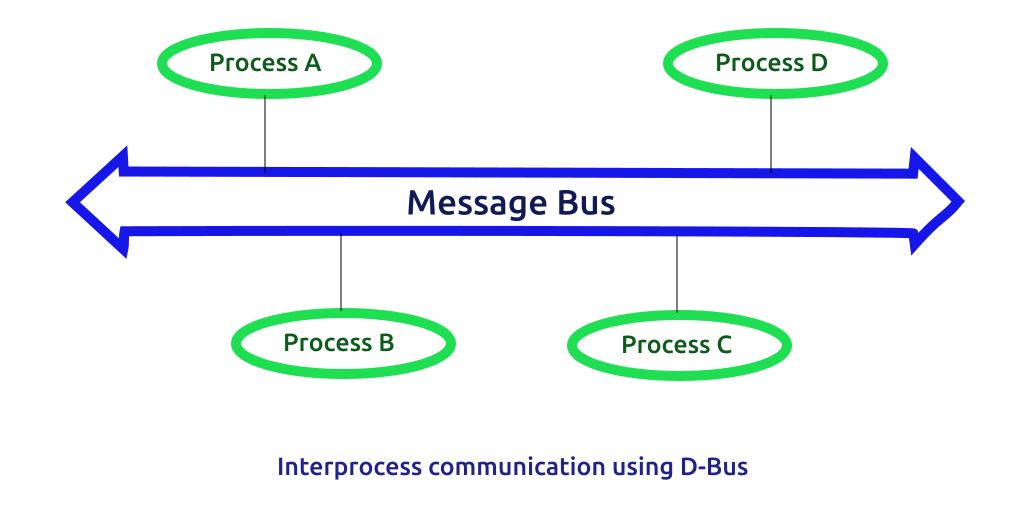
D-Bus is a mechanism for interprocess communication for Linux systems. D-Bus has a layered architecture. At the lowest level is the D-Bus specification, which specifies the D-Bus wire protocol for communication between two processes. The libdbus library is the low level C API library based on the D-Bus specification. Normally, processes communicate via one of the two message bus daemons, the system bus and the sessions bus. 


Interprocess communication using D-Bus

Read more at https://www.softprayog.in/programming/d-bus-tutorial


SDN Vendor PLUMgrid is No More; Some Assets Acquired by VMware

A VMware spokesperson told EnterpriseNetworkingPlanetthat on Friday December 16, VMware acquired certain IP assets from the company and that a number of the PLUMgrid employees have now joined VMware.

PLUMgrid founder Pere Monclus wrote in a blog post that, the company, “will be starting a new journey as we continue revolutionizing and transforming the networking industry to build and expand on software-defined infrastructure for private and public clouds. “

Read more at Enterprise Networking Planet

Essentials of OpenStack Administration Part 3: Existing Cloud Solutions

Start exploring Essentials of OpenStack Administration by downloading the free sample chapter today. DOWNLOAD NOW

Infrastructure providers aim to deliver excellent customer service and provide a flexible and cost-efficient infrastructure, as we learned in part one of this series.

Cloud Computing, then, is driven by a very simple motivation from the infrastructure providers’ perspective: “Do as much work as possible only once and automate it afterwards.”

In cloud environments, the provider will simply provide infrastructure that allows customers to do most of the work on their own through a simple interface. After the initial setup, the provider’s main task is to ensure that the whole setup has enough resources. If the provider runs out of resources, they will simply add more capacity. Thus another advantage of automation is that it can facilitate flexibility.

In this article, we’ll contrast what we learned in part two about conventional, un-automated infrastructure offerings with what happens in the cloud.

The Fundamental Components of Clouds

From afar, clouds are automated virtualization and storage environments. But if you look closer, you’ll start seeing a lot more details. So let’s break the cloud down into its fundamental components.

First and foremost, a cloud must be easy to use. Starting and stopping virtual machines (VMs) and commissioning online storage is easy for professionals, but not for the Average Joe! Users must be able to start VMs by pointing and clicking. So any cloud software must provide a way for users to do just that, but without the learning curve.

Installing a fresh operating system on a newly created virtual machine is a tedious process, once again, hard to achieve for non-professionals. Thus, clouds need pre-made images, so that users do not have to install operating systems on their own.

Conventional data centers are heterogeneous environments which grow to meet the organic needs of an organization. While components may have some automation tools available, there is not a consistent framework to deploy resources. Various teams such as storage, networking, backup, and security, each bring their own infrastructure, which must be integrated by hand. A cloud deployment must integrate and automate all of these components.

Customer organizations typically have their own organizational hierarchy. A cloud environment must provide an authorization scheme that is flexible enough to match that hierarchy. For instance, there may be managers who are allowed to start and stop VMs or to add administrator accounts, while interns might only be allowed to browse them.

When a user starts a new VM, presumably from the aforementioned easy-to-use interface, it must be set up automatically. When the user terminates it, the VM itself must be deleted, also automatically.

A bonus of the work to implement this particular kind of automation is that with a little more effort, usually involving the implementation of a component that knows which VMs are running on which servers, the cloud can provide automatic load-balancing.

Online storage is an important part of the cloud. As such, it must be fully automated and easy to use (like Dropbox or Gdrive).

There are a number of cloud solutions, such as Eucalyptus, OpenQRM, OpenNebula, and of course, OpenStack. Open source implementations typically share some design concepts, which we will discuss in part 4.

Various cloud solutions have been in existence since the mid-1960s. Mainframes provide virtualized resources but tend to be proprietary, expensive, and difficult to manage. Since then there have been midrange and PC architecture solutions. They also tend to be expensive and proprietary. These interim solutions also may not provide all of the resources now available through OpenStack.

The Essentials of OpenStack Administration course teaches you everything you need to know to create and manage private and public clouds with OpenStack. Download a sample chapter today!

Read the other articles in the series:

Essentials of OpenStack Administration Part 1: Cloud Fundamentals

Essentials of OpenStack Administration Part 2: The Problem With Conventional Data Centers

Essentials of OpenStack Administration Part 4: Cloud Design, Software-Defined Networking and Storage

Essentials of OpenStack Administration Part 5: OpenStack Releases and Use Cases

Top 5 Linux Foundation Webinars of 2016

This was an exciting year for webinars at The Linux Foundation! Our topics ranged from network hardware virtualization to Microsoft Azure to container security and open source automotive, and members of the community tuned in from almost every corner of the globe. The following are the top 5 Linux Foundation webinars of 2016:

  1. Getting Started with OpenStack

  2. No More Excuses: Why you Need to Get Certified Now

  3. Getting Started with Raspberry Pi

  4. Hyperledger: Blockchain Technologies for Business

  5. Security Top 5: How to keep hackers from eating your Linux machine

Curious to watch all the past webinars in our library? You can access all of our webinars for free by registering on our on-demand portal. On subsequent visits, click “Already Registered” and use your email address to access all of the on-demand sessions.


Getting Started with OpenStack

Original Air Date: February 25, 2016

Cloud computing software represents a change to the enterprise production environment from a collection of closed, proprietary software to open source software. OpenStack has become the leader in Cloud software supported and used by small and large companies alike. In this session, guest speaker Tim Serewicz addressed the most common OpenStack questions and concerns including:

  • I think I need it but where do I even start?

  • What are the problems that OpenStack solves?

  • History & Growth of OpenStack: Where’s it been and where is it going?

  • What are the hurdles?

  • What are the sore points?

  • Why is it worth the effort?

Watch Replay >>


No More Excuses: Why you Need to Get Certified Now

Original Air Date: June 9, 2016

According to the 2016 Open Source Jobs Report, 76% of open source professionals believe that certifications are useful for their careers. This webinar session focused on tips, tactics, and practical advice to help professionals build the confidence to take the leap to commit to, schedule, and pass their next certification exam. This session, covered:

  • How certifications can help you reach your career goals

  • Which certification is right for you: Linux Foundation Certified SysAdmin or Certified Engineer?

  • Strategies to thoroughly prepare for the exam

  • How to avoid common exam mistakes

  • The ins and outs of the performance certification process to boost your exam confidence

  • And more…

Watch Replay >>


Getting Started with the Raspberry Pi

Original Air Date: December 14, 2016

Maybe you bought a Raspberry Pi a year or two ago and never got around to using it. Or you built something interesting once, but now there’s a new Pi and new add-ons, and you want to know if they could make your project even better? The Raspberry Pi has grown from its original purpose as a teaching tool to become the tiny computer of choice for many makers, allowing those with varied Linux and hardware experience to have a fully functional computer the size of a credit card powering their ideas. Regardless of where you are in Pi experience, this session with guest speaker Ruth Suehle, had some great tricks for getting the most out of the Raspberry Pi and showcased dozens of great projects to get you inspired.

Watch Replay >>


Hyperledger: Blockchain Technologies for Business

Original Air Date: December 1, 2016

Curious about the foundations of distributed ledger technologies, smart contracts, and other components that comprise the modern blockchain technology stack? In this session, guest speaker Dan O’Prey from Digital Asset, provided an overview of the Hyperledger Project at The Linux Foundation, the main use cases and requirements for the technology for commercial applications, as well as an overview on the history and projects in the Hyperledger umbrella and how you can get involved.

Watch Replay >>


Security Top 5: How to keep hackers from eating your Linux machine

Original Air Date: November 15, 2016

There is nothing a hacker likes more than a tasty Linux machine available on the Internet. In this session, a professional pentester talked tactics, tools and methods that hackers use to invade your space. Learn the 5 easiest ways to keep them out, and know if they have made it in. The majority of the session focused on answering audience questions from both advanced security professionals and those just starting in security.

Watch Replay >>

Don’t forget to view our upcoming webinar calendar to participate in our upcoming live webinars with top open source experts.

3 Common Open Source IP Compliance Failures and How to Avoid Them

The following is adapted from Open Source Compliance in the Enterprise by Ibrahim Haddad, PhD.

Companies or organizations that don’t have a strong open source compliance program often suffer from errors and limitations in processes throughout the software development cycle that can lead to open source compliance failures.

In part 3 of this series, we covered some of the risks that a company can face from license failures, including an injunction that prevents a company from shipping a product; support or customer service headaches; significant re-engineering; and more.

This time, we’ll cover three common intellectual property failures, how they’re discovered, and how to avoid them. And in part 5, we’ll discuss the most common open source license compliance failures and how to avoid them.

Download the free e-book, Open Source Compliance in the Enterprise, for a complete guide to creating compliance processes and policies for your organization.

3 Common Intellectual Property Failures

IP problems most commonly involve mixing source code that is licensed under incompatible or conflicting licenses (e.g., proprietary, third-party, and/or open source). Such admixtures may result in companies being forced to release proprietary source code under an open source license, thus losing control of their (presumably) high-value intellectual property and diminishing their capability to differentiate in the marketplace.

Problem #1: Inserting open source code into proprietary or third party code

This occurs during the development process when developers copy/paste open source code (aka “snippets”) into proprietary or 3rd party source code.

How it’s discovered: By scanning the source code for possible matches with open source code.

How to avoid it:

  • Offer training to increase awareness of compliance issues, open source (OS) licenses, implications of including OS code in proprietary or 3rd party code.

  • Conduct regular code scans of all project source code for unexpected licenses or code snippets.

  • Require approval to use OS software before committing it into a product repository.

Problem #2: Linking of open source into proprietary source code (or vice versa – specific to C/ C++ source code)

This occurs as a result of linking software components that have conflicting or incompatible licenses.

How it’s discovered: With a dependency-tracking tool that allows discovery of linkages between different software components and identifies if the type of linkage is allowed per a company’s OS policies.

How to avoid it:

  • Offer training on linkage scenarios based on company compliance policy

  • Regularly run a dependency tracking tool to verify all linkage relationships and flag any issues not in line with compliance policies.

Problem #3: Inclusion of proprietary code in an open source component

This happens when developers copy/paste proprietary source code into OS software.

How it’s discovered: By scanning source code. A tool will ID source code that doesn’t match what’s provided by the OS component, triggering various flags for an audit.

How to avoid it:

  • Train the staff

  • Conduct regular source code inspections

  • Require approval to include proprietary source code in OS components.

Read the other articles in this series:

An Introduction to Open Source Compliance in the Enterprise

Open Compliance in the Enterprise: Why Have an Open Source Compliance Program?

Open Source Compliance in the Enterprise: Benefits and Risks

3 Common Open Source IP Compliance Failures and How to Avoid Them

4 Common Open Source License Compliance Failures and How to Avoid Them

Top Lessons For Open Source Pros From License Compliance Failures

Download the free e-book, Open Source Compliance in the Enterprise, for a complete guide to creating compliance processes and policies for your organization.