

Thank you for your interest in the recorded sessions from MesosCon Asia 2016! View more than 40+ sessions from the event below.
Thank you for your interest in the recorded sessions from MesosCon Asia 2016! View more than 40+ sessions from the event below.

Data, file systems, and storage are at the heart of today’s computing environment. With the latest hardware, there is a need for more data storage capabilities and faster speeds.
Vault is the leading technical event dedicated to Linux storage and filesystems where developers and operators in the filesystems and storage space can advance computing for data storage.
The Linux Foundation is now seeking proposals from industry experts to speak at Vault on March 22-23, 2017, in Cambridge, MA, on a diverse range of topics related to storage, Linux, and open source. Help lead the conversation and share knowledge and expertise with the community.
Submit your speaking proposal now! The deadline for submissions is Jan. 14, 2017.
Suggested topics include:
Software Defined Storage (SDS)
Object, Block, and File System Storage Architectures (Ceph, Swift, Cinder, Manila, OpenZFS)
Distributed, Clustered, and Parallel Storage Systems (GlusterFS, Ceph, Lustre, OrangeFS, XtreemFS, MooseFS, OCFS2, HDFS)
Persistent Memory and Other New Hardware Technologies
File System Scaling Issues
Storage Management and Automation
Client/server file systems (NFS, Samba, pNFS)
Big Data Storage
Long Term, Offline Data Archiving
Data Compression and Storage Optimization
Vault will once again be co-located with the invite-only Linux Storage, Filesystems and Memory Management Summit, ensuring development and research experts and kernel subsystem maintainers will be present.
Not interested in speaking but want to attend? Linux.com readers can register now with the discount code, LINUXRD5, for 5% off the registration price. Save $225 by registering before January 28.
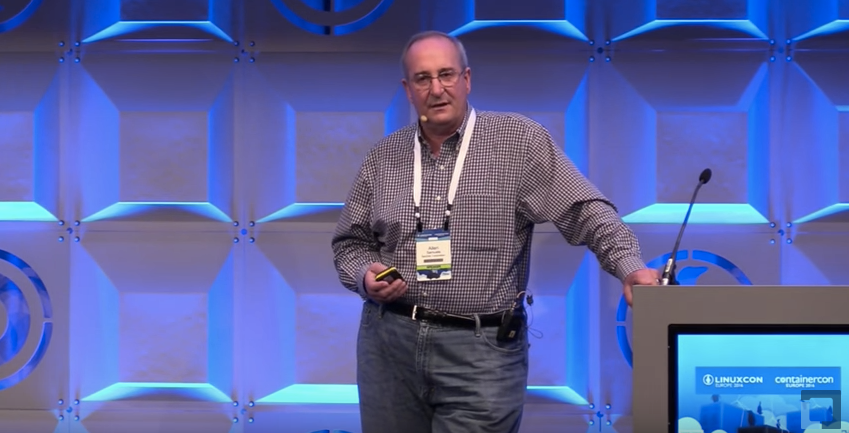
Ceph is a storage system designed to be used at scale, with clusters of Ceph in deployment in excess of 40 petabytes today. At LinuxCon Europe, Allen Samuels, Engineering Fellow at Western Digital, says that Ceph has been proven to scale out reasonably well. Samuels says, “the most important thing that a storage management system does in the clustered world is to give you availability and durability,” and much of the technology in Ceph focuses on controlling the availability and the durability of your data. In his presentation, Samuels talks not just about some of the performance advantages to deploying Ceph on Flash, but he also goes into detail about what they are doing to optimize Ceph in future releases.
The most common way that people use Flash with Ceph today is to put the journal on Flash. Samuels mentions that this “significantly improves your write latencies because the first thing that Ceph is going to do, is to take your transaction and put it into the journal. By putting the journal on Flash, you’re able to get high performance and short latency.” Another option is to put the key-value store, the metadata, on Flash, but you may or may not get much of a performance improvement depending on your specific usage. In some cases, where you have very small objects, moving the metadata to Flash can have a significant benefit, but for larger objects, you may get very little improvement.
“Over the last couple of years … we’ve developed, together with the community, about a 15X performance boost,” Samuels says. Unfortunately, they’ve reached the state where they need to break compatibility to make additional future improvements, because the basic architecture of FileStore has become an issue. Samuels outlines a number of specific issues with FileStore, which can be found in the video of his talk, but the key takeaway is that it is being replaced by BlueStore. The good news is that for now they can be intermixed within a cluster, so your new nodes can be set up to use BlueStore without breaking or needing to upgrade your existing FileStore nodes. However, Samuels points out that “if you update your software to the latest version and you expect it to suddenly start running better, you’ll be a little disappointed,” since you won’t see this improvement until you actively start using BlueStore. It is still under active development, but BlueStore is expected to be at least twice as fast as FileStore for write operations and to outperform FileStore for read operations, too. Some additional functionality that will be coming with BlueStore includes checksums on reads. Currently, Ceph replies on your hardware to provide data integrity, which can be a bit dangerous at scale.
To get more details about how to improve the performance of Ceph using Flash or to hear more about additional improvements coming in future versions of Ceph with BlueStore, watch the video from LinuxCon Europe.


In part 1, we installed and tested the Postfix SMTP server. Postfix, or any SMTP server, isn’t a complete mail server because all it does is move messages between SMTP servers. We need Dovecot to move messages off your Postfix server and into your users’ email inboxes.
Dovecot supports the two standard mail protocols, IMAP (Internet Message Access Protocol) and POP3 (Post Office Protocol). An IMAP server retains all messages on the server. Your users have the option to download messages to their computers or access them only on the server. IMAP is convenient for users who have multiple machines. It’s more work for you because you have to ensure that your server is always available, and IMAP servers require a lot of storage and memory.
POP3 is an older protocol. A POP3 server can serve many more users than an IMAP server because messages are downloaded to your users’ computers. Most mail clients have the option to leave messages on the server for a certain number of days, so POP3 can behave somewhat like IMAP. But it’s not IMAP, and when you do this messages are often downloaded multiple times or deleted unexpectedly.
Fire up your trusty Ubuntu system and install Dovecot:
$ sudo apt-get install dovecot-imapd dovecot-pop3d
It installs with a working configuration and automatically starts after installation, which you can confirm with ps ax | grep dovecot:
$ ps ax | grep dovecot
15988 ?  Ss 0:00 /usr/sbin/dovecot
15990 ?  S  0:00 dovecot/anvil
15991 ?  S  0:00 dovecot/log
Open your main Postfix configuration file, /etc/postfix/main.cf, and make sure it is configured for maildirs and not mbox mail stores; mbox is single giant file for each user, while maildir gives each message its own file. Lots of little files are more stable and easier to manage than giant bloaty files. Add these two lines; the second line tells Postfix you want maildir format, and to create a .Mail directory for every user in their home directories. You can name this directory anything you want, it doesn’t have to be .Mail:
mail_spool_directory = /var/mail
home_mailbox = .Mail/
Now tweak your Dovecot configuration. First rename the original dovecot.conf file to get it out of the way, because it calls a host of conf.d files and it is better to keep things simple while you’re learning:
$ sudo mv /etc/dovecot/dovecot.conf /etc/dovecot/dovecot-oldconf
Now create a clean new /etc/dovecot/dovecot.conf with these contents:
disable_plaintext_auth = no
mail_location = maildir:~/.Mail
namespace inbox {
  inbox = yes
  mailbox Drafts {
    special_use = Drafts
  }
  mailbox Sent {
    special_use = Sent
  }
  mailbox Trash {
    special_use = Trash
  }
}
passdb {
  driver = pam
}
protocols = " imap pop3"
ssl = no
userdb {
  driver = passwd
}
Note that mail_location = maildir must match the home_mailbox parameter in main.cf. Save your changes and reload both Postfix and Dovecot’s configurations:
$ sudo postfix reload
$ sudo dovecot reload
Use these commands to quickly review your Postfix and Dovecot configurations:
$ postconf -n
$ doveconf -n
Now let’s put telnet to work again, and send ourselves a test message. The lines in bold are the commands that you type. studio is my server’s hostname, so of course you must use your own:
$ telnet studio 25
Trying 127.0.1.1...
Connected to studio.
Escape character is '^]'.
220 studio.router ESMTP Postfix (Ubuntu)
EHLO studio
250-studio.router
250-PIPELINING
250-SIZE 10240000
250-VRFY
250-ETRN
250-STARTTLS
250-ENHANCEDSTATUSCODES
250-8BITMIME
250-DSN
250 SMTPUTF8
mail from: tester@test.net
250 2.1.0 Ok
rcpt to: carla@studio
250 2.1.5 Ok
data
354 End data with .Date: November 25, 2016
From: tester
Message-ID: first-test
Subject: mail server test
Hi carla,
Are you reading this? Let me know if you didn't get this.
.
250 2.0.0 Ok: queued as 0C261A1F0F
quit
221 2.0.0 Bye
Connection closed by foreign host.
Now query Dovecot to fetch your new message. Log in using your Linux username and password:
$ telnet studio 110
Trying 127.0.0.1...
Connected to studio.
Escape character is '^]'.
+OK Dovecot ready.
user carla
+OK
pass password
+OK Logged in.
stat
+OK 2 809
list
+OK 2 messages:
1 383
2 426
.
retr 2
+OK 426 octets
Return-Path: <tester@test.net>
X-Original-To: carla@studio
Delivered-To: carla@studio
Received: from studio (localhost [127.0.0.1])
        by studio.router (Postfix) with ESMTP id 0C261A1F0F
        for <carla@studio>; Wed, 30 Nov 2016 17:18:57 -0800 (PST)
Date: November 25, 2016
From: tester@studio.router
Message-ID: first-test
Subject: mail server test

Hi carla,
Are you reading this? Let me know if you didn't get this.
.
quit
+OK Logging out.
Connection closed by foreign host.
Take a moment to compare the message entered in the first example, and the message received in the second example. It is easy to spoof the return address and date, but Postfix is not fooled. Most mail clients default to displaying a minimal set of headers, but you need to read the full headers to see the true backtrace.
You can also read your messages by looking in your ~/Mail/cur directory. They are plain text. Mine has two test messages:
$ ls .Mail/cur/
1480540325.V806I28e0229M351743.studio:2,S
1480555224.V806I28e000eM41463.studio:2,S
Our Dovecot configuration enables both POP3 and IMAP, so let’s use telnet to test IMAP.
$ telnet studio imap2
Trying 127.0.1.1...
Connected to studio.
Escape character is '^]'.
* OK [CAPABILITY IMAP4rev1 LITERAL+ SASL-IR LOGIN-REFERRALS
ID ENABLE IDLE AUTH=PLAIN] Dovecot ready.
A1 LOGIN carla password
A1 OK [CAPABILITY IMAP4rev1 LITERAL+ SASL-IR LOGIN-REFERRALS
ID ENABLE IDLE SORT SORT=DISPLAY THREAD=REFERENCES THREAD=REFS
THREAD=ORDEREDSUBJECT MULTIAPPEND URL-PARTIAL CATENATE UNSELECT
CHILDREN NAMESPACE UIDPLUS LIST-EXTENDED I18NLEVEL=1 CONDSTORE
QRESYNC ESEARCH ESORT SEARCHRES WITHIN CONTEXT=SEARCH LIST-STATUS
BINARY MOVE SPECIAL-USE] Logged in
A2 LIST "" "*"
* LIST (HasNoChildren) "." INBOX
A2 OK List completed (0.000 + 0.000 secs).
A3 EXAMINE INBOX
* FLAGS (Answered Flagged Deleted Seen Draft)
* OK [PERMANENTFLAGS ()] Read-only mailbox.
* 2 EXISTS
* 0 RECENT
* OK [UIDVALIDITY 1480539462] UIDs valid
* OK [UIDNEXT 3] Predicted next UID
* OK [HIGHESTMODSEQ 1] Highest
A3 OK [READ-ONLY] Examine completed (0.000 + 0.000 secs).
A4 logout
* BYE Logging out
A4 OK Logout completed.
Connection closed by foreign host
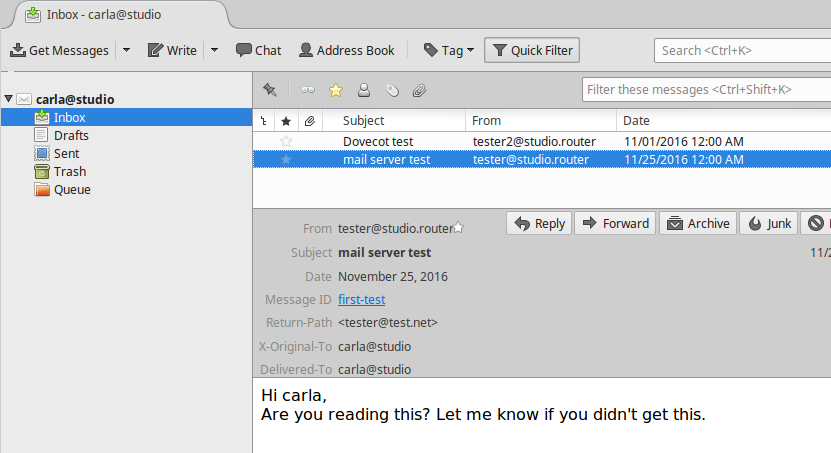
This screenshot in Figure 1 shows what my messages look like in a graphical mail client on another host on my LAN.
At this point, you have a working IMAP and POP3 mail server, and you know how to test your server. Your users will choose which protocol they want to use when they set up their mail clients. If you want to support only one mail protocol, then name just the one in your Dovecot configuration.
However, you are far from finished. This is a very simple, wide-open setup with no encryption. It also works only for users on the same system as your mail server. This is not scalable and has some security risks, such as no protection for passwords. Come back next week to learn how to create mail users that are separate from system users, and how to add encryption.
Advance your career in system administration! Check out the Essentials of System Administration course from The Linux Foundation.