Home Blog Page 649

Old Kernel Code Execution Bug Patched

A critical, local code-execution vulnerability in the Linux kernel was patched more than a week ago, continuing a run of serious security issues in the operating system, most of which have been hiding in the code for years. Details on the vulnerability were published Tuesday by researcher Philip Pettersson, who said the vulnerable code was introduced in August 2011. A patch was pushed to the mainline Linux kernel Dec. 2, four days after it was privately disclosed. Pettersson has developed a proof-of-concept exploit specifically for Ubuntu distributions, but told Threatpost his attack could be ported to other distros with some changes.

Read more at Threat Post

9 Tools to Monitor Linux Disk Partitions and Usage in Linux

In this article, we will review a number of Linux command line utilities that you can use to check disk partitions in Linux.

Monitoring storage device(s) space usage is one of the most important tasks of a SysAdmin, this helps to ensure adequate free space remains on the storage devices for efficient running of your Linux system.

Read the complete article at Tecmint

Open Compliance in the Enterprise: Why Have an Open Source Compliance Program?

The following is adapted from Open Source Compliance in the Enterprise by Ibrahim Haddad, PhD.

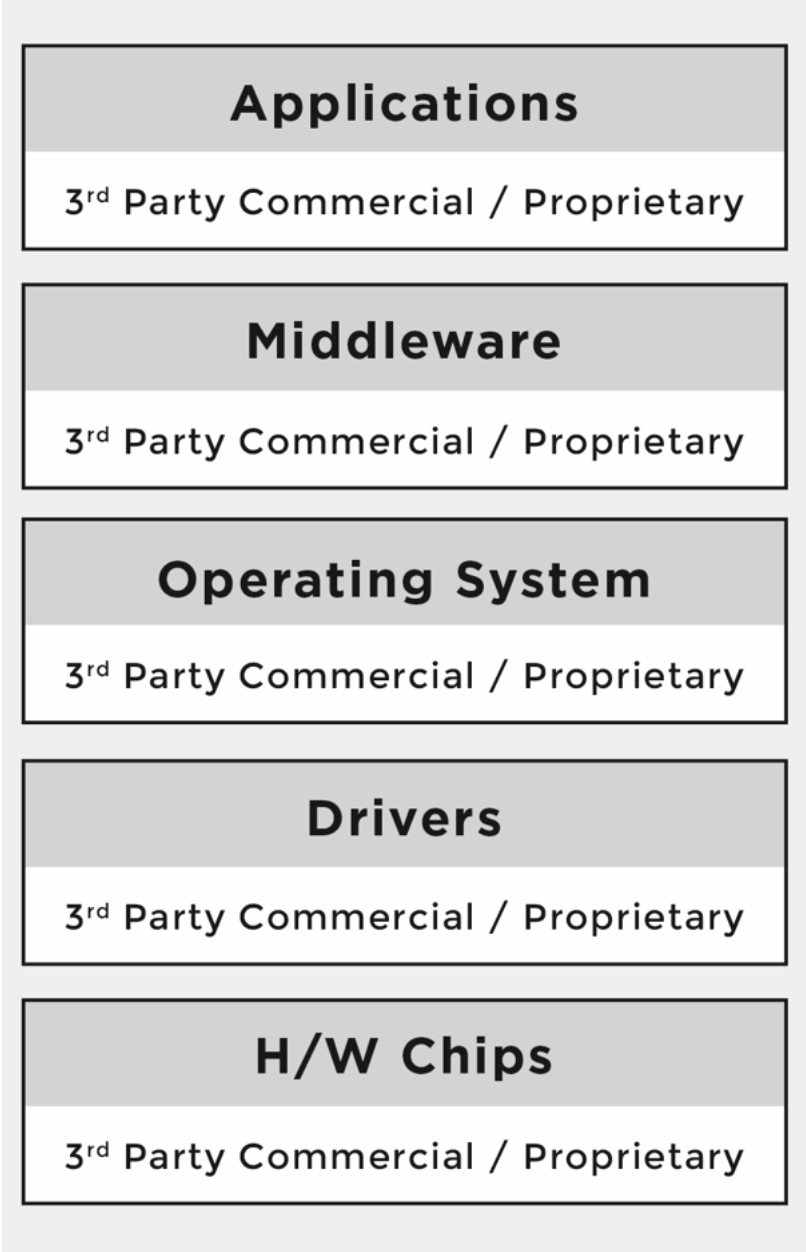
Traditionally, platforms and software stacks were implemented using proprietary software, and consisted of various software building blocks that originated as a result of internal development or via third-party software providers with negotiated licensing terms.

The business environment was predictable and companies mitigated potential risks through license and contract negotiations with the software vendors. It was very easy to know who was the provider for every software component.

Figure 1 illustrates the major building blocks of a traditional hardware and software platform.

Over time, companies started to incorporate open source software into their platforms and software stacks due to the advantages it offers. The reasons varied from product to product, but the common theme across industries was that open source components provided compelling features out of the box, there were meaningful economies to be gained through distributed development that resulted in a faster time-to-market, and they offered a newfound ability to customize the source code. As a result, a new multi- source development model began to emerge.             

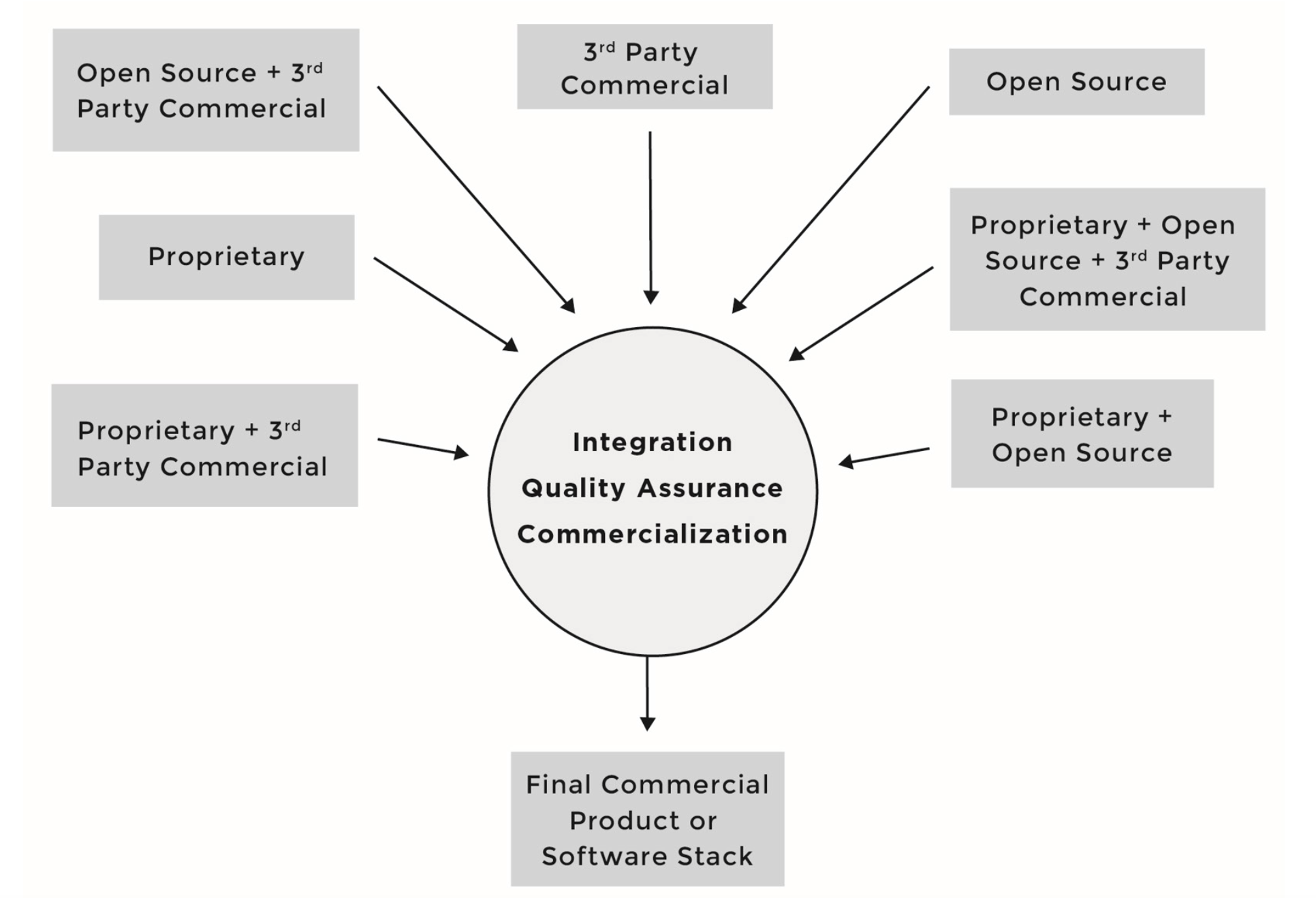
Under the new model, a product could now have any combination of:

  • Proprietary code, developed by the company building the product/service                    

  • Proprietary code, originally developed by the company under an open source license in the process of integrating and deploying open source components, but was not contributed back to the upstream open source project                    

  • Third-party commercial code, developed by third-party software providers and received by the company building the product/service under a commercial license

  • Open source code, developed by the open source community and received by the company building the product/service under an open source license.                     

Figure 2 illustrates the multi-source development model and the various combinations of sources for incoming source code.

Under this development model, software components can consist of source code originating from any number of different sources and be licensed under different licenses; for instance, software component A can include proprietary source code in addition to third-party proprietary source code, while software component B can include proprietary source code in addition to source code from an open source project.

As the number of open source software components grew in what were once straightforward proprietary software stacks, the business environment diverged from familiar territory and corporate comfort zones.

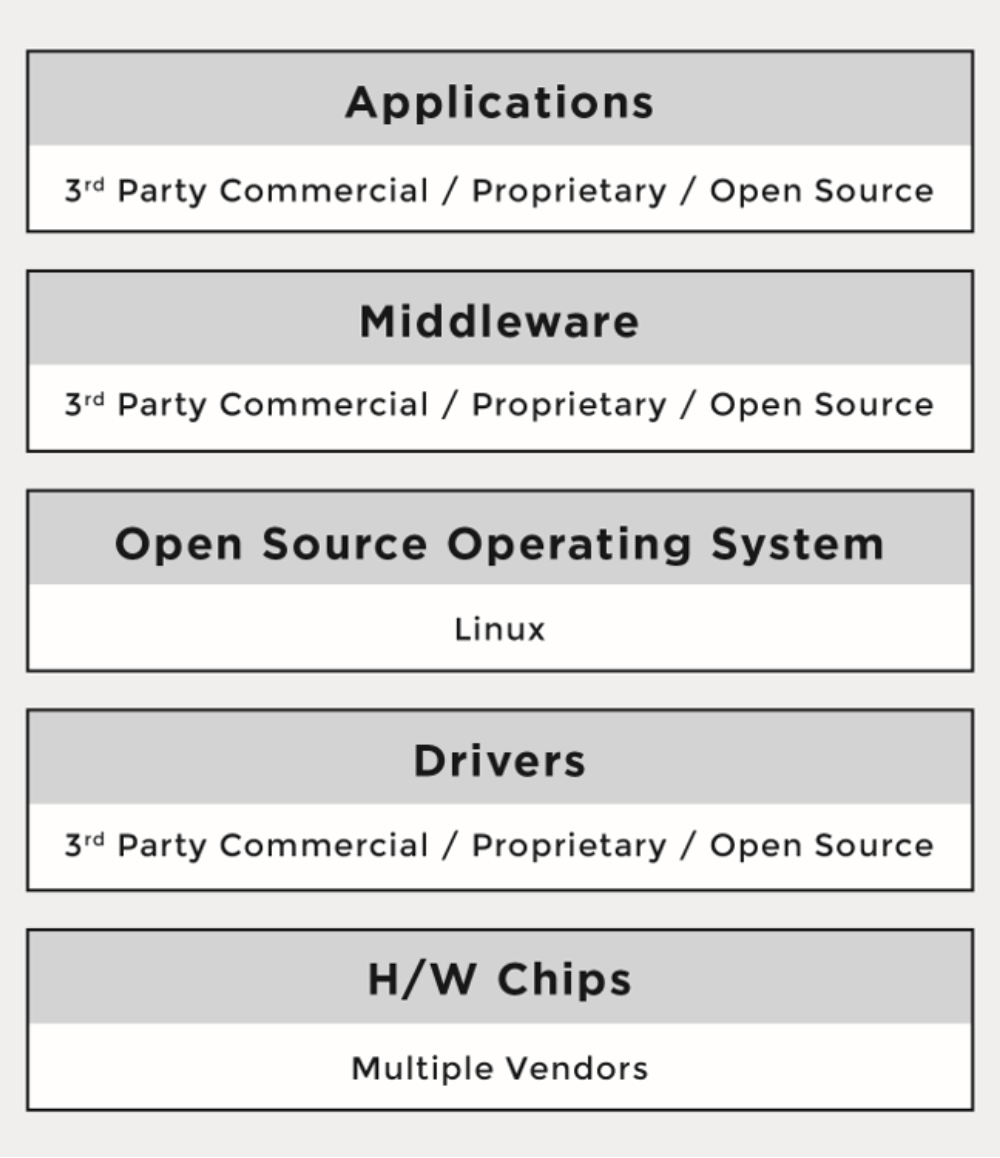
Figure 3 illustrates the adoption of open source software throughout the various levels of a given platform or software stack.

One of the major differences between the proprietary and the multi-source development models has been that the licenses of open source software are not negotiated. There are no contracts to sign with the software providers (i.e., open source developers or projects). Rather, the individuals who initiate the project chose a given open source license, and once a project reaches a certain scale, the licenses are virtually impossible to change.

When using the multi-source development model, companies must understand the implications of tens of different licenses (and combinations of licenses) coming from hundreds or even thousands of licensors or contributors (copyright holders). As a result, the risks that companies previously managed through company-to-company license and agreement negotiations are now managed through robust compliance programs and careful engineering practices.

Part 1 of this series gave an introduction to open source compliance and the business environment behind it. Next week we’ll cover the benefits of open source compliance and the risks that companies face when they fail to comply.

Read the other articles in this series:


An Introduction to Open Source Compliance in the Enterprise

Open Compliance in the Enterprise: Why Have an Open Source Compliance Program?

Open Source Compliance in the Enterprise: Benefits and Risks

3 Common Open Source IP Compliance Failures and How to Avoid Them

4 Common Open Source License Compliance Failures and How to Avoid Them

Top Lessons For Open Source Pros From License Compliance Failures

The 7 Elements of an Open Source Management Program: Strategy and Process


Download the free e-book, Open Source Compliance in the Enterprise, for a complete guide to creating compliance processes and policies for your organization.


Remote Logging With Syslog, Part 2: Main Config File

In the previous article, we looked at some of the basics of rsyslog — a superfast Syslog tool with some powerful features for log processing. Here, I’ll be taking a detailed look at the main config file. Let’s dive right in.

Something to note — in case this causes you issues in the future — is that although the entries found in our main config file (/etc/rsyslog.conf) are read from the top down, the order in which they are presented does in fact make a difference.

Run this command inside the /etc directory:

# ls rsys*

rsyslog.conf  rsyslog.d/

The main config file is called rsyslog.conf, whereas the rsyslog.d/ is the directory where you save your other configuration files. Looking in the rsyslog.conf file, we use a type of $IncludeConfig statement to pick up any files with the .conf extension that reside in that directory, as follows:

# Include all config files in /etc/rsyslog.d/

$IncludeConfig /etc/rsyslog.d/*.conf

These user-defined configs might include remote logging to a rsyslog server.

You can include an individual file, too, or indeed a whole directory (no matter the file extensions), as follows:

$IncludeConfig /etc/rsyslog.d/chris-binnie-config.conf

$IncludeConfig /etc/rsyslog.d/

What does our main config file look like inside, though? Listing 1 shows that the file includes lots of useful comments and the heart of our rsyslog config in addition. Bear in mind that this file defines local logging in most cases. However if you’re turning your local server into a recipient Syslog server too then you also add config to set that live there too. Note that after each config change you will need to restart the daemon as we will see shortly.

#  /etc/rsyslog.conf    Configuration file for rsyslog.

#

#                       For more information see

#                       /usr/share/doc/rsyslog-doc/html/rsyslog_conf.html


#################

#### MODULES ####

#################


$ModLoad imuxsock # provides support for local system logging

$ModLoad imklog   # provides kernel logging support

#$ModLoad immark  # provides --MARK-- message capability


# provides UDP syslog reception

#$ModLoad imudp

#$UDPServerRun 514


# provides TCP syslog reception

#$ModLoad imtcp

#$InputTCPServerRun 514


###########################

#### GLOBAL DIRECTIVES ####

###########################


#

# Use traditional timestamp format.

# To enable high precision timestamps, comment out the following line.

#

$ActionFileDefaultTemplate RSYSLOG_TraditionalFileFormat


#

# Set the default permissions for all log files.

#

$FileOwner root

$FileGroup adm

$FileCreateMode 0640

$DirCreateMode 0755

$Umask 0022


#

# Where to place spool and state files

#

$WorkDirectory /var/spool/rsyslog


#

# Include all config files in /etc/rsyslog.d/

#

$IncludeConfig /etc/rsyslog.d/*.conf


###############

#### RULES ####

###############


#

# First some standard log files. Log by facility.

#

auth,authpriv.*                 /var/log/auth.log

*.*;auth,authpriv.none     -/var/log/syslog

#cron.*                            /var/log/cron.log

daemon.*                        -/var/log/daemon.log

kern.*                             -/var/log/kern.log

lpr.*                                -/var/log/lpr.log

mail.*                              -/var/log/mail.log

user.*                             -/var/log/user.log


#

# Logging for the mail system. Split it up so that

# it is easy to write scripts to parse these files.

#

mail.info                       -/var/log/mail.info

mail.warn                       -/var/log/mail.warn

mail.err                        /var/log/mail.err


#

# Logging for INN news system.

#

news.crit                       /var/log/news/news.crit

news.err                        /var/log/news/news.err

news.notice                     -/var/log/news/news.notice


#

# Some "catch-all" log files.

#

*.=debug;

       auth,authpriv.none;

       news.none;mail.none     -/var/log/debug

*.=info;*.=notice;*.=warn;

       auth,authpriv.none;

       cron,daemon.none;

       mail,news.none          -/var/log/messages


#

# Emergencies are sent to everybody logged in.

#

*.emerg                         :omusrmsg:*


#

# I like to have messages displayed on the console, but only on a virtual

# console I usually leave idle.

#

#daemon,mail.*;

#       news.=crit;news.=err;news.=notice;

#       *.=debug;*.=info;

#       *.=notice;*.=warn       /dev/tty8


# The named pipe /dev/xconsole is for the `xconsole' utility.  To use it,

# you must invoke `xconsole' with the `-file' option:

#

#    $ xconsole -file /dev/xconsole [...]

#

# NOTE: adjust the list below, or you'll go crazy if you have a reasonably

#      busy site..

#

daemon.*;mail.*;

       news.err;

       *.=debug;*.=info;

       *.=notice;*.=warn       |/dev/xconsole

Listing 1:The default Debian “rsyslog.conf” is shown; other flavors vary, some more than others.

Careful consideration has been programmed into this excellent software. It’s worth noting that there might be subtle config differences between versions so employ lookup differences online to compare notes between the older or newer syntax.

We’ll start by separating our view of rsyslog’s config into three parts. These parts would be any imported modules first of all, our config second and finally our rules.

Logging MARK entries

I’ll begin with a look at using modules. There are several different types of modules, but here’s an example to get you started. Simply think of the Input Modules as a way of collecting information from different sources. Output Modules are essentially how the logs are written, whether to files or a network socket. Another module type, which can be used to filter the received message’s content, is called a Parser Module.

As we can see from the top of the config file in Listing 1, we can load up our default modules as so:

$ModLoad imuxsock # provides support for local system logging

$ModLoad imklog     # provides kernel logging support

The comments are hopefully self-explanatory. The first module allows the dropping of logs to our local disks and if I’m reading the docs correctly the second module picks up events and drops them to “dmesg” after a system boot has completed and kernel logging has been taken over by the Syslog daemon.

The following commented-out line is for the “immark” module, which can be very useful in some circumstances:

#$ModLoad immark  # provides --MARK-- message capability

For example, I’ve used it frequently when I’m filling the /var/log/messages file up with several entries a second whilst testing something. In addition to using the functionality in scripts, I like to be able to type a Bash alias super quickly in the file ~/.bashrc during my testing:

alias mes=’/usr/bin/logger xxxxxxxxx’

If you add that alias then you can simply type “mes” at the command prompt, as your user, to add a separator in the “messages” file. If you haven’t altered your .bashrc file in the past, then after changing it you need to do this to refresh it.

# cd ~

# . .bashrc

I’m not sure but I suspect that the –MARK– separators, alluded to in the comment after the module’s config entry, were first introduced to add a line to a log file to show you that Syslog was still running if there has been no logging entries present for a little while.

You could add the markers to your logs every 20 minutes, for example, if your logs are quiet (using this entry

$MarkMessagePeriod      1200 

I imagine, too, that it might be useful functionality, if you have rotated your logs in the middle of the night and then need to see that Syslog was still paying attention to the task in hand shortly after that point in time.

We can see the other modules are commented out. I’ll briefly mention modules later, but let’s continue on through our config file in the meantime.

The Global Directives section in Listing 1 is not too alien I hope. Look at this, for example, the top entry:

# Use default timestamp format

$ActionFileDefaultTemplate RSYSLOG_TraditionalFileFormat

Directives start with a dollar sign, as a variable, and then have an associated property. From that entry, you can see that we’re still wearing 1970s flared trousers and opting to go traditional with the format of the our of logging.

The “permissions” entries there probably isn’t too tricky to translate either:

$FileOwner root

$FileGroup adm

$FileCreateMode 0640

$DirCreateMode 0755

$Umask 0022

When rsyslog runs we can alter who owns what and which file-creation mask is used. The working directory and “$IncludeConfig” entries are hopefully easy enough to follow so let’s keep moving forwards. Next time, we’ll get our hands a bit dirtier with some logfile rules and then finish up with some networking considerations.

Chris Binnie is a Technical Consultant with 20 years of Linux experience and a writer for Linux Magazine and Admin Magazine. His new book Linux Server Security: Hack and Defend teaches you how to launch sophisticated attacks, make your servers invisible and crack complex passwords.

Advance your career in system administration! Check out the Essentials of System Administration course from The Linux Foundation.

Paradigm Shift in CI at PayPal with Docker and Mesos by Manivannan Selvaraj, PayPal

This talk will be about how PayPal adopted open source tools Docker, Mesos, Jenkins and Aurora to build a scalable, highly available CI solution for PayPal which resulted in a Paradigm shift compared to the conventional VM based model.

What’s New with Xen Project Hypervisor 4.8?

I’m pleased to announce the release of the Xen Project Hypervisor 4.8. As always, we focused on improving code quality, security hardening as well as enabling new features. One area of interest and particular focus is new feature support for ARM servers. Over the last few months, we’ve seen a surge of patches from various ARM vendors that have collaborated on a wide range of updates from new drivers to architecture to security.

We are also pleased to announce that Julien Grall will be the next release manager for Xen Project Hypervisor 4.9. Julien has been an active developer for the past few years, making significant code contributions to advance Xen on ARM. He is a software virtualization engineer at ARM and co-maintainer of Xen on ARM with Stefano Stabellini.

Read more at Xen Project Blog

IBM Bluemix Wants to Take the Drudgery out of DevOps

IBM’s Bluemix Continuous Delivery offers reusable workflows for devops, with familiar services like GitHub and Slack as part of the plan.

With Bluemix, IBM set out to create a cloud environment rich with tools that developers could then harness to their benefit. Next step for IBM: Make it easy to string together and use those tools in common workflows, without reinventing the wheel with each new project.

That’s the idea behind IBM Bluemix Continuous Delivery, which provides devops teams with end-to-end, preconfigured toolchains for many common tasks, as well as the ability to create new toolchains for future development needs. 

Read more at InfoWorld

High School’s Help Desk Teaches Open Source IT Skills

The following is an adapted excerpt from chapter six of The Open Schoolhouse: Building a Technology Program to Transform Learning and Empower Students, a new book written by Charlie Reisinger, Technology Director for Penn Manor School District in Lancaster County, Pennsylvania. In the book, Reisinger recounts more than 16 years of Linux and open source education success stories.

Penn Manor schools saved over a million dollars by trading proprietary software for open source counterparts with its student laptop program. The budget is only part of the story. As Linux moved out of the server room and onto thousands of student laptops, a new learning community emerged.

By August 2013, Penn Manor High School’s official Student Help Desk program was online. It was an independent study course. There were no course prerequisites—everyone with the curiosity and desire to learn was welcome. There was no formal curriculum. Students would learn alongside the district technology team, and together we would figure out what we needed when we needed it. There were no exams; this was a results-only learning environment, not an academic exercise.

Five seniors represented the core help desk. Andrew Lobos, Ben Thomas, and Nick Joniec were there, as well as their mutual friend, Collin Enders. The four friends formed the nucleus of the inaugural help desk team and served as mentors to incoming students new to technology support. Benjamin Moore, a student with little IT background beyond the motivation to learn more about computers, was the fifth apprentice. Ben Moore’s first love was theater production, but he decided on a whim that the Student Help Desk would be interesting. He thought computers were cool and wanted to learn to code.

Between the five students’ schedules, I had help desk coverage from the start of school until the ending bell. Apprentices reported to the help desk room just like they would to any other course on their schedule. All similarity to a traditional math or science class ended once they entered the room. The help desk was a serious operation, and our first deadline was looming. In less than two weeks, a pilot group of 90 high school students would receive laptops running Linux and open source software exclusively. We needed the apprentices to help us prepare for the pilot program, and for the full 1700 student one-to-one laptop program launch in January 2014.

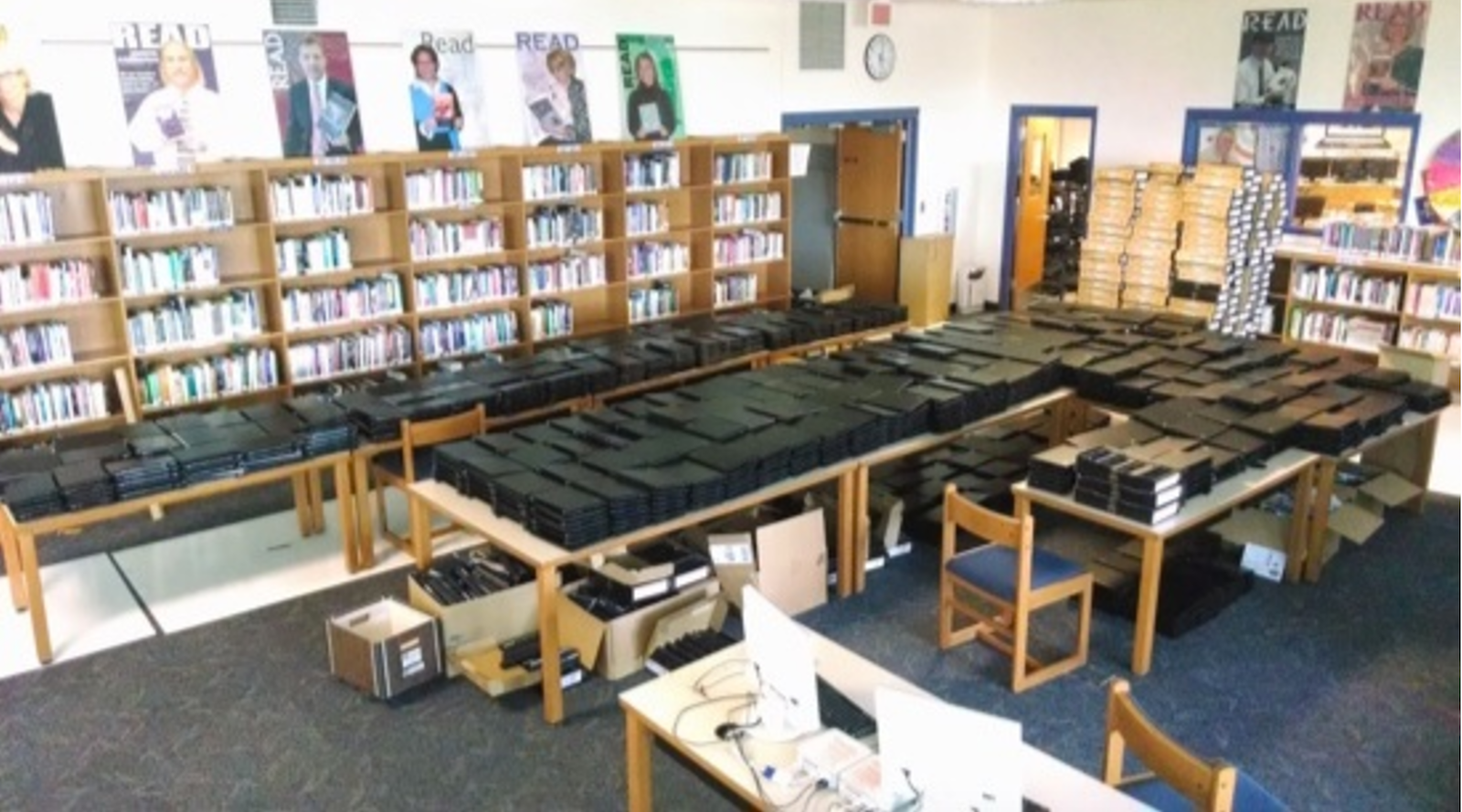
The help desk classroom, Room 358, was crowded with a wagonload of sinuous network cables, power adapters, carry cases, mice, USB drives, and towers of boxes filled with demo laptops waiting patiently for the chance to greet their new student owners.

To better supervise the students’ activities, Penn Manor Technician, Alex Lagunas, relocated his desk from the high school technology office to the Student Help Desk room. With no physical separation between the student and the staff spaces, the apprentices couldn’t evade oversight. But Alex wasn’t there to bark orders to minions. His role was that of a team leader and co-worker. He directed day-to-day support activities and mentored the young team on everything from repairs to programming tricks. Together, as teacher and apprentice, the entire affair resembled an 18th-century French atelier—except with less painting, and more programming.

It would soon become difficult to discern the line between staff technician and student apprentice. Support roles overlapped and visitors received equal assistance from the apprentices and IT staff. As this community evolved, the student apprentices became even more passionate and energetic. They loved the work and felt a deep commitment to the mission and purpose of the laptop project. As the weeks progressed, any lingering fears that students couldn’t make this happen evaporated.

The student team was tight-knit, and remarkably good at self-organizing. Each student apprentice found an individual role. Collin and Nick were quick to tackle logistics and organizational tasks. Andrew and Ben Thomas preferred writing code. And the core quartet took it upon themselves to welcome and help Ben Moore.

Project-based learning? Check. Everything the student apprentices created was part of an authentic technology project. Challenge-based learning? Absolutely. We had four months to do something Penn Manor High School had never done. How about 20 percent time? Certainly. Innovation was encouraged 100 percent of the time. Hour of code? Plural. Our apprentices were about to log hundreds of hours of programming time.

We had created a paradise for student hackers.

During the first year of the high school one-to-one Linux laptop program, the student apprentices created three important software programs. The first was the Fast Linux Deployment Toolkit (FLDT), a software imaging system Andrew created after he and fellow apprentices grew frustrated by limitations with FOG. The second project was a student laptop and inventory tracking and ticket system. The third, a URL-sharing program called PaperPlane, was born from a staff idea that turned into a student challenge.

Other projects were less practical and much more playful. Collin’s favorite funny memory about the help desk was a mischievous prank—“trolling” Ben. “I worked with Andrew to secretly install a program on his laptop. Once every hour, a Cron job triggered the machine to speak out loud the phrase ‘I’m watching you!’ He had no idea what was going on. That was fun to watch.”

Thinking about Ben Thomas’ laptop inexplicably blurting “I’m watching you!” in the middle of a quiet class still makes me break from the role of serious school official and laugh out loud like a schoolboy. The whimsical caper invokes the genuine spirit of hacking and reminds me that schools shouldn’t be glum factories of curriculum and testing. When you let students go, when you trust them, you change their world.

The Open Schoolhouse is available on Amazon.com.

A Lone Tester at a DevOps Conference

I recently had the chance to go to Velocity Conf in Amsterdam, which one might describe as a DevOps conference. I love going to conferences of all types, restricting the self to discipline specific events is counter intuitive to me, as each discipline involved in building and supporting something isn’t isolated. Even if some organisations try and keep it that way, reality barges its way in. Gotta speak to each other some day.


So, I was in an awesome city, anticipating an enlightening few days. Velocity is big. I sometimes forget how big business some conferences are, most testing events I attend are usually in the hundreds of attendees. With big conferences comes the trappings of big business. For my part, I swapped product and testability ideas with Datadog, Pager Duty and others for swag. My going rate for consultancy appears to be tshirts, stickers, and hats.

Read more at Testing is Believing

There’s a New DDoS Army, and It Could Soon Rival Record-Setting Mirai

For almost three months, Internet-of-things botnets built by software called Mirai have been a driving force behind a new breed of attacks so powerful they threaten the Internet as we know it. Now, a new botnet is emerging that could soon magnify or even rival that threat.

The as-yet unnamed botnet was first detected on November 23, the day before the US Thanksgiving holiday. For exactly 8.5 hours, it delivered a non-stop stream of junk traffic to undisclosed targets, according to this post published Friday by content delivery network CloudFlare. Every day for the next six days at roughly the same time, the same network pumped out an almost identical barrage, which is aimed at a small number of targets mostly on the US West Coast. More recently, the attacks have run for 24 hours at a time.

Read more at Ars Technica