Home Blog Page 648

Building an Email Server on Ubuntu Linux, Part 2

In part 1, we installed and tested the Postfix SMTP server. Postfix, or any SMTP server, isn’t a complete mail server because all it does is move messages between SMTP servers. We need Dovecot to move messages off your Postfix server and into your users’ email inboxes.

Dovecot supports the two standard mail protocols, IMAP (Internet Message Access Protocol) and POP3 (Post Office Protocol). An IMAP server retains all messages on the server. Your users have the option to download messages to their computers or access them only on the server. IMAP is convenient for users who have multiple machines. It’s more work for you because you have to ensure that your server is always available, and IMAP servers require a lot of storage and memory.

POP3 is an older protocol. A POP3 server can serve many more users than an IMAP server because messages are downloaded to your users’ computers. Most mail clients have the option to leave messages on the server for a certain number of days, so POP3 can behave somewhat like IMAP. But it’s not IMAP, and when you do this messages are often downloaded multiple times or deleted unexpectedly.

Install Dovecot

Fire up your trusty Ubuntu system and install Dovecot:


$ sudo apt-get install dovecot-imapd dovecot-pop3d

It installs with a working configuration and automatically starts after installation, which you can confirm with ps ax | grep dovecot:


$ ps ax | grep dovecot
15988 ?  Ss 0:00 /usr/sbin/dovecot
15990 ?  S  0:00 dovecot/anvil
15991 ?  S  0:00 dovecot/log

Open your main Postfix configuration file, /etc/postfix/main.cf, and make sure it is configured for maildirs and not mbox mail stores; mbox is single giant file for each user, while maildir gives each message its own file. Lots of little files are more stable and easier to manage than giant bloaty files. Add these two lines; the second line tells Postfix you want maildir format, and to create a .Mail directory for every user in their home directories. You can name this directory anything you want, it doesn’t have to be .Mail:


mail_spool_directory = /var/mail
home_mailbox = .Mail/

Now tweak your Dovecot configuration. First rename the original dovecot.conf file to get it out of the way, because it calls a host of conf.d files and it is better to keep things simple while you’re learning:


$ sudo mv /etc/dovecot/dovecot.conf /etc/dovecot/dovecot-oldconf

Now create a clean new /etc/dovecot/dovecot.conf with these contents:


disable_plaintext_auth = no
mail_location = maildir:~/.Mail
namespace inbox {
  inbox = yes
  mailbox Drafts {
    special_use = Drafts
  }
  mailbox Sent {
    special_use = Sent
  }
  mailbox Trash {
    special_use = Trash
  }
}
passdb {
  driver = pam
}
protocols = " imap pop3"
ssl = no
userdb {
  driver = passwd
}

Note that mail_location = maildir must match the home_mailbox parameter in main.cf. Save your changes and reload both Postfix and Dovecot’s configurations:


$ sudo postfix reload
$ sudo dovecot reload

Fast Way to Dump Configurations

Use these commands to quickly review your Postfix and Dovecot configurations:


$ postconf -n
$ doveconf -n

Test Dovecot

Now let’s put telnet to work again, and send ourselves a test message. The lines in bold are the commands that you type. studio is my server’s hostname, so of course you must use your own:


$ telnet studio 25
Trying 127.0.1.1...
Connected to studio.
Escape character is '^]'.
220 studio.router ESMTP Postfix (Ubuntu)
EHLO studio
250-studio.router
250-PIPELINING
250-SIZE 10240000
250-VRFY
250-ETRN
250-STARTTLS
250-ENHANCEDSTATUSCODES
250-8BITMIME
250-DSN
250 SMTPUTF8
mail from: tester@test.net
250 2.1.0 Ok
rcpt to: carla@studio
250 2.1.5 Ok
data
354 End data with .Date: November 25, 2016
From: tester
Message-ID: first-test
Subject: mail server test
Hi carla,
Are you reading this? Let me know if you didn't get this.
.
250 2.0.0 Ok: queued as 0C261A1F0F
quit
221 2.0.0 Bye                                                                   
Connection closed by foreign host.

Now query Dovecot to fetch your new message. Log in using your Linux username and password:


$ telnet studio 110                                            
Trying 127.0.0.1...                                                             
Connected to studio.                                                         
Escape character is '^]'.                                                       
+OK Dovecot ready.                                                              
user carla
+OK
pass password
+OK Logged in.
stat
+OK 2 809
list
+OK 2 messages:
1 383
2 426
.
retr 2
+OK 426 octets
Return-Path: <tester@test.net>
X-Original-To: carla@studio
Delivered-To: carla@studio
Received: from studio (localhost [127.0.0.1])
        by studio.router (Postfix) with ESMTP id 0C261A1F0F
        for <carla@studio>; Wed, 30 Nov 2016 17:18:57 -0800 (PST)
Date: November 25, 2016
From: tester@studio.router
Message-ID: first-test
Subject: mail server test

Hi carla,
Are you reading this? Let me know if you didn't get this.
.
quit
+OK Logging out.
Connection closed by foreign host.

Take a moment to compare the message entered in the first example, and the message received in the second example. It is easy to spoof the return address and date, but Postfix is not fooled. Most mail clients default to displaying a minimal set of headers, but you need to read the full headers to see the true backtrace.

You can also read your messages by looking in your ~/Mail/cur directory. They are plain text. Mine has two test messages:


$ ls .Mail/cur/
1480540325.V806I28e0229M351743.studio:2,S
1480555224.V806I28e000eM41463.studio:2,S

Testing IMAP

Our Dovecot configuration enables both POP3 and IMAP, so let’s use telnet to test IMAP.


$ telnet studio imap2   
Trying 127.0.1.1...
Connected to studio.
Escape character is '^]'.
* OK [CAPABILITY IMAP4rev1 LITERAL+ SASL-IR LOGIN-REFERRALS 
ID ENABLE IDLE AUTH=PLAIN] Dovecot ready.
A1 LOGIN carla password
A1 OK [CAPABILITY IMAP4rev1 LITERAL+ SASL-IR LOGIN-REFERRALS 
ID ENABLE IDLE SORT SORT=DISPLAY THREAD=REFERENCES THREAD=REFS 
THREAD=ORDEREDSUBJECT MULTIAPPEND URL-PARTIAL CATENATE UNSELECT 
CHILDREN NAMESPACE UIDPLUS LIST-EXTENDED I18NLEVEL=1 CONDSTORE 
QRESYNC ESEARCH ESORT SEARCHRES WITHIN CONTEXT=SEARCH LIST-STATUS 
BINARY MOVE SPECIAL-USE] Logged in
A2 LIST "" "*"
* LIST (HasNoChildren) "." INBOX
A2 OK List completed (0.000 + 0.000 secs).
A3 EXAMINE INBOX
* FLAGS (Answered Flagged Deleted Seen Draft)
* OK [PERMANENTFLAGS ()] Read-only mailbox.
* 2 EXISTS
* 0 RECENT
* OK [UIDVALIDITY 1480539462] UIDs valid
* OK [UIDNEXT 3] Predicted next UID
* OK [HIGHESTMODSEQ 1] Highest
A3 OK [READ-ONLY] Examine completed (0.000 + 0.000 secs).
A4 logout
* BYE Logging out
A4 OK Logout completed.
Connection closed by foreign host

Thunderbird Mail Client

This screenshot in Figure 1 shows what my messages look like in a graphical mail client on another host on my LAN.
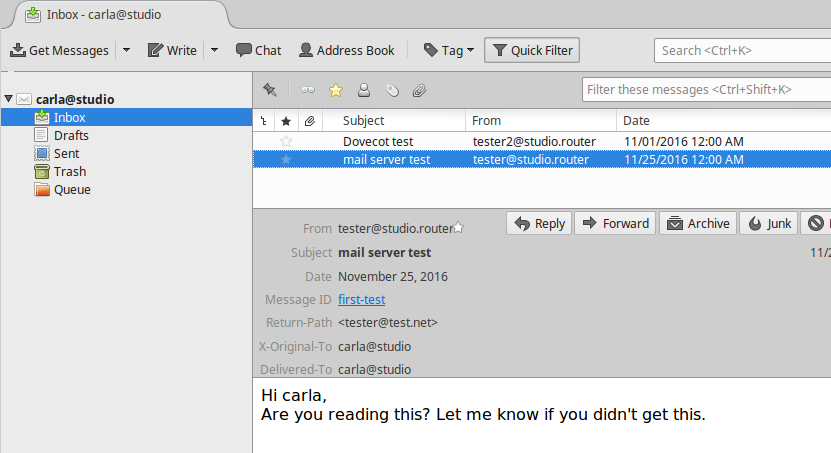
Figure 1: Thunderbird mail.

At this point, you have a working IMAP and POP3 mail server, and you know how to test your server. Your users will choose which protocol they want to use when they set up their mail clients. If you want to support only one mail protocol, then name just the one in your Dovecot configuration.

However, you are far from finished. This is a very simple, wide-open setup with no encryption. It also works only for users on the same system as your mail server. This is not scalable and has some security risks, such as no protection for passwords. Come back next week to learn how to create mail users that are separate from system users, and how to add encryption.

Advance your career in system administration! Check out the Essentials of System Administration course from The Linux Foundation.
Ceph and Flash by Allen Samuels, Western Digital

This presentation will examine the history and current best-practices for deploying flash with Ceph. Future developments in the Ceph platform and their impact on flash deployments will also be described.

Pet Containers: You’re Not Doing it Wrong

The conventional wisdom of Linux containers is that each service should run in its own container. Containers should be stateless and have short lifecycles. You should build a container once, and replace it when you need to update its contents rather than updating it interactively. Most importantly, your containers should be disposable and pets are decidedly not disposable. Thus the conventional wisdom is if your containers are pets, you’re doing it wrong. I’m here to gently disagree with that, and say that you should feel free to put your pets in containers if it works for you.

Read more at Cloud World Series

IBM Building Blockchain Ecosystem

IBM believes blockchain technology, with its capability to create an essentially immutable ledger of digital events, will alter the way whole industries conduct transactions. To make that happen, Big Blue asserts, requires a complete ecosystem of industry players working together.

To that end, IBM today said it is building a blockchain ecosystem, complete with a revenue sharing program, to accelerate the growth of networks on the Linux Foundation’s Hyperledger Fabric. IBM envisions the ecosystem as an open environment that allows organizations to collaborate using the Hyperledger Fabric.

Read more at InfoWorld

The New Role of Assurance for Virtualized Networks

For as long as any of us can remember, fulfillment and assurance were two independent processes, mostly because they were conceived, operated and purchased by separate departments. As Alfred D. Chandler demonstrated in his classic book “Strategy and Structure,” operations and even business structure follow organizational charts and vice-versa. Fulfillment and assurance are no exceptions, with those organizations driving processes and supporting software purchases. While many know that its not ideal, the situation has mostly worked.

Virtualized networks promise agility and OPEX cost reductions, along with other significant benefits. But – a big but — these gains demand highly efficient, hands-off automation. One of the things we learn from control theory – which is one branch of engineering associated closely with real-world automation, is that there must be a single control method – and what we think of as “assurance” is simply an input (feedback) into that method. One method, not two, nor three.

Read more at SDx Central

The Perfect Server – Debian 8 (nginx, BIND, Dovecot, ISPConfig 3.1)

This tutorial shows how to prepare a Debian 8 (Jessie) server (with nginx, BIND, Dovecot) for the installation of ISPConfig 3, and how to install ISPConfig 3. ISPConfig 3 is a web hosting control panel that allows you to configure the following services through a web browser: Apache or nginx web server, Postfix mail server, Courier or Dovecot IMAP/POP3 server, MySQL, BIND or MyDNS nameserver, PureFTPd, SpamAssassin, ClamAV, and many more. This setup covers nginx (instead of Apache), BIND as DNS server, and Dovecot (instead of Courier).

Read complete article at HowToForge

Best Open Source Control Panels for Linux Servers

If you own a Linux server and you don’t want to do everything via the command line, you can use a control panel. We published a list of the best free and open source control panels that you can use on your Linux server. There’s a comparison table, demos/screenshots, and all major features listed for each control panel.

So, choosing the right one for you should be easy if you use our best open source hosting control panels list.

Old Kernel Code Execution Bug Patched

A critical, local code-execution vulnerability in the Linux kernel was patched more than a week ago, continuing a run of serious security issues in the operating system, most of which have been hiding in the code for years. Details on the vulnerability were published Tuesday by researcher Philip Pettersson, who said the vulnerable code was introduced in August 2011. A patch was pushed to the mainline Linux kernel Dec. 2, four days after it was privately disclosed. Pettersson has developed a proof-of-concept exploit specifically for Ubuntu distributions, but told Threatpost his attack could be ported to other distros with some changes.

Read more at Threat Post

9 Tools to Monitor Linux Disk Partitions and Usage in Linux

In this article, we will review a number of Linux command line utilities that you can use to check disk partitions in Linux.

Monitoring storage device(s) space usage is one of the most important tasks of a SysAdmin, this helps to ensure adequate free space remains on the storage devices for efficient running of your Linux system.

Read the complete article at Tecmint

Open Compliance in the Enterprise: Why Have an Open Source Compliance Program?

The following is adapted from Open Source Compliance in the Enterprise by Ibrahim Haddad, PhD.

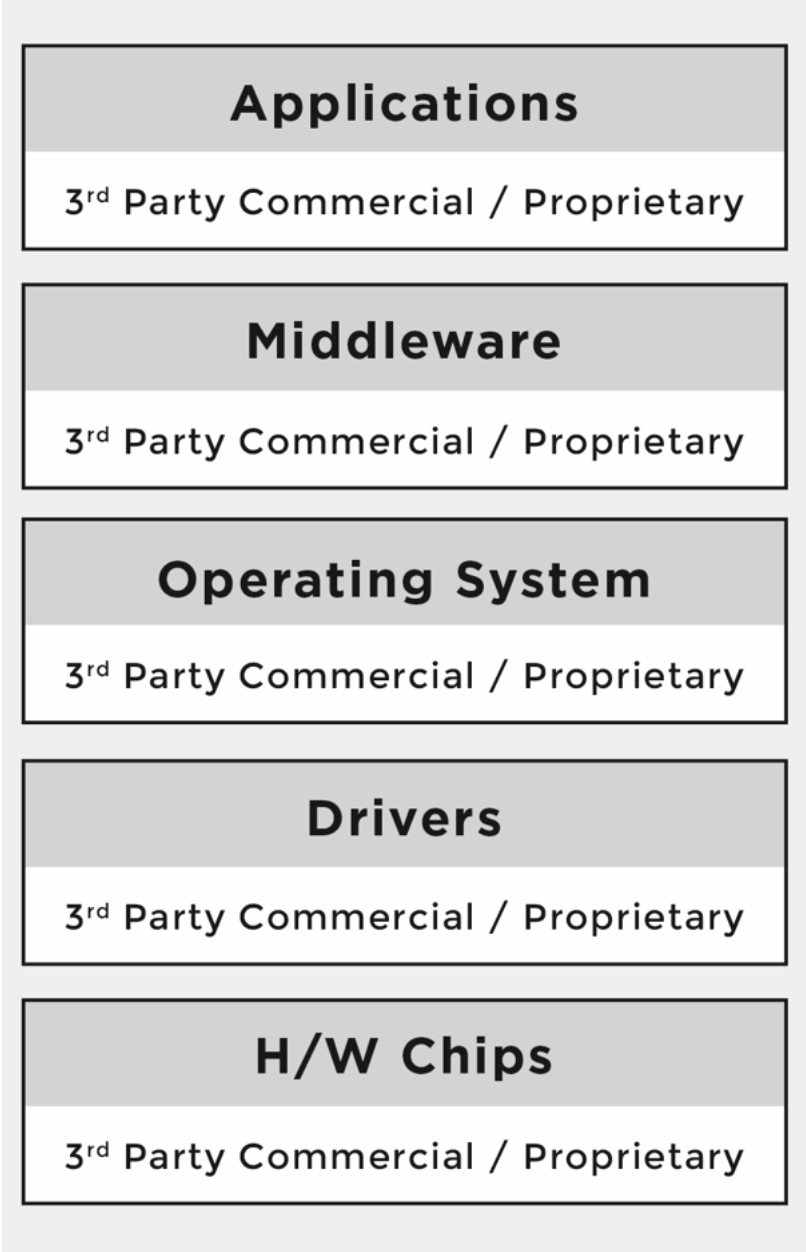
Traditionally, platforms and software stacks were implemented using proprietary software, and consisted of various software building blocks that originated as a result of internal development or via third-party software providers with negotiated licensing terms.

The business environment was predictable and companies mitigated potential risks through license and contract negotiations with the software vendors. It was very easy to know who was the provider for every software component.

Figure 1 illustrates the major building blocks of a traditional hardware and software platform.

Over time, companies started to incorporate open source software into their platforms and software stacks due to the advantages it offers. The reasons varied from product to product, but the common theme across industries was that open source components provided compelling features out of the box, there were meaningful economies to be gained through distributed development that resulted in a faster time-to-market, and they offered a newfound ability to customize the source code. As a result, a new multi- source development model began to emerge.             

Under the new model, a product could now have any combination of:

  • Proprietary code, developed by the company building the product/service                    

  • Proprietary code, originally developed by the company under an open source license in the process of integrating and deploying open source components, but was not contributed back to the upstream open source project                    

  • Third-party commercial code, developed by third-party software providers and received by the company building the product/service under a commercial license

  • Open source code, developed by the open source community and received by the company building the product/service under an open source license.                     

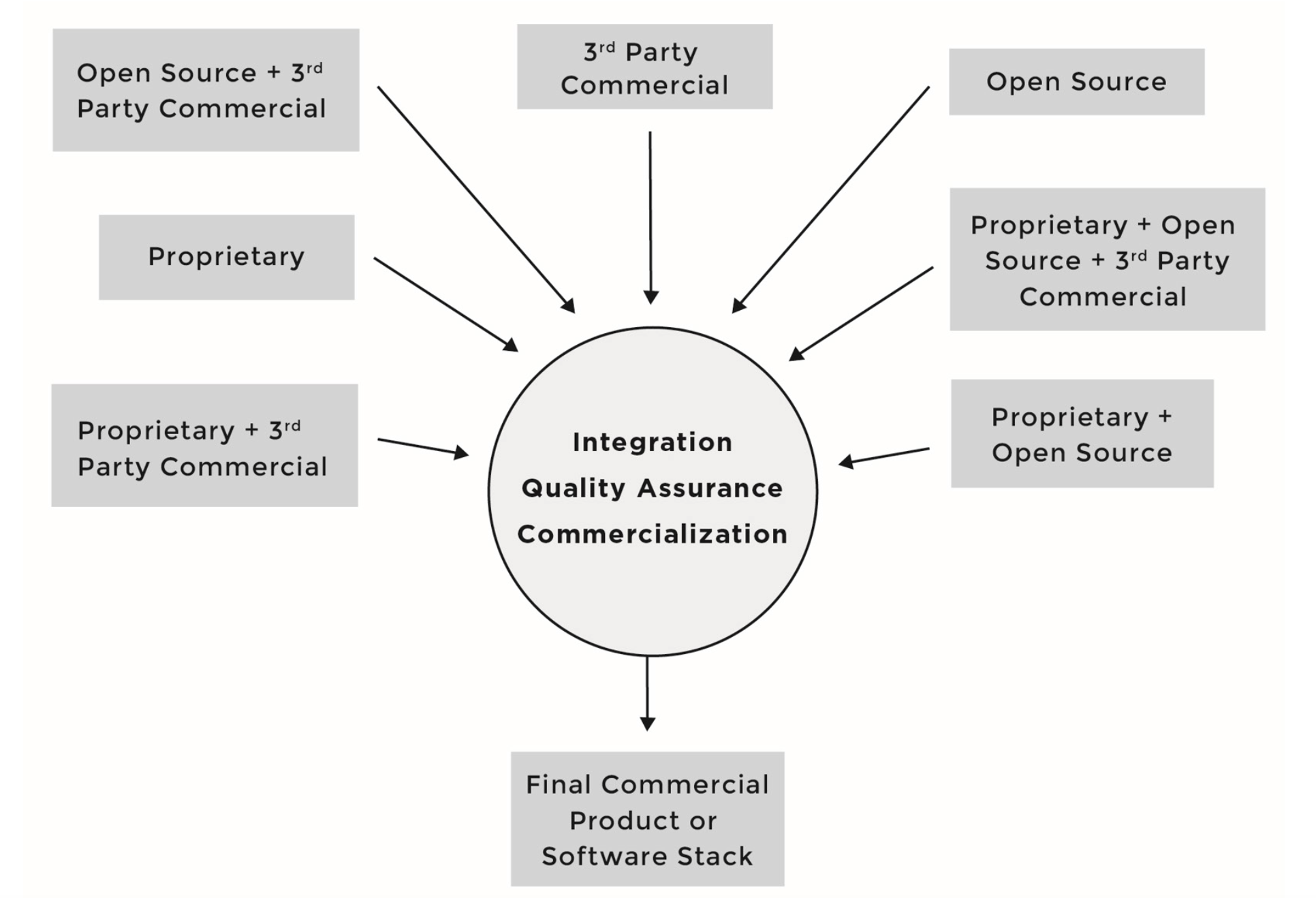
Figure 2 illustrates the multi-source development model and the various combinations of sources for incoming source code.

Under this development model, software components can consist of source code originating from any number of different sources and be licensed under different licenses; for instance, software component A can include proprietary source code in addition to third-party proprietary source code, while software component B can include proprietary source code in addition to source code from an open source project.

As the number of open source software components grew in what were once straightforward proprietary software stacks, the business environment diverged from familiar territory and corporate comfort zones.

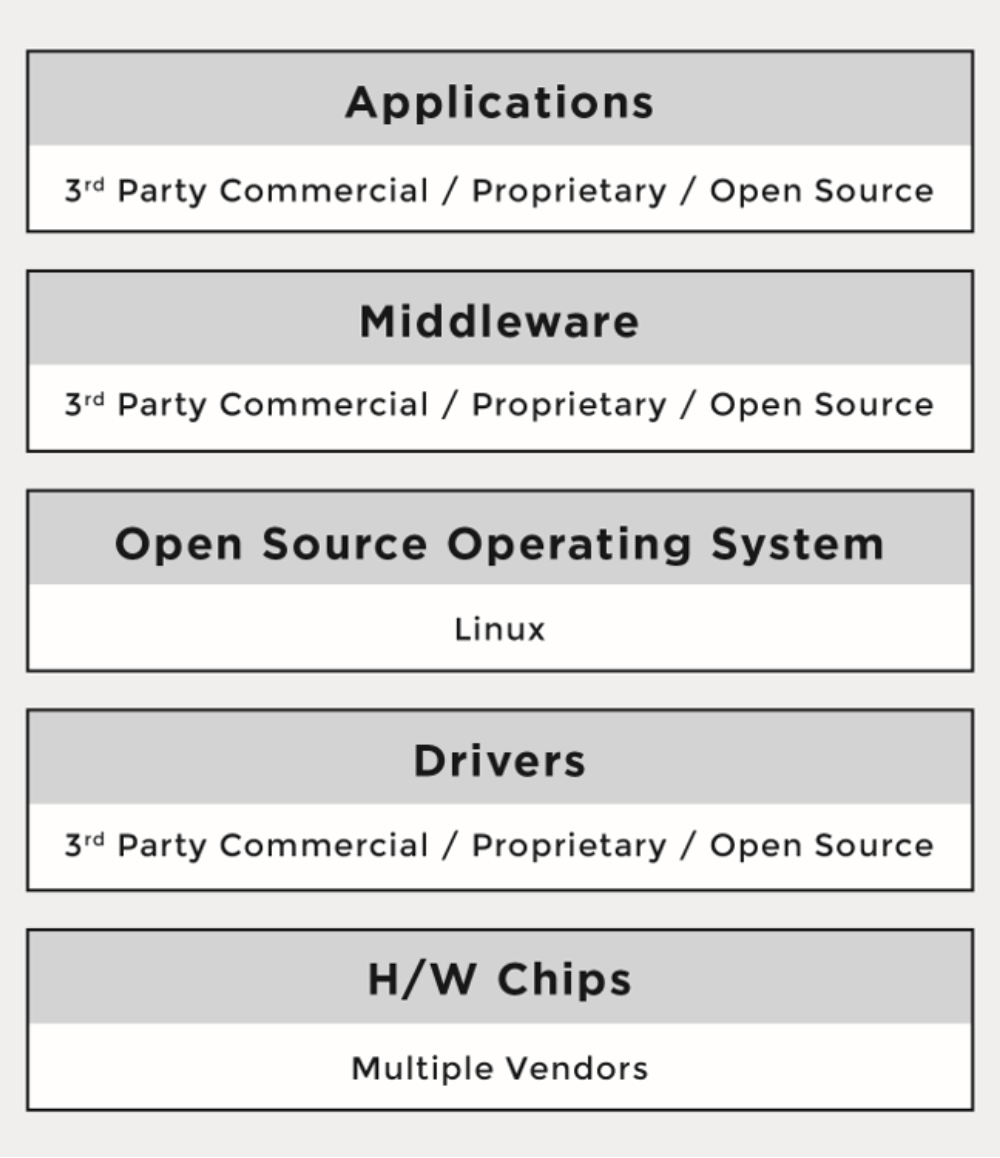
Figure 3 illustrates the adoption of open source software throughout the various levels of a given platform or software stack.

One of the major differences between the proprietary and the multi-source development models has been that the licenses of open source software are not negotiated. There are no contracts to sign with the software providers (i.e., open source developers or projects). Rather, the individuals who initiate the project chose a given open source license, and once a project reaches a certain scale, the licenses are virtually impossible to change.

When using the multi-source development model, companies must understand the implications of tens of different licenses (and combinations of licenses) coming from hundreds or even thousands of licensors or contributors (copyright holders). As a result, the risks that companies previously managed through company-to-company license and agreement negotiations are now managed through robust compliance programs and careful engineering practices.

Part 1 of this series gave an introduction to open source compliance and the business environment behind it. Next week we’ll cover the benefits of open source compliance and the risks that companies face when they fail to comply.

Read the other articles in this series:


An Introduction to Open Source Compliance in the Enterprise

Open Compliance in the Enterprise: Why Have an Open Source Compliance Program?

Open Source Compliance in the Enterprise: Benefits and Risks

3 Common Open Source IP Compliance Failures and How to Avoid Them

4 Common Open Source License Compliance Failures and How to Avoid Them

Top Lessons For Open Source Pros From License Compliance Failures

The 7 Elements of an Open Source Management Program: Strategy and Process


Download the free e-book, Open Source Compliance in the Enterprise, for a complete guide to creating compliance processes and policies for your organization.