Home Blog Page 660

Code Review Essentials

Let’s say, hypothetically, that you have just started working for a new company. Finally, a perfect job you have always dreamed about…or at least, that’s what it seems to be before you’ve taken a first look at the code. That’s when first crisis comes along. After you give it some deep thought, you realize that you can face it. You’re not giving up so easily. After all, it’s you who will be working there and you can (and should) make it better (and I mean here much, much better). You have to come up with a plan.

What can you do to both improve how things are right now and gain some knowledge about the project, which for certain will be useful in the further steps of your brilliant plan? The obvious answer comes to your mind: code reviews! Just think about it; it means that no more code that doesn’t meet good coding standards will be created (or at least merged). You, of course, still have to deal somehow with the code that already exists, but at least it won’t keep getting worse. 

Read more at DZone

Open Source Summit 2017 Combines LinuxCon and Three Other Events

The Linux Foundation today announced it will combine LinuxCon with two other events and a brand new Community Leadership Conference in 2017.

Now called Open Source Summit, the event will bring LinuxCon, CloudOpen, and ContainerCon together under one umbrella and in three locations: North America, Europe, and Japan.

The Community Leadership Conference, led by community-building expert and consultant Jono Bacon, will also join the Open Source Summit in North America and Europe.

“As open source continues to grow and expand into new areas such as hardware, data, IoT, standards, and beyond, having an accessible, productive community strategy is critical for success,” Bacon said. “I am excited to launch the Community Leadership Conference as part of the Open Source Summit to support the continued evolution of community leadership and the success of those who practice it.”

The Linux Foundation organizes hundreds of open source community events each year, and LinuxCon has always been its largest one. In recent years the conference has grown along with the role of open source in business to include co-located events such as CloudOpen, ContainerCon, Xen Project Summit, CloudNativeDay, and others.

“In recent years, open source has expanded to be the default software in virtually every area of technology, so it is important that the broad community have a place to gather and exchange ideas,” said Linux Foundation Executive Director Jim Zemlin. “The Linux Foundation Open Source Summit will gather the best and brightest from every corner of open source technology together for an event where they can collaborate and share best practices.”

Each of the four conference areas will bring a different part of the open source community to the table, providing a holistic overview of the industry for attendees of the new Open Source Summit.

LinuxCon

This is the event where leading maintainers, developers and project leads in the Linux community and from around the world gather together for updates, education, collaboration and problem-solving to further the Linux ecosystem.

ContainerCon

Leading experts in both the development and operations communities will come together to share ideas and best practices for container technologies with a focus on DevOps culture, automation, portability and efficiency. The goal of the event is to bring companies on the leading edge together with users and developers to continue to innovate on the delivery of open source infrastructure.

CloudOpen

The open source projects, products, technologies, and companies driving the cloud, big data and networking ecosystems of today and tomorrow gather at this event. They discuss cloud platforms, automation and management tools, DevOps, virtualization, containers, software-defined networking, storage and filesystems, big data tools and platforms, open source best practices, and much more.

Community Leadership Conference (North America and Europe only)

Leading practitioners who are building empowered and productive open source communities come together to share their expertise. Whether its focus is on collaborative workflow, licensing, governance, outreach, messaging, social media, or anything else, there is sure to be content and conversation that will bring value to any organization or project.

Registration for The Linux Foundation Open Source Summit Japan, North America and Europe will open in December. Organizations interested in sponsoring these events can download a prospectus from http://events.linuxfoundation.org/sponsor.

The events will take place at the following dates and locations:

4 Notable Trends in Open Source Cloud Computing

Some of the most successful public companies today are built around cloud-native applications — a fashionable term that simply means they’re designed to run in the cloud. Netflix, Facebook, LinkedIn, Twitter, and Amazon have all leveraged open source components within a distributed, microservices-based architecture to quickly deliver new products and services that are cost-effective and responsive to market demands and changes.

By breaking applications up into microservices, or distinct, single-purpose services that are loosely coupled with dependencies and explicitly described through service endpoints, they have significantly increased the overall agility and maintainability of applications and used that to gain competitive advantage.

The rest of the market has scrambled to replicate this architecture and approach, cobbling together their own solutions using custom scripts and open source software — often using the open source versions of these web giants’ own infrastructure (i.e., Google’s Borg, which became Kubernetes; Twitter’s Mesos project, VMware’s Cloud Foundry, etc.).

This experimentation has set off a chain of innovation with four notable trends, still playing out today:

1. Increasing consumption of public cloud resources

2. Adoption of container technologies like Docker and others (Fifty-three percent of organizations are either investigating or using containers in development or in production, according to a recent Cloud Foundry report)

3. The rise of DevOps as the most effective method for application delivery in the cloud

4. An explosion in available open source tooling as user companies like Walmart and Capital One release their management software under open source licenses.

From banking and finance to automotive and healthcare, companies are facing the reality that they’re now in the technology business. In this new reality, cloud strategies can make or break an organization’s market success. And successful cloud strategies are built on Linux and open source software.

As cloud adoption grows, open source technologies will continue to be the source of innovation and the foundation for new markets and ecosystems. For each of the trends, above, there are open source projects actively involved in creating the future of IT infrastructure on which companies will deliver their products and services, in the coming year and beyond.

Organizations that wish to succeed should become familiar with these projects, the categories of technology in which they are influential, and the ways in which they can help companies remain competitive in this age of digital transformation.

In our next installment in this cloud series, we’ll discuss the trend toward microservices architectures and public cloud usage.

Learn more about trends in open source cloud computing and see a list of the top open source cloud computing projects. Download The Linux Foundation’s Guide to the Open Cloud report today!

Read the other articles in this series:

Trends in the Open Source Cloud: A Shift to Microservices and the Public Cloud

3 Emerging Cloud Technologies You Should Know

Why the Open Source Cloud Is Important

Enterprise Linux Showdown: SUSE Linux

SUSE has always been a strong player in the Linux arena. Both the commercial server and desktop versions are solid and enterprise ready, while openSUSE — the SUSE developed for and with the community — has become increasingly popular over the years. And, despite some rocky times in the past, the company and its distribution are thriving.

A Brief History of SUSE

SUSE is one of the older Linux distributions and predates both Red Hat and, of course, Ubuntu. In fact, SUSE is the third oldest surviving distribution. Only Debian and Slackware are older.

SUSE, the company, was founded in Germany in 1992 by Roland Dyroff, Thomas Fehr, Burchard Steinbild, and Hubert Mantel. The original name of the company was Gesellschaft für Software und Systementwicklung mbH (Software and Systems Development Corporation), but soon became Software- und System-Entwicklung (i.e., S.u.S.E.), which means Software and Systems Development. SUSE, the distribution, came into being in 1994 as S.u.S.E. 1.0. as a German extension of Slackware. In fact, Slackware’s own Patrick Volkerding helped Dyroff and company translate Slackware to German.

The first independent version of SUSE Linux came out in 1996 with a 4.2 version number. The version number was a reference to Douglas Adam’s The Hitchhiker’s Guide to the Galaxy — and the creators jokingly peddled the distro as “the answer to life, the universe and everything.

By 1997, S.u.S.E. had become Germany’s biggest Linux distributor and started its expansion into the United States by setting up an office in Oakland, California. In 1998, the company changed its name officially to SuSE Linux Ag. and continued its expansion in Europe, the States, and Asia. Then the 2001 recession struck. Germany was hit hard, and SuSE was forced to reduce its staff. Around this time, the company also introduced SUSE Linux Enterprise Server to try to boost corporate sales.

The Novell Years

In the early 2000s, Novell was suffering its own particular recession, as the market for its core product, Netware, had been declining for years. Seeking a way to invigorate its product line, in 2003, Novell acquired SUSE for $210 million, and SUSE was incorporated as a subsidiary of Novell. During this time, several actions carried out by Novell’s management angered the community and cast a dark cloud over the distribution. First, several prominent and outstanding core engineers were laid off. But what made the community really flip was the deal Novell struck with Microsoft.

Steve Ballmer was then CEO at Microsoft and, to put it mildly, he was disliked by the Linux community. After Ballmer called Linux a cancer, any deal struck with him would be regarded with suspicion. The deal Novell did make was a non-aggression agreement, in which Novell licensed patents and intellectual property to Microsoft, and, in turn Microsoft promised it would not sue SUSE Linux clients for using infringing IP in Linux. This deal enraged the Linux community because it implied that Linux contained code copied from Microsoft. Although the agreement also brought a windfall of cash to Novell, the company was already doomed, and in 2010, it was acquired by Attachmate. In the process, SUSE was extricated from Novell, and the patent portfolio and IP of the company were either put under GPL licenses or donated to the Open Invention Network.

Not everything was bad while SUSE was part of Novell. On the bright side, it was during that time that the previously proprietary YaST2 system management dashboard was released under a free GPL license and the openSUSE project was started.

Current Ecosystem

What is known nowadays as SUSE Linux is the commercial version of the distribution, with enterprise grade support and paid licenses. SUSE Linux comes in two flavors: SLES, the SUSE Linux Enterprise Server; and SLED, the SUSE Linux Enterprise Desktop.

Apart from running on servers and desktops worldwide, you can also find commercial, but tweaked versions of SUSE Linux powering the London Stock Exchange and used extensively in high performance computing (HPC). The Cray Linux Environment, which powers some of the most powerful supercomputers in the worlds, is a customized SUSE Linux Enterprise Server. IBM’s Watson, which beat Jeopardy! champions Brad Rutter and Ken Jennings in 2011 and is now used to help diagnose and work out treatment for cancer patients, also runs a customized version of SUSE Linux.

However, even more interesting is the ecosystem that has sprouted up around openSUSE. Today, openSUSE is — apart from a free distribution for the community — a test bed for technologies that are later incorporated into the commercial offering, much like what Fedora is to Red Hat.

openSUSE comes in two flavors: Leap is version-based flavor that uses sources from SUSE Linux Enterprise branch and follows the same release cycle. It has minor updates every six months, and a new service pack every year. The first Leap came out in November 2015 and, continuing with the tradition, was given 42.1 as its first release number. Version 42.2 came out on November 15, 2016. Leap is designed to be stable and conservative and is recommended for business and production environments.

openSUSE Tumbleweed, by contrast, is a rolling release. This means Tumbleweed users update incrementally, never having to re-install the system from scratch. openSUSE Tumbleweed evolved from the Factory codebase, which was previously a development platform. Tumbleweed is a stabilized version of Factory and made it into a rolling release distribution.

Although Tumbleweed is mostly very usable, it does tend towards the bleeding edge, and sometimes an update can make the system unstable. Fortunately, the solution usually comes in the next update, which often pops up the next day. Also, thanks to Btrfs’s Snapper tool (openSUSE uses Btrfs as the default filesystem format for the main system), you can roll back changes in… well… a snap, and continue working until the amending update turns up.

Finally, as with Fedora and Ubuntu, there are the derivatives — versions of either Leap or Tumbleweed — some of which are created by the community and others by the openSUSE team itself. Argon (based on Leap) and Krypton (built on Tumbleweed), for example, like Jonathan Riddell’s Neon, taps directly into KDE’s git and development repositories. This means that Argon and Krypton allow developers, early testers, and enthusiast adopters to experience the latest KDE software without having to wait for openSUSE developers to package them.

Online Tools

This brings us to SUSE’s online services. Over the years, SUSE has put a web front end on many of the tools that were used internally to build the distribution. Thanks to this policy, now everybody can use them.

One of the most immediately useful services for end users is the openSUSE Package Search service. This works more or less like Ubuntu’s PPAs: If a package you want to install is not in your default repositories, visit the Package Search website, input the name of the software, and the service will return several options, drawing from alternative repositories. It also makes the process easy, because you can install directly from your web browser. Click on 1 Click Install, and YaST’s software management tool will open up and do its thing.

As with PPAs, this process can be a bit hazardous. It’s a good idea to do some research beforehand and make sure the repository you are using is regularly updated and maintained. You must also be careful that it doesn’t conflict with any of your other repositories. If you explore the Package Search service, you will soon realize there are literally hundreds of repositories, most containing one or two packages or a very specific subset of applications and libraries. This is because of OBS or the openSUSE Build Service.

This service allows developers to compile, package and share any software you can compile or run locally. Although packaging with OBS is not trivial, it is not exactly rocket science either, and a many an itch has been scratched thanks to it. OBS also allows you to create packages for non-SUSE distributions, including Debian, Ubuntu, Red Hat, and Fedora.

But maybe the most fun service of them all is SUSE Studio, which allows you to create a custom SUSE distribution from scratch. By tailoring repositories, configuration files, and settings and using a step-by-step online assistant, Studio helps you find, add, and remove software to your distribution; resolve dependencies; create configuration scripts; and add files to be included in the image.

When you’re done, you can download your derivative as a live ISO that you can burn to a DVD or a USB thumbdrive, create a virtual machine image, or deploy your system to most popular cloud services. You can also share it in the Gallery, which is a good place, by the way, to look for interesting derivatives.

Conclusion

SUSE combines tried and tested tools and build methodologies that make this Linux offering a favorite in corporate environments. At the same time, and thanks to openSUSE and the online services built around it, SUSE Linux can also be daring and exciting. Although it has had low points over its long history, the Linux community is lucky that SUSE Linux is still with us and still going strong.

See the previous articles on Red Hat Enterprise Linux and Ubuntu Linux for more information.

Advance your career in system administration! Check out the Essentials of System Administration course from The Linux Foundation.

5 Fun Raspberry Pi Projects: Getting Started

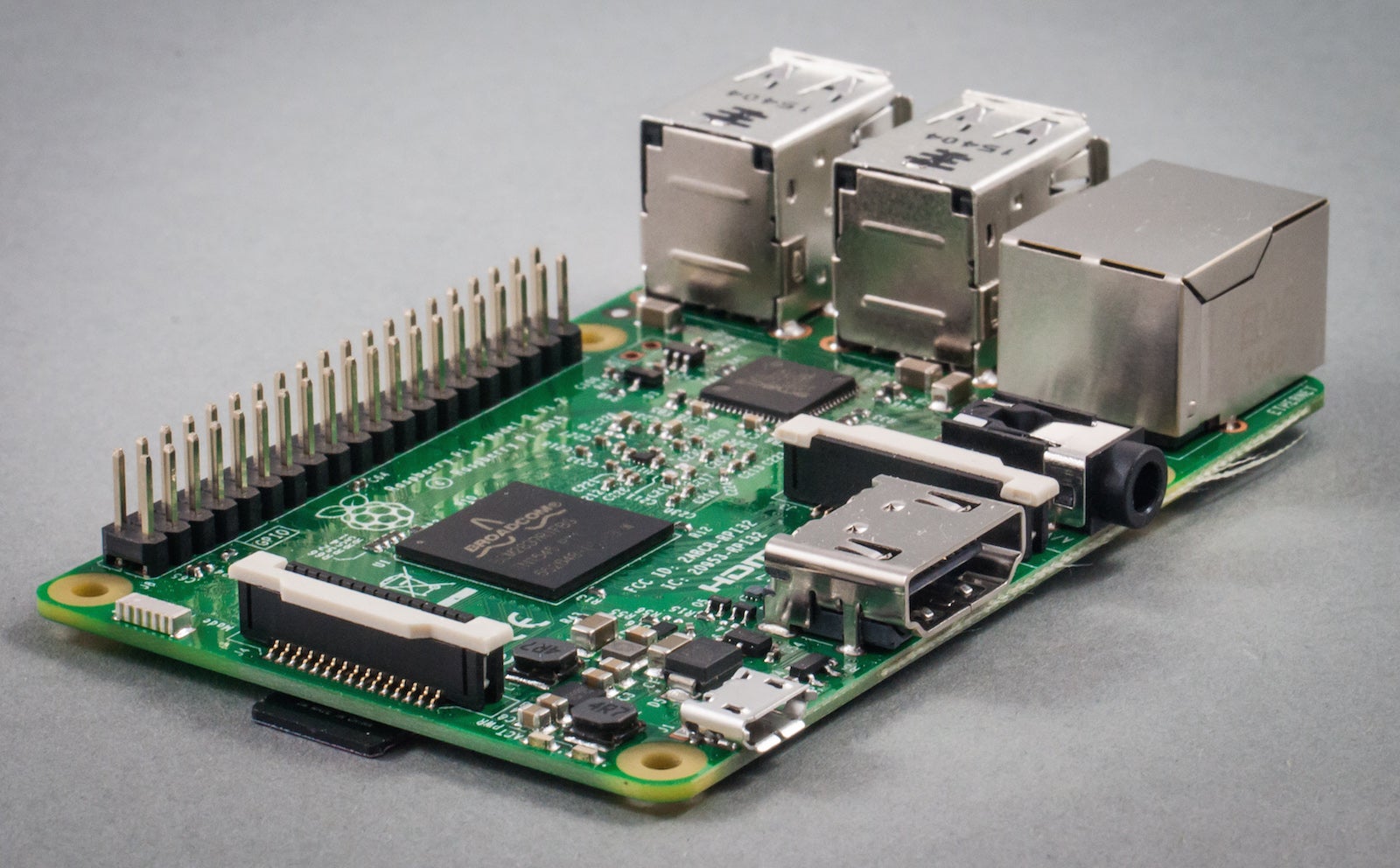
Nearly five years after the first Raspberry Pi boards shipped, the device continues to far surpass its expected popularity, spreading well beyond its originally intended purpose as an educational tool. Though creator Eben Upton originally hoped to sell at most 10,000 boards, more than 10 million are now in the hands of students, teachers, and makers. In addition to three generations of the Raspberry Pi, you can also now have the even smaller Raspberry Pi Zero, as well as several additional products, from the Compute Module to the specially designed cameras, touchscreen, and assorted HATs (Hardware Attached on Top boards).

With so much available and so many possibilities, it can be intimidating to know where to start. Use these tips to learn some basic information about starting your own project. This article assumes you know what a Raspberry Pi is, how to connect things like a keyboard and a display, and how to use a Linux command line, but not much else. (See the official Raspberry Pi help videos for the basics.)

This tutorial is part of the free Linux Foundation Training E-book, 5 Fun Projects for Raspberry Pi 3. Download it now!

Which Pi do I have?

If you’ve had a Raspberry Pi sitting in your desk drawer for so long that you’re not even sure any more what version it is, you’re not alone. Whenever I give a talk on the Raspberry Pi, I ask how many people have one, and generally most of the room confesses to owning one while only a handful have actually used it.

Beyond the amount of RAM, which is the most obvious difference in the earlier boards, or big changes like the additional GPIO in later boards (which is easily apparent), there are some minor distinctions that can be useful to know as you plan your project or troubleshoot problems.

With some visual examination, you can generally figure out which board you have by looks alone, but there’s an easier way using the command line.

Start your Pi, open a terminal, and run the command

cat /proc/cpuinfo | grep 'Revision'

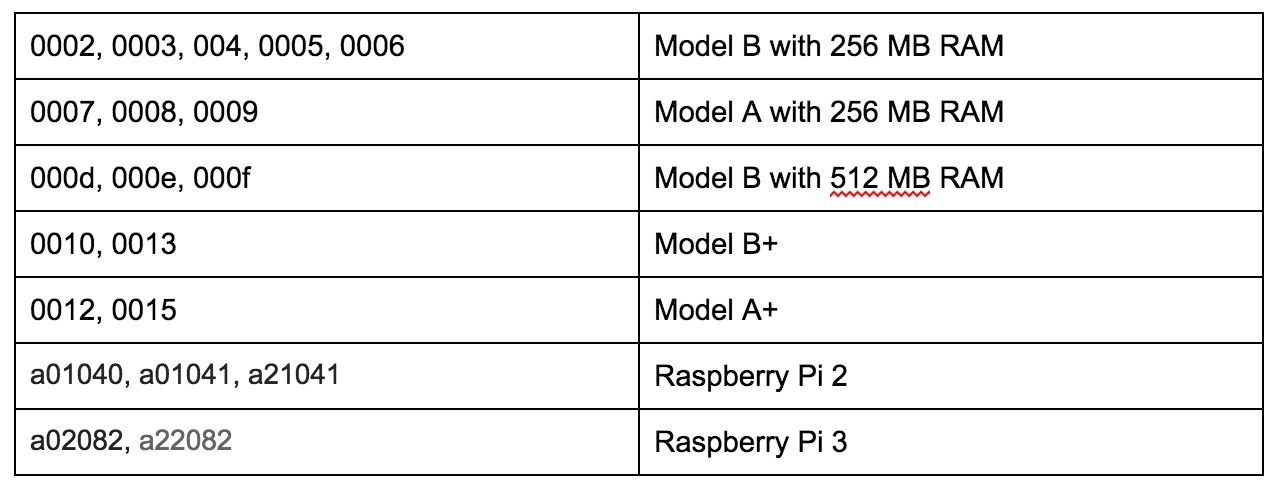
The output should be a four- or six-character string that indicates which board you have:

If you see a very long number that starts with “1000,” the part after that is the revision number, and the “1000” indicated that your board has been overvolted.

The following will give you a quick comparison of the major features across the various boards:

0RgbzZ4vA0Mr-qAKPvzH6aytKMJBbPXLQOQm_vSM

If you would like to see even more information about your board from the command line, try the following commands:

  • Hardware: cat /proc/cpuinfo

  • Version: cat /proc/version

  • Memory: cat /proc/memory

  • SD card partitions: cat /proc/cpuinfo

Power it up

You’re probably accustomed to some general truths about the electronics in your house. You plug them into the wall, flip an on/off switch, and they work. The Raspberry Pi is not one of these electronics. Getting a good power supply and cable that provide clean, adequate, consistent power is crucial to your Pi’s performance. And there’s no on/off switch. But that’s ok–you can make one.

How much power is enough?

If you think that insufficient power may be a problem (and if you’re having problems with a Pi, there’s a good chance it’s the power), you can check the actual voltage to see if you’re right.  

On an older Model B, you’re looking for small holes on top of the board marked TP1 and TP2. On a Model B+ or Raspberry Pi 2 or 3, there are spots on the bottom of the board on the side with the SD card slot that are marked PP3 and PP7.

First, plug in all of the peripherals you’ll be using for your project. Use a multimeter set to 20 volts. Touch the red lead to TP1 or PP3 and the black lead to TP2 or PP7. The multimeter should read something close to 5 volts. Anything more than .25 volts variance is a problem, and the closer to 5, the better.

If you find your voltage is low, there are two most likely culprits:

  • Your power cable. The good news about the Raspberry Pi is that if you use an Android phone, you almost certainly already have a multitude of micro USB cables ready to power your Pi. The bad news is that if you picked that cable up from the discount bin, it may give your phone a slow drip that’s enough for a phone recharge, but your Pi won’t be amused by the dribble of electricity you’re offering.

  • Your devices. All those USB peripherals you’re plugging into it–even your lowly keyboard–are hungry for power. You should use a powered USB hub to help out.

Add a reset switch

Now that you know some basics, and you’ve tested your power source, you’re ready for a quick and easy project that will make your Pi feel more like the rest of the electronics you have. You’re going to add a simple reset switch.

Most of the electronics you own come with on/off switches. Because the Pi doesn’t, to restart it, you have to pull the power cable out altogether and reinsert it. The following instructions will let you start or reboot the Pi quickly without having to do so.

You’re looking for two holes on the board next to each other. One has a circular edge and the other a square. On the original Model B, they’re marked “P6” and are found near the HDMI port. On later Raspberry Pis, they’re marked “RUN” and can be found closer to the GPIO pins.

You can purchase strips of breakaway pin headers from anywhere you get other electronics supplies. Solder two of these pins into the P6/RUN holes, and you’ve created a CPU reset switch. All you have to do is touch a piece of metal across both pins.

From here, you can get as creative as you’d like about what to attach to use as the actual button. The simplest solution is to attach a 2-pin switch cable on the pins you attached.

Meet the GPIO

Aside from its low price point, the GPIO options on the Raspberry Pi are one of its most appealing features. They are also the part most likely to intimidate new users. (And if you think stepping on an errant Lego brick hurts, don’t leave your Pi with the GPIO side up on the floor!)

GPIO stands for “general purpose input/output,” which is exactly what these pins do. Nearly all of the awesome projects you’ve seen built with Raspberry Pis take advantage of these pins in some fashion. Their flexibility is their strength!

The earlier boards had 26 GPIO pins, while the Raspberry Pi 2 and 3 have 40. (Technically only 17 of the 26 and 28 of the 40 are GPIO, while the rest are power or ground pins.) They are referred to with pin numbers. The numbers aren’t in any logical order, so you need a diagram to make sure you’re using the right ones. (To add to the confusion, you will sometimes see them referred to by their physical pin numbers, which is the pins counted in order.) If you’re going to be using the GPIO frequently, I recommend Simon Monk’s Raspberry Leaf project, which is a tiny printout of the pins you can lay over them for reference. If you have a 26-pin Pi, you can print one yourself on Monk’s website, or if you have a 40-pin Pi, you can buy them from Adafruit in paper and hard versions.

Now that you know which is which, you’ll need a way to tell the pins what you want them to do, which is going to require a bit of programming. If you’re a beginner, the Pi part of the Raspberry Pi name comes from its original intent as a tool to teach Python, so in a way, you’re using the Pi for its original purpose! (Even if your endpoint is an automated coffeepot or killer robot.)

Of course, teaching you Python is well beyond the scope of this article, but there are plenty of resources waiting. Sparkfun and Adafruit both have starter tutorials for how to use the GPIO, and the Raspberry Pi Foundation’s learning resources include a Python Intro. If you prefer to go more in-depth with a book, there are a few options, including Learning Python with Raspberry Pi and Programming the Raspberry Pi: Getting Started with Python, written by the aforementioned Simon Monk.

Finally, Pinout.xyz can serve throughout your project as a reference tool for each of the pins.

Find a project

The best thing you can do now is start making something. Even if you’ve never written a line of code or touched a soldering iron, the Raspberry Pi is a perfect learning tool for those things and more. But what to build?

If you’re still nervous and want to have something useful that requires writing no code nor touching the GPIO, I recommend setting up Kodi (previously called XBMC). In minutes, you can turn your Pi into a functioning media center.

Once you’ve done that and you’re ready to get braver, think about what interests you. Video games? Home automation? Photography? Whatever it is, chances are good that someone has built something similar and offered their instructions online. Follow them. Make your own changes. Find improvements, or fix problems in the original version. That’s the best way to learn. And once you’ve done so, don’t forget to share what you’ve done with others.  

To get you started on ideas, here are a few of my favorite projects for a variety of interests:

  • The Cupcade is the easiest way to build your own tiny gaming system. There are tons of video game build tutorials out there, but if you’re more interested in starting with a kit, this provides all the pieces you need for a satisfying project. (If you’re more of a builder and would like to go bigger, take a look at the Coffee Table Pi.)

  • Homebrewers who would like to take their brewing to the next level should try BrewPi.

  • If you have access to a 3D printer and would like an amusing but not terribly useful device where all the code’s been written for you, try the Pi Ball.

  • One of the most popular Pi projects is the MagicMirror. It’s customizable to your interests, useful to have in your house, and all of the code is on Github.

  • If you’d like to try robotics, the options are broad. Start with this DIY Hacking tutorial. Adafruit has an introductory robot tutorial as well. From there, the possibilities are up to you.

For 5 more fun projects for the Raspberry Pi 3, including a holiday light display and Minecraft Server, download the free E-book today!

Read the next articles in the series:

How to Build a Minecraft Server with Raspberry Pi 3

Build Your Own Netflix and Pandora With Raspberry Pi 3

Turn Raspberry Pi 3 Into a Powerful Media Player With RasPlex


Planning Microservices: Know the Tradeoffs with Monolithic Design

By now you no doubt understand the advantages of using a microservices architecture, especially in greenfield applications, and in new organizations that need to achieve efficiencies wherever they can. But what about your legacy code and applications? Do you totally rewrite the monolith, or do you chip away at it with new functionalities, added as microservices, over time?

You could pull out some functionality from the monolith, something that isn’t scaling well that you need to rewrite anyway. You might choose to implement it as a standalone service. But then you’ll have a hybrid application that presents delivery challenges. How do you deliver those hybrid apps while they’re in transition to a more flexible architecture based on microservices?

These are just some of the challenges organizations face when planning future products. Fortunately, there are  several strategies you can use when planning a microservices-based system. But the issues can be complicated when existing monolithic systems are in play.

Read the full blog post here. 

Kubernetes Founders Launch Heptio to Help Bring Containers to the Enterprise

For years, the public face of Kubernetes was one of project’s founders: Google group product manager Craig McLuckie. He started the open source container management project together with Joe Beda, Brendan Burns and a few other engineers inside of Google, which has since brought it under the guidance of the newly formed Cloud Native Computing Foundation.

Beda became an entrepreneur in residence at Accel Partners in late 2015. Burns left Google for Microsoft earlier this year and McLuckie quietly left Google to start a new venture a few weeks ago. McLuckie and Beda have now teamed up again to launch Heptio, a new pure-play Kubernetes company.

Read more at TechCrunch

4 Reasons Why SSH Connection Fails

As DevOps or IT professionals, people may ask us why they can’t ssh to servers. It happens from time to time. Isn’t right? Not much fun. Just routine work.

Want to ease the pain and burden? Let’s examine common ssh failures together. Next time forward this link to your colleagues, if useful. People may be able to identify the root cause all by themselves, or be efficient in collecting all necessary information, before turning to us.

Why SSH Connection Failed


Original Article: http://dennyzhang.com/ssh_fail

It’s not something fancy or difficult. Just not everyone posses enough information or experience about this. As DevOpsers, we shouldn’t stand in the way for any process. Let’s empower people with a simple and easy guide.

Here are Common SSH Failures sorted by frequency.

1. Our SSH Public Key Is Not Injected To Servers.

SSH by password is very dangerous. Nowadays almost all serious servers will only accept ssh by key file. Here is the process:

  • We generate a ssh key pair. Even better, protect private key with passphrase.
  • Send our ssh public key to the person who manages the servers.
  • He/She will inject our ssh public key their. Usually it’s ~/.ssh/authorized_keys.
  • Then we should be able to ssh.

Here comes the most frequent ssh failure!

denny@laptop:/# ssh root@www.dennyzhang.com
Permission denied (publickey).

This error message may have 2 possible clauses:

  • The private key doesn’t have the privilege to login.

Either public key is not injected correctly or simply it’s missing.

Tips: If your Ops/DevOps are not available, you can try alternatives. Think who else in the team can ssh. In fact anyone who can ssh, is capable to perform the change.

  • Local ssh public key and private key is not correctly paired.

Before connecting, ssh will check whether our public key and private key is correctly paired. If not, it will reject to use the private key silently. Yes, silently!

You may wonder how could this happen? As humans we don’t, but we may have some automation scripts which create the mess. BTW, if we only have a valid private key without public key, it’s fine.

2. Firewall Prevents Us From Connecting

For security concern, people may enforce a strict firewall policy. It means only certain source IP can ssh.

denny@laptop:/# ssh root@www.dennyzhang.com
ssh: connect to host www.dennyzhang.com port 22: Connection refused

# Confirm with telnet. Usually it shall connect in seconds
denny@laptop:/# telnet www.dennyzhang.com
Trying 104.237.149.124...

You may want to fetch help immediately. Just wait a second.

People may have reconfigured sshd to listen on other port. Are you sure it’s port 22? Even better, double check the server ip or dns name.

I know they might be stupid questions. But people make these mistakes sometimes.

Once it’s confirmed, talk to your DevOps. There is another possible reason for this failure: sshd is not up and running. Very rare I would say. But could be. In that case, DevOps/Ops need to take actions immediately.

3. Host Key Check Fails

When you see below warning for the first time, you may get confused. To be simple, it helps us to avoid the attack of man-in-the-middle.

denny@laptop:/# ssh root@www.dennyzhang.com
@@@@@@@@@@@@@@@@@@@@@@@@@@@@@@@@@@@@@@@@@@@@@@@@@@@@@@@@@@@
@       WARNING: POSSIBLE DNS SPOOFING DETECTED!          @
@@@@@@@@@@@@@@@@@@@@@@@@@@@@@@@@@@@@@@@@@@@@@@@@@@@@@@@@@@@
The ECDSA host key for [www.dennyzhang.com]:22 has changed,
and the key for the corresponding IP address [45.33.87.74]:22
is unknown. This could either mean that
DNS SPOOFING is happening or the IP address for the host
and its host key have changed at the same time.
@@@@@@@@@@@@@@@@@@@@@@@@@@@@@@@@@@@@@@@@@@@@@@@@@@@@@@@@@@@
@    WARNING: REMOTE HOST IDENTIFICATION HAS CHANGED!     @
@@@@@@@@@@@@@@@@@@@@@@@@@@@@@@@@@@@@@@@@@@@@@@@@@@@@@@@@@@@
IT IS POSSIBLE THAT SOMEONE IS DOING SOMETHING NASTY!
Someone could be eavesdropping on you right now (man-in-the-middle attack)!
It is also possible that a host key has just been changed.
The fingerprint for the ECDSA key sent by the remote host is
37:df:b3:af:54:a3:57:05:aa:32:65:fc:a8:e7:f9:3a.
Please contact your system administrator.
Add correct host key in /root/.ssh/known_hosts to get rid of this message.
Offending ECDSA key in /root/.ssh/known_hosts:2
  remove with: ssh-keygen -f "/root/.ssh/known_hosts" -R [www.dennyzhang.com]:22
ECDSA host key for [www.dennyzhang.com]:22 has changed and you have requested strict checking.
Host key verification failed.

Each server can have a fingerprint. If the server is re-provisioned or simply a different server, the fingerprint would be different. Once we have successfully login, our laptop will save the server’s fingerprint locally. Next time we login, it will do a comparison first. If the fingerprint doesn’t match, we will see the warning.

If we’re confident it has been re-provisioned recently, we can ignore this warning. Remove the entry from ~/.ssh/known_hosts. Or you can empty the file. Even turn off ssh host key checking for all hosts.[1] Certainly I would not recommend.

4. Your SSH Key File Mode Issues

As a self-protection, the file access of your ssh key file can’t be widely open. The file mode should be either 0600 or 0400.

denny@laptop:/# ssh -i id_rsa root@www.dennyzhang.com
@@@@@@@@@@@@@@@@@@@@@@@@@@@@@@@@@@@@@@@@@@@@@@@@@@@@@@@@@@@
@         WARNING: UNPROTECTED PRIVATE KEY FILE!          @
@@@@@@@@@@@@@@@@@@@@@@@@@@@@@@@@@@@@@@@@@@@@@@@@@@@@@@@@@@@
Permissions 0644 for 'id_rsa' are too open.
It is required that your private key files are NOT accessible by others.
This private key will be ignored.
bad permissions: ignore key: id_rsa
Permission denied (publickey).

Use -v for verbose output: ssh -v $user@$server_ip.

More Reading:

Footnotes:

Google Unleashes its Machine Learning Group

Google Unleashes its Machine Learning Group Google offers GPUs to support the more complex workloads. 

Google announced its Google Cloud Machine Learning Group to be led by two machine-learning experts: Fei-Fei Li and Jia Li. The group will focus on delivering cloud-based machine learning software to businesses.

The new group evolves from Google’s Cloud Machine Learning alpha application it launched in March. 

In conjunction with announcing the new group, Google also introduced the new Google Cloud Jobs API to help people advance their careers.

Read more at SDx Central

Eclipse Che Cloud IDE Joins Docker Revolution

Eclipse Che 5.0 is making accommodations for Docker containers and Language Server Protocol across multiple IDEs. The newest version of the Eclipse Foundation’s cloud-based IDE and workspace server will be available by the end of the year.

The update offers Docker Compose Workspaces, in which a workspace can run multiple developer machines with support for Docker Compose files and standard Dockerfiles. … Che also has been certified for Docker Store, which features enterprise-ready containers. In addition, Docker is joining the Eclipse Foundation and will work directly with Che.

Read more at InfoWorld