Home Blog Page 659

Nothing Good Is Free: How Linux and Open Source Companies Make Money

We all know how popular and helpful Linux and open source products are, but since most of them are available for free, how do the companies that produce them make any money to pay their bills? As it turns out, lots of ways.

HOW DEMAND FUELS COMMERCIAL SOFTWARE DEVELOPMENT

Let’s start with the issue of demand. The more specialized a type of software is, the fewer users there will be. Generally, the fewer users, the smaller the market opportunity. The smaller the market opportunity, the fewer the number of companies that will invest in developing applications of that type. 

There’s actually a bit of a bell curve in the demand/developer ratio for commercial products. Usage areas with very few users have very few developers who are willing to invest. But applications like office suites, which are dominated by a few incredibly powerful players, also have very few companies creating them 

Read more at ZDNet

Linus Torvalds Announces the Sixth RC of Linux Kernel 4.9, Only Two More to Go

That’s right, the sixth RC of Linux kernel 4.9 is now ready for public testing, and, according to Linus Torvalds, it’s a fairly normal patch and things have stayed pretty calm since last week’s RC4 milestone. As for the changes, Linux kernel 4.9 RC6 ships with RDMA updates, GPU fixes, minor build and tooling improvements, several arch updates (ARM, PowerPC, x86, Xtensa), and other small changes here and there.

“We’re getting further in the rc series, and while things have stayed pretty calm, I’m not sure if we’re quite there yet. There’s a few outstanding issues that just shouldn’t be issues at rc6 time, so we’ll just have to see. This may be one of those releases that have an rc8, which considering the size of 4.9 is perhaps not that unusual,” wrote Linus Torvalds…

Read more at Softpedia

This Week in Open Source: Microsoft Expands Open Source Love, 498/500 Supercomputers Run Linux, and More

This week in Linux and OSS news, Microsoft joins the Linux Foundation as a Platinum Member; a powerful move that signifies its commitment to open source, 498 out of 500 supercomputers run Linux, and more! This week was a big one for open source. Make sure you’re caught up with our weekly digest.

1) Microsoft has joined The Linux Foundation as a Platinum Member, ushering in a new era of open source community building.

Microsoft Goes Linux Platinum, Welcomes Google To .NET Foundation– Forbes

Microsoft—Yes, Microsoft—Joins The Linux Foundation– Ars Technica

2) “With 498 out of 500 supercomputers running Linux, it is evident that this operating system provides the capability and security such machines direly need.”

Nearly Every Top 500 Supercomputer Runs On Linux– The Merkle

3) The Core Infrastructure Initiative renews financial support for The Reproducible 

Builds Project, which ensures binaries produced from open source software projects are tamper-free.

Linux Foundation Doubles Down on Support for Tamper-Free Software– InfoWorld

4) Beyond it’s cost-effectiveness, officials around the world view it as a means of speeding up innovation in the public sector.

Open Source in Government IT: It’s About Savings But That’s Not the Whole Story– ZDNet

5) Enter key vulnerability reveals “major Linux security hole gaps.”

Press the Enter Key For 70 Seconds To Bypass Linux Disk Encryption Authentication– TechWorm

Go Beyond Local with Secure Shell

If you have high hopes of becoming a Linux administrator, there are plenty of tools you’ll need to know and know well. Some of those tools are limited to actions taken locally on the machine with which you are working: tools like iptables, make, top, diff, tail, and many more. These tools, isolated to the local machine, are invaluable to your task of managing those Linux servers and desktops. And even though GUI tools are available to help you with those tasks, understanding the command line is tantamount to understanding Linux.

But what about when you need to venture outside of 127.0.0.1 (aka, your local machine)? Administering a remote server cannot be accomplished with tools that do not contain the ability to reach beyond the local. That’s where the likes of ssh and scp come in handy. With these tools, you can easily work with remote machines to make your admin life considerably easier.

I want to introduce you to these two commands so that you can take advantage of what many would consider must-have Linux networking tools.

The need for more security

Secure Shell (otherwise known as ssh) is one of the first tools admins reach for when they must connect to a remote Linux server. By definition (from the ssh man page):

ssh (SSH client) is a program for logging into a remote machine and for executing commands on a remote machine.  It is intended to provide secure encrypted communications between two untrusted hosts over an insecure network. X11 connections, arbitrary TCP ports and UNIX-domain sockets can also be forwarded over the secure channel.

The most important element of ssh is that of security. Where telnet and ftp allow you to do the same tasks as ssh and scp, they do so at the expense of security. If you value the precious information housed on your Linux machines, you full-well understand that telnet and ftp are to be shunned in favor of their more secure counterparts. With the likes of secure shell and secure copy, administrators can easily connect to their remote servers with an acceptable level of security.

So, how do we use these tools? Believe it or not, they are quite simple. Let’s start with the tool that will get your securely logged into your remote servers.

Ssh

The ssh command is quite simple to master. The format of the command looks like this:

ssh remote_host

where remote_host is either the IP address or URL of the remote server. The above command would work fine if you’re attempting to connect to a remote server with the same user being used on the local machine.

In other words, if I am on a local machine, logged in as olivia and I want to log onto olivia’s account on another Linux machine at 192.168.1.166, I can issue the command ssh 192.168.1.166. I would be prompted for the password associated with user olivia and, once I’ve authenticated, I will be presented with the bash prompt on the remote machine.

But what if I’m logged in on the local machine as nathan and need to connect to the remote machine as a olivia? Simple, I alter the command in the following way:

ssh -l olivia 192.168.1.166

That same action can be handled with a different form of the command, like so:

ssh olivia@192.168.1.166

Either way, I will be prompted for olivia’s password. Once authenticated, I will be logged into the remote machine as user olivia.

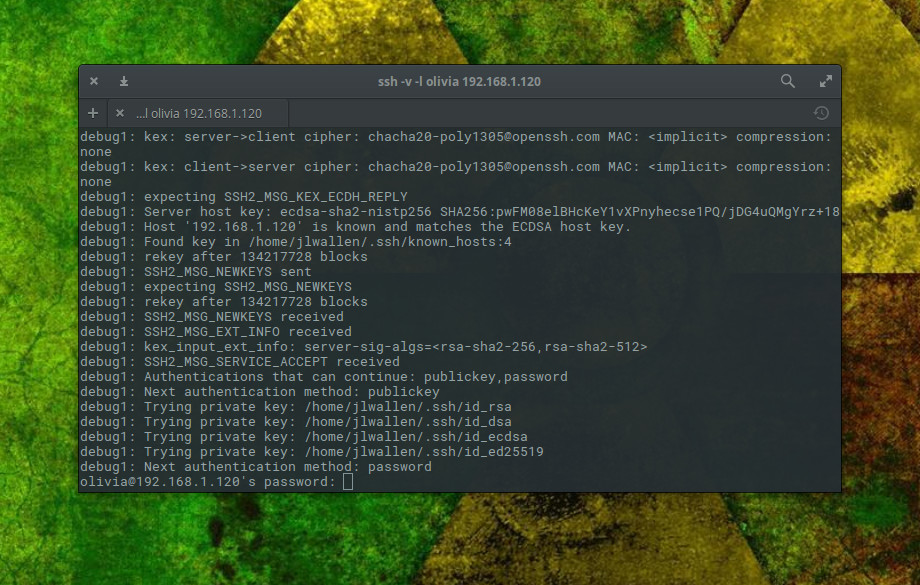
I prefer to have ssh output a bit more information as it makes a connection. For that, I employ the verbose option like so:

ssh -v -l olivia 192.168.1.166 

When I do that, the ssh command will output information relative to making the connection (Figure 1).

Figure 1: Secure Shell making a connection between hosts.

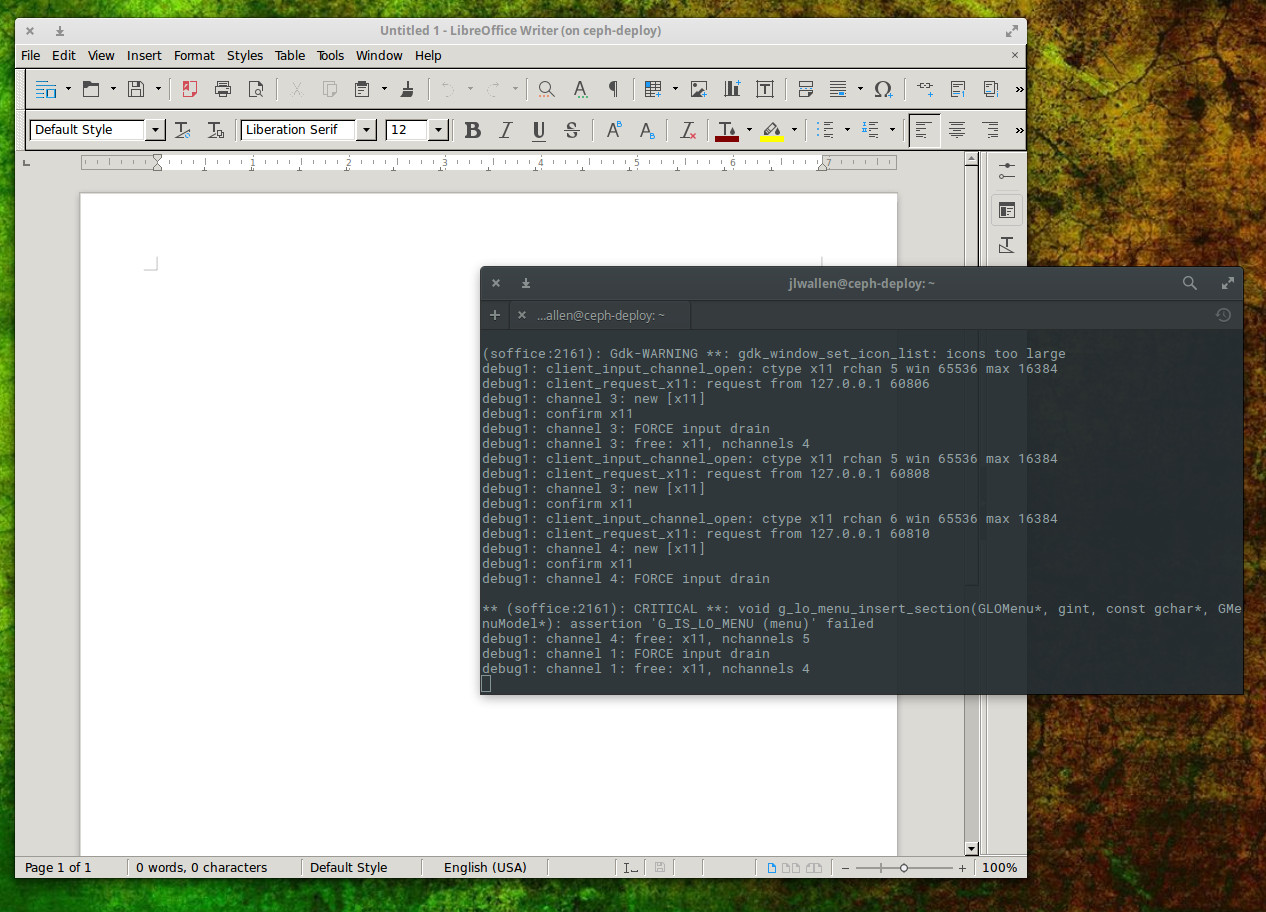
Secure Shell has several other tricks up its sleeve. One trick that many like to take advantage of is tunnelling X. This allows you to log into a remote machine and run the GUI tools from that machine on the local machine. Anything you do with that GUI tool will be reflected on the remote machine (not the local). To do this, you only have to add a simple switch like so:

ssh -l olivia -X 192.168.1.166

You can then issue a command to start a GUI application and have it run on the local machine (Figure 2).

Figure 2: Running a remote instance of LibreOffice Writer, from a remote machine.

What happens when you need to move files from a local machine to a remote machine? There’s a command for that.

Secure Copy

The secure shell command also happens to come with a protocol for handling the copying of files. Once upon a time, the standard tool for such a task was ftp. The ftp command is still heavily in use, but for those that prefer a much more secure method of transferring files, scp is what you want. With a structure similar to that of ssh, scp makes short work of moving files securely from one host to another.

With the scp command, you can send file to a remote host or copy them from a remote host. The syntax of the command can be a bit tricky, but once you understand it, it’s second nature.

Let’s first send a local file to a remote host. The structure of that command is:

scp filename username@remote_host:/some/remote/directory

Say we want to copy the file myfile to the Documents directory of remote user olivia on machine 192.168.166. Here’s how that command would look:

scp myfile olivia@192.168.1.166:/home/olivia/Documents

Enter olivia’s password, when prompted, and myfile will be securely copied to the directory /home/olivia/Documents/ on the machine at IP address 192.168.1.158.

Now, say you want to securely copy that same file from 192.168.1.158 into the Documents directory on the local machine. Do that, the command would now look like:

scp olivia@192.168.1.158:/home/olivia/Documents/myfile /home/olivia/Documents

You can now securely move files from one machine to another.

RTFM

As with any command, once you have the basics down, it is imperative that you (with a nod to Battlestar Galactica) Read The Frakking Manual (RTFM). For Secure Shell, issue the command man ssh and for Secure Copy, issue the command man scp. Both of these man pages will give you more information than you could possibly imagine about their respective commands.

If you’re looking for a secure route to working with remote machines, look no further than ssh and scp. Once you’ve mastered these two commands, you’ll be able to remotely (and securely) administer beyond the 127.0.0.1 address.

Advance your career in system administration! Check out the Essentials of System Administration course from The Linux Foundation.

Can Node.js Scale? Ask the Team at Alibaba

Alibaba is arguably the world’s biggest online commerce company. It serves millions of users and hosts millions of merchants and businesses. As of August 2016, Alibaba had 434 million users with 427 million active mobile monthly users. During this year’s Singles Day, which happened on November 11 and is one of the (if not the) biggest online sales events, Alibaba registered $1 billion in sales in its first five minutes.

So when you are talking about scaling a site and its properties for users’ demands, Alibaba tops the list. And how does it scale so quickly? One of the technologies that helps the company is the versatile applications platform, Node.js.

In advance of Node.js Interactive, to be held Nov. 29 through Dec. 2 in Austin, we talked with Joyee Cheung, a developer at Alibaba, about Alibaba’s instrumentation of Node.js; why they chose to use Node.js; and the challenges that they faced with trying to scale Node.js on the server side.

Linux.com: How is Alibaba using Node.js? Why did it decide to use Node.js as a technology?

Joyee Cheung: In Alibaba, we use Node.js for both frontend tool chains and backend servers. For frontend stuff, it is just a natural transition, since Node.js has become the de-facto platform for frontend tooling. But for backend applications, Node.js has come a long way in Alibaba.

We started to adopt Node.js since 2011, and used it as a frontend in the backend – to serve data or render web pages. By then most of Alibaba’s business was still about E-commerce, so the applications were bound to change frequently to meet the demands of sales, marketing and operation. We used Java for most of our applications, which was stable and rigorous, tailored for the enterprise, but it came with the cost of productivity. Meanwhile, the view layer became deeply coupled with other layers on the server side, which made the code harder and harder to maintain. During that time, Rich Internet application and Single Page Applications were on the rise, but we were still limited if the innovation just stayed on the client side. Many improvements to the user experience could not be done without modifications to both sides.

Then we developed the idea of separation of frontend from backend, meaning we take away the burden of frontend-related responsibilities (routing, rendering, serving data through HTTP API, etc.) out of the traditional backend applications and give them to applications dedicated to these kinds of stuff.

The backend applications can keep focusing on business logic and use a more stable and rigorous technology like Java, because they are less subject to change. They provide reliable services via RPC’s called by the frontend-backend applications. These frontend-backend applications can then focus on user experience and better adjust to the changes of design, product, and operation with a more flexible language.

By giving frontend developers the access to our faster and trusted internal network, we can also reduce the overhead of network requests and keep the user state secure behind a set of more restricted HTTP APIs. And nothing is more suitable for this kind of job than Node.js, because it is designed for efficient I/O, quick to start up and deploy, and uses a flexible language in which most frontend developers are already fluent. The separation of frontend and backend on the server side is actually the separation of concern, where we use different technologies to meet the needs of different expertise and handle different frequencies of changes.

It was not an easy ride, however. Many people questioned if Node.js was mature enough for enterprise applications, because it lacked the tooling and infrastructure we had with Java. And because Alibaba is a huge group with many subsidiaries, each with a slightly different technology stack, we needed to unite the effort throughout the group to make this work. To fit Node.js into our architecture and environment, we’ve developed our own npm registry and client (cnpm), customized web frameworks (Egg and Taobao Midway), monitoring and profiling solution (alinode, which I’m working on and is offered to external customers in the Cloud), and numerous middleware that hook into our infrastructure. We also give back to the community by developing cnodejs.org (a Chinese forum for Node.js), having people contributing to Koa.js (which most of our frameworks rely on) and Node.js core(we have three collaborators at the moment), and open sourcing a lot of node modules (most of them are under node-modules and ali-sdk).

Now Node.js runs on thousands of machines in our clusters, handling a moderate amount of traffic across different subsidiaries of Alibaba. It has proven itself after several double-11 sales. We expect it to receive more adoption in the next few years.

Linux.com: What prompted you to analyze the V8 garbage collection logs?

Joyee Cheung: When using Node.js at scale on the server side, garbage collection quickly becomes more important to performance than it is on the client side, since server-side applications tend to run much longer and handle more data than average client-side applications.

When the garbage collector is not working properly with the application, the CPU usage could go up and hurt responsiveness, the memory might not be reclaimed in time and other processes could be affected.

Even when the garbage collector is doing a good job, developers can make mistakes that mislead the garbage collector and result in memory leaks. V8 and Chromium provide tools to analyze the heap and memory allocations, but they don’t reveal the whole picture, especially when it comes to garbage collection.

Luckily, V8 provides garbage collection logs for us (though not documented), and sometimes these logs can shed some light on problems that other tools can’t help us with. Thanks to the LTS plan of Node.js, the format of the garbage collection logs is very stable throughout a LTS version. So now we can put the GC logs into our box of tricks.

Linux.com: After analysis, what performance problems did you discover? How did you solve the problems you encountered?

Joyee Cheung: We have discovered some common causes of performance issues related to GC: inappropriate caching strategies, excessive deep clones, some particular uses of closures, bugs in templating engines, to name a few.

As a team offering performance management solutions, the problems we analyze usually come from other teams (both inside and outside Alibaba), so we need to work together with them to fix the problems. For external clients, we can give a rough direction, since most of the times we cannot access the code base. Things usually get clearer after a few rounds of Q&A.

For internal clients, especially for those who work on infrastructures, we can usually access at least part of the codebase and are usually more familiar with their business logic, thus giving more suggestions.

We provide a platform for monitoring the performance of Node.js applications down to the core, including garbage collections. So after the application is modified and redeployed, we usually ask our clients to check if the statistics they see on our platform goes back to normal. If it is hard to tell by just looking at the figures, we will ask them to turn on the GC log for a few minutes and visualize it using our solution to see if the pattern of the problem has gone.

Linux.com: How can people take what Alibaba did and implement it? Are there certain environments that might find this more useful?

Joyee Cheung:  We plan to open source our parser (and possibly the visualization) for the garbage collection logs in the near future. We have also posted a few articles about our experiences with them on our blog (we plan to translate them into English as part of the documentation).

These tools are more useful to long-running server-side applications that handle at least a fair amount of traffic, especially those who do a lot of serialization/deserialization and data transformation.

View the full schedule to learn more about this marquee event for Node.js developers, companies that rely on Node.js, and vendors. Or register now for Node.js Interactive.

Kids Day Out: From Curiosity to Creativity

This year at LinuxCon North America in Toronto, The Linux Foundation partnered with MakerKids and Kids on Computers to organize a day-long event focused on getting school-aged children interested in learning more about computer programming. The Kids Day workshops included projects around Linux, Arduino, robots, and more.

“Kids on Computers has participated at SCALE and OSCON in years past, but this was our first time at LinuxCon. We do lot of hands-on training with students, teachers, and communities where we install computer labs (we have 12 in Mexico!), but this was our very first conference-based workshop. We are excited to see our Linux Foundation partnership grow and very much appreciated the opportunity to be at LinuxCon and conduct this workshop,” said  Avni Khatri, President of Kids on Computers.

Kid’s talk: The future is open

I talked to some of the children and their parents participating in the event. Here, I am using only their first names to protect their privacy.

“It was a great opportunity for me to bring my daughter to work and expose her a little with what I do. It’s an excellent workshop that the Linux Foundation has come up along with LinuxCon,” said Bryan, an engineer with EMC.

His 9-year-old daughter, Adele, said that she has been using a computer forever. And she uses Linux, specifically Gentoo Linux. She uses it for playing games, researching for school, and for finding games, she told me. Adele and her dad also enjoy playing games that involve some coding.

Bryan said that, in his opinion, you should expose your kids to all kinds of things and find out what they like, and as soon as they can read, allow them to program or type on the keyboard. And if they like it, they like it. Adele was certainly excited about the workshop and said she had a lot fun.

Sean was also attending the event and brought his two kids, Matthias (11) and Naomi (13). Matthias uses his computer at home to play games, and he has done some programming in the school library and has participated in the Hour Of Code program. Naomi is a Chromebook and Android user and has done the Genius Hour program. Compared to her brother, she was much more excited about the workshop.

Sean said that he brought his children so they could enjoy the wider world of Linux and open source ecosystem and see what the nature of collaboration development is all about. He added that during the workshop, they would mostly be doing very basic, low-level stuff and get initial exposure to Linux. “I am hoping they will have some fun with Arduino and some of the whole maker culture stuff,” said Sean.

Kaden is 11 and uses a computer at home to do research for school projects and to play games. He hasn’t done any programming yet, but he came to the workshop to learn more about computers and learn how they work. His dad is a software engineer at IBM, who saw a great opportunity in bringing his son to the event. However, he doesn’t believe in pushing his son to learn anything about computers. “I think it’s a natural thing because he already has a lot of video games at home, so it’s up to him how he likes the programming and Linux or open source. All these concepts are new to him, so we will see.”

Khatri said 13 kids registered and 19 kids showed up for the workshop. “It was exciting to see so much enthusiasm around LinuxCon’s first ever Kids Day, the workshop, and to see kids with engaged parents and older siblings working on the workshop activities,” said Khatri.

It’s not child’s play

It was a busy day for children. During the workshop kids learned how to do a Linux install where they tried Ubermix that’s a fork of Ubuntu with a turn-key 5 minute installation.

They also learned how to install software on Linux using Arduino IDE + Ardublock in preparation for the afternoon workshop with MakerKids. Graham from MakerKids brought over the Arduinos in the morning so the kids could test them.

The children also learned about networking. Tim Moody of Unleash Kids brought an Intel NUC with Internet in a Box (IIAB) installed and taught this portion. “The kids connected to the IIAB access point, accessed content and then used the local network to ping each other, SSH into each other’s machines and SCP files,” said Khatri.

The children also did some scratch programming where they learned to use Scratch (for beginners) and write their name (for folks who already knew how to use Scratch).

According to Khatri, “The participants who attended the workshop were much more experienced than the kids we usually work with in Kids on Computers. They knew how to use a computer and some of them had used Scratch before as well. From what I could tell, none of them had installed Linux on a computer before or were very familiar with networking. Many were also new to Arduino and Arduino programming.”

Do we need such workshops?

These days kids are exposed to computers at a very early age. That’s a good and bad situation. It’s good in the sense that the next generation is getting comfortable with technologies that will be at the core of their lives, but most of these products are dumbed down closed source technologies that erect a wall between how things work and curious minds, locking them out of the immense knowledge of how things work. Thus, projects like Kids on Computers become even more important: These efforts can transform kids from consumers to creators.

“Many kids today have access to an immense amount of technology and we hope our efforts will help them begin their journey to create their own products and building upon technology they use,” said Khatri. “I feel like this workshop was on opportunity for the participants to learn what an Operating System is, how to install an OS, and learn a little bit about programming and networking. We also discussed free and open source software (FOSS) with the participants, how GNU/Linux is FOSS, and I hope something they began to understand from the workshop is the flexibility and power provided when code is easily accessible and modifiable.”

In the end, it turned out to be a really exciting experience. Khatri said the feedback from parents and kids was extremely positive. The parents were excited about what the kids were learning. “I especially loved seeing the kids’ reactions as we taught them how to use SSH and they were able to connect to each other’s machines and send messages over a local network we had in the room,” said Khatri.

That is kind of future we need, where we have complete access to the technologies that we use, and organizations like Kids on Computers and MakerKids help lay the foundation for that future. Let’s build a generation of dreamers and creators.

To learn more about Linux basics, check out the Introduction to Linux, Open Source Development, and GIT course from The Linux Foundation. 

Cloud Native: Service-driven Operations that Save Money, Increase IT Flexibility

I obsess about operations. I think it started when I was a department IT manager at a financial services institute. It was appallingly difficult to get changes deployed into production and the cost of change was spectacularly high. It felt like there had to be a better way, and most every decision I have made professionally since 2008 has led me to work on technology that makes that guy or gal’s life easier….

The Systems Administrator stands between the business and chaos. Though we have seen some changes in the philosophy of automation and configuration this remains true in many places today.

With the SysAdmin the ticket is the atom of work, and a human being is the operator.

Read more at The New Stack

How to Fix the Cryptsetup Vulnerability in Linux

A new vulnerability has been found to affect encrypted Debian and Ubuntu systems. Here’s how to put a temporary fix on the Cryptsetup issue.

Linux enjoys a level of security that most platforms cannot touch. That does not, in any way, mean it is perfect. In fact, over the last couple of years a number of really ugly vulnerabilities have been found — and very quickly patched. Enough time has passed since Heartbleed for those that do to find yet another security issue.

And this one’s a doozy. …

Before I hand you the band aid for this issue, know that by the time you read this, the fix might already be in place. Linux vulnerabilities get patched very quickly.

Read more at TechRepublic

5 Common Myths about Containers

Containers are faster. Containers work only on Linux. Containers are insecure. These are all examples of myths about Docker and other container platforms that continue to persist.

Some of these misconceptions reflect popular misunderstandings of containers. Others are based on information that was once accurate, but is no longer true. Either way, these myths are important to clear up if you want to deploy containers effectively.

Read more at ContainerJournal

OpenSUSE 42.2 Merges Best Features of Enterprise, Community Models

In the world of Linux distributions, users are often faced with the option of choosing an enterprise-grade distribution or a community distribution. With the openSUSE Leap approach, SUSE is attempting to merge the best of both the enterprise and community models into a new type of Linux distribution. In the pure community-first model the upstream open-source code is packaged in a distribution, which can then be further hardened to eventually produce an enterprise-grade Linux product. The open-source openSUSE Leap 42.2 Linux distribution became generally available on Nov. 16 and takes a different approach.

Read more at eWeek