Home Blog Page 676

Let’s Encrypt and The Ford Foundation Aim To Create a More Inclusive Web

Let’s Encrypt was awarded a grant from The Ford Foundation as part of its efforts to financially support its growing operations. This is the first grant that has been awarded to the young nonprofit, a Linux Foundation project which provides free, automated and open SSL certificates to more than 13 million fully-qualified domain names (FQDNs). 

The grant will help Let’s Encrypt make several improvements, including increased capacity to issue and manage certificates. It also covers costs of work recently done to add support for Internationalized Domain Name certificates. 

“The people and organizations that Ford Foundation serves often find themselves on the short end of the stick when fighting for change using systems we take for granted, like the Internet,” Michael Brennan, Internet Freedom Program Officer at Ford Foundation, said. “Initiatives like Let’s Encrypt help ensure that all people have the opportunity to leverage the Internet as a force for change.”

We talked with Brennan and Josh Aas, Executive Director of Let’s Encrypt about what this grant means for the organization.

Linux.com: What is it about Let’s Encrypt that is attractive to The Ford Foundation? 

Michael Brennan: The Ford Foundation believes that all people, especially those who are most marginalized and excluded, should have equal access to an open Internet, and enjoy legal, technical, and regulatory protections that promote transparency, equality, privacy, free expression, and access to knowledge. A system for acquiring digital certificates to enable HTTPS for websites is a fundamental piece of infrastructure towards this goal. As a free, automated and open certificate authority, Let’s Encrypt is a model for how the Web can be more accessible and open to all.

Linux.com: What is the problem that Let’s Encrypt is trying to solve? 

Josh Aas: As the Web becomes more central to our everyday lives, more of our personal identities are revealed through unencrypted communications. The job of Let’s Encrypt is to help those who have not encrypted their communications, especially those who face a financial or technical barrier to doing so. Let’s Encrypt offers free domain validation (DV) certificates to people in every country in a highly automated way. Over 90% of the certificates we issue go to domains that were previously unencrypted or not otherwise not using publicly trusted certificates. 

Linux.com: How does Let’s Encrypt further the goals of The Ford Foundation? 

Michael Brennan: We think a lot about the digital infrastructure needs of the open Web. This is a massive area of exploration with numerous challenges, so how and where can the Ford Foundation make a meaningful impact? One of the ways we believe we can help is by supporting initiatives that broadly scale access to security and help introduce those efforts to civil society organizations fighting for social justice. Let’s Encrypt fits perfectly into this goal by both serving critical Web security needs of civil society organizations and doing so in a way that is massively scalable.

Linux.com: From your perspective at The Ford Foundation, what population of people is Let’s Encrypt serving? 

Michael Brennan: The Internet Freedom team recently took on a trip to visit the Ford Foundation office in Johannesburg, South Africa. While we were there we met with a number of organizations leveraging the Internet to promote social justice. One of the organizations we met was building a tool to serve the needs of local communities. They were thrilled to hear we were supporting Let’s Encrypt because prior to its existence they could only afford to secure their production server, not their development or testing servers.

Let’s Encrypt is changing security on the Web on a massive scale so it can be easy to overlook small victories like this. The people and organizations that Ford Foundation serves often find themselves on the short end of the stick when fighting for change using systems we take for granted, like the Internet. Initiatives like Let’s Encrypt help ensure that all people have the opportunity to leverage the Internet as a force for change.

Linux.com: What can Let’s Encrypt users expect as a result of this grant? 

Josh Aas: We will make several improvements through this grant, including our recently added support for Internationalized Domain Name certificates. We will also use these funds to increase capacity to keep up with the growing number of certificates we issue and manage. 

Linux.com: What other fundraising initiatives are you pursuing? 

Josh Aas: We run a pretty financially lean operation — next year, we expect to be managing certificates covering well over 20 million domains an operating cost of $2.9M. We have funding agreements in place with a number of sponsors, including Cisco, Akamai, OVH, Mozilla, Google Chrome, and Facebook. Some of those agreements are multi-year. These agreements provide a strong financial foundation but we will continue to seek new corporate sponsors and grant partners in order to meet our goals. We will also be running a crowdfunding campaign in November so individuals can contribute. 

Linux.com: How can people financially support Let’s Encrypt today? 

Josh Aas: We accept donations through PayPal. Any companies interested in sponsoring us can email us at sponsor@letsencrypt.org. Financial support is critical to our ability to operate, so we appreciate contributions of any size.

Linux.com: How can developers and website admins get started with Let’s Encrypt?

Josh Aas: It’s designed to be pretty easy. In order to get a certificate, users need to demonstrate control over their domain. With Let’s Encrypt, you do this using software that uses the ACME protocol, which typically runs on your web host.

We have a Getting Started page with easy-to-follow instructions that should work for most people.

We have an active community forum that is very responsive in answering questions that come up during the install process.

Using OpenStack To Build A Hybrid Cloud With AWS

Multi-cloud has become the new standard and a lot of organizations see it as a necessary evil. Organizations cannot avoid investing in a cloud and still expect to remain competitive. However, it is extremely complex to deploy and manage a multi-cloud across diverse endpoints, while trying to use a single set of IT policies across them. In addition, developers want to get frictionless access to any cloud endpoint they choose.

OpenStack was founded with the intention to break free from the vendor lock-in that proprietary technology stacks such as VMware imposed, by bringing together diverse virtualization technologies under a single, open standard.

Today, we announced the first-of-its-kind set of OpenStack drivers to control and manage resources on AWS. The drivers provide the ability to integrate core OpenStack projects such as Nova, Glance, Neutron, and Cinder with AWS and provide a seamless experience managing an AWS endpoint using OpenStack. Our goal is for this to become a community-driven initiative to help contribute support for other popular public clouds in the future.

Read more at Platform 9

Apache on CentOS Linux For Beginners

We learned the basics of running the Apache HTTP server on the Debian/Ubuntu/etc. family of Linux distributions in Apache on Ubuntu Linux For Beginners and Apache on Ubuntu Linux For Beginners: Part 2. Now we’re going to tackle CentOS/Fedora/andtherest. It’s the same Apache; the differences are package names, configuration files, and that never-ending source of fun times, SELinux.

Install Apache in the usual way with Yum, set it to automatically start at boot, and then start it:


$ sudo yum -y install httpd
$ sudo systemctl enable httpd.service
$ sudo systemctl start httpd.service

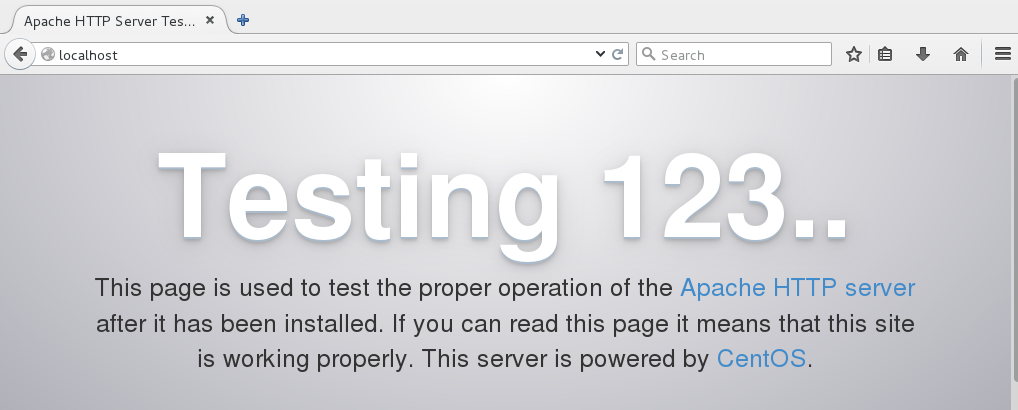
Point a web browser to http://localhost, and you should see a test page (Figure 1).

Figure 1: Apache test page.

It works! We are wonderful.

SELinux

CentOS installs with an active SELinux configuration set to SELINUX=enforcing in /etc/sysconfig/selinux, which will prevent your new virtual hosts from operating. There are two ways to handle this. One way is to disable SELinux by changing SELINUX=enforcing to SELINUX=permissive, and then rebooting. This keeps your rules active without enforcing them, and logs all SELinux messages so you can study how the rules are working, and if they are set correctly.

The other way is to leave SELinux in enforcing mode and create a ruleset for your new virtual host. In the following examples our virtual host root is /var/www/html/mysite.com:


$ sudo semanage fcontext -a -t httpd_sys_rw_content_t 
  '/var/www/html/mysite.com(/.*)?'
restorecon -RF /var/www/html/mysite.com

While you’re testing and learning, you could make this ruleset apply to your entire web root by using '/var/www/html(/.*)?' instead of creating rules for each individual virtual host. Note that neither of these rulesets are very secure; they’re for making testing easier. A more secure SELinux configuration is more fine-grained and applied to individual directories; I leave it as your homework to study how to do this.

Configuration Files

CentOS/etc. use a different configuration file structure than the Debian Linux family. Apache configuration files are stored in /etc/httpd. The default CentOS 7 installation supplies these directories:


conf
conf.d
conf.modules.d
logs
modules
run

conf contains the main server configuration file, httpd.conf. You probably won’t edit this file very often. This contains global configurations such as the location of the configuration files, include files, the Apache user and group, document root, and log file location and format.

conf.d is where your virtual hosts and any other custom configurations go. It contains welcome.conf, which is is the default virtual host that displays the default welcome page. autoindex.conf enables directory listings, and php.conf controls how Apache interacts with PHP.

All files in conf.d must have a .conf extension. This is controlled in httpd.conf, so you have the option to change it to whatever you want. Really. Even something goofy, like .feedme or .hiapache.

conf.modules.d loads whatever installed modules you want to use.

logs, modules, and run are all symlinks to other directories. Take a little time to study your configuration files and see what is in them.

Create a new virtual host

Now that we have an inkling of what to do, let’s create a new virtual host and its welcome page. In this example it is mysite.com.


$ sudo mkdir -p /var/www/html/mysite.com
$ cd /var/www/html/test.com
$ sudo nano index.html

You are welcome to copy this fabulous custom welcome page:


<head>
<title>Mysite.com index page</title>
</head>
<h1>Hello, welcome to mysite.com! It works!</h1>            
<h2>That is all I have to say. If you don't 
see this then it doesn't work.</h2>
</body>
</html>

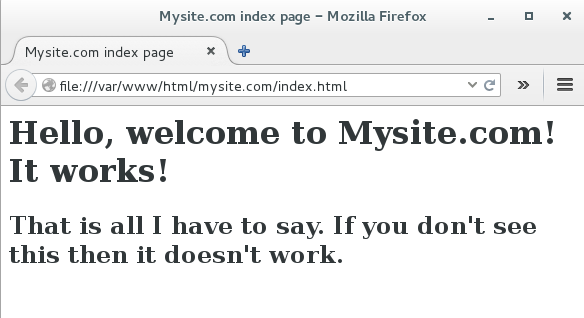
Test your new index page by opening it in a web browser (Figure 2), which in this example is file:///var/www/html/mysite.com/index.html.

Figure 2: Mysite test page.

Excellent, the welcome page renders correctly. Now let’s configure a virtual host to serve it up, /etc/httpd/conf.d/mysite.conf.


$ cd /etc/httpd/conf.d/
$ sudo nano mysite.conf

This is a basic barebones virtual host:


<VirtualHost *:80>
    ServerAdmin carla@localhost
    DocumentRoot /var/www/html/mysite.com
    ServerName mysite.com
    ServerAlias mysite.com
</VirtualHost>

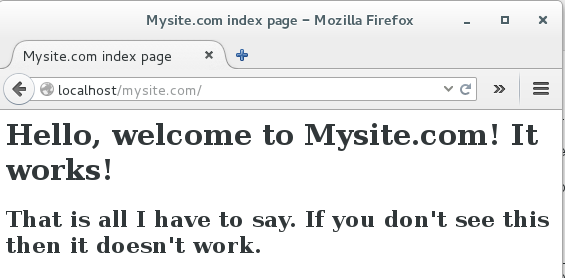
Now point a web browser to http://localhost/mysite.com to (Figure 3).

Figure 3: Mysite virtual host.
Behold! Your fab new virtual host lives! If it doesn’t look right restart Apache, and force your browser to bypass its cache by pressing Shift+reload. After years of testing multiple setups and running Apache on all kinds of Linux distributions, I’m rather muddled on when you need to restart or reload the configuration without restarting, or when Apache picks up new configurations automatically. During your testing, you can restart it with gay abandon.

Multiple virtual hosts

For quick easy testing map your server’s IP address to your domain names in /etc/hosts:


192.168.1.25       mysite.com
192.168.1.25       www.mysite.com

Now you can access http://mysite.com and http://www.mysite.com without the localhost portion of the address. Copy these /etc/hosts entries to other hosts on your LAN, and they should also have access to your site.

To set up more sites repeat these steps, creating different document roots and domains for each one, and their corresponding entries in /etc/hosts. For example, adding second virtual host looks like this:


192.168.1.25       mysite.com
192.168.1.25       www.mysite.com
192.168.1.25       mycatpics.com
192.168.1.25       www.mycatpics.com

And beware of SELinux.

When you’re ready to roll out a production server refer to Dnsmasq For Easy LAN Name Services to learn how to set up DNS on your LAN with the excellent Dnsmasq name server.

Creating a publicly accessible Internet web server is a much bigger job that involves registering domain names, setting up careful and correct DNS, and building a good firewall. Do please study this with great care.

The fine Apache documentation is exhaustively thorough, and it makes more sense when you have a live server running, and have some idea of how things work.

Advance your career in system administration! Check out the Essentials of System Administration course from The Linux Foundation.

Keynote: OpenSDS – An Industry-Wide Collaboration for SDS Management

Cameron Bahar, SVP and Global CTO of Huawei Storage, and Steven Tan, Chief Architect at Huawei, launch the project proposal for a new open source initiative called OpenSDS during their LinuxCon Europe keynote.


Microsoft Releases Open Source Toolkit Used to Build Human-Level Speech Recognition

Last week, Microsoft announced a speech recognition breakthrough: a transcription system that can match humans, with a word error rate of 5.9 percent for conversational speech. This new system is built on an open source toolkit that Microsoft already developed. A major new update to the toolkit, now called the Cognitive Toolkit, was released today in beta.

Formerly called the Computational Network Toolkit (CNTK), the MIT-licensed, GitHub-hosted project gives researchers some of the building blocks, such as neural networks, to develop their own machine learning systems. These machine learning applications can run on both CPUs and GPUs, and the toolkit has support for compute clusters. This scalability has already made CNTK strongly competitive with other popular frameworks, including Google’s TensorFlow.

Read more at Ars Technica

Root Cause: How Complex Web Systems Fail

Distributed web-based systems are inherently complex. They’re composed of many moving parts — web servers, databases, load balancers, CDNs, and many more — working together to form an intricate whole. This complexity inevitably leads to failure. Understanding how this failure happens (and how we can prevent it) is at the core of our job as operations engineers.

In his influential paper How Complex Systems Fail, Richard Cook shares 18 sharp observations on the nature of failure in complex medical systems. The nice thing about these observations is that most of them hold true for complex systems in general. Our intuitive notions of cause-and-effect, where each outage is attributable to a direct root cause, are a poor fit to the reality of modern systems.

In this post, I’ll translate Cook’s insights into the context of our beloved web systems and explore how they fail, why they fail, how you can prepare for outages, and how you can prevent similar failures from happening in the future.

Read more at Scalyr Blog

How to Assess the Benefits of SDN in Your Network

Find out what three networking problems the benefits of SDN could address in your network and the questions you should ask to make sure you’re on the right track.

In terms of the benefits of SDN, let’s look at three of the most important problems the technology can solve, along with some considerations you can use to decide how SDN could help you.

More intelligent access. One of the main benefits of SDN technologies is to help you make the access edge of your branch and campus networks more intelligent for both security and performance management

Read more at TechTarget

The World Runs on OpenStack

The OpenStack Summit keynotes got underway the morning of October 25, with Mark Collier, Chief Operating Officer of the OpenStack Foundation, declaring that the world runs on OpenStack.

Collier’s claims were not exactly bravado, as they were backed by a conga line of large operators all using OpenStack to power their cloud services.

The core design approach around OpenStack is driven by what Collier referred to as the four opens: open source, open community, open development and open design.

Read more at ServerWatch

How to Sort Output of ‘ls’ Command By Last Modified Date and Time

One of the commonest things a Linux user will always do on the command line is listing the contents of a directory. As we may already know, ls and dir are the two commands available on Linux for listing directory content, with the former being more popular and in most cases, preferred by users.

When listing directory contents, the results can be sorted based on several criteria such as alphabetical order of filenames, modification time, access time, version and file size. Sorting using each of these file properties can be enabled by using a specific flag.

[[ This is a content summary only. Visit my website for full links, other content, and more! ]]

Read complete article

How to Keep your Linux PC Safe From Exploits

As with any big piece of software, Linux is complex, and difficult for outsiders to comprehend. That’s why it’s not terribly shocking that a 9-year-old Linux kernal vulnerability, known as Dirty COW, wasn’t patched until just a few days ago on October 20.

First off, here’s a quick reminder of what Linux is: Linux is a kernel, just one piece of software in the GNU/Linux OS, with the GNU suite of tools making up the majority of the base operating system. That said, the kernel is one of the keys to the OS, allowing the software to interact with hardware. Linux’s importance to servers and infrastructure means that a lot of eyes are constantly looking at the kernel. Some of those eyes belong to employees at companies like IBM or Red Hat who are paid to work on it full-time. That’s pretty impressive for a piece of software that’s freely given away.

Read more at PC World