Home Blog Page 679

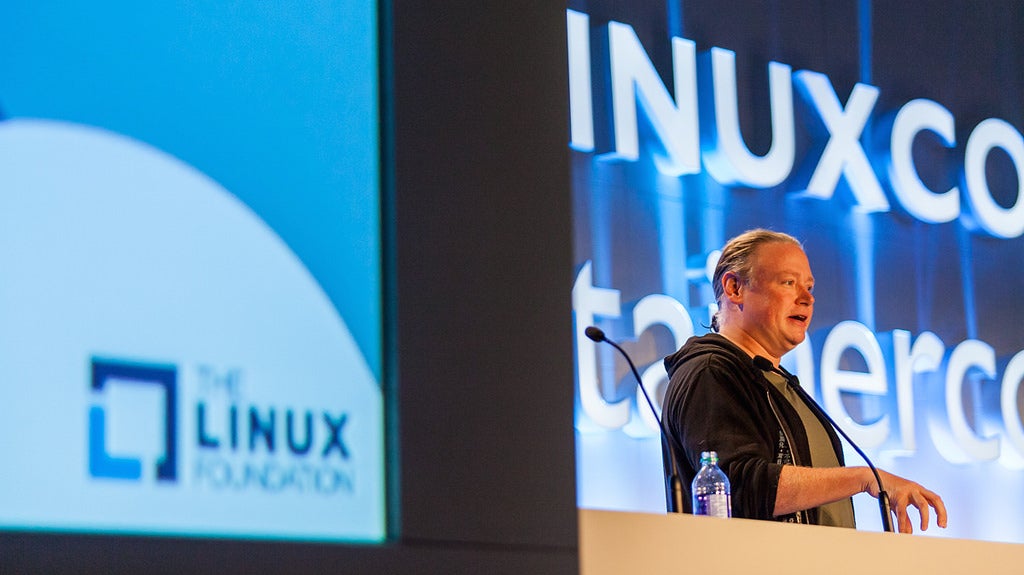
Keynote: Brian Behlendorf, Executive Director, Hyperledger Project

Brian Behlendorf, Executive Director of the Hyperledger Project, explains everything you need to know about blockchain, Hyperledger, and other amazing new technologies in his LinuxCon North America keynote.

Top 5 Reasons to Love Kubernetes

At LinuxCon Europe in Berlin I gave a talk about Kubernetes titled “Why I love Kubernetes? Top 10 reasons.” The response was great, and several folks asked me to write a blog about it. So here it is, with the first five reasons in this article and the others to follow. As a quick introduction, Kubernetes is “an open-source system for automating deployment, scaling and management of containerized applications” often referred to as a container orchestrator.

Created in June 2014 by Google, it currently has over 1000 contributors, more than 37k commits and over 17k stars on GitHub and is now under the governance of the Cloud Native Computing Foundation at The Linux Foundation. A recent private survey by Gartner listed Kubernetes as the leading system to manage containers at scale.

Choosing a distributed system to perform tasks in a datacenter is quite difficult, because comparing various solutions is much more complex than looking at a spreadsheet of features or performance. Measuring performance of systems like Kubernetes fairly is quite challenging due to the many variables we face. I believe that choosing a system also depends highly on past experiences, one’s own perspective and the skills available in a team. Yes, this does not sound rational but that’s what I believe. 🙂

So here, in no particular order, are the top five reasons to like Kubernetes.

#1 The Borg Heritage

Kubernetes (k8s) inherits directly from Google’s long-time secret application manager: Borg. I often characterize k8s as a rewrite in the open of Borg.

Borg was a secret for a long time but was finally described in the Borg Paper. It is the system used by the famed Google Site Reliability Engineers (SRE) to manage Google applications like Gmail and even its own Cloud: GCE.

borg.png

Historically, Borg managed containerized applications because when it was created, hardware virtualization was not yet available and also because containers offered a fine grain compute unit to pack Google’s data-center and increase efficiency.

As a long-time cloud guy, what I found fascinating is that GCE runs on Borg. This means that the virtual machines we get from GCE are actually running in containers. Let that sink in. And, that GCE is a distributed application managed by Borg.

Hence, the killer reason to embrace Kubernetes for me, was that Google has been re-writing in the open the solution that manages their cloud. I often characterize this as “Imagine AWS was open sourcing EC2” — this would have solved us all a bunch of headaches.

So, read the Borg paper; even if you just skim through it, you will learn valuable insights into the thinking that went into Kubernetes.

#2 Easy to Deploy

This one is definitely going to be contentious, but when I jumped into Kubernetes in early 2015, I found that it was quite straightforward to set up.

First, you can run k8s on a single node, we will get back to that, but for a non-HA setup you just need a central manager and a set of workers. The manager runs three processes (i.e., API server, Scheduler, and a resource Controller) plus a key-value store using etcd and the workers run two processes (i.e., the Kubelet that watches over the containers and the Proxy that exposes services).

This architecture, at a high level is similar to Mesos, CloudStack, or OpenStack, for instance, as well as most non peer-to-peer systems. Replace etcd with zookeeper, replace the manager processes with Mesos master, and replace kubelet/proxy with Mesos worker, and you have Mesos.

When I started, I was able to quickly write an Ansible playbook that used CoreOS virtual machines and set up all the k8s components. CoreOS had the advantage of also shipping a network overlay (i.e., flannel) and Docker. The end result was that, in literally less than 5 minutes, I could spin up a k8s cluster. I have been updating that playbook ever since, and many others exist. So for me, spinning up k8s is one command:

```

$ ansible-playbook k8s.yml

```

Note that if you want to use Google Cloud, you have a service for Kubernetes cluster provisioning, the Google Container Engine (GKE) and getting a cluster is also one command that works great:

```

$ gcloud container clusters create foobar

```

While from my perspective this is “easy”, I totally understand that this may not be the case for everyone. Everything is relative, and reusing someone’s playbook can be a pain.

Meanwhile, Docker has done a terrific job when rewriting Swarm and embedding it into the Docker engine. They made creating a Swarm cluster as simple as running two bash commands.

If you like that type of setup, Kubernetes is now also shipping with a command called kubeadm, which lets you create a cluster from the CLI. Start a master node and have the workers join, and that is it.

```

$ kubeadm init

$ kubeadm join

```

I have also made a quick and dirty playbook for it, check it out.

#3 Development Solution with minikube

Quite often when you want to experiment with a system, take it for a quick ride, you do not want a full blown distributed setup in your data center or in the cloud. You just want to test it on your local machine.

Well, you’ve got minikube for that.

Download, install, and you are one bash command away from having a single-node, standalone Kubernetes instance.

```

$ minikube start

Starting local Kubernetes cluster...

Kubectl is now configured to use the cluster.

```

Within a short moment, minikube will have booted everything and you will have access to your single node k8s instance:

```

$ kubectl get nodes

NAME       STATUS    AGE

minikube   Ready     25s

```

By default, it will use Virtualbox on your machine and start a VM, which will run a single binary (i.e., `localkube`) that will give you Kubernetes quickly. That VM will also have Docker, and you could use it as a Docker host.

Minikube also allows you to test different versions of Kubernetes, as well as configure to test different features. It also comes with the Kubernetes dashboard, which you can open quickly with:

```

$ minikube dashboard

```

#4 Clean API that is easy to learn

There was a world before REST, and it was painful. It was painful to learn, to program, to use, and debug. It was also full of evolving and competing standards. But let’s not go there. That’s why I love clean REST APIs that I can look at and that I can test with curl. To me, the Kubernetes API has been a joy. Just a set of resources (or objects) with HTTP actions, with request and response that I can manipulate in JSON or YAML.

As Kubernetes is moving quite fast, I enjoy that the various resources are grouped in API Groups and well versioned. I know what is alpha or beta or stable, and I know where to check the specifications.

If you read reason #3 you already have minikube, right ? Then the fastest way to check the API is to dive straight into it:

```

$ minikube ssh

$ curl localhost:8080

{

 "paths": [

   "/api",

   "/api/v1",

   "/apis",

   "/apis/apps",

   "/apis/apps/v1alpha1",

...

```

You will see all the API groups and be able to explore the resources they contain, just try:

```

$ curl localhost:8080/api/v1

$ curl localhost:8080/api/v1/nodes

```

All resources have a kind, apiVersion, and metadata.

To learn about the schema of each resource, there is a Swagger API browser that is quite useful. I also often refer to the documentation when I am looking for a specific field in the schema. The next step to learn the API is actually to use the command-line interface to Kubernetes kubectl, which is reason #5

#5 Great CLI

Kubernetes does not leave you out in the cold, having to learn the API from scratch and then writing your own client. The command line client is there; it is called kubectl, and it is sentence based and extremely powerful.

You can manage your  entire Kubernetes cluster and all resources in it via kubectl.

Perhaps the toughest part of kubectl is how to install it or where to find it. There is room for improvement there.

Let’s get going with our minikube setup again and explore a few kubectl verbs like get, describe, and run.

```

$ kubectl get nodes

$ kubectl get nodes minikube -o json

$ kubectl describe nodes minikube

$ kubectl run ghost --image=ghost

```

That last command will start the blogging platform Ghost. You will shortly see a pod appear. A pod is the lowest compute unit in Kubernetes and the most basic resource. With the run command, Kubernetes created another resource called a deployment. Deployments provide a declarative definition of a containerized service (see it as a single microservice). Scaling this microservice is one command:

```

$ kubectl scale deployments/ghost --replicas=4

```

For every kubectl command you try, you can use two little tricks I love: –watch and –v=99. The watch flag will wait for events to happen, which feels a lot like the standard Linux watch command. The verbose flag with the value of 99 will give you the curl commands that can mimic what kubectl does. It is a great way to keep learning the API, find the resources it uses and the requests.

Finally, to get your mind blown you can just edit this deployment in place, it will trigger a rolling update.

```

$ kubectl edit deployment/ghost

```

Stay tuned for five more reasons to love Kubernetes.

So you’ve heard of Kubernetes but have no idea what it is or how it works? The Linux Foundation’s Kubernetes Fundamentals course will take you from zero to knowing how to deploy a containerized application and manipulate resources via the API. Sign up now!

Hyperledger — The Source of Truth

Well, here we go again with yet another new technology with a name that doesn’t tell us much about what it is: Hyperledger. Hyperledger is related to Bitcoin, Ethereum, and blockchains… but, what are these things? They sound like science fiction: I have plenty of Bitcoins, so let’s go splurge on a nice evening at the Ethereum. Fortunately, Brian Behlendorf, Executive Director of the Hyperledger Project explains these amazing new technologies in his LinuxCon North America keynote.

Obviously, because this is a Linux and open source website, these things are all related to open source projects. Bitcoin is a distributed peer digital currency and a shared world ledger that records balances. Ethereum takes concepts from Bitcoin and expands them to build a decentralized computing platform that runs smart contracts.

Both use blockchains, and Behlendorf explains what these are. He says, “People have started to focus on underlying technology within Bitcoin, within Ethereum, that sort of thing. That’s something called a blockchain. The blockchain is actually not a dramatically new idea. It’s a decentralized database that has multi-masters. Anybody can write to it. It’s a ledger, and it’s resilient to hostile actors. Somebody can try to corrupt the consensus-forming process of what’s the next entry to write into the ledger, and the rest of the network would be able to recognize that and stop it.”

“This decentralized ledger is something that used to be core to thinking about how we might scale up database systems, and then we figured out to make the central single master kind of model work and scale up and then we forgot about it, until Satoshi. Until Bitcoin reintroduced this idea by helping us realize these different masters could represent different actors, different organizations, different individuals, perhaps even anonymously. Satoshi took this whole series of different ideas, including blockchain and this kind of decentralized database idea, and created a currency out of it, but in doing that he highlighted the potential to come back to this idea of distributed ledgers as this really interesting technology,” he says.

System of Record

What might that be used for? According to Behlendorf, “the distributed ledger that keeps track of that is essentially the system of record. The source of truth in a community of participants. You could use that as a way to build an immediate settlement network for a bank where 20 banks might be writing into this ledger. Such and such traded with such and such, whatever, and then be able to go back and prove that actually all happened in sequence, and not be able to refute that certain things happened as well.”

Where does Hyperledger come in? Hyperledger is a Linux Foundation Collaborative Project, founded to address issues of code provenance, patent rights, standards, and policy. Behlendorf says, “A set of organizations started to place calls to Jim [Zemlin, the Executive Director of the Linux Foundation]. He started to host some conference calls, some face-to-face meetings, and those companies included very familiar names like IBM and Intel. They included some brand new types of companies such as Digital Asset Holdings and R3, and included some companies that had never previously engaged with the Linux Foundation before such as JP Morgan Bank.”

Hyperledger was launched in December 2015 under the framework of the Linux Foundation’s collaborative projects framework. “The first code release happened in February. That code was called Hyperledger Fabric. Hyperledger Fabric is an implementation of this kind of private blockchain model where if you have a set of known named entities, 20 banks, or a government, and a regulatory agency, and NGOs and others who all want simply a shared distributed ledger, and want to be able to layer on top of that a smart contract platform,” says Behlendorf.

Watch Brian Behlendorf’s keynote (below) to learn about this bleeding-edge technology that is bringing together an unlikely cast of participants, including JP Morgan Bank, Airbus, IBM, Intel, and various companies and open source developers all over the globe.

Watch 25+ keynotes and technical sessions from open source leaders at LinuxCon + ContainerCon Europe. Sign up now to access all videos!

Debunking Unikernel Criticisms

The security and tooling worries around unikernels are vastly exaggerated, asserted Idit Levine, creator of the Unik, a unikernel compilation tool, as well as a cloud chief technology officer at Dell EMC.

A relatively new concept, Unikernels could be thought of as stripped-down containers with only the functionality needed to run the specific workload at hand. They could offer gains in saved storage and faster performance, but they are anything but a proven technology.

A few months back, a then-EMC colleague of Levine’s charged that unikernels are fundamentally unsecurable as they provided the deepest, “Ring 0” access to an operating system. And a few months prior to that, the chief technology officer of Joyent was also quick to point out another problem of unikernels: lack of tooling.

In this latest edition of The New Stack Makers podcast, Levine concisely answers both of these criticisms, as well as discusses the first possible use case for unikernels, namely to power edge devices on the Internet of ThingsThe interview was conducted by TNS founder Alex Williams and managing editor Joab Jackson at Cloud Foundry Summit Frankfurt.

The post Debunking Unikernel Criticisms appeared first on The New Stack.

4 Useful Cinnamon Desktop Applets

The Cinnamon desktop environment is incredibly popular, and for good reason. Out of the box it offers a clean, fast and well configured desktop experience.

But that doesn’t mean that you can’t make it a little better with a few nifty extras.

And that’s where Cinnamon Applets come in. Like Unity’s Indicator Applets and GNOME Extensions, Cinnamon Applets let you add additional functionality to your desktop quickly and easily.

This post, 4 Useful Cinnamon Desktop Applets, was written by Joey-Elijah Sneddon and first appeared on OMG! Ubuntu!.

Where to Find the World’s Best Programmers

So which countries produce the best coders is an interesting question to ask. Perhaps more importantly why do some countries lead the way?

One source of data about programmers’ skills is HackerRank, a company that poses programming challenges to a community of more than a million coders and also offers recruitment services to businesses. Using information about how successful coders from different countries are at solving problems across a wide range of domains (such as “algorithms” or “data structures” or specific languages such as C++ or Java),HackerRank’s data suggests that, overall, the best developers come from China, followed closely by Russia. Alarmingly, and perhaps unexpectedly, the United States comes in at 28th place.

Read more at NetworkWorld

Puppet Unveils New Docker Build and Phased Deployments

Puppet released a number of announcements today including the availability of Puppet Docker Image Build and a new version of Puppet Enterprise, which features phased deployments and situational awareness.

In April, Puppet began helping people deploy and manage things like Docker, KubernetesMesosphere, and CoreOS. Now the shift is helping people manage the services that are running on top of those environments. The Puppet Docker Image Build automates the container build process to help organizations deploy containers into production environments. This gives users a consistent way to install Docker environments using the same code they rely on to automate the delivery of software in the data center or the cloud.

Read more at SDxCentral

Continuous Testing in DevOps…

I’ve recently attended a number of conferences, some testing ones, some agile ones and some dev ones too. Although some of the talks were painful due to misunderstandings of one thing or another (be it testing, automation, agile, BDD, TDD, etc…), overall, I thought the conferences were pretty good and I met some new people too and got to share some stories with them.

One thing I heard a fair amount was about DevOps. Many people were talking about it. It’s a big topic! But too many people seemed hugely confused about where testing fits in this wonderful world of DevOps. Some suggested that you only need automation in DevOps, but when asked to explain, their arguments fell floppily by the waist-side. Some people blatently refused to guess at how they’d try and implement testing in DevOps.

Read more at Dan Ashby

Mitigating dirtyc0w with systemd

Basic mitigation

Known exploits for the CVE-2016–5195 vulnerability involve the madvise syscall, so it’s possible to mitigate by excluding the necessary call via a systemd service or container configuration. This is easy with for a systemd unit:

[Service]
SystemCallFilter=~madvise

The tilde after the equal sign indicates that this is a blacklist of syscalls.

As with any configuration change, you’ll want to test this out before deploying it. …

Read more at David Timothy Strauss Blog

OpenTracing: Microservices in Plain View

By Ben Sigelman (@el_bhs), OpenTracing co-author

Those building microservices at scale understand the role and importance of distributed tracing: after all, it’s the most direct way to understand how and why complex systems misbehave. When we deployed Dapper at Google in 2005, it was like someone finally turned the lights on: everything from ordinary programming errors to broken caches to bad network hardware to unknown dependencies came into plain view.

trace_screenshot_clear.png

A screenshot illustrating the multi-process trace of a production workflow

Everyone running a complex distributed system deserves — no, needs — this sort of insight into their own software. So why don’t they already have it?

The problem is that distributed tracing has long harbored a dirty secret: the necessary source code instrumentation has been complex, fragile, and difficult to maintain.

This is the problem that OpenTracing solves. Through standard, consistent APIs in many languages (Java, Javascript, Go, Python, C#, others), the OpenTracing project gives developers clean, declarative, testable, and vendor-neutral instrumentation. There are three constituencies who care about OpenTracing:

  1. Application developers want the flexibility to choose or swap out a tracing system without touching their instrumentation. They also need the instrumentation in their web framework to be compatible with the instrumentation in their RPC system or database client.

  2. Open-Source package developers need to make their code visible to tracing systems, but they have no way of knowing which tracing system the containing process happens to use. Moreover, for services and RPC frameworks, there’s no way to know specifically how the tracing system needs to serialize data in-band with application requests.

  3. Tracing vendors can’t instrument the world N times over; by using OpenTracing, they can achieve coverage across a wide swath of both open source and proprietary code in one fell swoop.

As OpenTracing gains traction with each constituency above, it then becomes more valuable for the others, and in this way it fosters a virtuous cycle. We have seen this at play with application developers adding instrumentation for their important library dependencies, and community members building adapters from OpenTracing to tracing systems like Zipkin in their favorite language.

opentracing_diagram.png

Last week, the OpenTracing project joined the Cloud Native Computing Foundation (CNCF). We respect and identify with the CNCF charter, and of course it’s nice for OpenTracing to have a comfortable – and durable – home within The Linux Foundation; however, the most exciting aspect of our CNCF incubation is the possibility for collaboration with other projects that are formally or informally aligned with the CNCF.

To date, OpenTracing has focused on standards for explicit software instrumentation: this is important work and it will continue. That said, as OpenTracing grows, we hope to work with others in the CNCF ecosystem to standardize mechanisms for tracing beyond the realm of explicit instrumentation. With sufficient time and effort, we will be able to trace through container-packaged deployments with little to no source code modification and with vendor neutrality. We couldn’t be more excited about that vision, and by working within the CNCF we believe we’ll get there faster.

This article originally appeared on Cloud Native Computing Foundation