Known exploits for the CVE-2016–5195 vulnerability involve the madvise syscall, so it’s possible to mitigate by excluding the necessary call via a systemd service or container configuration. This is easy with for a systemd unit:
[Service]
SystemCallFilter=~madvise
The tilde after the equal sign indicates that this is a blacklist of syscalls.
As with any configuration change, you’ll want to test this out before deploying it. …
Those building microservices at scale understand the role and importance of distributed tracing: after all, it’s the most direct way to understand how and why complex systems misbehave. When we deployed Dapper at Google in 2005, it was like someone finally turned the lights on: everything from ordinary programming errors to broken caches to bad network hardware to unknown dependencies came into plain view.
A screenshot illustrating the multi-process trace of a production workflow
Everyone running a complex distributed system deserves — no, needs — this sort of insight into their own software. So why don’t they already have it?
The problem is that distributed tracing has long harbored a dirty secret: the necessary source code instrumentation has been complex, fragile, and difficult to maintain.
This is the problem that OpenTracing solves. Through standard, consistent APIs in many languages (Java, Javascript, Go, Python, C#, others), the OpenTracing project gives developers clean, declarative, testable, and vendor-neutral instrumentation. There are three constituencies who care about OpenTracing:
Application developers want the flexibility to choose or swap out a tracing system without touching their instrumentation. They also need the instrumentation in their web framework to be compatible with the instrumentation in their RPC system or database client.
Open-Source package developers need to make their code visible to tracing systems, but they have no way of knowing which tracing system the containing process happens to use. Moreover, for services and RPC frameworks, there’s no way to know specifically how the tracing system needs to serialize data in-band with application requests.
Tracing vendors can’t instrument the world N times over; by using OpenTracing, they can achieve coverage across a wide swath of both open source and proprietary code in one fell swoop.
As OpenTracing gains traction with each constituency above, it then becomes more valuable for the others, and in this way it fosters a virtuous cycle. We have seen this at play with application developers adding instrumentation for their important library dependencies, and community members building adapters from OpenTracing to tracing systems like Zipkin in their favorite language.
Last week, the OpenTracing project joined the Cloud Native Computing Foundation (CNCF). We respect and identify with the CNCF charter, and of course it’s nice for OpenTracing to have a comfortable – and durable – home within The Linux Foundation; however, the most exciting aspect of our CNCF incubation is the possibility for collaboration with other projects that are formally or informally aligned with the CNCF.
To date, OpenTracing has focused on standards for explicit software instrumentation: this is important work and it will continue. That said, as OpenTracing grows, we hope to work with others in the CNCF ecosystem to standardize mechanisms for tracing beyond the realm of explicit instrumentation. With sufficient time and effort, we will be able to trace through container-packaged deployments with little to no source code modification and with vendor neutrality. We couldn’t be more excited about that vision, and by working within the CNCF we believe we’ll get there faster.
This morning’s attack started around 7am and was aimed at Dyn, an Internet infrastructure company headquartered in New Hampshire. That first bout was resolved after about two hours; a second attack began just before noon. In both cases, traffic to Dyn’s Internet directory servers on the East Coast of the United States was stopped by a flood of malicious requests disrupting the system. Still ongoing, the situation is a definite reminder of the fragility of the web, and the power of the forces that aim to disrupt it.
Ripping Up the Telephone Book
Dyn offers Domain Name System (DNS) services, essentially acting as an address book for the Internet. DNS is a system that resolves the web addresses we see every day, like https://www.WIRED.com, into the IP addresses needed to find and connect with the right servers so browsers can deliver requested content, like the story you’re reading right now. A DDoS attack overwhelms a DNS server with lookup requests, rendering it incapable of completing any. That’s what makes attacking DNS so effective; rather than targeting individual sites, an attacker can take out the entire Internet for any end user whose DNS requests route through a given server.
This week in open source and Linux news, The executive director of The Hyperledger Project explains how blockchain can help refugees identify themselves, Nasdaq group to provide OSS platform to investors, and more! Read on to get caught up on the most important recent news!
1) Brian Behlendorf of The Linux Foundation’s Hyperledger Project speaks on the helpful importance of blockchain to refugee identification.
3) A new partnership between Red Hat & Ericsson to center around OpenStack, NFV infrastructure, software-defined networking, software-defined infrastructure and containers
At some point in your life as a Linux administrator, you’re going to have to work with a database. And because you’re working with the Linux platform, chances are high that database will be MySQL. In some cases, you’ll only need to interact with MySQL long enough to create an empty database to be used for a web-based tool, such as OrangeHRM, WordPress, Drupal, or Nextcloud. You might also be on track to learn the open source database tool, in hopes of someday serving as a database administrator for a company.
Regardless of why, you need to get up to speed with MySQL…and that very well might mean starting from the very beginning. That’s exactly what we’re here for: to install MySQL and learn how to use it, without having to depend upon a GUI tool for all the heavy lifting.
I’ll be demonstrating on a fresh install of Ubuntu 16.10. Let’s kick this off by installing MySQL.
Installation
There are a number of ways to install MySQL. You can install it as a standalone server from the command line, you can install it from the GUI package manager (as in Ubuntu Software), or you can install it alongside a full-blown LAMP (Linux Apache MySQL PHP) server. Because, more often than not, you’ll be using MySQL on a LAMP server, let’s go that route. Why? Because it tends to be the most reliable method of installing MySQL on a Debian-based distribution.
The installation of a LAMP server will differ from distribution to distribution. For Ubuntu, that goal can be achieved with a single command:
sudo apt-get install lamp-server^
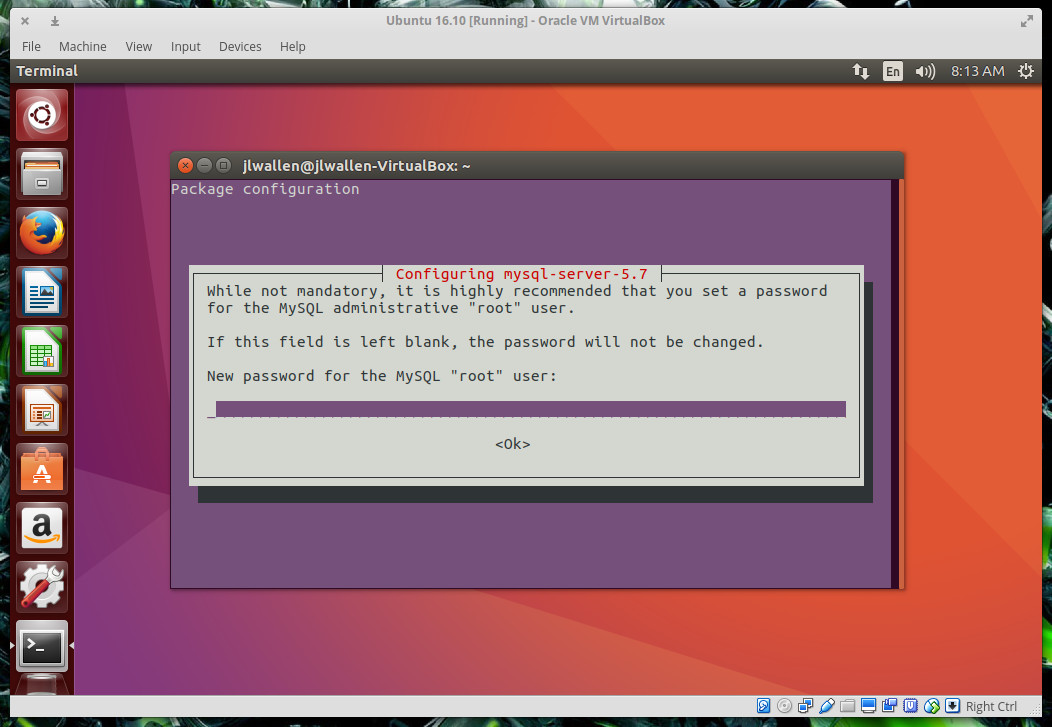
The above command will install all the necessary dependencies for your LAMP server. During the installation, you’ll be prompted to enter (and verify) a password for the MySQL “root” user (Figure 1).
Figure 1: Creating a password for the MySQL root user.
Do notleave this blank. Enter a strong password for the MySQL root user and tab down to OK, hit Enter on your keyboard, and then retype the new password. The installation will continue to completion. You are now ready to begin working with MySQL.
Logging into MySQL
To work with MySQL, you have to log into what is called the MySQL Shell. This is quite different from your normal bash shell, and you are limited to MySQL-only commands. When you log into MySQL use the root user and the password you just created (during installation).
When logging in, you can specify not only which user to work with but also which database to use. We haven’t created a database yet, so we will only be specifying a user. To log in, open up a terminal window, and issue the command:
mysql -u root -p
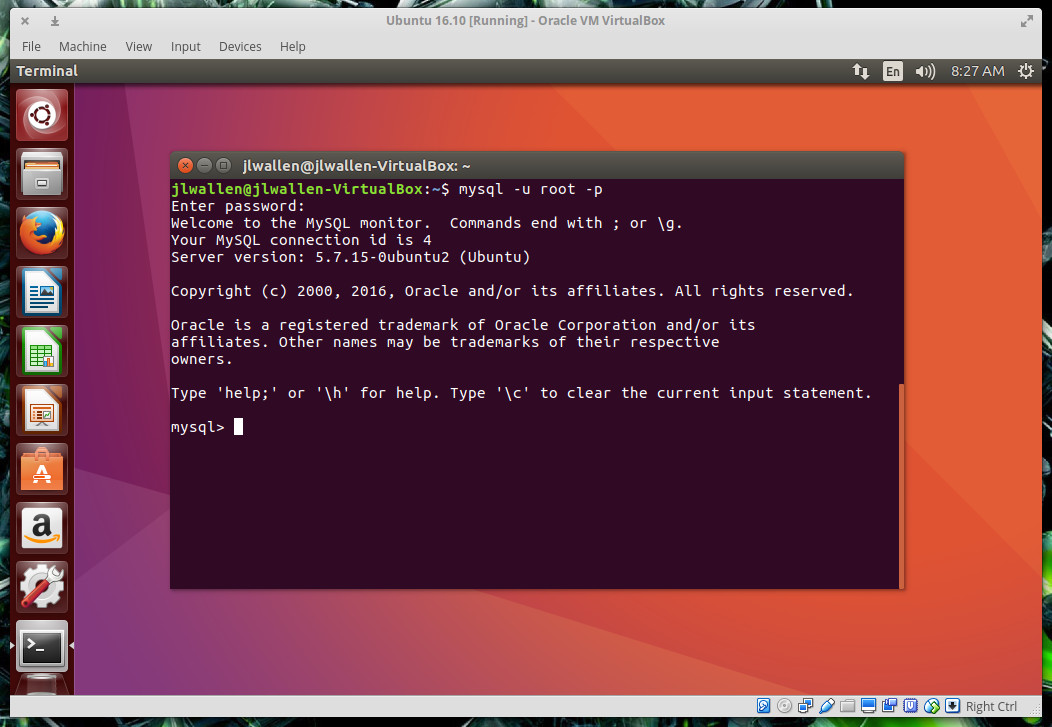
The -uoption indicates what user you will log in with and the -p option tells MySQL to require a password. When prompted, enter the password you created during installation and you will be greeted with the MySQL Shell (Figure 2).
Figure 2: The MySQL Shell ready for work.
Creating a new database
The first thing to do is create a new database. Let’s say we want to create a new database called clients. To do this, you’d issue the command:
CREATE DATABASE clients;
Notice the ending “;” character. This is important, as it instructs MySQL of the command end. You could issue that command as:
CREATE DATABASE clients
And MySQL would return a > prompt. If there were more to that command, you could enter it there. Once you’d completed the command, type; and hit the Enter key on your keyboard. I prefer to enter my commands all at once (to avoid confusion).
When you issue the complete command, MySQL will return:
Query OK, 1 row affected (0.00 sec)
Your database has been created. As it stands, you cannot work with that database, because you’re not using it. To use the newly created clients database, you must issue the command:
USE clients;
MySQL will return:
Database changedmysql>
You can now work with the newly created database.
Creating a table
Unless you are simply creating the database to be used by a third-party application (and the installation of said third-party software will populate the database with the necessary information), your database needs data. For a database, data starts with tables. Let’s say we want to create a table for our new client database that will contain the following information:
Name
Email
Phone
To do this, you first must know what kind of characters will be necessary for each entry. The three basictypes available are:
CHAR (alphanumeric entry must contain a fixed length)
VARCHAR (alphanumeric entry can contain up to the maximum length)
INT (numeric entry)
All three points of information for our table (name, email, phone) will be VARCHAR. Why?
Not all names and emails will be the same length
For clarity, phone numbers are broken into 123-456-7890 and the “-” character is not an integer.
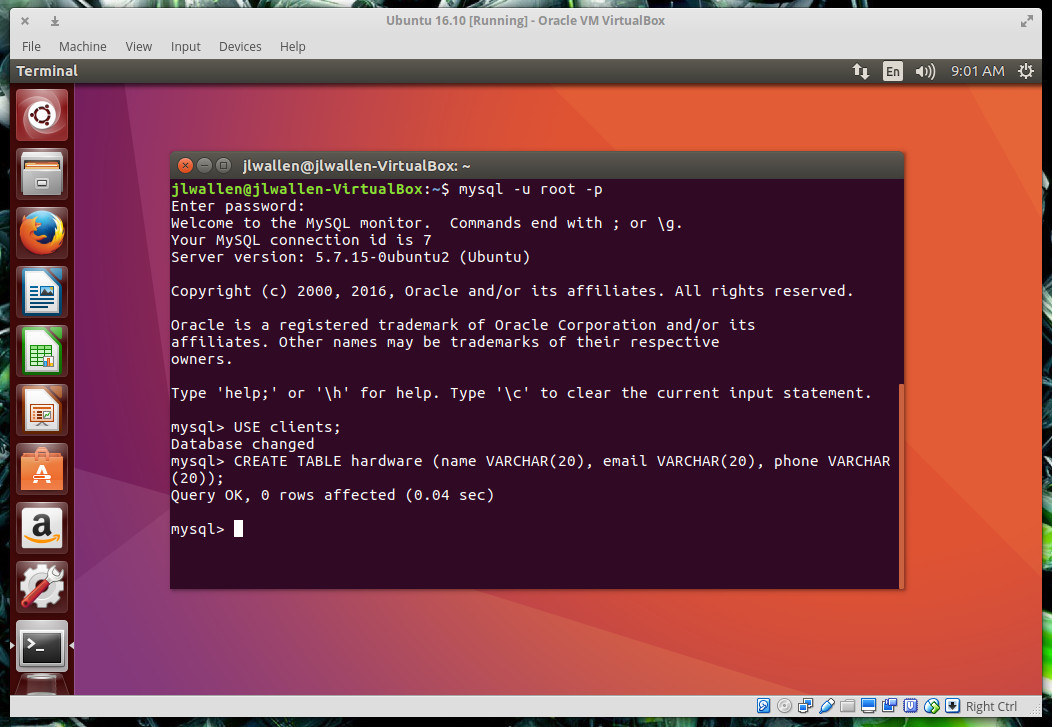
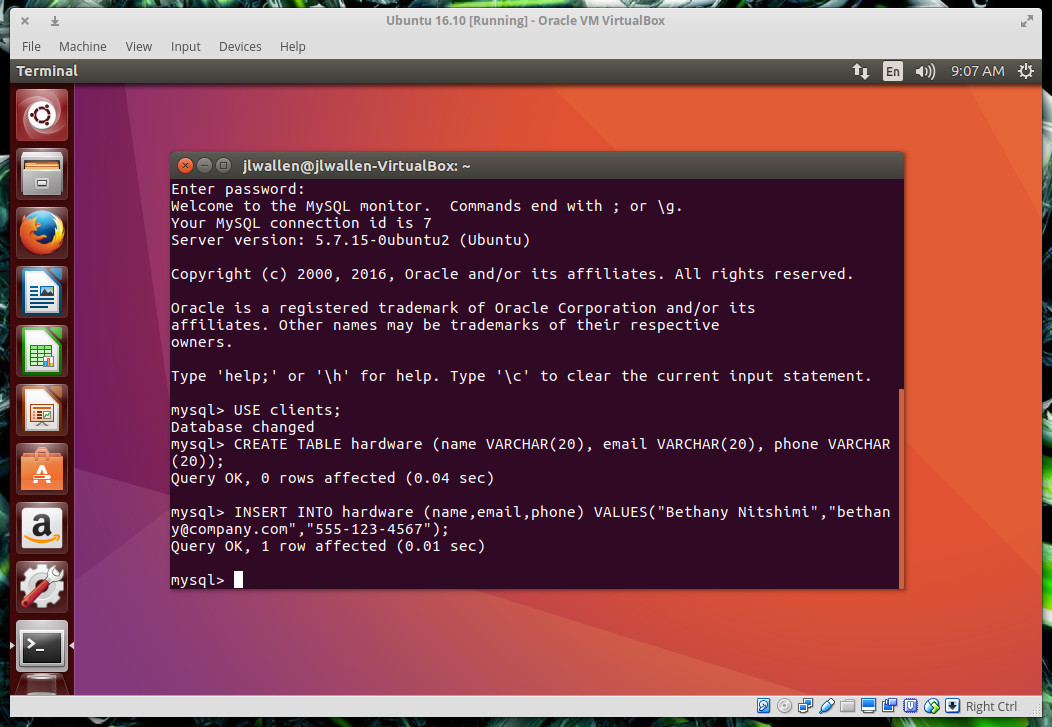
Let’s create a table for the clientsdatabase, called hardware. To do so, enter the command (from the MySQL Shell):
INSERT INTO hardware (name,email,phone) VALUES ("Bethany Nitshimi","bethany@company.com",”555-123-4567”);
The data will be added to the table and MySQL will return you back to the prompt (Figure 4).
Figure 4: Adding data to the hardware table with a single command.
If you don’t want to manually enter the data one row at a time, you can always import it from a text file. The text file in question would have to formatted similarly as was in the above command. So, to import data into the hardwaretable, each entry of the text file would have to be (one per line):
nameemailphone
As in:
Bronson Coulterbronson@company.com555-987-6543
NOTE: The data must be delineated by a tab.
Once you have that file created (we’ll call it data), go back to the MySQL Shell (make sure to use the clients database), and issue the command:
LOAD DATA LOCAL INFILE '/path/data' INTO TABLE hardware;
Where pathis the exact path to the data file.
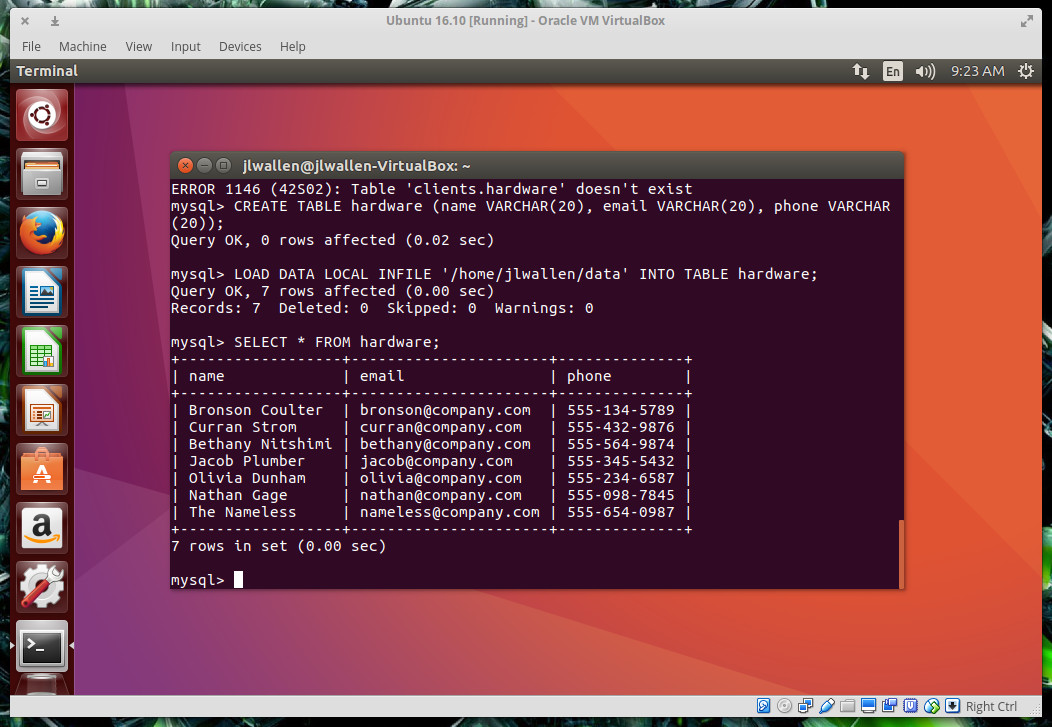
You can view the contents of the hardwaretable with the command:
SELECT * FROM hardware;
MySQL will issue a report on all the data contained with that table (Figure 5).
Figure 5: Listing out the contents of the hardware table on the clients database.
Your database is ready
Once you’ve added all the tables and data to your database, you can issue the command exit to leave the MySQL Shell. Your database is ready to be used. Although this will only serve as an introduction to MySQL, you should now have a solid understanding of how to install MySQL, log in, create a database, create a table, and fill the table with data. When you’re ready to move onto more advanced topics, you can always check out the official MySQL documentation.
A serious vulnerability that has been present for nine years in virtually all versions of the Linux operating system is under active exploit, according to researchers who are advising users to install a patch as soon as possible.
While CVE-2016-5195, as the bug is cataloged, amounts to a mere privilege-escalation vulnerability rather than a more serious code-execution vulnerability, there are several reasons many researchers are taking it extremely seriously. For one thing, it’s not hard to develop exploits that work reliably. For another, the flaw is located in a section of the Linux kernel that’s a part of virtually every distribution of the open-source OS released for almost a decade. What’s more, researchers have discovered attack code that indicates the vulnerability is being actively and maliciously exploited in the wild.
“This talk will provide empirical evidence from our Deep Speech work that application level performance (e.g. recognition accuracy) scales with data and compute, transforming some hard AI problems into problems of computational scale. It will describe the performance characteristics of Baidu’s deep learning workloads in detail, focusing on the recurrent neural networks used in Deep Speech as a case study. It will cover challenges to further improving performance, describe techniques that have allowed us to sustain 250 TFLOP/s when training a single model on a cluster of 128 GPUs, and discuss straightforward improvements that are likely to deliver even better performance.”
Each Docker container has its own network stack. This is due to the Linux kernel NET namespace, where a new NET namespace for each container is instantiated and cannot be seen from outside the container or from other containers.
Docker networking is powered by the following network components and services.
Linux bridges: These are L2/MAC learning switches built into the kernel and are to be used for forwarding.
Open vSwitch: This is an advanced bridge that is programmable and supports tunneling.
NAT: Network address translators are immediate entities that translate IP addresses and ports (SNAT, DNAT, and so on).
IPtables: This is a policy engine in the kernel used for managing packet forwarding, firewall, and NAT features.
AppArmor/SELinux: Firewall policies for each application can be defined with these.
New to Linux? Learn the basic Linux commands with this cheat sheet
Linux is the flavor for programmers and wannabe hackers today as it is slowly and steadily being adopted for standalone PCs in addition to networked PCs. One of the basic reasons it is so popular among coders and hackers is its rugged command line structure, unlike Windows and Mac based PCs.
Linux was designed around a strong and highly integrated command line interface.
Government agencies in the U.S. and internationally are increasingly favoring open source software. MSPs should therefore embrace open source solutions.
One of the biggest trends today in the government sector is high demand for open source software. If you’re an MSP, it’s time to take notice.
Traditionally, open source was not a major part of IT operations for government agencies, at least in the United States.