If you go out looking for PC benchmark results, there’s a very strong chance the tests won’t perfectly translate to performance under Linux, since they were likely run in Windows. This is particularly true if certain hardware has limited support in the Linux kernel. However, there are still plenty of tests you can run in Linux, and the vast majority of them are free.
Testing in Linux
Linux users can find an easy-to-use test for their systems in the Gnome Disks utility, which comes with both the Gnome 3 and Ubuntu’s Unity desktops. Though the utility is most often used to administer disk partitions and software RAID, it features a built-in benchmark. It’s pretty basic, but will suffice for a general overview. Simply search for Disks in Ubuntu’s dash (or Gnomes Activities panel) to find the utility.
Iotop is an open source and free utility similar to top command, that provides an easy way to monitor Linux Disk I/O usage details and prints a table of existing I/O utilization by process or threads on the systems.
Iotop tool is based on Python programming and requires Kernel accounting function to monitor and display processes. It is very useful tool for system administrator to trace the specific process that may causing a high disk I/O read/writes.
[[ This is a content summary only. Visit my website for full links, other content, and more! ]]
You must set up your Apache web server to use SSL, so that your site URL is https:// and not http://. Sure, there are exceptions, such as test servers and lone LAN servers that only you and your cat use.
But any Internet-accessible web server absolutely needs SSL; there is no downside to encrypting your server traffic, and it’s pretty easy to set up. For LAN servers it may not be as essential; think about who uses it, and how easy it is to sniff LAN traffic.
We’ll learn the easy way how to enable SSL on Apache, and the slightly harder and more authoritative way. Please refer to part 1 of this series, Apache on Ubuntu Linux For Beginners, as this builds on the examples shown there.
The Easy Way
Apache installs with a pair of default encryption certificates: /etc/ssl/certs/ssl-cert-snakeoil.pem and /etc/ssl/private/ssl-cert-snakeoil.key. The following virtual host example modifies our example from part 1.
Then enable the Apache SSL module and restart the server:
$ sudo a2enmod ssl
$ sudo service apache2 restart
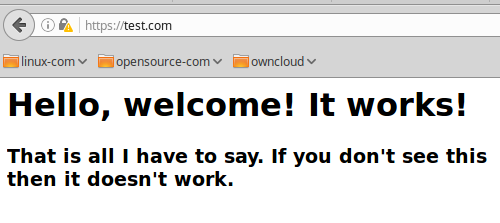
Point your web browser to https://test.com. The first time you do this you’ll get browser paranoia, and warnings how this site is dangerous and will do terrible things to you. Click through all the steps to make a permanent exception for the site. When, at last, you are allowed to actually visit the site you will see something like Figure 1.
Figure 1: test.com
Hurrah! Success! It should also work for https://www.test.com, and you’ll have to create an exception for that too. Just for fun click on the little padlock in your browser to read about how your SSL is no good because you’re using a self-signed certificate. Your self-signed certificate is fine, and we’ll discuss this more presently.
Troubleshooting
a2enmod is short for “Apache 2 enable module”. Apache always performs a configuration test at start and restart. If it finds any errors it helpfully tells you how to see what they are:
Job for apache2.service failed because the control process
exited with error code. See "systemctl status apache2.service"
and "journalctl -xe" for details.
So what are you waiting for? Run the two commands to see what’s wrong. This snippet tells me that I forgot to enable the SSL module:
Syntax error on line 4 of /etc/apache2/sites-enabled/test.com.conf:
Invalid command 'SSLCertificateFile', perhaps misspelled or defined
by a module
Action 'configtest' failed.
Another way to test SSL is with openssl s_client, a fabulous tool for testing SSL on servers. It spits out a lot of output, and prints the public encryption certificate. Look for these items at the beginning and the end to indicate a correct setup:
Another way to check is with netstat. When SSL is correctly configured and you have a virtual host up, it will listen on port 443:
$ sudo netstat -untap
[...]
tcp   0   0 0.0.0.0:443
Apache’s apachectl -S is a great tool for examining your server configuration and finding any errors. It lists your document root, HTTP user and group, configuration file locations, and active virtual hosts.
Forward Port 80 Connections
When you get your nice SSL and HTTPS setup working, you must automatically forward traffic to your HTTPS address. If site visitors try HTTP they’ll see an error message, and then go away and never visit you again. The best way to do this is by editing your virtual host configuration. For our test.com, add this to the existing virtual host file:
Restart Apache, and try both https://test.com and http://test.com. Both should redirect to https://. Refresh your browser to make sure. The Redirect directive defaults to a 302 temporary redirect. Always use this until you have thoroughly tested your configuration, and then you can change it to Redirect permanent.
Using Third-Party SSL Certificates
Managing your own SSL certificate authority and public key infrastructure (PKI) is a royal pain. If you know how to do it, and how to roll out your certificate authorities to your users so they don’t have to battle frightened web browsers, then you are an über guru and I bow to you.
An easier way is to use a trusted third-party certificate authority. These work without freaking out your web browsers because they are already accepted and bundled on your system. Your vendor will have instructions on setting up. See Quieting Scary Web Browser SSL Alerts to learn some ways to tame your SSL madness.
.htaccess
I know, I said I was going to show you how to tame the beastly .htaccess. And I will. Just not today. Soon, I promise you! Until then, this article might be helpful to you: How to Use htaccess to Run Multiple Drupal 7 Websites on Your Cheapo Hosting Account. Sure, it’s about Drupal, but it’s also a good detailed introduction to .htaccess.
The Open Networking Foundation (ONF) is merging with On.Lab, creating one entity that will curate standards such asOpenFlow while developing software projects such as ONOS and the Central Office Re-Imagined as a Datacenter (CORD).
The groups have begun operating as one organization led by On.Lab Executive Director Guru Parulkar. But the merger won’t legally be completed until next year; August 2017 is the target timeframe. (A nonprofit merger turns out to have all the complications of a corporate merger, Parulkar says.)
Google today releasedNomulus, the Java-based registry platform that powers Google’s own .google and .foo top level domains (TLDs).
Google says it started working on the technology behind Nomulus after the company applied to operate a number of generic TLDs itself back in 2012. Until then, domain names were mostly restricted to the .com’s, .net’s and various country-level TLDs like .de and .uk. Once the Internet Corporation for Assigned Names and Numbers (ICANN) decided to open TLDs up to so-called generic TLD’s like .app, .blog and .guru, Google jumped into the fray and applied for .google and a number of other TLDs.
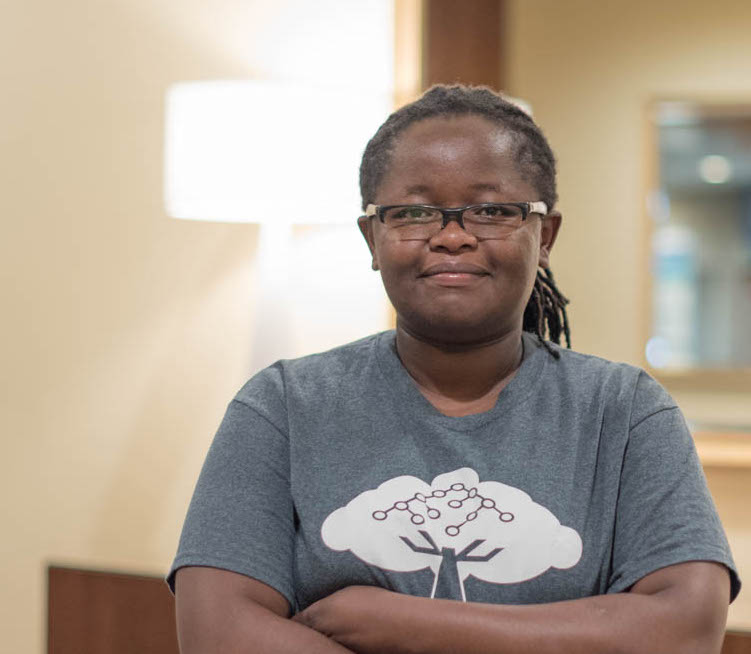
Judy Gichoya is a medical doctor from Kenya who became a software developer after joining the open source medical records project, OpenMRS. The open source project creates medical informatics software that helps health professionals collect and present data to improve patient care in developing countries.
After seeing how effective the open medical records system was at increasing efficiency and lowering costs for clinics in impoverished areas of Africa, she began hacking on the software herself to help improve it. Then she set up her own implementation in the slums outside Nairobi, and has done the same for dozens of clinics since.
This is a classic story of open source contributors, who join in order to scratch an itch. But Gichoya was a doctor, not a programmer. How did she make the leap?
Meeting open source
The radiology resident at the Indiana University School of Medicine began her career learning technology at IMIS, an information services management program. But, eventually, Gichoya went to the Moi University Schools of Medicine (MUSOM) and Public Health (MUSPH) in western Kenya. There she continued her association with the IT world with a part-time job assembling computers for a local company but didn’t have much time, or use, for developing her programming skills.
Dr. Judy Gichoya
After her clinical work began, Gichoya found that instead of taking care of patients, she was spending most of her time completing paperwork. She was running around the hospital from one department to another looking for lab work and other documents. There was no centralized or electronic system for such data. In her own words, “it was very frustrating.”
Because of her computer background, she knew very well that there was a better way of organizing all of this information; something that would vastly improve the way healthcare was being delivered. Gichoya set out to find a solution.
She started talking to people about how they conducted care for their patients, and that’s when she discovered the AMPATH Medical Record System (AMRS), a program to support HIV prevention and treatment in Africa. She got involved with the program and started learning how to code to help with openMRS, an open source project started by two doctors at Indiana University School of Medicine to help scale the AMRS software to serve more clinics in developing countries.
Three years later in 2009, when she graduated from medical school, she still had no idea what open source actually was, despite being involved with openMRS for AMRS. It was only in 2010 when she did her own implementation of openMRS that she came to understand the value of open source.
After graduation, Gichoya went to work in a clinic in the Kibera slums, which is one of the largest slums in Africa, near Nairobi, Kenya. She wanted to improve healthcare in the slum so she decided to use openMRS. She bought some old computers, installed OpenMRS, and trained a young guy to use computers and openMRS who had never used computers before. Since then, she has done many other such implementations across different regions in Africa.
From doctor to software developer?
It wasn’t an easy transformation for Gichoya to get into software development. She had learned Pascal and Visual Basic at IMIS. But, by the time she got involved with OpenMRS no one was using those languages anymore. It was all about Java.
Back in 2006, when Gichoya started working on OpenMRS, Internet connectivity was very poor and very expensive, and it was hard for her to learn Java on her own, due to the lack of mentors and teachers. But, she learned bit by bit, and now, she has learned many other languages including Python, Angular JS, and various HTML5 technologies.
“Things are better nowadays, as there are disciplines like Informatics for doctors that help those who want to study IT and be a doctor,” she said.
As important as software is, Gichoya also feels that it’s just a tool for accomplishing what you want to do.
“Maybe you are just trying to discover a new drug. You want to focus your mind on the new drug and let the tools help you manage data,” she said. “Knowledge of programming helps a lot. But, you shouldn’t be wasting time trying to fix your programming language or trying to fix your operating system. Then you lose focus from your real goal.”
That’s true not only for medical professionals but everyone else.
openMRS and the Future
Gichoya still has one more year of her radiology residency at Indiana University. She is currently working on one of her most ambitious projects: a radiology information system.
Her earlier projects were more about electronic medical record systems, which house patients’ records. Now she wants to make a direct impact on how healthcare is delivered to patients — to make an impact on the real world.
Currently, if someone is diagnosed with a cough, they are sent to a big facility with CT scanning capabilities. They get examined there and get a date for CT scanning. They make a second trip for actual scanning and then are called again to collect the report. That’s three trips. There are only a few such facilities and most patients live far away. Each trip could be 3-4 hours one way. Making three such trips discourages people from going in at an early stage.
Gichoya wants a system where the patient has to go to the big facility only once for the actual scan. The reports would be exchanged between the local medical center and the big facility over email so the treatment can start at an earlier stage. This approach will have a direct impact on how people receive healthcare. It will also encourage people to see doctors at earlier stages and start receiving treatment quicker.
Join the movement
One of the biggest challenges Gichoya faces to this ambitious project is talent. Previously, she had two developers helping her code — a developer from Austria, doing most of the coding, and a Google Intern from Cameroon.
So Gichoya is thinking innovatively. She said that in many countries students have to do projects at school. What if they could help with actual projects like hers? “Nothing big and serious, just some non-essential things that we need and these students get credit for that. It’s a win-win situation: those students get real projects that help real people and we get the much-needed resources,” she said.
But that’s more or less getting help with the basics. She also has a plan to get real experts involved with her project. Gichoya said that nowadays a lot of big companies have started offering sabbaticals to their employees.
“People have started to take time off work, sabbaticals. Innovation is driven by creative minds, and companies encourage these people to take time off, to remain sharp, to avoid burnout. What if these people come to Africa and work on different projects? They get to take a break from their work and get to see amazing places in Africa. It’s very rewarding, personally: you help a good cause and you also get a new experience. It’s a big win-win,” she said.
Open Source: The Kenyan way
Now that she has learned how to be a developer as well as a doctor, Gichoya must learn another fundamental skill of open source: community building. Open source is as much about people as it is about software. How different people from different cultures and regions come together to weave this fabric of technology that improves everyone’s quality of life.
Fortunately, Gichoya said, this is a skill she comes to naturally as a native of Kenya.
“The most interesting thing about Kenyans is coming together. After colonials left, my parents relocated to a portion we live in. They started digging wells, tubs, and created a community,” she said. “There was no school; the community came together to create schools and build things. And that’s what open source does, too. People come together to help each other and build things.”
The new 2016 State of Software Security Report from Veracode shows the hazards of buggy libraries and applications.
Application developers are getting burnt by security vulnerabilities in the very open source- and third-party frameworks and software components that make up their finished application product.
That’s one of the major findings in Veracode’s annual State of Software Security 2016 report, published today and based on data from the application security firm’s code-level analysis of billions of lines of code the past 18 months.
What if you had no proof of who you are? What would you do when the bank manager asked for ID when you tried to open an account or when the hospital asked for your documentation?
You wouldn’t be able to function, at least not easily. Billions face this problem internationally, but now blockchain technology is helping those with no paper proof of existence get the same services as those with “official” identification.
Blockchain technology, made famous by cryptocurrencies like Bitcoin, is a coding method that allows for secure record keeping in online community ledgers. Network members share and confirm information across computers with no central authority. No one user controls the information or messes with it independently; members must jointly confirm information before it’s added to the jointly-held data repository.
What’s OpenStack’s killer app? Users say it’s dev and test. According to the latest OpenStack User Survey, most deployments of the open source cloud infrastructure project are on-premises private clouds for dev-and-test work that serve teams of fewer than 100 users.
The survey tallied responses from users running some 260 deployments of OpenStack worldwide, with results available through a portal that allows the data to be tabulated in various ways.
Richard Guy Briggs, a kernel security engineer and Senior Software Engineer at Red Hat, spoke about the current state of Kernel Audit and Linux Namespaces at Linux Security Summit. He also shared problems plaguing containers and what might be done to address them soon.


 The
The