Ansible was originally written by Michael DeHaan in Python with its first release on February 20, 2012. It was later acquired by Red Hat. Ansible is an open source configuration management and orchestration utility. It helps to automate deployment or softwares and configurations of multiple remote hosts. Instead of writing custom, unmanaged, long and individual bash scripts, system administrators can write playbooks in Ansible. Ansible is also supported by DevOps tools, such as Vagrant and Jenkins.
Playbook is a YAML (YAML Ain’t Markup Language) file which consists a list of Plays.
A Play in a playbook is a list of Tasks.
A Task in a play contains Modules and its arguments.
Where as Module are the ones that do the actual work in ansible.
How Ansible Works?
The greatest benefit of Ansible that I see is, unlike Puppet it is agent less. The only requirement on remote host (know as Managed Host) is Python 2.4 or later. If you are running less than Python 2.5 on the remotes, you will also need python-simplejson. Ansible is installed on a central host (know as Control Host) where Playbooks are created. Playbooks are pushed to Managed Host thru SSH as a Python code and executed locally on Managed Host.
Shell scripting is a must-have skill for DevOps. I used to be very very confident at Shell. But when I first tried ShellCheck , I realized that I’m just too proud and arrogant. ShellCheck is a powerful code analysis tool for shell scripts. Like Pylint for Python or Rubocop for Ruby. Give it a try! You’ll get surprised.
ShellCheck helps to identify a lot of potential issues in your shell scripts. For example, here is one common mistake which ShellCheck reminds me. Mostly original code will work. However if we feed $dir with value like “Denny Documents”, it hurts. Sometime the bad code may incur very severe damage!
ShellCheck is very easy to install and use. It is built and packaged using Cabal. We can install by apt-get/yum. Or use cabal-install directly like below.
By default, ShellCheck enforces hundreds of rules. Each rule has a dedicated wiki page, which explains the purpose and improvement suggestion clearly. For example, wiki for Rule SC1000: https://github…shellcheck/wiki/SC1000. I’m sure you can easily guess the wiki link of other rules.
Skip some ShellCheck rules, which don’t fit your projects. For your reference, here are rules I used to skip.
# Run test excluding certain rulesEXCLUDE_CODE_LIST="SC1090,SC1091,SC2154,SC2001,SC2002"
sudo shellcheck -e $EXCLUDE_CODE_LIST $file# Run test against all scripts under a folderEXCLUDE_CODE_LIST="SC1090,SC1091,SC2154,SC2001,SC2002"
find . -name "*.sh" | xargs sudo
shellcheck -e $EXCLUDE_CODE_LIST $file
Enforce Daily Shell Code Check by Jenkins. Enforce code quality check in your daily CI definitely helps.
This week in Linux and open source news, the popularity of blockchain amongst banks will continue to surge through 2017, Linus Torvalds refelcts on the anniversary of Linux at LinuxCon Europe, and more! Read on and stay in the know!
A new report from The Linux Foundation & Dice finds that Europeans working in open source are well situated in the global job market.
1) Four out of 5 banks will be using blockchain tech by next year, according to the World Economic Forum.
4) With just a mere 48 characters of code, Linux admin and SSLMate founder Andrew Ayer has figured out how to crash major Linux distributions by locally exploiting a flaw in systemd.
In her LinuxCon Europe talk, “The Set of Programmers: How Math Restricts Us,” Carol Smith, Education Partnership Manager at GitHub, got us thinking about how math requirements impact our ability to bring more people into the field of computer programming.
Carol kicked off her talk with a story about how she traveled to New Zealand with two friends, Boris and Natasha (not their real names), and learned that Boris has agoraphobia, which causes him extreme anxiety in open spaces. New Zealand, as it turns out, is full of wide open spaces. During one hike, Boris really struggled with crossing the long bridge across a gully. The more he told himself he could do it, the harder it was. He felt like he should be able to do this and felt like he was the only person who couldn’t do it. A lot of people get this feeling when they try to do math. They feel like everyone else can do math, and the more they think this, the more they feel like they are the only person who can’t do math.
Last fall, after working in various technology jobs for 10 years, Carol decided to finally see if she enjoyed programming. She began the process to enroll in a local community college with regular classes and an instructor for when she had questions. As part of the process, she had to take a reading and math assessment. She did really well on the english skills portion, but didn’t do as well in math and was required to take entry level math, Math 101 – Elementary Algebra. However, the programming classes all required Math 103. So, she needed to pass two math courses before she could even enroll in the programming classes, so she needed to spend a year doing math before she could take a programming class. Needless to say, she didn’t enroll. She decided to do this talk, instead.
29% of Americans report they are “not good at math”
21% of men say they’re “not good at math”
37% of women say they are “not good at math”
39% of Americans 18-24 years old report not being good at math
1/3 of Americans say they’d rather clean the bathroom than do a math problem
These are all measures of perception, and since our perception of our skills influence what we decide to do, it can be more important in influencing behavior than how we do on aptitude test.
Carol breaks the issue of math and programming into three areas. In this case, “Math” refers to what students learn beyond arithmetic.
1. Separate math and programming
Carol says, “The ways people are getting into this field aren’t separating math and programming. Our pipeline of people coming into the field is composed of people who overcame the math barriers or were comfortable with math.” People are coming in from academia with degrees in computer science, which required quite a bit of math. Another option is to be self-taught using programming books or tutorials, but most of these also include plenty of math with the Head First series being on exception. Coding bootcamps are one other path into the industry, and they are doing the best job of separating math from computer science, but it’s less common than academia.
However, Carol talks about some skills that are important, like logic skills and language. Recursion and loops are also fundamental concepts that can be introduced before math.
2. Separate programming and computer science
Carol says that we can also separate the career paths between computer scientists and programmers and give people the ability to major in one or the other. The Wikipedia definitions of the two careers do a pretty good job of articulating the differences.
“A computer scientist is a scientist who has acquired the knowledge of computer science, the study of the theoretical foundations of information and computation and their application.”
“A computer programmer […] is a person who writes computer software. The term computer programmer can refer to a specialist in one area of computer programming or to a generalist who writes code for many kinds of software […] A programmer’s primary computer language (Assembly, COBOL, C, C++, C#, Java, Lisp, Python, etc.) is often prefixed to these titles…”
3. Separate those fields in computer science that require math skills from those that don’t
Carol points out that there are areas within computer science that do require math, but others don’t, and people can tailor their experience based on different areas.
Cryptography – requires math
Video game physics – requires math
UI design – can introduce math later for the few things that need it
Databases – can introduce math later for the few things that need it
Carol says, “We may be unwittingly excluding people we’d like to get into our field without realizing it.” In short, think about poor Boris when you are writing textbooks or tutorials and writing job requirements.
If you’re a Linux administrator, there will be times when you have to work with the command line… many times. There’s a reason for that. With the command line comes great power and flexibility. For that very reason, you need to know the command line and know it well.
One area that you need a rock-solid understanding of is how to use the command line to work with network configurations. This is especially true when you have deployed headless (or GUI-less) servers that only offer a bash prompt for an interface. You’ll need to know how to manipulate those network configurations without the aid of a GUI.
Let’s take a look at some of the commands you have at your disposal and find out how they work. Some of these commands require admin privileges. This means you will either make use of sudo or have to first su to the root user before issuing the commands.
ip
The ifconfigcommand has been deprecated. In its place is ip, which can do everything ifconfig could. This is one of the first commands you’ll want to learn as a Linux administrator (as far as commands to manage network configurations are concerned). Let’s look at some of the more useful things you can do with this command.
First and foremost, you must use the ipcommand to view a listing of your network devices. To view all available network devices, issue the command:
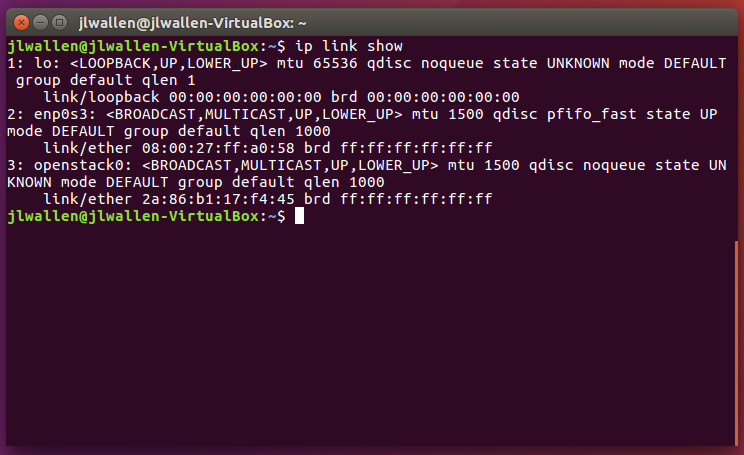
ip link show
Figure 1 illustrates the output of the ip link show command.
Figure 1: Finding names of network devices with the ip command.
Now that you know the device name you want to work with, you can assign a static IP address to that device with iplike so:
sudo ip addr add 192.168.1.100 dev DEVNAME
where DEVNAME is the actual name of the device.
You can then enable that device by usingipin this way:
sudo ip link set DEVNAME up
where DEVNAMEis the actual name of the device.
Take the device down with the command:
sudo ip link set DEVNAME down
If you need to add a default gateway to a machine, ip is ready to serve. Say your default GW is 192.168.1.254. To set that on the machine, use:
sudo ip route add default via 192.168.1.254
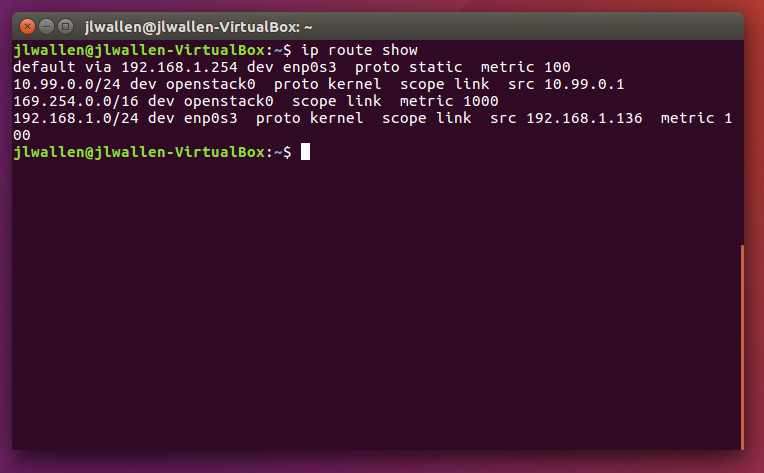
The ip command can also show/control the routing table on your machine. Use sudo ip route show to see the routing information (Figure 2).
Figure 2: The ip show route command in action.
You can also add a static route to the machine. Say you have a 10.10.10.x address scheme as well as a 192.168.1.x scheme and you want the 10.10.10.x addresses to bypass the default gateway of the network, via 192.168.1.101. This can be achieved with the help of the ip command like so:
sudo ip route add 10.10.10.0/24 via 192.168.1.101 dev DEVNAME
where DEVNAME is the actual name of the device.
For more information on the ip command, issue man ip and read the entire man page to garner as much knowledge as you can.
route
The route command is there to show and manipulate the IP routing table. With this command, there are a number of tasks you can undertake. Let’s walk through a few examples.
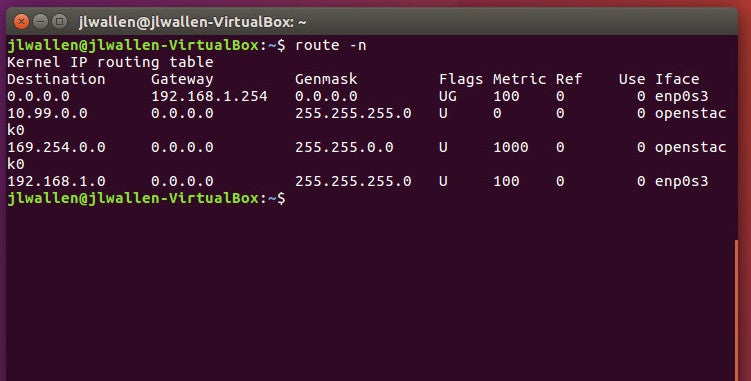
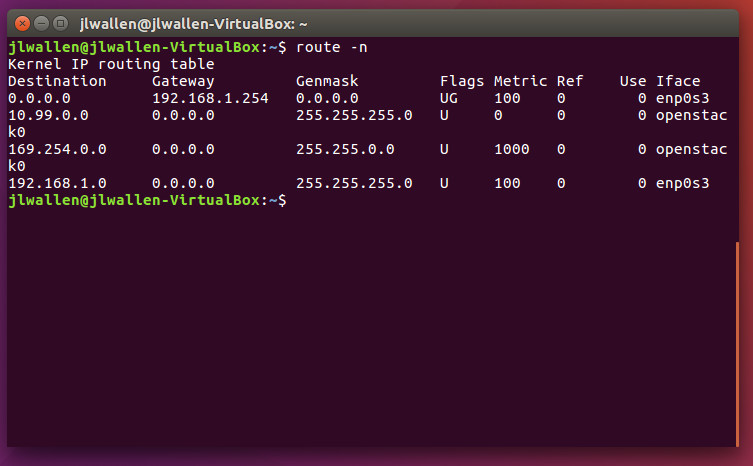
The first thing you’ll want to do is display the IP routing table. To do that, issue the command route -n. This will list out destination, gateway, genmask, flats, metric, and more. The output of this command will look similar to that found in Figure 3.
Figure 3: Displaying the routing table with route.
To add and remove a 10.10.10.x network with a gateway of 192.168.1.1 using route, the commands would look like:
sudo route add -net 10.10.10.0/24 gw 192.168.1.1
sudo route del -net 10.10.10.0/24 gw 192.168.1.1
If you only need to add or remove a default gateway of 192.168.1.254, the route commands would resemble:
sudo route add default gw 192.168.1.254
sudo route del default gw 192.168.1.254
What if you want to add a route to a specific host of 192.168.1.101 on your network with a gateway of 192.168.1.254? That is also possible with a command similar to this:
Now let’s say you have two LANs, one with a 10.10.10.x network scheme and the other with a 192.168.1.x scheme. There’s a firewall between each LAN that contains two Ethernet cards: eth0 (attached to the 10.10.10.x network)and eth1(attached to the 192.168.1.x network). Your firewall needs to be able to route packets from the 10.10.10.x network through the 192.168.1.x network (which will forward packets to the external internet).
To manage this, you would set up the firewall with two IP addresses. For our example, we’ll use 10.10.10.50 on eth1 and 192.168.1.50 on eth0. The gateway to the external internet on 192.168.1.x network is 192.168.1.254. On the firewall machine, you would use the route command like so:
sudo route add -net 192.168.1.0 netmask 255.255.255.0 dev eth1
sudo route add default gw 192.168.1.254
sudo route add -net 10.10.10.0 netmask 255.0.0.0 dev eth0
On all computers in the 10.10.10.x network, you would issue the route command like this:
sudo route add -net 10.10.10.0 netmask 255.0.0.0 dev eth0
sudo route add default gw 10.10.10.50
The above commands instruct each computer that the default gateway is 10.10.10.50 (your firewall/router).
On all computers in the 192.168.1.x network, you have to add a specific routing statement to each machine so the routing packets do not get lost (as they are unaware of the 10.10.10.x network). On those machines (on the 192.168.1.x network), issue the command:
The above command instructs the kernel to route all packets destined for the 10.10.10.0 network to 192.168.1.50, which has been defined as a gateway to the 192.168.1.x network.
By using the routecommand in this way, the following things will happen:
All packets to 192.168.1.0 are handled without a gateway
All packets to 10.10.10.0 are routed to the defined gateway 192.168.1.50.
All other packets are routed to the default gateway, 192.168.1.254.
The above is really just an example of how to make use of the route command. Considering there are many variables involved in mapping out your network routing, you will want to make sure to issue man route and learn as much as you can about this helpful command.
arp
The arp (Address Resolution Protocol) command is quite helpful in that it manipulates or displays the kernel’s IPv4 network neighbour cache. With the help of arp, you can add/delete entries to the table, view the current content, or map an IP network address to a corresponding hardware MAC address. It is that last task which is most helpful.
You can view your local arp table by issuing the command:
arp -a
This will list all addresses (hostname, IP, and MAC) for all associated ethernet devices on the machine.
Say you want to map IP address 10.10.10.100 to MAC address 80:1b:68:30:e9:74. To do that, the arpcommand would be:
sudo arp -s 10.10.10.100 80:1b:68:30:e9:74
That command will tell arp that the host with the IP address 10.10.10.100 has a MAC address of 80:1b:68:30:e9:74.
You can then delete the arp entry with the command:
sudo arp -d 10.10.10.100
Make sure to read the arp man page to find out more.
hostname
The hostname of a machine is used to identify said machine on a network. If you issue the command hostname with no arguments, the hostname of the machine will be displayed. You can change the hostname of the machine by issuing the command:
hostname NAME
where NAME is the new hostname to be used. The only caveat to using this command to change the hostname, is that the machine will revert back to the permanent name set by /etc/hostnameand /etc/hosts. To avoid the hostname reverting, you will have to manually edit those files and change the name there. Once changed, the hostname will remain, even upon rebooting.
Stop/start/restart the network
At some point, you’re going to need to stop, start, or restart your network. How this is done will depend upon your distribution. For example, on a Ubuntu-based system, the network can be stopped, started, restarted with the commands:
sudo service networking stop
sudo service networking start
sudo service networking restart
On CentOS/RHEL/Fedora/openSUSE, those commands are:
service network stop
service network start
service network restart
That’s it…you can now stop, start, or restart your network.
RTFM
You now have a basic understanding of some of the more important commands for network configuration on your Linux machines. This is, by no means, an exhaustive list. As I’ve said numerous times, you will want to make sure to read the man pages for every command you use, in order to get a full understanding of each tool.
OpenStack, the massive open source project that helps enterprises run the equivalent of AWS in their own data centers, is launching the 14th major version of its software today. Newton, as this new version is called, shows how OpenStack has matured over the last few years. The focus this time is on making some of the core OpenStack services more scalable and resilient. In addition, though, the update also includes a couple of major new features. The project now better supports containers and bare metal servers, for example.
Quick tip: if you’re in a room full managers and executives from non-technology companies and one of them asks, “what kind of company do you think we are?”…no matter what type of company they are, the answer is always “a technology company.” That’s the trope us in the technology industry have successfully deployed into the market in recent years. And, indeed, rather than this tip being backhanded mocking, it’s praise. These companies are taking advantage of the opportunity to use software and connected devices in novel ways to establish competitive advantage in their businesses. They’re angling to win customer cash by having better software and technology than their competitors.
What does it look like “on the ground,” though when it comes to “being a technology company”? I’d argue that the traditional ways we think about structuring the IT department is different than how technology companies structure themselves.
Jim Zemlin raises an eyebrow when I say Hyperledger is rather outside Linux Foundation’s usual domain, being a bit, er, consumery.
“It’s totally enterprise,” the Foundation’s executive director tells me. “It’s infrastructure.” Just like Linux, he reckons. Hyperledger is the layer above the operating system, above Linux.
Linux is the Linux Foundation’s oldest and hardest of hard-core projects – a technology fundamental that drives economies.
The Foundation went beyond Linux ages ago and in 2015 it set a record in starting new projects – 13, nearly half the Foundation’s total.
2016 has seen seven so far – network switch, network analytics and small footprint real time operating systems.
fswatch is a cross-platform, file change monitor that gets notification alerts when the contents of the specified files or directories are altered or modified.
It executes four types of monitors on different operating systems such as:
A monitor build on the File System Events API of Apple OS X.
A monitor based on kqueue, a notification interface present in FreeBSD 4.1 also supported on many *BSD systems, OS X inclusive.
A monitor based on File Events Notification API of the Solaris kernel plus its spin-offs. …
[[ This is a content summary only. Visit my website for full links, other content, and more! ]]
We have seen a changing of the guard in the past few years as software takes center stage and once-beloved hardware simply becomes a canvas for developers. The ability to code is an important skill for the production of any modern technology, especially a product that falls within the internet of things. If IoT developers are to create the next big thing in tech, they will need to know the most important and popular IoT coding languages. Here is a list of top coding languages providing the backbone of IoT software:
C
C, a language first developed to program telephone switches, is available on nearly every advanced embedded system platform that exists. For some platforms where it’s not directly available, it’s still the basis for the dedicated language used in the SDK.