Home Blog Page 689

2016 LiFT Scholarship Winner Lorien Smyer: Bookkeeper Turned Technologist

Lorien Smyer is a former bookkeeper who decided she wanted to start a new career in computer science. She was one of 14 aspiring IT professionals to receive a 2016 Linux Foundation Training (LiFT) scholarship, announced in August.  
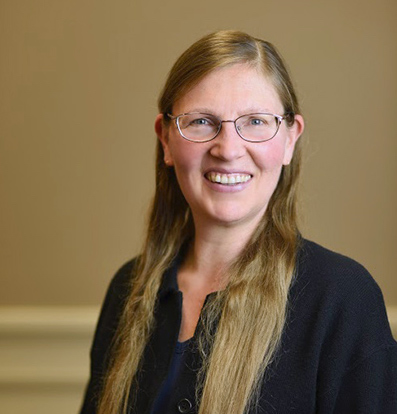
Lorien Smyer, LiFT Scholarship Winner
Lorien completed a six-month web development bootcamp, followed by Intro to Linux through edX, where she achieved a 100% grade. She hopes that the additional training provided by this scholarship will increase her chances of finding a job that will allow her to exercise her love of coding.

Linux.com: Why are you switching careers, and why did you choose technology?

Lorien Smyer: I was a bookkeeper for many years. Long ago, I had to hand-enter all data to a paper spreadsheet with a pencil.

When my clients started getting computers, I was fascinated by everything about these amazing tools: the hardware, the software, how customizable it all was. In my spare time, I started taking occasional computer-related classes at my local community college, and doing many IT-related tasks for my clients, in addition to the bookkeeping I was already doing for them.

In 1995, I met the man who became my husband. He got a personal computer that same year, and happily allowed me to become our home IT expert.

A few years ago, the company I had been working for as a bookkeeper and occasional IT tech informed me that my office would be moving to Santa Cruz. Since I didn’t want to move to Santa Cruz, I needed to find something else to do. They were kind enough to give me a year’s notice, so I increased the number of computer-related classes I was taking at my local community college, thinking I might be able to ease into a job in some tech-related field.

When the year was up, initially I continued working generally in bookkeeping/office managing, with some tech responsibilities; but I still hadn’t made a full career switch. My husband and I then agreed that I could start studying full time, in order to try and make my tech career switch possible. I still enjoyed bookkeeping, but really felt most engaged professionally when I was involved in tech-related tasks at work.

The first class I took after starting full-time studying was the Introduction to Linux class on edX, which had just become available. I finished the class in two weeks, with a score of 100, and got my verified certificate. Completing that course gave me confidence that I had made the correct decision to pursue a job in tech.

After that, I completed a full semester of computer science and web development classes at community college, then attended a six-month, 70-hour-per-week immersive web development program at Galvanize.

I am now in the process of trying to pick a field within tech to pursue professionally. I have studied many different areas, and I think they all have attractive aspects.

Linux.com: What is your ultimate dream job, and what are you doing to accomplish it?

Lorien: My ultimate dream job would have a great team of co-workers. I believe, with the right group of people, who all share the goals of working together to help the company succeed and genuinely care about each others’ well-being, I could be happy doing many things.

As previously mentioned, I enjoy pretty much all aspects of the tech field. My dream job, practically speaking, is one that is interested in hiring an older female career-switcher, so it would have to be a job that needs juniors, and has some mentoring and onboarding for new hires. Beyond that, I’m pretty open to what kind of company I work for.

What I’m doing to accomplish finding my dream job? Right now, I’m continuing to add to my skills, and looking at many job listings every day, to see what kind of skills are in demand in the SF Bay Area (where I live).

Linux.com How do you plan to use your LiFT Scholarship? How will it help you advance your career?

Lorien: I plan to use my LiFT Scholarship to take the Linux System Administration (LFS201) virtual course, and then take the LFCS exam. There are many Linux System Administrator jobs available in the SF Bay Area, and I will be very happy to be able to put that skill on my resume.

Interested in learning more about starting your IT career with Linux? Check out our free ebook “A Brief Guide To Starting Your IT Career In Linux.

[Download Now]


Apache Milagro: A New Security System for the Future of the Web

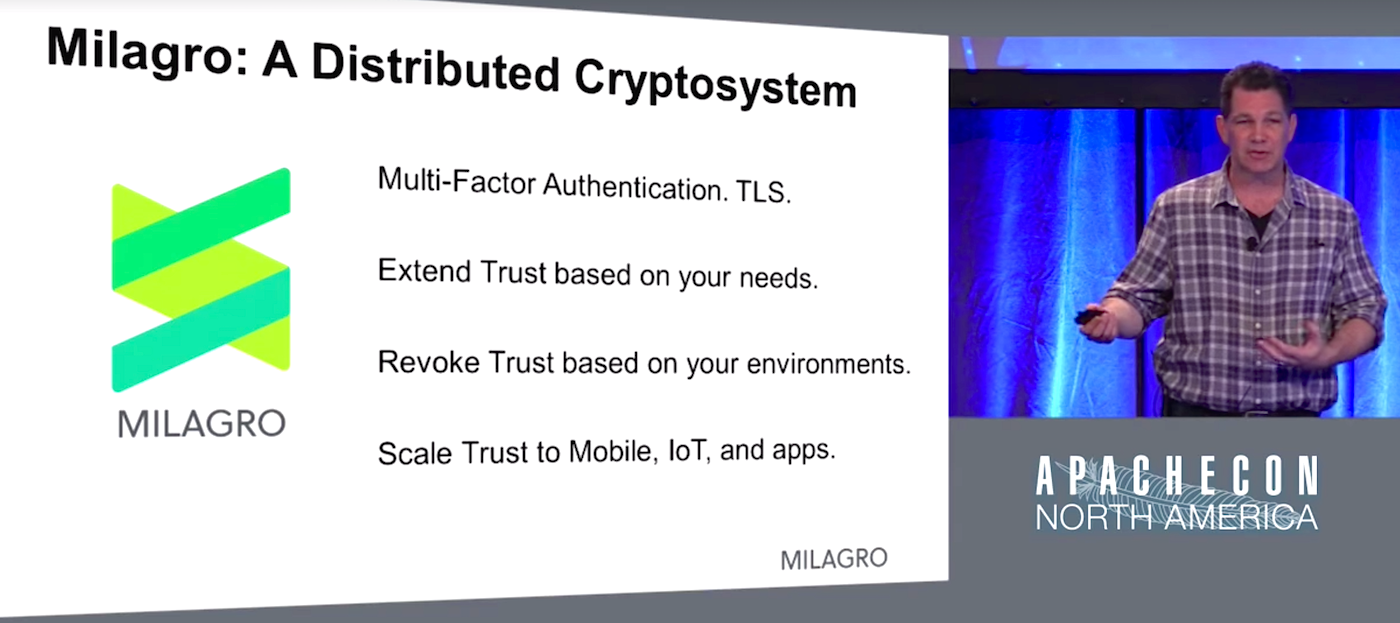
With 25 billion new devices set to hit the Internet by 2025, the need for a better worldwide cryptosystem for securing information is paramount. That’s why the Apache Milagro project is currently incubating at the Apache Software Foundation. It’s a collaboration between MIRACL and Nippon Telegram and Telegraph (NTT), and Brian Spector, MIRACL CEO and Co-Founder, discussed the project in his keynote at ApacheCon in May.

Spector said the project was born in a bar on the back of a napkin after a brainstorm about how one would rebuild Internet security from the ground up. That sounds like a lot of work, but Spector believes it’s absolutely necessary: the future of the Web is going to be very different from the past.

“Something is going to change, and that something is the proliferation of IoT devices and software applications that will be acting in an app-centric way,” Spector said. “If you believe that we’re going to start moving from a browser model to an IoT and app-centric model, the architecture and hence the requirements are going to be fundamentally different. This is where things get interesting.”

That back of the napkin read something like this:

A modern cryptosystem would:

  • Have distributed trust authorities, not centralized on four or five browser companies offering certificates and all from the United States

  • Have no single point of compromise

  • Use state of the art mathematics so that identities are burned into security keys

  • Fix things like revocation of trust so they actually, you know, worked

  • Be open source and easily auditable, not proprietary

And so Apache Milagro was born.

Spector and his team are building a system with no public key infrastructure (PKI) and therefore no passwords at all; you’re not authenticating yourself to billions of different web servers, so there aren’t as many opportunities for fraud. This system allows you to choose your “trust” providers, each with a piece of your master key, distributed around the world in countries whose governments respect privacy of their citizens.

“Milagro envisions a world where we have a fleet of new service providers come on line that we called distributed trust authorities,” Spector said. Instead of certificate authorities that would digitally sign somebody’s public key, thereby stating that you are the owner of that digital certificate and hence the corresponding private key, you get shares, or fractions of a private key issued to you by these distributed trust authority providers. And the keys have your identity burned into them, so you don’t need to have a certificate.

“These keys are issued to clients and services that will run Milagro applications for authentication or secure channel or have the code embedded inside of them,” Spector said. “So what can you do with the keys that have been issued out of the distributed trust authorities? This is where Milagro gets interesting. With Milagro multi-factor authentication, you can embed this into your web or mobile application in minutes.”

Spector believes Milagro does three things no other platform current does:

  1. It gets rid of the risk of password database breach, in part because it gets rid of the need for passwords all together.

  2. Improves the authentication user experience: Users only need a four-digit pin, with 128-bit security baked in to your master key.

  3. It’s extendable to any number of authentication factors, including biometrics, geolocation, hardware, etc.

Spector said the project is in early stages but has some fairly significant implementations, including the British tax office and the credit agency Experian.

However, the project needs people’s feedback and help, and Spector said he welcomes everyone to have a look at the project and make suggestions.  

Watch the complete presentation below:

https://www.youtube.com/watch?v=bIaA7-Eady0?list=PLGeM09tlguZTvqV5g7KwFhxDlWi4njK6n

linux-com_ctas_apache_052316_452x121.png?itok=eJwyR2ye

Neural Net Computing Explodes

Neural networking with advanced parallel processing is beginning to take root in a number of markets ranging from predicting earthquakes and hurricanes to parsing MRI image datasets in order to identify and classify tumors.

As this approach gets implemented in more places, it is being customized and parsed in ways that many experts never envisioned. And it is driving new research into how else these kinds of compute architectures can be applied.

Fjodor van Veen, deep learning researcher at The Asimov Institute in the Netherlands, has identified 27 distinct neural net architecture types. (See Fig. 1 below). The differences are largely application-specific.

Read more at SemiConductor Engineering

Vint Cerf Warns Humanity: Can Our Data Survive Longer Than A Century?

Transmission Control Protocol (TCP) co-author Vint Cerf is hailed as “the father of the internet,” but now he’s worried about an even larger communications protocol, on a scale of thousands of years. How will our civilization communicate with people in the future? When it comes to generations yet to come, how will we preserve the glory that is present-day, 21st-century society?

Yes, we’ve got storage media — but for long-lasting durability, does it really compare with centuries past? “We’re going backward,” Cerf argued in his column published inCommunications of the ACM looking fondly back at the history of humankind — and the way bygone eras preserved glimpses of their lives to echo down through the ages. It’s like a tour of humanity’s mediums over the last 17 millennia, offering the breath-taking perspective of a tumble through time.

Read more at The New Stack 

An Open Source Font System for Everyone


A big challenge in sharing digital information around the world is “tofu”—the blank boxes that appear when a computer or website isn’t able to display text: ⯐. Tofu can create confusion, a breakdown in communication, and a poor user experience.


Five years ago we set out to address this problem via the Noto—aka “No more tofu”—font project. Today, Google’s open source Noto font family provides a beautiful and consistent digital type for every symbol in the Unicode standard, covering more than 800 languages and 110,000 characters.

Read more at Google Open Source Blog

No SDN Kubernetes

Kubernetes networking has a few requirements. They are:

  • Pods are routable on a flat network
  • Pods should see their own routable IP address
  • Nodes can communicate with all containers

How these requirements are implemented is up to the operator. In many cases this means using a software defined network “SDN” also called an overlay network (e.g. flannelweavecalico) or underlay network (MACvlan, IPvlan). The SDNs all accomplish the same three goals but usually with different implementation and often unique features.

Read more at Justin Garrison’s Blog

The Power of Open Source Is Customer Freedom

The open source community is a diverse and fractious collection of individuals and organizations. In its infancy, in many ways it could be compared to the hippie movements of the ’60s: a lot of passion, a lot of fun, a lot of weirdness, and not a lot of organization. Over the last decade or so, it has evolved into a respected software development force that relies on the support of its members.

As it’s grown and diversified over the last decade, it has gotten more mainstream in the sense that there are now many different players that are making quite a bit of money based on open source principles. It has more prestige and a lot more respectability. As they say, money changes everything.

Read more at OpenSource.com

How to Take Screenshots on Ubuntu 16.04 with ScreenCloud

Screenshots come in handy in many situations. For example, while making tutorials, discussing problems, or sharing information. What I mean to say is that it’s a very common activity, so much so that there’s a dedicated keyboard button to take screenshots. However still, there are many screenshot taking applications available in the market, and their selling point is the list of useful features they offer, including the ability to store captured images on cloud in some cases. If you are looking for such an application, look no further, as in this tutorial we’ll be discussing a useful screenshot taking app dubbed ScreenCloud.

Read complete article

Legends of Linux Part 4: Jim Zemlin

LINUXCON IS over for another year, but while we were there we got some time with friend of the INQ Jim Zemlin, head honcho of the Linux Foundation, and took the opportunity to ask him our Legends of Linux questions to celebrate 25 years of the operating system.

What’s your first memory of Linux?

My memory is going to be funny because I worked at a hosted software company before I worked in open source. I was working at a company called Acorio. We were hosting enterprise software and we were dragged into an office and asked what our Linux strategy was.

At the time everything was running on Solaris and such and the ironic thing was that at the time everyone laughed and asked: ‘Who on Earth ran anything worthwhile on Linux?’. And that is actually my first memory of Linux in any kind of business context.

Read more at The Inquirer

RDO Newton Overcloud HA Deployment via instack-virt-setup on CentOS 7.2 VIRTHOST

Draft below may be considered as POC awaiting release of TripleoO QuickStart
along with flexible templates managed by ansible and KSM patching.
Follow http://lxer.com/module/newswire/view/234586/index.html   setting up instack VM and configuring “centos7-newton/current-passed-ci” based delorean repos on VIRTHOST and INSTACK . After log into “instack VM” (undercloud VM) create 4GB swap file and restart “instack VM”

Complete text may be seen here http://dbaxps.blogspot.com/2016/10/rdo-newton-overcloud-ha-deployment-via.html