
Home Blog Page 695

How to Effectively and Efficiently Edit Configuration Files in Linux

Every Linux administrator has to eventually (and manually) edit a configuration file. Whether you are setting up a web server, configuring a service to connect to a database, tweaking a bash script, or troubleshooting a network connection, you cannot avoid a dive deep into the heart of one or more configuration files. To some, the prospect of manually editing configuration files is akin to a nightmare. Wading through what seems like countless lines of options and comments can put you on the fast track for hair and sanity loss.

Which, of course, isn’t true. In fact, most Linux administrators enjoy a good debugging or configuration challenge. Sifting through the minutiae of how a server or software functions is a great way to pass time. But this process doesn’t have to be an exercise in ineffective inefficiency. In fact, tools are available to you that go a very long way to make the editing of config files much, much easier. I’m going to introduce you to a few such tools, to ease some of the burden of your Linux admin duties. I’ll first discuss the command-line tools that are invaluable to the task of making configuration more efficient.

Let’s begin.

diff

If you’ve never used the diff command, you don’t know what you’re missing. The gist of diff is simple: It compares one file against another and displays the differences. Let me explain.
Say you have two files. File1 has the contents:

<Directory “/var/www”>

     AllowOverride None

     Require all granted

</Directory>

File2 has the contents:

<Directory “/var/www/html”>

     AllowOverride None

    Require all granted

</Directory>

If that’s all those two files contained, it would really simple to open them up and see the diff. But what if those lines of code were buried within thousands of other lines and interspersed with comments and other options? All of a sudden, that task becomes a bit more daunting.

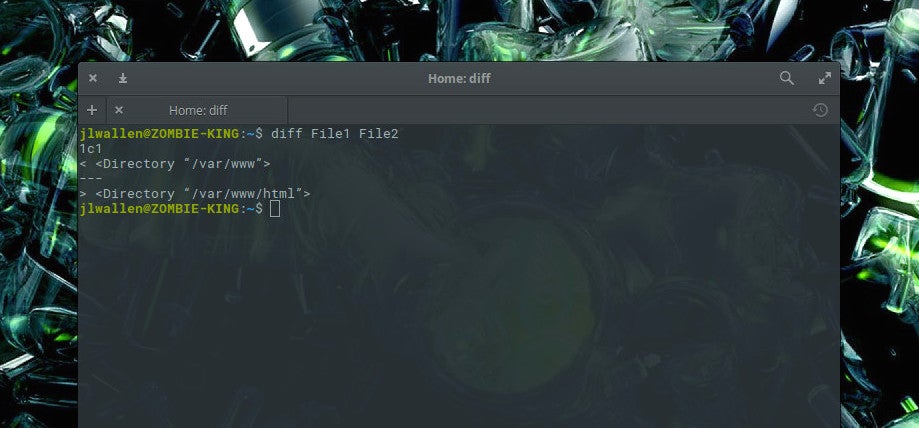
Thanks to diff, we can find these differences easily. If we open up a terminal and issue the command diff File1 File2, we’ll see the output clearly displaying the differences (Figure 1).
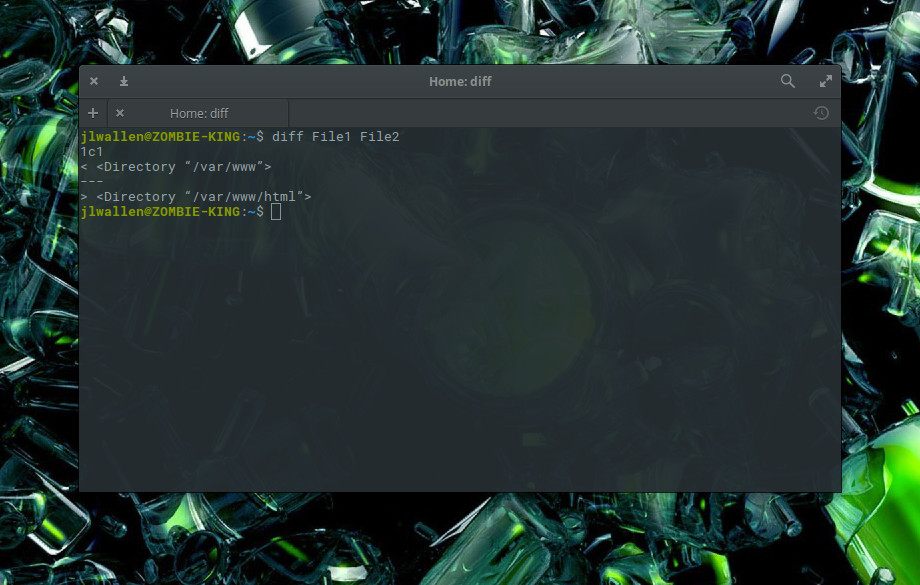
Figure 1: The diff command outputting the variances between File1 and File2.

What you want to look for are the letters a, c, and d, where:

  • a means something was added

  • c means something was changed

  • d means something was deleted

In this example, you see 1c1, which means line 1 was changed in the second file.

The diff output is a bit cumbersome because it was actually intended to be read by the system, not humans. The intention of diff is to show what would need to be done to the files to put them in sync with one another. What is important in the output, however, is that it will only output the lines which are different. In our example, everything in the file is identical except for the first lines, where you have /var/www in one and /var/www/html in the other. Using diff makes it incredibly easy to find out the differences between two configuration files. Of course, diff is much more complex than that, but understanding this very fundamental usage of the tool will help you tremendously when comparing two files.

If we change File2 to reflect:

<Directory “/var/www/html”>
    AllowOverride all
</Directory>

The output of diff would then a bit more complex. For that, we might want to run diff -c File1 File2. The c option prints the output in context format, which makes it much easier to read (Figure 2).
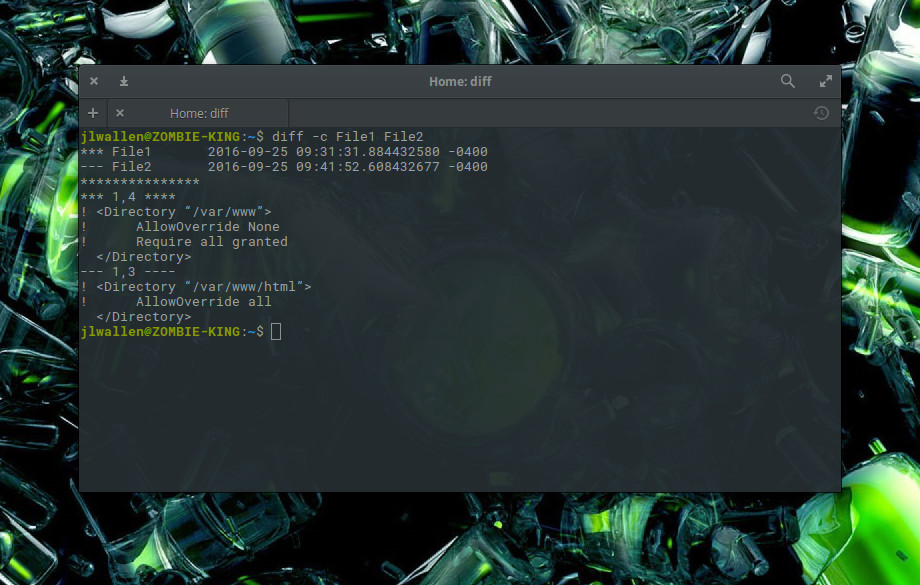
Figure 2: More complex diff output which has been made easier to understand with the c option.

Here we see diff reporting that lines 1 and 4 in File1 and lines 1 and 3 in File2 do not match. You can now make those changes.

grep

The grep command should be one of the first tools you learn as a Linux administrator. Without it, you will find yourself searching for the proverbial needle in a haystack, especially when digging around more extensive configuration files. Say, for instance, you want to disable the EnableSendfile in your CentOS Apache configuration. You could open up the /etc/httpd/httpd.conf and then scroll through until you see the entry, or you could issue the command grep -n EnableSendfile /etc/httpd/conf/httpd.conf.

What grep does is print lines matching a pattern. It’s that simple. However, if you add the -n option, grep will also print the line number for which the pattern can be found. In our example, grep outputs that EnableSendfile is found on lines 340, 346, and 349 (Figure 3).
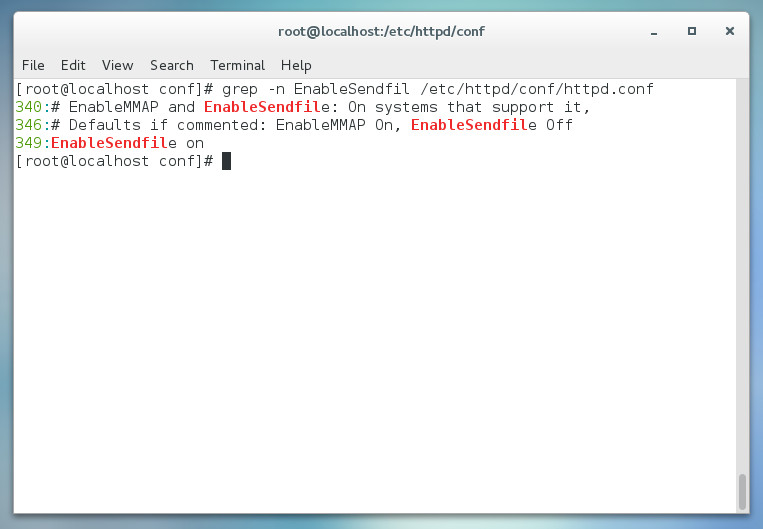
Figure 3: Using grep to locate an option in a configuration file.


If you happen to use a text editor, such as nano, you can open up the /etc/httpd/conf/httpd.conf file, scroll down a bit and hit Ctrl-c to report what line number the cursor is on. Keep scrolling until you find the line you need to edit. You can also open up the file with nano, using the -c option, to display the current line number (without having to hit the key combination — Figure 4).
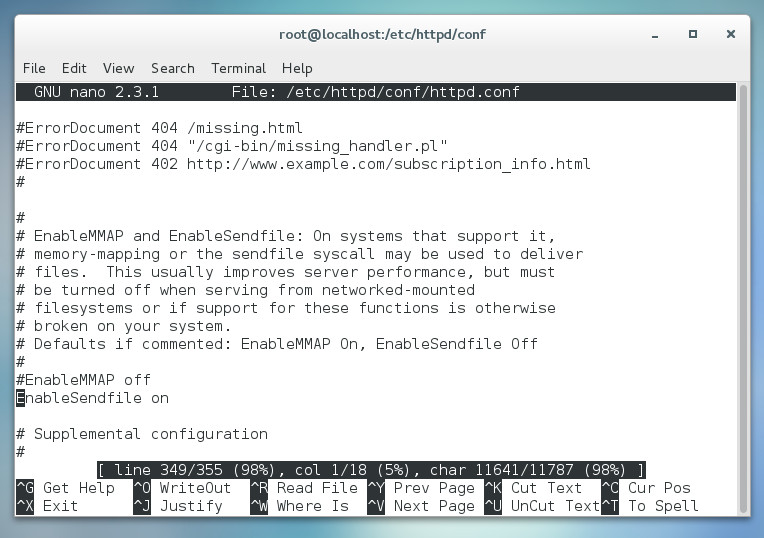
Figure 4: Nano displaying the line number.

The grep command is incredibly powerful. Make sure to view the man page (man grep) to learn everything you can about this helpful tool.

Find a good GUI

Some people would rather spend their time with a GUI tool than the command line. Although I highly recommend you fully understand how to work with the command line, there are instances where a GUI can go a long way to make this process easier. Take, for instance, the Gedit text editor. With this GNOME-friendly editor, you can set syntax highlighting on the fly to easily suit the configuration file you’re working with.

Suppose you open up /etc/httpd/conf/httpd.conf in Gedit. Because this particular file is just a basic text file, Gedit will open it set on Plain Text (in other words, no syntax highlighting). You can switch that from the drop-down in the bottom toolbar and select the type of syntax highlighting you want. If you switch it to PHP, anything that could be viewed as a PHP element will be highlighted (Figure 5).
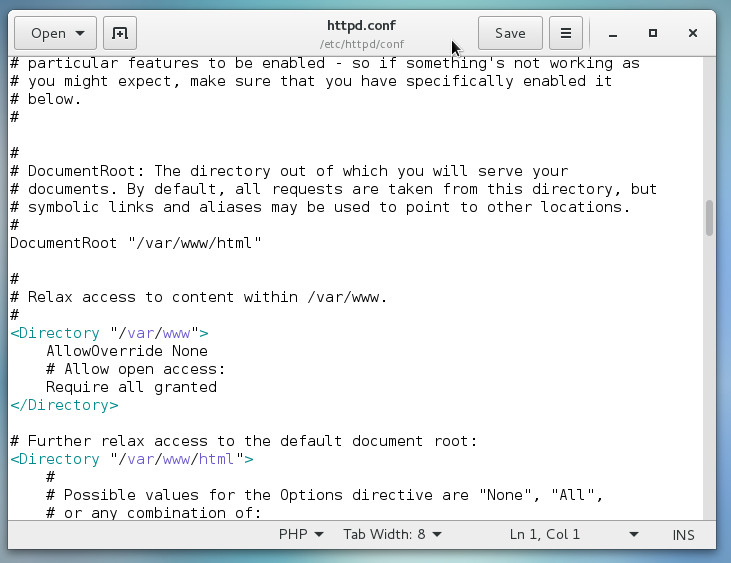
Figure 5: Adding syntax highlighting for easier configuration.

There are plenty of solid editors out there that will aid you in making cumbersome configurations a bit easier. Start with the tool included with your desktop and see if it will do the trick. If not, open up your package manager and see if you can find one that might fit your needs (such as Sublime Text, Geany, or Leafpad).

Don’t let it overwhelm you

With just a few simple tools, you can make the process of editing Linux configuration files quite easy. Start out with these three tools and build from there. Eventually you’ll have a toolkit so powerful, you’ll be editing config files like a pro. And don’t forget to RTFM!

Want to learn more about managing your configuration files? Check out the Essentials of System Administration course from The Linux Foundation.


 

Why Good Linux Sysadmins Use Markdown

The Markdown markup language is perfect for writing system administrator documentation: it is lightweight, versatile, and easy to learn, so you spend your time writing instead of fighting with formatting.

The life of a Linux system administrator is complex and varied, and you know that documenting your work is a big time-saver. A documentation web server shared by you and your colleagues is a wonderful productivity tool. Most of us know simple HTML, and can whack up a web page as easily as writing plain text. But using Markdown is better.

Markdown is designed for writing text articles for the web, a writing tool rather than a publishing tool. Markdown files are designed to be easy to read, with a minimum of tag clutter, and with tags that flow naturally with your text. Blockquotes look like quotes, lists look like lists, and I think everyone is familiar with using *asterisks* for emphasis.

My favorite Markdown feature is its handling of special characters: there aren’t any. You don’t have to worry about using HTML special character codes for left angle braces and ampersands, which exist to make life difficult for people who write for the web, and a special nightmare when you’re trying to write a web document to teach HTML.

If Markdown is missing some HTML formatting that you want, no worries, just use the HTML tags right in your Markdown document.

Markdown Quickstart

Check out this example Markdown document:

# A Nice H1 Heading

## A Nice H2 Heading

### H3… Get it? This goes up to H6.

Paragraphs are easy! Just start typing, then separate them with a blank line. No muss, no fuss.

Who uses Markdown? Students, teachers, scientists, GitHub, Stackoverflow, Drupal, WordPress, Doxygen… It is supported in many programming languages, including Python, Perl, JavaScript, Haskell, Awk, C, C++, and many more.

Several Markdown extensions support advanced formatting, so if you want all kinds of fancy tables, image management, math equations, and multiple output document formats check out [PHP Markdown Extra](https://michelf.ca/projects/php-markdown/extra/) and [MultiMarkdown](http://fletcherpenney.net/multimarkdown/). See the nice way of creating hyperlinks? No hassling with wrapping multiple tags for a single link.

> Blockquotes are paragraphs that start with an angle brace.
>
>> Go wild and make nested blockquotes.
>
> Then return to your first level.

> You can create a multiple-line blockquote with a single angle brace, and then load it up with as much text as you want, being all verbose and windy and everything.

> Or, use hard line breaks and
> start every line with an angle
> brace for more formatting
> control in your Markdown file.
> This won’t affect your HTML conversion.

Making bulleted lists is so easy you will weep with happiness. Unordered bulleted lists use hyphens, plus signs, or asterisks, whatever your whim desires. After conversion to HTML you get nice bullets no matter which one you used:

* You can
– even mix
+ them up.

Numbered lists use numbers followed by periods:

1. Like this
2. Numbered
3. List

List items can span multiple lines. The easy way is to not worry about identation:

* If you’re still reading this and thinking “Oh gosh, I know that keeping a sysadmin notebook is a good idea, but I never have time! And nobody will ever use it anyway, not even me!”

* I fear you are sadly mistaken. Tis true that many bosses are sadly impressed by drama and emergencies, rather than calm, smoothly running systems. It is also true that keeping everything in your head is faster than consulting documentation.

Or you can use indentation and line breaks, although when you convert to HTML it looks the same as without indentation and line breaks. But it’s more readable in your source Markdown file:

* But relying on memory becomes chancier
  as your systems become more complicated,
  and your memory is no good to anyone else
  if you’re not there.

* I think that being indispensable is a
  bad idea if you ever want any time off.

Wrapping words with *single asterisks* make italics, and **double asterisks** make bold. My favorite Markdown feature is not having to hassle with pairs of tags as much as in HTML. Mostly you just tag ’em once and move on. Paragraphs need no tags at all, which is glorious.

Easily Test It Yourself

You can quickly test an HTML conversion by copying the above example document into a plain text editor, and name it with an .md extension, for example “testmarkdown.md”. Then convert it to HTML with Python:

$ python -m markdown testmarkdown.md > testmarkdown.html

Open it in a web browser and behold! A simple, nicely formatted web page.

There are many converters and Markdown extensions. Start with John Gruber’s Markdown documentation, because as one of the inventors of Markdown he ought to know a thing or two about it. Then to find information about extensions and Markdown implementations with expanded features, try a Wikipedia search.

Then be a good sysadmin and start writing things down.

To learn more, check out the Essentials of System Administration course from The Linux Foundation.

The Rise of the Helpful Operational Bots: ChatOps

Over the last number of years, the idea of a conversational interface to technology has entered the mainstream conscience. As is often the case, many of the ideas that get neatly packaged up into consumer facing technology have been knocking around for a long time, and conversational interfaces are no different. For the rise of conversational bots, we need to step back a little and think about bots in general, and in particular their most common manifestation in technology teams – that of ChatOps.

While some of the concepts surrounding ChatOps has been around for a long time, it is fair to say that the idea only really began to get traction within technical communities when Jesse Newland gave a talk on ChatOps at Github during  PuppetConf 2012. Since 2012 we have seen a growth in interest in the new use of bots within operations.

Read more at Red Monk

A Primer on OVN

OVN is a virtual networking platform developed by the fine folks over at openvswitch.org. The project has been in the works for nearly two years now and is starting to mature to the point of being production ready. In this posting I’ll walk through the basics of configuring a simple layer-2 overlay network between 3 hosts. But first, a brief overview of how the system functions.

OVN works on the premise of a distributed control plane where components are co-located on each node in the network. The roles within OVN are:

  • OVN Central – Currently a single host supports this role and this host acts as a central point of API integration by external resources such as a cloud management platform. The central control houses the OVN northbound database, …

Read more at Dustin Spinhirne Blog

Ubuntu’s Shuttleworth Explains Why Not All Containers are the Same

As container use continues to grow, Mark Shuttleworth provides some definition on why he’s backing Kubernetes but isn’t a fan of OpenStack Magnum.

Mark Shuttleworth, the founder of Ubuntu Linux, was an early backer of OpenStack as well as containers. This week, Shuttleworth’s company Canonical announced new commercial support for Kubernetes, which is a widely deployed container orchestration and management engine.  In an interview with Datamation Shuttleworth emphasized that it’s important to understand the different use cases for containers and what the different types of container systems are all about.  

“There are going to be different types of container co-ordination systems,” Shuttleworth said. “There will trucks, tractors and cars.”

Read more at Datamation

Why Deep Learning Is Suddenly Changing Your Life

Neural nets aren’t new. The concept dates back to the 1950s, and many of the key algorithmic breakthroughs occurred in the 1980s and 1990s. What’s changed is that today computer scientists have finally harnessed both the vast computational power and the enormous storehouses of data—images, video, audio, and text files strewn across the Internet—that, it turns out, are essential to making neural nets work well. “This is deep learning’s Cambrian explosion,” says Frank Chen, a partner at the Andreessen Horowitz venture capital firm, alluding to the geological era when most higher animal species suddenly burst onto the scene.

Think of deep learning as a subset of a subset. “Artificial intelligence” encompasses a vast range of technologies—like traditional logic and rules-based systems—that enable computers and robots to solve problems in ways that at least superficially resemble thinking. Within that realm is a smaller category called machine learning, which is the name for a whole toolbox of arcane but important mathematical techniques that enable computers to improve at performing tasks with experience. Finally, within machine learning is the smaller subcategory called deep learning.

Read more at Fortune

ICANN Grinds Forward on Crucial DNS Root Zone Signing Key Update

The Internet Corporation for Assigned Names and Numbers is moving — carefully — to upgrade the DNS root zone key by which all domains can be authenticated under the DNS Security Extensions protocol.
ICANN is the organization responsible for managing the Domain Name System, and DNS Security Extensions (DNSSEC) authenticates DNS responses, preventing man-in-the-middle attacks in which the attacker hijacks legitimate domain resolution requests and replaces them with fraudulent domain addresses.

DNSSEC still relies on the original DNS root zone key generated in 2010. That 1024-bit RSA key is scheduled to be replaced with a 2048-bit RSA key next October. Although experts are split over the effectiveness of DNSSEC, the update of the current root zone key signing key (KSK) is long overdue.

Read more at Tech Target

Tencent: Transforming Networks with SDN

“SDN can really transform the way we do networks,” said Tom Bie, VP of Technology & Operation of Data Center, Networking and Server, Tencent, during his Wednesday keynote address at the Open Daylight Summit. The China telecom giant should know about the issues of massive scale networks: they have more than 200 million users for QQ instant messaging, 300 million users of their payment service, and more than 800 million users of their VChat service.  Bie noted that Tencent also operates one of the largest gaming networks in the world, along with video services, audio services, online literature services, news portals, and a range other digital content services.

Tencent has a three-pronged core communication strategy based on “connecting everything.” They focus on people to people, people to services, and people to devices (IoT). The foundation is an open platform for partners to connect to public clouds. Here, third parties can run their applications on top of the infrastructure designed for the massive scale that Tencent deals with every day.  Today, millions of applications are running along the “beachhead” applications of Tencent. To ensure they have a steady flow of new and interesting services, they’ve created an innovation space for startup companies to develop and commercialize new services.  Bie noted that there are currently 4 million startups involved with the innovation space.

Working at such massive scale has forced Tencent to look for new solutions and innovations in networking technology to overcome their challenges. These challenges, Bie noted, include Agility and Scalability, End-to-End Quality of Service (QoS), Global View, Deep Insights, Automation, and Intelligence. The first two are driven from the business perspective. Services must always be available and of sufficient quality — and Tencent must be able to scale fast. The next two are from an operational perspective.  A key concern here is the need to quickly find a problem anywhere in the network to minimize the impact on services and on their business. Having a global view of the entire network with real-time deep insights enables a rapid response to network anomalies and failures. Today, the information provided to the controller or management plane is not fast enough or good enough to enable a rapid response.

This massive scale requires automation, said Bie. People, he noted, are too slow and too error prone. Automation must apply throughout the life cycle of the service and include provisioning, operations, and finally decommissioning. Bringing intelligence to the network is key.  With programmable networks, massive amounts of data can be generated and acted upon by analytics and even machine learning to drive actionable intelligence.

The first SDN use case Bie discussed was that of the Data Center Interconnect Backbone. Tencent has major datacenters in China and across Asia as well as on other continents.  Their backbone must support all of their applications so users can have quality services no matter where they are. This backbone is based on MPLS, MPLS-TE (Traffic Engineering), and MPLS VPNs. Currently, it is challenging to manage and to operate.  By adding ODL-based controllers, Tencent realizes global path optimization, fast convergence around failures or congestions, and end-to-end quality of service.

The second use case Bie discussed was managing the network within a datacenter. They use VxLANs over the fabric controller to control both the overlay networks and underlay networks. Bie noted the capability required to scale out firewalls. Here, Tencent uses flow-based load balancing, real-time monitoring, and automatic traffic schedule to scale out to up to 24 firewall pairs. The final use case involved their Internet-facing networks. A key feature Bie noted was the ability of the ODL controller to collect routes from BGP routers, determine the optimal path, and then overwrite the BGP routing tables.

Bie concluded by noting that the Internet has always been empowered by what he called an open spirit. He called out the increasing scope and range of open source initiatives around the globe.  Lastly, he highlighted ODL for adding value to cluster performance and scale, southbound interfaces for load balancing, software maintenance including the mandatory ISSU (In Service Software Upgrades, aka Hitless upgrades), and northbound interfaces standardized on Yang Modeling.

Minijail: Running Untrusted Programs Safely by Jorge Lucangeli Obes, Google

https://www.youtube.com/watch?v=oGmj6CUEup0?list=PLbzoR-pLrL6pq6qCHZUuhbXsTsyz1N1c0

This talk describes Minijail, a sandboxing and containment tool initially developed for Chrome OS and now used across Google, including client platforms (like Android) and server environments (like Chrome’s fuzzing infrastructure ClusterFuzz).

How to Find Your First OpenStack Job

We’ve covered the growth of OpenStack jobs and how you can become involved in the community. Maybe that even inspired you to search for OpenStack jobs and explore the professional opportunities for Stackers. You probably have questions, so we’re here to answer the frequent questions about working on OpenStack professionally.

Am I qualified? How do I know?

Taking stock of your current skills can be difficult. Here’s a common method that will give you a generic barometer of your qualifications:

  1. Head to the OpenStack Jobs board, or a search for OpenStack on your preferred job posting aggregator (like Indeed, LinkedIn, Jobr, etc.), and pull down a handful of descriptions that pique your interest.

  2. Create a separate list of your current skills and rank them in strength (using an A-F grading system can be helpful here).

  3. Compare the requested experience to your list: Looking across the set of descriptions, is there a skill you’re constantly missing? Is there an area of “high priority” for the company that’s in your “weakest” category? Don’t let a one-off mismatch deter you, but if you’re continually missing a particular requirement or it’s constantly at the bottom of your skillset, that’s the area you’ll want to focus on building up.

As you gain more experience and improve your OpenStack skills, keep coming back to your checklist and adding new job descriptions to your set. When you have a passing grade for their requested skills, that’s a good time to apply!

How much Python do I need to know?

OpenStack is written in Python, but how proficient your Python skills need to be vary by your role. Developers will need more advanced Python, while operators can successfully work on OpenStack with more minimal Python knowledge. As always, the OpenStack community is here to help one another. It’s not uncommon to see sessions like “Python Basics for Operators Troubleshooting OpenStack” at Summits (the aforementioned talk was featured at the OpenStack Summit Austin).

Do I need to have a significant contribution history to get hired?

This answer varies by employer, but being a Project Team Lead (PTL) of an OpenStack project isn’t a hiring requirement! While a history of contributions never hurts, companies who have embraced OpenStack are equally as eager to find professionals who fit their technical culture. In transitioning to OpenStack, many companies have also shifted their tech cultures to be focused on open source, such as Walmart, who will be presenting about their transition at the OpenStack Summit Barcelona. Being passionate about open source and understanding how open source contributes to innovation will set you off on the right foot with any OpenStack ecosystem organization.

Where can I find OpenStack jobs?

The OpenStack community job board is located at openstack.org/jobs. Here you’ll find organizations hiring for roles like “OpenStack Developer,” “OpenStack Cloud Architect,” “OpenStack Cloud Administrator,” “Senior Software Engineer for Cloud Services.” The list goes on. Companies posting here are looking specifically for people familiar with OpenStack and who are actively involved in the OpenStack community.

Another great place to find an OpenStack job is at an OpenStack event. Networking is always your friend in securing a new job. In the previous post, we outlined the various OpenStack events. At the OpenStack Summit, companies will post a “We’re Hiring!” sign at their booth in the OpenStack Summit Marketplace if they have open positions. Take a spin around the Marketplace and shake a few hands. If you can’t make it to a Summit, your local OpenStack Days event or find a local user group, which are full of networking opportunities.   

I’ve played with OpenStack outside of work, I think I have the qualifications; how can I show I’m ready for an OpenStack job?    

This is the game-winning question, and there’s lots to say! So much so, our entire fourth post will be dedicated to making the transition from “OpenStack hobbyist” to “OpenStack professional.”   

Want to learn the basics of OpenStack? Take the new, free online course from The Linux Foundation and EdX. Register Now!

The OpenStack Summit is the most important gathering of IT leaders, telco operators, cloud administrators, app developers and OpenStack contributors building the future of cloud computing. Hear business cases and operational experience directly from users, learn about new products in the ecosystem and build your skills at OpenStack Summit, Oct. 25-28, 2016, in Barcelona, Spain. Register Now!