Home Blog Page 696

Minijail: Google’s Tool To Safely Run Untrusted Programs

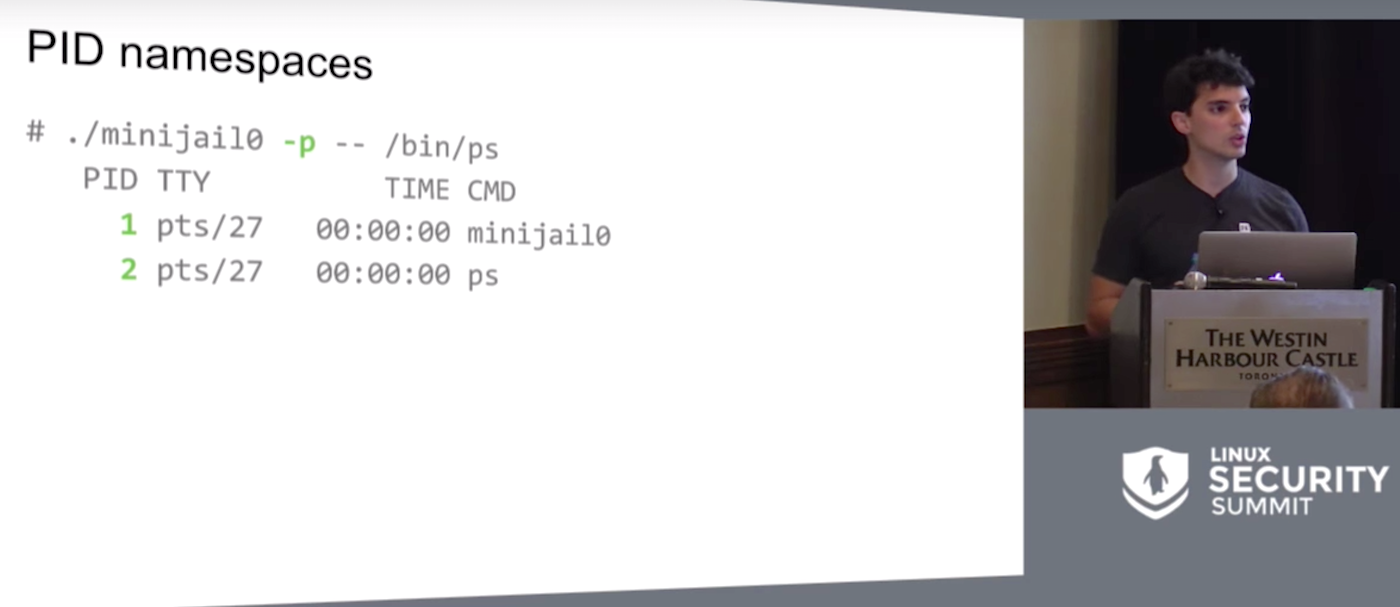
Google’s Minijail sandboxing tool could be used by developers and sysadmins to run untrusted programs safely for debugging and security checks, according to Google Software Engineer Jorge Lucangeli Obes, who spoke last month at the Linux Security Summit. Obes is the platform security lead for Brillo, Google’s Android-based operating system for Internet-connected devices.

Minijail was designed for sandboxing on Chrome OS and Android, to handle “anything that the Linux kernels grew.” Obes shared that Google teams use it on the server side, for build farms, for fuzzing, and pretty much everywhere.

Since “essentially one bug separates you and any random attacker,” Google wanted to create a reliable means to swiftly identify problems with privileges and exploits in app development and easily enable developers to “do the right thing.”

The tool is designed to assist admins who struggle with deciding what permissions their software actually needs, and developers who are vexed with trying to second guess which environment the software is going to run in. In both cases, sandboxing and privilege dropping tends to be a hit or miss affair.

Even when developers use the privilege dropping mechanisms provided by the Linux kernel, sometimes things go awry due to numerous pitfalls along that path. One common example Obes cited was trying to ride a switch user function that will drop-root and then forgetting to check the result of the situation relief, or setuid function, afterwards.

In this scenario, the exploit is in causing the setuid call to fail which still allows the program to run with root privileges. This in turn will exploit another bug in the process. The best way to stop this kind of exploit is to create a fix that will abort the program in the case of a setuid call fail.

Find and Fix

While security pros may be quick to scoff at such a rudimentary mistake, it’s often the simplest oversights that lead to the biggest security problems. Rather than judge one another, Obes said, remember that the goal is to find and fix problems in the software. Although there will always be bugs, eradicating as many as possible, from the simple to the sophisticated, is always the goal.

Minijail first identifies and flags roots where problems exist. It is unnecessary for developers to understand all the intricacies of dropping privileges using Linux kernels because the tool provides a single library for privilege dropping code.

“By using Minijail, we turned the 15+ lines of sign-in capabilities to one or three, because of formatting,” he said. The system never fails to check the results, such as result of a setuid call, and it provides for unit and integration testing, too, to ensure the app always works.

Eventually the team realized that Minijail was roughly 85 percent of the way to building real containers so they took the tool the rest of the way. “Minijail is essentially underlying this new technology that Google added to Chrome OS which allows you to run Android applications, natively with no emulation or distortion,” he said. “It’s just an Android system running inside a container.” Thus, Minijail evolved to be both a sandboxing and containment helper.

It accomplishes this primarily by blocking some root permissions through the use of capabilities to partition the information. In this way, developers can “grant specific subsets of that functionality directly to a process without granting the whole function to do that process.”

Obes returned to his Bluetooth D example as it needs permissions to configure a network interface. “That shouldn’t give it permissions to, for example, reboot the system or mount things,” he explained.

Watch the full presentation below.

https://www.youtube.com/watch?v=oGmj6CUEup0?list=PLbzoR-pLrL6pq6qCHZUuhbXsTsyz1N1c0

linux-com_ctas_security_090716_452x150.jpg?itok=XsvIOO55

Google’s Open Source Fuchsia OS: The Mystery Linux Distro

Few things are more tantalizing than a good mystery, and Google is making waves for an open source-centric mystery that may end up having profound implications. It all started in August when an extensive and unusual code repository for a new operating system called Fuchsia was discovered online, and now the growing source code set is on GitHub.

Thus far, Google officials have been mostly mum on the aim of this operating system, although they have made a few things clear in chat forums. Two developers listed on Fuchsia’s GitHub page — Christopher Anderson and Brian Swetland — are known for their work with embedded systems. The Verge, among other sites, has made a few logical deductions about the possible embedded systems focus for Fuchsia: “Looking into Fuchsia’s code points gives us a few clues. For example, the OS is built on Magenta, a “medium-sized microkernel” that is itself based on a project called LittleKernel, which is designed to be used in embedded systems,” the site reports.

The GitHub postings that confirm that Fuchsia is based on Magenta are particularly notable because Magenta has had applications in the embedded systems space. Here are some direct quotes: “Magenta is a new kernel that powers the Fuchsia OS. Magenta  is composed of a microkernel as well as a small set of userspace services, drivers, and libraries necessary for the system to boot, talk to hardware, load userspace processes and run them, etc. Fuchsia builds a much larger OS on top of this foundation.”

Meanwhile, Fast Company has focused on the fact that Google is building this new OS seemingly from scratch, which could mean that it is reimagining longstanding kernel technology such as the Linux kernel: “Here’s something you might not realize about your phones, tablets, and laptops,” Fast Company reports. “For the most part, they’re adaptations of software ‘kernels’ that are quite old.”

Could Google be completely reinventing the core functionality of what we consider to be an operating system? There are certainly historical precedents for that. When Google launched a beta release of Gmail in 2004, Hotmail, Yahoo! Mail, AOL Mail and other services had absolutely dominant positions in the online email space. Look what happened. Google reimagined online email. Likewise, Chrome OS reimagined the operating system with unprecedented security features and cloud-centricity.

One could argue that Android and Chrome OS have roots in the same playbook, but the fact is that they are both based on Linux. Fuchsia, is not.

Android Police is convinced that Fuchsia may be aimed at the Internet of Things, and that could be a good guess. The embedded systems folks behind the new operating system would be logical choices to develop an IoT-targeted platform, and why would an IoT-focused operating system necessarily need to resemble our current ones? Additionally, let’s not forget that Google is already in the embedded hardware and home-focused hardware business, with the OnHub router and Google Home.

Wouldn’t it make sense that Google might try to front-run the build out of the Internet of Things with a new, portable and lightweight operating system that can work like an embedded system OS on a variety of Net-connected device? After all, the early creation of Android, building on Linux roots, enabled Google to be very agile as the mobile device revolution took shape. Surely, the company learned from that experience that an open source Hail Mary can result in a very timely touchdown.

You can find a Google developer commenting succinctly on Fuchsia on this page, but speculation abounds.

There is an old saying about Google — that the company “likes to throw spaghetti at the wall and see what sticks.” We’re likely to hear more about Fuchsia soon, but one of the early, clear indications is that it won’t have much to do with the operating systems that you’re used to.

Dig into DNS: Part 4

Previously in this series (see links below), I’ve described the dig utility and its many uses in performing DNS lookups, along with several examples to help solve specific problems. In this final installment, I’ll look briefly at some security options and wrap up with additional examples.

All Secure Here

Many of you will have come across DNSSec in the past. It’s not an area that I have explored in great detail, I admit, but as you would expect the excellent dig utility takes the securing of DNS in its stride with the following option:

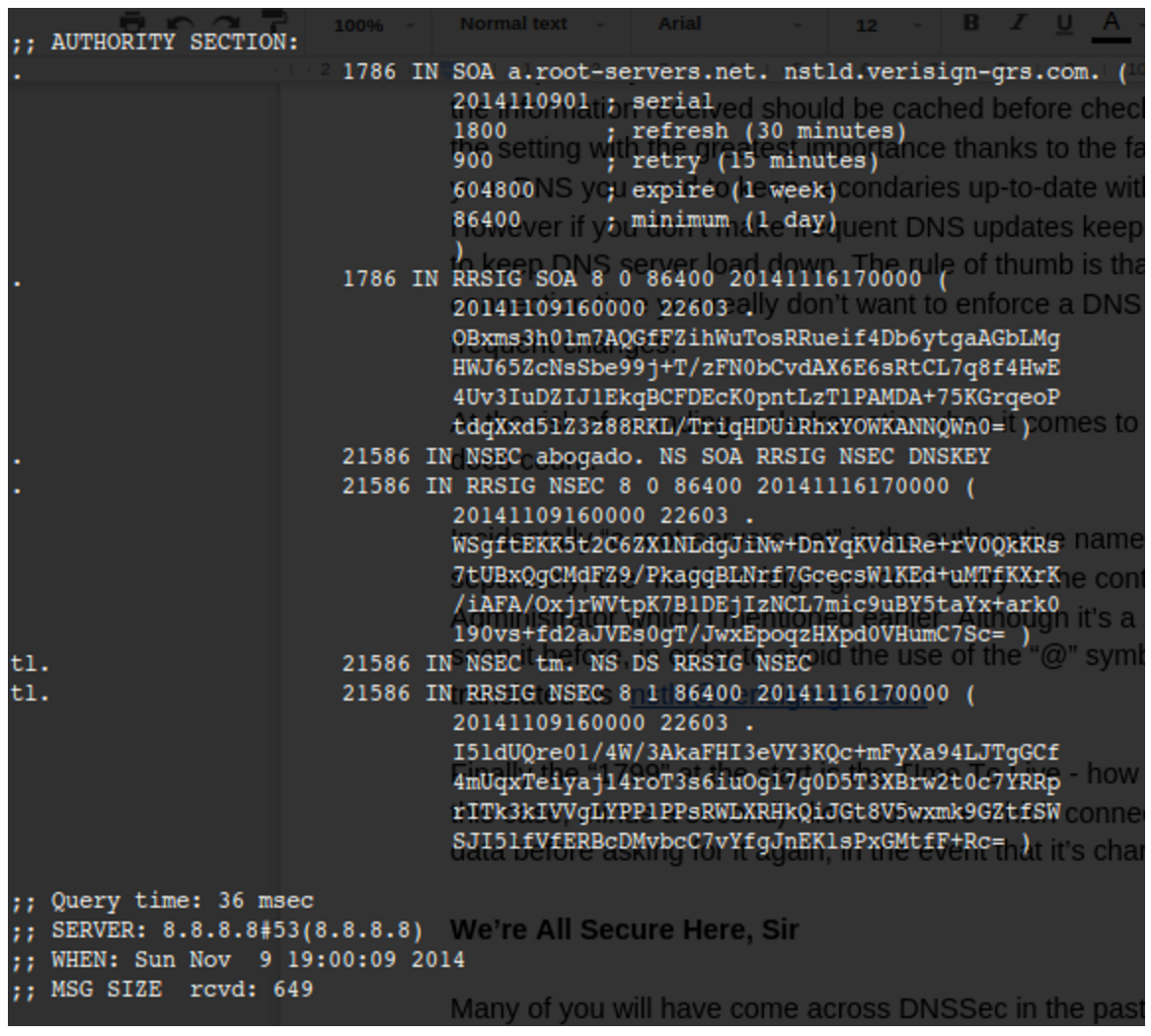
# dig @8.8.8.8 chrisbinnie.tld A +dnssec +multiline

where I request an “A” record and any associated DNSSec records with it.

We can see the inclusion of DNSSec records in Figure 1. For clarity, we are purposefully interrogating a non-existent domain name so you can see the response from the a root server (a.root-servers.net) again.

Figure 1: Shows setting dig to request that DNSSec records are also sent with the query’s answer.

Custom Fitted

To facilitate those readers with a compulsive, painstaking need to make certain configuration changes with the dig utility, there’s a config file option which reads from within a user’s home directory, named as follows:

# cat ~/.digrc

+nocomments +recurse +multiline +nostats +time=1 +retry=5

As you can see, my “.digrc” file is simple and to the point, but it keeps the output straightforward. Note that the standard “A Record” is the default lookup unless another type of record is specified such as “MX” etc. That might affect how much information you usually want from your output, and thus how you set up your “.digrc” file, should you be looking up less popular record types more frequently.

Negatory

It would be remiss not to mention at this stage that I have intentionally — to keep things simple for newcomers to the dreaded DNS realm — so far not mentioned the fact that each and every one (barring a couple exceptions where it simply wouldn’t make sense) of the powerful dig utility’s command-line options can be negated with a prepended “no”.

A simple example, which I will leave you to apply to your heart’s content, might be as follows:

# dig chrisbinnie.tld +notrace

I’m sure you get the gist and that any further explanation would be futile. You can try any of the other options with a “no” in front if you’re unsure.

Eggs, Beans, Spam

With the viral outbreak of spam during the latter years of the Internet, clearly it’s critical that the largely successful attempt by the community to suppress it within DNS be integrated into the dig utility.

Step forward TXT record checking. You can either point at a “@server” to query directly or use something like this in the same format as before:

# dig chrisbinnie.tld txt

If you look closely at the ANSWER section, the IP addresses that SPF (Sender Policy Framework) pays attention to should be fairly obvious. In brief, this shows which IP addresses are authorized to send email on behalf of a domain name amongst other settings. Another important parameter is how strictly to enforce such settings before bouncing or blackholing an email as spam.

Suit Yourself

In keeping with the truly accommodating perspective with which the dig utility was written, there are also a couple of useful options that have caught my eye in the past.

First, the try-hard dig utility offers the ability to look past any malformed or corrupted responses received from name servers with the following option:

# dig @8.8.8.8 chrisbinnie.tld A +besteffort

In other words, this says to display some corruption if it exists, even if the output is a little nonsensical, in the hope that some useful information might be gleaned. You might see why this could be very useful if I mention that the dig utility even pays attention to non-ASCII based domain names.

Referred to as IDN Support, (which the manual reports is Internationalized Domain Name Support), the mighty dig tool can covertly change its character set before receiving an answer or sending a question to an international name server. On today’s Internet, this is of significant value and will likely only become more useful in the future as international languages meld further.

Actually, It’s A Feature

One concluding note, which I enjoyed reading from the June 30th, 2000 version of dig’s man pages, was at the foot of the information under the “BUGS” section. This line might be read differently on a number of levels but expresses simple sentiments if read literally.

The BUGS section of the manual is usually a way of briefing declaring known issues. In dig’s case, however, the line “There are probably too many query options.” is all that exists.

I’m afraid that on the surface I would have to agree, but I suspect that, at one stage or another, each one of those DNS options has been very useful to someone, somewhere. I mention this because it’s not always obvious how far to delve into DNS, even when faced with relatively complex scenarios such as using name servers for failing-over between web servers. Be assured, however, that whatever you need from a DNS query, the ever-faithful dig utility will almost certainly provide it, in varying levels of detail, to suit your preference.

Summary

I have barely scratched the surface of the dig utility’s feature list and how DNS actually works. If you are new to working as a sysadmin, there will likely be many opportunities for you to learn DNS and evolve your knowledge over time.

My hope in writing these articles was to give you the confidence required to turn to the dig utility if you ever need to query DNS in detail. And, having written this series, I have come to realize that “dig www.domainname.tld” is actually shorter than using the “host” command alternative. You never know, maybe my daily DNS habits have been changed forever as a result, and I will turn to the dutiful dig over the “host” command from now on.

Read previous articles in the series: Part 1, Part 2, and Part 3.

Chris Binnie is a Technical Consultant with 20 years of Linux experience and a writer for Linux Magazine and Admin Magazine. His new book Linux Server Security: Hack and Defend teaches you how to launch sophisticated attacks, make your servers invisible and crack complex passwords.


Learn more about network and system management with the Essentials of System Administration course from The Linux Foundation.

Meet Apache Spot, a New Open-Source Project for Cybersecurity

Hard on the heels of the discovery of the largest known data breach in history, Cloudera and Intel on Wednesday announced that they’ve donated a new open-source project to the Apache Software Foundation with a focus on using big data analytics and machine learning for cybersecurity. 

Originally created by Intel and launched as the Open Network Insight (ONI) project in February, the effort is now called Apache Spot and has been accepted into the ASF Incubator.

Read more at ComputerWorld


The Second Wave of Platforms, an Interview with Cloud Foundry’s Sam Ramji

In today’s world of platforms, services are increasingly connected. In the past, PaaS offerings were pretty much isolated. It’s that new connected infrastructure that is driving the growth of Cloud Foundry, the open source, service-oriented platform technology.

Sam Ramji is CEO of Cloud Foundry, which is holding its European event in Frankfurt this week. At the conference, we spoke with Ramji to discuss, among other topics:

  • Europe’s adoption of platform technologies.
  • IoT and the connection to serverless technologies.
  • The maturity of the container ecosystem and the corollary to Cloud Foundry.
  • Cloud Foundry BOSH, the open source tool for release engineering, deployment, lifecycle management, and monitoring of distributed systems. …

Read more at The New Stack

Open Source Is Not to Blame for a Lack of Industry Standards

Carol Wilson wrings her hands over the “boring” nature of open source standardization, declaring that “Open source processes can take the fun out of everything, particularly technology wars.” Putting aside for a minute the irony of expecting standards to ever be anything more than mind-numbingly dull, Wilson’s larger argument misses the point.

The problem with open source standards aren’t that they’re boring; it’s that they’re largely the same as the proprietary standards that preceded them. In practice, this presents no problem at all.

Read more at Tech Republic

Raspberry Pi Foundation Unveils New LXDE-Based Desktop for Raspbian Called PIXEL

Today, September 28, 2016, Raspberry Pi Foundation’s Simon Long proudly unveiled a new desktop environment for the Debian-based Raspbian GNU/Linux operating system for Raspberry Pi devices.

Until today, Raspbian shipped with the well-known and lightweight LXDE desktop environment, which looks pretty much the same as on any other Linux-based distribution out there that is built around LXDE (Lightweight X11 Desktop Environment). But Simon Long, a UX engineer working for Raspberry Pi Foundation, was hired to make it better, transform it into something that’s more appealing to users.

Read more at Softpedia

Ericsson: The Journey to a DevOps Future in SDN

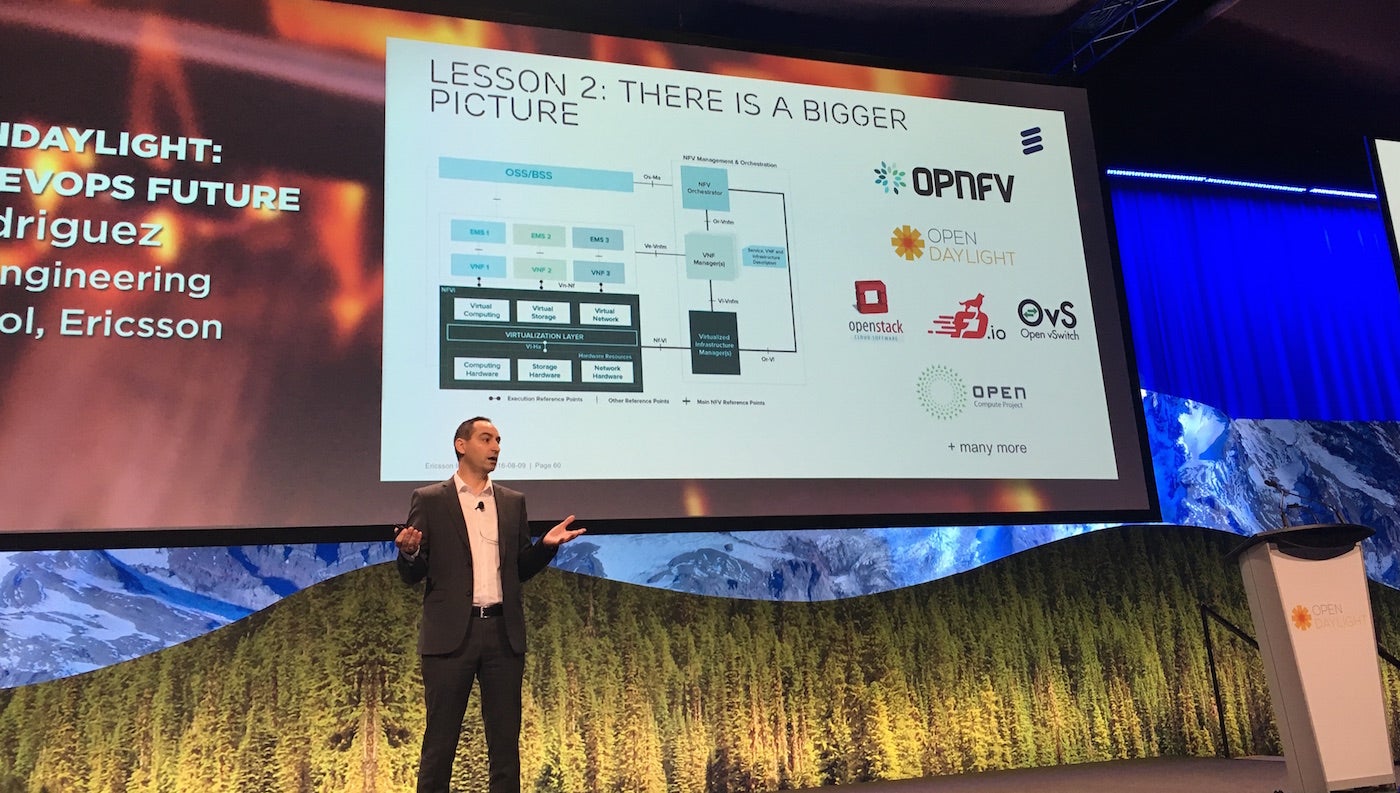
There are big transformations going on in the world today that are driving rapid changes to the business of networks, said Santiago Rodriguez, VP of Engineering and head of the product development unit SDN & Policy Control at Ericsson, in his keynote Tuesday at OpenDaylight Summit.    

“Society is transforming, the way we do business is transforming, and accordingly the way we build our networks is transforming,” Rodriguez said.

The three pillars of this network transformation include: 5G, virtualization and open source.

5G, the next generation mobile standard, has been promised to be the biggest innovation in mobile networking since the first cellular handset. Interestingly, Rodriguez noted that it took 120 years for the fixed (or wired) telephony market to reach 1 billion subscribers.  In only the last 20 years, the number of mobile subscriptions has ballooned to more than 10 billion consumer devices and more than 7 billion machines. Concurrently, the number of devices in each home is growing rapidly as well.  If you count all the smartphones, laptops, tablets, and TVs in the home and then add the growing number of IoT devices, the number of network devices in an average home is exceeding 15 to 20 and is expected to continue to grow.

To make things more challenging, the requirements are widely disparate.  Some devices, such as home energy sensors, require small amounts of power and generate small amounts of data volumes, yet there are millions of them.  Other devices and applications, such as a telemedicine, require ultra-low latency, extreme availability, and must be highly reliable with full redundancies built in.  These disparities in performance characteristics add complexities and challenges to the service providers and to the vendor community and are requiring both to re-think how networks are built.

Rodriguez described the transformation in virtualization as “SDN-enabled NFV and Cloud Infrastructure.”  SDN gives you the connectivity required and is used for cross-domain control, orchestration and management. Then you have NFV for virtual network functions and Cloud for scaling network functions and enabling optimal deployments.  The key across virtualization is the need for automation, which he noted is critical to cope with the proliferation of devices.

The third pillar is open source.  Ericsson joined OpenDayLight, the open source SDN platform and a Linux Foundation project, at the beginning and has been an active participant in the community.  They have also joined more than 15 other open source initiatives.  In each, the company is taking the same approach:  Join early and participate actively.  With close to four years of experience with ODL and other open source projects, they’ve learned a few things.  Rodriguez noted three of them.   They are:

  1. Upstream First

  2. There’s a Bigger Picture

  3. The User Matters

Ericsson takes a module-by-module approach when using open source.  In some cases, the module may not be required so it’s dropped, and in other cases the module may not be sufficiently mature and Ericsson will enhance it internally.  They may also look at a module and determine that they can do it better, and lastly, they demand the ability to add their own new modules.  It was unclear in which cases they donate the code back to the community.   This approach requires them to take what he called an “upstream first” approach so they can be confident that future releases of the open source in question doesn’t render the previous customizations obsolete or redundant.

The “bigger picture” refers to the open source community as a whole.  Carrier networks are vast and complex with numerous features and functions required on an end-to-end basis.   There isn’t a single open source project that does it all.  Hence, Ericsson joining and participating in numerous open source projects is important.  In many cases, Rodriguez noted, for a given standard there are multiple open source projects implementing the same standard.   Standardization is required to drive interoperability and predictability.

And his third lesson: usability is paramount to success.  When determining whether software is usable they look at the quality of the code, the performance, the upgradability and the robustness.  Rodriguez noted that at the onset of an open source project there is a push for many features.  When first released, the feature-rich code will not get adopted since it lacks in usability.  The key, he noted, is “good enough features” with “good enough usability.”  That’s when the technology will go mainstream.

In the OpenDaylight community, Rodriguez noted that users and developers are working closely together in the DevOps tradition. The benefit of this approach is developers get immediate feedback from users and they can then modify their products based on what the user actually needs.

In his keynote, Rodriguez wanted the audience to have three “take-aways” to assist with their journey to a DevOps future.  First, this is happening now.  Ericsson is shipping and deploying products based on ODL to customers around the globe “as we speak.”  Second, this future is based on open source and ODL is part of a bigger ecosystem.  Third, usability is the most important aspect for open source success. He then concluded with a reminder that we are all part of the networked society.

Watch Docker CTO Solomon Hykes and More Talk Live at LinuxCon + ContainerCon Europe

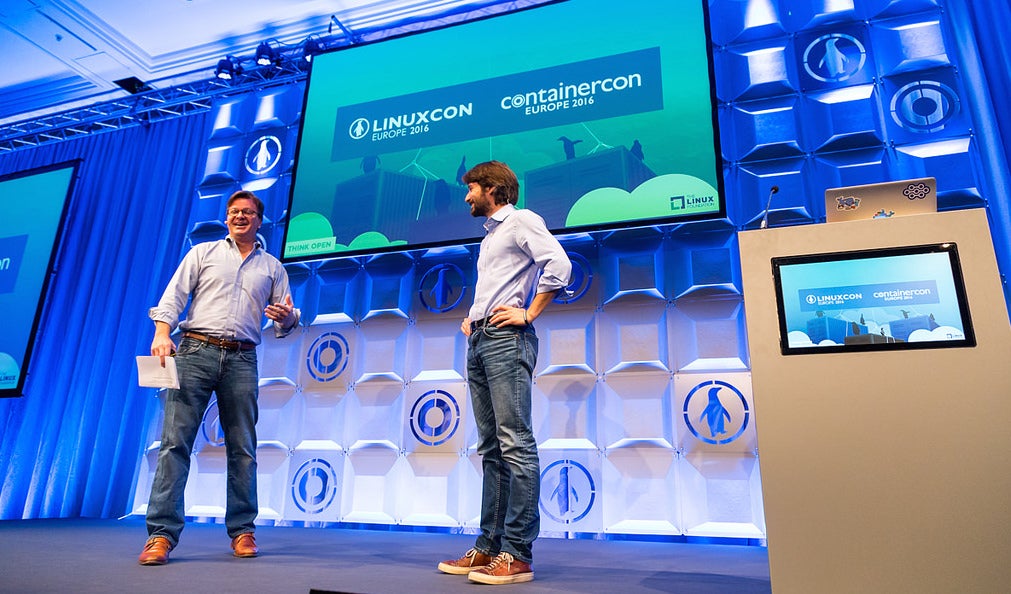
Watch open source leaders, entrepreneurs, developers, and IT operations experts speak live next week, Oct. 4-6, 2016, at LinuxCon and ContainerCon Europe in Berlin. The Linux Foundation will provide live streaming video of all the event’s keynotes for those who can’t attend.

Sign up for the free streaming video.

The keynote speakers will focus on the technologies and trends having the biggest impact on open source development today, including containers, networking and IoT, as well as hardware, cloud applications, and the Linux kernel. See the full agenda of keynotes.

Tune into free live video streaming at 9 a.m. CET each day to watch keynotes with:

  • Jilayne Lovejoy, Principal Open Source Counsel, ARM

  • Solomon Hykes, Founder, CTO and Chief Product Officer, Docker

  • Brian Behlendorf, Executive Director, Hyperledger Project

  • Christopher Schlaeger, Director Kernel and Operating Systems, Amazon Development Center Germany

  • Dan Kohn, Executive Director, Cloud Native Computing Foundation

  • Brandon Philips, CTO, CoreOS

  • Many more

Can’t catch the live stream next week? Don’t worry—if you register now, we’ll send out the recordings of keynotes after the conference ends!

You can also follow along on Twitter with the hashtag #linuxcon. Share the live streaming of keynotes with your friends and colleagues!

Vendors and Customers Gettin’ Open Sourcey With It

I’ve written extensively how open source has leveled the playing field between technology vendors and their customers. I’ve also written about how “users” — aka, the customers of vendors — are now driving much of the software innovation in the world by leading several large open source ecosystems. If you’re a technology vendor, this development may frighten you, and for good reason — you grew up believing that you were the one true source of innovation. That is simply no longer the case.

This doesn’t mean that vendors don’t drive any innovation, but rather they must learn to collaborate with their customers and end users on innovation. The vendors that figure this out will run the world. As for those who don’t, well… we all remember what happened to the dinosaurs, right? Basically, if you’re a technology vendor right now, you have a fiduciary duty to work with your customers on open source collaboration. If they’re already open source savvy — great! Time to work with them. And if they’re not open source savvy, this is a great opportunity to enable their inner open source advocate and develop a working collaboration that will benefit both parties extensively. And that’s what I want to focus on in this article: open source enablement of your customers.

Basically, “open source enablement” seems to be about teaching customers how to embrace open source principles, both in terms of internal processes as well as external communities and ecosystems. As I’ve worked with many engineering and product teams over the years, I’ve seen many open source initiatives fail to reach their potential because of ingrained cultural obstacles that usually manifest in the form of corporate inertia that blocks forward progress.

This is where you, good vendor, can lend a hand — assuming you are also not blocked by the same internal obstacles. Open source enablement for customers has to focus on internal processes as much as or more than external participation and collaboration. In fact, I think a lot of companies miss the memo on internal processes because they are blinded by the “sexiness” of external projects and the success it engenders. Before you can run, you must learn to walk, and that means taking a good hard look at how your teams work together and ensuring that their processes are optimized for any kind of collaboration, whether internal or external. A good vendor will recognize this and see it for the opportunity that it is. For more on “innersource” principles, I highly recommend taking a good look at the fabulous innersource commons materials assembled and produced by Danese Cooper and her team at PayPal.

Strategically, there are three ways to look at this, all of mostly equal importance, although I might attach a hair of extra weight to #1, below:

1. Keep existing customers on your technology platforms so that they will be ready for a conversation about your broader vision when the time is right — that would be later. If you turn this conversation into one about direct sales, you will lose.  Of course, this is a much easier conversation to have if your platforms are open source. If you need to understand more about that, I’ve written extensively on that subject, as well. Many of your customers probably just use your standard technologies and platforms without understanding how they’re made, what open source components are already inside, and how they got there. They may not even understand what possibilities exist for them to benefit from open source-style collaboration on your platforms.

This is where you sell them on your broader open source vision that includes innersource principles as well as how embracing those principles opens up a gateway to collaborative innovation with you. Do this, and selling the rest of your technology vision becomes a whole lot easier. The win for the customer is that they get the benefits that come from fully embracing the open source way of collaborating and breaking down silos. You, the vendor, benefit because you’re their partner in such activities, opening the door to more and deeper solutions in the future. Go beyond just selling the product and sell the whole vision. This generally applies no matter what your occupation, but open source adds a few wrinkles in the equation that you would do well to master.

2. Expanding your customer base. If you execute fully on #1, above, then you can make a stronger case for adding new customers, in multiple directions. Those that have yet to embrace the open source way and still haven’t become your customers will perhaps have more reasons to adopt your solutions after you are able to demonstrate and document success from the other customers mentioned above. But there’s another group of potential customers: those that have adopted open source software for various workloads. If they already benefit from open source code, what is the benefit to them of buying from you? This is tricky because many of these shops have convinced themselves that they don’t need vendors and are perfectly happy with a “DIY” approach.

If you are able to execute on #1, above, and give those customers a chance to shine, they will become your best advocates to the rest of the world. Now, not only do you have a strong extended portfolio of open source solutions to sell (presumably, right?), but you can then add the idea of being a partner in IT transformation. Demonstrate real increases in productivity that you can point to, and suddenly those DIY-only shops will begin to understand that vendors can help, too. The key is not to pretend that you have all the answers, but rather that you’re a good partner who will help them find the right solution and not abandon the open source aspects of their existing infrastructure. This is what will allow you to expand your customer base to both open source-savvy and unsavvy customers, as well as transform more of the latter into the former.

3. Expanding your ecosystem and, by extension, your influence on the technology world. If you execute on #1 and #2, above, you can readily point to an expanding group of customers who not only buy into the open source way but who have documented their success on your platforms. This means that when they interact with the upstream projects and communities, which they all eventually will, they will do so from the perspective of being your customer and your platform adopters.

The more that your customers participate in the upstream world, the more likely that upstream communities will see your platforms as something they need to support for future releases. This would help to counteract any industry trends towards your competitors. After all, if your customers are helping the upstream developers see increased value by supporting your platforms, then you’ll ensure the long-term viability, at a minimum, of your platforms and hopefully accelerate their growth.

So, when I hear anyone talk about “open source enablement” of customers, I actually interpret that to be three related things from a customer’s point of view: open source principles of collaboration (innersourcing), devops and IT transformation, and open source evangelism. If you can be seen as the partner that helps companies execute on those three things, it opens a lot of new doors for you.