As organizations of all sizes seek to transform themselves into digital businesses, the need for an agile IT infrastructure becomes ever more acute. Network virtualization (NV) can increase IT agility, according to emerging case studies and user feedback.
Here’s an example of one of the challenges in IT agility: A virtual machine (VM) can be provisioned in a matter of minutes. But the networking resources required to support that VM still often require weeks to provision. At a time when many IT organizations are trying to maintain control over application workloads that are being moved into public clouds (which are simpler to provision), lack of network flexibility has become a pressing issue for IT leaders.
GitHub has published The state of the Octoverse 2016, a very interesting report that offers an insight into how its 14 million users leveraged the hugely popular repository this year. Among them is a list of organizations with the most open source contributors, most popular coding languages, most used emoji reactions, new user interactions and much more.
The list of organizations with the most open source contributions is particularly interesting, because it shows Microsoft leading the pack with over 16,000 users. The software giant is followed by Facebook and Docker, with Google only coming in fifth place.
…The state of the Octoverse 2016 reveals that JavaScript is, by far, the most popular language used by GitHub users, followed by Java and Python. C++ is in sixth place, C# is in eight, and Objective C comes in 12th place.
Five Questions for Katherine Daniels: Thoughts on adopting DevOps effectively, the importance of empathy, and new essential skills for today’s ops professionals.
Katherine is co-author, along with Jennifer Davis, of O’Reilly Media’s Effective DevOps, and is presenting on the topic of “Building bridges with DevOps” at Velocity New York in September. We recently sat down to discuss what it’s like when an organization adopts DevOps, and how that transition can be improved. Here are some highlights from our conversation.
You’ve written extensively on DevOps—including the book Effective DevOps with Jennifer Davis. What do organizations usually get wrong when “going DevOps”?
One of the big issues I’ve seen is organizations that look to “DevOps” as a solution without a clear understanding of what problems they are trying to solve.
You’ve may have seen chatter on the internet about installing Linux on your Chromebook. Plenty of longtime Chrome OS users are doing it, and it allows the use of programs like GIMP (a Photoshop replacement), or Darktable, (a Lightroom alternative) as well as plenty of programs for video and audio editing. It’s a way to use your Chromebook for the few power-user features you might need. It’s also completely free and easier than you think.
Let’s walk through an easy setup that keeps Chrome OS and is able to run Ubuntu with the Xfce desktop and any applications you might need. You’ll be able to run both operating systems at once with a shared Downloads folder, a shared clipboard and web links opening in the Chrome browser you’re already familiar with. You can even run them side by side in a split window.
It would be an understatement to say that the security world tends to be full of hype and noise. At times, it seems like vendors virtually xerox each other’s marketing materials. Everyone uses the same words, phrases, jargon, and buzzwords. This is a complicated phenomenon and there are many reasons why this is the case.
The more important issue is why security leaders find ourselves in this state. How can we make sense of all the noise, cut through all the hype, and make the informed decisions that will improve the security of our respective organizations? One answer is by making precise, targeted, and incisive inquiries at the outset. Let’s start with a game of 20 questions. Our first technology focus: analytics.
Some of the popular and frequently used system resource generating tools available on the Linux platform include vmstat, netstat, iostat, ifstat and mpstat. They are used for reporting statistics from different system components such as virtual memory, network connections and interfaces, CPU, input/output devices and more.
As a system administrator, you may be looking for that one tool that can give your a good amount of the information provided by above tools, even more, a single and powerful tool that has additional features and capabilities, then look no further than dstat.
[[ This is a content summary only. Visit my website for full links, other content, and more! ]]
Let’s define Node.js in simple terms: Node.js allows you to run JavaScript on your server without a web browser. That’s it. Put like that, it sounds pretty dry, doesn’t it?
There’s more to it, of course. Node.js is actually JavaScript on steroids and has been expanded and enhanced to make building frameworks for complex, interactive websites easy. It also comes with a huge number of modules that let you effortlessly do you stuff that otherwise would be very difficult (like building custom web servers for your apps).
You can use Node.js to create anything from a simple webchat to an app that turns your mobile phone into a game controller. If you are using a videoconferencing utility over the web, the host is probably running on Node.js. If you are accessing your email and day planner through a web browser or playing online games, Node.js is sure to be somewhere in the mix, too.
Combine the mountain of modules mentioned above, a client-side framework (i.e., JavaScript that runs in the browser and makes your pages actually dynamic) like jQuery or AngularJS, and a database engine like MongoDB or Redis, and Node.js becomes a killer. But let’s not get ahead of ourselves.
Installing Node.js
Download the Node.js package from the Node.js home page and decompress it somewhere. As far as installation goes, that is basically it. You will find executable node and npm (Node Package Manager) programs in thebin/ subdirectory.
To access these tools from anywhere in your filesystem, you can add Node.js’s bin/directory to your $PATH environment variable, or you could soft-link the node and npm programs into an existing directory in your $PATH. I linked mine into the bin/ directory in my home directory.
As I said earlier, at its simplest, Node.js is a JavaScript interpreter. As with Python, Perl, and others, you can run a node shell into which you can type JavaScript/node commands:
(The console object shown above prints messages to stdoutand stderr). You could also write scripts and execute them from Bash. Type the following into a text file:
Save it as consoledemo.js and make it executable with chmod a+x consoledemo.js. Now you can run it like any other script.
This is all well and good, but with Bash, Perl, Python and so on, who needs a console interpreter for JavaScript? Where Node.js comes into its own is when it’s generating web pages and running the back end of web applications. So, let’s do a bit of that.
Web Applications
The most basic application, I suppose, is to pipe a text into a web page:
var http = require("http");http.createServer(function (request, response) { response.writeHead(200, {'Content-Type': 'text/html'}); for (i=10;i>0;i--){ response.write(String(i)+"<br />"); } response.end('Boom!!!');}).listen(8081);console.log('Server running at http://127.0.0.1:8081/');
Type that into a text file, save it as server.js, and run it with
> node server.jsServer running at http://127.0.0.1:8081/
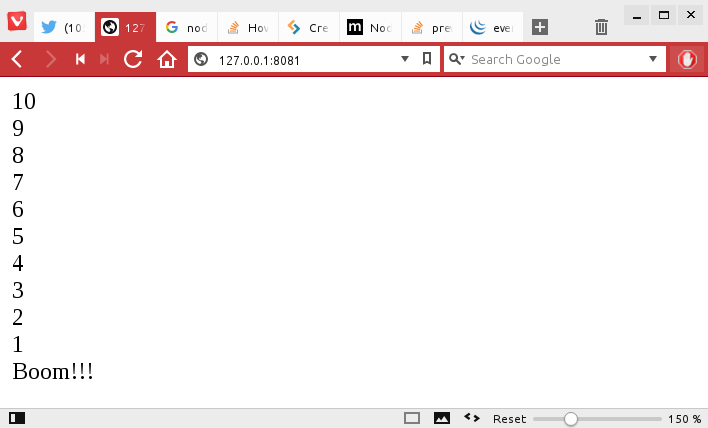
Now point your web browser tohttp://127.0.0.1:8081 and you will see what is shown in Figure 1.
Figure 1: Your first rendered web page using Node.js.
Let’s deconstruct that script to see what’s going on:
var http = require(“http”); loads in Node.js’s http module and creates an http object. You can then use this object to create a web server. http is a core module that comes by default with Node.js, so you don’t have to install it separately.
http.createServer(function (request, response) { actually starts the server. The callback function (a function that is passed as an argument to another function) tells the server what the content is going to be and how it has to respond to petitions from clients…
… like the line response.writeHead(200, {‘Content-Type’: ‘text/html’});, which tells the server to serve up text formatted with HTML tags.
The for (i=10; i>0; i–) { response.write(String(i) + “<br />”); } loop prints out the count down in a similar way we saw above on the console, but formatted with HTML tags. Notice you have to convert it into a String.
response.end(‘Boom!!!’); tells the server that, with whatever is included within the brackets, it has reached the end of the data to push out to the page.
}).listen(8081); tells the server to listen on port 8081.
You have already seen what the likes of console.log(‘Server running at http://127.0.0.1:8081/’); does. In this case, it just reminds you what IP and port to visit.
I know, I know! This is like PHP but in reverse — instead of having code peppered in your HTML, you have HTML peppered in your code. I realize this is terrible and that you wouldn’t usually write an app like this. You would do your darnedest to keep your design separate from your programming.
To get rid of the sloppiness, you could do something like this:
var http = require("http"), fs = require("fs");fs.readFile('./head.html', function (err, head) { if (err) { response.writeHead(500); response.end(); } fs.readFile('./foot.html', function (err, foot) { if (err) { response.writeHead(500); response.end(); } http.createServer(function (request, response) { response.writeHead(200, {'Content-Type': 'text/html'}); response.write(head); for (i=10;i>0;i--){ response.write(String(i)+"<br />"); } response.write('Boom!!!'); response.end(foot); }).listen(8081); });});console.log('Server running at http://127.0.0.1:8081/');
This does the same as the previous listing, but by using the Node.js fs(filesystem) module, you can read in HTML from files, head.htmland foot.html, and dump the contents into variables (head and foot), thus keeping design separate from code.
After making sure reading the file doesn’t bork on you — if (err) { … } — output the contents of the variables through a response.write() and response.end(). If you make head.html look like this:
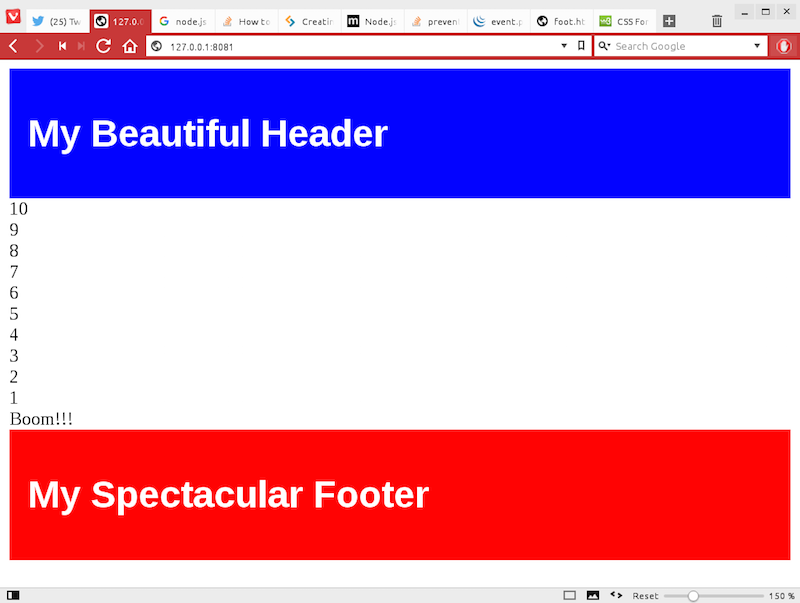
then you will end up with a web page like that shown in Figure 2.
Figure 2: A rendered page with caveman-style templating.
Again, this is not a terribly convenient way of creating templates for your pages. To see how to do templating right, you will want to look into Node.js’s pug and ejs modules.
You should also look into installing the express module, a web framework for Node.js. Where Node.js does JavaScript applications for the command line and the web, express only does web, but it does it very, very well. So much so that, once you get into Node.js programming, you will see it used again and again.
In the next article, I’ll explain more about npm, install some modules, and see what that brings to the table.
Docker containers are ephemeral by design. They come and they go like a herd of hyperactive squirrels, which is great for high availability, but not so great for preserving your data. Kendrick Coleman of EMC {code} demonstrated how to have both ephemeral containers and persistent data in his talk called “Highly Available & Distributed Containers” at ContainerCon North America.
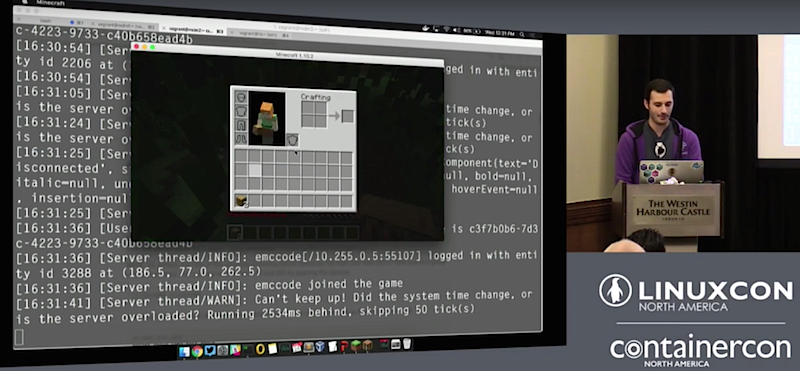
As container technologies become more complex, using them becomes easier. Coleman gave a wonderful presentation using a Minecraft game to demonstrate persistent data storage with ephemeral containers, and did it all live. This setup requires two technologies that were not available as recently as a year ago: Docker SwarmKit and REX-Ray.
SwarmKit is an easy-to-set-up cluster manager, in contrast with the older Kubernetes which is not easy to set up. SwarmKit is a major upgrade to Swarm, the native Docker cluster manager. Coleman said, “SwarmKit is where life is becoming more and more simplified. It’s integrated directly into the Docker engine. It’s an optional feature so you don’t have to start Swarm if you don’t want to. It has desired state, you’d be able to say, “I want this many types of containers running for this particular service”, as well as reconciliation, “If I lose a host” it’s going to restart those containers on a different host as well. It’s decentralized by having concepts of managers and workers, so now you can delineate work out to different things.”
SwarmKit provides load balancing, service discovery, rolling updates, and secure TLS networking with the option of using your existing certificates.
REX-Ray provides storage orchestration, a vendor- and storage-agnostic tool that links your persistent storage to your now-you-see-them-now-you-don’t containers. “REX-Ray is our Docker volume driver that we had written at EMC, and it’s still under heavy development, and it’s a completely open source project…REX-Ray is a super-simple installation and a super-simple architecture. It’s a stateless application that only needs a configuration file, and it’s a simple cURL-Bash command that installs a binary,” Coleman said.
Container technologies are improving so quickly that “Clustering, networking and failover with persistent applications has gotten exponentially easier than it was even four months ago”, said Coleman. See for yourself how easy in the video of Coleman’s presentation below.
You won’t want to miss the stellar lineup of keynotes, 185+ sessions and plenty of extracurricular events for networking at LinuxCon + ContainerCon Europe, Oct. 4-6 in Berlin. Secure your spot before it’s too late! Register now.