There’s a new community standard for container metadata in town, with contributors from Puppet, Mesosphere, Microscaling Systems, Container Solutions, Weave, Cloud66, Tigera and others. The release candidate of Label Schema is being launched Friday at Container Camp in London.
The initiative was inspired by Puppets Gareth Rushgrove, who pointed out how useful additional metadata about a container can be. Docker already provides the LABEL directive for adding arbitrary key-value pairs to any container image, and Label Schema aims to build on this by agreeing standards amongst the community for some common data.
“OpenDaylight fundamentally changed their [the Linux Foundation’s] world,” says Ward. “It’s been wildly successful. It’s the de facto standard open sourceSDN controller for the industry today.” …Later this month, Ward will be giving a talk at the OpenDaylight Summit where he’ll discuss an “Open Networking Umbrella Architecture” in which open source projects align and fit into a unified strategy for enabling up-stack application development.
If you are a person who is, or has been in the past, in charge of inspecting and analyzing system logs in Linux, you know what a nightmare that task can become if multiple services are being monitored simultaneously.
In days past, that task had to be done mostly manually, with each log type being handled separately. Fortunately, the combination of Elasticsearch, Logstash, and Kibana on the server side, along withFilebeat on the client side, makes that once difficult task look like a walk in the park today.
[[ This is a content summary only. Visit my website for full links, other content, and more! ]]
This week in Linux and open source news, Hyperledger’s membership continues to surge, Adobe to resurrect Flash on Linux, and more! Read on to stay informed on the biggest industry news.
The Linux Foundation’s Hyperledger Project continues to dominate the industry.
In 2014 Bloomberg hosted its first “Open Source Day” event, which was an experiment to see if we could combine the company’s long history of volunteerism with open source collaboration. We brought one of the Git project’s core developers to New York City, got about 30 employees signed up, and they spent the day learning how to build, test, and improve Git. The event was such a success that we’ve held a half-dozen more, and they’ve grown into weekend events with attendees from our Engineering team, local universities and colleges, and of course the open source community.
We’ve held events for Clang/LLVM, Python, Perl, NumFocus projects (matplotlib, NumPy, SciPy), and others. Attendees have had a lot of fun, learned a great deal about some of their favorite open source projects, and produced patches (some of which have been merged during the event!).
Our next events will be held on October 1 & 2, 2016, in both New York City and London. This time we’ll be working on the Node.js project, which combines two of the most important programming languages for Bloomberg: JavaScript and C++. We have a long history of behind-the-scenes development in the JavaScript community, but this event will bring more of our developers into the community to participate in open source collaboration.
If you’re interested in learning about the inner details of Node.js, and more importantly, how you can help improve it, register for one of these events! You’ll enjoy it, meet people who share your interests, and maybe become a regular contributor to Node.js.
If you’re a Node.js committer or experienced contributor and are willing to act as a mentor at one of these events, let us know! We’ll provide travel and lodging so you can focus on doing what you enjoy: writing code and helping others learn.
Organizations use open source software to gain competitive advantage in many ways: to speed up software delivery, save money on development, to stay flexible, and to stay on the leading edge of technology.
But using open source software, and especially integrating and redistributing it in products and services, carries with it added complexity and risk. Code coming in from multiple sources, under different licenses and with varied quality and maturity levels, can expose organizations to issues with security, integration, support and management — not to mention legal action — if the code is not properly managed.
That’s why companies that successfully leverage open source for business advantage, have established programs to manage their open source development processes.
“When open source is business critical, it predicates the use of professional open source management,” said Bill Weinberg, senior director and analyst of open source strategy at The Linux Foundation. “You need a clear management strategy that aligns with your business goals. And you need efficient processes to ensure that compliance does not discourage participation.”
Professional open source management requires a clear strategy, driven by your organization’s business objectives. It includes well-defined policies and a set of efficient processes that help an organization deliver consistent results with open source software. Below are the seven dimensions of a good corporate open source policy and processes, provided by Weinberg and Greg Olson, senior director of open source consulting services at The Linux Foundation.
Want to learn more about professional open source management? Watch a free replay of Bill Weinberg and Greg Olson’s recent webinar, “Open Source Professional Management – When Open Source becomes Mission-Critical.” Watch Now.
7 dimensions of open source management
1. Discovery – Provide guidance for developers on how to find and evaluate open source software for use in their work.
2. Review and Approval – A checkpoint to review architectural compatibility, code quality and maturity, known bugs and security vulnerabilities, availability of required support, and license compatibility.
3. Procurement practices – Review and approval for code that enters through commercial procurement, rather than downloading from the Internet.
4. Code management and maintenance – ensures that open source is reliably tracked and archived and that it is supported and maintained at a level appropriate for each application.
5. Community interaction – clear guidelines for developers who interact with outside community members and an approval process for contributions to open source communities.
6. Compliance program – ensures that OSS elements subject to license requirements are identified and implemented.
7. Executive oversight – important for long-term success. Executives should review OSS management operations, participate in and approve open source management policy and approve policy exceptions and significant contributions to community projects. Legal executives should review all new OSS licenses and any licensing policy exceptions.
I’ve spent a good bit of time explaining the ins and outs of open source products: what they are, how to make money with them, and what they are not. Namely, products are products, no matter the source code license they are published under. But there’s a journey that a software project must undergo before it can be accurately labeled with the moniker “product.” This journey includes, but is not limited to, the open source supply chain going from upstream bits to downstream product, as well as a bit of special sauce branding, complete with trademark, that applies only to the supported product. But, I can feel a bit of grousing bubbling just under the surface: Why does it have to be so complicated?
Why can’t I just offer support and services for a software project? Isn’t that much simpler? In theory, yes, it sure does sound simple. And yet, history tells us that this approach fails almost universally. The reason? Too many people confuse “product” with “project” without understanding the massive differences between the two and how their trajectories are orthogonal. In fairness, offering support and services for a software project is a great way to bootstrap a startup before you really fill out your product jacket (mine’s salmon pink! Follow it on Twitter!) But that’s only for the short term and not a good way to scale a company beyond a handful of customers.
There are several reasons why your software project is not a product. Here’s a list of differences between the two and what those differences mean for software and service providers as well as end users.
The goals of a project are fundamentally different from a product
A project is not a place to put too many constraints. Your project is designed to a be a hub of innovation, and you never know where or when the ideas that drive your future revenue will strike. It could come from your engineering team. It could come in the form of a collaboration between your engineering team and others outside your company. Or it could result from your team collaborating with another team in the same company. Or it could come completely out of left field because Joe random developer started a discussion thread titled, “Hey, wouldn’t it be cool if…”
Not only is your project where the innovation happens, and you can’t accurately predict the time and place of that innovation, it’s also the place where people will use your software for off-label purposes. Maybe their use case didn’t quite fit your mental models, or perhaps they saw a unique dimension for your software that you never considered. This is why you create an open source community and project space: to make a safe place for innovation to happen. Constraining that space with product requirements is precisely how one kills a community or prevents it from ever really launching.
Products Are Designed to Reduce Risk
Where projects are about innovation and expanding horizons, products are specifically designed to scope out the lines of where, exactly, a customer use case is supported or not. You don’t want your product vision to expand like our universe, infinitely in all directions. You need to constrain it if you ever hope to be able to support your customers and scale out your operations. This means reducing your risk, as well as that of your customers, even if it means saying no to developing new features for the time being.
Having watched many products crash and burn, with a few actually succeeding, I’ve deduced that there’s a magic line where products are just innovative enough to be highly valuable for customers, but constrained enough to be profitable for vendors or other service providers. More on that in this article’s conclusion. But for now, think of this simple summary: projects expand, where products shrink or stay in a steady state. Failing to sufficiently reduce risk and thinking you can easily support software you just downloaded from an upstream .org is what I call a product management fail.
Product and Project People Are Different
In keeping with the above themes, separate goals also mean that the people you want working on each will have very different skills. You don’t really want your product management people heavily involved in an upstream project, and your forward-thinking project engineers are sometimes (often?) ill-suited for making the product sausage. Inviting product management to participate in an upstream project is like inviting investment bankers to an artist workshop: “yeah, that’s cool, but can I *sell* it?” There are exceptions, of course, and I never say never.
Obviously, engineering directives and requirements have to come from somewhere and don’t spontaneously generate from the ether. And often the upstream engineers will have valuable insight for turning the product crank, but it’s a matter of defining who drives what. Let the creative folks do what they do best, and let those who know how to fine-tune software be the most productive with their limited time.
The Project Risk Curve Is not Conducive to Supportability
I mentioned risk before, so what am I really referring to? There are several elements of risk relating to technology, but I want to focus on two which seem to come up fairly often in the software world:
The risk of software failing, causing an outage, or otherwise resulting in lost time and/or money. I’ll call this “infrastructure risk.”
The risk of being locked into a particular product and vendor. We’ll call this “lock-in risk.”
If you do a thought experiment and plot out the risk curves of each, you’ll find that they are inversely related. How so? An upstream project has significant churn: lots of new code checked in regularly, with many developers from multiple sources. The result of this is two-fold: Because no company dominates this upstream project, the risk of being locked into a particular vendor is very low. Conversely, the risk to your infrastructure is extremely high. One would have to do much more vetting and, in many cases, modification of software before deploying in production compared to most vendor solutions.
Now take a downstream product based on that upstream code: It will be an older release, having utilized significant QE and product management resources to hone the end product into something usable and reliable. Thus, the risk to infrastructure will be much lower, but because you’re using a solution from a technology provider, the risk of lock-in is quite high. Perhaps not as high as with a proprietary product, but still high nonetheless. I view the plotting of this risk curve as below, with a dashed line indicating the sweet spot for profitability for the provider and value to the end user:
Conclusion
In this analysis, I hope I’ve helpfully explained the difference between a project and product, why they’re both useful, and why one should never try to shoehorn the goals of one into the other. They’re different spaces designed for different things. Each is useful in its own right but to very different ends. A smart technology provider will have a nuanced view of each and will know how to utilize them effectively.
I’ve been a big fan of Elementary OS Freya since it released in 2015. So, when I heard the developers had released the beta of the next iteration, Loki, into the wild, I immediately downloaded and installed. I went into this wondering how the Elementary team could improve on their already unbelievably smooth Freya. Well…they did; and in doing so created what I believe to be one of the most elegant and well-designed Linux desktops on the planet.
Before I get into this, you should know that, to some, the Elementary desktop looks and feels like that of OS X. Some time ago, however, I said that Elementary OS was not just the “poor man’s Apple” and that still holds true. It should also be said that Elementary OS Freya was downloaded over 1.2 million times with 73 percent of those downloads coming from closed source OSes.
Elementary OS founder, Daniel Foré says: “Rather than competing directly with existing open source projects, elementary seeks to grow the market share for open source software in general. And as we’ve seen with previous releases, that’s exactly what we’re doing.”
Elementary has also made progress on their mission to create Open Source jobs. With about $8,700 in bounties paid out during the Loki development cycle, their total payout comes to $17,521. But, what will interest you more are the improvements made over Freya—which is a very impressive feat.
Let’s take a quick glance at what has improved in the new release of Elementary OS.
Kernel
First, note that Loki ships with kernel version 4.4. That is a marked improvement over Freya (which was based on Ubuntu 14.04 LTS). Freya only recently upgraded to the 4.x kernel, which went a long way to improve performance and extending support for even more hardware. The changes between the 3.x kernel and 4.x are many. For more information on the Linux 4.4 kernel, check out this Linux.com article.
Beyond the kernel, we have to look at specific bits of the desktop—all of which come together to make a seriously impressive whole.
Indicators
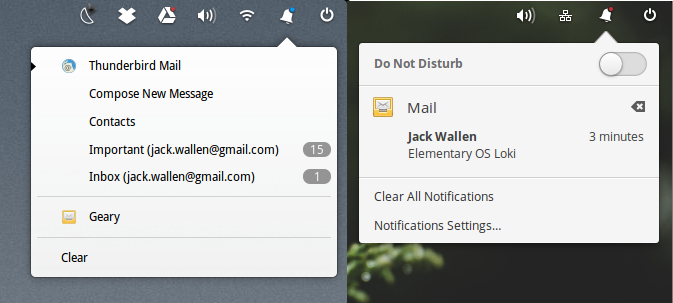
The developers have completely revamped the indicator system for Loki. The audio, network, bluetooth, power, and Notification Center indicators have all undergone major changes. Take a look at Figure 1. On the left, you’ll see the Notification Center for Freya and on the right for Loki.
Figure 1: The difference between Freya and Loki Notifications.
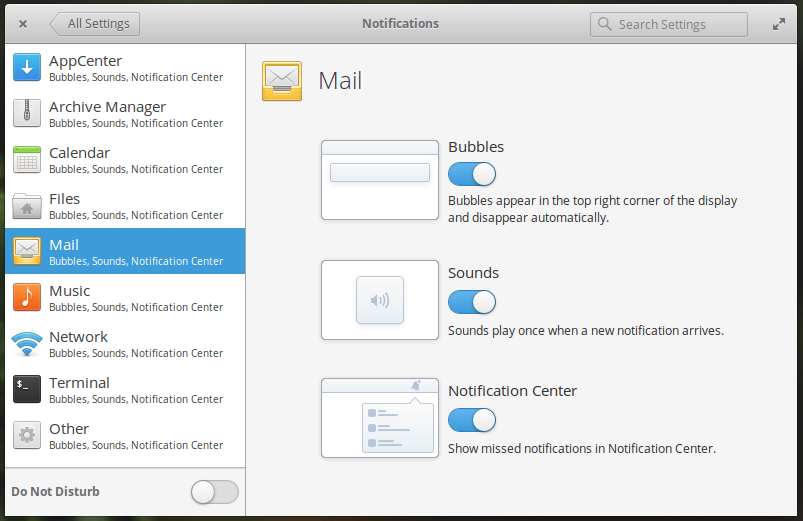
With Freya, you were only given new mail counts in the notification. Loki makes this much more user-friendly by listing the sender and subject of the incoming email. The only caveat is that you cannot enable/disable more or less information. It’s all or none. With the Notifications settings window (Figure 2), you can enable/disable Bubbles, Sounds, and Notifications for each supporting app (but you cannot define what kind of information is displayed—maybe a feature for the future?).
Figure 2: Enabling/disabling notifications for Loki.
New software
Loki adds a few “new” pieces to the puzzle. Some of them are serious improvements over previous releases.
Elementary OS Freya shipped with Midori. For some, that minimal browser was fine. However, the developers saw to it to make a shift in choice to Epiphany—a Webkit2-powered browser. You’ll still get that annoying message (from the likes of Google Drive) that you’re using an unsupported browser, but it works significantly better than Midori. Epiphany uses the same rendering engine as Apple Safari and brings improved performance, better website compatibility, per-tab processes, improved SSL support, security and stability enhancements, and an all-new web inspector. Epiphany also utilizes the OS keychain for saved passwords (which translates to your private data being encrypted and safe).
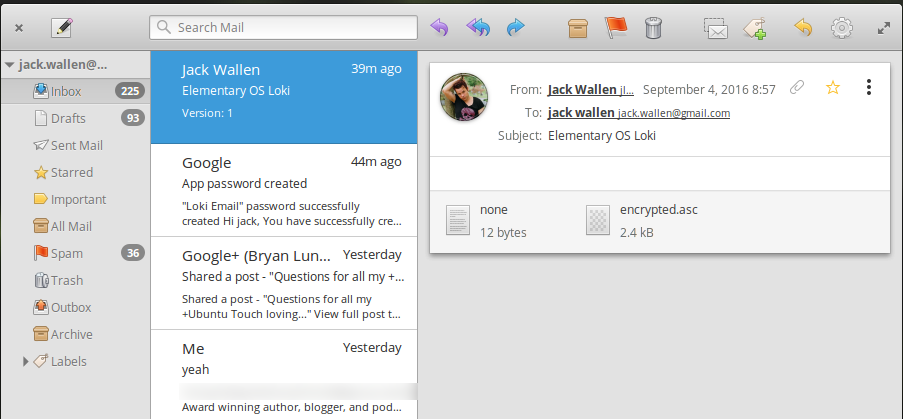
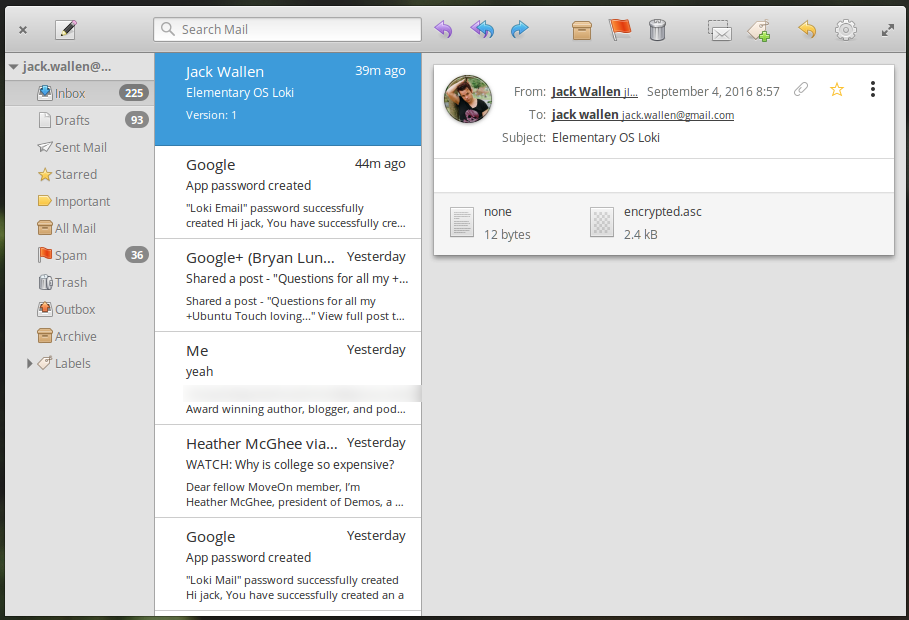
Another welcome addition comes by way of forking the Geary email client, from the now-defunct non-profit Yorba. The developers previously announced they would be continuing Yorba’s Geary email client, in the form of Mail. The new client looks very much like Geary, although it is very much improved. The Elementary team has added a new Always Show Images setting, redesigned the toolbar, and improved the overall look and feel throughout the app (Figure 3). Mail also now integrates into the new Online Accounts feature.
Figure 3: The official Loki Mail client.
Mail is a much-needed breath of fresh air, considering how the Linux desktop mail client space has become stagnant.
Speaking of online accounts, Loki does include a new system that will enable users to add their online accounts (which will then seamlessly integrated into the desktop). As of the initial release, however, the only supported services are Last.fm and FastMail. More services are under development (hopefully that means the likes of Google, Twitter, Facebook, Dropbox, etc.).
Calendar
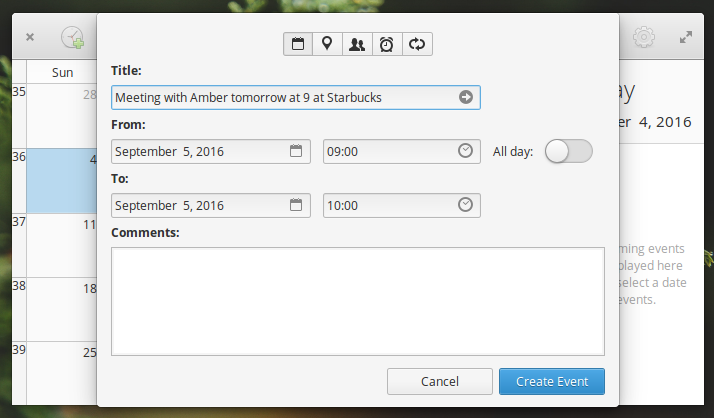
The improved Calendar app does something really impressive. If you open up the new event window (by clicking the + button in the Calendar main window) and typing something like “Meeting with Amber tomorrow at Starbucks” in the Title field (Figure 4), and hit Enter, the details will auto-fill in the correct places.
Figure 4: Easy calendar event creation with the Elementary Calendar.
There is one caveat to using the Calendar app. You will notice that the location feature is broken. As of July 11, 2016, when Mapquest discontinued direct title access, which effectively brought GNOME Maps to a halt. This isn’t a deal breaker, as it will still fill out the details for the meeting (you just won’t be given a map of your location).
New App Store
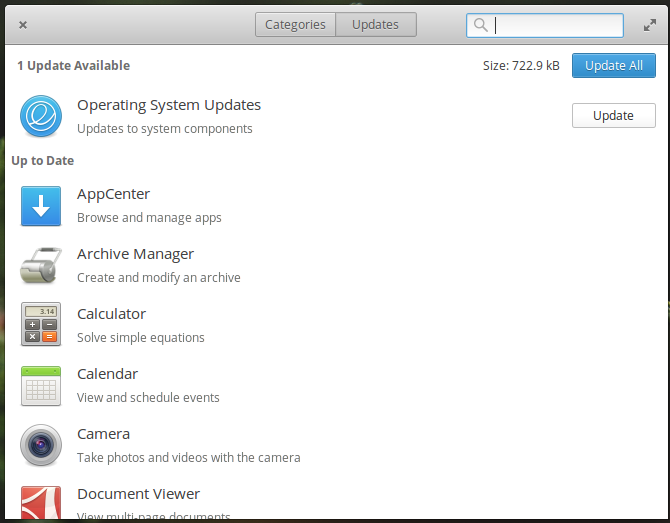
We can all rejoice that the Ubuntu Software Center is no more. The Elementary team has developed their own app store, called AppStore, that works as well as GNOME Software. It’s fast, reliable, includes an update section (Figure 5), and makes the process of installing and updating apps so simple any and all users will immediately feel at home.
Figure 5: The Elementary AppStore in action.
The final conclusion
If you have been using Elementary OS Freya, you should be incredibly excited about the prospect of seeing your platform of choice gain even more polish. For those that have never given Elementary a chance, Loki will be a perfect introduction to one of the most elegant and user-friendly Linux desktops on the market.
I highly recommend that every Linux user at least kick the tires of Elementary OS Loki. Elementary was the first distribution to permanently sway me from Ubuntu and it shows no signs of releasing me any time soon. And since today, September 9, 2016 is the official release day of Loki, now is the perfect time to find out if Elementary OS Loki can sway you.
Open source software and security will be fundamental elements of 5G, according to top executives at the 2016 CTIA Super Mobility conference here.
During yesterday’s opening keynote session, CTIA chairman and AT&T mobility president and CEO Glenn Lurie highlighted the role of open source software in the 5G roadmap. “We have to embrace open source, software-centric solutions. We know this drives flexibility and scalability with the growth of the network. It makes everything faster, better, and cheaper,” Lurie said.
It is often the illusive “H Factor” – the human element – that ends up being the weakest link that makes cyber-attacks and data breaches possible, sometimes even more so than hackers exploiting zero-day system vulnerabilities or employing new malware.
According to the 2016 Verizon DBIR, human errors are a major factor in most data breaches. This “human touch” is especially true with the growing mobility of employees and BYOD (Bring Your Own Device) policies that are becoming more widespread. Therefore, while technological cybersecurity solutions take centre stage in many businesses’ cybersecurity plans, addressing the human element is as important as the technological one.