In my previous article, What is an open source program office? And why do you need one?, I introduced the idea of an open source program office (OSPO) and discussed what they do, why a company would want to create one, and how to optimize them. In that article I focused on technology vendors and for a good reason—they were the first to embrace open source program offices strategically.
From IBM and Intel to Oracle and even Microsoft, open source program offices were all the rage at technology companies from 1999 through about 2005.
Linux is a free and open source operating system. However, Linux (and another open source operating system) can use and load device drivers without publicly available source code. These are vendor-compiled binary drivers without any source code and known as Binary Blobs. Die hard open source fans and Free Software Foundation (FSF) recommends completely removing all proprietary components including blobs.
Top 5 Reasons to Avoid Binary Blobs
Modification & distribution – Binary blobs can not be improved or fixed by open source developers. You can not distribute modified versions.
Reliability – Binary blobs can be unsupported by vendors at any time by abandoning driver maintenance.
Auditing – Binary blobs cannot be audited for security and bugs. You are forced to trust vendors not to put backdoor and spyware into the blob.
Bugs – Binary blobs hide many bugs. Also, it can motivate people to buy new hardware.
In this tutorial, we will install Django 1.10 on a Ubuntu 16.04 server. Django can be installed on a server in many ways, in this tutorial, I will show you 3 different ways to install Django:
Django installation with pip.
Install Django with virtualenv.
Install Django fron it’s github repository.
When the Django installation is done, I will show you the first steps to start a new project with the Django web framework.
OpenOffice, once the premier open source alternative to Microsoft Office, could be shut down because there aren’t enough developers to update the office suite. Project leaders are particularly worried about their ability to fix security problems.
“It is my considered opinion that there is no ready supply of developers who have the capacity, capability, and will to supplement the roughly half-dozen volunteers holding the project together,” Hamilton wrote.
Nmap was released 19 years ago on September 1. Seems like it has been around for ever. Nmap (Network Mapper) is a security scanner and open source software originally written by Gordon Lyon used to discover hosts and services on a computer network. Nmap first appeared in an article in Phrack magazine back in 1997. Instead of cake, nmap project celebrating open source style with a new release!
Nmap was designed to rapidly scan large networks, although it works fine against single hosts. Nmap uses raw IP packets in novel ways to determine what hosts are available on the network, what services (application name and version) those hosts are offering, what operating systems (and OS versions) they are running, what type of packet filters/firewalls are in use, and dozens of other characteristics. While Nmap is commonly used for security audits, many systems and network administrators find it useful for routine tasks such as network inventory, managing service upgrade schedules, and monitoring host or service uptime.
A lot has been written recently about open source products and services, namely the former doesn’t really exist and the latter is the exclusive way forward. As a self-proclaimed open source product expert, I have opinions and would like to share them. Firstly, the blending of enterprise software and services long predated the emergence of open source. And secondly, open source is a development model, not a business model, and it has very little actual impact on the ultimate delivery of products and services.
But first, a refresher on open source products especially as it pertains to how the open source sausage is made.
As I mentioned previously, software product is about so much more than code. Yes, the code is obviously an important component, but equally important are usability, ease of integration, management, and time to value, which I try to itemize in the graphic above. Implied as part of the total solution is product delivery and support, which would include configuration, customization and “day 2” management issues.
In many cases, internal IT teams simply don’t have the resources on hand to fully deploy a new solution and require the aid of a vendor or consultant to get the most out of a given technology. The point is, to look at a product as merely the sum total of its bits is to miss the forest for the trees; any modern generalized solution for complex problems will entail not only the bits, but also packaging, delivery, customization, et al.
This is nothing new. The idea that a software product or solution goes beyond the bits and bytes of its compiled code is about as old as software itself. Whenever I give the talk “It Was Never About Innovation,” I like to walk the audience through a thought experiment: what would change if, overnight, all the world’s software were to become open source? The answer: not much.
Complex data-driven applications that run large enterprises and require an army of consultants to configure properly would become… complex data-driven applications that run large enterprises and require an army of consultants, except now the underlying code would be open source. Big whoop — that changes very little in terms of usability and time to value. The larger point is this: the rise of open source hasn’t changed the idea of software products and solutions, which were always greater than the sum of their collective parts. The big difference is that now, with open source ubiquitous, it’s much easier to plug in multiple components and go to market that much more quickly.
Once Again: Open Source is not a Business Model
I will repeat this ad nauseum until the greater technology world begins to grasp it. Open source is a development model. It’s one way of getting a massive network effect of developers that allows companies to build a product more iteratively, responsively, and dynamically. It is not, nor has it ever been, a business model. The reason that “open source business models” have lost their shine in recent years is because there never was such a thing. This is not to say that open source can’t be an important component of product *building*, and it can be one vehicle for seeding the world with your software (but not always — see Splunk for a successful example of non-OSS “freemium” software), but it is not particularly valuable for selling a given solution.
If your product doesn’t add value for the customer, they’re not going to buy it, regardless of its anti-lock-in properties. Customers these days don’t want vendor lock-in, which drives them to open source solutions, but they buy products that solve their problems. Open source becomes the third or fourth bullet in a sales deck as a suggestion that the product is based on software that may be more easily replaced. Any higher than that, and you have problems with your product or explaining its value.
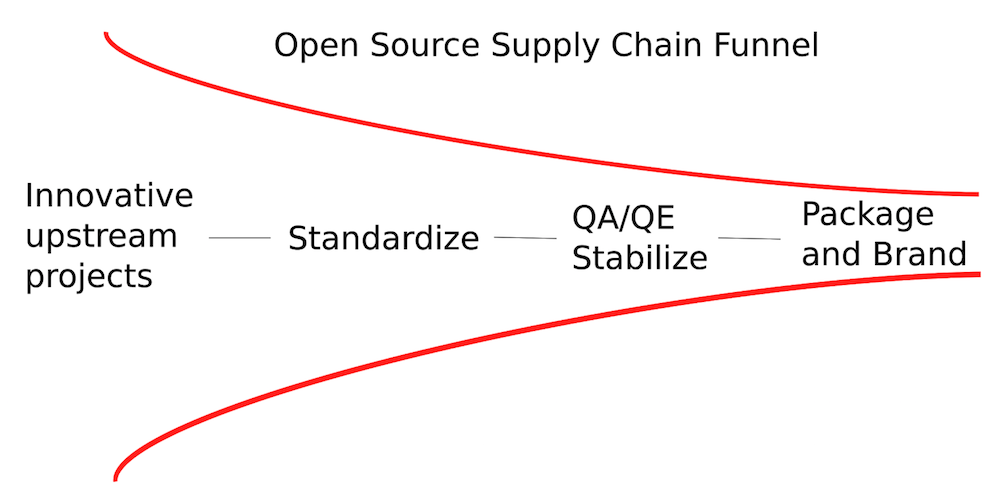
The reason Red Hat makes money is because they are able to take a collection of open source software, package it together in such a way as to reduce complexity for IT shops, and sell the whole solution. This is not any different from many other software vendors who do pretty much the same thing. The fallacy in asking the question, “How does Red Hat make money?” is that it implies that Red Hat’s value proposition is that much different from other vendors. Their ability to package and sell is only tangentially related to their open source bona fides, but their ability to build a product and quickly add value, on the other hand, has *everything* to do with open source. This is the difference.
While Red Hat is the only profitable “pure play” open source software vendor, we really need to expand what we mean by “open source vendor.” By everyone’s count, open source is packaged with software products all the time. EMC, for example, uses all kinds of open source software with its products and also makes lots of software contributions to OpenStack and other major open source communities. Does that make EMC an open source product company? What about Microsoft, which has also started to bundle in open source components with its products and services, especially with Azure.
What, exactly, constitutes an open source product company? It’s an open question, and my sense is that every vendor, if not already, will very soon become an open source product company. To suggest that Red Hat is the only successful open source product company is to ignore all the changes that have been taking place in the world of software products and to apply far too narrow a standard.
Back to the “Death of Infrastructure Software”
Which brings me back to Boris Renski’s claim that “infrastructure software is dead,” by which he means open source is about services and support, not product. To which I would ask, what movie has Boris been watching? By his own argument, infrastructure software has been dead for years, because services and support are baked into the enterprise software model. To suggest that we are in a new age of services and support is to ignore everything that has taken place in the IT realm for the past 25 to 35 years. This is not to say that he’s wrong, per se — just that he’s a little late to the party.
One of the great innovations in software licensing, the software subscription model, became popular for primarily two reasons: it became an OpEx line item, as opposed to CapEx, and it lumped together software, services and support, instead of breaking them out individually, greatly simplifying the process of acquiring various solutions and accurately predicting their impact on future budgets. The rise of software subscriptions is an implicit recognition of the reality: that software and services are forever intertwined.
Don’t think of them as separate items. To do so as a vendor is to risk losing your value prop to customers, and to do so as a customer is to risk missing out on innovations that will improve your company’s efficiency.
Traditional security processes and ‘security says no’ can often seem to block progress in agile environments but there are ways to build software securely without compromising agility. It’s all about ensuring security is built into your development best practices so that everyone can build securely without having to be an expert.
Trusting your team
Security teams in agile environment can’t review every codebase change even if they want to. Work and deployments happen too quickly and too often so it’s just not feasible for them to review everything.
There are times when you download a .deb file that simply must be installed. Once on your machine, you run the dpkgcommand on the file only to find yourself in a quagmire of dependencies. Unfortunately, that necessary piece of software cannot be found in a standard repository. Instead of trying to wade through the dependency hell that dpkg can put you through, why not let apt take care of the heavy lifting?
“But how?” you may ask. Believe it or not, the solution lies in creating your very own localized repository that apt can recognize. Because apt will now see your local repository, it can install any .deb file placed in the local repo directory and then resolve the associated dependencies when you issue the command to install the package.
That’s handy. It’s also really easy. Let me walk you through the process.
Necessary addition
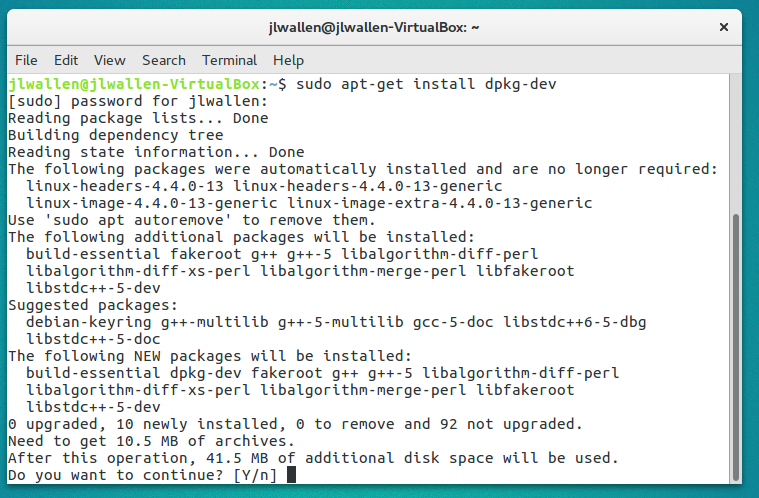
The first thing you must do is install the dpkg-dev package. Do this by issuing the command sudo apt-get install dpkg-dev. You will immediately be greeted by several necessary dependencies that must be installed (Figure 1). Fortunately (as is the point of this setup), apt will handle all of those dependencies.
Figure 1: Installing dpkg-dev requires a few dependencies to be resolved.
Once you’ve installed the dpkg-dev package, you’re ready to move on.
Creating the directory
You must have a directory on your system that will serve as the repository. This folder will contain the .deb files you want to install with the apt package manager. We’ll create the folder /usr/local/mydebswith the command sudo mkdir -p /usr/local/mydebs. With that folder created, you can now move your .deb packages. Say those packages are located in ~/Downloads. Issue the command sudo mv ~/Downloads/*.deb /usr/local/mydebs to move the files into the newly created repository.
The executable script
We now must create a script that will use the dpkg-scanpackages (which will already be installed on your system) tool to scan the local repository and output the results of that scan into a compressed file that apt-getcan then read and work from.
Create the new file update-mydebswith the following content:
Save the file and then give it executable permissions with the command:
chmod u+x update-mydebs
For running the command, you have two options:
Keep the file in the location you created it, knowing you will always have to run the file from that location (as in sudo ./update-mydebs)
Move the file into /usr/binso that it can be run globally
Personally, I prefer to move the file into /usr/bin(for the sake of ease). You might prefer to go the localized route. Either way, the script will work as needed.
Edit sources.list
The next step is adding a line to your /etc/apt/sources.listfile. This is necessary in order to make apt aware of the local repository (otherwise, it wouldn’t know of its existence). To take care of this step, open up the /etc/apt/sources.listfile in your favorite text editor (mine being nano) and add the following line:
deb file:/usr/local/mydebs ./
Update and run
Finally, you can now update apt and then install the .deb files without having to work with dpkg. Here’s what you must do.
Go back to the terminal window (the one you’ve been working with this whole time)
Issue the command sudo update-mydebs(or sudo ./update-mydebs, if you’ve opted to not move the script into /usr/bin)
Once the update-mydebscommand completes, issue the command sudo apt-get update
At this point, apt will now be ready to install any .deb file contained within the /usr/local/mydebs repository. All you have to do now is issue the command sudo apt-get install PACKAGE(where PACKAGE is the name of the package to be installed).
When you do run the installation command, you will have to okay the installation of an unverified package (what you’ve added to the local repository).
What’s also really nice about this setup is that any package you add to the local repository will also be found in yourapt front end (e.g., GNOME Software or Synaptic). You can add the .deb files to /usr/local/mydebs, run the updates and then install the software with your favorite GUI tool.
The only thing you have to remember is that any time you add a new .deb file to the /usr/local/mydebsdirectory, you must once again issue the commands sudo update-mydebsand sudo apt-get update (otherwise, apt will not be aware of the new package).
Make it network-able
If you happen to have a number of Linux machines on a network, you can avoid having to create these local repositories on every machine by housing all of the .deb files on a Samba file server. With that Samba share mounted on each local client, you can adjust the update-mydebsscript to reflect the path to the shared folder as well as the sources.list entry.
That does mean each client will have to have the dkpg-dev package installed and the update-mydebs script as well as all of the commands will have to be issued individually. This allows the .deb files to be housed on only the Samba share (thus saving space and time). It requires a bit more work on the front end, but it could save you from having to constantly copy .deb files over to numerous machines. Once step less is always nice.
Avoiding dependencies is worth the trouble
I remember, so long ago, when installing Linux apps could be the cause of much hair pulling. Times have changed and Linux has evolved into an incredibly easy to use platform. Along with its ease of use, comes a level of flexibility few platforms can match. With the ability to create your own local repositories, to avoid having to manually resolve dependencies, you see some of that flexibility in action. What little trouble this setup adds to your daily grind is very well worth the time involved. Not only will you enable the installation of software outside the standard repositories, you can avoid the headaches that were once an inevitability.
As core network virtualization technologies go, it’s hard to imagine one that is more strategic than Open vSwitch (OVS). OVS is now the network foundation for most VMware environments and deployments of OpenStack. Because of that dual role it’s only natural that OVS would become an open source project managed by The Linux Foundation, which means a new Open vSwitch future is taking shape.
With so many vendors building platforms based on OVS technology that wavs owned by VMware, there was always going to be some concern over who is setting the OVS agenda. Becoming a Linux Foundation open source project takes that issue off the table.
“We wanted to make the process a little more formal,” says Justin Pettit, a senior staff engineer for VMware. “Customers now don’t have to be worried about being locked into a virtual switch.”
Red Hat’s Project Atomic, best known for its lightweight containerized operating system Atomic Host, actually isn’t a “project” per se, but an overall brand for myriad container projects.
There are more than 30 GitHub repositories under Project Atomic nameplate. Some are primarily Red Hat open source projects and others with a wider community based on the Linux, Docker, Kubernetes stack.
The projects include the Atomic command-line interface, patches to Docker, public Ansible playbooks, Atomic builder bundle and more. The OS upgrade OSTree project, for example, grew out of Gnome and has a growing community.