Chinese search engine giant Baidu now has an open source project in the same vein: a machine learning system it claims is easier to train and use because it exposes its functions through Python libraries.
PaddlePaddle — “Paddle” stands for “PArallel Distributed Deep LEarning” — was developed by Baidu to augment many of its own products with deep learning.
Baidu touted PaddlePaddle’s speech transcription in Chinese, either for transcribing broadcasts or as a speech-to-text system to replace keyboards in smartphones. The company claims it needed 20,000 hours of audio as training material to achieve these results with its framework.
As organizations fiercely compete to hire top security practitioners, it’s important to be aware of how big the problem is, which skills they need, and how they can compensate for a lack of talent to stay secure.
The Problem Is Severe
Experts agree: the lack of talent is a major problem across the economy.
“There is a severe security skill shortage in businesses,” says Owanate Bestman, information security contract consultant at Barclay Simpson. “We see the general economic slowdown hasn’t affected job flow at all within security.”
Things are looking up for the Internet of Things. 80% of organizations have a more positive view of IoT today compared to a year ago, according to a survey of 512 IT and business executives by CompTIA. “This reflects greater levels of attention from the C-suite and a better understanding of how the many different elements of the IoT ecosystem are starting to come together,” says CompTIA. Here are the highlights from this and other recent surveys:
How big is the IoT and how fast is it growing? The number of connected things, from computers to household monitors to cars, is projected to grow at an annual compound rate of 23.1% between 2014 to 2020, reaching 50.1 billion things in 2020.
Remember the days when technology platforms sat in silos and our fierce allegiance to them did too? “We’re a Mac shop,” admins would announce. “We’re all in on Windows,” another might say.
Those days are quickly fading, along with the barriers that used to separate platform and infrastructure technologies. Instead, we are moving toward a world of containers, multiple instances of virtual machines, and multiple operating systems working in tandem. This is especially true in data centers, and open source tools are helping to drive the trend.
There is a pronounced need for ways to run applications on multiple types of infrastructure, ranging from bare metal to virtual machines to containers to the cloud. That’s whereHabitat comes in. It’s an open source project focused on “automation that travels with the application.” It has pedigree, too. Habitat comes from the makers of the venerable configuration management and automation platformChef, which, likePuppet, has helped to optimize many heterogeneous technology environments.
According to Habitat developer and Chef CTO Adam Jacob: “Habitat exists to solve the problem of how we build, deploy, and manage applications…Our software becomes an example ofConway’s Law in action. The deep silo-ing of responsibility present in most enterprises drives us to design software specifically for one silo or another: we build security software, or we build application deployment software, or we build configuration management software. If we endeavor to escape this trap by designing solutions that cut across the silos, we fall prey to another issue: we’re forced to integrate into every silo’s existing software toolchain.”
Application Automation
Habitat is intended for building, deploying, and managing applications assuming that you are taking the application’s perspective on the problem. Habitat’s developers have a succinct phrase for summing this up: application automation.
Habitat insulates application execution from the dependencies of the environments that they operate in. So the applications become cloud- and platform-agnostic. Other orchestration tools require you to lay down the roots that an application will run on, and the roots needed for management, reconfiguration, and more. That produces a lot of extra workloads.
Habitat puts automation and management requirements for an application in one package with two components: 1) a flexible software packaging system; and 2) a supervisor that manages the lifecycle of the services declared in the packages. According to Jacob: “The supervisor component is where the run-time magic happens. Each supervisor can be joined with many others in a ‘ring,’ with the service it manages formed together into service groups. These supervisors can then handle ensuring the application has the correct configuration, has the right secrets, is in the correct topology, coordinates dynamic software upgrades, and more.”
The Chef-based team behind Habitat observed what it refers to as the “production cliff” — the difficulty in application management that arises when you get close to production. The DevOps community is familiar with this problem. Rather than forcing the deployment of more and more infrastructure and management software as you approach production, Habitat removes infrastructure contingencies.
Is Habitat meant to replace the container-centric tools of the moment, including Docker, Flocker, and Kubernetes? No, Habitat can be thought of as a close relative, but it is completely ecumenical when it comes to running on bare metal, virtual machines, or on PaaS platforms.
“We can take an application, wrap it in a layer of application automation, and the resulting package can be deployed on the infrastructure or runtime that suits it best. If your application has hard requirements on physical infrastructure (SAN settings, network topologies, GPUs, etc.), you can deploy it there, and manage it the same way you manage the software that deploys on top of a PaaS, or in a container,” said Jacob.
The best way to get familiar with Habitat is to walk through the free demonstrationfound here, and you can also walk through a tutorial,launchable here. The demonstration is very telegraphic. Essentially, it allows you to download and run existing packages, creating services with them. If you have experience with Linux package management, you’ll find the process to be very intuitive. The demo will take you about 10 minutes, and is eye-opening.
“Habitat is technology that simplifies the complexity of how we build, deploy, and manage our applications,” Jacob reports. “It empowers the teams that need to collaborate in order to deliver the future; and accelerates the speed with which we can get a better experience out to our users.”
Devops and cloud computing go together like chocolate and peanut butter, but you can have one without the other.
Devops strongly benefits many enterprises by encouraging more continuous development and deployment by bringing some operations capabilities to in-house programmers. The business case for continuous everything is easy to make, although these benefits vary from organization to organization.
It’s easy to attribute the rise of devops directly to the rise of cloud computing. After all, cloud computing also assumes continuously updated applications and infrastructure. Thus, many enterprises are looking at devops as the path to their cloud strategy. But that may not be the right approach.
Infinera today announced software-defined networking (SDN) for transport networks used in the long-haul, metro, and data center interconnect (DCI) markets. The new product — Xceed Software Suite — has some pretty sophisticatedSDN features, including the use of containers for “slices” of the transport network.
While SDN is used in various domains, including the data center, on-premises at enterprises, and in telco central offices, Pravin Mahajan, director of product marketing with Infinera, says SDN in metro and long-haul transport networks has lagged innovation in those other domains.
“Transport networks are hard,” says Mahajan. “SDN is about taking the control plane to software in the cloud. But in transport, these control planes are all distributed across the network. You need to coordinate state across all network elements.”
Infinera took a fresh look at control and built its SDN controller from the ground up with OpenDaylight source code.
In a previous article, I talked about the Ring communication app. The article proved quite popular and aside from drawing a bit of attention — or maybe because of it — that article also drew some criticism, including “What about Tox?” That’s a totally fair question, so here we are.
About Tox
I have talked about about TOX elsewhere, albeit very briefly. And, when I saw the turn Skype was taking, I re-wrote parts of the ever-evolving Multimedia section in Ubuntu User magazine and included Tox as a recommended IM/video conferencing solution, with the caveat that it was still rough around the edges. Some time has passed since then, and now it’s time to check out TOX and see how the project is coming along.
Tox is open source, encrypts messages, uses a P2P network to relay messages, and has clients for a wide range of platforms, including mobile devices. So far, so cool. What Tox isn’t is one, defined, closed application. It is actually a bunch of projects that revolve around the central toxcore project. In consequence, there are several clients and other bits and pieces you can use to communicate over Tox. Because most of us are end users, I’ll look at the project from that point of view and show how to get some clients up and running.
It seems that no official PPA for qTox is currently supported for Ubuntu, and the instructions on the Tox site are outdated and do not work. Don’t despair though. Although the site recommends compiling from source if you can’t install from a repository, there will be no need for that today. The qTox’s GitHub site says there are packaged versions of the client for many of the most popular distros compiled by a kind openSUSE user.
To install qTox on Ubuntu, for example, you can do the following:
Installing on openSUSE was surprisingly simpler: Just click on your version of openSUSE in the link above, and Yast does the rest.
The uTox client is even easier to install. The project developers supply a package that is statically compiled — no need to even modify repositories, install dependencies, and so on. Just download, and decompress with
tar xvf utox_linux_x86-64.tar.xz
An executable file called (unsurprisingly) utox will appear in your folder. Run that and you’re in business.
Antox is the most popular Tox client for Android and you can install it from Google Play.
Profiles
uTox has the added advantage of being more lightweight than qTox, but at the cost of features. One such feature that makes me favor qTox over uTox for the desktop is its easy profile import/export feature. qTox allows you to import profile files from over clients (like uTox), so you can go from uTox to qTox and not lose your contacts or details. But you can’t do this the other way around, because uTox has no easy way to import profiles.
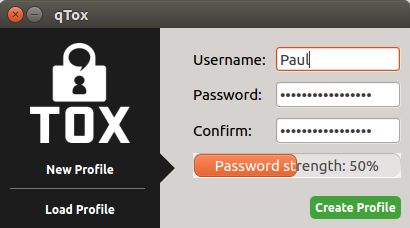
Figure 1: Setting up a profile in qTox entails picking a username and setting a password.
qTox’s profile import/export feature comes in handy also when you want to port your profile to another device, such as your smartphone. To do this, set up your profile on qTox by clicking on the profile picture and then scroll down to the bottom.
You will see a series of buttons that allow you to manage your profile and password (Figure 1).
The one you need is, of course,Export. Click that and then choose a place in which to store the Tox profile file.
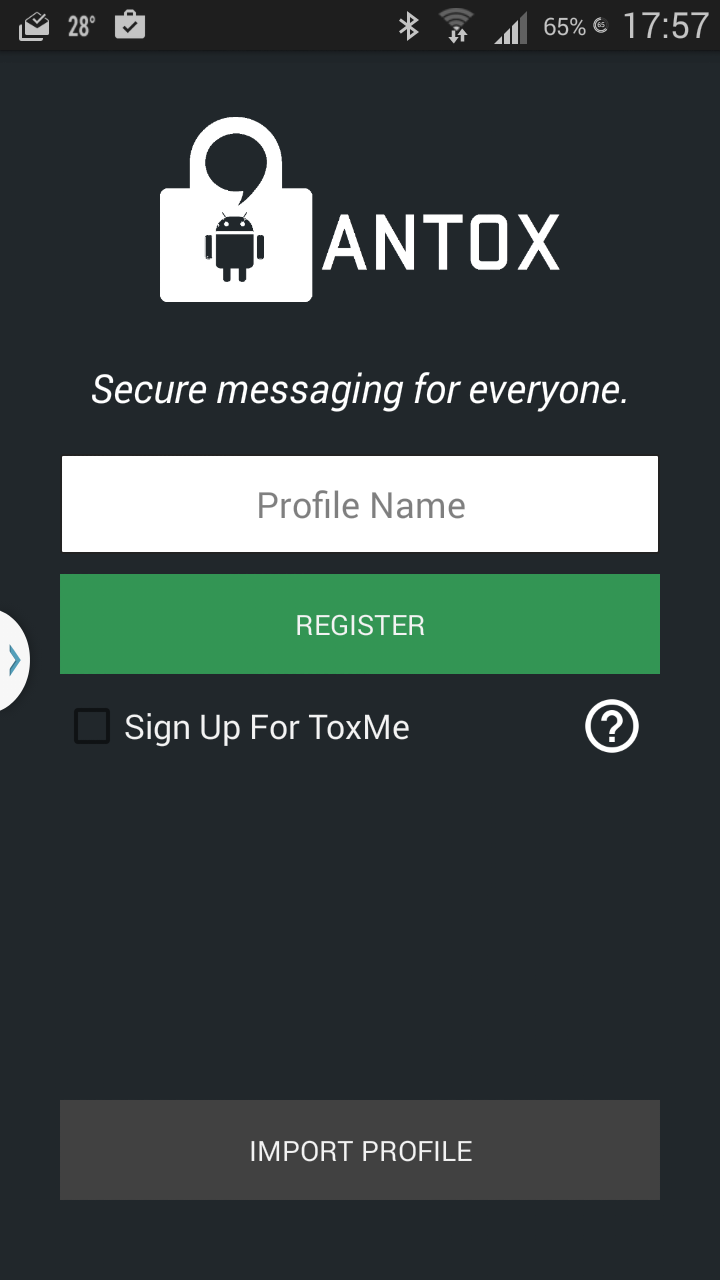
Figure 2: You can share profiles across devices by exporting and importing profile files.Next, send the file to your phone, open Antox for the first time, and you’ll see a button that allows you to import a profile file (Figure 2).
Locate the file you copied over from your desktop machine to your phone and open it. If you are using a password on your desktop client, Antox will tell you that the file is encrypted and ask you to enter a password. Use the password you use to open your desktop client.
Calling
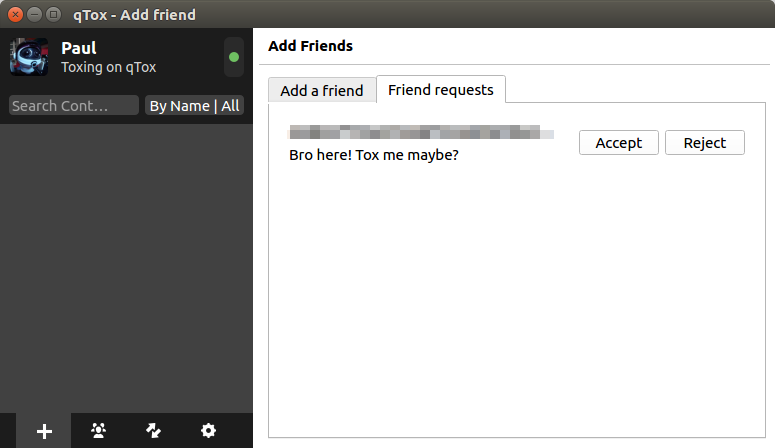
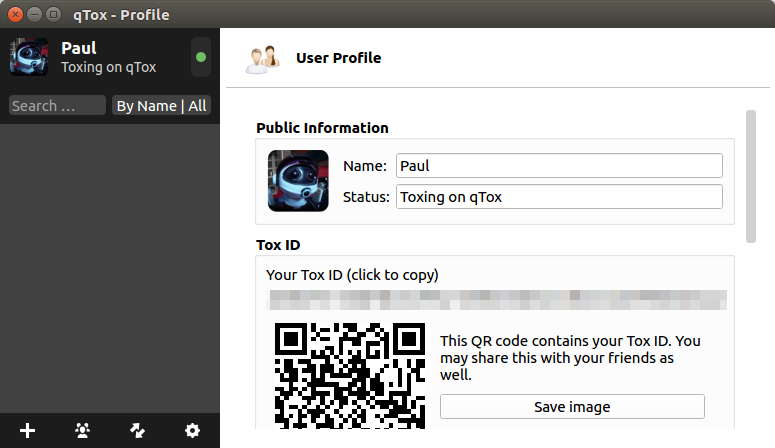
Before you call a friend, you’ll need to mutually authorize each other (Figure 3). In qTox, you do this by clicking on your profile image in the panel on the left and, as with Ring.cx, your Tox client will provide you with a long hexadecimal string to pass around to your colleagues.
qTox also generates a QR barcode you can snap with your phone instead of having to copy out the long list of numbers and letters (Figure 4).
Figure 3: You need to authorize contacts before you can talk to them.
You can also sign up to an ID server like toxme.io so that other users can find you easily. To sign up to this service, again click on your profile picture and scroll down until you see the Toxme register section.
Figure 4: Share your Tox ID or a QR barcode with others so they can friend you.
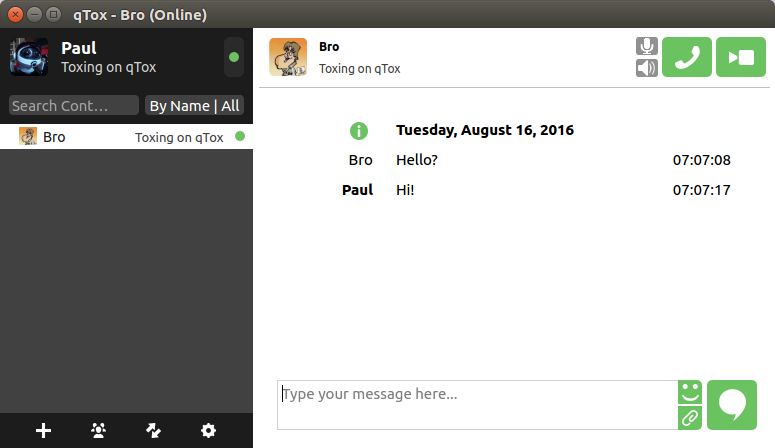
Once you have your friend’s ID, you can send of a friend request. Friend requests may take up to several minutes to arrive at their destination and then slightly less to be confirmed back. But, once this first interaction is solved, communication is more or less instantaneous and you can start chatting immediately (Figure 5).
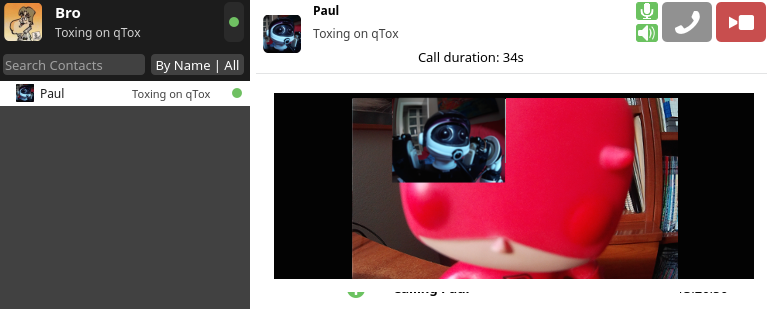
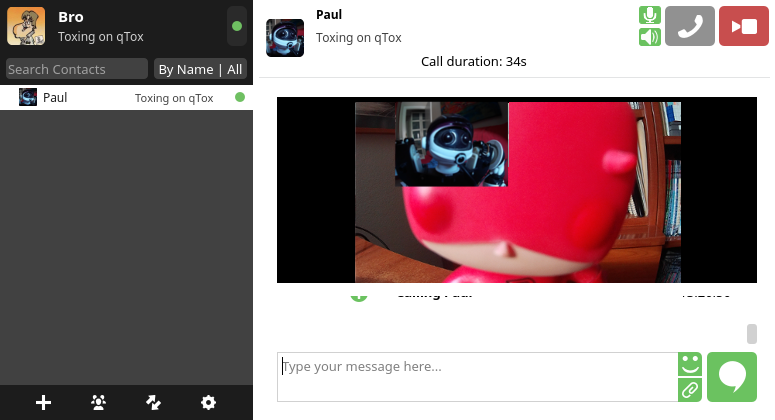
Audio and video calls are very straightforward (Figure 6). Click on the phone button in the upper right-hand corner to start an audio call, and click on the camera button for video. You may have to configure your video device first though.
Figure 5: Tox is a perfectly good instant messaging service…
Figure 6: …that also happens to support videoconferencing.
To do this, click on the little gear icon at the bottom of contact list. The setting tabs will open in the panel on the right. Click on Audio/Video, scroll down until you see the Video Settings section and choose your device from the Video device drop down.
This is, by the way, also how you would share your desktop. In the Video device drop down, pick Desktop and… Voilà! desktop sharing.
qTox and uTox don’t have major issues with audio and video conferencing, but the support on Antox is very experimental at this stage. The Android client crashes a few seconds after placing a call, so basically it is just the instant messaging features available that work well at the moment.
The uTox project is working on a version of its client for Android. This is interesting because, if it contains all the features of the desktop version, we will finally get audio and video conferencing using Tox on Android. At the moment, however, the uTox port to Android is not very usable.
Group chats
Group chats are also desktop-only for the moment, but Antox shows a message saying the feature is “coming soon” when you try to start one on Android.
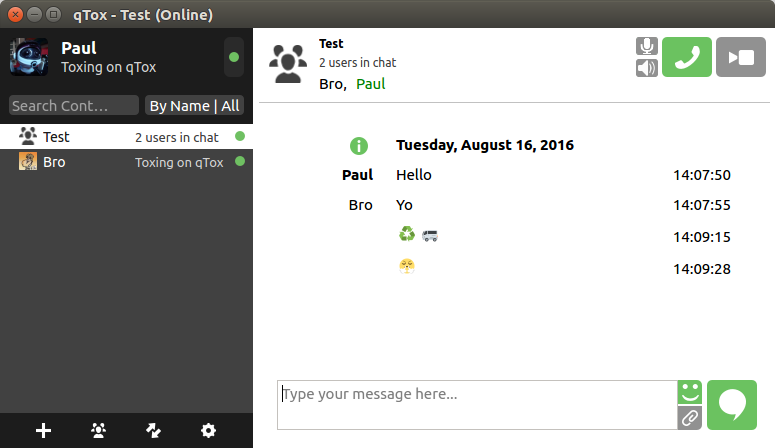
On qTox, to start a Group chat (Figure 7), click on the Group tab at the bottom of the contact list and then click on Create new group at the top of the view that opens in the right panel. You can edit the name of the group before contacting your friends. Click on the room to open it in the panel on the right.
Figure 7: Group chats allow you to share a chat room with a group of friends.
To add new users to the chat room, in theory, you would be able to drag and drop contacts onto the room to invite them to attend, but that worked only sometimes for me. What does work is right-clicking on a contact and choosing Invite to group from the context menu that pops up and then picking the name of the chat room from a list.
It seems that group video chatting is not available at the moment in qTox, because the camera button remains grayed out while in a shared chat room. Audio group conferences, however, do work, although the parties involved have to know when to pick up the call, because there is no sign from qTox, audible or otherwise, that you are being called.
Conclusion
Tox is a really good project right on the verge of becoming something great. But, like many projects in the shadow of big, proprietary projects, it is marred by not having much support, which means its resources are limited.
Some may argue that the project is not widely supported because users don’t need security, they need convenience. So, why should they use Tox if their friends don’t? And, they might add that Tox is redundant. In answer to these points, I say that setting up Tox takes all of 5 minutes; that apps everybody uses come and go; and, that in a world where any reasonably stocked supermarket offers 20 varieties of mayonnaise, I don’t even know what redundant means anymore.
I do know is that Tox is respectful with users’ privacy, it is full-featured, and more or less everything works. Thus, if you are at all interested in open source software and the principles behind it, you should give Tox a whirl. And, if you think it has any merits at all, you should at least offer the developers your moral support and constructive feedback.
…It’s become increasingly common over the past decade or so to see laws being passed to either mandate the use of open-source software or, at the very least, encourage people in government who make procurement decisions to do so. Here’s a map of the status of open-source laws around the world, via the magic of Google Fusion Tables.
IBM has underscored how seriously its taking Blockchain technology with the creation of a new business unit centered around it. The new business, called Industry Platforms, will be led by Global Business Services chief, Bridget van Kralingen.
IBM’s entire blockchain leadership team will transition to the new business, which was first announced last year. As well as working on Blockchain technology, the Industry Platforms business will also work to promote its Watson artificial intelligence platform in the financial services sector.
The first beta version of OpenSUSE Leap 42.2 is now available, giving enterprises and other stability-minded users the chance to check it out and get a taste of what’s coming in the final release, which is due Nov. 16. This is the first key update to the Leap software since OpenSUSE adopted its dual-path approach late last year withOpenSUSE 42.1.
“Leap is for pragmatic and conservative technology adopters,” Ludwig Nussel, the release manager for OpenSUSE Leap, said in the software’s official announcement. “Testing the beta helps make Leap even more mature, so we encourage as many people as possible to test it.”