Home Blog Page 715

8 Best and Most Popular Linux Desktop Environments of All Time

One exciting aspect of Linux unlike with Windows and Mac OS X, is its support for numerous number of desktop environments, this has enabled desktop users to choose the appropriate and most suitable desktop environment to best work with, according to their computing needs.

Desktop Environment is an implementation of the desktop metaphor built as a collection of different user and system programs running on top of an operating system, and share a common GUI (Graphical User Interface), also known as a graphical shell.

[[ This is a content summary only. Visit my website for full links, other content, and more! ]]

Read complete article

The Automotive Industry is Driving Innovation with DevOps

How Urban Science is Implementing Continuous Delivery to Save Thousands of Man Hours a Year — and Change the Auto Industry in the Process

The trajectory of the road intersection at night

Detroit, Michigan has been the center of the American auto industry since the turn of the 20th century, when Henry Ford churned out a few cars each day at his Mack Avenue factory. Nowadays, in addition to Ford, Buick, Cadillac and the rest of the GM family call Motor City home. Behind all the horsepower and sheet metal of the production line, car manufacturers also employ numerous software applications and tools from various vendors as part of their business. One such organization in the automotive industry that you may not have heard of is  Detroit-based Urban Science – a company that is changing the way the car industry does business.

marc-priolo-urban-scienceUrban Science is a global automotive retail performance expert that serves nearly every automotive OEM in over 70 countries. From Acura to Volvo and just about every manufacturer in between, Urban Science is finding new and innovative ways for auto companies to increase market share and improve profitability. Their goal is to identify and solve the toughest business challenges of this massive industry. They work with manufacturers to help them understand how people are buying, servicing their cars, and using their cars. Basically, if there is any kind of statistic around the automotive industry, Urban Science is tracking and interpreting it. Their work helps manufacturer gain insights across the entire product lifecycle. For example, not only can they tell you which Ford dealer is selling the most yellow Mustangs with ragtops, but they can give Ford insights into how likely the client is to bring that car back to that same dealer for repairs, and if they do so, what that means the client will do the next time they are ready to purchase a car.

You can imagine the infrastructure and software updates required to support such an operation — with its demanding customers, high stakes business, and massive amount of data being collected from all over the world and analyzed 24/7.

Mark Priolo, Software Configuration Manager at Urban Science, is tasked with this challenge. Straddling the line between Configuration Management and Release Management, Priolo is responsible for building and managing the software release processes and IT environments to deliver Urban Science’s offering to its customers.  And he’s doing it by implementing DevOps automation and Continuous Delivery (CD) as part their software delivery practices.

The Drivers

Across its portfolio and various services, Urban Science develops and releases dozens of applications, developed and managed by hundreds of developers and IT release managers.

As Urban Science’s applications continued to get more complex, their corresponding deployments and release processes became more complex as well.  Limited test coverage and lack of standardized processes and environments were delaying critical software rollouts to their clients, leading to missed releases. In addition, infrastructure utilization was inefficient, with growing infrastructure costs and increased management overhead. For the company to remain competitive and effectively serve its customers – something had to be done.

While Urban Sciences’ IT operations teams were incredibly strong, the complex nature of these deployments continued to increase the likelihood of errors. It was identified that what was being asked of ops team simply wasn’t sustainable. For example, there were teams that were rolling out applications which required having 15-page documents with go-to logic in them (I.E. “Go to Page 7 and do this…then go to page 3 and do this”). Not only were the deployments complex and time-consuming to develop, the deployment process itself could take hours.

So, Priolo set out to implement automation and CD practices to accelerate this pipeline – aiming to reduce manual tasks, one-off configurations and deployment errors, while increasing test coverage, feedback loops and release cadence.

Doing so, however, was not without its growing pains.

The Challenges on the Path to Continuous Delivery

The first thing Priolo was challenged with was figuring out what to automate. Sure, the old way of doing things is painful, but at the same time, it was working. However, the fact was there was a ton of man power going into doing things manually. Even when the decision was made that, “Yes, we should automate,” the question remained: should they try to automate what’s working or just concentrate on new stuff and make sure new builds are automated from the beginning. The initial decision was to focus on automating the delivery processes for only new applications and workflows, and – for the time being – keep the old processes as-is.

Another challenge of automation was team-adoption. Although the executive management recognized the need to adopt DevOps practices and implement CD, these practices were not required for teams to use. Rather, teams were given a choice if they wanted to automate, or continue doing things the old, manual, way.

After a while, the organization took a step back to analyze and re-evaluate their rollout strategy. It was clear things could be improved – and part of this realization came directly from looking at tickets assigned to old applications’ release processes that were over 2 years old, and were simply not progressing, while newer, CD-enabled developments were gliding through the pipeline. Now, people were asking “ “Can we automate the old stuff, too?”

Streamlining Your Path to CD

You are more alike than you realize:

The fact was, that while every application’s code was  unique, and some deployment processes required very unique configurations or tasks —  90% of the delivery process throughout the lifecycle was the same across all applications. Priolo and his team set out to find those similarities in the commit-to-release pipeline across the different applications. Once they could map the process, they came up with a robust pipeline model that would work with that 90%. They then proceeded to rolling out this pipeline, and all its inherent automation tasks, to about  half a dozen teams who started using it.

The results were extremely encouraging: with a relatively small number of teams and applications included, the project had already saved over 1,800 man hours annually.

Look at the big picture, focus on the biggest pain for the biggest impact

Priolo approached automation by looking at it from the perspective of identifying the opportunities for big wins and focusing on those. The goal wasn’t to fix local processes that were broken along the way, but rather to discern pain points and give the most bang for the buck.

Being a small team, Priolo didn’t want to have automation creep – ad-hoc fixing of different processes for various teams to address specific scenarios. The focus had to have been on reusability, system-level view and the ability to scale. These would allow his efforts to have the most impact for the entire organization, rather than achieving onlylocal optimizations, which may not amount to much in the large scheme of things (- or – may just be moving the bottlenecks to other areas in the pipelines.)

Therefore, Urban Science focused on three different pipeline models that would be applicable for the vast majority of use cases. By doubling down on those three, Urban Science can service the majority of teams and application, giving them just about everything they need.

Bring others on board!

While the initial efforts to implement automation started off with just that half dozen teams buying-in, Urban Science now has over 70 teams taking advantage of that model. Depending on the specific application and use case, some teams have chosen to release monthly, weekly, and even multiple times a day.

These three pipeline models and the standardization across teams allow the entire organization to become more agile, and increase product quality and release velocity and throughput. This sort of release cadence and speed was just not possible with trying to schedule times for manually manage all the processes and environments configurations involved in the delivery pipeline.

Think ‘Process as Code’

After modeling the key release pipelines and standardizing their processes, Urban Science turned their focus on treating their Process as Code. Using a technology that enabled them to essentially export their pipeline models and all related automation as code, they were able to have their DevOps processes themselves be programmable. This meant that they could be versioned, reuse and stored in their source code repository- along with their application code and environment configuration.

With the process itself being codified, Urban Science could more easily on-board new applications and teams, update their code to support additional use cases, and more easily extend certain pipelines for specific needs- – achieving predictable, repeatable, releases processes across the organization.

Do it end-to-end

To accomplish all this, Urban Science leveraged Electric Flow – an end-to-end DevOps Release Automation platform from Electric Cloud, to simplify build, test, deployment and release of multi-tiered applications.

A successful DevOps transformation takes the right people and culture, the right processes, and also the right tooling. From a tooling perspective, it was crucial for Urban Science to have a unified, single platform that can support their entire end-to-end delivery process, across all teams, and be able to orchestrate all the point tools, workflows and environments that are part of the process.

This ensured the ability to standardize their pipelines across teams and applications, and scale to support the entire organization (rather than cobble-together a different chain of tools or snowflake configurations for various tasks). In addition, this provided both Development and IT shared control and visibility into their software pipeline, across development, testing and packaging stages.

To ensure compliance and organizational control, the pipeline also supports both automated and manual approval gates as code is promoted to further stages along the pipelines and into higher environments. (For example, code can be promoted automatically upon passing a battery of test, or await a confirmation from a supervisor via the platform, before proceeding to the next stage.)

Continuous Improvement and the bottom line:

By adapting new ways of thinking and new technology solutions, Urban Science is now able to drive their software production within a Release Pipeline model. In this approach, all the tasks and workflows throughout the pipeline – from code commit to Release into Production – are being completely automated, and standardized as much as possible across teams.

This has had a great impact on the business.

 DevOps and CD are essentially a journey – along a path to continuously optimize your software delivery, to improve IT and organizational performance. Automating the end-to-end Release pipeline is what “greases the wheels” for Urban Science software innovation. Now, the teams are freed to focus on developing great features, rather than on building ad-hoc workflows or doing manual work to manage the path that the code has to go through until it is ready to be released to end users.

DevOps release automation and Continuous Delivery practices have enabled Urban Science to accelerate their software delivery – saving time, lowering costs and increasing productivity. They are now able to better serve their automotive clients – building new and innovative solutions that are changing the way auto manufacturers produce, sell and services their cars.

Urban Science achieved:

  • Faster and more frequent deployments. Urban Science went from 12 deployments per week to 40 deployments a week.
  • Fewer person resources required. Manual processes replaced by automation reduced person resources needed for deployment by 78%.
  • Fewer process errors. Tedious, error-prone manual operations have been eliminated, improving predictability and reliability, and reducing the number of deployments needed.
  • Better software quality. Automated deployments mean more time is spent testing instead of on the deploy process.

Linux Kernel Developers on 25 Years of Linux

One of the key accomplishments of Linux over the past 25 years has been the “professionalization” of open source. What started as a small passion project for creator Linus Torvalds in 1991, now runs most of modern society — creating billions of dollars in economic value and bringing companies from diverse industries across the world to work on the technology together.

Hundreds of companies employ thousands of developers to contribute code to the Linux kernel. It’s a common codebase that they have built diverse products and businesses on and that they therefore have a vested interest in maintaining and improving over the long term.

The legacy of Linux, in other words, is a whole new way of doing business that’s based on collaboration, said Jim Zemlin, Executive Director of The Linux Foundation said this week in his keynote at LinuxCon in Toronto.

“You can better yourself while bettering others at the same time. Linux has proven it…,” Zemlin said. “Sharing is a higher purpose – it matters. That’s the magic of open source. That’s what this movement, and Linux in particular, has accomplished… billions of dollars are being invested into a future that’s based on sharing.”

Creator Linus Torvalds and his fellow Linux kernel developers have blazed the trail for other open source projects, which are now defining the future of whole new technology ecosystems. Automotive, software-defined networking and storage, the Internet of Things, and many more areas are now being built around open source technologies.

“Linux has put open source on the map. We have shown it’s a viable development model,” said Olaf Kirch, vice president of Linux Enterprise R&D at SUSE, in his keynote at LinuxCon North America last week.

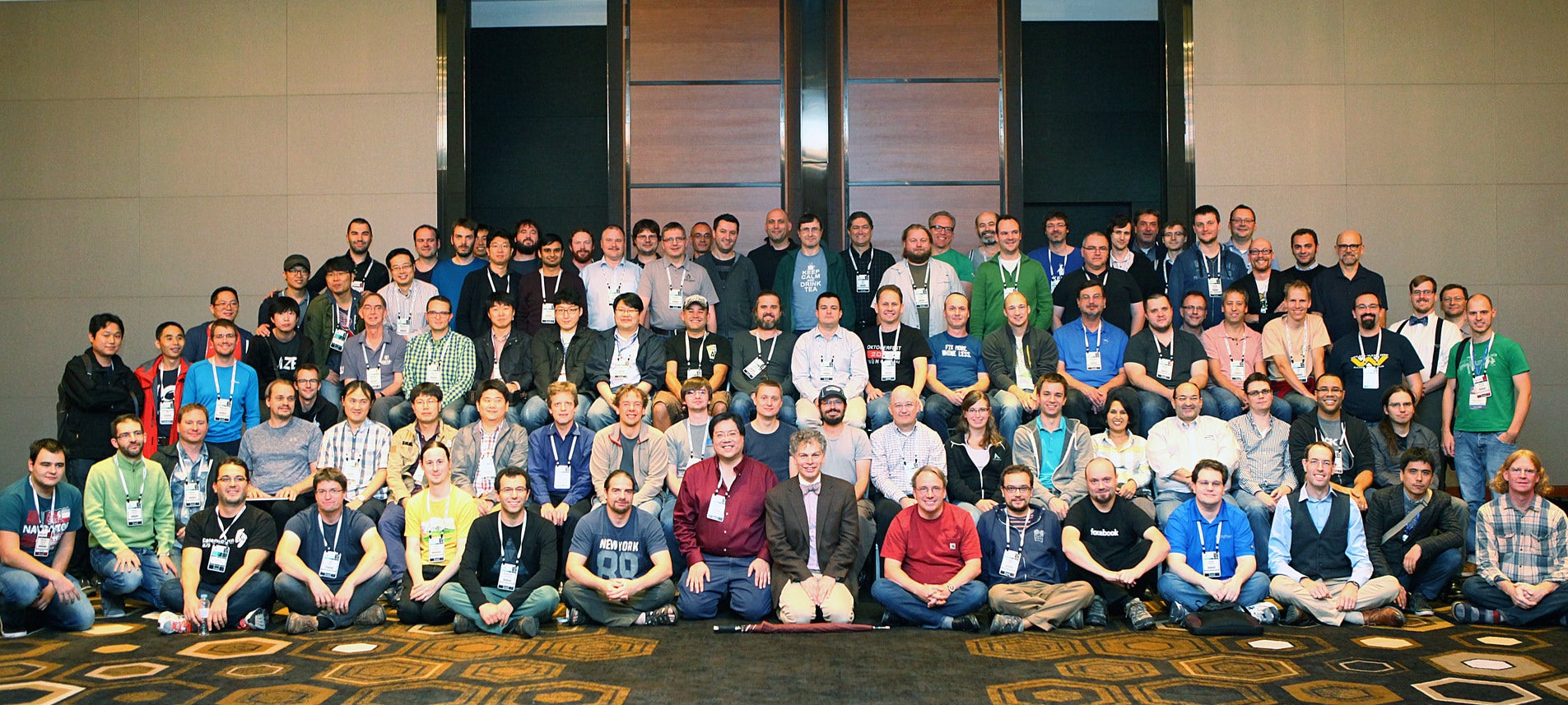
We talked with a few Linux kernel developers at LinuxCon about what it was like for them to see the project evolve from a small project made of volunteer contributors, into a large, professional project. Here are their stories. You can also read more about Linus Torvalds’ reflections on the past 25 years.

Stone Soup

Theodore “Ted” T’so, staff engineer at Google and maintainer of the ext4 Linux subsystem

Ted T’so has been involved in Linux kernel development since the summer of 1991, with the 0.09 kernel. At the time, the only way to download Linux was over a rather slow connection from an FTP server in Finland. So, Ted, who was the first North American kernel developer, set up and hosted the tsx-11.mit.edu FTP server, which was his personal desktop.  

“I worked at MIT during the very early days, and lots of software packages were distributed on Usenet,” he said. People were accustomed to the collaborative model because of projects like Perl and through Usenet. It was common to send patches to the author, and people were familiar with the GNU, BSD, and MIT licenses.  

No one gave it a name, he said, it was just the way people did things.

T’so likened the success of the collaborative approach to the “stone soup” model, wherein everyone has their own interests. If you’re writing software for yourself, he said, it’s much simpler. These days, you may have a product manager and a features expert trying to figure out what users want.

In the early days of Linux — much like with emacs or vi or Perl, developers were writing software for themselves to solve their own problems. In essence, he said, everyone was their own product manager or user experience expert.

The earliest pieces of code were software that was designed to make the developer’s life easier. Everyone has their own features that they care about, he said. “If the project or the problem is important to you, you’ll work on it.”

He said, “When I was working for MIT and my day job was security software and Linux was just a hobby, I could work on it as much as I liked.” Once it becomes a day job, however, you may have to work on things that bring value to your company, rather than the things that are important to you.

In some enlightened companies, he said, a developer may be able to make the case for the importance of a particular problem, and the company may then allow you time to work on it — e.g., Google’s 20 percent time. For T’so, for example, working on filesystem-level encryption became important to Google because it solves some problems in Android. In a case like this, he said, the corporatization of open source is an “adder”; it may allow you to do even more work and you may even get help.  

“You can actually get minions,” he said with a laugh. “You can get people to help, and if it’s already an open source project, then the path of least resistance is to release as open source.”

“If you can find ways to make it in everybody’s interest to collaborate, they will.” Additionally, he noted, if as an open source developer, you can find those points of collaboration, you can be very successful.

Guardians of Process

James Bottomley, Distinguished Engineer at IBM, is the maintainer of the SCSI subsystem, PA-RISC Linux, and the 53c700 set of drivers.

James Bottomley first started contributing to the Linux kernel in 1992 on the 0.99.15 kernel, he thinks. He described submitting his first kernel patch, which was for the Linux NFS client. There was a bug causing certain files to be truncated. Within a week, he and some other developers tracked down the bug, wrote a patch, and sent it off to kernel developer Alan Cox. In contrast, now, he said, you have to submit a patch through the chain of the kernel mailing list. “You can no longer just send it to a developer that you happen to know.”

Bottomley said the attraction of open source for many developers was that it freed them from dependence on the proprietary process. For many developers, he said, problem-solving is the interesting bit. The ability to work on problems that you have a personal interest in stimulates the open source ecosystem.

In the 1990s, developers and contributors came to understand the open source process by doing, not by theorizing. In the early days, developers were hands-on techies. Now they’re guardians of process, Bottomley said.

A Career Prospect

Rafael Wysocki, Linux core ACPI and power management maintainer and a software engineer at Intel Open Source Technology Center.

Rafael Wysocki was a Linux user for 10 years before he started to contribute. He was teaching programming at a university in Warsaw, Poland, at the time and felt that if you were teaching something you should also be a practitioner. So he sent his first patch was in 2005, which was merged by Dave Miller.

“I had a 64-bit laptop and I wanted to be able to suspend it, not shut it down and reboot,” he said. “I decided, why don’t I fix that for myself. So I started work on hibernation”

He had the idea that maybe some day he could do it full time, but didn’t expect that one day he would be maintaining a subsystem of the Linux kernel.

“And it’s not just one. I maintain a few of them now,” he said.

When he first started contributing to the Linux kernel, “everyone was skilled enough to look at the code and fix the problems they saw on their systems. I could fix 64-bit hibernation without knowing a lot about the kernel.”

Today it’s much harder for a developer to start this way. “Now people are getting involved through their jobs,” he said. “Today you first get a job with a company that happens to work on the Linux kernel and that way you get involved in the community.”

Collaboration is key

Mimi Zohar, linux-integrity subsystem maintainer and member of the Secure Systems Group at the IBM T.J. Watson Research Center

Mimi Zohar was working on firewalls at IBM in the mid-1990s when the company moved to Linux from AIX. Then in 2004 or 2005 she started working on what’s now called the integrity subsystem of the Linux kernel.

At the time, there was only one Linux security module (LSM), SELinux. The IMA (integrity-measurement architecture), which was limited to taking file measurements, was being developed by a colleague. And EVM (extended verification module), which Zohar was working on, verified both file data and file meta-data integrity.  

“I inherited IMA and ended up upstreaming it first,” she said. Verifying file data integrity was subsequently upstreamed not as EVM, but as IMA-appraisal. EVM was eventually upstreamed, but was limited to verifying file metadata.

The first piece of code that she wrote for Linux was upstreamed in 2009 and now she maintains EVM, trusted keys, encrypted keys, and IMA.

“A lot’s happened with security since I first started working on Linux,” Zohar said. “Today there are three major LSMs and a couple of minor LSMs. It will be interesting to see new use cases for the minor LSMs.”

Because of the interconnected nature of the Linux subsystems, it can still be challenging to upstream patches.

“By being in LSM, you have hooks in all the other maintainers’ subsystems. It’s not just your own subsystem you’re modifying. So you have to get everybody’s approval,” Zohar said. “The last set of patches I upstreamed, I think, touched six different subsystems. Everybody is busy. So getting others to review patches isn’t always easy. The key is collaboration. In this case, with

Luis Rodriguez and Kees Cook’s help, we were able to upstream these patches relatively quickly.”


Learn more about who is contributing to the Linux kernel, its pace of development, and much more in the 2016 Linux Kernel Development report. Download the report now!

Cool Linux Command-Line Image Management Hacks

Feh and the identify command are two of the tools I use for viewing and managing images on Linux. They are fast, flexible, and can be stuffed into scripts for automating operations, which is especially valuable when you work with artists or marketing people who have large image galleries to maintain. For me, they are faster and better for managing large numbers of images than graphical image managers, which tend to require too much clicking and poking through nested menus to find what I want, if they even have it.

feh

The feh X11 image viewer is my favorite fast, lightweight image-viewing tool. Feh runs in any X terminal. Feh displays single images, slideshows, montages, thumbnails, and lists of images. It runs primarily from the command line, though it also has a right-click menu on open images.

Firecracker
Feh supports all the image file formats supported by Imlib2, which includes PNG, JPEG, TIFF, PNM, BMP, GIF, XPM, and TGA. It simplest usage is to open a single image. feh crackerdog.jpg shows a picture of my dog Firecracker.

feh displays images at their native resolution. You can shrink large images by specifying a smaller geometry in pixels:

$ feh -g 400x300 image.png

Your image proportions are preserved, so you don’t have to figure out the exact proportional geometry. feh --multiwindow opens all images in the current directory in their own windows. Closing any single window closes all of them, or right-click on any image to open a menu and click Exit.

Launch a slideshow from the current directory with a duration of 5 seconds per slide, in fullscreen:

$ feh --fullscreen --slideshow-delay 5

Press Alt+tab to cycle back to your console and stop the slideshow by pressing Ctrl+c, or right-click any image, and click Exit from the menu. When I have a lot of images to review, I put the filename at the top left and display EXIF data at the bottom left. --draw-tinted puts a background on the EXIF data to make it more readable:

$ feh --draw-filename  --draw-tinted  --draw-exif --fullscreen 
       --slideshow-delay 5

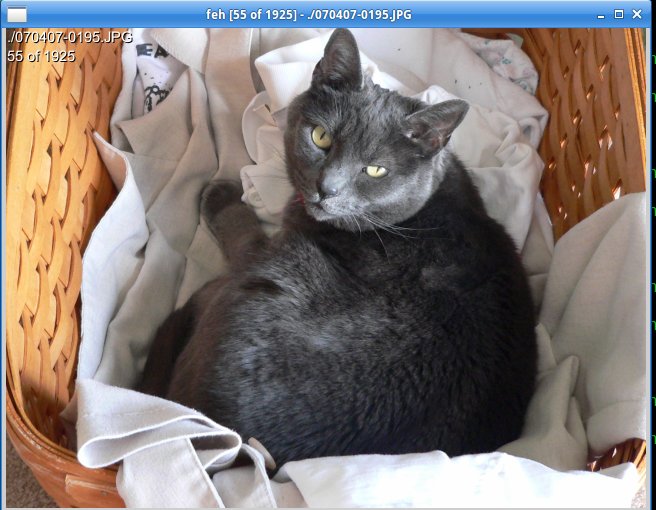
Displaying image with feh.
This example displays all the images in a directory one at a time, limited to a size of 640×480, sorted by filename, with filenames displayed in the image window.

feh -g 640x480 -d -S filename images/

Press the spacebar to advance through the images. The right and left arrow keys navigate forward and backward, and the up and down arrow keys zoom in and out.

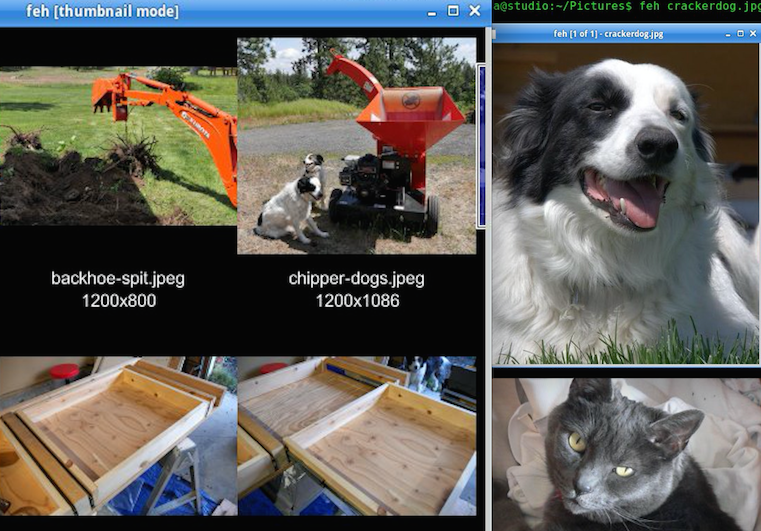
This command creates a thumbnails gallery from the current directory, with each thumbnail sized to 200×200 pixels, and displays the name and size of each image:

$ feh --thumbnails  --thumb-height 200 --thumb-width 200 
       --index-info "%nn%wx%h"

Click on any thumbnail to open the full image. You can save an image of your thumbnails by appending the --output option, for example --output thumbnails.png.

You can create a montage, and preserve it as a new image:

$ feh --montage --thumb-height 200 --thumb-width 200 
       --index-info "%nn%wx%h" --output montage.png

List images in a directory with their dimensions and file sizes:

$ feh -l
NUM FORMAT WIDTH HEIGHT PIXELS SIZE ALPHA FILENAME
1  jpeg    1200  800    960k   529k  -    ./backhoe-munch.jpeg
2  jpeg    1200  800    960k   534k  -    ./backhoe-spit.jpeg
3  jpeg    1200  1086     1M   663k  -    ./chipper-dogs.jpeg
4  jpeg    1200  834      1M   242k  -    ./cinder-donut-shop.jpg
5  jpeg    800   1200   960k   353k  -    ./dee-walt-table-saw.jpg

Getting Image Information with Identify

Graphical file managers don’t always display the image file information you want, or they make you wade through menus that let you select only one option at a time and then close, so you have to keep going back over and over to configure multiple options. The identify command, which is part of the fabulous ImageMagick suite of image manipulation tools, quickly extracts the image type, width and height, bit depth, file size, and color profile:

$ identify sheba.png
sheba.png PNG 1280x720 1280x720+0+0 8-bit sRGB 1.298MB 0.000u 0:00.000

The zeroes at the end report how long it took to read and process the image. The -verbose option dumps all possible information about your image, including EXIF data:

$ identify -verbose image.jpg

Most identify options alter images, so the safe way to extract specific information is with egrep. This examples filters some of the information I like to have when I am printing images:

$ identify -verbose image.jpg|egrep -iw 'print size|resolution| 
       filesize|background color'
  Resolution: 72x72
  Print size: 35.5556x26.6667
  Background color: white
  Filesize: 1.327MB

Combine identify with find to generate a plain-text report of all JPG and PNG files in the current directory:

$ find . -iregex ".*.(jpg|png)" -exec identify {} ; > image-report.txt

-iregex performs a case-insensitive search to find jpg, JPG, png, and PNG files. You can add more file extensions such as (jpg|png|jpeg|gif), and remember to escape the pipes and parentheses. See Supported Image Formats for a list of supported image formats.

Bonus: xcowsay

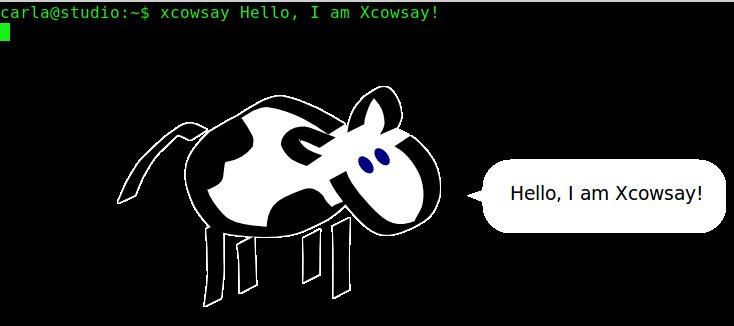
All work and no play makes Jill dull, so take a break from your serious duties with xcowsay. This is the graphical version of the beloved classic cowsay. xcowsay requires an X terminal. Try xcowsay Hello, I am Xcowsay!:

Graphical version of beloved cowsay.
xcowsay closes after a few seconds. It has a number of fun options: –time= to control duration, –font= to select a different font, –think to display a thought bubble instead of a speech bubble, –dream= to display your own image instead of text in the speech bubble, and –image= to select your own image instead of the cow. See man xcowsay for a complete option list.

Advance your career in Linux System Administration! Check out the Essentials of System Administration course from The Linux Foundation.

Car Manufacturers Cooperate to Build the Car of the Future

Automotive Grade Linux (AGL) is a project of the Linux Foundation dedicated to creating open source software solutions for the automobile industry. It also leverages the ten billion dollar investment in the Linux kernel. The work of the AGL project enables software developers to keep pace with the demands of customers and manufacturers in this rapidly changing space, while encouraging collaboration.

Walt Miner is the community manager for Automotive Grade Linux, and he spoke at LinuxCon in Toronto recently on how Automotive Grade Linux is changing the way automotive manufacturers develop software.

He said, “Traditionally, these guys don’t share. It’s a dog eat dog world.” However, this mindset has changed for these same developers working with Automotive Grade Linux. “This is the first time I’ve seen Tier 1s1 and OEMs cooperating with each other.” To see these competitors working on the same software, and even sitting in the same room at times is remarkable. AGL is about collaborating to build the car of the future, and doing that through rapid innovation. 

Read more at OpenSource.com

Maru OS Mixes a Custom ROM with a Dockable Debian Desktop, and Now it’s Open Source

The idea of a smartphone that magically turns into a full PC has been something of a pipedream for a while now. Motorola tried it with its Atrix laptop dock, Canonical is trying something similar with its Ubuntu Unity phone OS that can dock into a monitor. Even Microsoft is giving it a go with Windows Phone devices that can dock into a slimmed-down ARM Windows environment. The latest attempt with an Android base comes from “Maru OS,” the brainchild of developer Preetam D’Souza.

Maru takes a different approach: while the phone-desktop combos above all rely on more or less a single operating system with different user interfaces for different hardware, Maru mixes standard Android on a phone and Debian Linux on the desktop. 

Read more at Android Police


Keynote: Role of Apache in Transforming eBay’s Data Platform – Seshu Adunuthula

https://www.youtube.com/watch?v=wKy9IRG4C2Q?list=PLGeM09tlguZQ3ouijqG4r1YIIZYxCKsLp

eBay’s ecommerce platform creates a huge amount of data. It has more than 800 million active listings, with 8.8 million new listings each week. There are 162 million active buyers, and 25 million sellers.

“The data is the most important asset that we have,” said Seshu Adunuthula, eBay’s head of analytics infrastructure, during a keynote at Apache Big Data in Vancouver in May. 

How eBay Uses Apache Software to Reach Its Big Data Goals

eBay’s ecommerce platform creates a huge amount of data. It has more than 800 million active listings, with 8.8 million new listings each week. There are 162 million active buyers, and 25 million sellers.

“The data is the most important asset that we have,” said Seshu Adunuthula, eBay’s head of analytics infrastructure, during a keynote at Apache Big Data in Vancouver in May. “We don’t have inventory like other ecommerce platforms, what we’re doing is connecting buyers and sellers, and data plays an integral role into how we go about doing this.”

Inside eBay, hordes of hungry product teams want to make use of all the transactional and behavioral data the platform creates to do their jobs better, from surfacing the most interesting items to entice buyers to helping sellers understand the best way to get their stuff sold.

Adunuthula said that about five years ago, eBay make the conscious choice to go all-in with open source software to build its big data platform and to contribute back to the projects as the platform took shape.

“The idea was that we would not only use the components from Apache, but we also start contributing back,” he said. “That has been a key theme in eBay for years: how do we contribute back to the open source community.”

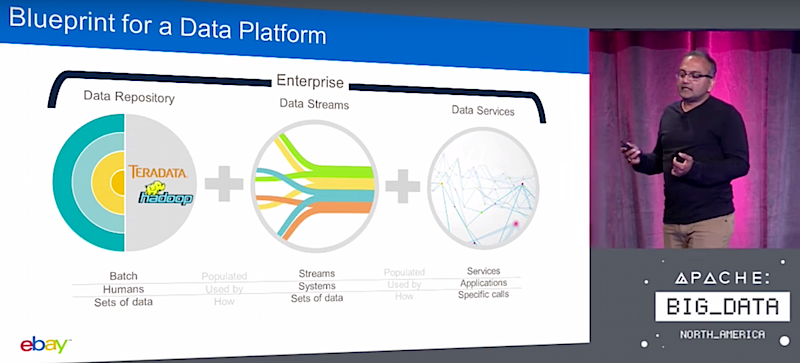
Repository, Streams, and Services

Adunuthula said there are three main components to eBay’s data platform: the data repository, data streams, and data services.

Starting with data repositories, eBay is making use of Hadoop and several of the surrounding projects, like Hive and Hbase, along with hardware from Teradata to store the data created by millions of daily transactions on eBay.

“A decade ago we used to call them data warehouses; now for the last five years because of the type of the data and the structure of the data changing, we are calling them data lakes,” Adunuthula said. “Apache Hadoop is a big component of how we’re implementing the data lakes. It essentially is a place where you store your denormalized data, your aggregated data, and historical data.”

The data streams are a key portion of the strategy; product teams and analysts desperately want to see data as it comes in so they can pull insights that much quicker. eBay has built connectors to Hadoop, processes the streaming data with Storm and Spark clusters, and accesses it via Kafka.

“Today we have deployed 300-400 Kafka brokers,” he said. “LinkedIn probably has the biggest Kafka deployment, but we might get there soon. The amount of data that the product team is requesting to be available in streams is high. We’ll get a lot of Kafka topics with lots of data available stream processing happening on Storm, but Spark 2.0 looks very promising.”

For data services, eBay has created its own distributed analytics engine with an SQL interface and multi-dimensional analysis on Hadoop and made it open source: the Apache Kylin project.

“The realization was: now we’ve got this commodity scale computation platform, and I have MOLAP style cubes and they were never operational at scale before,” Adunuthula said. “You could never take a 100TB cube and keep scaling it at the rate at which the data is growing.

“But now with all components that are available to us: the raw data in Hive, the processing capabilities using MapReduce or Spark, and then storing the cubes in HBase, with a very limited effort we were able to build out these MOLAP cubes, and we have more than a dozen MOLAP cubes operational within eBay, around 100TB is the size of the largest cubes, with around 10 billion rows of data in them.”

eBay’s latest work is making the Kylin cubes “completely streaming aware,” Adunuthula said.

“Instead of taking three hours to do daily refreshes on the data, these cubes refresh every few minutes, or even to the second,” he said. “So there is a lot of interesting work going into Kylin and we think this will be a valuable way of getting to the data.”

The final piece is creating “Notebook” views on all that complex data being processed with Apache Zeppelin, allowing analysts to work together collaboratively and quickly.

“The product teams love this a lot: there is always that one analyst among them that knows how to write that best query,” he said. “We can take that query, put that into this workspace so others can use it.”

Watch the complete presentation below:

https://www.youtube.com/watch?v=wKy9IRG4C2Q?list=PLGeM09tlguZQ3ouijqG4r1YIIZYxCKsLp

linux-com_ctas_apache_052316_452x121.png?itok=eJwyR2ye

Fedora 24 Review: The Year’s Best Linux Distro Is Puzzlingly Hard to Recommend

Fedora 24 is very near the best Linux distro release I’ve used, and certainly the best release I have tested this year. Considering 2016 has welcomed new offerings like Mint 18 and Ubuntu 16.04 LTS, that says a great deal about the Fedora project’s latest work. But like many Fedora releases before it, even Fedora 24 got off to a rocky start.

Longtime Fedora users are more than likely conservative when it comes to system upgrades. And historically, new Fedora releases tend to be rough around the edges. Wise Fedora followers tend to be patient and give a new release a couple of months for the kinks to work out and the updates to flow in. Usually, such a timing cushion also means all the latest packages in RPM Fusion have been updated as well. With that kind of precedent, being the first to jump on a Fedora upgrade—which comes every eight or so months—can be risky.

Patience does typically reward you with a really great Linux distro, though. 

Read more at Ars Technica

SMS Two-Factor Authentication Is No Longer Enough

With the near-constant occurrence of highly organized and complex cybercrime attacks, effective digital authentication has never been more challenging. Businesses must verify who they’re transacting with by implementing additional security measures, but at the same time they need to minimize friction and provide seamless user experiences to avoid losing users to competitors.

SMS two-factor authentication (2FA) has proven effective in providing additional security, and by simply sending a one-time SMS to a trusted user’s device to ensure they’re the person transacting, it doesn’t introduce significant user friction. However the U.S. National Institute for Standards and Technology recently announced its recommendation that businesses phase out SMS 2FA. Why? In short, the cybercrime landscape is evolving so quickly that single-point fraud solutions are no longer enough.

Read more at RSA Conference blog