While graph databases are certainly a rising tide in the world of technology, graph theory and graph algorithms are mature and well-understood fields of computer science.
In particular, graph search algorithms can be used to mine useful patterns and results from persisted graph data. As this is a practical introduction to graph databases, this blog post will discuss the basics of graph theory without diving too deeply into mathematics.
The NVIDIA Jetson TX1 offers enormous GPU processing in a tiny computer that only consumes 5-20 watts of power. Aside from the GPU, the CPU is certainly not slow with four 64-bit A57 ARM cores. And, you have 4GB of RAM and 16GB of eMMC storage, so you should be able to load your application onto the on-board storage and throw around big chunks of data in RAM. The SATA interface gave great performance when paired to an SSD, and the two antenna 802.11ac gave speeds up to gigabit Ethernet over the air.
The small size, low power, and great GPU processing of the Jetson TX1 screams for robotics applications where the machine is on the move and needs to process streams of images and sensor data in real time. Stepping away from robotics specifically, the Jetson TX1 is a very interesting machine when you want to take performance with you. Whether the Jetson TX1 is driving a screen in a car seat or performing image recognition at a remote location with limited bandwidth — it’s a smarter choice to perform processing on site. You might not care about the 4k video streams at a job site, but you want to know if an unknown person is detected in any image at 2am.
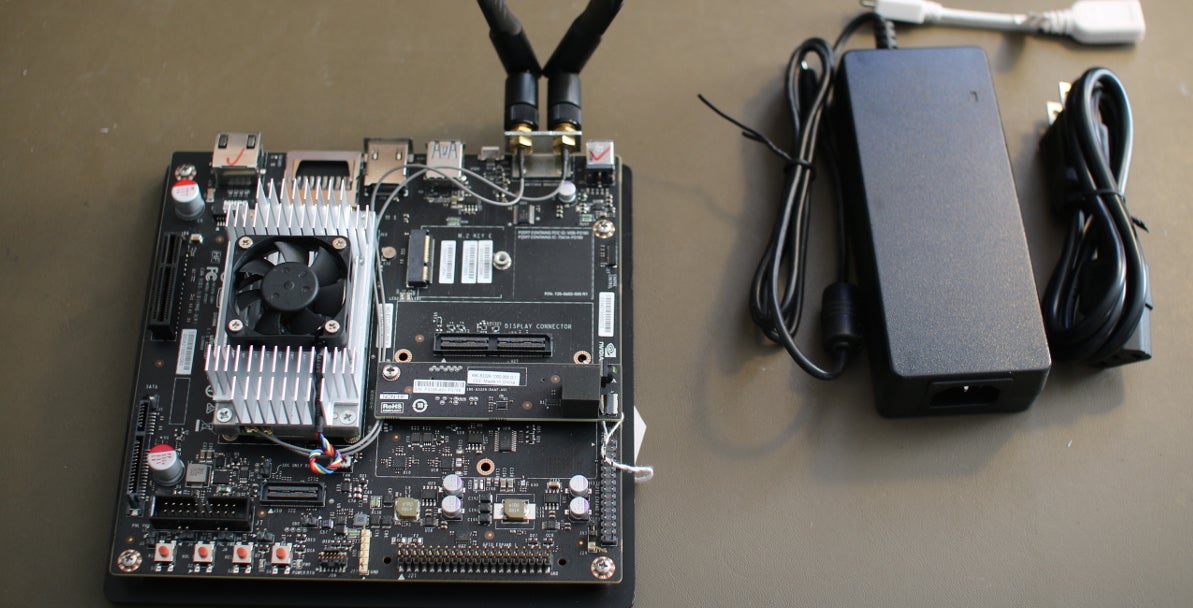
The heart of the Jetson is on a computer on a module (COM). This includes the NVIDIA Maxwell GPU, CPUs, RAM, storage, WiFi handling, etc. The COM contains all these and physically sits below the aluminum heat sink in the picture. To help you use all these features, a base board with a mini-ITX form factor is part of the developer kit, and it gives you one USB3 port, a microUSB port for setup, 19-volt DC input for power, HDMI 2.0, SATA, full-sized SD card slot, camera and display connections, two antenna connectors, and access to low-level hardware interaction such as SPI, GPIO, and TWI connections.
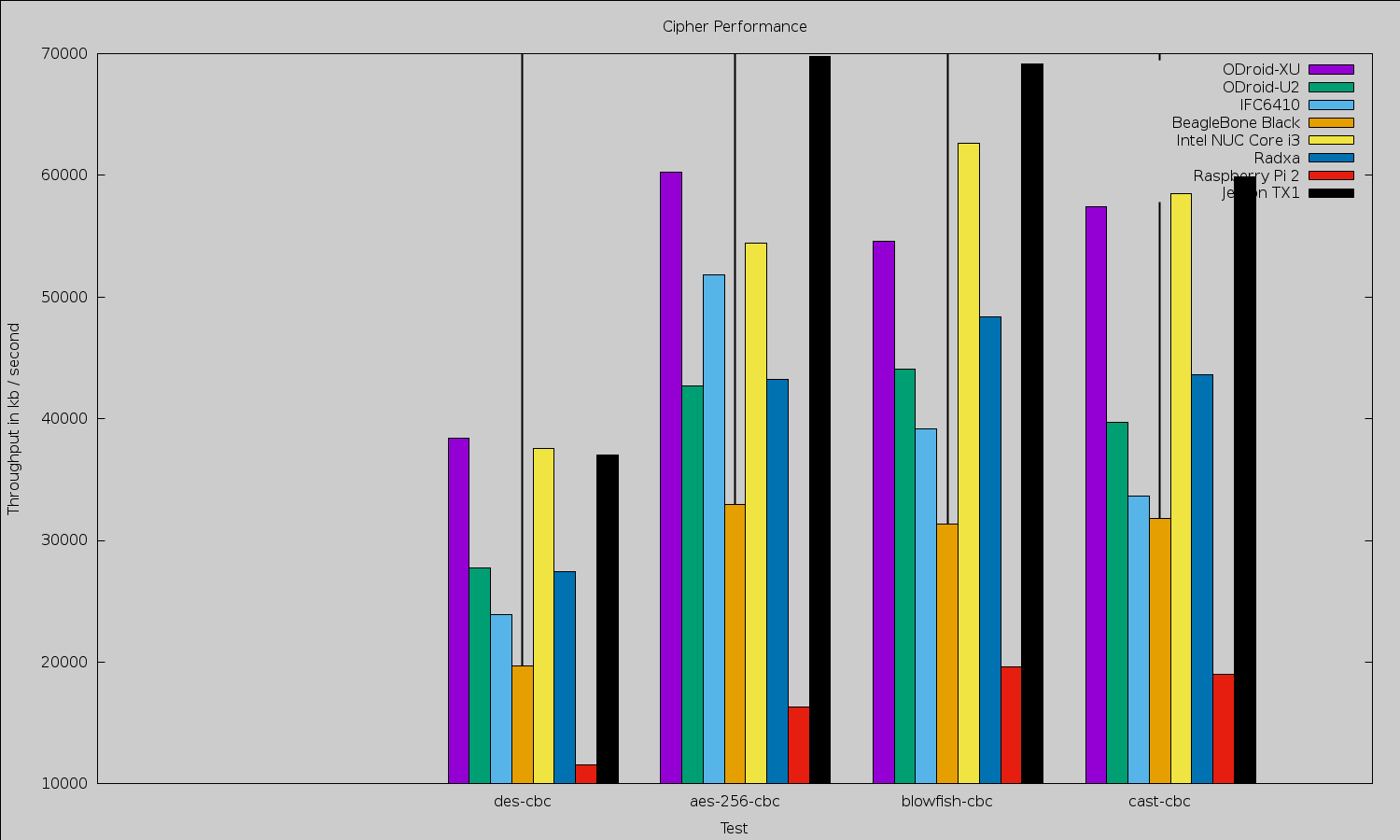
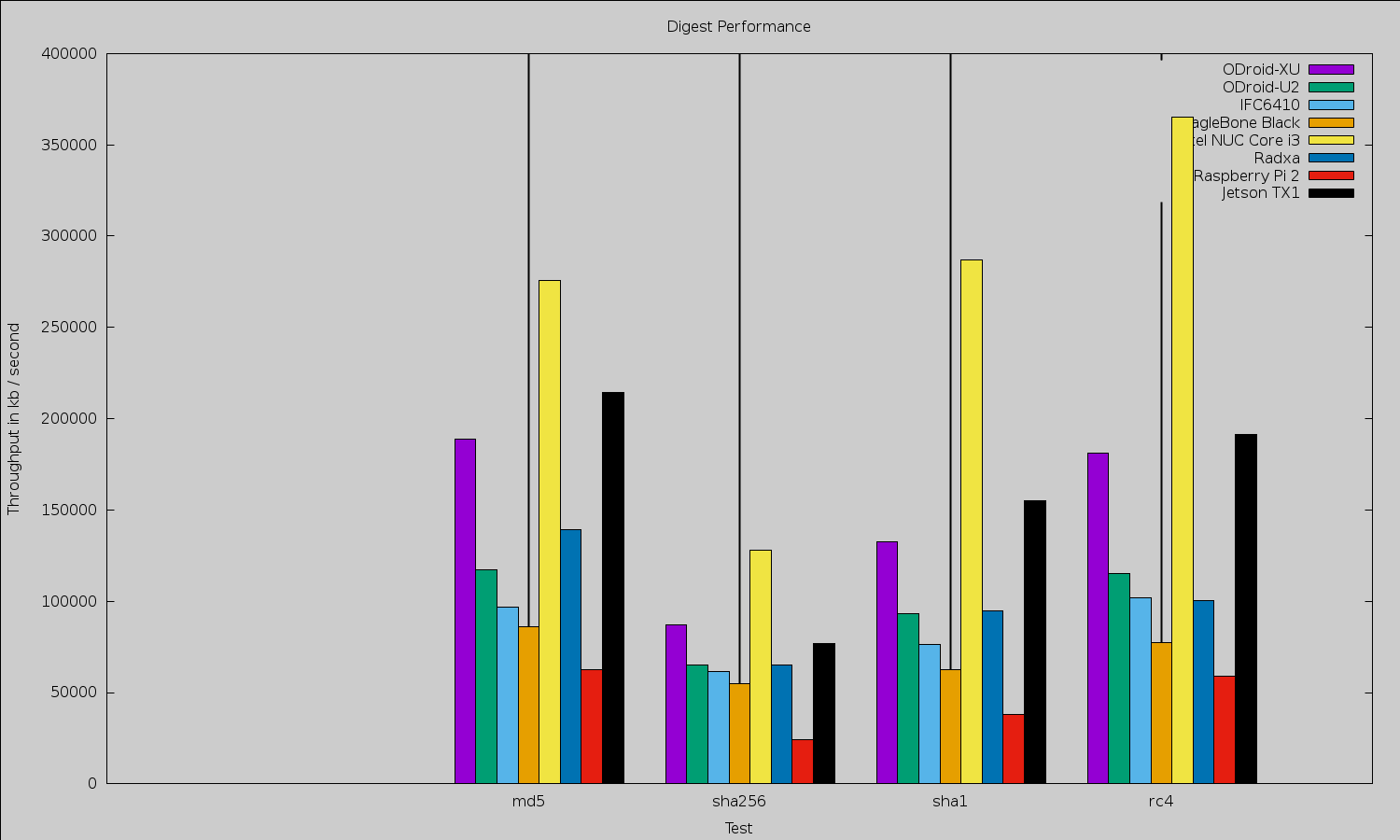
Because of the small size of the Jetson TX1, it is tempting to compare it with other small machines like the various Raspberry Pis, BeagleBone Black, and ODroid offerings (Figures 1 and 2). Any such comparison will quickly lead to moving away from benchmarks that target the CPU only to considering the performance advantage offered by the NVIDIA Maxwell GPU on the Jetson board that is covered later in the article. The GPU can perform many general-purpose tasks as well as much of the image manipulation and mathematics used in high-end robotics. When comparing the Jetson TX1 with desktop and server hardware, however, although the latter can have powerful GPU hardware, the Jetson will likely draw significantly less power.
Figure 1: OpenSSL cipher performance speed test.
Figure 2: OpenSSL digest performance speed test.
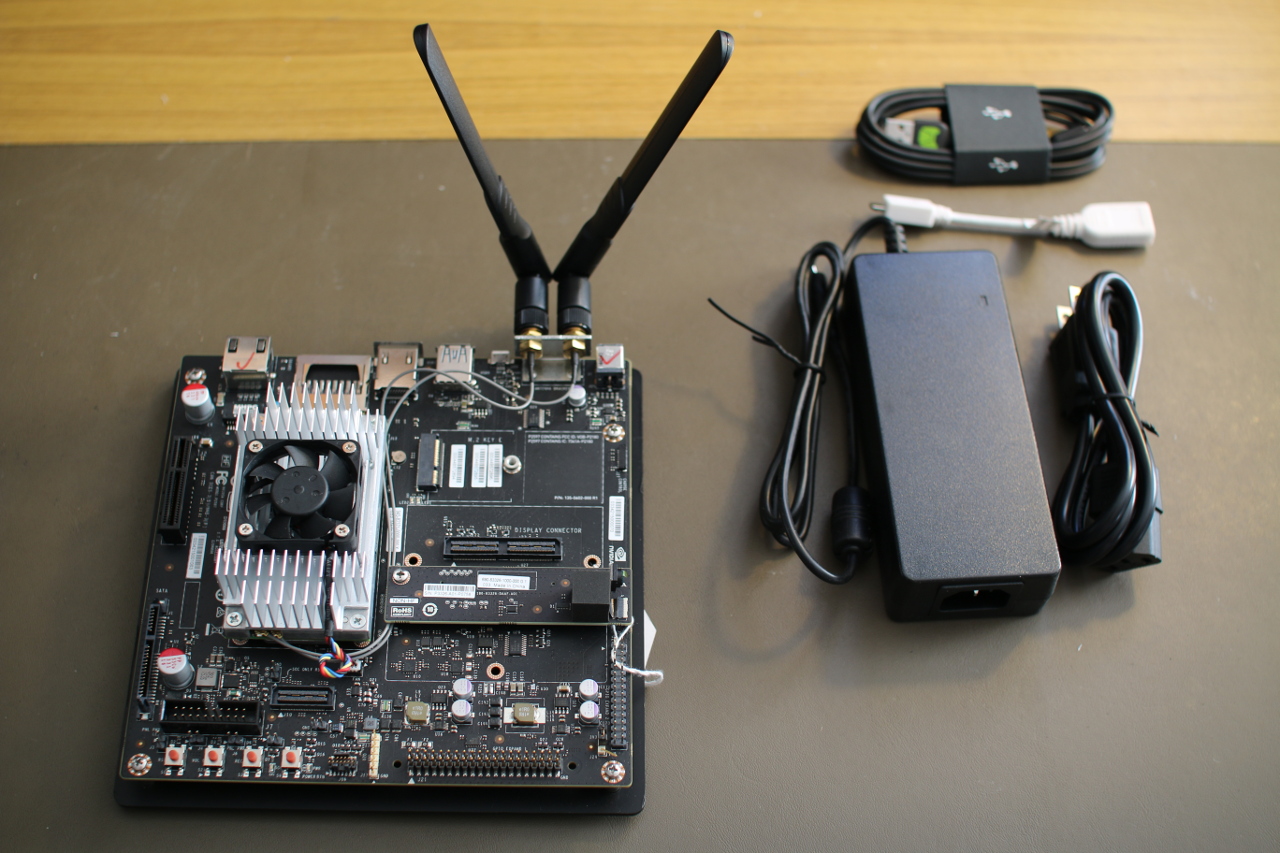
The Jetson has most of its connectors on the base board along the back, including a gigabit Ethernet connector, an SD card slot, HDMI, USB 3.0, microUSB, two WIFI antennas, and a DC power input socket. On the left side of the board next to the Jetson COM, you’ll find a PCIe x4 slot and the SATA and SATA power connectors. The microUSB slot is used during initial setup and a USB “on the go” adapter lets you then adapt the microUSB to a regular USB 2.0 slot so your keyboard can be connected there, leaving the USB 3.0 port free for more interesting tasks. The little daughter board on the middle right of the image is the camera module (Figure 3).
Figure 3: NVIDIA Jetson TX1.
The base board has a M.2 Key E slot on it. Most M.2 SSD drives need a Key B and/or Key M instead. So, you should make sure that an SSD is going to be compatible with Key E if you are hoping to expand the storage on the Jetson TX1 using the M.2 slot. You’ll also find regular SATA and SATA power connectors on the Jetson TX1, which might be a more hassle-free route to an SSD. You will have to order cables for these SATA and power ports, because the ones on the Jetson are the opposite gender to those on a regular motherboard. I was tempted to try to connect a SATA SSD directly to the base board (the connectors themselves would allow this), but there is a large capacitor in the way blocking such maneuvers.
Unlike many other small Linux machines, the Jetson TX1 wants you to have a desktop machine with 64-bit Ubuntu 14.04 running on it in order to get started. In some ways, this approach makes things simpler, because you can follow the prompts provided by the Jetpack for L4T installer software. If you have your Jetson TX1 connected via USB to the Ubuntu desktop and the network cable plugged into the Jetson TX1 with access to the Internet without needing a proxy server, then everything installs fairly easily. The instructions are shown on screen when you need to put the Jetson TX1 into recovery mode to flash the software, and everything runs smoothly.
When I first started up the Jetson, I tried to find demos in the menu. Opening a file manager shows many graphical and general-purpose GPU programming examples to be explored. There is also GStreamer support for taking advantage of the hardware and a version of OpenCV optimized to run on the GPU. The more standard libraries and tools that can be optimized to take advantage of running on the GPU, the easier it will become to fully take advantage of the Jetson TX1. Imagine if std::sort could offload the mergesort to your GPU, and all of a sudden a large sort was 15 times faster.
The WIFI came up without any issue or manual intervention. When connecting the Jetson to a D-Link DSL-2900AL router, iwconfig reported a bitrate of 866.5 Mb/s. I used the following command to initiate the connection to my access point.
nmcli dev wifi con ACCESSPOINTNAME password PASSWORDHERE name ACCESSPOINTNAME
Performance
Looking at general purpose computing speed, in the advanced section of the CUDA examples, there are mergesort implementations for both the CPU and the GPU. This was a golden chance for me to test performance on a common task not only on the Tegra CPU and GPU but also to throw in numbers for Intel CPUs to compare with. I noticed that compiling for the CPU, there was a huge difference in performance between just compiling and using -O3, leading me to think perhaps the NEON Single Instruction, Multiple Data (SIMD) instructions might be getting used by gcc at higher optimization levels.
On the Jetson TX1 board, running the gcc -O3 code on the GPU took 8.3 seconds, while the GPU test could complete in 370ms or less. I say “or less” because I hacked the source to include the time taken to copy buffers from CPU to GPU and back so the 370ms is a complete round trip. About half the 370ms were spent copying data to and from the GPU memory. In contrast, an Intel 2600K took 4 seconds and a Core M-5Y71 took about 4.5 seconds. It is impressive that the CPU-only test was so fast on the Jetson relative to the Intel CPUs. Obviously, if you can do your sorting on the GPU, then you are much better off.
For testing web browsing performance, I used the Octane Javascript benchmark. For reference, using the 64-bit version 32.0.3 of Firefox, an Intel 2600K gives an overall figure of about 21,300, whereas the Intel J1900 chip comes in at about 5,500 overall. Using Iceweasel version 31.4.0esr-1, the Raspberry Pi 2 got 1,316 on Octane. The Jetson TX1 got 5995 using Firefox.
OpenSSL 1.0.1e took about 2 minutes to compile on the Jetson TX1. Although the OpenSSL test is only operating on the A57 core and not taking any advantage of the GPU, it does show that the CPU on the Jetson is very capable. Three of the top scores are taken by the Jetson for plain encryption.
Media
The Jetson has support for both hardware encode and decode of various common image and video formats. This is conveniently exposed through GStreamer so you can take advantage of the speed fairly easily. I grabbed the grill-mjpeg.mov file from the Cinelerra test clips page for testing JPEG image support. The first command below uses the CPU to decode and then re-encode each JPEG frame of the motion jpeg file. The slight modification in the second command causes the dedicated hardware on the Jetson to kick in. The first command took 4.6 seconds to complete, and the second ran in 1.7 seconds.
The Jetson comes with a CSI camera attached to the base board. It has been mentioned on the forums that in the future that camera will be exposed through /dev/video. The camera can be accessed already through JetPack install. I tested it using the following command.
The Jetson can decode and encode H.264 video in hardware. The first command generates a test pattern video and encodes it to H.264 using hardware. The second command generates random “snow” video and encodes it at a much higher bitrate to try to preserve the random patterns of the snow video. Both of these commands caused one CPU core of the Jetson to sit at 100 percent usage.
In an attempt to work out how much of the CPU usage in the above encode example was due to buffer handling and source video generation, I encoded data right from the onboard CSI camera with the following command. This resulted in all CPU cores at around 10-15 percent with peaks up to 20 percent. Increasing the encode parameters to use profile=8 bitrate=100000000 and with very large and swift changes on the camera increased the CPU to 100 percent at times.
Unfortunately, the version of GStreamer that comes with the current software release for Jetson has a matroskamux that does not support the H.265 format. The Jetson is also capable of handling the H.265 in hardware.
OpenCV
The Jetson comes with a specialized build of OpenCV 2.4.12.3 that is modified to offload calculations onto the GPU. By linking with that OpenCV (which is also the only one installed by default), you should automatically leverage the GPU on the Jetson. I had some fun figuring out how to test this. OpenCV comes with some performance tools if you enable them at build time, but those tools were not packaged by NVIDIA.
I ended up doing my own compilation of OpenCV on the Jetson to get the tools and then replacing OpenCV libraries that were built with the ones supplied with the Jetson. This way I got the performance measuring tools from OpenCV, which were also using the modified OpenCV that takes advantage of the GPU. I also used the script mentioned on the forum, which increases the clock governor limits to their maximum. The script also brings the main fan on for safety. I hadn’t seen much of the fan until this point.
I also compiled the same version of OpenCV on an Intel 2600K desktop machine. Looking at the imgproc results, the BilateralFilter family ranged from the Jetson being about twice as quick as the 2600K through to around 2.5 times slower. The CLAHE::Sz_ClipLimit tests are clearly optimized with the Jetson coming in at needing around 75 percent of the time the 2600K consumed. There are also cases like Filter2d::TestFilter2d::(1920×1080, 3, BORDER_CONSTANT) where the Jetson is 11 times slower than the 2600K. Some of the colorspace conversions are clearly optimized on the Jetson with cvtColor8u::Size_CvtMode::(1920×1080, CV_RGB2YCrCb) needing only 18 percent of the time that the 2600K took, a result that was repeated again with cvtColorYUV420::Size_CvtMode2 only wanting 11 percent of the time that the 2600K took.
This is not to say that the major share of the imgproc results showed the 2600K being 1.5, 2, 3, or 4 times faster than the Jetson. These are general purpose tests, some of which are operating on small data sets that may not lend themselves to being treated on the GPU. Again, these results were on general purpose OpenCV code, just using the optimized OpenCV implementation that comes with the Jetson. No code changes were made to try to coerce GPU usage.
The features2d results are a mixed bag, the Jetson needing 17 percent the time of the 2600K to calculate batchDistance_Dest_32S::Norm_CrossCheck::(NORM_HAMMING, false) through to the Jetson being 5 times slower for the extract::orb tests and 8 times slower on batchDistance_8U::Norm_Destination_CrossCheck::(NORM_L1, 32SC1, true). OpenCV video tests ranged from almost even through to the Jetson being 4 times slower than the 2600K.
I connected a 120Gb SanDisk Extreme SSD to test SATA performance. For sequential IO, Bonnie++ could write about 194 Mb/s and read 288 Mb/s and rewrite blocks at about 96 Mb/s. Overall, 3588 seeks/s were able to be done. Many small boards have SATA ports that are not able to reach the potential transfer capabilities of an SSD. Given that this is a slightly older SSD, the Jetson might allow higher transfer speeds when paired with newer SSD hardware. For comparison, this is the same SSD I used when reviewing the CubieBoard, Cubox, and the TI OMAP5432 EVM. The results are tabulated below.
Board
Read
Write
Rewrite
Jetson TX1
288
194
96
CuBox i4 Pro
150
120
50
TI OMAP5432 EVM
131
66
41
CubieBoard
104
41
20
Power
During boot the Jetson wanted up to about 10 watts. At an idle desktop around 6-7 watts were used. Running make -j 8 on the openSSL source code jumped to around 11.5 watts. Running four instances of “openssl speed” wanted around 12 watts. This led me to think that CPU-only tasks might range up to around 12 watts.
Moving to stressing out the GPU, the GameWorks ParticleSampling demo wanted 16.5 watts. The ComputeParticles demo ranged up to 20.5 watts. Hacking the GPU-based merge sort benchmark to iterate the GPU sort 50 times, resulted in 15 watts consumed during sorting. Reading from the camera and hardware encoding to an H264 file resulted in around 8 watts consumed.
Final Words
The Jetson TX1 is a powerful computer in a great tiny-sized module. The small module gives more determined makers the option of building a custom base board to mount the Jetson into a small robot or quadcopter for autonomous navigation. If you don’t want to go to that extreme, small base boards are already available, such as the Astro Carrier, to help mount the TX1 on a compact footprint.
You have to be willing to make sure your most time-intensive processes are running on the GPU instead of the CPU, but when you do the performance available at such a low power draw is extremely impressive.
The Jetson TX1 currently retails for $599. There is also a $299 version for educational institutions in the USA and Canada. I would like to thank NVIDIA for providing the Jetson TX1 used in this article.
Bridging the transition to (and Google’s desire for) 48-volt racks.
Google is sharing Open Rack v2.0, a proposed standard for a data center rack that runs on 48-volt power, with the Open Compute Project (OCP). The company is gathering feedback on the standard before final submission.
Google announced the contribution via a blog post today, noting that it has been collaborating with Facebook on it. If the standard is accepted, it will be Google’s first contributions to the OCP community.
A fledgling open source project at Intel is wiping the slate clean in managing workloads in VMs, in containers, and on bare metal alike. The CIAO Project — “CIAO” is short for “Cloud Integrated Advanced Orchestrator” — has been described in a Register article as what might result if OpenStack were redone from scratch.
CIAO is split into three major components: controller, scheduler, and launcher. The controller provides all the top-level setting and policy enforcement around workloads, while the scheduler places workloads on available nodes.
This is the second article in a series taken from the inside HPC Guide to The Industrialization of Deep Learning.Given the compute and data intensive nature of deep learning which has significant overlaps with the needs of the high performance computing market, the TOP500 list provides a good proxy of the current market dynamics and trends.
From the central computation perspective, today’s multicore processor architectures dominate the TOP500 with 91% based on Intel processors. However, looking forwards we can expect to see further developments that may include core CPU architectures such as OpenPOWER and ARM. In addition System on a Chip approaches that combine general purpose processors with technologies such as field programmable gate arrays (FPGAs) and digital signal processors (DSPs) can be expected to play an increasing role in deep learning applications.
If you are dealing with deploying instances (a.k.a Virtual Machines or VMs) to public cloud (e.g. AWS, Azure), then you might be wondering what your instance goes through before you can start using it.
This article is going to be about that. I hope you enjoy it. Please let me know at the end how you liked it!
All operations that occur from the moment you request for a VM to the moment you can log in to the VM is called provisioning.
Most of the provisioning magic happens at cloud provider’s proprietary/internal software that manages their physical machines in the datacenter. A physical node is picked and the VM image you specified is copied to the machine and hypervisor boots up your VM. This is provisioning from the infrastructure side and we are not going to be talking about it here.
As an alternative to cron job scheduler, the at command allows you to schedule a command to run once at a given time without editing a configuration file.
The only requirement consists of installing this utility and starting and enabling its execution:
[[ This is a content summary only. Visit my website for full links, other content, and more! ]]
A researcher exposes design and control flaws in Windows 10 versions that have the capability to run Linux.
Embedded within some versions of the latest Windows 10 update is a capability to run Linux. Unfortunately, that capability has flaws, which Alex Ionescu, chief architect at Crowdstrike, detailed in a session at the Black Hat USA security conference here and referred to as the Linux kernel hidden in Windows 10.
In an interview with eWEEK, Ionescu provided additional detail on the issues he found and has already reported to Microsoft. The embedded Linux inside of Windows was first announced by Microsoft in March at the Build conference and bring some Ubuntu Linux capabilities to Microsoft’s users. Ionescu said he reported issues to Microsoft during the beta period and some have already been fixed. The larger issue, though, is that there is now a new potential attack surface that organizations need to know about and risks that need to be mitigated, he said.
So, Linux kernel 4.7 is here. The release happened July 24, just over 10 weeks after the release of 4.6 and two weeks after the final release candidate (4.7-rc7). This release cycle was slightly longer than usual due to Torvalds traveling commitments.
That said, the last sprint was a pretty leisurely one, something Torvalds attributes to it being “summer in the northern hemisphere.” However, there were some “network drivers that got a bit more loving” and several “Intel Kabylake fixes” in the last batch of patches.
Maybe the biggest news, at least for end users, is that 4.7 includes drivers for the Polaris line of AMD GPUs. This is quite big because at least some of the models in the Polaris line of cards are still not available at the moment of writing. This also means that Linux is now at a stage where it’s getting video card AMD drivers before the hardware is on sale. Nvidia should probably take note.
In other news, the USB/IP subsystem has started supporting virtual devices. Introduced in kernel 3.17, USB/IP is already an interesting little project in itself. It allows you to access USB devices over the network, letting you, for example, peruse images from a webcam, or scan from a scanner on a remote server as if it were locally connected. The only limitation up until kernel 4.6 was the devices had to be real, physical machines.
The support for virtual devices in 4.7 makes USB/IP even more useful, especially for developers: Now they can access emulated smartphones and other emulated devices on virtual machines, or from elsewhere in the network, and run tests on them as if they were running on their personal machine.
Other changes to the kernel include…
Another kernel, another increase in the number of supported ARM chips. In this new batch, we have support for first-generation Kindle Fires; the Exynos 3250 chip, which is used in Samsung’s Galaxy Gear line of smartwatches; and the Orange Pi single board computer, to name but three.
An interesting new security feature included into 4.7 is the LoadPin module. This module, once activated, forces the kernel to load the files it needs (modules, firmware, and so on) all from one single filesystem. Assuming that said filesystem is itself immutable — like what you would find on read-only optical disk or on a dm-verity-enabled device — this allows to create a secure read-only system without the need to individually sign every file.
Open Virtual Networking (OVN) is a new open source project that brings virtual networking to the Open vSwitch user community and aims to develop a single, standard, vendor-neutral protocol for the virtualization of network switching functions. In their upcoming talk at LinuxCon North America in Toronto this month, Kyle Mestery of IBM and Justin Pettit of VMware will cover the current status of the OVN project, including the first software release planned for this fall. Here, Mestery and Pettit discuss the project and its goals and give us a preview of their talk, “OVN: Scalable Virtual Networking for Open vSwitch.”
Linux.com: Tell us briefly about the OVN project. What are its main goals and what are the problems the project aims to address?
Kyle Mestery: OVN is a project to build a virtual networking solution for Open vSwitch (OVS). The project was started in 2015 and is being developed in the OVS repository by a large group of contributors, including developers from VMware, Red Hat, IBM, and eBay.
The project can integrate with platforms such as OpenStack and Kubernetes to provide a complete and scalable virtual networking solution. OVN is built around both a northbound and southbound database. The NB DB stores logical state of the system, while the SB DB stores information around logical flows and all of the chassis in the system.
Linux.com: How did you become involved in this project?
Kyle: Justin is one of the original members of the OVS team. I have been involved with OVS since 2012. We both wanted to provide a solid virtual networking solution for projects such as OpenStack, and we figured the best way to do this was to work on a new virtual networking solution we could develop with the rest of the OVS team.
Linux.com: What can you tell us about the project’s upcoming software release? What are important features and functionality?
Kyle: The first release of OVN will be this fall. It will include a complete solution to provide virtual networking, including supporting logical L3 routers and gateways, NAT, and floating IPs. It will provide an active/passive HA model for both the NB and SB DBs in the system as well. In addition, the integration with OpenStack Neutron will release this fall around the same time as the Newton release of OpenStack.
Linux.com: What interesting or innovative trends are you seeing around NFV?
Kyle: NFV is a hot topic in recent years. One very interesting trend is around service function chaining, or SFC. SFC attempts to provide a chain of ports for packets to go through, allowing operators to provision different appliances to handle modifying and inspecting packets along the chain. OVN is working to integrate SFC support, and it’s likely to land in the second release at this point.
Linux.com: Why is open source important to this industry?
Kyle:Open source provides the ability for disparate groups to work together to solve problems in a targeted manner. For example, OVN has traditional software development houses and operators building the software and deciding the requirements for the release together. This means we understand how the system is likely to be deployed and get a lot of functional testing before the release is even considered stable.
Kyle MesteryKyle Mestery is a Distinguished Engineer and Director of Open Source Networking at IBM where he leads a team of upstream engineers. He is a member of the OpenStack Technical Committee and was the Neutron PTL for Juno, Kilo, and Liberty. He is a regular speaker at open source conferences and the founder of the Minnesota OpenStack Meetup. Kyle lives with his wife and family in Minnesota. You can find him on Twitter as @mestery.
Justin PettitJustin Pettit is a software developer at VMware. Justin joined VMware through the acquisition of Nicira, where he was a founding employee. He was one of the original authors of the OpenFlow Standard, working on both the specification and reference implementation. He is one of the lead developers of Open vSwitch and OVN, and involved in the development of VMware’s networking products. Prior to Nicira, Justin worked primarily on network security issues.
LinuxCon + ContainerCon Europe
Look forward to three days and 175+ sessions of content covering the latest in containers, Linux, cloud, security, performance, virtualization, DevOps, networking, datacenter management and much more. You don’t want to miss this year’s event, which marks the 25th anniversary of Linux! Register now before tickets sell out.