Playing Pokemon Go? This indicator applet for Ubuntu tells you when the game’s servers are up and running so you can head out and catch em all.
Pokémon GO is ripping up the world right now, but trying to catch ’em all isn’t made easy thanks to continual server outages.
Any wannabe trainers among you have no doubt felt the frustration of heading off on a Pokémon hunt only to find the game serverKoffing and Weezing under demand or, more often, grinding to a full-on Poké-stop. It would be great if the game could sort itself out and work properly, but that won’t happen overnight.
In the meantime there is a neat little helper you can add to your Ubuntu desktop.
Electric Cloud wants to free up deployment teams weekends by eliminating the heavy scripting and manual steps involved in releasing new software. The latest feature for its ElectricFlow release automation software is rolling deployments with the push of a button, allowing customers to choose the deployment strategy including rolling, blue/green, canary that suits them best.
“We’ve heard about the Facebooks, the Etsys, the Twitters, the unicorns, all the wonderful stuff they do in how they deliver software,” said Anders Wallgren, Electric Cloud chief technology officer. “They’ve been able to do that through massive amounts of resources. They’ve spent many years building these bespoke systems to very efficiently push software into production through their delivery pipelines. We’ve been focusing in the past few years on bringing those capabilities to companies that are not unicorns that don’t have the resources or capabilities to build these things from scratch.”
The rolling deployments feature allows teams to practice deployments in QA, staging and pre-production environments so full rollout isn’t the first time its been done, making them more reliable.
A final target of this post is to compare undercloud configuration been built by QuickStart and undercloud configuration been built per official documentation for Mitaka stable . Please see Attempt of official Mitaka TripleO HA install via instack-virt-setup for instack-virt-setup installation issue due to missing procedure of creating device vlan10 as OVS port of br-ctlplane on undercloud (instack VM) in official manuals.
Over the past few decades, most companies have become IT companies. No matter what products or services they provide, businesses have shifted in such way that they need to work with computers. Not only computers, but large arrays of interconnected machinery with special, climate-controlled places to store their data and important equipment.
Linux without a doubt has accelerated and facilitated this shift in many ways, and sysadmins became a necessity, with the role of building all of the infrastructure and then being the point of contact for whenever something didn’t work. Now sysadmins are also increasingly responsible for the actual day-to-day operations of a business — delivering products and services as well as keeping email and networks running — a stressful position even in the best of times.
When things do go wrong, the worst thing a sysadmin can hear is,“It’s not working.” We hear that a lot, all the time. Here’s what’s actually going on inside our heads when we hear that:
“It’s” — When rushing to the SA’s desk, many people assume that we are aware what they are talking about. That’s not true most of the time, because we are dealing with many things at once. This assumption makes us load in our minds a list of all the assets we manage.
“not” — We think of a list of power tools, hazardous materials, and natural catastrophes.
“working.” — Now we combine the two scenarios and start thinking of ways in which they might be interacting to disrupt the service, probably starting from the 8th layer of the system, going through all the cables and wires, to the ISP, and the data center/cloud where the servers are running.
And after all of this mental exercise, our response is often “It works for me.”— which is the worst thing you can say to a user. This is the most probable cause of why sysadmins (and other IT professionals) can be misunderstood in the workplace.
Note for users: If you have a problem and you need to contact your sysadmin, please provide as much information as you can.
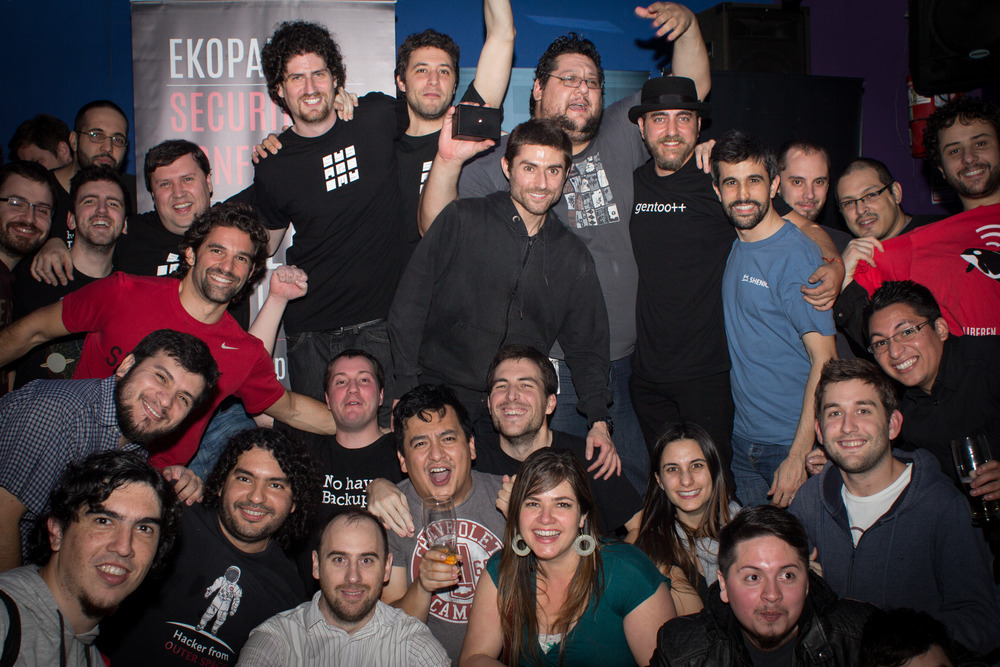
AdminFest
Thus, AdminFestwas born, as a safe harbor for sysadmins in their day of celebration. To rescue them from this eternal dance with our users.
We started the Buenos Aires-based event in 2009 (for the 10th anniversary of SysAdmin Appreciation Day) with a series of YouTube videos, which depicted the daily life of some sysadmins that weren’t able to communicate with the rest of the world because of the cryptic slang they used. Then we released a video with a therapy session for them (Administrators Anonymous) in which viewers were invited to the party.
The next year, we released a video explaining that we had been so busy keeping the uptime high and with being on-call that we hadn’t had the time to organize the party. In less than two days, we got more than 15,000 views (remember, in 2010, that number of organic views was a lot!), so we ended up doing something small to keep AdminFest going.
Members of the sysarmy.
A few years later, sysarmy, the local IT community, was born as the “Support for those who give support.” And in that spirit, for this 8th AdminFest edition, we want to do exactly that: support those who help others in our Q&A platform, sysarmy.com/help. Each 500 points a participant earns, he/she gets a free drink in return!
This SysAdmin Day, I encourage all IT professionals to find support in our peers — all of us tired of hearing “It’s Not Working” — and attend (or start!) your own local sysadmin group. It’s a refuge in which, no matter how much things may change, we all speak the same language: beer.
System administrators play a crucial role in businesses today. They are the individuals responsible for the configuration, support and maintenance of company computer systems and servers. For this reason, they are a popular hiring request, with defense and media companies alike looking for these professionals on Dice.
Yet, despite the ongoing demand, finding and recruiting system administrators may be more of a challenge. Data from the U.S. Bureau of Labor Statistics (BLS) found that the quarterly unemployment rate for system administrators was 0.6%, well below the national quarterly average (4.9%) and the quarterly average for all tech professionals (2.1%). Employers thus need to focus more of their recruitment strategies on poaching this talent from competitors.
Like many other tech positions, the role of the system administrator has evolved significantly over time due, in large part, to the shift from on premise data centers to more cloud-based infrastructure and open source technologies. While some of the core responsibilities of a system administrator have not changed, the expectations and needs from employers have.
With businesses modifying and expanding their tech infrastructures, they are looking for individuals who can implement and maintain this next generation architecture. As a result, some companies’ tech teams have adopted more of a DevOps approach to addressing these infrastructure changes that combine the traditional roles of developers and IT operations. However, this does not replace the need for, or value of, a system administrator.
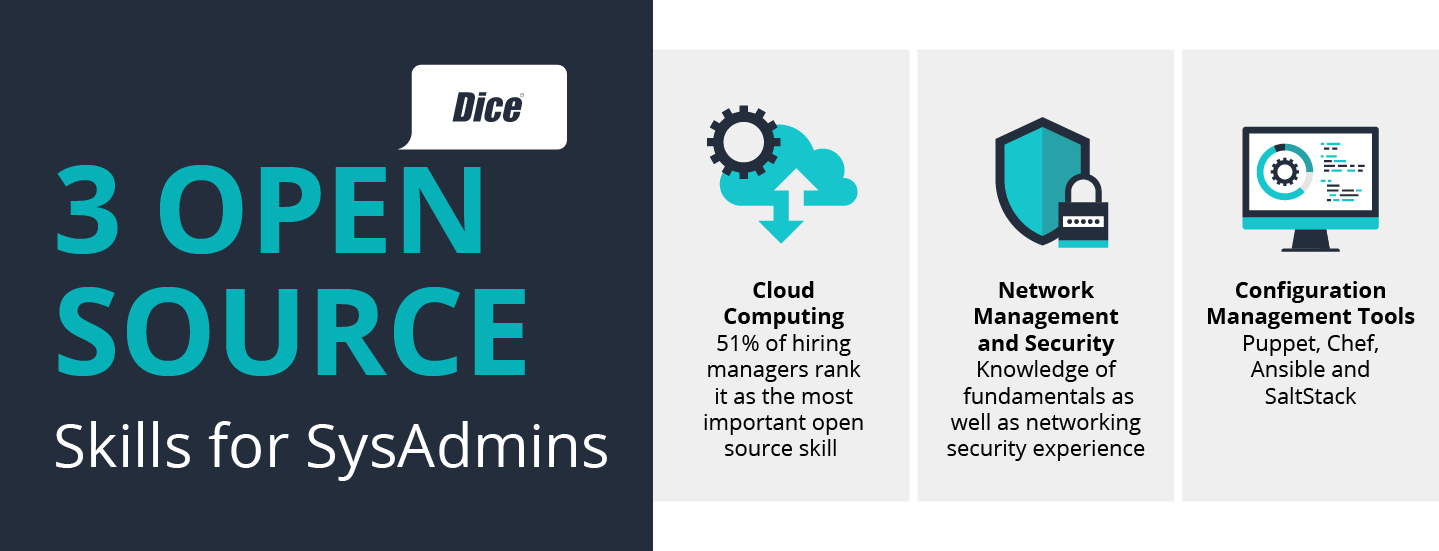
From a sysadmin perspective, it’s important to understand how the market is changing and adapt and develop one’s skillset accordingly. There is a lot of value in knowing open source related skills, particularly as they become more desired and needed by employers. With that, below are just a few popular knowledge areas employers on Dice request and that reflects the ever-changing nature of the sysadmin role.
Cloud: Today, the comprehensive need and value of cloud computing hasn’t gone unnoticed, with both hiring managers (51%) and tech professionals (50%) ranking it as the most important open source skill, according to the 2016 Open Source Jobs Report. As a result, for system administrators, being an expert in some of the most widely-used cloud-based vendors (i.e. Amazon Web Services and Microsoft Azure) is less a nice-to-have than a necessity.
Network Management and Security:As company tech teams build out their tech infrastructure, two issues that are always top of mind are network management and security. In addition to a strong working knowledge of fundamental networking technologies, such as routing or firewalls, system administrators should have some networking security experience, with employers on Dice looking for professionals who can maintain security of highly sensitive information.
Configuration Management Tools:Flexibility and consistency is key when it comes to the deployment and maintenance of back-end infrastructure. This is what drove the rise of configuration management tools, like Puppet, Chef, Ansible and SaltStack, with Puppet postings on Dice, as an example, up 20% year-over-year. For system administrators, these tools are incredibly valuable, automating configuration management and software deployment and eliminating the potential for human error.
As businesses have begun relying more upon open source solutions to support their business needs, the sysadmin role has evolved, with employers looking for individuals with cloud computing and networking experience and a strong working knowledge of configuration management tools. This position “metamorphosis” though hasn’t shrunk the need for these sysadmin professionals. The future job outlook for system administrators looks promising, with current BLS research indicating employment for these professionals is expected to grow 8% from 2014 to 2024.
Yuri Bykov manages Data Science at Dice.
Celebrate Sysadmin Day and Win Prizes!
Sign up this week to receive one free Linux tutorial each week for 22 weeks from Linux Foundation Training, and you’ll be entered to win a free e-learning course or a free pass to LinuxCon North America. Sign Up Now »
So, a few months have passed, and you’ve realized that, wow, you’re not dreaming, and it wasn’t an April Fool’s Joke, but in fact that Ubuntu-on-Windows thing is real! You’re thinking, surely some of the early kinks have been worked out, and it’s ready for a test drive… And you would be correct on both counts!
Let’s take a look at how to get started, running Ubuntu and Linux compiled binaries, natively on a Windows 10 Desktop. For the record, Microsoft’s official instructions are here.
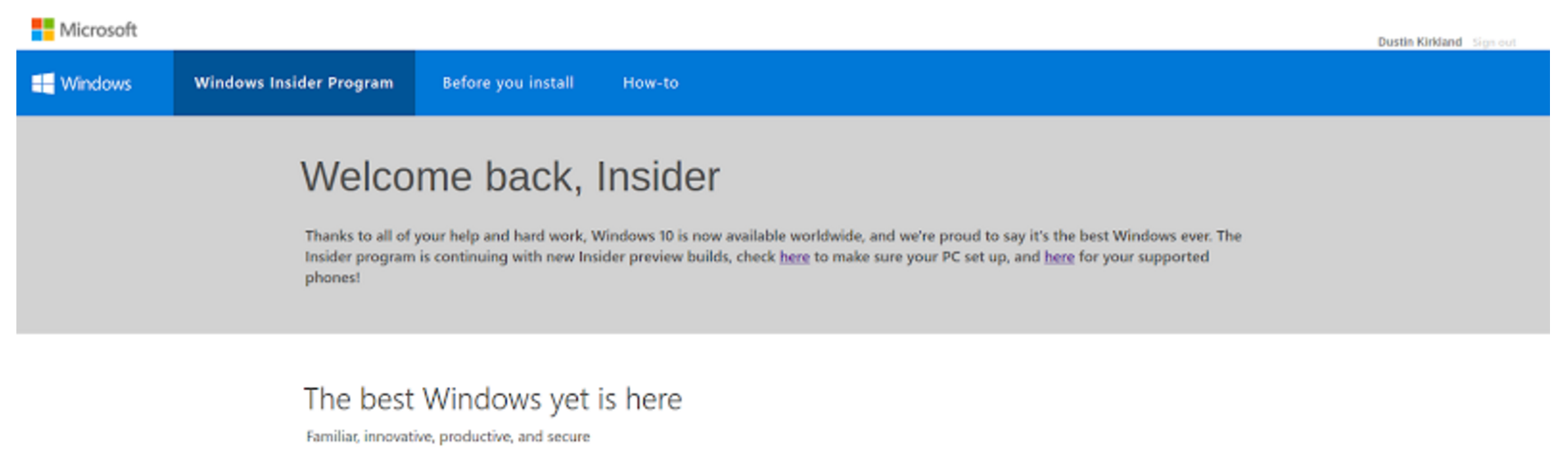
First, you’ll need a 64-bit Windows 10 Desktop. You might already have Windows 10 running natively on your laptop, desktop, or in a virtual machine. If not, you can actually download Windows 10 for free, by creating a Windows Insider account at insider.windows.com. I did so, and downloaded a 4.2GB Win10_1511_1_English_x64.iso.
From my Linux desktop, I partitioned a USB stick using fdisk, creating a single NTFS partition, then formatted it using mkfs.ntfs, and mounted it. After loop mounting the ISO, you can simply rsync all of the contents of the ISO onto the NTFS partition. Finally, unmount, sync the disk, and set the partition as “bootable” using gparted. Now, with the USB stick, you can install Windows 10 onto a 64-bit laptop or desktop machine.
Installing Windows is a much lengthier process than an Ubuntu Desktop installation, so I encourage you to be very patient, through all of its many reboots.
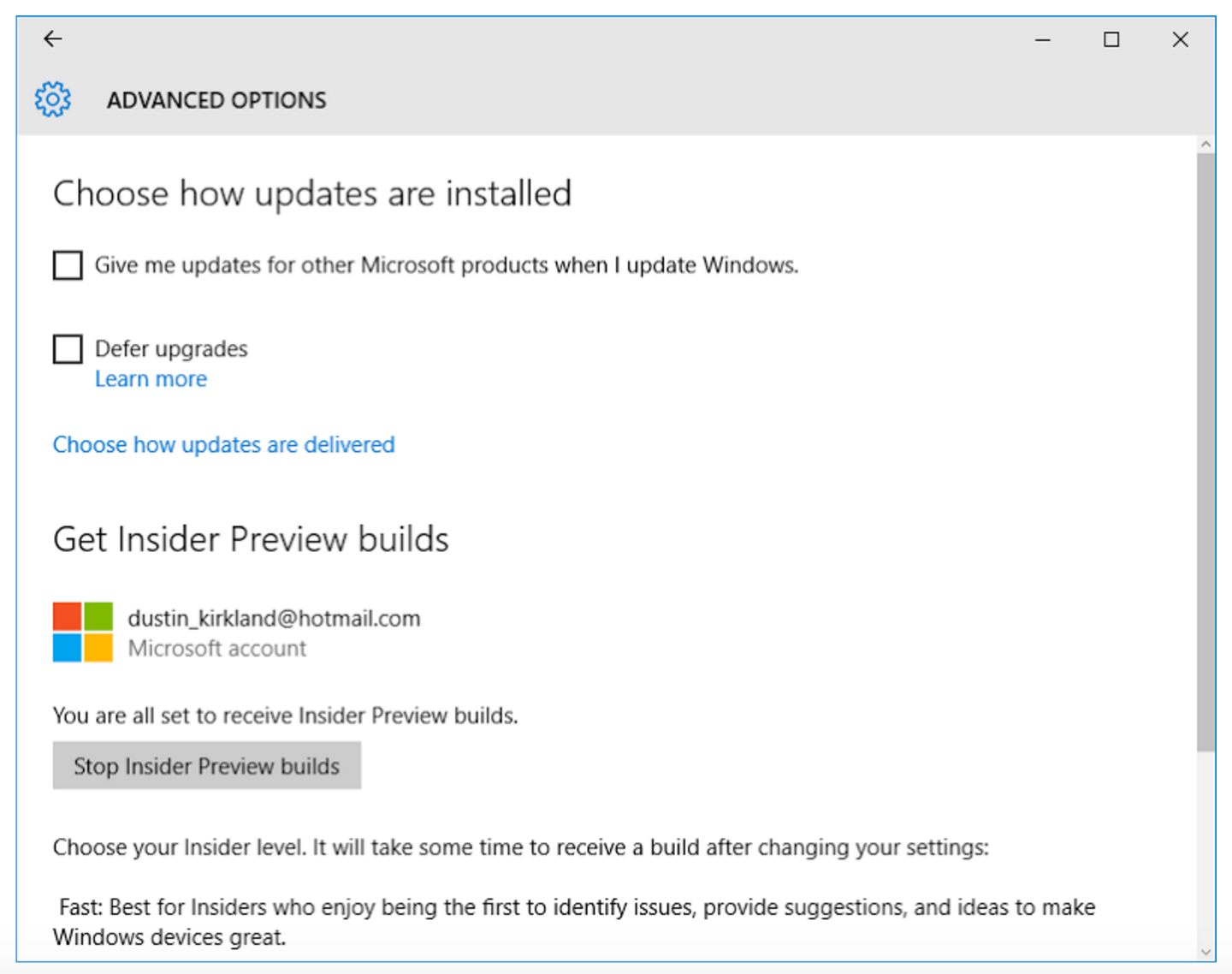
Figure 1: You’re a Windows Insider.
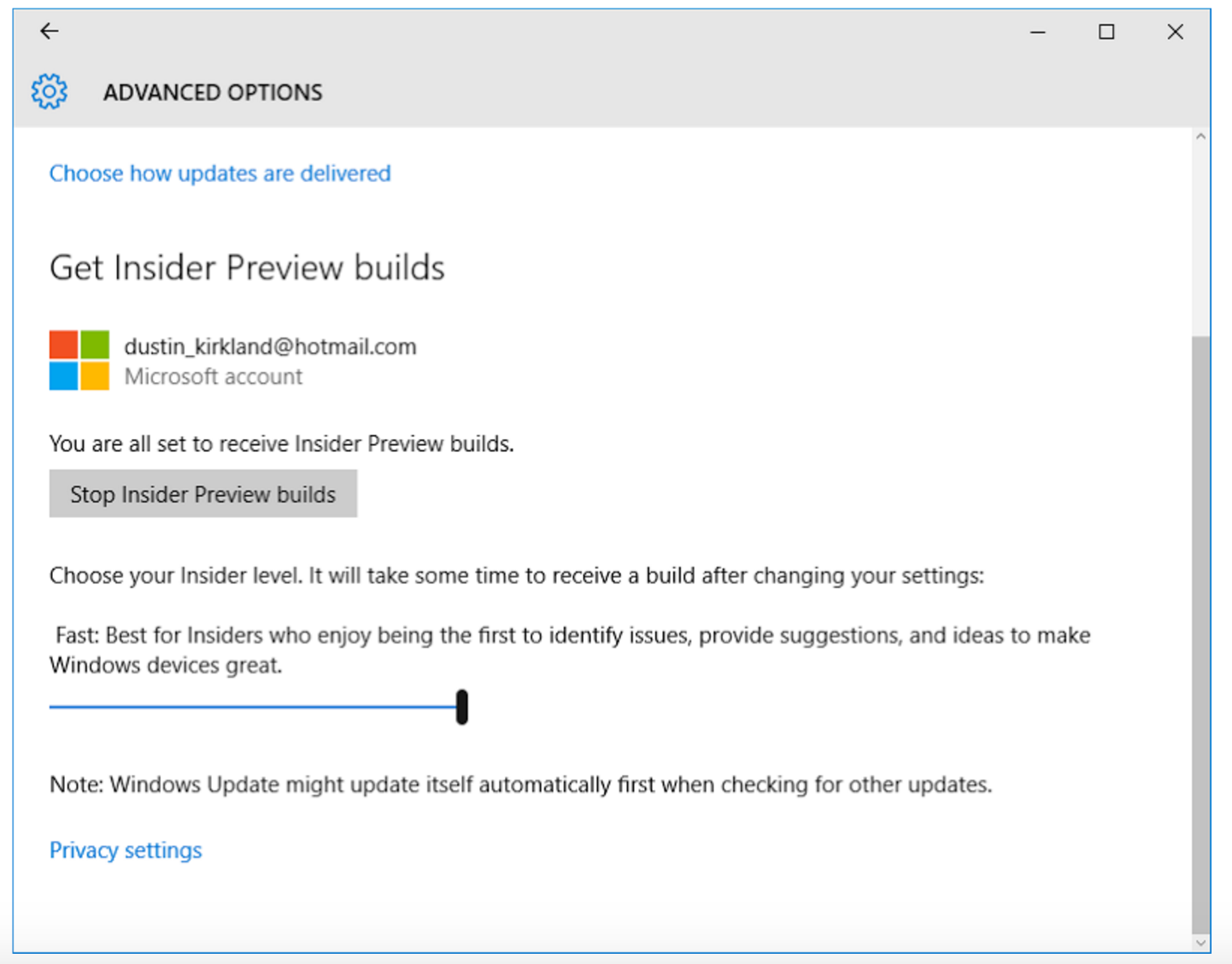
Once you’re installed, you’ll need to tell Windows that you’re a Windows Insider (Figure 1), and log in to your Insider account. You can do this in System Settings → Advanced Windows Update Options (Figure 2).
Figure 2: Log in to your Insider account.
You’ll also need to be in the “fast ring” which gets beta Windows updates, more quickly. Move the slider to the far right (Figure 3).
Figure 3: Get in the “fast ring,” which allows beta Windows updates.
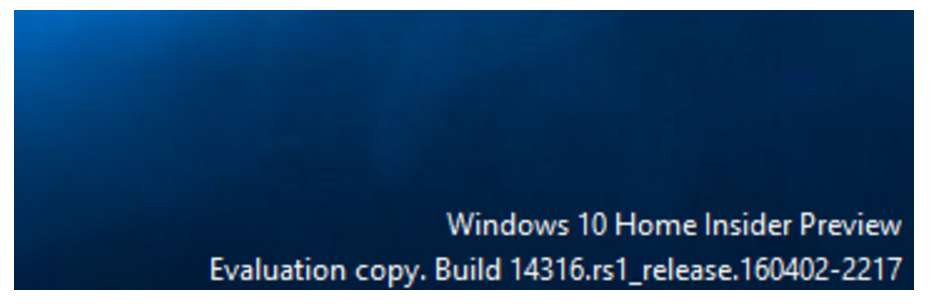
You’ll need to reboot for these changes to take effect, and you may need to update one or more times to get on the latest builds. Eventually, you should ensure that you’re running the Insider Build, which should be at least newer than this (Figure 4):
Figure 4: Ensure that you’re running the Insider Build.
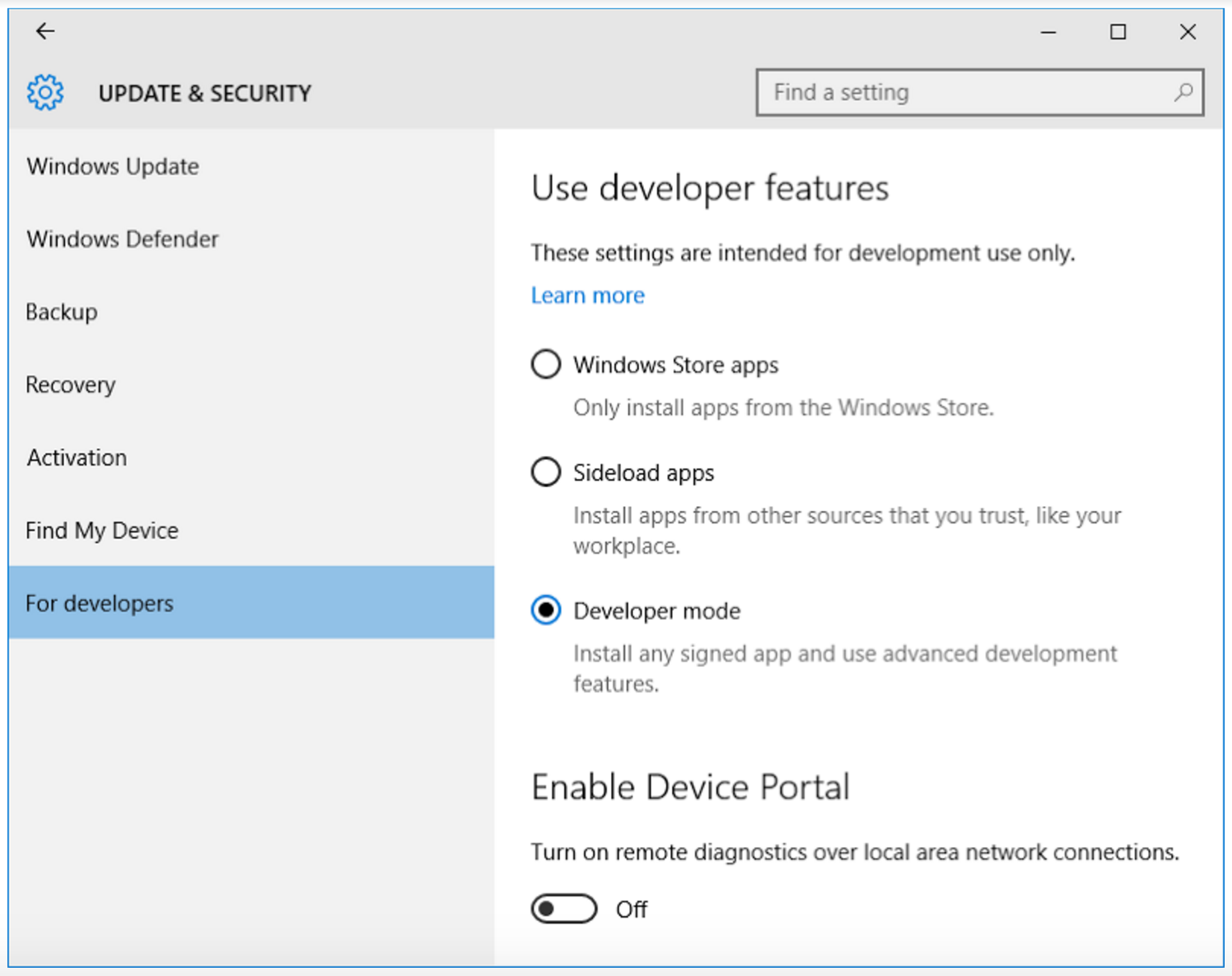
Next, you’ll need to enable “developer mode” (Figure 5), as this feature is very much geared specifically toward developers, rather than general Windows users.
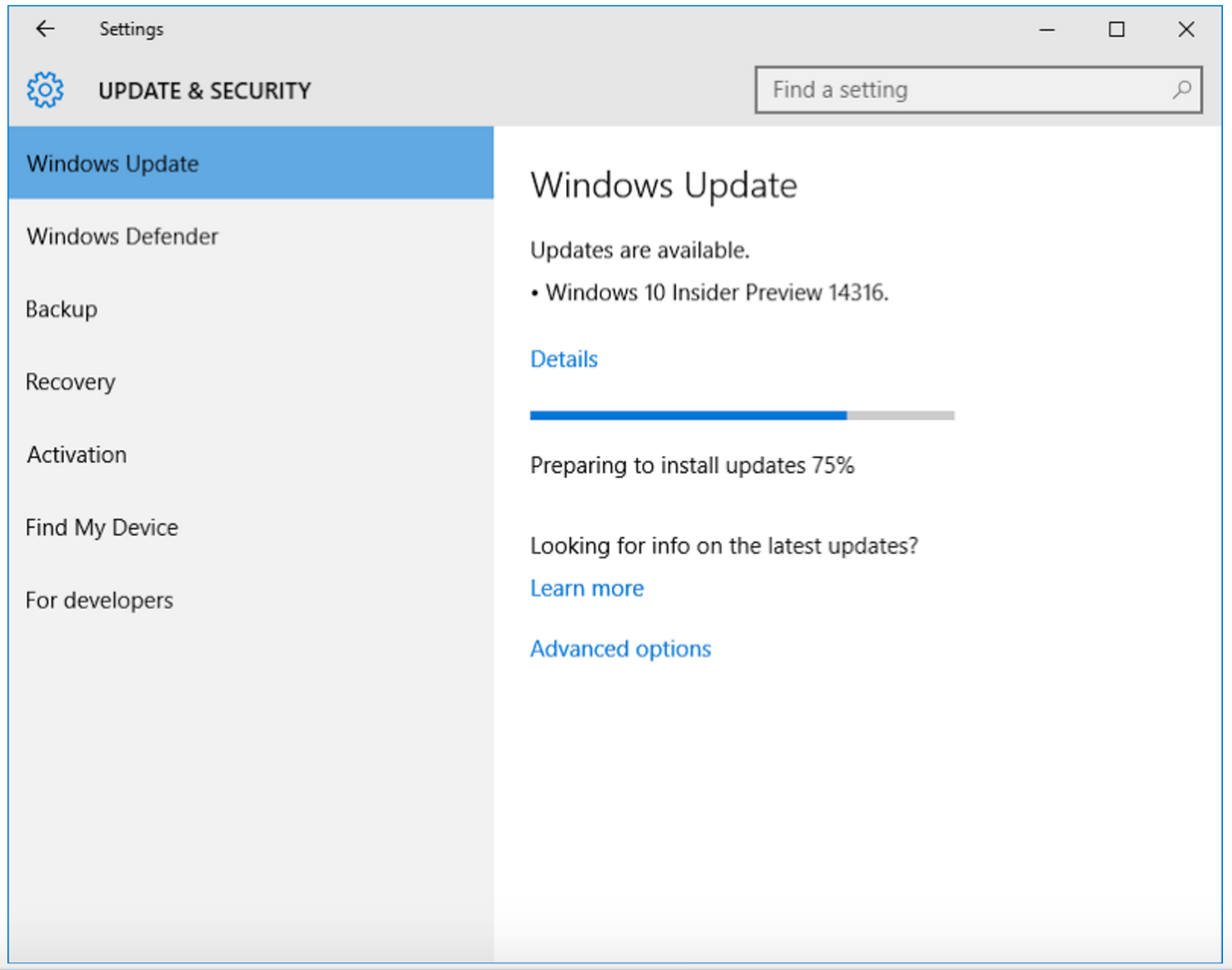
Now, check for updates, apply all of them, and restart (Figure 6). Note that in many users’ experiences, it sometimes takes several days or several hours for Windows to “notice” that updates are available.
Figure 5: Enable “developer mode.”
Figure 6: Check for updates, apply all of them, and restart.
Reboot a few more times.
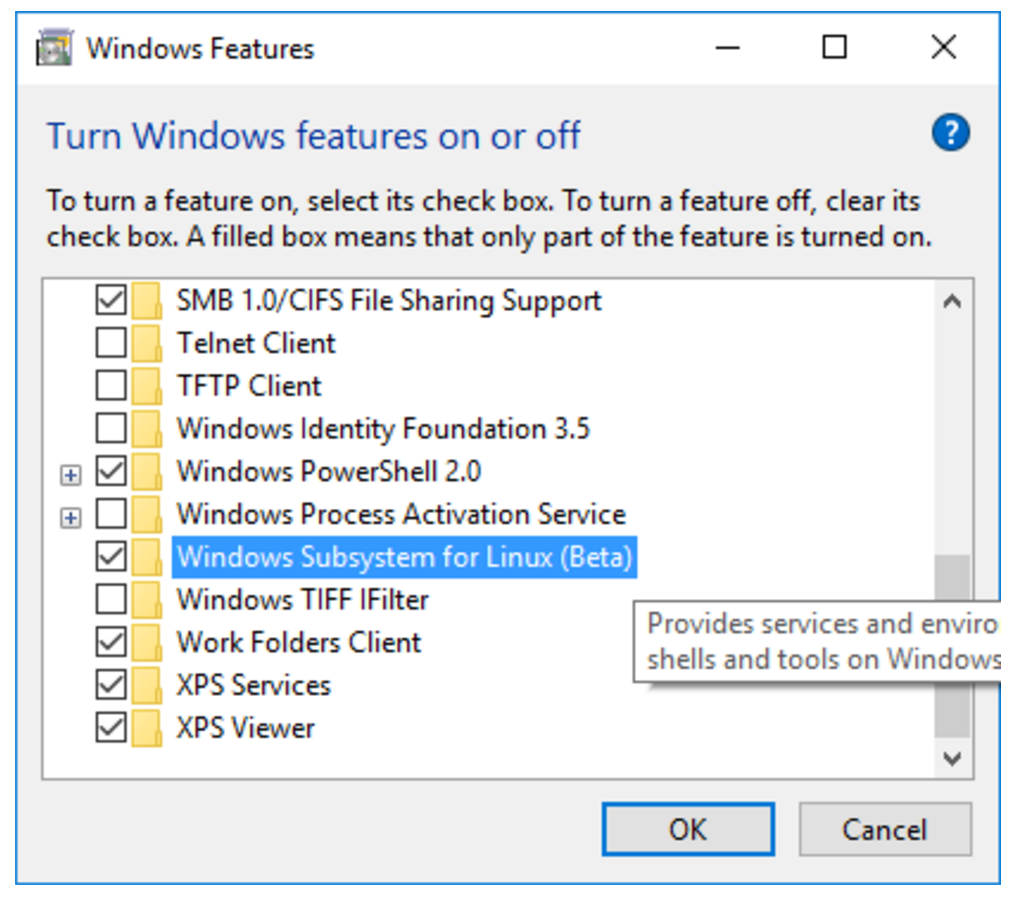
Now you need to enable the “Windows Subsystem for Linux” (Figure 7). Note (again) that you must have the 64-bit version or Windows, or you won’t even see this option.
Figure 7: Enable the “Windows Subsystem for Linux.”
You guessed it. Reboot again.
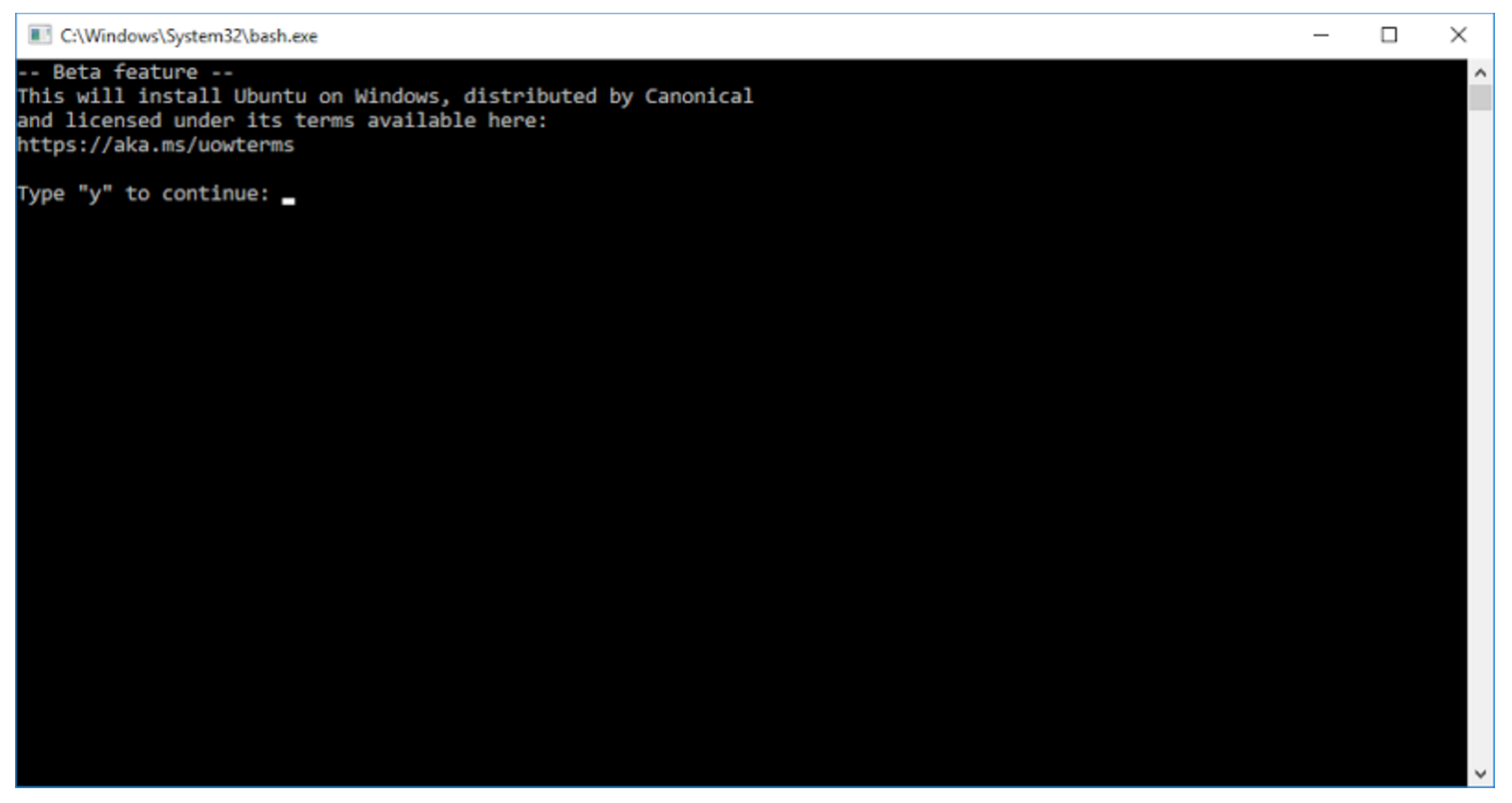
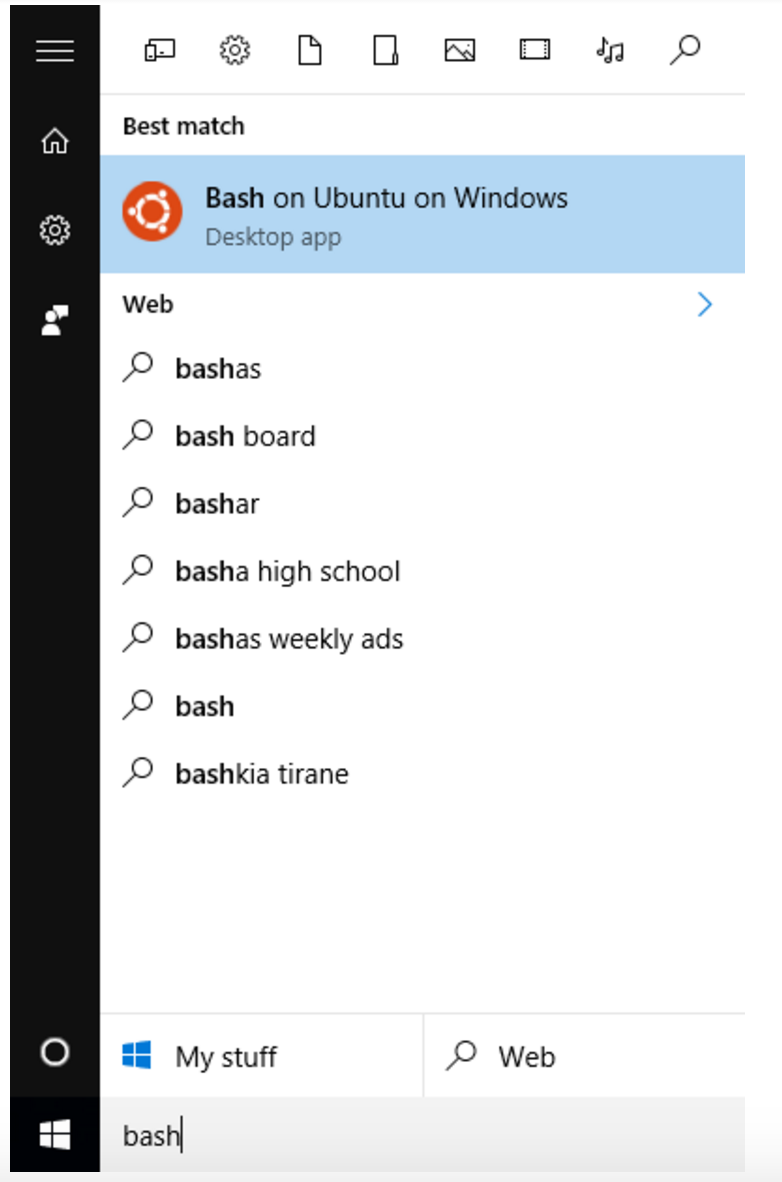
After Windows is back up, press the Windows key, and type “bash”, and hit enter. You’ll be prompted to accept the terms of service (Figure 8) and then Windows will download the Ubuntu root tarball from the Windows store.
Figure 8: Accept the terms of service.
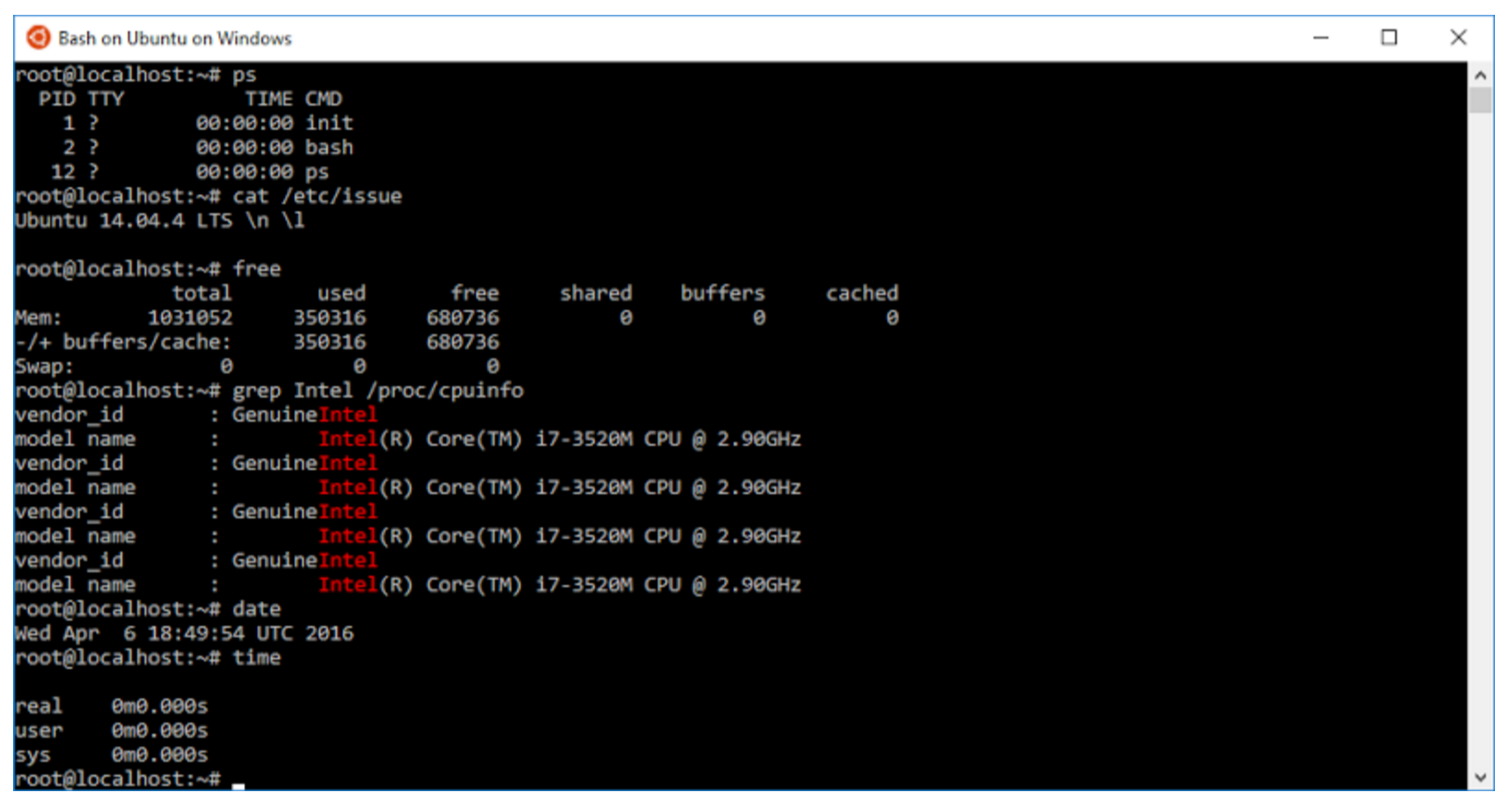
After this completes, you should be up and running! You should see the Ubuntu icon in the Windows launcher and task bar (Figure 9).
Figure 9: You should be up and running.
The latest builds will actually prompt you to create a non-root user, to give you the more secure, more Ubuntu-like experience (Figure 10).
Figure 10: Create a non-root user.
At this point, I encourage you to explore, and have some fun! Try apt installing some of your favorite command line tools. Let us know what works well, and anything that doesn’t, by asking questions at AskUbuntu.com and tweeting to @ubuntu. Explore your Windows files in /mnt/c. Try writing, compiling, and running some code or executing your own scripts. You should also check out the Microsoft blog articles on the Windows Subsystem for Linux.
In case you mess something up, and want to “reset” your Ubuntu environment, simply run the following from a Windows shell: ‘lxrun /uninstall /full’, and then run ‘bash’ again.
Enjoy,
Dustin
Learn more about Running Linux Workloads on Microsoft Azure in this on-demand webinar with guest speaker Ian Philpot of Microsoft. Watch Now >>
Read more about how the Canonical and Microsoft partnership happened in Dustin’s previous article, an Introduction to Ubuntu on Windows.
Most users of containers have Docker Engine in their stack, even if it is just the open source engine. Now that Docker Engine 1.12 comes with built-in orchestration capabilities, we expect future surveys to find a substantial increase in people using some of that capability.
While this gives Docker an edge in many ways, do not misinterpret those “anticipated” findings to mean the company has suddenly cornered the “orchestration market.” As seen in several surveys, including our own, multiple orchestration tools are in being used at the same time, with many planning to continue this practice going forward. In this environment, insight is gained by evaluating which providers are preferred most, and by whom.
The fourth major new Linux kernel of 2016 is now out with the debut today of Linux 4.7. The Linux 4.7 kernel follows Linux 4.6, which debuted on May 15.
Among the new features that are included in Linux 4.7 is the LoadPin Linux Security Module
“This LSM enforces that kernel-loaded files (modules, firmware, etc) must all come from the same filesystem, with the expectation that such a filesystem is backed by a read-only device such as dm-verity or CDROM,” the LoadPin commit message explains. “This allows systems that have a verified and/or unchangeable filesystem to enforce module and firmware loading restrictions without needing to sign the files individually.”
Paying those who take your data hostage only makes the ransomware problem worse, says Kaspersky.
The European Police Agency Europol on Monday announced a collaboration with tech giant Intel, security expert Kaspersky Lab and the Netherlands police to tackle the exponential growth of ransomware use by criminals. Together, the companies and agencies launched an online portal called No More Ransom to help inform the public about the dangers of ransomware and help victims recover their data without having to fork over money to criminals.
In this video, John Willis takes a brief look at the history of how Devops principles and operating systems have converged. He spends most of the time forward looking at what and how unikernels will converge with Devops tools, processes and culture. He ends with a demo of how containers, unikernels and Devops ideas can work together in the future.