Does leading or engaging in DevOps a career booster?
Gene Kim, author of The Phoenix Project and leading DevOps proponent, seems to think so. In a recent interview with TechBeacon’s Mike Perrow, Kim notes that of “the nearly 100 speakers at DevOps Enterprise Summits over the last two years, about one in three have been promoted.”
Kim suggests that the reason these individuals have been promoted is because they “have created something of incredible value” to their organizations,…
Since the Digital Millennium Copyright Act (DMCA) became law in 1998, it has been a federal crime to copy a DVD or do anything else that subverts digital copy-protection schemes.
Soon, government lawyers will have to show up in court to defend those rules. Yesterday, the Electronic Frontier Foundation filed a lawsuit (PDF) claiming the parts of the Digital Millennium Copyright Act that deal with copy protection and digital locks are unconstitutional.
Under the DMCA, any hacking or breaking of digital locks, often referred to as digital rights management or DRM, is a criminal act. That means modding a game console, hacking a car’s software, and copying a DVD are all acts that violate the law, no matter what the purpose. Those rules are encapsulated in Section 1201 of the DMCA, which was lobbied for by the entertainment industry and some large tech companies.
Over the past seven years or so, an emerging generation of cloud companies turned the tech industry on its head. Now, these cloud companies face their own disruption — courtesy of blockchain technology. Unless these providers develop offerings that leverage blockchain, they may see a new generation of blockchain-savvy vendors take their place.
That’s the word from EY, which just published an analysis that details how blockchain threatens existing vertical tech vendors, noting that companies “that responded too slowly to the mobile or cloud disruptions paid a high price.”
Stack Overflow is bringing gamification to the sometimes dreary labor of software documentation. On Thursday, the company launched Documentation, a new service that aims to document the workings of every software program not behind corporate firewalls.
Since its launch in 2008, Stack Overflow has become a wildly popular site for community-driven Q&As, amassing a content base of over 10 million entries that answer pretty much every conceivable question programmers might have about whatever languages or technologies they are using. This new product is the largest expansion the company has taken to date. Documentation, now in beta, is built on the same construct; Stack Overflow is asking the developer community to share examples of processes they use regularly.
Most software documentation is all telling and not showing, said Jay Hanlon, vice president of community for Stack Overflow. We’re asking the community to upload examples of how to make the software work…
I have often encountered code littered with lots of nested if and else statements. I consider it a serious code smell. Deeply nested code, especially if the nesting is due to conditionals, is very difficult to follow, wrap your head around and test. It even makes it difficult for the compiler or runtime to optimize. In many cases it is possible to flatten deeply nested code by very simple means. Here are a few examples in Python, but the concepts translate to most languages.
I’m fed up with the word “alternative.” There, I said it. When you use alternative to refer to an open source application, you are sure to get on my wick. “Linux is an alternative to Windows,” “GIMP is an alternative to Photoshop,” “LibreOffice is an alternative to Microsoft Office,” and so on. The word “alternative” gives a subtle connotation of inferiority to the thing it’s describing. It suggests it’s what we have to make do with, because for Linux there’s nothing better.
It is like when you say Ring is an alternative to Skype. No, no, it’s not. Skype is ghastly. It is proprietary; it is demonstrably insecure; there is evidence that Microsoft uses Skype to siphon off conversations to the NSA; and the GNU/Linux version still lags behind the Windows one. So no, Ring is not an alternative to Skype. Ring is a full-featured, open source product that you need to know about.
Installing
Installing Ring is pretty straightforward on many Linux distros. The project’s website gives (simple) instructions on how to get the software you need for several platforms.
On the likes of Debian and Ubuntu, you add a repository, update, and install using APT. On the latest Debian (9 at the moment of writing), you would do this:
If you are an Arch user, you can find Ring in the AUR, and you even have a choice between the GNOME or KDE clients. Look forring-gnome or ring-kde.
As for openSUSE, it turns out Ring is packaged in the openSUSE’s user repositories. It installed without a problem for me, and I was able to use the client’s chat functionality. However, the back end would die every time I received or tried to place a call. I sent a bug report, and the Ring developers are very active and responsive, so maybe by the time you read this, the problem will be sorted.
Installing on Android
Getting Ring to work on Android is also quite easy. First, it is on Google Play so you can grab it from there.
However, if you are a bit paranoid about whether Google messes with its downloads, you can also find Ring on F-Droid, the independent marketplace for Free and Open Source Android software. You can enable F-Droid by grabbing and installing its apk. Remember, you must have “Allow installation from sources other than Pay Store”activated on your device — this option is usually one of the Security options within your Settings. You can then use F-Droid to install and download Ring from the repository.
Placing a Call
Now that you have it installed, let’s phone someone.
For the desktop, you’re best option is Ring’s GNOME client, because it requires very little in the way of dependencies (even on non-GNOME desktops) and I found it to be much more stable than the KDE client. You will also see how to use the Android client.
Although you may see two components when you go to install Ring from your software administration program (and, yes, you have to install both client and daemon), when you run the client, the daemon runs automatically. There’s no need to run it by hand with systemd or anything like that.
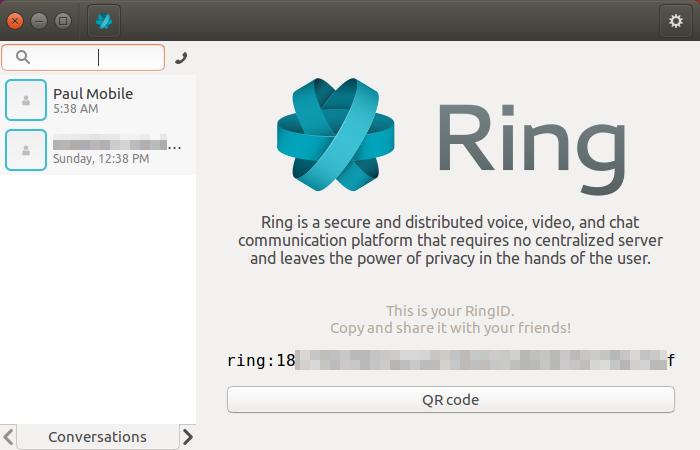
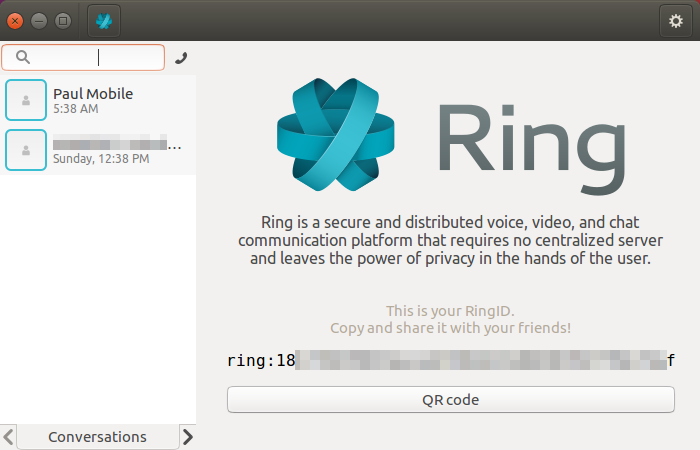
The first time you run Ring, it will register you within its system (it relies on a p2p network) and assign you an identifier in the shape of a long string of hexadecimal numbers. Ring does not have a centralized server and nodes do not store information of your calls, but you do need to be uniquely identified to get calls routed to and from you. Having said that, this is the only identifier you will ever need. Ring does not require you input a name, email, or anything else (Figure 1).
Figure 1: GNOME startscreen.
Your details and configuration are saved in your home folder under .config/ring/dring.yml. That is the file you have to save if you switch computers or reinstall your operating system and overwrite your home directory.
Once you have your identification number, you can send it to other Ring users so they can call you. You can also send it to yourself, to, for example, your smartphone and then import it into your Android client so you can use one account across multiple devices.
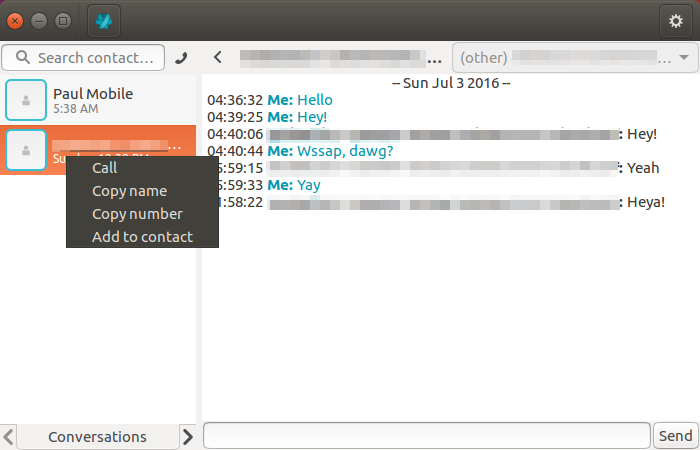
When you get a number from a friend, copy and paste it into the search box at the top of the panel on the left. Then, click on the phone icon to place your first call. Once you have been authorized by the receiving party (i.e., they accept your call), you can start chats or video calls or add the contact to your address book (Figure 2). Right-click on your contact’s number to see all the options.
Figure 2: Adding contacts in GNOME.
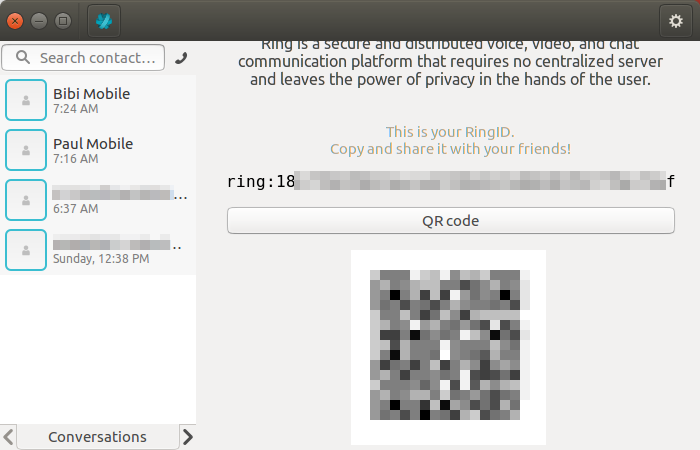
The same goes for the Android client, except you can also scan a QR code from your friend’s desktop or phone, and then press the phone icon to place your first call — use the QR icon in the upper right-hand corner of the screen to do this (Figure 3). Once authorized, you can tap on the contact and start a text chat, voice or video call, or add the number to your contacts (Figure 4).
Figure 3: Scan a QR code.
Figure 4: Add a contact in Android.
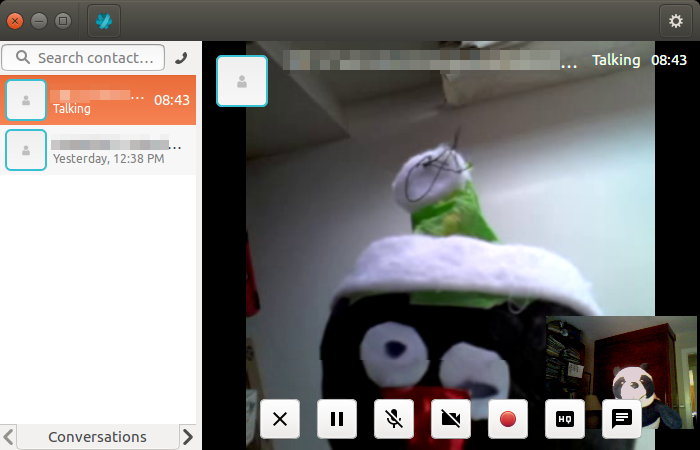
While placing a video call from the GNOME client (Figure 5), if you hover over the video stream, a series of buttons appear along the bottom of the panel. They allow you to, among other things, mute your microphone, disconnect your video, and record the audio from the conversation.
Figure 5: Place a call.
In the GNOME client, you have a tabs at the bottom of the panel on the left of the window. Use the the left- and right-pointing arrows to cycle through Conversations (i.e. text chats), Contacts (your address book), and History, which contains the logs of your placed and received calls.
Conference calls
Finally, probably the coolest feature in Ring is that you can use it to organize conference calls with several users simultaneously. At the moment, you can only organize conference calls from a desktop client, but any client — even Android clients — can participate.
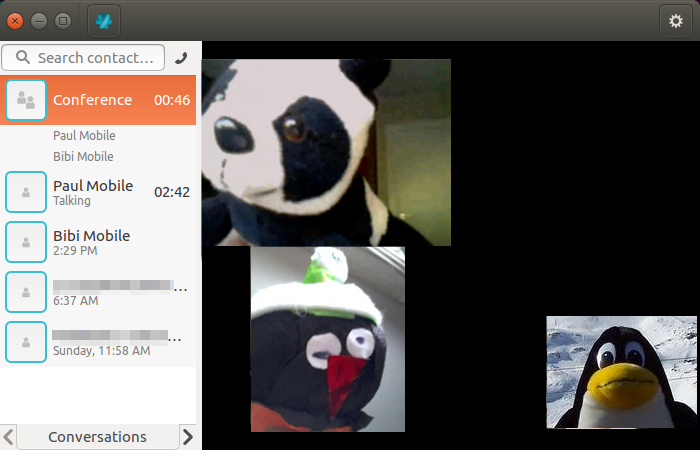
It is not very clear by just looking at the interface how to start a conference call, and there is no option or menu. However, it is really simple. First, just place call from the GNOME client to one of the participants and wait for her to pick up. Once she does, go to the Contacts tab in the left panel and grab the names of the other people you want to invite and drag and drop them onto your friend’s name. Hey presto! Multi-user conference!
Figure 6: Conference call.
Ring as SIP client
You can also configure a Ring client, be it GNOME, KDE, or Android, to use your existing VoIP system transparently. In the GNOME client, click on the gear icon in the upper right-hand corner and choose the Accounts tab. At the bottom of the panel on the left, click on the drop-down menu and pick SIP, then press the + on the right.
The panel on the right will now show all the fields you need to configure your SIP account.
In Android, tap the menu icon in the upper right-hand corner and choose Manage accounts. Tap the + symbol and choose Add your SIP account.
Conclusion
Although I did hit some bumps with Ring due to its beta status, this is a project well worth following and supporting if you are considering an open and secure live communication system for your friends, family or business.
Seriously, Ring is a pretty cool piece of software. Not only it is free (as in beer *and* freedom), distributed under a GPLv3 license, it is also based on open and standard protocols. It will also integrate well with your existing VoIP framework. Additionally, consider all the privacy features it comes with: point-to-point strong encryption, no central server thanks to its P2P network of nodes, and no need to register personal data with a third party.
Couple all that up with it’s great multi-user conferencing feature, and you’ve got everything but an “alternative” to something else.
The excitement that comes with a college degree is memorable – not only because of the joy of accomplishment, but because of the fear of the unknown.
In the open source community, job hunting is its own unique experience. There is great optimism and opportunity in The Linux Foundation’s 2016 Open Source Jobs Report, which found that recruiting open source talent is a top priority for IT recruiters and hiring managers. The report found 65 percent of hiring managers say open source hiring will continue to increase more than any other part of their business over the next six months.
But for many candidates, there’s also the pressure to secure a dream job right out of school. And for hiring managers, there’s a competitive structure to identify and recruit top young talent. What can graduates do to capitalize on this growing market and get the job of their dreams?
Open Source is growing fast and there are numerous factors driving the increased number of jobs. More and more customers are recognizing the value of investing in open source technologies, and this is creating a greater need for more skilled and passionate employees to fill those jobs. At SUSE, we are experiencing first-hand the fast pace of growth, hiring for more than 111 jobs across all facets of the organization, and we are identifying many new opportunities that apply to both experienced and less experienced candidates. These positions are addressing an uptick of new technologies being embraced by enterprises within a wide range of industries. Take OpenStack, for example, where 81 percent of senior IT professionals are planning to move, or are already moving, to OpenStack private cloud. All of this technology, powered by open source, is causing a greater need for zealous workers to fill those jobs.
For applicants, like college grads, who may lack more experience, there are numerous positions available varying from intern positions to junior roles in programming and QA. Companies are looking for candidates who possess the right basic skills, but even more important, the right personality and attitude toward this industry.
Experience, Knowledge, and Passion
Certification is always a nice add-on but not essential to securing the position. Active participation in the open source community, relevant experience, and technical knowledge are quality ingredients hiring managers and recruiters look for in new hires. In addition, there needs to be visible passion that will propel individuals to build experiences that will help to grow a career in open source. SUSE, for example, has a large number of colleagues who have grown their careers, and retention of these young professionals is very important.
When undergoing the interview process as a college grad, you will find there are always minimum requirements hiring managers look for, including attitude, team fit, language and technical skills/expertise. You will often be asked to complete a specific task that demonstrates your technical abilities. The interview process goes both ways, though; organizations need to ensure that potential new hires receive enough information about the position and the company so candidates can make an intelligent choice in their favor.
For those still in school or looking to further understand what path you should pursue to qualify for an open source job, here are a few tips to help guide you.For starters, it’s important to have open source in your genes! It’s all about understanding and appreciating the way open source works and how it is being embraced by businesses globally.
Once you dedicate your time to understanding the specifics of how open source works, it’s a great idea to get involved in one or more open source projects that interest you. Observe what contributions are being made and how you can follow suit. Use this as a chance to build your network in the open source community. And start contributing! There is no better entry to being accepted in the open source community than contributing to projects you are equally passionate about. Start small, and act professionally.
Marie Louise van Deutekom is Global HR Director, SUSE.
I just wanted to share a new competition we launched yesterday called Hack The World. I think it could be interesting to those of you already hacking, but also those of you interested in learning to hack.
The idea is simple. HackerOne provides a platform where you can go and hack on popular products/services (e.g. Uber, Adobe, GitHub, Square, Slack, Dropbox, GM, Twitter, Yahoo!, and many more) and submit vulnerability reports. This is awesome for hackers as they can safely hack on products/services, try out new hacking approaches/tools, build relationships with security teams, build a resume of experience, and earn some cold hard cash.
Currently HackerOne has 550+ customers, has paid over $8.9 million in bounties, and fixed over 25,000 vulnerabilities, which makes for a safer Internet.
Hack The World
Hack The World is a competition that runs from 20th July 2016 – 19th September 2016. In that time period we are encouraging people to hack programs on HackerOne and submit vulnerability reports.
When you a submit a vulnerability report that is valid, the program may award you a bounty payment (many people all over the world earn significant buckets of money from bounties). In addition, you will be rewarded reputation and signal. Reputation is an indicator of active activity and participation, and signal is the average reputation in your reports.
Put simply, whoever earns the most reputation in the competition can win some awesome prizes including $1337 in cash, a hackable FPV drone kit, awesome limited edition swag, and bragging rights as being one of the most talented hackers in the world.
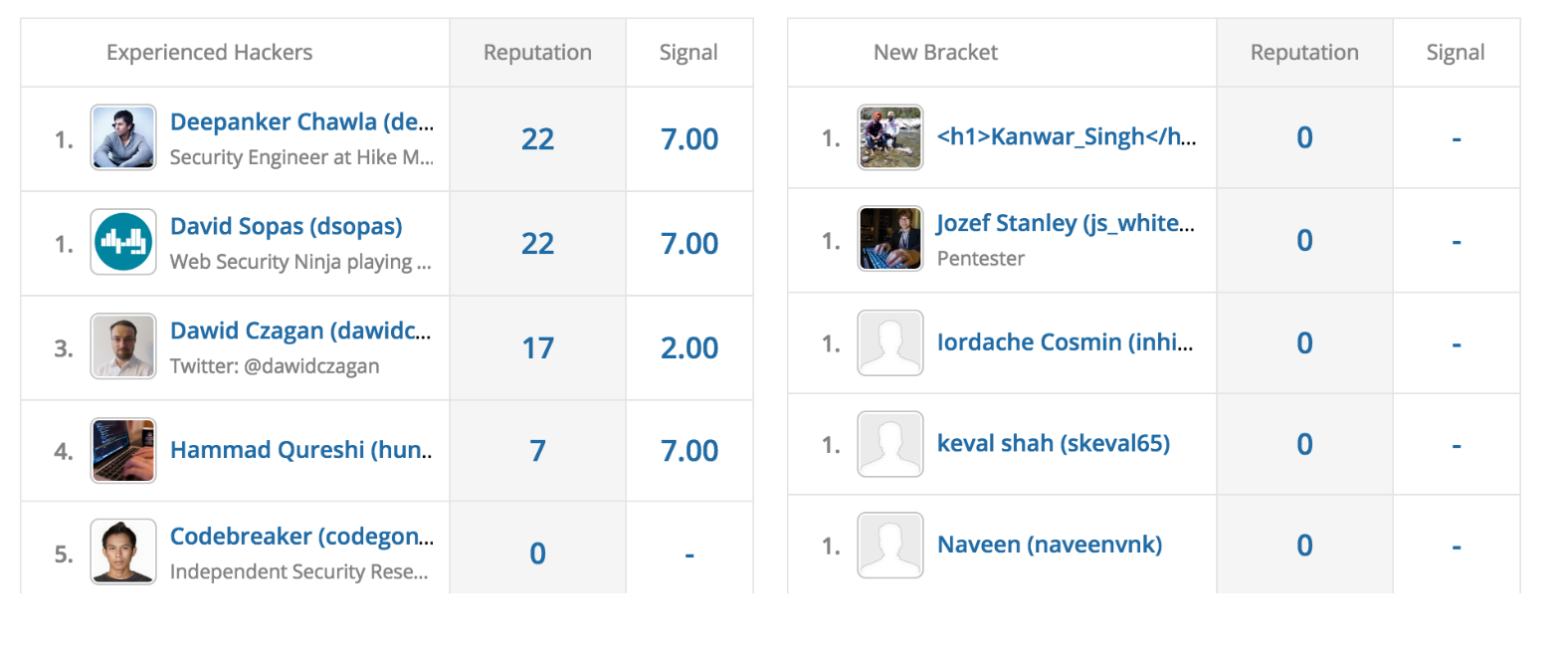
To ensure the competition is fair for everyone, we have two brackets – one for experienced hackers and one for new hackers. There will be 1st, 2nd, and runner up prizes in each bracket. This means you folks new at hacking have a fighting chance to win!
To get you started, we are providing a free copy of Peter Yaworski’s awesome Web Hacking 101 book. Ensure you are logged in and then go here to grab the book. It will then be emailed to you.
When your reports are reviewed by the security teams in the programs you are hacking on the reputation will be awarded. You will then start appearing on the Hack The World Leaderboard which at the time of writing looks a little like this:
So that’s the basic idea. You can read all the details about Hack The World by clicking here.
Hack The World is a great opportunity to hack safely, explore new hacking methods/tools, make the Internet safer, earn some money, and potentially be crowned as a truly l33t hacker. Go hack and prosper, people!
The Verizon business unit rolls out three virtual network services on a managed, on-demand basis, offering total flexibility and deployment choices.
Verizon Enterprise Solutions today announced its first set of virtual network services, including the usual suspects of security, WAN optimization, software-defined WANs and virtualized customer premises gear. Working with mostly established vendors, Verizon is making its services available globally on an immediate basis, and focusing heavily on giving customers lots of options for how they transition to the virtualized world.
A history of containerization technology starting in 1979, and what the future holds for Docker and similar technologies.
In general, containers provide a means of creating container images based on various Linux distributions, an API for managing the lifecycle of the containers, client tools for interacting with the API, features to take snapshots, migrating container instances from one container host to another, etc.