Home Blog Page 772

Keynote: Verizon Calls Mesos

https://www.youtube.com/watch?v=RjtPQFGI-Eg?list=PLGeM09tlguZQVL7ZsfNMffX9h1rGNVqnC

As data services change the way the world does business, Verizon Labs has built a platform designed around the Mesos open source system that enables the robust development of micro services for a variety of products and services. This presentation from MesosCon will use a real world example of how Verizon Lab’s Mesos-based platform integrates with America’s most reliable wireless network to transform how Verizon builds and delivers new services. 

Make Peace With Your Processes: Part 2

In this article, we continue our look at processes and go back to school for a moment, where we’ll pick up some of the basics that will help us increase our knowledge later. We will (very loosely) mimic the Process Tree output that we saw in the previous article with just the ps command. You might stumble across “forest” puns in manuals with regards to “trees” in case it’s confusing.

The “-e” switch is also equal to “-A” and will dutifully display ALL of the processes. We’re going to combine that with the “-j” option, which should give us a “jobs format.” I’m sorry to potentially give you more headaches, and I encourage to try a few of these of alternative options, but one small caveat would be that running “j” and “-j” gives different levels of information. The non-hyphenated version provides more output in this case.

We will also add the “-H” to display the hierarchical output. We can achieve this by running:

# ps -ejH

Or, in a parallel universe, alternatively, you could also use the following for vaguely similar results:

# ps axjf

Try it yourself. It’s far from identical to the “pstree” command seen previously, but there are similarities in the output due to the hierarchies.

Day to Day

It is easy to get overwhelmed by the level of detail that the ps command can provide. My favorite process command is:

# ps -ef 

Using the “-e” option gives us a display of all the processes in the Process Table and the newly added “-f” switch gives us what’s known as full-format listing. Apparently, we can add “-L” to this concoction to offer us process thread information. I find this command very easy to remember around Christmas time.

# ps -eLf

Et voilà, as requested, two new columns NLWP (number of threads) and LWP (thread ID) are added to the now busy display.

If you only wanted to print the name of a process (which might be ideal for scripting), then you can separate the wheat from the chaff by using this command for process number “37”:

# ps -p 37 -o comm=

This is an option that I’ve used in the past a few times to check what command my terminal is currently responsible for. This is useful if you’re stressing your server or worrying your workstation with lots of extra load. The simple (non-hyphenated) “T” switch lets us view this.

# ps T

You can test this by running something unusual — like a for loop with a pause in it using “sleep” — or anything odd that stands out, such as this command.

# echo {1..999999} &

This simply runs a counter process in the background. And, when we run “ps T”, we can see processes associated with the terminal in question.

Built-In Features

Let’s look at a few other built-in basics of the pliable ps command.

You can reverse the output of a command with a non-hyphenated “N” switch, which stands for negate. Or, more precisely, from the manual, this lets you “Select all processes except those that fulfill the specified conditions. (negates the selection) Identical to –deselect.”

All is revealed in Listing 1. As you can see, there isn’t any mention of “ntp” except from our ps command.

# ps N ntp


PID TTY   STAT   TIME COMMAND

1414 tty1     Ss+    0:00 /sbin/mingetty /dev/tty1

1416 tty2     Ss+    0:00 /sbin/mingetty /dev/tty2

1418 tty3     Ss+    0:00 /sbin/mingetty /dev/tty3

1420 tty4     Ss+    0:00 /sbin/mingetty /dev/tty4

1426 tty5     Ss+    0:00 /sbin/mingetty /dev/tty5

1430 tty6     Ss+    0:00 /sbin/mingetty /dev/tty6

9896 pts/1    S       0:00 sudo -i

9899 pts/1    S       0:00 -bash

10040 pts/1   R+     0:00 ps N ntp

Listing 1: Demonstrates running processes without including “ntp” (note our “ps” command again being seen)

Imagine that you wanted to see the SSH activity as well as the Hardware Abstraction Layer daemon, “hald”. These are hardly related I agree, but you can never account for strange scenarios when it comes to computers.

The following command is a way of searching for a list of processes with a certain name, separated without a space and just a comma in this case.

# ps -C sshd,hald

If you need to check any processes that are run by a particular system group, you can do so with the following command:

# ps -G ntp

Compatibility

Although it’s not always the case, the modern ps command cleverly mitigates our migraine-inducing compatibility headaches by letting us run a simple command in several ways.

If, for example, you wanted to select a list of processes that belonged to the superuser, root, then you could achieve this with the following three commands (which admittedly display ever-so-slightly different outputs):

# ps -u root 

# ps U root 

# ps --user root

The above commands dutifully offer what’s known as the “EUID” or “effective ID” of a user but not the “real user ID”. In reality — no pun intended — every process actually has two user IDs, just to keep things simple. This also applies to groups, but let’s not worry about that.

Apparently, the kernel is most concerned with the “effective user ID” for activities such as writing to a file and whether a user is allowed to complete a request to do something that requires a privilege.

And, although this is required much of the time, there’s an important scenario within which the “real user ID” must be paid attention to. If someone or something wants to alter the owner of “effective user ID” on an already running process, then the kernel needs to check both the “real user ID” and the “effective user ID”.

Changing the ownership of a process is particularly useful if a new user wants to do essentially the same thing (like write to a file) as the existing owner does. Rather than duplicating the process (adding extra strain to the system and potentially introducing more security aspects to consider), we can avoid duplicating the process and simply reassign it.

What about after a user is finished with their short task? The answer is that we only temporarily give access and then swap it back to its original owner. If you want to reveal the somewhat elusive “real user IDs” then you can do so with system groups like this (which is the same as “-G”):

# ps --Group ntp

And, not surprisingly, we can do exactly the same thing for users as follows (we do this with “-U”):

# ps --User chrisbinnie

If you want to query a very specific Process ID (because you’ve spotted it in “top” or a script has complained about it), then for all intents and purposes, these commands all the do the same thing. I have included some output for comparison, because it’s short and easy to read in this case:

# ps -p 1248


PID TTY   TIME      CMD

1248 ?      00:00:08 ntpd


# ps p 1248


PID TTY STAT TIME COMMAND

1248 ?      Ss    0:08   ntpd -u ntp:ntp -p /var/run/ntpd.pid -g


# ps --pid 1248


PID TTY    TIME      CMD

1248 ?      00:00:08 ntpd

If you’ve ever wondered about the efficiencies of a system, here’s something interesting. The kernel has to be able to tidy up when a user logs out (otherwise, there would be a plethora of useless processes clogging up the pipes) so Unix-like systems dutifully group processes into “sessions”. You can test for session IDs by using “–sid” or as below with “-s”:

# ps -s 1526

Note that a session can have an associated terminal (of “tty” or “Teletype” varieties) controlling it, however, only one process can be at running in the foreground. All these components are given numbers to keep the system nice and orderly. As a result, we have thread IDs, process IDs, process group IDs, and session IDs. And, here you were thinking that the ps command didn’t have much to do.

If you’re interested in reading a little more about sessions, this book excerpt is intriguing with sentences such as “Consequently, sessions are largely the business of shells. In fact, nothing else really cares about them.”

Here, I’ve provided a bit more detail about the powerful ps command and how it can help you discover information about your processes. There’s more to learn about parent processes, filesystems, and more in the next few articles.

Chris Binnie is a Technical Consultant with 20 years of Linux experience and a writer for Linux Magazine and Admin Magazine. His new book Linux Server Security: Hack and Defend teaches you how to launch sophisticated attacks, make your servers invisible and crack complex passwords.


 

Cisco Unfurls its Tetration Data Center Analytics Platform

Cisco today took the wraps off a new platform for data centers – Tetration Analytics.

According to its announcement today, existing data center analytics tools are disjointed. Cisco created Tetration as an entirely new analytics platform to monitor every action in the data center.

Tetration is based upon a 39-rack-unit appliance that’s installed on-premises at the data center. In addition, Tetration uses sensors that create an analytics platform.

“It’s a complete system, monitoring every single packet and monitoring changes happening across those packets,” said Yogesh Kaushek, a Cisco senior director of product management, in a pre-briefing with SDxCentral.

Read more at SDx Central

Syslog, A Tale Of Specifications

The advantage of a unikernel work cycle is many-fold. You get performance benefits from not having a memory management unit or Kernel/User boundary and the attack surface is greatly minimized as all system dependencies are compiled with your application logic. Don’t use a file-system in your application? Leave it out. The philosophy here is keep it simple and use what you need. These unikernels are also the secret sauce for how Docker Beta natively works on Windows and MacOSX.

I’m specifically focusing on hacking on the Mirage implementation of Syslog which was started by Jochen Bartl (verbosemode, lobo on IRC) who is an all around awesome guy to work with. This is Jochen’s first big OCaml project (mine too) and has already proven how capable and passionate he is by leading the charge. 

Read more at Gina Codes

Network Security: The Unknown Unknowns

Using the Assimilation Project to Perform Service Discovery and Inventory of Systems

I recently thought of the apocryphal story about the solid reliability of the IBM AS/400 systems. I’ve heard several variations on the story, but as the most common version of the story goes, an IBM service engineer shows up at a customer site one day to service an AS/400. The hapless employees have no idea what the service engineer is talking about. Eventually the system is found in a closet or even sealed in a walled off space where it had been reliably running the business for years completely forgotten and untouched. From a reliability perspective, this is a great story. From a security perspective, it is a nightmare. It represents Donald Rumsfeld’s infamous “unknown unknowns” statement regarding the lack of evidence linking the government of Iraq with the supply of weapons of mass destruction to terrorist groups.

Alan Robertson, an open source developer and high availability expert, likes to ask people how long it would take them to figure out which of their services are not being monitored. Typical answers range from three days to three months.

Read more at Security Week

Scientific Audio Processing, Part I – How to read and write Audio files with Octave 4.0.0 on Ubuntu

Octave, the equivalent software to Matlab in Linux, has a number of functions and commands that allow the acquisition, recording, playback and digital processing of audio signals for entertainment applications, research, medical, or any other science areas. In this tutorial, we will use Octave V4.0.0 in Ubuntu and will start reading from audio files through writing and playing signals to emulate sounds used in a wide range of activities.

Best Linux Command-Line Tools For Network Engineers

Trends like open networking and adoption of the Linux operating system by network equipment vendors require network administrators and engineers to have a basic knowledge of Linux-based command-line utilities.

When I worked full-time as a network engineer, my Linux skills helped me with the tasks of design, implementation, and support of enterprise networks. I was able to efficiently collect information needed to do network design, verify routing and availability during configuration changes, and grab troubleshooting data necessary to quickly fix outages that were impacting users and business operations. Here is a list of some of the command-line utilities I recommend to network engineers.

Read more at Network Computing

6 Amazing Linux Distributions For Kids

Linux and open source is the future and there is no doubt about that, and to see this come to a reality, a strong foundation has to be lied, by starting from the lowest…

[[ This is a content summary only. Visit my website for full links, other content, and more! ]]

True Network Hardware Virtualization

If your network is fine, read no further.

TROUBLE IN PARADISE

But it’s likely you’re still reading. Because things are not exactly fine. Because you are probably like 99.999% of us who are experiencing crazy changes in our networks. Traffic in metro networks is exploding, characterized by many nodes, with varying traffic flows and a wide mix of services and bit rates.

To cope with all this traffic growth and changing usage patterns, WAN and metro networks require more flexibility. Network resources that can be dynamically and easily set into logical zones; the ability to create new services out of pools of network resources.

Virtualization is a concept that has achieved this in data centers where compute resources have long been virtualized using virtual machines (VMs). NICs providing network connectivity to VMs have been virtualized. But network resources are still rigidly and physically assigned in metro and WAN networks.

You, the devoted architects and tireless operators of these high capacity networks, are confronted with complex networking structures that don’t lend themselves to any form of dynamic change. A further dilemma is that you need to both manage existing connections but also build new platforms that excel at delivering on-demand services and subscriber-level networking.

VAULTING TO THE FRONT

The IXPs and ISPs who architect networks with dynamic programmatic control will achieve service velocity that is winning.

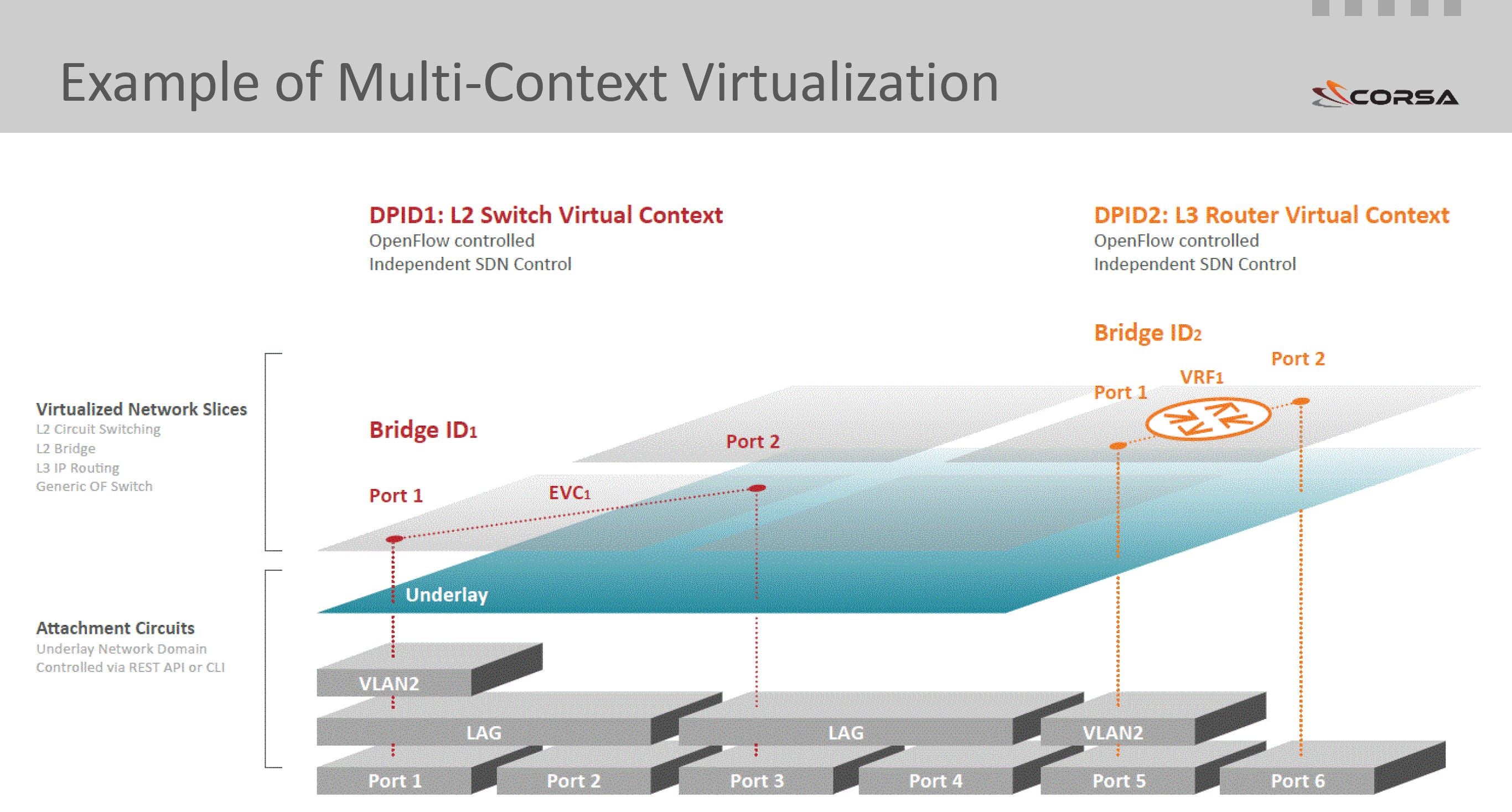
Enter true network hardware virtualization which creates virtual forwarding contexts (VFCs) at WAN scale. For ISPs, Internet Exchanges (IX) and Large Campus networks, WAN-scale multi-context virtualization offers dynamic creation of logical forwarding contexts within a physical switch to make programmable network resource allocation possible.

VIRTUALIZATION IN NETWORK HARDWARE FOR WAN AND METRO NETWORKS

Corsa’s SDN data planes allow hardware resources to be exposed as independent logical SDN Virtual Forwarding Contexts (VFCs) running at 10G and 100G physical network speed. Under SDN application control, VFCs are created in the logical overlay. Three context types are fully optimized for production network applications: L2 Bridge, L3 IP Routing, L2 Circuit Switching. A Generic OpenFlow Switch context type is provided for advanced networking applications where the user wants to use OpenFlow to define any forwarding logic.

Each packet entering the hardware is processed with full awareness of which VFC it belongs to.
Each VFC is assigned its own dedicated hardware resources that are independent of other VFCs and cannot be affected by other VFCs scavenging. Each VFC can be controlled by its own, separate SDN application.

The physical ports of the underlay are abstracted from the logical interfaces of the overlay. The logical interfaces defined for each VFC correspond to a physical port or an encapsulated tunnel, such as VLAN, MPLS pseudo wire, GRE tunnel, or VXLAN tunnel, in the underlay. Logical interfaces of any VFC can be shaped to their own required bandwidth.

USE SDN VIRTUALIZATION TO AUGMENT YOUR NETWORK WHERE IT’S NEEDED

This level of hardware virtualization, coupled with advanced traffic engineering and management, allows building traditional Layer 2 and Layer 3 services with new innovative SDN enabled capabilities. For example, an SDN enabled Layer 2 VPLS service can provide SDN enabled features such as Bandwidth on Demand, or application controlled forwarding rules, and at the same time use existing network infrastructure in the underlay (physical) network to provide connectivity for the new service. To further differentiate, service providers may even allow customers to bring their own SDN controllers to control their services, while retaining full control over the underlay network.

STOP READING AND START DOING!

With Corsa true network hardware virtualization, virtual switching and routing can be achieved at scale to enable programmable, on-demand services for operators and their customers.

WEBINAR

Join us on the live webinar at 10am PDT on June 22 to see how networks can be built using true network hardware virtualization and learn the specific uses cases that it benefits. This webinar will outline specific attributes of open, programmable SDN switching and routing platforms that are needed, especially at scale and in the process dispel the notion of ‘the controller’, discussing how open SDN applications can be used to control the virtualized instances.

Register Now!


A Shared History & Mission with The Linux Foundation: Todd Moore, IBM

IBM is no stranger to open source software. In fact, the global corporation has been involved with The Linux Foundation since the beginning. Founded over a century ago, IBM has made a perennial commitment to innovation and emerging technology; That’s why they chose to participate in Linux Foundation Collaborative Projects.