Understand Docker images, containers, and registries and how they deliver the benefits of immutable infrastructure and software reuse.
Docker started out in 2012 as an open source project, originally named dotcloud, to build single-application Linux containers. Since then, Docker has become an immensely popular development tool, increasingly used as a runtime environment. Few — if any — technologies have caught on with developers as quickly as Docker.
One reason Docker is so popular is that it delivers the promise of “develop once, run anywhere.” Docker offers a simple way to package an application and its runtime dependencies into a single container; it also provides a runtime abstraction that enables the container to run across different versions of the Linux kernel.
According to 451 Research’s latest Cloud Price Index (CPI), the cloud services sector is a long way from being a commodity market. Price, the CPI indicates, barely affects market share, while value-added services comprise the real driver in the sector.
Amazon Web Services (AWS) and Google have been cutting virtual machine (VM) prices relentlessly for a while now, spurring some to refer to this tactic as a “race to the bottom.” And although 451 Research finds that VM pricing has dropped 12 percent on average over the past 18 months, it conversely found that the price of storage, load balancing, bandwidth, and other services has remained stable and continues to provide margins.
In 2013, last time Tech Pro Research conducted a poll on the topic, half of respondents said they didn’t know anything about software-defined networking. This time, respondents were more familiar with SDN and much more willing to consider it. Plans to implement increased from 6% in 2013 to 32% now.
Respondents whose companies have already made the leap reported faster time to implementation for new business solutions, improved network performance, lower network management costs, and better reliability.
This white paper by Jesse Hertz [PDF] examines various ways to compromise and escape from containers on Linux systems. “A common configuration for companies offering PaaS solutions built on containers is to have multiple customers’ containers running on the same physical host. By default, both LXC and Docker setup container networking so that all containers share the same Linux virtual bridge.
Continuing to innovate at a rapid clip within the container orchestration space,CoreOS has launched an open source project aimed to give Kubernetes users a proper storage system to work with their pods.
The goal behind Torus is to provide scalable storage to container clusters orchestrated by Kubernetes.
“We’ve heard from Kubernetes users that working with existing storage systems can be difficult,” said Wei Dang, CoreOS head of product, in an interview with TNS. “We made it really easy to run Torus. It runs within a container and can be deployed with Kubernetes. It provides a single distributed storage cluster to manage microservices workloads.”
Enterprise network functions virtualization, or NFV, can simplify the network design, deployment, and reduce costs at remote branch sites.
Many enterprise organizations have a problem: the proliferation of networking hardware at branch sites. A typical branch site might have a mix of devices to provide routing, telephony service, security, wireless LAN control, WAN acceleration, and Layer 2 switching. Traditionally, each function requires its own box (oftentimes a simple, general-purpose compute platform that runs software implementing a function), resulting in high cost and long deployment and upgrade times.
Upgrading and configuring numerous devices at each branch consumes a lot of network staff time, and potentially requires the shipment of new hardware to each branch. Also problematic is getting new or upgraded hardware properly connected to the existing hardware and transitioning from the old to the new. Software upgrades are typically an all-or-nothing switch because the platforms often can only run one instance of the software at a time.
Several mail servers are available on the market today. Some are rather confounding to configure but are super-reliable. Others are a little old school and rely on no small degree of background knowledge to get them up and running.
According to the website Mail Radar, in a randomized survey of 59,209 servers, some 24 percent were running Sendmail, the parent of all popular MTAs (Mail Transfer Agents). This was followed by Postfix at 20 percent and qmail at 17 percent. Surprisingly, almost half (48 percent) of the IP addresses hosting these mail servers were registered to ranges in the United States.
Having used the mighty qmail, which is so efficient that it thwarted non-trivial Mail Bomb attacks in the late 1990s without breaking a sweat at an ISP that I worked for, I became a Postfix convert around the time that the most popular Linux distributions took a shine to its reliability and began including it as their default MTA.
To say that Postfix is brimming with features is an understatement. There are simply too many features to cover. This powerful mail server can process prodigious amounts of emails in a highly efficient manner and still pay attention to somewhat obscure, but very useful, config options.
The main Postfix manual spanned some 8,800 words (and there are several other manuals in addition) so it’s not surprising that one of the topics that Postfix pays attention to is getting the best possible performance out of your mail server.
In this series, I’ll look at a few tips that the Postfix documentation recommends to get the most out of your MTA build and process emails more efficiently. Not all scenarios will apply to your build of course, but — as with all things — understanding various scenarios should help improve your ability to troubleshoot in the future.
For clarity, when “clients” are mentioned, they are almost always other mail servers and not what some might consider as mail clients (i.e., the ones you pick up email with, such as Thunderbird or Evolution etc.).
Debaser
There’s a welcome file bundled with Postfix called “DEBUG_README,” which cites the best routes to follow when solving an issue. It can be seen in Listing 1:
* Look for obvious signs of trouble
* Debugging Postfix from inside
* Try turning off chroot operation in master.cf
* Verbose logging for specific SMTP connections
* Record the SMTP session with a network sniffer
* Making Postfix daemon programs more verbose
* Manually tracing a Postfix daemon process
* Automatically tracing a Postfix daemon process
* Running daemon programs with the interactive ddd debugger
* Running daemon programs with the interactive gdb debugger
* Running daemon programs under a non-interactive debugger
Listing 1: Starting from the top, here is how Postfix recommends you approach troubleshooting any issues that you encounter.
As you can see, there are several methods to explore before enabling a debugger, such as ddd or gdb.
Qshape
If you’re ever hit by a mountain-sized amount of email from a particular domain name and you haven’t set up your anti-spam filters correctly beforehand, then you can use a clever tool called qshape. Although this tool is apparently bundled in certain older versions, I couldn’t find it on my Postfix 2.6 installation, so this is the way forward if you need to install it on Red Hat derivatives and Debian derivatives, respectively:
Any issues with running qshape once the package is installed might relate to the fact that Perl isn’t installed, so look into the relevant packages for your distribution if you encounter headaches. On Red Hat and its children, you can reportedly do that by running this command:
# yum groupinstall perl development
Now that we have a working installation of qshape, let’s see how it works. The ever-helpful Postfix docs discuss the fact that qshape offers a formatted table of your mail queue usage — as seen in Listing 2 — having run this command (for the “hold” queue, which I’ll look at in a moment):
Listing 2: Results from the “hold” queue on Postfix using qshape.
In Listing 2, the top line showing “T” stands for the total “sender” count for each domain name. The manual explains that the “columns with numbers above them show counts for messages aged fewer than that many minutes, but not younger than the age limit for the previous column.” Then, the “TOTAL” count tallies up all domain names.
In Listing 2, there are 14 messages that may or may not have legitimately come from “yahoo.com.” One of those messages is between 10 and 20 minutes old, one is between 320 and 640 minutes old and 12 are older than 1,280 minutes, which is rapidly approaching a full day.
The insightful qshape tool should assist you in discerning which offenders are clogging up your mail server’s pipes. Once you’ve gleaned that information, you can then create filters or rules to help reduce the volume of emails from problematic senders.
Queue Types
In Listing 2, we used the “hold” queue. Postfix uses a number of different queues which offers exceptional flexibility and keeps it running efficiently. Table 1 shows what each is used for.
Queue Name
Usage
incoming
This queue receives incoming e-mail either via network interfaces or by the local mail “pickup” daemon via the “maildrop” directory.
active
When Postfix’s queue manager opens an email with a view to delivering it such an email sits in the active queue. This queue is limited in size for performance.
deferred
If an initial effort to deliver email fails to succeed then this queue picks up that email. The delays between attempted retries are cleverly increased over time.
corrupt
Any emails that Postfix can’t read and thinks may be damaged or corrupt in some way are moved into this queue for inspection.
hold
If you need to manually delay either individual or volume transmissions of certain emails for any reason, then you can set them to sit in the hold queue, essentially in jail, until you deem them publicly acceptable.
Table 1: The different queues which Postfix uses to assist with achieving the best efficiency.
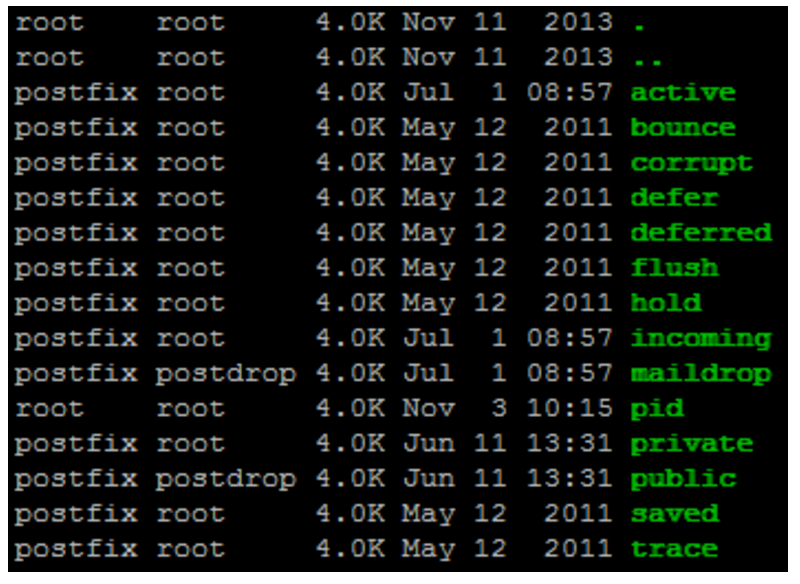
Figure 1: We can see familiar directory names from the different queues Postfix uses (which would contain email data if there were anything queued).
If you look in the “/var/spool/postfix” directory, you should see something similar to that displayed in Figure 1 (potentially depending on your version and distribution).
An example of an unhealthy queue is also available in the Postfix docs.
The docs discuss a dictionary-based attack where multitudinous email addresses are emailed in the hope that they are valid. We check the “deferred” queue with this command as so:
Listing 3: A mail queue after an attack that hunted for valid addresses to send spam to.
It’s important to note that a busy “deferred” mail queue is not always cause for alarm. This is especially the case if your “active” and “incoming” queues are relatively quiet so that mail deliveries can continue efficiently. In Listing 3, however, the “MAILER-DAEMON” entries display a large number of bounces, and some 849 emails have been sitting undelivered for some time.
As you can imagine, digging out such information from the logs is a far more difficult challenge. The qshape tool is a welcome addition to any admin’s Postfix toolkit and comes highly recommended for a quick glance at what your MTA is up to. The installation, if it’s not bundled with your version, is worth the effort.
Troubleshooting
Next, let’s spend a moment considering a smattering of other issues that might need looked at on an MTA.
One of the few times that you tinker with the “master.cf” file — which is a relatively dangerous undertaking relative to other config files — is when you introduce the running of Postfix inside a chrooted environment. In other words, it’s when you run Postfix inside a limited environment so it has little chance of contaminating other parts of your system should if compromised.
The docs suggest that not managing to set up a chroot correctly is fairly common, so if you have problems, it should be one of the first things that you disable. Apparently, the master Postfix process won’t run chrooted thanks to the fact that it is needed to spawn the other processes. So, don’t let that confuse you if you can’t get a chroot working. I’m guessing that this “root” privilege might be required in the same way that Apache needs the “root” user to open a privileged TCP port (where the initial process runs as “root”), and from there many child processes run as the less-privileged users, such as “httpd” or “apache”.
In the past, I’ve seen an issue where the mail logs contain lots of entries mentioning “Unknown”. If you find yourself flummoxed by such errors, you can rest assured that they usually relate to DNS lookup problems. Check that the server’s local “resolv.conf” file holds valid name server information or if those servers are down or misbehaving. Essentially, this error means simply that no hostname resolved correctly so the machine name remains “unknown” to Postfix.
Before I look at how to pacify an unhappily busy Postfix instance — one which is so stressed with load that it’s creaking at the seams — I will first consider that (until recently at least) each and every SMTP connection to your MTA spawned an individual process. If your server is having a tantrum because it’s too busy, then you’re likely not getting the best out of your SMTP processes. And, there’s a chance that the limit of the number of processes allocated is too low and needs adjusted within the “master.cf” file. Let’s look further into this issue, albeit briefly.
Although this next recommendation only applies to deprecated versions in my experience, you can never predict when you might have an ancient version of a piece of software foisted upon you to fix. A somewhat older approach to machines that abused the services provided by a server was referred to as “tar-pitting.” This is where a delay was purposely introduced at the initial greeting stage. The idea was that because of this irritating delay the attraction of sending lots of spam was lessened (and less profitable). This was phased out in Postfix 2.0, but there is a useful setting to disable this “sleep” time. Again, this is not needed from Postfix 2.1 on but resides in “/etc/postfix/main.cf”:
This was phased out because other anti-spam measures were successfully employed, and because introducing lengthier sessions to every single email exchange that your server makes is, upon reflection, not always entirely helpful.
I mention this because a couple of clever options were spun off the basic premise of “sleeping.” I’ve used it (along with many other carefully considered options) so successfully in the past that allmost every piece of spam was caught before hitting my Inbox. Let’s look at the newer, more evolved options now.
First, the “smtpd_soft_error_limit” option allows us to set a limit of errors that an individual connection generates. This defaults at 10 errors. If that count is reached, then Postfix will delay any valid and invalid responses it sends by the value configured by the option “smtpd_error_sleep_time” in seconds (which is one second by default).
Having seen the name of the first option, you might have guessed that the second option refers to “hard” limits: “smtpd_hard_error_limit”. If the default limit of 20 is reached, then Postfix dutifully stops speaking to the remote server completely, throws down its toys, and storms off in a huff.
You’re advised to tweak these error limits to suit your preferences. Of course, it’s sensible to start off being less restrictive and slowly adjusting them (followed by reloading Postfix’s config each time). I have to admit that I opted for the other route (mainly because the mail server on which I tested the config changes only received a small amount of email traffic).
Knowing that I had half an hour to tune the aforementioned settings to my heart’s content, I introduced relatively draconian limits and immediately locked out all the pesky spam. Gingerly, I opened up some of the limits and began to see ham (legitimate emails) slowly return from their MTAs to retry their deliveries having been told to delay their initial attempt. After some trial and error (and only a few emails were ultimately delayed by 5 or 10 minutes), there was no spam to be seen.
Next Time
In this article, I covered some ways to process emails more efficiently and discussed how to debug various MTA issues. In part two of this series, I’ll take a closer look at some warning signs and consider ways to mitigate issues when you see that your server is stressed.
Chris Binnie is a Technical Consultant with 20 years of Linux experience and a writer for Linux Magazine and Admin Magazine. His new book Linux Server Security: Hack and Defend teaches you how to launch sophisticated attacks, make your servers invisible and crack complex passwords.
Almost all applications that perform anything useful for a given business need to be integrated with one or more applications. With microservices-based architecture, where a number of services are broken down based on the services or functionality offered, the number of integration points or touch points increases massively.
Systems based on microservices architectures are becoming more and more popular in IT environments. The rise of microservices increases the challenges associated with systems with multiple integrations. Almost all applications that perform anything useful for a given business need to be integrated with one or more applications. With microservices-based architecture, where a number of services are broken down based on the services or functionality offered, the number of integration points or touch points also increases massively. This can impact the system as a whole, since now overall system performance is also dependent upon external factors (the performance of an external system and its behavior).
I have been recently watching https://www.youtube.com/watch?v=8zFQG5mKwPk&feature=autoshare . Regardless external bridge br-ex usually doesn’t have DHCP mode but on system where management and external interfaces are supported by different NICs ( say eth0 and eth1) . It makes sense to turn br-ex into DHCP mode, splitting DHCP pools of DHCP Server serving physical external network and allocation pool of floating IPs which belongs to virtual external network. Lars’s Kellogg Stedman Video has been made for RDO IceHouse, and I wanted to make sure that explicit update to ovsdb via br-ex syntax would work as expected on RDO Mitaka . To see for yourself that it works exactly as proposed a while ago.
A little over a week ago, it was announced that approximately 117M username and passwords from a 2012 LinkedIn breach were being offered for sale on the internet. In direct reaction to this latest breach, the Microsoft Active Directory team will no longer allow you to use terrible passwords. I actually didn’t realize it, but up until this announcement, Microsoft was still allowing users to use passwords such as ‘12345’ and ‘password’. This made me think, what is our responsibility as system administrators, engineers, architects, and programmers? In other words, how do we become good stewards of our client’s information?
To answer this question, we must first identify some of the basic challenges we face. First and foremost, on its own, the password is archaic, antiquated, and generally insecure. However, until someone develops an alternative to the password, it is here to stay. Now, some of you are screaming at me right now, suggesting plenty of alternatives to the username and password combination. To date, all alternatives to the password require the user to invest in some new piece of hardware, require upgrades and/or changes to the current infrastructure, or require significant training before it can be implemented. Until we find a solution that can check those boxes, the password will remain.
Our second major challenge is a lack of security awareness and education on the part of the end-user. Most user receive some form of computer user agreement when they first start a job. Generally, this agreement tells them how they may use their computer and may give them some security tidbits. At best, this user may receive quarterly corporate training that they day dream through. The accountant doesn’t have an in-depth knowledge of computer security, networks, and so forth. When John, our accountant, chooses ‘password1234’ he doesn’t realize that his insecure password allows an enterprising attacking to make his way to a main server in our network, elevate his privileges and steal design documents for the company’s newest prototype.
So, what makes us good stewards of our user’s information? Education is the first step towards being a good data steward, technologies are ever evolving. It is important as a subject matter expert (SME) in your technology that you are continuing your education, keeping up with best practices and staying apprised of the security landscape.
Certifications are another excellent way to make sure security is at the forefront of our projects. Take a look at CompTIA Security+, Systems Security Certified Practitioner (SSCP), and Certified Information Systems Security Professional (CISSP). These are only a few, countless others exist and no one is the be-all and end-all in the security world. However, what these certifications do provide you is a framework for security concepts and mindset to implement them.
Keep in mind, security incidents are going to happen! Enterprising attackers are looking for new vectors to attack you and your projects every day. Transparency is key in the event of an attack or data breach. The use of third party reporting sites, such as Troy Hunt’s, Have I Been Pwned, can help show your users you are serious about safeguarding their data. Keeping your users informed and letting them know what has been done to mitigate the situation is often the difference between losing your user base and keeping them long after an incident has occurred.
Overall, being a good steward of your user’s information requires us to begin to take a security minded approach to everything we do. Security should no longer be an afterthought, it should be built into our projects from the ground up. While not every incident can be avoided, with proper planning and a security minded approach we help mitigate these attacks and keep our user’s data protected.