Home Blog Page 802

ONUG Hopes to Nudge Networks Toward Real Interoperability

For all the complexity underlying software-defined networking (SDN) — the shift to a DevOps culture, the ending of siloed organizational habits — one recurring gripe is that all these “open” and “standards-based” networking products don’t operate cleanly with one another.

It’s an old complaint in networking, but it’s still on users’ minds, as you could hear during last week’s meeting of theOpen Networking User Group (ONUG).

Read more at SDx Central

DevOps and Sharing

Right now I hold the hilarious title of “DevOps Heroine” at Acrolinx. For non-native English speakers: a heroine is a female hero. I started working at Acrolinx in the beginning of this year. Earlier I was a junior software engineer at a small Polish company called Three of Coins. Three of Coins is a consulting company, focused on security and infrastructure. Acrolinx sells software for professional, advanced text editing. There’s a lot of natural language processing and computational linguistics involved. It’s pretty fascinating. Technologies we use include Java, Python, Clojure, Node.js, Ember, Ant, Maven, Gradle, Jenkins, Docker, lambdacd… and many more. We test and build or software on Linux, RedHat, Windows and MacOS. We have a team of around 20 developers (but I can never remember how much exactly) – most of them on site – and some of them are computational linguists. I won’t go into more detail, since this is not a company pitch.

Read more at That Marta

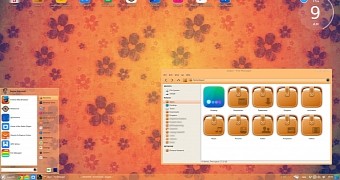
ChaletOS 16.04 Linux Arrives for Windows Refugees, Based on Ubuntu 16.04 LTS

Dejan Petrovic has had the great pleasure of announcing the release and immediate availability for download of his newest ChaletOS operating system.

ChaletOS 16.04 arrived based on Ubuntu 16.04 LTS (Xenial Xerus), offering users the same level of support as Canonical offers their users, of course, based on the upstream software repositories. Therefore, ChaletOS 16.04 is based on the same long-term supported Linux 4.4 kernel as Ubuntu 16.04 LTS.

… ChaletOS’ main design goal is to help ex-Windows users with their migration to an open-source, desktop-oriented computer operating system powered by Linux kernel.

“Also, now they are more complete, and include details for many applications,” reads today’s announcement. “

Read more at Softpedia

How to Install Rundeck on a Debian 8 (Jessie) Server

Rundeck allows you to run commands/scripts on a remote computer. In this tutorial, I will deal with Linux servers : Debian for rundeck server and Debian/ubuntu for the remote computers. This tutorial shows the steps to install and configure a rundeck server.

Linux Server Provisioning Using Stacki

Server provisioning is a set of actions to prepare a server, taking it from bare metal to a functioning system complete with an operating system, data and software. There are a number of sophisticated tools available for Linux that are adopted in provisioning servers, offering the ability to simultaneously set up thousands of machine unattended. Automation and consistency across Linux infrastructure is hard but in our today’s article we will be setting up Linux installations of heterogeneous hardware across 10’s to 1000’s of machines fast, flexible, and absolutely consistent using Stacki.

Read more at Linuxpitstop.com

Know Your Virtual Workloads: Block Size & Workload Shift

To properly design and optimize your data center, it’s important to understand various workload characteristics, how they change over time, and how they impact application performance. I’ve identified the top six things you should know about your virtualized workloads.

In my last post, I looked at two characteristics of your VMs that are traditionally overlooked in the data center: the different effects that reads and writes have on VMs, and how different access patterns impact performance. Failure to recognize and appropriately measure these things can adversely impact application performance and lead to high IT costs.

In this post, I’ll address two other characteristics that are equally important: block sizes and workloads.

Read more at Network Computing

The Mega Guide To Harden and Secure CentOS 7 – Part 1

This tutorial only covers general security tips for CentOS 7 which can be used to harden the system. The checklist tips are intended to be used mostly on various types of bare-metal servers or…

[[ This is a content summary only. Visit my website for full links, other content, and more! ]]

Multiple Virtual Hosts on CentOS 7 or RHEL 7

This article tends to help you to set up multiple websites (virtual hosts) on single web server running on Linux CentOS 7 or Red Hat 7.

It’s particularly useful if you don’t want to spend money on multiple Virtual Private Servers (VPS), but you’d like to have ability to run and build multiple websites with minimum cost on the same server. In real world scenario, most of those sites would be based on common content management systems such as WordPress, Drupal, Joomla, etc.

The idea lies in the fact that instead of having single root directory for your website (which is /var/www/html/ in our example), you can have multiple folders located in /var/www/ where each folder will contain separate website.

For Ubuntu version follow this link: https://www.linux.com/blog/shared-hosting-your-web-server-multiple-virtual-hosts. Note, this is basic setup tutorial and shouldn’t be used as a guide how to set up proper environment for big commercial projects.

What would you need to have to make it work:

  • web server which already has full LAMP stack on it. As example in this article, we use RHEL 7.2 and Apache (httpd) as web server.
  • root access to this web server

What we actually would do? When you want to add new website into your server, there are following three steps to consider:

  • pointing your domain into that folder
  • creating root folder for the website and setting up web server to recognize that folder

Note, it doesn’t matter in what sequence you are following these steps, as long as they all completed. And once all these steps completed, you are good to go with installation of your CMS as per its documentation.

All actions shown as performed under root account. Remember, it’s best practice to use regular account with sudo rather than root to perform any changes in your system.

Step 1: Point the domain

Point your web traffic of your  domain on to your server as per requirements of  your domain provider. Essentially it means you would need to create A record which resolves into your web server’s IP.

Step 2: Adding virtual host into web server’s configuration.

Let’s assume we want to build  website called cutepuppies.com  and related configuration files and folders in our server will be named accordingly as cutepuppies

Make separate root directory for your new website:

mkdir  /var/www/cutepuppies

Give ownership of the directory to the Apache web user (which is apache)

chown apache:apache -R /var/www/cutepuppies

Also, if you action not under root account, add your username to the web group:

usermod -aG apache YOUR_USER_NAME
Assuming you have fresh Apache installation, it most likely doesn't know that there will be more than one website yet. 
We need to make your webserver to look for configuration files for each website created in the future. Go to /etc/httpd/conf/httpd.conf and add this line into the file:
IncludeOptional sites-enabled/*.conf

Check Apache configuration folder /etc/httpd. You need to craete two folders if they don’t exist: /etc/httpd/sites-available and /etc/httpd/sites-enabled. Go to /etc/httpd/sites-available and create configuration file cutepuppies.conf in there. In order to make your website working, this file should contain at least following data:

<VirtualHost *:80>
        ServerName www.cutepuppies..com
        ServerAlias cutepuppies.com
        DocumentRoot    /var/www/cutepuppies/
</VirtualHost>

Once your configuration file is ready, you need to enable it. Create sympolic link to your configuration file in sites-enabled folder for that:

ln -s /etc/httpd/sites-available/cutepuppies.conf /etc/httpd/sites-enabled/cutepuppies.conf

Now to make it work after changes, you need to reload configuration of your web server:

systemctl restart httpd

Now you are ready to unpack your website into root directory /var/www/cutepuppies/, the website should be accessible by your domain.

If you have anything to add or clarify, please feel free to comment and contibute.

Linus Torvalds Ships “Fairly Big” Linux Kernel 4.6 Release

Linus Torvalds this week released the final code for version 4.6 of the Linux kernel. This release comes two months after the previous 4.5 version and has gone through seven release candidates.

“The 4.6 kernel on the whole was a fairly big release – more commits than we’ve had in a while,” Torvalds wrote in his release notes on the LKML mailing list. “But it all felt fairly calm despite that.”

Despite the relative calm of the last few release candidates, Linux kernel 4.6 “Charred Weasel” does come with its fair share of interesting changes. Many end users will notice performance improvements in the temperature control of their laptops, for example, because this version closes a quite serious bug that caused thermal throttling in some models of Lenovo laptops. Support for Dell laptops, including their Alienware gaming line of machines has also been improved.

Embedded machines also get a boost with the support of 13 new ARM-based SoCs. These include SoCs from Allwinner, LG, Qualcomm, and Broadcom, among other manufacturers. Devices that will see an improvement of support for their boards include several WiFi routers, the Nexus 7 smartphone, and the Raspberry Pi nano-computer.

Continuing on the topic of Linux for ARM, support for the 64-bit ARM architecture is chugging along nicely. Both performance enhancements and new features have made their way into the current kernel, which also now supports, among other things, the half-precision floating point format for binary numbers.

Another architecture on the way to being supported by the kernel is the line of new Power9 processors. This hardware is typically built into high-end servers and, although Power8 and earlier versions are fully supported by the kernel, Power9 remains very much work in progress. However, IBM has designated Linux as the default operating system for their line of Power-based computers (even over their AIX), which means that, with IBM’s input, it is likely that the Power9 will be supported shortly.

Most of the big changes for this version happened early on in the development cycle, with things quieting down after that, prompting Torvalds to remark that the only big change in the latest release candidates was the correction of a long-standing InfiniBand interface problem. Infiniband is used in high-performance computing, so, unless you are administering a supercomputer, it is unlikely the change will affect you.

Despite the above, however, the last week of this development cycle was quite hectic according to Torvalds, with a slew of patches pouring in, most of which were corrections for drivers, including Radeon, AMD GPU, and network drivers.

From release candidate 6 onwards, Torvalds christened this release “Charred Weasel” in a homage to the poor little furry fellow that recently got fried by accident in the particle accelerator at the Large Hadron Collider. The critter gnawed through a power line, causing a short in the collider and shutting down the installation for weeks in the process. As the LHC runs its own variant of Linux on the cluster that analyzes the data from experiments, it is an apt tribute.

Other changes to the kernel include:

  • Kernel 4.6 now supports OrangeFS, a modern scale-out network file system designed for use on high-end computing systems. OrangeFS provides very high performance access to multi-server based disk storage.

  • Support for the Synaptics RMI4 protocol has also been added in this version. This translates into an improved support for touchscreens on a wide range of mobile devices.

  • Developers have improved the drivers for many HIDs (read “game controllers”) as well as for Intel’s Skylake line of processors.

  • Version 4.6 also improves the security of the EFI firmware, isolating its context from the rest of the kernel.

  • Other security updates, including kernel memory protection by default on ARMv7+, arm64 and mandatory on x86, and more oulined by Kees Cook, are part of an ongoing effort to create “airbags for the kernel” by preventing bugs from becoming security issues. 

For more information, read the official announcement of the release or visit Phoronix, where they have more on the most significant changes that made their way into 4.6.

OPNFV’s Inaugural Plugfest Hosted by CableLabs

OPNFVs first Plugfest was held at CableLabs facility in Louisville, CO. This event, which focused on deployment and integration of OPNFV as well as Virtual Network Function (VNF) applications, was open to both OPNFV members and non-members.

A key goal of the Plugfest was to fortify OPNFV’s already unique testing projects and infrastructure (functional and performance) across new use cases from OPNFV members and other interested parties.  Forty one participants from nineteen organizations–including three non-members–from around the world attended. They brought their key NFV use cases and the technologies needed to bring them to fruition. Many commented that the in-person collaboration was a major benefit.

OPNFV began eighteen months ago as an effort to ensure that open source projects such as OpenStack, OpenDaylight and others can be integrated into a carrier-grade environment that fully supports the performance and availability requirements of service provider networks.

Accordingly, OPNFV, along with CableLabs and Kyrio, hosted the plugfest to help establish testing criteria and find testing solutions to ensure NFV interoperability.

Mitchell Ashley, President and General Manager of Kyrio said, Kyrio was founded by CableLabs to bring innovations and expertise to the market.  Our experienced engineers are thought leaders in NFV. We congratulate OPNFV on its inaugural plugfest! It supports our mission to guide the community in virtualizing network services.

The Plugfest used the test functionality first methodology and then measured results accordingly. The Functest (function testing) and Yardstick (system measurement) projects were heavily represented, along with the the Storperf (storage performance) and CPerf (controller performance) projects. In particular, the Cperf project is doing extensive SDN controller integration on various installers.  

Additionally, all of the installer groups (Apex, JOID, Fuel and Compass) were represented and members extensively used these installers on different platforms (including on-site community labs that were generously provided by Huawei and Intel).

The Plugfest focused on the installation of NFVI and of VNFs (such as vIMS and vEPC) on multiple hardware platforms using multiple installers. In many instances, these combinations were attempted for the first time, and with OPNFVs testing infrastructure in place, new VNF were benchmarked much more quickly than would otherwise be possible.

In addition to all the real-time interop testing of NFV infrastructure and applications, the Plugfest included several well-attended and valuable breakout sessions on OpenDaylight, the Functest and Yardstick testing projects, and a session on the entire OPNFV testing ecosystem. Many of the lessons from these sessions were immediately applied in the lab. All lessons from the entire Plugfest will be fed back into OPNFV Certification & Compliance Committee efforts.

As we look to the future, we hope to expand future Plugfests to multiple geographic locations. This will allow OPNFV to test our multisite applications. We will also concentrate on new use cases made possible by the Colorado release. As with this Plugfest, OPNFV will continue to reach out to other communities to get a broader spectrum of users involved in NFV application development.