At CoreOS Fest, Greg Kroah-Hartman, maintainer of the Linux kernel, declares that almost all bugs can be security issues. The Linux kernel is a fast moving project, and it’s important for both users and developers to quickly update to new releases to remain up-to-date and secure. That was the keynote message Greg Kroah-Hartman, maintainer of the stable Linux kernel, delivered at CoreOS Fest on May 9 here.
Kroah-Hartman is a luminary in the Linux community and is employed by the Linux Foundation, publishing on average a new Linux stable kernel update every week. In recent years, he has also taken upon himself the task of helping to author the “Who Writes Linux” report that details the latest statistics on kernel development. He noted that, from April 2015 to March 2016, there were 10,800 new lines of code added, 5,300 lines removed and 1,875 lines modified in Linux every day.
HPE looks to make it easier for enterprises and service providers to connect and manage Internet of Things (IoT) devices with the debut of its IoT Platform 1.2. The platform is aligned with the oneM2M ETSI industry standard and will also support long-range, low-power networks such as LoRa and SigFox.
HPE said its platform, which has been announced in conjunction with the IoT World 2016 conference in Santa Clara, Calif., this week, will support a variety of protocols including cellular, radio, WiFi, and Bluetooth.
Application servers are dead. At least, that seems to be the message being pushed by most evangelists and even a few enterprise software providers. In their place will rise self-contained microservices, running much the same kind of technology, but now deployed in containers or stand alone applications.
I really like the idea of microservices. They force you to communicate via well-defined interfaces, provide a small surface area for updates and testing, and look really good on a resume. Unfortunately, without a PaaS, I just don’t see how self-contained, self-hosting microservices would actually work in practice.
Microservices allow engineering teams to move quickly to grow a product… assuming they don’t get bogged down by the complexity of operating a distributed system. In this post, I’ll show you how some of the hardest operational problems in microservices—staging and canarying of deep services—can be solved by introducing the notion of routing to the RPC layer.
Looking back at my time as an infrastructure engineer at Twitter (from 2010 to 2015), I now realize that we were “doing microservices”, though we didn’t have that vocabulary at the time. (We used what I now understand to be a bad word—SOA).
Buzzwords aside, our motivations were the same as those doing microservices today. We needed to allow engineering teams to operate independently—to control their own deploy schedules, on call rotations, availability, and scale. These teams needed the flexibility to iterate and scale quickly and independently—without taking down the site.
In 2008, Patrick Debois laid the foundations for DevOps at an Agile conference in Toronto. He was trying to come up with a solution for the inherent conflicts between developers and system admins. Both disciplines seemed to be at odds: developers wanted to release software more frequently, but system admins wanted to ensure stability, performance, and scalability. While this conflict isn’t necessarily black and white, it highlighted the need for developers and system admins to no longer consider themselves as mutually exclusive roles, but rather as cross-functional partners.
A year later, Paul Hammond and John Allspaw gave a talk at the Velocity ‘09 conference that highlighted the necessity for cooperation between Dev and Ops. This inspired Debois to coin the term “DevOps” (#DevOps)…
This tutorial will be the first in a series that will help you create continuous integration and deployment (CI/CD) pipelines for your applications.
CI/CD are vital in an Agile organization. We are going to discover how the addition of Docker tools in our toolkit can greatly improve application updates, testing and shipping.
Depending on your resources and constraints, there are of course multiple ways of achieving such a goal. Here, we are going to start simple and discover the free tools that Docker has made available to us.
You are going to create a Dockerfile for a simple web application, build it, get it to run locally, store it online, and create your first automated build on Docker Hub.
Requirements
A valid account on Docker Hub
A valid account on either Github or Bitbucket. Both platforms have free plans to get you started.
Docker toolbox installed and running on your local machine.
Create a local repo for your app
For this tutorial you will use a very simple Flask application, written in python, and create a production ready Docker image.
Create a folder for your application code and initiate a git repo in it with:
mkdir flask-demo-app
cd flask-demo-app
git init
Add the following code in a file named app.py:
from flask import Flask

app = Flask(__name__)
app.debug = True

@app.route('/')
def main():
    return 'Hi ! I'm a Flask application.'

if __name__ == '__main__':
    app.run(host='0.0.0.0')
Docker helps us stay as DRY as possible, by giving us the ability to extend an already existing image. Here, I propose to use the image jazzdd/alpine-flask, as it is based on Alpine Linux, thus very lightweight.
Create a Dockerfile with the following content in it:
Test it by running curl in a temporary container with:
docker run --rm --link app:app byrnedo/alpine-curl http://app
You should see in your terminal something like:
Hi ! I'm a Flask application.
Stop and remove your container with:
docker rm -vf app
Add and commit your files to your local repo:
git add app.py Dockerfile
git commit -a -m "Initial commit"
Upload your repo online
Here, you can choose either Github or Bitbucket. Both are very well supported by Docker Hub. In case it’s the first time you’re doing this, here are the links to their documentation:
If you navigate through the web interface, you should now see the code of your application.
Create an automated build on Docker Hub
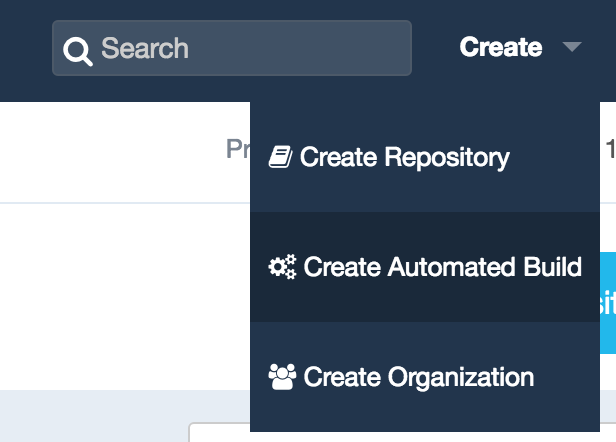
In the top right part of your Docker Hub account web interface, click on the create automatic build button and follow the process, which is really self-explanatory.
In the top right part of your Docker Hub account web interface, click on the create automatic build button.
As the documentation is not exactly up to date, you will need to trigger the first build manually by clicking on the Trigger button in the Build settings tab:
Test your Build
Once you’ve created your automatic build and triggered its first run, you should now be able to test it with:
docker run -d --name app -p 80:80 <your_docker_hub_id>/<your_project_name>:latest
Stop and remove this container, once you’re done with it.
Version tagging
One of the most interesting features of the Hub is the ability to tag your Docker images. This way you can easily differentiate between them and, in the case of a problem with a specific version, perform a rollback.
In most cases the default configuration should suffice. It is very well integrated with Github and Bitbucket repositories.
When using a specific git branch name, Docker Hub will create your images with the matching tags.
Create a branch for a newer version of your code.
git checkout -b 1.1.0
Modify your app.py code with:
def main():
    return 'Hi ! I'm a Flask application in a Docker container.'
Upload your new branch:
git push -u origin 1.1.0
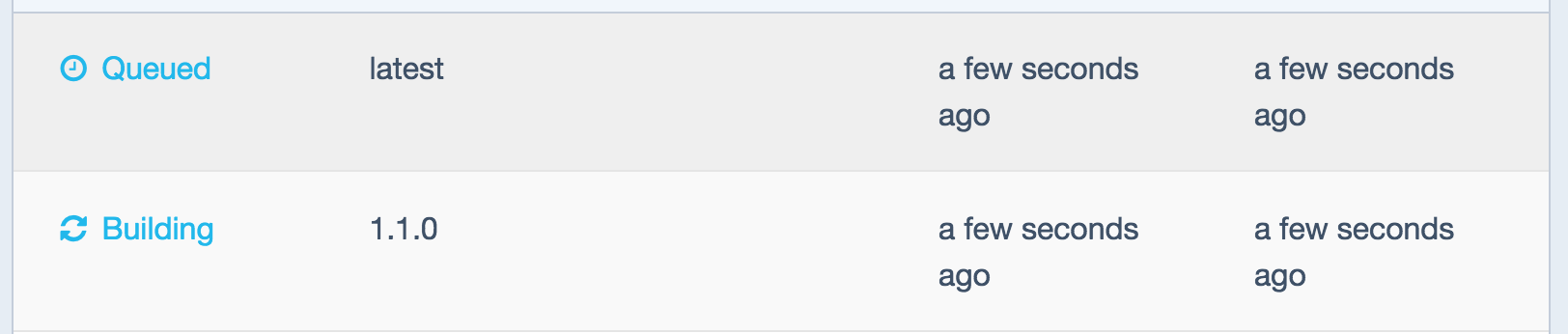
See the new image being built:
See the new image being built.
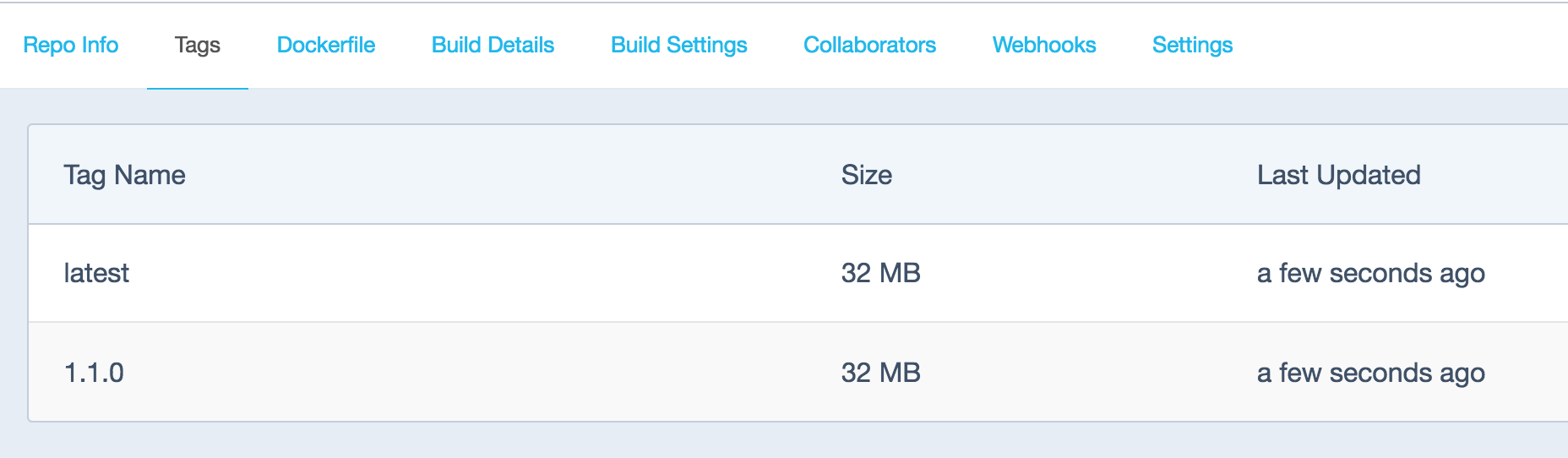
A new tagged build is now available:
A new tagged build is now available.
Run it with:
docker run -d --name app -p 80:80 <your_docker_hub_id>/<your_project_name>:1.1.0
Bravo, you just connected to the version 1.1.0 of your application!
Conclusion
As I mentioned earlier, using Docker Hub to build your images each time the code is modified and pushed to repository has some limitations. As of today it will build your images at the most every 5 minutes. But it is certainly a very cheap way of doing so as you don’t have to maintain your own repository. Later on, you might want to look into using base images of your making and hosting your own private Docker registry for obvious privacy and performance reasons.
Next time, we will explore how to run unit tests on your application using Travis.
Plasma has always been the talk of the town for its sleek and cutting edge look. KDE Plasma among all other Linux Desktop Environments have always stood out for its continuous development. The latest release of KDE Plasma is 5.6 which includes some new features, tweaks and fixes. Plasma desktop is also highly customizable so that you can customize it the way you need it to be.
While cloud is still top of mind for many chief information officers, Red Hat office of technology vice president and chief technologist Chris Wright believes an increasing area of focus for businesses today is trying to figure out how to automate their infrastructure stack.
Speaking to ZDNet, Wright said a key goal of many businesses today is to improve their speed to market, and part of making that happen has been through automation so that engineers and developers can focus on application development, rather than be concerned with running the backend.
“It’s all about the application at the end of the day; we’re not just building infrastructure to just sit there … we actually want to do real work and that work is generated from application developers being able to quickly build apps,” he said.
Traditional approaches to network management and security are ill-suited for the fluid nature of container and microservices-based architectures. Containers appear, disappear and are moved around to different compute nodes far too frequently to be assigned static IP addresses, much less be protected by firewalls and IP tables at the network’s perimeter.
With this in mind, two open source projects, CoreOS’ Flannel virtual networking technology, and the Project Calico, another network overlay technology with strong security controls, have joined forces to offer a single package, called Canal, that will offer policy-based secure networking for the container and microservices era.
A new San Francisco-based company has been formed, Tigera, that will manage both projects. Tigera is a spin-off of network solutions provider Metaswitch, and many of the San Francisco Metaswitch engineers who worked on Calico have moved over to Tigera. CoreOS is donating the Flannel codebase to Tigera.
When combined, SDN and NFV promise to bring an unprecedented level of digital control to global IT networks.
While software-defined networking (SDN) shuns proprietary hardware for an open, programmable global network infrastructure that can be centrally managed, network functions virtualization (NFV) enables features, such as firewall/proxy and acceleration, to be virtualized and delivered either from the network or from customer premise equipment (CPE), enabling zero touch provisioning when additional functionality is required.
Together these technologies make it possible for enterprises to access network capacity on demand via a self-service portal. In addition, routing and security policies can automatically adapt to address real-time congestion, security threats or network outages.