For the first time in the 11-year history of the Embedded Linux Conference (ELC), held in San Diego, April 4-6, the keynotes included a discussion with Linus Torvalds. The creator and lead overseer of the Linux kernel, and “the reason we are all here,” in the words of his interviewer, Intel Chief Linux and Open Source Technologist Dirk Hohndel, seemed upbeat about the state of Linux in embedded and Internet of Things applications. Torvalds very presence signaled that embedded Linux, which has often been overshadowed by Linux desktop, server, and cloud technologies, had come of age.
Linus Torvalds speaking at Embedded Linux Conference.
IoT was the main topic at ELC, which included an OpenIoT Summit track, and the chief topic in the Torvalds interview.
“Maybe you won’t see Linux at the IoT leaf nodes, but anytime you have a hub, you will need it,” Torvalds told Hohndel. “You need smart devices especially if you have 23 [IoT standards]. If you have all these stupid devices that don’t necessarily run Linux, and they all talk with slightly different standards, you will need a lot of smart devices. We will never have one completely open standard, one ring to rule them all, but you will have three of four major protocols, and then all these smart hubs that translate.”
Torvalds remained customarily philosophical when Hohndel asked about the gaping security holes in IoT. “I don’t worry about security because there’s not a lot we can do,” he said. “IoT is unpatchable — it’s a fact of life.”
The Linux creator seemed more concerned about the lack of timely upstream contributions from one-off embedded projects, although he noted there have been significant improvements in recent years, partially due to consolidation on hardware.
“The embedded world has traditionally been hard to interact with as an open source developer, but I think that’s improving,” Torvalds said. “The ARM community has become so much better. Kernel people can now actually keep up with some of the hardware improvements. It’s improving, but we’re not nearly there yet.”
Torvalds admitted to being more at home on the desktop than in embedded and to having “two left hands” when it comes to hardware.
“I’ve destroyed things with a soldering iron many times,” he said. “I’m not really set up to do hardware.” On the other hand, Torvalds guessed that if he were a teenager today, he would be fiddling around with a Raspberry Pi or BeagleBone. “The great part is if you’re not great at soldering, you can just buy a new one.”
Meanwhile, Torvalds vowed to continue fighting for desktop Linux for another 25 years. “I’ll wear them down,” he said with a smile.
Watch the full video, below.
Get the Latest on Embedded Linux and IoT. Access 150+ recorded sessions from Embedded Linux Conference 2016.Watch Now.
You have started down the road to DevOps. You have re-structured your teams and you are experimenting with DevOps tools and processes. You now understand that DevOps is a continuum that starts with planning and development and ends with deployment into operations. So where do you start your DevOps initiative?
DevOps projects tend to start in only one part of the continuum. Often, DevOps teams start with application build automation (development) or they start with automating the deployment of apps into operations. When the driver for DevOps is in the test organization, it is calledContinuous Integration. However, it is also important to work to continuously expand automation across the continuum because for DevOps to pay off, there needs to be continuous automation from development all the way through to operations.
If you either manage a number of systems (regardless of platform), or simply have a lot of passwords for computers, services, sites, and so forth, keeping track of those authentication credentials can be a serious strain to your memory. On top of that, these days passwords should not be such that you can easily memorize them. The more challenging they are, the harder they are to crack. Because of this, anyone with more than one password necessary to navigate through the daily grind (which would be just about everyone) should immediately make use of a password manager.
“What is a password manager,” you ask? Simple: A password manager is a tool that allows you to save authentication credentials within an encrypted “vault.” That vault only requires a single password for you to gain entry. Once you’ve entered the main password, you then have access to all of your credentials. Most password managers allow you not only to save usernames and passwords but also associated URLs and notes. Some even offer random password generators, so when you need to create a new, complicated password, all you have to do is click a single button.
But, which password managers are available for Linux and are worthy of your time? I have collected two that I believe do the best job of safe-keeping your passwords with the most user-friendly interfaces. I want to avoid web-based password managers and stick with desktop GUI tools only. Those criteria leave me with the two that I think are the best in breed.
Caveat Emptor
One thing to understand about password managers is that they truly are only as strong as the master password you set. Set a master password of password, and all of your authentication credentials will be easy pickin’s. If you want to get the most out of these tools, it is imperative that you set a very challenging master password. Use a combination of caps, lowercase, symbols, and numbers.
With that said, let’s dive in and see what the best password manager GUI tools for Linux have to offer.
Password Gorilla
Password Gorilla has been my go-to for a long time. One of the reasons I’ve always liked this particular take on the password manager is its simplicity. You create databases of passwords (each database encrypted by a master password) and then add groups and subgroups to the database. To each group or subgroup you can then add a login.
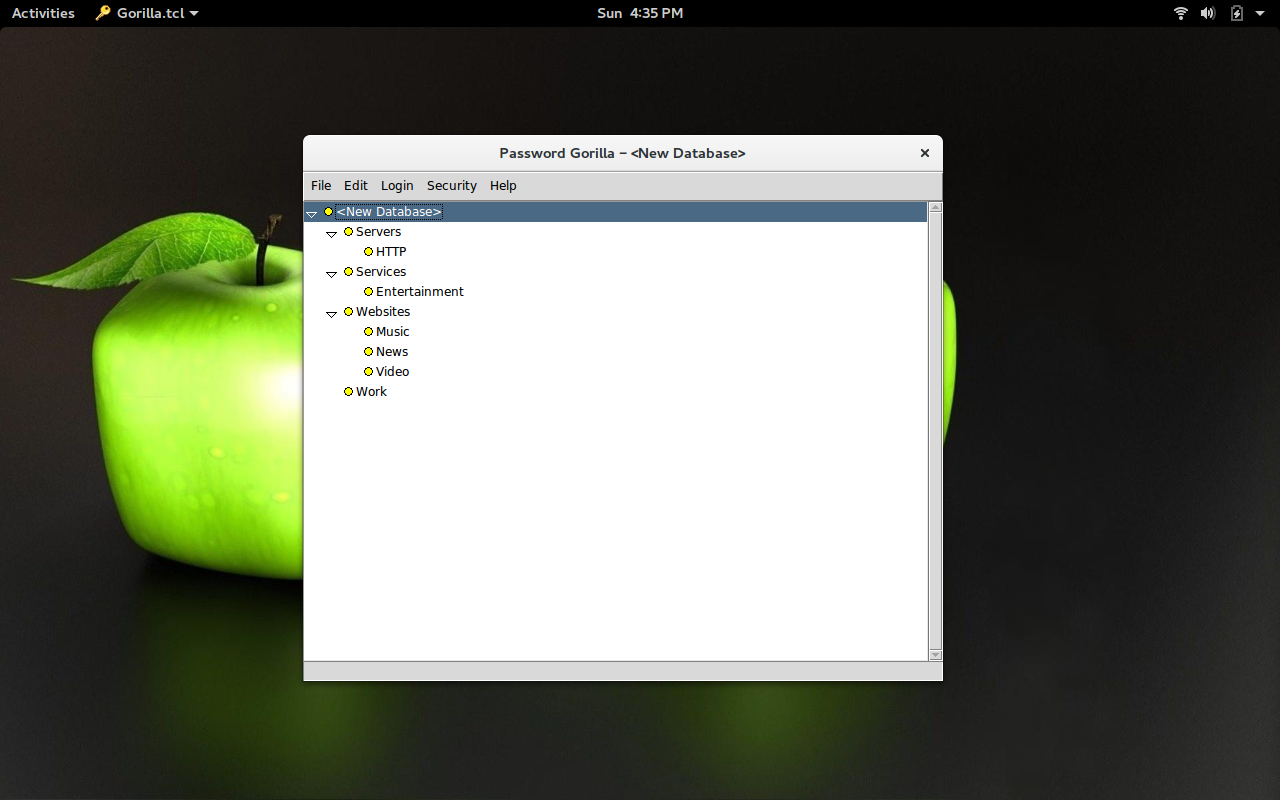
Password Gorilla can be installed from the standard repositories and works on most modern Linux distributions. Once installed, you will have to first set a master password for the database. With the master password set, the main window will open, displaying an empty database. The first thing you will want to do is create groups (Figure 1), so you can better organize your passwords. How you define these groups is up to you.
Figure 1: The Password Gorilla main window, with groups created.
To create a group, right-click the New Database listing and then select Add Subgroup (which will be a subgroup to the main database). Give the subgroup a name, then click OK. You can now create a subgroup to the newly created group. Select the group you just created and then click Add Subgroup. Give the new subgroup a name and click OK.
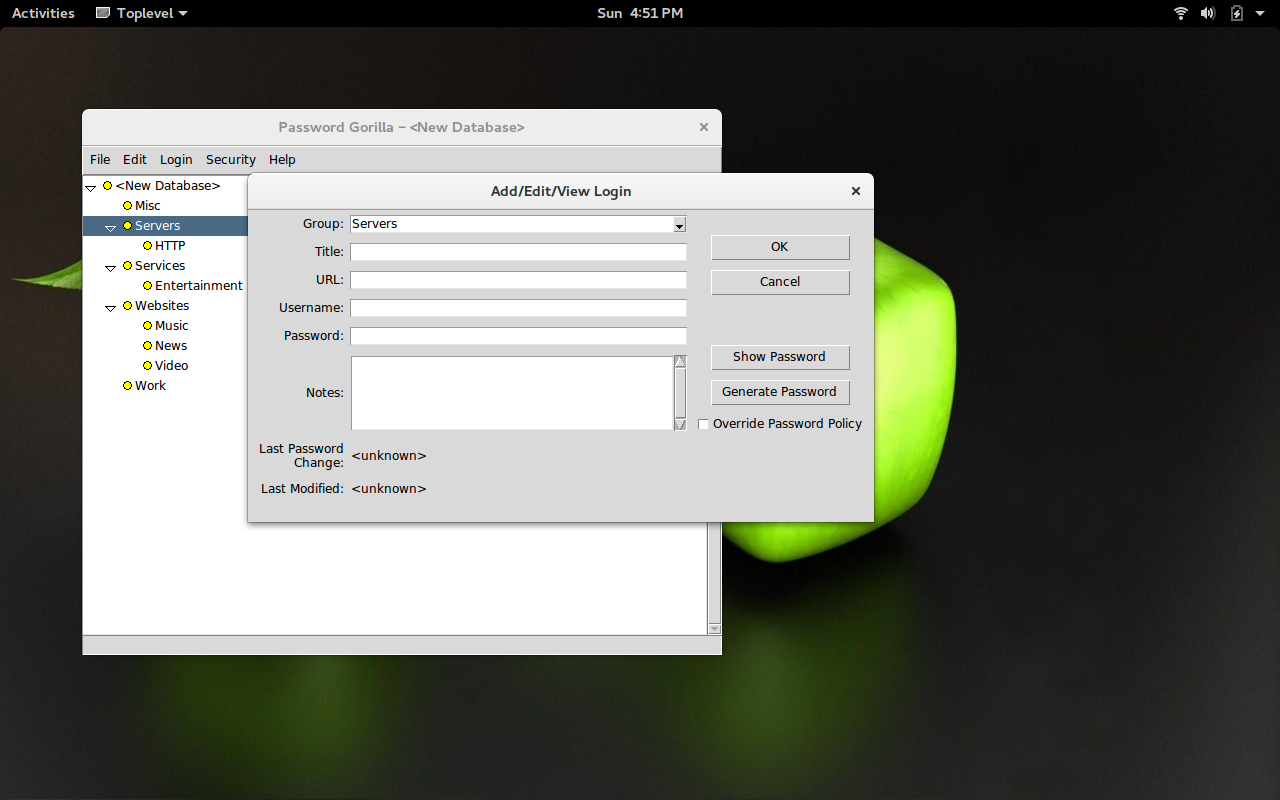
After you’ve created all your groups/subgroups, you can right-click either a group or subgroup and then click Add Login. Enter the details for the new login (Figure 2) and click OK.
Figure 2: Adding a new login to a group.
Password Gorilla does include a password generator that you can use when adding a new login to a group.
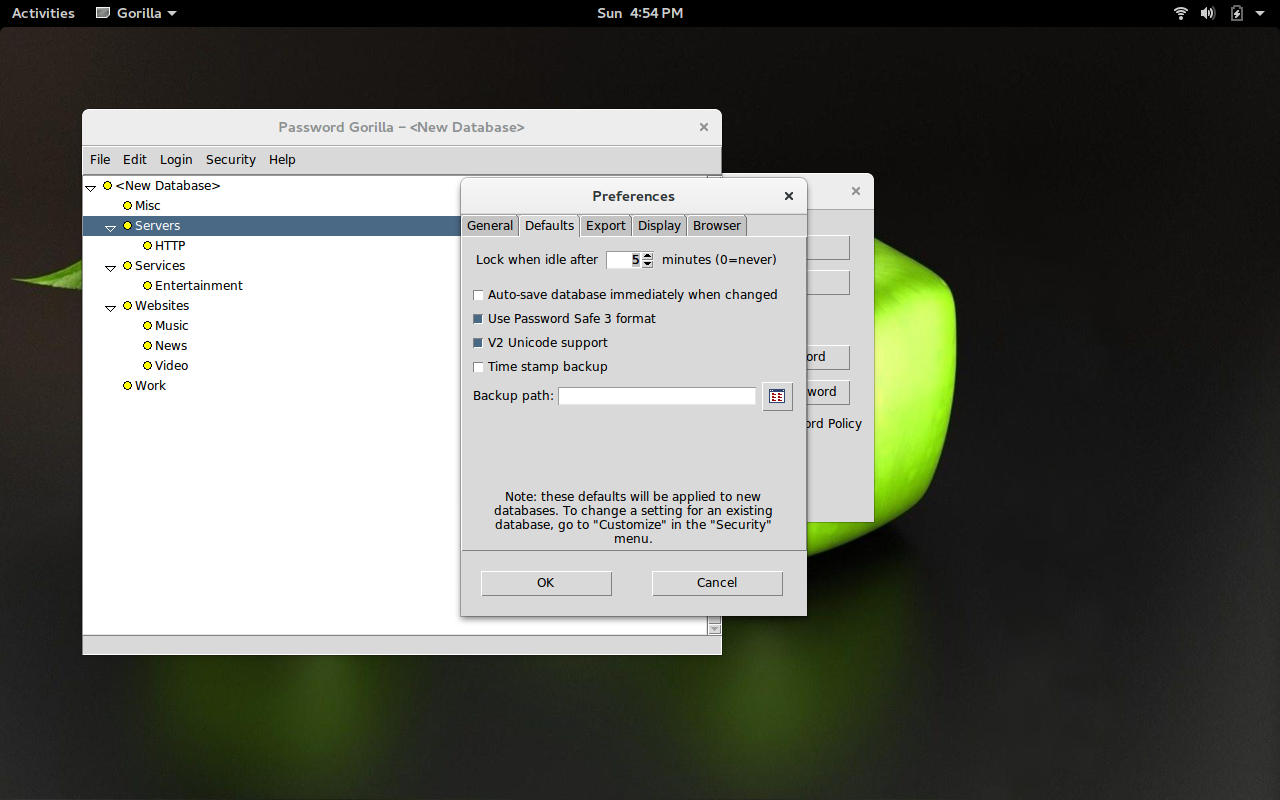
One nice feature of Password Gorilla is that you can set the lock after idle time. By default Password Gorilla will lock a database after five minutes of idle time. You can set that in File > Preferences > Defaults > Lock when idle after (Figure 3).
Figure 3: Setting the lock after idle time in Password Gorilla.
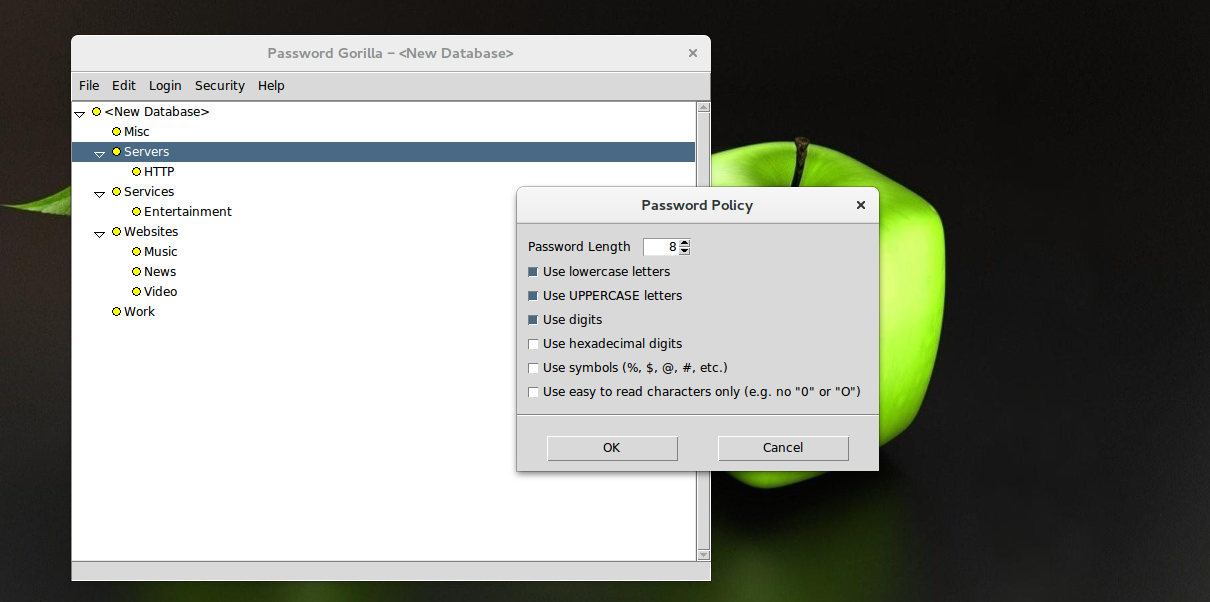
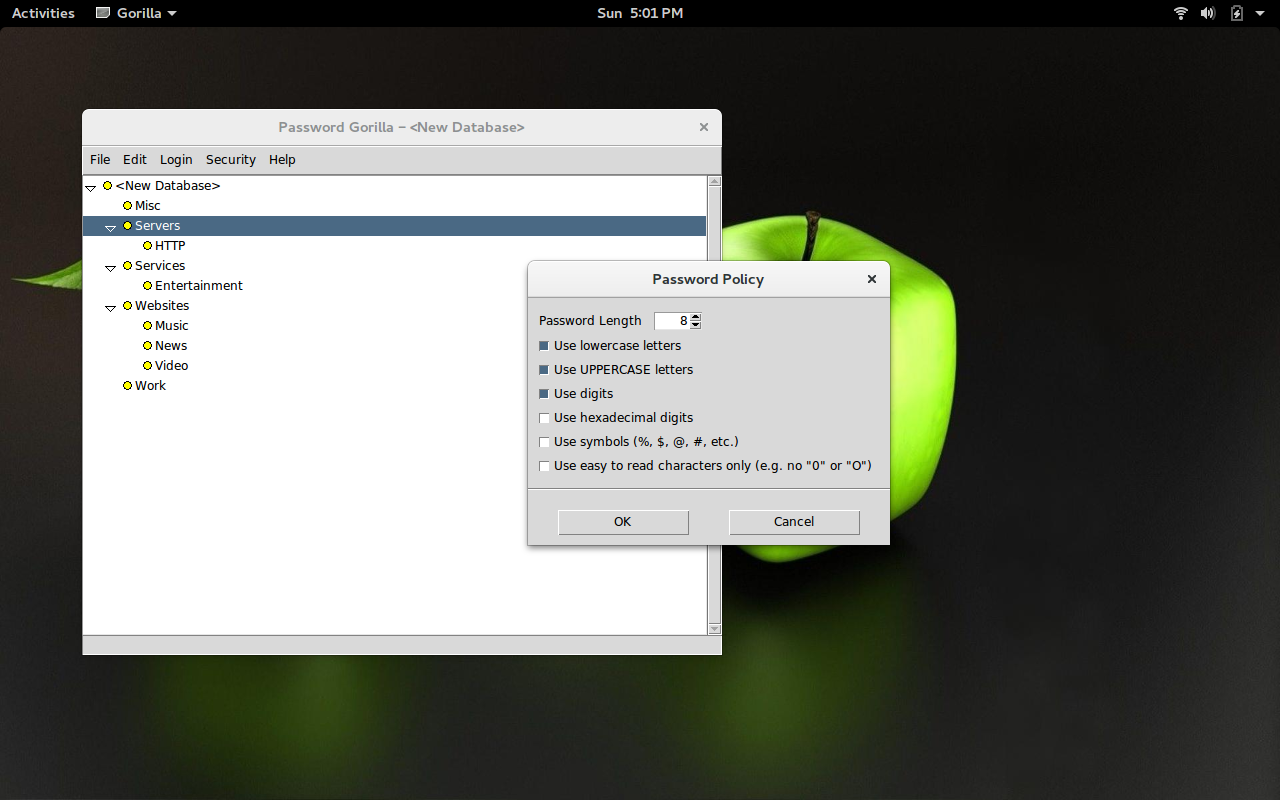
Another outstanding feature included in Password Gorilla is the ability to create your own password policy. With this, you can ensure that random passwords, generated by the tool, always meet your particular criteria. To use this feature, click Security > Password Policy and then (in the new window) edit the default policy to suit your needs (Figure 4).
Figure 4: Editing the password policy in Password Gorilla.
KeePassX
KeePassX is one of the more popular password managers for the Linux platform. KeePassX can also be installed from the standard repositories of most Linux distributions. This take on the password manager offers many of the same features as Password Gorilla, but it also includes the ability to protect a database with a key file.
Let’s say, for example, you have a key file generated by the gpg command. You can use that key to lock your database. To do this, you will need to have exported your gpg key and named it with the .key extension.
To export you gpg key in this fashion, you could issue the command gpg –armor –export EMAIL ADDRESS FOR KEY > name.key (Where EMAIL ADDRESS FOR KEYis the email address associated with the gpg key you want to use, and name is the name you’ll use for the key). To be safe, save that file on a thumbdrive or in a hidden location (otherwise, anyone could happen upon the key and open your password manager).
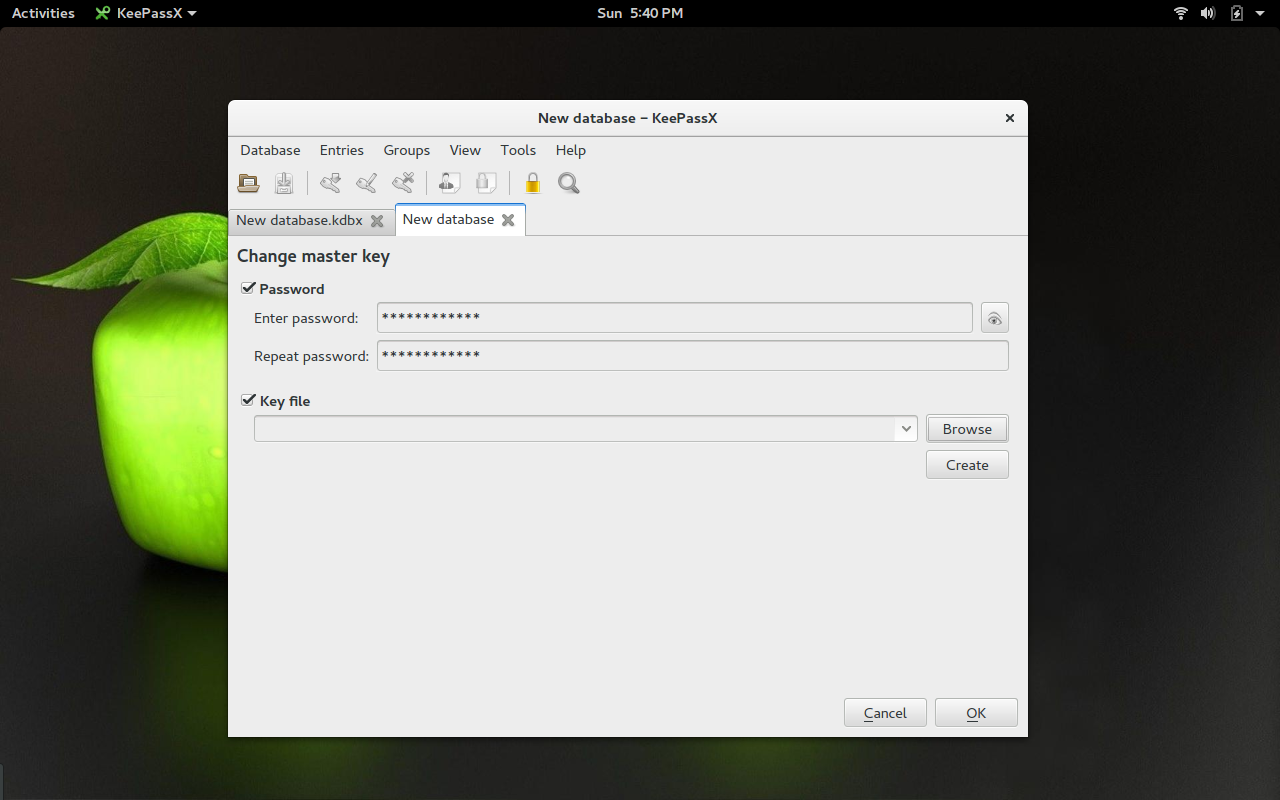
Once you have that key in place, do the following:
Open KeePassX
Click Database > New Database (Figure 5)
When prompted add a master password and verify the password
Check the box for Key File
Click the Browse button
Navigate to where your .key file is housed and select the file
Click Open
Click OK
Figure 5: Create a new database in KeePassX.
You should now immediately save your new database. Click the Save button, navigate to where you want the database to be saved, give the database a name, and click Save. Your database is good to go.
When you want to open this newly created database, you’ll have to enter the database master password and locate the keyfile. If you do not have both the master password and the keyfile, you will not be able to gain access to the delights within. Now you can create groups, subgroups, and entries in similar fashion to Password Gorilla.
Step Up Your Password Game
It’s time you started working with a password manager. Period. Plenty of options are available (even web-based tools like LastPass), but you cannot go wrong with either Password Gorilla or KeePassX. Give one of these tools a try and see if one (or both) doesn’t perfectly fill the gaping hole you have in the realm of password security.
The creator of Kel, a devops-focused PaaS for Web applications has released an open source edition of its platform.
Kel is based on the container-cluster management system Kubernetes and was originally made to run Gondor, a managed host for Python and Django apps. Eldarion, the company behind Gondor, hopes Kel will appeal to developers who want a PaaS that’s built with workflow in mind, not just app deployment.
According to James Tauber, co-founder and CEO of Eldarion, Kel’s big distinction from other PaaSes is its focus on how developers work across the lifecycle of an application: development, QA, testing, staging, and production.
As the microservices approach is becoming more prevalent in application development, API operations, or API Ops, is increasingly being recognized as a requisite skill amongst enterprise and startups.
Microservices architecture breaks down services and assets into discrete, composable units. And they use APIs to communicate and connect with each other. Which in turn means dev teams are needing to build up their API design and creation skills (which requires testing and other ops tasks), as well as outsource functionality like security.
It also requires an API gateway service to manage the flow of APIs between and from an internal-to-external environment, and all of this needs testing tools that can map how the APIs call and respond to make sure there are no glitches in the flow of the microservices composability.
Post below is addressing the question when Controller/Network RDO Mitaka Node has to have external networks of VLAN type with predefined vlan tags. Straight forward packstack deployment doesn’t allow to achieve desired network configuration. External network provider of vlan type appears to be required. In particular case, office networks 10.10.10.0/24 vlan tagged (157) ,10.10.50.0/24 vlan tagged (172) already exists when RDO install is running.
There are those that believe the era of infrastructure is gone, but Martin Casado is not among them. Casado, now a venture capitalist at Andreessen Horowitz, discussed during a keynote address at the Interop conference here why we’re now on the cusp of an evolutionary shift in the infrastructure market.
Casado is well-known in the networking world as co-author of the groundbreaking research paper in 2005 that ignited the software-defined networking (SDN) era. He co-founded Nicira in 2007, a company he sold to VMware in 2012 for $1.2 billion. Nicira helped usher in the SDN era by removing networking from the constraints of being restricted to purpose-built hardware appliances.
“Traditional infrastructure is going through a shift, but we’re now on the cusp of something much better, a golden era of infrastructure,” Casado said. “I have heard many people talk about how infrastructure is dead, but I believe it’s coming to life in new way.”
“Open standards can [ensure] money is invested more efficiently and dramatically accelerate IoT adoption and growth,” said Jeremy Green, Machina analyst and author of the report. Machina provides market research and strategic guidance on M2M and IoT.
Reliance on open standards should seem obvious, but experts said it has been difficult for cities to compare their technology decisions, much less make IoT systems interoperate. Cities will sometimes work with a vendor that offers proprietary technology at low cost or build their own custom solutions.
The cost savings are possible because open standards improve interoperability on networks and limit vendor monopolies that can raise prices; open standards can also reduce integration costs, according to Machina and other research firms.
When smart devices are closed, they’re not smart at all.
Netbeast is an open source platform for developing Internet of Things (IoT) applications for appliances and other devices. It’s an environment-agnostic platform that allows users to ignore details like wireless protocols, brand-specific public APIs, or device detection. One of Netbeast’s main goals is to help foster and develop an open source community in IoT.