Home Blog Page 824

Ubuntu 16.04 LTS Is Now Available To Download

ubuntu 16.04 releasedA long waited release Ubuntu 16.04 has finally been made available to download with some new & interesting features. Ubuntu 16.04 is a long-term supported release that means once you install Ubuntu 16.04, it’s going to provide security updates, bug fixes and applications updates for 5 years with no if and but. Ubuntu and other family members’ (Ubuntu Mate, Kubuntu, Lubuntu, Xubuntu etc.) 16.04 version can be downloaded and installed.

Read At LinuxAndUbuntu

What’s the Total Cost of Ownership for an OpenStack Cloud?

Technical discussions around OpenStack, its features, and adoption are copious. Customers, specifically their finance managers, have a bigger question: “What will OpenStack really cost me?” OpenStack is open source, but its adoption and deployment incur costs otherwise. So, what is the OpenStack TCO (total cost of ownership)?

There has been no systematic answer to this questionuntil now. Massimo Ferrari and Erich Morisse, strategy directors at Red Hat, embarked on a project to calculate the TCO of OpenStack-based private cloud over the years of its useful life.

Read more at Opensource.com

Creating Servers via REST API on RDO Mitaka via Chrome Advanced REST Client

In posting bellow we are going to demonstrate Chrome Advanced REST Client
successfully issuing REST API POST requests for creating RDO Mitaka Servers (VMs) as well as getting information about servers via GET requests. All required HTTP Headers are configured in GUI environment as well as body request field for servers creation.

Complete text may be seen here.


Recent Advances in Machine Learning and Their Application to Networking – Dave Meyer, Brocade

https://www.youtube.com/watch?v=IUksoV7l8ww

Machine learning and artificial intelligence are hot areas of innovation that are bringing unbelievable benefits to the different components of IT infrastructure, said David Meyer, Chairman of the Board at OpenDaylight, a Collaborative Project at The Linux Foundation, in his presentation at the DevOps Networking Forum last month. And while it’s still unclear, how networking projects will actually incorporate machine learning and AI, these technologies are coming soon to the networking industry. Read the article summary of this video.

How to Upgrade from Ubuntu 15.10 to Ubuntu 16.04 on Desktop and Server Editions

Ubuntu 16.04, codename Xenial Xerus, with Long Term Support has been officially released today in wild for Desktop, Server, Cloud and Mobile. Canonical announced that the official support for this version will last till…

[[ This is a content summary only. Visit my website for full links, other content, and more! ]]

Why Using a Cloud Native Platform Transforms Enterprise Innovation [Video]

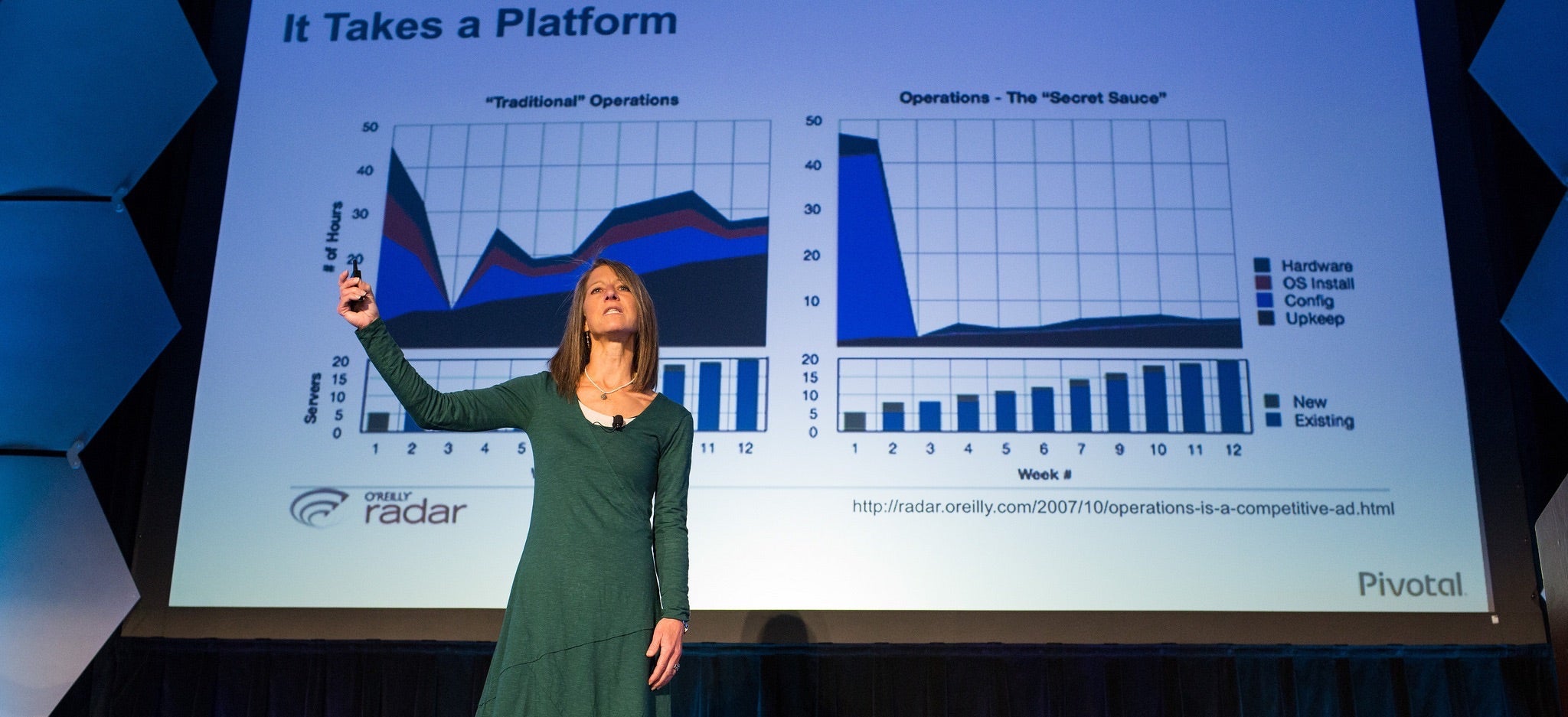
In the four years that Cornelia Davis has worked on the open source Cloud Foundry platform at Pivotal, she has spent much time explaining the technical merits of the emerging technology to customers and partners, she said in her keynote at Collaboration Summit last month.

“But I spent just as much time talking to them about how they had to change the way that they were thinking about solving problems to be able to use the platform effectively,” said Davis, CTO of the transformation practice at Pivotal where she helps customers develop and execute on their cloud platform strategies. “And also, conversely, how the existence of the platform allowed them to think about things differently.”

Cloud Foundry, known as a Platform-as-a-Service or Cloud Native Platform, enables companies to transform their problem-solving abilities as much as their technology infrastructure.

Companies crave this transformation for many common reasons, she said. They want to:

  • enable speed to market.

  • deliver better customer experience.

  • create an engaged and enthusiastic workforce.

  • create better products.

“What does it take to change?” she asked. “It’s all about the developer. It’s changing development practices.”

Using a cloud native platform allows the transition of development practices away from the traditional Water-scrum-fall toward much more Agile methods that allow for continuous delivery and, thus, continuous innovation, she said. In other words, it enables DevOps – or the breaking down of silos between a company’s developers and operations teams.

“The fact that deployments are high ceremony is a huge problem,” for companies that use a traditional development method, she said. “Deployments have to be low ceremony so that we can do them very, very frequently.”

In organizations that have embraced continuous delivery, change is the rule – not the exception– and the key to their success is the cloud platform.

“All of the successful internet scale companies are doing this. They all built their own platforms. The platform matters,” Davis said. “You have to have the right platform to be able to do continuous delivery and continuous innovation. That platform needs to support development and operations.”

Watch Cornelia Davis’s full keynote, below, for more on how a cloud platform enables change and innovation.

And view all 13 keynote videos from Collaboration Summit, held March 29-31 in Lake Tahoe, California.


https://www.youtube.com/watch?v=tvw1Qnc8t6M?list=PLGeM09tlguZQ17kXq679jthIhf12Tkat9

How to Manage Logs in a Docker Environment With Compose and ELK

The question of log management has always been crucial in a well managed web infrastructure. Well managed logs will, of course, help you monitor and troubleshoot your applications, but it can also be source of information to know more about your users or investigate any eventual security incidents.

In this tutorial, we are first going to discover the Docker Engine log management tools.

Then we are going to see how to stop using flat files and directly send our application logs to a centralized log collecting stack (ELK). This approach presents numerous advantages:

  • Your machines’ drives are not getting filled up, which can lead to service interruption.
  • Centralized logs are much easier to search and back up.

Requirements for this tutorial

Install the latest Docker toolbox to get access to the latest version of Docker Engine, Docker Machine and Docker Compose.

Discovering docker engine logging

Let’s first create a machine on which we are going to run a few tests to showcase how Docker handles logs:

$ docker-machine create -d virtualbox testbed
$ eval $(docker-machine env testbed)

By default Docker Engine captures all data sent to /dev/stdout and /dev/stderr and stores it in a file using its default json log-driver.

Let’s run a simple container outputting data to /dev/stdout:

$ docker run -d  alpine /bin/sh -c 'echo "Hello stdout" > /dev/stdout'
3e9e2cbbbe6e237cc197d6f2277c234f10c379897b621150e2141c1d42135038

We can access the json file where those logs are stored with:

$ docker-machine ssh testbed sudo cat  /var/lib/docker/containers/3e9e2cbbbe6e237cc197d6f2277c234f10c379897b621150e2141c1d42135038/3e9e2cbbbe6e237cc197d6f2277c234f10c379897b621150e2141c1d42135038-json.log
{"log":"Hello stdoutn","stream":"stdout","time":"2016-04-13T09:55:15.051698884Z"}

Or by using the simpler command:

$ docker logs 3e9e2cbbbe6e237cc197d6f2277c234f10c379897b621150e2141c1d42135038
Hello stdout

It is worth noticing that the json driver is adding some metadata to our logs which are stripped out by the command docker logs.

Getting your apps’ logs collected by the docker daemon

So as we’ve just experienced, in order to collect our application’s logs, we simply need them to write to /dev/stdout or /dev/stderr. Docker will timestamp this data and collect it. In most programming languages a simple print or the use of a logging module should suffice to achieve this task. Existing software that’s designed to write to static files can be tricked by cleverly linking to /dev/stdout and /dev/stderr.

That’s exactly the solution used by the official nginx:alpine image, as we can see in its Dockerfile:

# forward request and error logs to docker log collector
RUN ln -sf /dev/stdout /var/log/nginx/access.log 
    && ln -sf /dev/stderr /var/log/nginx/error.log

Let’s run it to prove our point:

$ docker run -d --name nginx  -p 80:80 nginx:alpine

Navigate to http://$(docker-machine ip testbest)

For example, on a mac:

$ open http://$(docker-machine ip testbest)

Monitor the logs with:

$ docker logs --tail=10 -f nginx
192.168.99.1 - - [13/Apr/2016:10:16:41 +0000] "GET / HTTP/1.1" 200 612 "-" "Mozilla/5.0 (Macintosh; Intel Mac OS X 10_11_4) AppleWebKit/537.36 (KHTML, like Gecko) Chrome/49.0.2623.110 Safari/537.36" "-"

Stop your nginx container with:

$ docker stop nginx

Now that we have a clearer understanding of how Docker manages logs by default, let’s see how to stop writing to flat files and start sending our logs to a syslog listener.

Creating an ELK stack to collect logs

You could choose to use an hosted log collection service like loggly, but why not use a Docker Compose playbook to create and host our own log collection stack? ELK, which stands for Elasticsearch + Logstash + Kibana, is one of the most standard solutions to collect and search logs. Here’s how to set it up.

Clone my ELK repo with:

$ git clone git@github.com:MBuffenoir/elk.git
$ cd elk

Create a local machine and start ELK with:

$ docker-machine create -d virtualbox elk
$ docker-machine scp -r conf-files/ elk:
$ eval $(docker-machine env elk)
$ docker-compose up -d

Check the status of your ELK with stack:

$ docker-compose ps
[...]
elasticdata     /docker-entrypoint.sh chow ...   Exit 0
elasticsearch   /docker-entrypoint.sh elas ...   Up       9200/tcp, 9300/tcp
kibana          /docker-entrypoint.sh kibana     Up       5601/tcp
logstash        /docker-entrypoint.sh -f / ...   Up       0.0.0.0:5000->5000/udp
proxyelk        nginx -g daemon off;             Up       443/tcp, 0.0.0.0:5600->5600/tcp, 80/tcp

Getting docker to send container (Apps logs) to a syslog listener

Let’s start again a new nginx container, this time using the syslog driver:

$ export IP_LOGSTASH=$(docker-machine ip elk)
$ docker run -d --name nginx-with-syslog --log-driver=syslog --log-opt syslog-address=udp://$IP_LOGSTASH:5000 -p 80:80 nginx:alpine

Navigate first to https://$(docker-machine ip elk) to access your nginx webserver.

Navigate then to https://$(docker-machine ip elk):5601 to access kibana.

The login is admin and the password is Kibana05 (see the comments at the top of the file /conf-files/proxy-conf/kibana-nginx.conf to change those credentials).

Click on the Create button to create your first index.

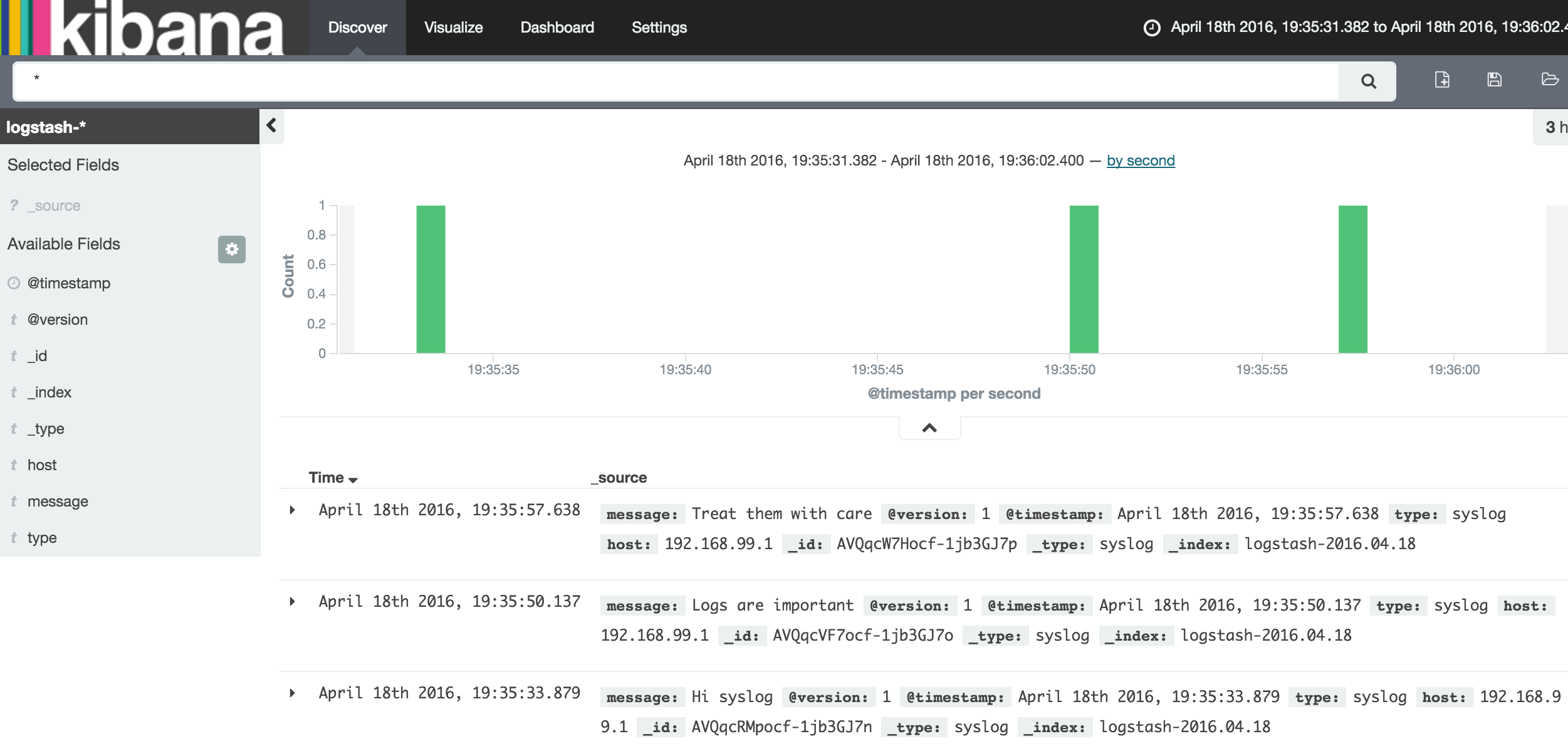
Click on the Discover tab. You should now see and search your nginx access logs in Kibana.

Compose file

If you’re starting your containers using Compose and would like to use syslog to store your logs add the following to yourdocer-compose.yml file:

webserver:
  image: nginx:alpine
  container_name: nginx-with-syslog
  ports:
    - "80:80"
  logging:
    driver: syslog
    options:
      syslog-address: "udp://$IP_LOGSTASH:5000"
      syslog-tag: "nginx-with-syslog"

Conclusion

The presented solution is certainly not the only way to achieve log collection, but should get you started in most cases. In fact, the Docker Engine also supports journald, gelf, fluentd, awslogs and splunk as log drivers, which you could experiment with. And finally, remember to use TLS if you are going to transmit your logs over the Internet.

SUSE Manager 3 Released with Salt Automation Software

SUSE today announced the availability of SUSE Manager 3, the company’s Linux server management solution, which features increased IT efficiency with improved configuration management via Salt software.

According to the announcement, SUSE Manager 3 “provides comprehensive lifecycle management and monitoring for Linux servers across distributions, hardware architectures, virtual platforms and cloud environments. SUSE Manager 3 includes Salt automation software and features improved configuration management, easier subscription management and enhanced monitoring capabilities.”

Read more at SUSE

Why Parallelism?

“As clock speeds for CPUs have not been increasing as compared to a decade ago, chip designers have been enhancing the performance of both CPUs, such as the Intel Xeon and the Intel Xeon Phi coprocessor by adding more cores. New designs allow for applications to perform more work in parallel, reducing the overall time to perform a simulation, for example. However, to get this increase in performance, applications must be designed or re-worked to take advantage of these new designs which can include hundreds to thousands of cores in a single computer system.”

Since most applications have not been designed to run in a highly parallel mode, understanding how to take advantage of this increase in parallelism is as important as how to restructure a piece of code, or the entire application.  Understanding the architecture of the system is critical to understanding how to gain maximum performance.

Read more at insideHPC