Home Blog Page 829

ownCloud 9.0 Enterprise Edition Arrives with Extensive File Control Capabilities

ownCloud, Inc. has had the great pleasure of announcing the availability of the Enterprise Edition (EE) of its powerful ownCloud 9.0 self-hosting cloud server solution.

Engineered exclusively for small and medium-sized business, as well as major organizations and enterprises, ownCloud 9.0 Enterprise Edition is now available with extensive file control capabilities and all the cool new features that made the open-source version of the project famous amongst Linux users. 

Prominent new features in ownCloud 9.0 Enterprise Edition are built-in Auto-Tagging and File Firewall apps, which have been based on some of the new features of ownCloud 9.0, such as file tags, file comments,…


Read more at Softpedia

Open Container Initiative Launches a Container Image Format Spec

The Open Container Initiative (OCI) has taken the next step in establishing a standards base for the emerging container ecosystem. The organization has launched a project to establish a container image format specification.

As a follow-up to the container runtime standard OCI is working on, open specifications for a container image is a “key part of this whole discussion,” said CoreOS CEO Alex Polvi. CoreOS offers the rkt container software, an alternative to the widely used Docker container image format.

“I like web browser analogies. It’s like Firefox and Chrome,” he said. “Those are like Docker and rkt;…”

Read more at The New Stack

15 Examples of How to Use New Advanced Package Tool (APT) in Ubuntu/Debian

One important thing to master under Linux System/Server Administration is package management using different package management tools. Different Linux distributions install applications in a pre-compiled package that contain binary files, configuration files and also information about the application’s dependencies.

This is a content summary only. Visit Tecmint for full links, other content, and more!

Apache Spark and Vsync Creators to Keynote at MesosCon 2016

The Linux Foundation today announced the lineup of keynote speakers and educational sessions for MesosCon North America. The Mesos community will gather June 1-2 in Denver, CO for a full two days of conference sessions, keynotes, evening events and a hackathon to learn more about the Apache Mesos core.

The program will include workshops to get started with Mesos, keynote speakers from industry leaders, and sessions led by adopters and contributors to the open source project, including CloudBees, Huawei, IBM, Mesosphere, Microsoft, Netflix, PayPal, Twitter, and more.

The keynote speakers headlining the event are:

  • Matei Zaharia, CTO of Databricks, creator of Apache Spark and Assistant Professor of Computer Science at MIT.

  • Dr. Ken Birman, creator of Vsync and N. Rama Rao Professor of Computer Science at Cornell University, who will speak on the topic, “A Real Time Cloud for the Internet of Things.”

Apache Mesos is an open source cluster management tool that allows companies to build and run distributed systems more easily and efficiently.

MesosCon North America is an annual conference organized by the Apache Mesos community, bringing together the project’s users and developers to share and learn about Mesos and its growing ecosystem.

The full schedule of sessions can be viewed here.

Register by April 22 and save $100.

How to Migrate your Thunderbird Mailbox from Linux to Windows

Migrate your Thunderbird Mailbox from Linux to Windows

Thunderbird is the most flexible email client present which is available for all platforms. Users can easily migrate from one platform to another by taking their old profiles and can access them on the required platform with the help of Thunderbird email client.

How to copy the Thunderbird mailbox in Linux?

Linux is an open source platform having many email clients but Thunderbird is the most popular among all.

In Linux, the data is stored in the directories. Similarly Thunderbird mailbox data and profile settings are stored in the following directory

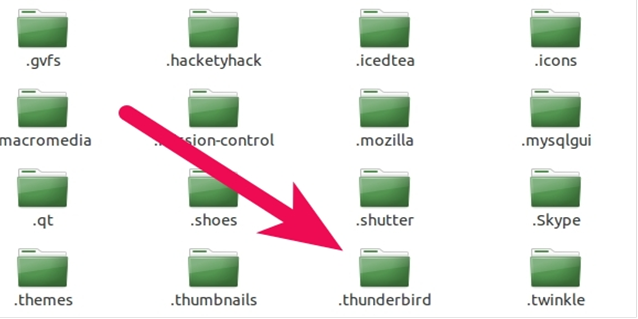
/home/username/.thunderbird

Go to your home folder & press ” Ctrl + h ” to view hidden folders

Just copy this entire directory to the USB pen drive on Linux Platform

Inside  .thunderbird, the users can see many other files & folders named Cache, Mail, IMAP Mail etc.

clip_image002.png

The profile.ini file contains the profile of the Thunderbird account in which the default location path is there which is given below:

[General]

StartWithLastProfile=1

[Profile0]

Name=Default User

IsRelative=0

Path=/media/diskF/ThunderbirdMail/5mu9j6vu.default

Default=1

How to Import Old Thunderbird Mailbox on Windows?

Thunderbird stores the data in the profile directory not in the program directory since it is easy to re-install or do upgrade while choosing profile directory without any worry to lose the data.

Your profile has all of your mail, address books, settings, saved passwords, add-ons, etc. Thunderbird uses profiles.ini file to find the existence and location of the profiles unlike the default location which is used by other email clients.

Create a new profile and migrate your old data

Follow the below steps:

  • First install the Thunderbird application on your Windows PC.
  • Then open the application and create a new profile or account.
  • After creating the profile, close the application and then paste both the profile and its profile.ini file which was copied from Linux Platform containing the account setting for that particular profile to the local destination of Thunderbird mail client which is given as:

             C:UsersadminAppDataRoamingThunderbirdProfiles

This is the location where the user should copy the previous profile data which was copied from Linux platform.

Note: Thunderbird application should be closed during copying the profile file at the local destination.

After pasting the Linux platform profile to the local directory, run the Thunderbird application. Now there the user can see the newly added profile.

Now, this is all about migrating your Thunderbird mailbox from Linux to Windows. Thunderbird email client uses MBOX file format which is used by many other email clients as well.

But at times, a user needs to access the Thunderbird mailbox in Outlook PST or in Lotus Notes or any other email format.

In that situation the MBOX data has to be converted to that particular email client format in order to access it. So, a converter application comes handful for such purposes.

MBOX Converter Application

The software application is designed in such a way that it gives the location of local directory of Thunderbird email client to the user where all the account settings & profiles are created in the email client.

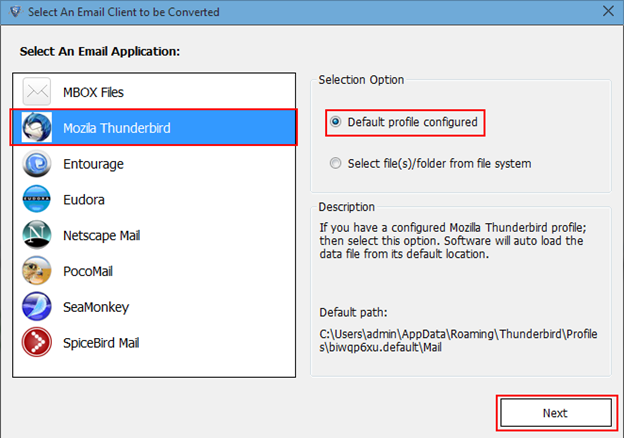
After launching the application, it gives the list of several email clients along with the option of adding a normal MBOX file. Users just have to select the Thunderbird email client from the list and the software application takes the MBOX file of the email client directly into account which is shown in below screen.


import thunderbird emails to outlook

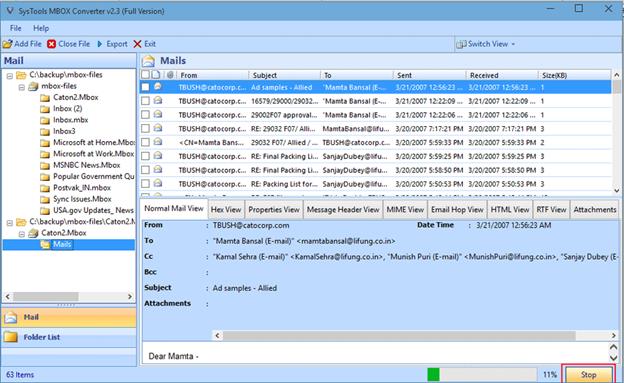
After selecting and adding the file, all the emails & attachments of that particular MBOX files are loaded in the application with multiple views options which is shown in below screen

import thunderbird emails to outlook

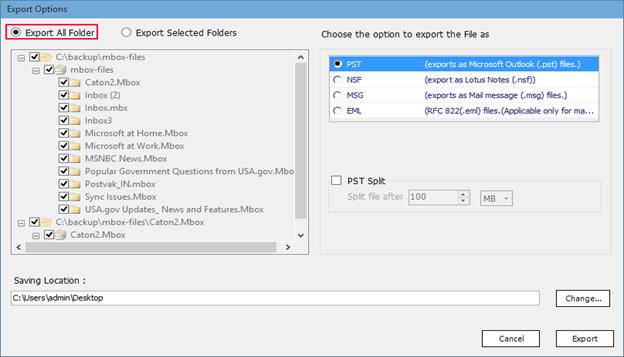
All the MBOX file data can be converted to PST, MSG, EML or NSF directly by selecting the emails from the list.

export all folder

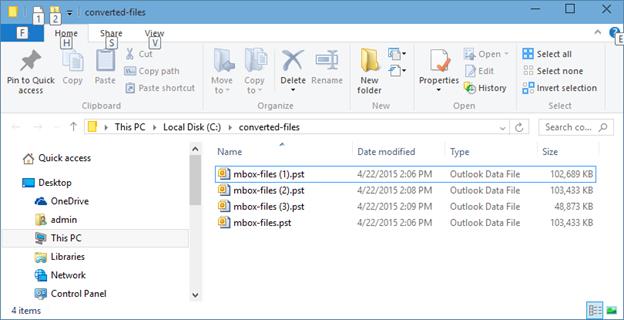
As per the required format, MBOX file gets converted to that format. For e.g. if PST is selected as export option, then below screen shows the converted files.

open pst

In this way the Thunderbird MBOX files is converted to the required format and can be accessed to the particular email client.

Virtual Hosting with vsftpd + TLS Encryption and MySQL on Ubuntu 15.10

Vsftpd is one of the most secure and fastest FTP servers for Linux. Usually vsftpd is configured to work with system users. This document describes how to install a vsftpd server that uses virtual users from a MySQL database instead of real system users. This is much more performant and allows to have thousands of ftp users on a single machine.

Read the full article at HowToForge

10 Cloud Jobs In Highest Demand Now

Companies are increasingly turning toward the cloud and need to hire workers who can help them get there. Here are the top 10 cloud positions in demand, some of which may surprise you.

In a study of online job ads that were posted between Feb. 15 and March 15, the term “cloud” appeared in 460,000 posted ads — making cloud knowledge No. 3 among the most in-demand IT skills, according to data collected by CEB TalentNeuron, the employee recruiting unit of consulting firm CEB.

Read more at InformationWeek

Apache Storm 1.0 Packs a Punch

When big data mavens debate the merits of using Apache Spark versus Apache Storm for streaming data processing, the argument usually sounds like this: Sure, Storm has great scale and speed, but it’s hard to use. Plus, it’s slowly being overtaken by Spark, so why go with old and busted when there’s new and hot?

That’s why Apache Storm 1.0 hopes to turn the ship around, not only by making it faster but by also easier and more convenient to work with.

Read more at InfoWorld

Microsoft Releases Open Source CentOS-Based ‘Linux Data Science Virtual Machine’ for Azure

Microsoft is both an open source and Linux champion nowadays — on the surface at least (pun intended). In other words, while it does embrace those things, we may not know the motivation of the Windows-maker regarding them. Regardless, Linux and open source are now important to the Redmond company.

Today, Microsoft announces a CentOS-based VM image for Azure called ‘Linux Data Science Virtual Machine’. The VM has pre-installed tools such as Anaconda Python Distribution, Computational Network Toolkit, and Microsoft R Open. It focuses on machine learning and analytics, making it a great choice for data scientists.

Read more at BetaNews

Weaveworks Embraces Container Network Interface for SDN

Weaveworks is now embracing the new Container Networking Interface (CNI) standard used by Kubernetes.

With Weave Net 1.5 which is officially being released today, Weave Net goes beyond its Docker container roots. That said Docker and CNI are not exactly polar opposites either. Weaveworks COO Mathew Lodge explained to Enterprise Networking Planet that CNI and Docker Networking (Libnetwork) have similar aims.

Read more at Enterprise Networking Planet