Home Blog Page 864

How to Easily Back Up and Restore Linux File Permissions

You’ve done an outstanding job of setting up a backup for your files and folders. Your system is running like a champ, and all is smooth sailing. But truth be told, there’s this guy named Murphy…and he has a habit of wreaking havoc when you least expect it.

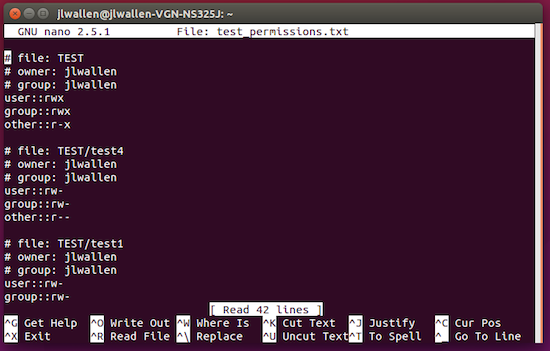
Figure 1: The format of the permissions file created by acl.

One such instance of havoc can happen when you’re tweaking file system permissions (on that directory hierarchy you’ve worked so hard on). One wrong tweak and the script is flipped. This is especially true when you’re not one hundred percent sure what you’re doing — for example, accidentally running chmod -R 777 on a crucial folder. You know what happens next…things take a turn for the tragic.

Fortunately, there’s a way for you to back up only the permissions of files and folders before you work your monstrous sysadmin magic and fubar the folder. Thanks to Access Control Lists (ACL), this is really quite simple.

Let me show you the way. I will demonstrate on an Ubuntu 16.04 daily build.

Install ACL

The first thing you must do is to install the acl tool. The installation of acl on most modern Linux systems is easy. For Ubuntu, the process goes like this:

  • Open a terminal window (hit the key combination Ctrl+Alt+T)

  • Type the command sudo apt-get install acl

  • Type your sudo password and hit Enter

  • When prompted type y and hit Enter

  • Allow the installation to complete

The installation on other systems will be similar (only substituting apt-get for your package manager of choice — such as, dnf install acl, zypper install acl, or yum install acl).

Backing Up Permissions

Once you have acl installed, you can use it to back up folder permissions. I’ve created a folder called TEST that contains five files:

  • test1

  • test2

  • test3

  • test4

  • test5

The original permissions of the folder are rwxrwxr-x and the permissions of the files are rw-rw-r–. The first thing to do is back up the permissions into a text file. To do this, follow these steps:

  1. Open up a terminal window

  2. Type the command getfacl -R TEST > test_permissions.txt

  3. Hit Enter

The above command will create the file test_permissions.txt that contains all the permissions of the folder and files within. The format of the created file is shown in Figure 1 above.

Restoring File Permissions

Say you’ve issued the command chmod -R ugo-rw TEST. This will cause no end of problems with the contained files. At this point, the permissions for that folder (and its contained files will be –x–x–x). Issue the command ls -l to make sure the permissions are, in fact, fubar’d. Not much going on there now.

So, how can you fix this problem? You restore the permissions with the help of acl and the backup file you just created. To do, follow these steps:

  1. Open up a terminal window

  2. Change into the directory containing the folder with the wonky permissions (I’ll assume the permissions backup file is in the same location)

  3. Type the command setfacl –restore=test_permissions.txt

  4. Hit Enter

  5. Type the command ls -l to ensure the permissions have, in fact, returned to their original state

This system is so powerful, it can backup/restore permissions of a folder, no matter how badly they are botched. The one caveat to this would be if, by some odd chance, the permissions of the /usr/bin folder were wrecked to the point you couldn’t issue the commands getfacl or setfacl. But, even if that did happen, you could probably get around the issue by mounting the affected drive on another system and running the setfacl command to restore the permissions (assuming you had a backup in the first place).

A Major Word of Warning

Do exercise caution when using this method. To test the limits of this system, I backed up the permissions of the /etc directory and then issued sudo chmod -R ugo-w /etc (knowing it would cause systemic problems across the board). When I attempted to run the restore, the command failed (unable to locate certain files). The problem with /etc is that it contains files like the sudoers list. Break the permissions of that file and you break the system. This clearly indicates backing up and restoring permissions with the acl tool isn’t infallible. So, avoid changing  permissions on system files/folders at all costs.

Cron That Task

Now, say you have a particular folder that’s of crucial importance…down to the file permissions. You might want to make sure you get a regular backup of those permissions, just in case. And, suppose you have a folder (we’ll call it SITE) in /var/www/ that is the lifeblood of your company. Not only do you want to ensure that folder is backed up daily, but you’ll want a regular backup of its permissions. To make this happen, you’ll take advantage of the Linux cron tool. Here’s how.

First, you’ll want to create a folder to house the permissions backup file. For the sake of example, I’ll create the folder in my external drive /media/jlwallen/DATA/ and the folder will be called PERMISSIONS. Next, I open cron in edit mode with the command crontab -e. I want to set this backup to run daily, so I enter the following line crontab:

0 0 * * * getfacl -R /var/www/SITE > /media/jlwallen/DATA/PERMISSIONS/SITE_permissions_backup.txt

NOTE: The above must be all one line.

Save the file and you’re good to go. You should start seeing a daily backup of the /var/www/SITE permissions in /media/jlwallen/DATA/PERMISSIONS/.

Should the permissions of that SITE folder change (on any given day), you now have the power to restore it.

Not Foolproof, But a Must-Know

This is clearly not a foolproof system, but it’s one every Linux admin should know. File/folder permissions change and, when they do, bad things can occur. Having the ability to backup and restore those permissions could save you a world of headaches.

Raspberry Pi 3 Still Essentially a 32-Bit SBC For Now

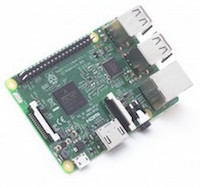
IMG RasberryPiFoundation copyThe arrival of the $35, wireless-enabled, Raspberry Pi 3, following a similarly 64-bit, $40 Odroid-C2 SBC a few weeks ago, represent a big speed boost for Linux hacker boards but not a sudden switch to 64-bit ARM computing. While the Odroid project offers an Ubuntu 64-bit image for the C2, the default Linux distribution released by the Raspberry Pi Foundation is still 32-bit.

An eventual change to 64-bit ARM firmware is inevitable given the fact that the technology offers significantly improved performance. Pressure will also come from more power-efficient, 64-bit x86 chips. Yet, because of the extensive reworking of code required for the changeover, the Raspberry Pi Foundation will commit only to “considering” a change to 64-bit for the Pi’s default Raspbian distribution in the coming months.

The Raspberry Pi 3 advances to Broadcom’s new quad-core, Cortex-A53 BCM2837 SoC. To ease backward compatibility, the SoC is architecturally quite similar to the BCM2836 of the year-old, quad-core Cortex-A7 Raspberry Pi 2. The Pi 3 delivers 50-60 percent higher performance in 32-bit mode versus the Raspberry Pi 2, claims the Pi Foundation. This is a result of the higher 1.2GHz clock rate, up from 900MHz, as well as other Cortex-A53 improvements.

The BCM2837 is paired with the same Broadcom VideoCore IV GPU found on the Pi 2, although clocked at a higher rate of 400MHz. So, don’t expect any 4K video, let alone high-end VR or deep learning projects from the Pi’s third generation. The Mali-450 equipped Odroid-C2 does, however, support 4K video decoding.

In his Pi 3 blog announcement, Raspberry Pi Trading CEO Eben Upton suggested that open source sensibilities may have trumped multimedia craving in the decision to stay with the VideoCore IV, although cost may also have had something to do with it. “VideoCore IV 3D is the only publicly documented 3D graphics core for ARM-based SoCs, and we want to make Raspberry Pi more open over time, not less,” wrote Upton. (Raspberry Pi Trading is commercial arm of the Raspberry Pi Foundation, and is the principal liaison with manufacturing and distribution partner Element14.)

Aside from the new SoC, the other big Pi 3 news concerns the addition of a Broadcom wireless chip enabling 2.4GHz, 802.11n WiFi and Bluetooth 4.1 BLE. This convenience helps make up for the Pi’s lower clock rate compared the 2GHz quad-core, Cortex-Amlogic S905 SoC found on Odroid-C2. The C2, however, lacks wireless and costs $5 more.

There has been considerable debate as to whether it’s better to have onboard wireless or let hackers choose their own wireless options via USB or Ethernet adapters. Of course, cost is the main consideration, and the dropping price of wireless chips was likely the deciding factor. Cost was further reduced because the Broadcom BCM43438 chip and its single antenna were soldered directly onto the board, rather than using a module approach. Considering the backlash from the lack of availability of the $5 Raspberry Pi Zero, which is now being sold for $45, the Pi Foundation perhaps decided that skipping WiFi in order to drop the price to $30 was not worth the trouble.

Other than the new processor and wireless capability, the Pi 3 is identical to the Pi 2, with the same dimensions, 1GB of RAM, and 40-pin expansion connector. The only layout change is a slight shift in the placement of the LED. You will, however, need to purchase a more robust 2.5A power supply.

Hardkernel, whose family of low-cost, Pi-compatible Odroid boards has proven to be one of the Pi’s biggest rivals, has followed the Pi Foundation’s lead in emphasizing backward compatibility. Aside from the processor update, the Odroid-C2 had relatively modest changes compared to the Odroid-C1+.

The Slow Road to 64-Bit

Aside from avoiding headaches for app developers, the main reason the Pi Foundation is taking its sweet time in moving Raspbian to 64-bit is that performance would likely suffer with only 1GB of RAM. An eventual 64-bit Raspbian release will likely be matched with an option for 2GB RAM. 
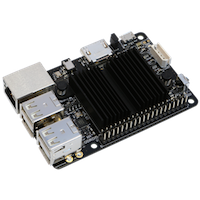
Odroid-C2-hardkernel copyThe Odroid-C2 already has 2GB of RAM, which is also available on the $29 “Plus” version of Pine64’s Pine A64, a quad-core, Cortex-A53 Allwinner A64 SBC with a 40-pin Pi-compatible connector. The PineA64 will soon start shipping to Kickstarter backers, and Pine64 is processing new orders for shipment starting in May.

The $15 version of the Pine A64 with 512MB RAM is sold out, but there’s also a $19 version with 1GB RAM that also moves up to Gigabit Ethernet. As with the Odroid-C2, wireless is an extra-cost option, and despite the Pine A64’s larger dimensions, even the top models are limited to dual USB host ports instead of four on the C2 and Raspberry Pi.

The only other 64-bit ARM hacker boards currently shipping are more expensive 96Boards-compatible SBCs, both of which have onboard wireless. These include Qualcomm’s quad-core, $75 DragonBoard 410c and the octa-core, $99 to $129 HiKey.

The move to 64-bit may be slowed by an increasing focus on lightweight Internet of Things projects for the Pi. Element14, for example, announced some IoT accessories for the Pi 3, including a PiFace add-on and a collaboration with IBM and EnOcean on a IoT Starter Kit endpoint-to-cloud framework for the SBC.

ARM certainly believes the change to 64-bit will be a lengthy process. In recently announcing a 32-bit only ARMv8 Cortex-A32 chip aimed at IoT duty, ARM stated: “We can expect a significant number of embedded devices to remain 32-bit for the foreseeable future.”

Still, even if Raspbian and most other Pi-compatible distros take their time moving to 64-bit, we can expect to see some Pi-compatible 64-bit Linux builds in the coming months. One of the first out of the gate will likely be version of Arch Linux ARM, which has run in 32-bit mode on the Pi, but inherently supports ARMv8, 64-bit operation.

Several 64-bit ARM capable Linux distros have become Pi 2 compatible over the last year, including Ubuntu, and more recently, Fedora. These projects may also decide to release a 64-bit image for the Pi 3 if they feel the RAM limit is not prohibitive.

Another possibility may be the Chromium OS project — the 64-bit ready progenitor of Google’s Chrome OS. A subproject called Chromium OS For All SBC recently expanded beyond the Pi 2 to support the Raspberry Pi Zero, the Chip, and the 64-bit Pine A64. The SBC versions, however, are 32-bit for now.

Finally, the Pi 3 may also accelerate Android’s slow path to the Pi. Even in 32-bit mode, the resource-hungry Android should run much better on the faster Cortex-A53 hardware.

[Editor’s note: This article was updated March 7 to reflect the fact that Odroid-C2 does ship with an ARM 64-bit Ubuntu distribution. We apologize for the error.]

How to Install a Mumble Voice Chat Server on Ubuntu 14.04

Mumble is a voice chat application which is designed for the gamer’s so that they can to talk to each other by connecting their mumble clients to the same server. This Voice over IP application is similar to Ventrilo and TeamSpeak. The simple administration interface, high-quality codecs and low latency makes it quite popular. In this article, I will tell you how you can install and configure Murmur on to your systems. Murmur is a server component of Mumble.

Read more at HowtoForge

Poor man’s Guide to Remote Linux Desktop Support

One of the most common things we face as Linux enthusiasts is the “vacuum of despair” that comes about from switching family to Linux without fully thinking through backups and restoration. It usually starts with the dreaded phone call that they tried to “do some Linux.”

Sometimes it’s as simple as fixing a broken X server install. In other cases, it could be more complicated, like the time your Aunt Martha accidentally knuckle pounded Ctrl+H in her home directory when trying to coax the cat off the keyboard. In what suddenly feels like a bad action movie, she’s convinced herself that she’s being hacked due to the sudden changes taking place on her monitor. (Read the rest)

How To Optimize Ubuntu for Speed

The release of Ubuntu 16.04 LTS is right around the corner and lots of users will be reloading their systems to take advantage of all the new features and updated software. Also, many other distributions are based on Ubuntu’s LTS versions, so all of you Linux Mint, elementary OS, Linux Lite and Zorin users can look forward to new versions coming along in the coming months, all based on Ubuntu 16.04. This means that lots of folks are going to be reloading their machines to get a nice clean install, so I’m going to present to you some tips and tricks that will make your system faster and more flexible. I’ve installed hundreds of Ubuntu systems over the last few years on all kinds of hardware and I have come up with a combination of tweaks that really make a huge difference in performance. You can mix and match to suit your own system but they really make the most difference when you start from scratch and put them all together at the time of installation. (Read the rest)

Skype’s Dead – All Hail WebRTC

It seems like only yesterday that Skype came onto the scene. Suddenly, the idea of making calls over the Internet felt completely doable. Before this, the alternatives were pretty limited. I forget my first experiences with Skype, but I remember some of the “boutique” distros at the time we’re bundling with it (Xandros, etc).

Well, according to this page the party is over. Seems he’s still under the impression Microsoft gives two rips about Linux users or their non-enterprise customers. Fun fact, Microsoft doesn’t care. Don’t get me wrong, I think Skype’s download page still making reference to Ubuntu 12.04 is quite disappointing too. But I’ve long since shrugged and moved on with my life. Today, I’ll show you what I use instead. (Read the rest)

FOSS History in Retrospect: 3 Generations of Open Source Coders and Users

It’s 2016, and open source is everywhere you look. The norms, forms and faces of open source have changed so much, in fact, that they seem to signal the rise of a new generation of open source programmers. Here’s why. 

Lest I ruin anyone’s day by appearing to spread falsehoods on the Internet, I will note that the idea of generations is a construct. …That said, generations are a useful concept for measuring cultural change. If you look at the history of free and open source software from this perspective, I think you can identify three distinct generations.

Read more at The VAR Guy

Perl Vulnerabilities Closed in All Supported Ubuntu OSes

perl-vulnerabilitiesCanonical has detailed three Perl vulnerabilities that have been identified and fixed in Ubuntu 15.10, Ubuntu 14.04 LTS, and Ubuntu 12.04 LTS operating systems.

Perl doesn’t get all that many fixes for vulnerabilities, but it happens from time to time. The Ubuntu maintainers have been quick to update the package, and it is now ready in the repos. Fixing the vulnerabilities and updating the system is a really good idea.

Borg, Omega, and Kubernetes (ACM Queue)

Five Google developers share the lessons from ten years of container development in this ACM Queue article. “Though widespread interest in software containers is a relatively recent phenomenon, at Google we have been managing Linux containers at scale for more than ten years and built three different container-management systems in that time. Each system was heavily influenced by its predecessors, even though they were developed for different reasons. This article describes the lessons we’ve learned from developing and operating them.”…

To cope with these kinds of requirements, configuration-management systems tend to invent a domain-specific configuration language that (eventually) becomes Turing complete, starting from the desire to perform computation on the data in the configuration (e.g., to adjust the amount of memory to give a server as a function of the number of shards in the service). The result is the kind of inscrutable ‘configuration is code’ that people were trying to avoid by eliminating hard-coded parameters in the application’s source code. It doesn’t reduce operational complexity or make the configurations easier to debug or change; it just moves the computations from a real programming language to a domain-specific one, which typically has weaker development tools (e.g., debuggers, unit test frameworks, etc).

Read more at LWN

KDE Launches A Distribution Outreach Program

With the Plasma 5.6 beta out the door, the KDE development community has today announced the formation of a Distribution Outreach Program. This program is a mailing list that’s seeking to improve the collaboration between KDE and distributions/operating-systems who distribute their software.

Read more at Phoronix