Home Blog Page 886

Lennart Poettering Announces the Release of systemd 229 for all Linux OSes

systemd-229-for-all-linuxIt has been three long months since systemd 228 was released to the open-source community, and today we’re glad to inform you that the controversial software received a new major update.

systemd 229 has been announced by its creator, Lennart Poettering, earlier today, February 11, and it packs a lot of new features, as well as the usual under-the-hood tweaks and bugfixes. The main attraction of this release, though, is systemd-resolved, the DNS resolver service, which has received quite a bunch of new features. Among the most important ones is support for using it as a DNSSEC validating stub resolver.

Pwn2Own Hacking Contest Returns as Joint HPE-Trend Micro Effort

Over a half million dollars in prize money is up for grabs as the Zero Day Initiative browser hacking contest continues even as corporate ownership shifts. 

The annual Pwn2Own browser hacking competition that takes place at the CanSecWest conference is one of the premier security events in any given year, as security researchers attempt to demonstrate in real time zero-day exploits against modern Web browsers. This year there was initial concern that the event wouldn’t happen, as the Zero Day Initiative (ZDI), which is the primary sponsor of Pwn2Own, is currently in a state of transition.

Read more at eWeek


Linux Foundation Launches Open Source Enterprise IO Project

The Linux Foundation and industry partners have announced a new project to build next-generation open source technology for data centers and service providers through FD.io, which will create an IO services framework for networking and storage applications.

IO is an emerging part of the “software-defined everything” ecosystem. Like SDN, NFV and software-defined storage, IO is designed to abstract data processing from underlying infrastructure. That makes applications more portable and scalable, while also offering significant performance advantages if implemented in the right way.

Read more at The VAR Guy

​How to Run Windows Programs on Linux with CrossOver

Want to move to Linux, but there’s this one application that’s keeping you stuck on Windows? CodeWeaver’s CrossOver Linux may be exactly what you need. 

Just because there’s a Windows application you must use doesn’t mean you must run Windows. CodeWeaver‘s CrossOver Linux enables you to run many popular Windows applications on Linux. Supported Windows applications include Microsoft Office (from Office 97 to Office 2010), Intuit Quicken, and some versions of Adobe Photoshop and Photoshop CS. CrossOver also runs games. For example, you can play such popular online games as World of Warcraft and Guild Wars.

Read more at ZDNet News

What to Do If Linux Plesk Server Gets Exhausted?

Finding no disk space after trying to donwload a backup file? 

Are you getting the following warning sign?

When you perform a system backup from the Parallels Plesk Control Panel, then after its completion you normally go to the Backup Manager and Click to download the current backup file. But sometimes file never get downloaded and you experience a slow server performance.

Here’s the reason behind it –

The above situation occurs most likely due to the unavailable free disk space on one of your partitions.

Explanation –

If you have a small root partition:

[root@/]# df -h
Filesystem Size Used Avail Use% Mounted on
/dev/mapper/isw_Volume0p2
9.5G 6.1G 3.0G 68% /
/dev/mapper/isw_Volume0p6
437G 51G 364G 13% /var

You may have set up backups to be stored on another partition:
Directory for storing backup files – “/var/lib/psa/dumps”
Temporary directory for dumps – “/var/tmp”

[root@/]# grep DUMP /etc/psa/psa.conf
DUMP_D /var/lib/psa/dumps
DUMP_TMP_D /var/tmp

However when you download backup files from the Plesk Control Panel, they are copied to a temporary location as a temporary file (these parameters are not manageable):
Full backups -> /usr/local/psa/PMM/tmp
Domains backups -> /usr/local/psa/tmp

Since those folders are located on the small root partition, you server runs out of free space.

The solution is simple – 

You need to create a symlink from the default location to some folder which have the enough free disk space.

For Example:

[root@ /]# ln -s /var/tmp/ /usr/local/psa/PMM/
[root@ /]# ln -s /var/plesk_temp/local-tmp /usr/local/psa/tmp
[root@ /]# chmod -R 777 /var/plesk_tmp/local-tmp

To know more about Linux Servers – https://www.bodhost.com/linux-server-management.php

How to install LiteSpeed web server on CentOS 7

LiteSpeed web server is a popular choice for replacing an Apache web server. Its features include an optimization of the web content and content delivery which maximizes the download speed and combines better performance with a smaller memory footprint. Being compatible with Apache features is also an added benefit, which helps to reduce downtime during migration from Apache to LiteSpeed. This tutorial shows the installation on a CentOS 7 server.

Read more at HowtoForge

ST Releases Free Linux IDE for 32-Bit MCUs

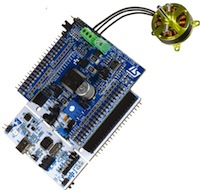
STM32 Nucleo expansion boardThe 32-bit microcontroller world is starting to open up to Linux. This week, leading ARM Cortex-M vendor STMicroelectronics (ST) released a free Linux desktop version of its development software for its line of STM32 microcontroller units (MCUs). The tools include ST’s STM32CubeMX configurator and initialization tool, as well as its System Workbench for STM32 (SW4STM32), an Eclipse-based IDE created by Ac6 Tools. SW4STM32 is supported with toolchain, forums, blogs, and technical support by the openSTM32.org development community.

“The Linux community is known to attract creative free-thinkers who are adept at sharing ideas and solving challenges efficiently,” stated Laurent Desseignes, Microcontroller Ecosystem Marketing Manager, Microcontroller Division, STMicroelectronics. “We are now making it ultra-easy for them to apply their skills to create imaginative new products, leveraging the features and performance of our STM32 family.”

Linux is the leading platform for Internet of Things gateways and hubs, as well as higher-end IoT endpoints. Yet, much of the IoT revolution, as well as the wearables market, is based on tiny, low-power microcontrollers, increasingly Cortex-M chips. A small subset of these can run the stripped-down uCLinux (see below), but none support more comprehensive Linux distributions. Instead, they are controlled with real-time operating systems (RTOSes) or go bare-bones with no OS at all. The firmware development work is typically done on a Windows-based Integrated Development Environment (IDE).

With ST’s free tools, Linux developers can more easily tap this new realm. ST’s tools, some of which should also be available for Mac OS/X in the second quarter, work with STM32 Nucleo boards, Discovery kits, and Evaluation boards. The Nucleo boards are available in 32-, 64-, and 144-pin versions, and offer hardware add-ons such as Arduino connectors.

The STM32CubeMX configurator and SW4STM32 IDE enable Linux developers to configure microcontrollers and develop and debug code. SW4STM32 supports the ST-LINK/V2 debugging tool under Linux via an adapted version of the OpenOCD community project.

The software is compatible with microcontroller firmware within the STM32Cube embedded-software packages or Standard Peripheral Library, says ST. Targets include ST’s full range of MCUs, from entry-level Cortex-M0 cores to high-performing M7 chips, including M0+, M3, and DSP-extended M4 cores.

ST is not the first 32-bit MCU vendor to offer Linux-ready IDEs for Cortex-M chips, but it appears to be one of the first major free Linux platforms. For example, NXP, whose share of the MCU market increased with its recent acquisition of Freescale (Kinetis MCUs, among others), offers an LPCXpresso IDE with Linux, Windows, and Mac support. However, LPCXpresso costs $450 per individual seat.

Microsemi, which integrates Cortex-M3 chips in its SmartFusion FPGA SoCs has a Libero IDE available for Red Hat Enterprise Linux (RHEL) in addition to Windows. However, Libero requires a license, and the RHEL version lacks support for add-on packages such as FlashPro and SoftConsole.

Why Learn MCU-Speak?

Even if a Linux developer has no plans to load uClinux on a Cortex-M chip, knowledge of MCUs should come in handy. This is especially true with complex, heterogeneous IoT projects that extend from MCU-based endpoints to cloud platforms.

For prototyping and hobbyist projects, an interface to an Arduino board offers fairly easy access to MCU benefits. Yet beyond prototyping, developers often replace the Arduino board and its 8-bit ATmega32u4 MCU with a faster 32-bit Cortex-M chip with additional functionality. This includes improved memory addressing, independent clock settings for the core and various buses, and in the case of some Cortex-M7 chips, rudimentary graphics.

Other categories where MCU development skills might come in handy include wearables, where low power, low cost, and small size give MCUs an edge, and robotics and drones where real-time processing and motor control are the main benefits. In robotics, you’re likely to see Cortex-A and Cortex-M both integrated in the same product.

There’s also a modest trend toward system-on-chips adding MCUs to Linux-driven Cortex-A cores, as with the NXP i.MX6 SoloX. While most embedded projects don’t use such hybrid SoCs or combine applications processor and MCUs on the same product, developers may increasingly find themselves working on product lines that extend from low-end MCU models to Linux- or Android-driven Cortex-A based designs.

uClinux Stakes Linux Claim in MCUs

With the rise of IoT, we’re starting to see more SBCs and computer-on-modules that run uClinux on 32-bit MCUs. Unlike other Linux distributions, uClinux does not require a memory management unit (MMU). uClinux does, however, have higher memory requirements than most MCUs can meet. The distro requires higher end Cortex-M4 and Cortex-M4 MCUs with built-in memory controllers supporting external DRAM chips.

Amptek’s iCon SBCs run uClinux on NXP LPC Cortex-M3 and -M4 chips, offering familiar trappings like WiFi, Bluetooth, USB, and other interfaces. Arrow’s SF2+ IoT development kit runs uClinux on an Emcraft Systems SmartFusion2 COM based on Microsemi’s 166MHz, Cortex-M3/FPGA SmartFusion2 hybrid SoC.

Emcraft, which sells uClinux-based COMs based on ST and NXP, as well as Microsemi MCUs, has been actively promoting the role of uClinux on 32-bit MCUs. Increasingly, uClinux is up against ARM’s own Mbed OS, at least on high-end MCU projects that require wireless communications and more sophisticated rules-based operation. Proponents of Mbed and modern, open source RTOSes like FreeRTOS say that uClinux requires too much RAM overhead to make it affordable for IoT endpoints. However, Emcraft and other uCLinux proponents claim the costs are overstated, and are worth the more extensive Linux wireless and interface support available even in a stripped down distro like uClinux.

When asked for comment on the ST release, Emcraft director of engineering Vladimir Khusainov had this to say: “ST’s decision to port its development tools to Linux is good news for Emcraft since it allows Linux users an easy way to start working with embedded STM MCUs. We expect that, having had a chance to get familiar with STM devices using the ST configurator and embedded libraries, some of those users may become interested in running embedded Linux (in its uClinux form) on the target.”

For a recent overview of uClinux on Cortex-M4, check out this slide show from last year’s Embedded Linux Conference by Jim Huang and Jeff Liaw. More on Cortex-M processors in general may be found in this tidy AnandTech overview.


Schneier: Terrorists Will Switch to More Secure Alternatives to Avoid Encryption Backdoors

world-encryption-100644224-primary.idgeA study shows that if the U.S. mandates backdoors to decrypt secret messages in order to help law enforcement, there would still be hundreds of alternative encryption products made outside the reach of U.S. law that terrorists and criminals could get their hands on. 

“Smart criminals and terrorists will easily be able to switch to more secure alternatives,” is the conclusion drawn by the study “A Worldwide Survey of Encryption Products”. The authors were Internet security authority Bruce Schneier of Harvard’s Berkman Center for Internet and Society, independent security researcher Kathleen Seidel, and Saranya Vijayakumar, a Harvard student.

Read more at IT World

Linux Foundation Certified System Administrator: Jorge Tudela Gonzalez de Riancho

jorgeThe Linux Foundation offers many resources for developers, users, and administrators of Linux systems, including its Linux Certification Program, which is designed to give you a way to differentiate yourself in a competitive job market.

To illustrate how well the certification prepares you for the real world, the Linux Foundation is featuring some of those who have recently passed the certification examinations. These testimonials should help you decide if either the Linux Foundation Certified System Administrator or the Linux Foundation Certified Engineer certification is right for you. In this installment, we talk with Jorge Tudela Gonzalez de Riancho.

How did you become interested in Linux and open source?

My first contact with Linux took place at the University, we used it in some Labs, but I didn’t become interested till my first job as Unix/Linux system administrator.

Regarding Open Source: Along with my current job as a Cloud Solution Engineer, I have started to use many open source tools and technologies, and I have become a true Open source believer!

What Linux Foundation course did you achieve certification in? Why did you select that particular course?

I got the Linux Foundation Certified System Administrator (LFCS). I chose it because I was already familiar with all the domain and competencies of the exam, I just wanted to test my Linux knowledge.

What other hobbies or projects are you involved in? Do you participate in any open source projects at this time?

I don’t participate actively in any open source project at the moment, but that is one of my 2016 year resolutions! I’m a sports lover (especially triathlons)…it is not all about technology and work. But sometimes I spend time at home getting my hands dirty with my raspberry-pi 🙂

Do you plan to take future Linux Foundation courses? If so, which ones?Lf-logo-new

Yes, I would like to the take Linux Foundation Certified Engineer (LFCE) and also, any other LF courses related to Open Stack or SDN/NFV.

In what ways do you think the certification will help you as a systems administrator in today’s market?

It’s important to prove your knowledge and skills, so I guess the certification makes the difference when it comes to find a new job.

What Linux distribution do you prefer and why?

Although I have experience working with Debian & derivatives, I prefer RHEL & derivatives.

There’s not really a strong reason behind that, just that at my first job, all of our Linux boxes were RHEL 🙂

Are you currently working as a Linux systems administrator? If so, what role does Linux play?

I work with Linux every day, but not as a typical System Administrator. I’m a Cloud Solution Engineer, so I work with many different technologies like Docker and OpenStack. But Linux is key; it is the base where most of our software stack runs.

Where do you see the Linux job market growing the most in the coming years?

The future of Linux is exciting! I believe IoT platforms of any kind and Automotive Grade Linux industry will enjoy an exponential growth in the coming years.

What advice would you give those considering certification for their preparation?

For experienced professionals, I recommend that they prepare the environment for the exam, and follow the instructions, It’s not a difficult exam if you work daily with Linux.

On the other hand, for newcomers, apart from having a look to open/free resources, I just encourage them to set up a Linux environment at home and get their hands dirty!!

Read more profiles:

Linux Foundation Certified Engineer: Francisco Tsao

Linux Foundation Certified System Administrator: Gabriel Canepa

Linux Foundation Certified Engineer: Michael Zamot

Linux Foundation Certified System Administrator: Ariel Jolo

Linux Foundation Certified System Administrator: Nam Pho

Linux Foundation Certified System Administrator: Steve Sharpe

Linux Foundation Certified Engineer: Diego Xirinachs

Openshot Video Editor 2.0.6 Beta 3 Is a Massive Release

openshot-releaseOpenshot is a video editor that features 3D animation, curve-based camera motion, compositing, transitions, audio mixing, vector titles, and many others features. A new beta build is now available for download and testing.

Developer Jonathan Thomas has released a new Beta build for the 2.0 branch of the application, and it’s a major upgrade. The dev has been really busy, and he pushed a huge number of changes and new features, and from the looks of it, he still has a lot of work to do.