Home Blog Page 900

Linux Foundation Announces 2016 Events, Adds OpenIoT

The Linux Foundation announced its 2016 event calendar, and issued a CFP for the Apr. 4-6 Embedded Linux Conference, which features an OpenIoT Summit.

OpenIoT will “bring together embedded and application developers with systems architects and firmware developers to advance the technical work required for the future of IoT,” says the LF. It will be interesting to see how the sessions are divvied up between ELC and OpenIoT. Depending on your definition of Internet of Things, it could be argued that most new embedded Linux projects these days merit the IoT label.

Read more at LinuxGizmos

Two Outstanding All-in-One Linux Servers

jack-clear aBack in 2000, Microsoft released their Small Business Server. This product changed the way many people viewed how technology could function within the realm of business. Instead of having multiple machines handle different tasks, you could deploy a single server which would handle email, calendaring, file sharing, directory services, VPN, and a whole lot more. For many of small businesses, this was a serious boon, but for some the cost of the Windows SMB was prohibitive. For yet others, the idea of relying on such a server, designed by Microsoft, simply wasn’t an option.

For that last group, there are alternatives. In fact, within the realm of Linux and open source, you can choose from several solid platforms that can serve your small business as a one-stop server shop. If your small business has between 10 and 50 employees, the all-in-one server might be the ideal solution to meet your needs.

Here, I’ll look at two Linux all-in-one servers, so you can see if one of them is the perfect match for your company.

Remember, these servers are not, in any way, suited for big business or enterprise. Larger companies cannot rely on the all-in-one server simply because a single server cannot take the load expected within the realm of enterprise needs. With that said, here’s what SMBs can expect from a Linux all in one.

ClearOS

ClearOS was originally released in 2009, under the name ClarkConnect, as a router and gateway distribution. Since then, ClearOS has added all the features necessary to define it as an all-in-one server. ClearOS offers more than just a piece of software. You can also purchase a ClearBox 100 or ClearBox 300. These servers ship complete with ClearOS and are marketed as IT in a box. Check out the feature comparison/price matrix here.

For those with hardware already in-house, you can download one of the following:

What do you get with ClearOS? You get a business-class server with a single, elegantly designed web interface. What is unique about ClearOS is that you will get plenty of features in the base server; beyond that, you must add on features from the Clear Marketplace. From within the Marketplace, you can install free or paid apps that extend the feature set of the ClearOS server. Here you’ll find add-ons for Windows Server Active Directory, OpenLDAP, Flexshares, Antimalware, Cloud, Web access control, Content filtering, and much more. You’ll even find some third-party add-ons such as Google Apps Synchronization, Zarafa Collaboration Platform, and Kaspersky Anti-virus.

ClearOS is installed like any other Linux distribution (based on Red Hat’s Anaconda installer). Once the install is complete, you will be prompted to set up the networking interface as well as presented with the address to point your browser (on the same network as the ClearOS server). The address will be in the form:

https://IP_OF_CLEAROS_SERVER:81

Where IP_OF_CLEAROS_SERVER is the actual IP address of the server. NOTE: When you first point your browser to the server, you will receive a “Connection is not private” warning. Proceed on to the address so you can continue the setup.

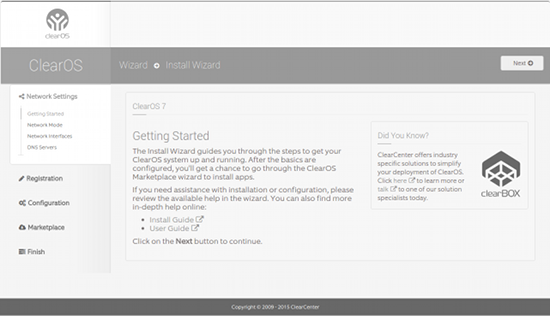
When the browser finally connects, you will be prompted for the root user credentials (you set the root user password up during initial installation). Once authenticated, you will be presented with the ClearOS setup wizard (Figure 1 above).

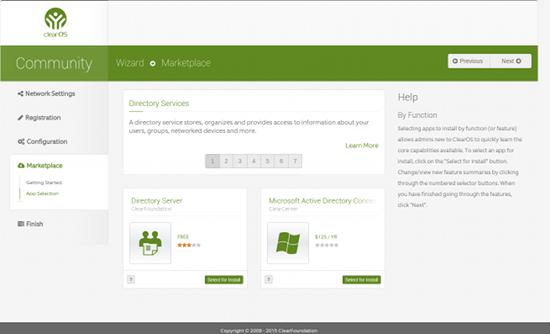
Click the Next button to begin the process of setting up your ClearOS server. The wizard is self-explanatory and, in the end, you will be asked which version of ClearOS you want to use. Click either Community, Home, or Business. Once selected, you will be required to register for an account. Once you’ve created an account and registered the server, you can then move on to updating the server, configuring the server, and adding modules from the marketplace (Figure 2).jack-clear b

At this point, you are ready to start digging deep into the configuration of your ClearOS small business server.

Zentyal

Zentyal is a Ubuntu-based small business server that was, at one point, distributed under the name eBox. Zentyal offers plenty of servers/services to fit your SMB needs:

  • Email — Webmail; Native MS Exchange protocols and Active Directory support; Calendars and contacts; Mobile device email sync; Antivirus/antispam; IMAP, POP, SMTP, CalDAV, and CardDAV support

  • Domain & Directory — Central domain directory management; Multiple organization units; Single sign-on authentication; File sharing; ACLs, Advanced domain management, Printer management

  • Networking & Firewall — Static and DHCP interfaces; Objects & services; Packet filter; Port forwarding

  • Infrastructure — DNS; DHCP; NTP; Certification authority; VPN

  • Firewall

The installation of Zentyal is very much like that of Ubuntu Server—it’s text based and quite simple: Boot up the install media, make a few quick selections, and wait for the installation to complete. Once the initial, text-based, installation is finished, you are presented with the GUI desktop where a wizard will appear for package selection. Select all the packages you want to install and allow the installer to finish the job.

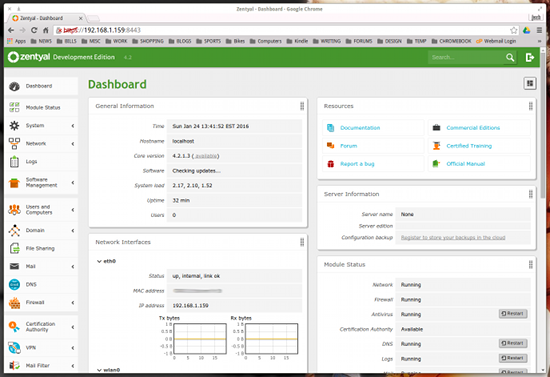
Finally, you can log into your Zentyal server via the web interface (point your browser to https://IP_OF_SERVER:8443 — where IP_OF_SERVER is the LAN address of the Zentyal server) or use the standalone, desktop GUI to administer the server (Zentyal includes quick access to an Administrator and User console as well as a Zentyal Administration console). When all systems have been saved and started, you will be presented with the Zentyal Dashboard (Figure 3).jack-zentyal a

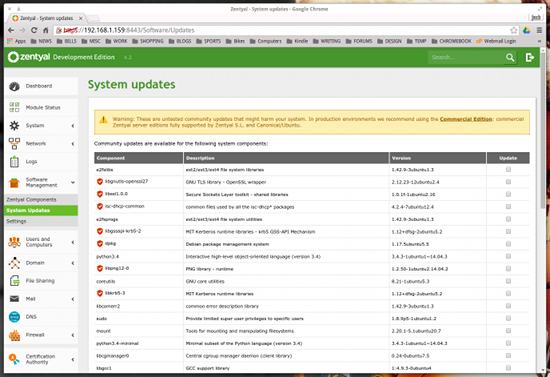
The Dashboard allows you to control all aspects of the server, such as updating, managing servers/services, and getting a quick status update of the server. You can also go into the Components area and install components that you opted out of during installation or update the current package list. Click on Software Management > System Updates and select what you want to update (Figure 4), then click the UPDATE button at the bottom of the screen.jack-zentyal b

Which Server Is Right for You?

The answer to this question depends on what you need. Zentyal is an amazing server that does a great job running your SMB network. If you need a bit more, such as groupware, your best bet is to go with ClearOS. If you don’t need groupware, either server will do an outstanding job.

I highly recommend installing both of these all-in-one servers to see which will best serve your small company needs.


10 Best Free Mobile Application Development Frameworks That Support Android

imgres copyIf you’re developing Android-based games or complex apps with extensive cloud integration, you’ll probably want to seek out native application development tools. These range from the Java-oriented Android SDK and Android Development Tools (ADT) Eclipse plugin to game-oriented engines like Corona to commercial enterprise platforms like the cloud-oriented Monaca toolsuite.

Most mobile apps, however, are simpler affairs with tight deadlines and budgets and the need to support both Android and iOS. For most app developers, especially those converting web apps to mobile, cross-platform mobile app frameworks are a better choice. And the latest mobile frameworks promise some native-like performance and functionality while still hewing to a basic “write once, run anywhere” development approach.

Requirements

Here I look at the 10 best Android-compatible mobile app frameworks. To meet my requirements, they must support HTML5 or JavaScript, although most support both, as well as CSS. They must also be open source, and offer at least some version of a free app. Almost all the programs listed here are both free and open source, and most support Linux desktops as well as Windows and/or OS X.

The open source requirement excludes some promising packages like Trigger.IO, as well as mainstays such as Microsoft’s Xamarin, based on the former Mono project. There’s also been a lot of interest in Intel XDK, which is not open source but is available in a capable free version.

I have also omitted several other programs that are either too rough around the edges, or too out of date. Let me know, however, if your favorite open source framework deserves mention.

These 10 packages range from those that are truly “write once, run anywhere” programs such as the lightweight jQuery Mobile to others that are more similar to native app products, but which make it fairly easy to port and reuse code between Android and iOS. These days, far-reaching cross platform support is not necessary for most app developers, who increasingly see little reason to support Windows Phone, let alone the fading Blackberry. Most of these packages fall somewhere in between “write once” and native, bridging the gap between a JavaScript API and a wrapper framework, while enabling some native functions such as camera control.

Not surprisingly, the packages are greatly improved compared to our previous roundup of 15 mobile app frameworks back in August 2012, In recent years, mobile frameworks have benefited from the increased use of HTML5, as well as much improved components for improving native app functionality and performance. The latest frameworks also let you apply modern UI styles such as Google’s Material Design.

Only four products survived from our original list: jQuery Mobile, Kendo UI, Sencha Touch, and Titanium. The two most popular options these days are relative newcomers: Ionic and Onsen UI.

Unlike the 2012 list, this one does not include Adobe’s venerable PhoneGap, which includes Apache’s Cordova rendering package. PhoneGap is really more of a wrapper and package deployment framework rather than a full development environment. Yet, many of these programs integrate Cordova/PhoneGap and most support optional integration.

Ionic is based on the AngularJS JavaScript MVVM (model–view–viewmodel) framework, which is supported as an option on many of the other products. Another popular optional component is Bootstrap UI. One program listed here based on both Angular and Bootstrap UI is Mobile Angular UI.

Top 10 Open Source Frameworks

Our top 10 open source mobile app frameworks are listed below in alphabetical order, with links to product pages. Unless otherwise noted, the software is available only in a free, open source version.

Framework 7iDangero.us — Since version 1.0 was released a year ago, Framework has been one of the best choices for developing iOS apps. Now that it offers Android support, it’s also a good option if you want to start with iOS, then build an Android version with an iOS like look and feel. Features include Material Design UI, native scrolling, 1:1 page animation, a custom DOM library, and XHR caching and preloading.

Ionic – Ionic – Based on the Sass CSS extension language, this popular cross-platform framework is fairly easy to use, yet it can also integrate AngularJS for building more advanced apps. Ionic offers a library of mobile-optimized HTML, CSS, and JS CSS components, gestures, and tools, and works with predefined components. A command-line interface provides features like emulators, live reload, and logging, There’s also a Cordova-based app packager.

jQuery Mobile – jQuery Foundation – Based on jQuery, this mature, lightweight framework lacks many of the advanced features of most packages here, but it still has a large, committed user base. While it offers features like semantic markup, progressive enhancement, themable design, PhoneGap/Cordova support, there’s not much here for native-like functionality and performance or advanced UI. On the other hand, its simplicity means that “write once, run anywhere” is often an achievable goal, and it’s a good choice for simple apps that also need to run on Windows Phone and BlackBerry.
Kendo-UI-image courtesyTelerikAM

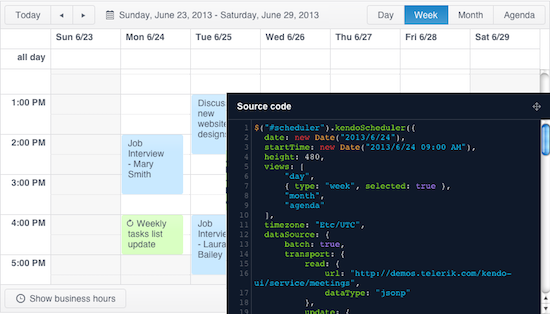
Kendo UI – Telerik – This jQuery based HTML5/JavaScript framework is available in open source and commercial versions. The enterprise-friendly Kendo UI offers a wide selection of UI widgets and plugins. It’s best known for its numerous prebuilt themes with Material Design styling, as well as a theme builder for custom themes. Other features include Angular and Bootstrap UI integration, as well as performance optimizations.

Mobile Angular UI – Maurizio Casimirri – This open source project combines AngularJS and a modified version of Twitter’s Bootstrap into a mobile UI framework. It is said to retain most of Bootstrap 3’s syntax for easier web-to-mobile portability while adding mobile components missing from Bootstrap, such as switches, overlays, sidebars, scrollable areas, and fixed-positioned navbars. Libraries include fastclick.js and overthrow.js. 

NativeScript– Telerik – As the name suggests, NativeScript focuses on native UX development, but it offers cross-platform code-sharing support across Android and iOS. The software uses existing native UI libraries, with UI is described with JavaScript, XML, or optionally, Angular. It’s not as easy to use as Telerik’s more traditional cross-platform Kendo UI framework, however.
Onsen-PM

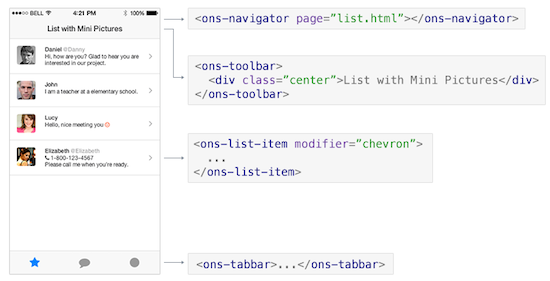
Onsen UI – Asial Corp. – Onsen is built on HTML and CSS, and is designed to work with PhoneGap and Cordova, which are not pre-integrated. It can also work with Angular and jQuery. As the name suggests, the program stresses UI development, and offers a wide range of web-based UI components and features, such as two-column views for tablets. (Material Design, however, is still missing.) The well-documented program is pitched at jQuery Mobile users who need ease of use but want more functionality, performance, and UI features. A drag and drop GUI tool is under development at Tokyo-based Asial, which also develops and maintains Monaca.

React Native – Facebook – React Native is an open source spin off of Facebook’s React JavaScript framework, which famously replaced the earlier HTML5 foundation. As the name suggests, this high-end, iOS-focused program is more of a native app package than a cross-platform framework, but with its new Android support, it loosely fits our requirements, as you can essentially write once in JavaScript and port to both platforms. Currently, only OS X desktops are fully supported, although there are experimental Linux and Windows versions for Android development.

Sencha Touch – Sencha – Sencha’s mature, enterprise-focused HTML5/JavaScript framework is available in both open source and commercial versions. Sencha builds upon ExtJS to enable native-like performance. It provides a visual app builder for HTML5, as well as the ability to reuse custom components. A native packager streamlines distribution to stores like Google Play.

Titanium – Appcelerator – Unlike the more web-oriented frameworks, Titanium uses JavaScript to create native code, with claimed benefits in performance. This Node.js-based SDK offers over 5,000 APIs for iOS, Android, Windows, Blackberry, and HTML5. Titanium is known more for its performance and extensive feature set than for ease of use. The software is open source, but the full-featured free version is free only as long as you don’t publish your app, at which point you have to pay at least $39 per month.

 

MQTT: Building an Open Internet of Things

esp8266The “Internet of Things” (IoT) is all about physical objects being able to communicate with each other. It may be that your home mailbox can tell you that new mail has arrived, windows know that it is raining and close themselves, or your washing machine knows that somebody just got in the shower and pauses itself temporarily. The MQ Telemetry Transport MQTT is an open protocol that allows devices to publish and subscribe to messages.

MQTT makes it fairly straightforward to set up programs on a Linux machine that harvest information and publish that info on the network for small, resource-constrained microcontrollers to see and process. The recent availability of very cheap WiFi-enabled microcontrollers such as the ESP8266 makes this an exciting time to be tinkering with IoT.

The advantage of using messages is that devices can listen for interesting things and can send any information that they think is important. Every device doesn’t need to know about the other devices on the network for this to happen. For example, a weather station can just publish the temperature, humidity, wind speed, and direction and the rest of your “things” can subscribe to take advantage of that information. Although there are many ways to send messages on a Linux desktop, MQTT should let you sent messages to and from your Arduino or mbed smart devices, too. If you are interested in buying an IoT or “smart” device, you might want to investigate whether the messaging used by it is an open standard, such as MQTT.

MQTT is published as an open standard by OASIS. Many implementations of MQTT are available, including the one I’ll focus on here: Mosquitto. Mosquitto can be installed on a Fedora 23 machine using the first command below and started with the second command.

# dnf install mosquitto-devel
# systemctl start mosquitto

Programs subscribe to messages that they are interested in, and programs can publish informative messages for clients to see. To make all this work, MQTT uses a broker process, which is a central server that keeps track of who wants to hear what and sends messages to clients accordingly.

To work out which clients are interested in which messages, each message has a topic, for example, /sensors/weather/temperature. A client can request to know just that temperature message or can use wildcards to subscribe to a collection of related messages. For example, /sensors/weather/# will listen to all messages that start with /sensors/weather/. The slash character is used much like the files and folders in a file system.

The two commands below give an introduction to how easy using MQTT can be. The two commands should be run in different terminal windows, with the mosquitto_sub executed first. When the mosquitto_pub command is run you should see abc appear on the terminal that is running mosquitto_sub. The -t option specifies the topic, and the -m option to mosquitto_pub gives the message to send.

$ mosquitto_sub -t /linux.com/test1
$ mosquitto_pub -t /linux.com/test1 -m abc

A relevant question here involves the timing of these commands. What if you run the mosquitto_pub command first? Nothing bad, but the mosquitto_sub command might not see the “abc” message at all. Now, if the topic was about the current temperature, and the topic was only published every hour, you might not want the client to have to wait that long to know the current temperature. You could have your weather station publish the temperature more frequently, for example, every 5 minutes or every 5 seconds. But, the trade-off is that you are sending messages very frequently for a value that changes infrequently in order for clients to have access to data right away.

To get around these timing issues, MQTT has the retain option. This is set when you publish a message using the -r option and tells the broker to keep that value and report it right away to any new clients that subscribe to messages on the topic. Using retain, you can run the publish command shown below first. Then, as soon as mosquitto_sub is executed, you should see def right away.

$ mosquitto_pub -t /linux.com/test2 -r -m def
$ mosquitto_sub -t /linux.com/+
def

In the preceding command, I’ve used the + in the topic used by the mosquitto_sub command. This lets you subscribe to all messages at that level. So, you will see /linux.com/test2 and /linux.com/test3 if it is sent, but not /linux.com/test2/something, because that is one level deeper in the hierarchy. The # ending will subscribe to an entire tree from a prefix regardless of how deep the topic gets. So, /linux.com/# would see /linux.com/test2/something and /linux.com/test2/a/b/c/d.

Another question to consider is what happens to messages that are sent when your program is not running. For example, a program might like to know if and how many times the refrigerator door has been opened in order to graph the efficiency of the refrigerator over time. The –disable-clean-session option to mosquitto_sub tells the broker that the program is interested in hearing those messages even if the program is not running at the moment.

Because the mosquitto_sub process might exit and might be running on a different computer to the broker, it needs to identify itself to the broker so that the broker knows who it is storing messages for and when that program has started up again. The –id option provides an identifier that is used to help the broker know who is the door watching client. Note that the open2, open3, and open4 messages might be sent when the mosquitto_sub is not running in the below example.

$ mosquitto_sub -t /linux.com/fridge/door --disable-clean-session --id doorwatcher -q 1
open1
^C
$ mosquitto_sub -t /linux.com/fridge/door --disable-clean-session --id doorwatcher -q 1
open2
open3
open4

$ mosquitto_pub -t /linux.com/fridge/door -m open1 -q 1
$ mosquitto_pub -t /linux.com/fridge/door -m open2 -q 1
$ mosquitto_pub -t /linux.com/fridge/door -m open3 -q 1
$ mosquitto_pub -t /linux.com/fridge/door -m open4 -q 1

The -q options that were used above tell MQTT what quality of service (QoS) we want for these messages. MQTT offers three levels of QoS. A QoS of 0 means that the message might be delivered, QoS of 1 makes sure the message is delivered, but that might happen more than once. A QoS of 2 means that the message will be delivered, and delivered only once. For messages to be stored for a client, the QoS must be 1 or more.

The message passing shown above is not limited to working without security. Both mosquitto_pub and mosquitto_sub sessions can use username and passwords or certificates to authenticate with the broker and TLS to protect communication. This can be a trade-off; as a protocol aimed at IoT, you might be more interested in knowing that a message is from a known good source and has not been altered than that the message has been encrypted. You might not care to keep it secret that the wind is at 20 miles an hour, but you do want to know that the message came from your weather station. So, you might want a valid message authentication code but the message itself can be sent in plain text format or using only a very rudimentary cipher.

ESP8266: Mixing in Small Microcontrollers over WiFi

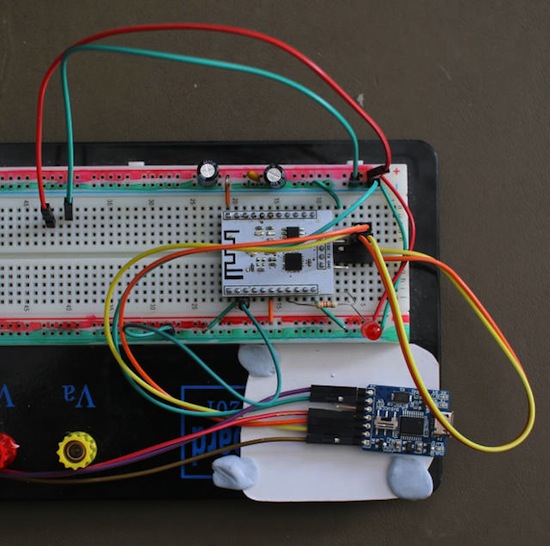
The ESP8266 is a small, very inexpensive, microcontroller with WiFi support (Figure 1 above). Depending on the board, you might get it for under $10. Recent versions of the Arduino environment can be set up to compile and upload code to the ESP8266 board, making it easy to get up and running.

I used an ESP-201 board and had to set the following pin connections to run the microcontroller. Pin io0 is set to ground before applying power to the ESP8266 when you want to flash a new firmware to the board. Otherwise, leave io0 not connected and the ESP8266 will boot into your firmware right away. Note that the ESP8266 is a 3.3 volt machine and connecting it to 5 volts will likely damage the hardware.

ESP-201       Connection
------------------------
3.3v          3.3v regulated voltage
io0           pulled low to flash, not connected for normal operation
io5           pulled low                                      
chip_en       pulled high (to 3.3v of supply to esp)             
rx            tx on UART board
tx            rx on UART board
gnd           gnd  

The code for the ESP8266 shown below is based on an example from the Adafruit MQTT Library ESP8266. You will need to replace the WiFi SSID and PASSWORD with your local settings and update the MQTT_SERVER to the IP address of the local Linux machine on which you are running your MQTT server. You should be able to upload the program from a recent version of the Arduino IDE using a USB to TTL serial converter.

/***************************************************
 Adafruit MQTT Library ESP8266 Example

 Must use ESP8266 Arduino from:
   https://github.com/esp8266/Arduino

 Works great with Adafruit's Huzzah ESP board & Feather
 ----> https://www.adafruit.com/product/2471
 ----> https://www.adafruit.com/products/2821

 Adafruit invests time and resources providing this open source code,
 please support Adafruit and open-source hardware by purchasing
 products from Adafruit!

 Written by Tony DiCola for Adafruit Industries.
 MIT license, all text above must be included in any redistribution
****************************************************/
#include
#include "Adafruit_MQTT.h"
#include "Adafruit_MQTT_Client.h"

// the on off button feed turns this LED on/off
#define LED 14  

/************************* WiFi Access Point *********************************/

#define WLAN_SSID       "...FIXME..."
#define WLAN_PASS       "...FIXME..."

// Create an ESP8266 WiFiClient class to connect to the MQTT server.
WiFiClient client;

const char MQTT_SERVER[] PROGMEM    = "192.168.0.FIXME";
const char MQTT_USERNAME[] PROGMEM  = "ben";
const char MQTT_PASSWORD[] PROGMEM  = "secret";

// Setup the MQTT client class by passing in the WiFi client and MQTT server and login details.
Adafruit_MQTT_Client mqtt(&client, MQTT_SERVER, AIO_SERVERPORT, MQTT_USERNAME, MQTT_PASSWORD);

const char ONOFF_FEED[] PROGMEM = "/sensor/espled";
Adafruit_MQTT_Subscribe onoffbutton = Adafruit_MQTT_Subscribe(&mqtt, ONOFF_FEED);

void setup() {
...
 WiFi.begin(WLAN_SSID, WLAN_PASS);
 while (WiFi.status() != WL_CONNECTED) {
   delay(500);
   Serial.print(".");
 }
 Serial.println();

 Serial.println("WiFi connected");
 Serial.println("IP address: "); Serial.println(WiFi.localIP());

 // Setup MQTT subscription for onoff & slider feed.
 mqtt.subscribe(&onoffbutton);
}

The main loop in this example reconnects to the MQTT broker if the connection was lost or has not yet been made. The readSubscription() call checks for any incoming data for subscriptions from MQTT and acts on the only subscription that the program has, turning an LED on and off depending on the message. The full example from which this code was taken is available on GitHub.

void loop() {
 MQTT_connect();

 Adafruit_MQTT_Subscribe *subscription;
 while ((subscription = mqtt.readSubscription(5000))) {
   // Check if its the onoff button feed
   if (subscription == &onoffbutton) {
     Serial.print(F("On-Off button: "));
     Serial.println((char *)onoffbutton.lastread);
     
     if (strcmp((char *)onoffbutton.lastread, "ON") == 0) {
       digitalWrite(LED, HIGH);
     }
     if (strcmp((char *)onoffbutton.lastread, "OFF") == 0) {
       digitalWrite(LED, LOW);
     }
   }

 }

 if(! mqtt.ping()) {
   mqtt.disconnect();
 }
}

Regardless of which MQTT implementation(s) you choose to run, by selecting an open standard, you are not limited in how your IoT devices can interact.

VoltDB Adds Geospatial Support, Cross-Site Replication

Volt-Shot-VoltDB, an in-memory column-oriented database system, is expanding its reach. The newly-released version 6 of the analytical database comes with geospatial support and a host of other goodies to aid what VoltDB Inc. calls its software’s “fast data†approach. VoltDB combines streaming analytics with transaction processing in a single, horizontal scale-out platform.

The new release adds Geospatial query support; Improved data ingestion and export connections;…


Read more at The New Stack

Plasma 5.5.3 & KDE Frameworks 5.18 Backported To Kubuntu 15.10

For KDE Ubuntu users wanting to run the latest upstream KDE software components without switching over to the 16.04 “Xenial Xerus” development repository, backports of the new packages have taken place for Kubuntu 15.10. The Kubuntu team has announced this morning…

Read more at Phoronix

13 Frameworks for Mastering Machine Learning

Over the past year, machine learning has gone mainstream in an unprecedented way. The trend isn’t fueled by cheap cloud environments and ever more powerful GPU hardware alone; it’s also the explosion of frameworks now available for machine learning. All are open source, but even more important is how they are being designed to abstract away the hardest parts of machine and make its techniques available to a broad class of developers.

Read more at InfoWorld

Pagure: DIY Git Project Hosting

Screen shot -pagure-AMPagure is a new, full featured git repository service for the web, written in Python. It is similar to other popular git forges like Github and Gitlab, allowing open source contributors to share and collaborate on code and content. By the way, pagure is French for “hermit crab,†as reflected in the logo on the project documentation.

Pagure is the brainchild of Pierre-Yves Chibon, a member of the Fedora Engineering team. The Fedora Engineering team focuses on Python based solutions because the language is easy to learn and thus presents less barrier to entry for contributors.

Read more at Fedora Magazine

Oracle Deprecates the Java Browser Plugin, Prepares for its Demise

The much-maligned Java browser plugin, source of so many security flaws over the years, is to be killed off by Oracle.  It will be removed some time after the release of Java 9. It will not be mourned.

Oracle, which acquired Java as part of its 2010 purchase of Sun Microsystems, has announced that the plugin will be deprecated in the next release of Java, version 9, which is currently available as an early access beta. A future release will remove it entirely.

Of course, Oracle’s move is arguably a day late and a dollar short. …

Read more at Ars Technica

6 Starting Points for Open Source Beginners

beginners open source leadOpensource.com asked readers a few months ago: What’s the biggest barrier to participation in open source? Answers from 56% of poll takers was that they aren’t sure where to start. And, 13% said they are uncomfortable jumping in. 

If you feel the same way, this post is for you. To help navigate your first open source contribution, I’ve put together a list of what I think are the most beginner-friendly open source starting points, as well as, a few other helpful resources. 

Read more at OpenSource.com