This is the second article in our Test Driving OpenStack series. To accelerate your knowledge with professional training, take some OpenStack training from The Linux Foundation.
 As I mentioned in the previous article in this series, at its most basic level, OpenStack consists of an API. The group heading up OpenStack has created developer software that implements OpenStack called DevStack. DevStack is meant for testing and development but not for running an actual data center. Various companies and organizations have created their own implementations of OpenStack that are intended for production.
Although these are all separate software products, they all share the fact that they expose an API consisted with the OpenStack specification. That API allows you to control the OpenStack software programmatically, which opens up a whole world of possibilities. Furthermore, the API is RESTful, allowing you to use it in a browser, or through any programming platform that allows you to make HTTP calls.
As a developer, this design allows you to take a couple approaches to manage an OpenStack infrastructure. For one, you could make calls to the API through your browser. Or, you can write scripts and programs that run from the command-line or desktop and make the calls. The scripts can be run using various automation tools.
First, let’s consider the browser apps. Remember that a browser app lives on two ends: The server side serving out the HTML and JavaScript and so on, and the app in the browser running said HTML and JavaScript. The code running in the browser is easily viewable and debuggable in the browser itself by an experienced developer. What this means is that you do not want to put any security code in the browser. That, in turn, means you typically wouldn’t make calls from the browser directly to the OpenStack API unless you’re operating in a strictly trusted development and testing environment.
The main reason for this is you don’t want to be sending private keys down to the browser that anyone could then access and pass around. Instead, you would follow best practices of web development and implement a security system between the browser and your server, and then have the server make the calls RESTful calls to the OpenStack API.
For the other case of scripts and programs outside of the browser, you have several options. You can make the RESTful calls yourself, or you can use a third-party library that understands OpenStack. These scripts and apps could manage your infrastructure by making the OpenStack API calls.
But, there’s yet another possibility. Various management tools allow you to manage an OpenStack environment using modules built specifically for OpenStack. Two such management tools are Puppet and Chef.
Puppet
With Puppet, you first define the state of your IT infrastructure, and Puppet automatically enforces the desired state. So, to get started using Puppet, you need to create some configuration files. You can use these files in a descriptive sense, essentially describing the state of your system. However, the configuration language also includes procedural constructs such as loops, along with support for such constructs such as variables.
Puppet provides full support for OpenStack, and the OpenStack organization has even devoted a page to Puppet’s support. The modules described on this page are created by the OpenStack community for Puppet and as such reside on OpenStack’s own Git repository system.
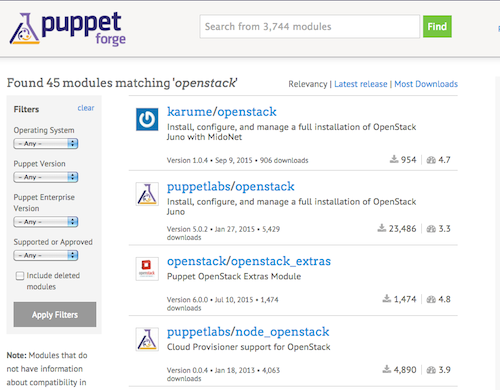
Additionally, the Puppet community has contributed modules that support OpenStack. If you head over to the Puppet Forge site, you can search by simply entering OpenStack into the search box. This brings up a few dozen modules (see Figure 1). Some are created by members of the community. The ones that are on OpenStack’s Git repository are also here as well. (Just a quick note here; in the list shown in the image, make sure you click on the module name — the word after the slash — not the username, which is the word before the slash. Clicking on the username takes you to a list of all modules by that user.)
Installing the modules for Puppet takes a quick and easy command, like so:
puppet module install openstack-keystone
This step installs the keystone module that’s created by the OpenStack organization. (Keystone is the name of OpenStack’s identity service.)
The modules come with examples, which you’ll want to study carefully. The openstack-keystone includes four examples, one of which is for a basic LDAP testing. Take a look at the file called ldap_identity.pp. It creates a class called keystone::roles::admin, which includes a username and password member.
Because this module is just for testing, the username and password are hardcoded in it. Then, it creates a class called keystone::ldap that contains information for connecting to LDAP, such as the following familiar-looking user string:
uid=bind,cn=users,cn=accounts,dc=example,dc=com
and other such members. The best way to become familiar with managing OpenStack through Puppet is to play with the examples and use them with a small OpenStack setup.
Chef
Chef offers similar tools for automating the provisioning and configuration of your infrastructure.
Chef uses cooking metaphors for its names. For example, a small piece of code is called a recipe, and a set of recipes is a cookbook. Here’s a page from the Chef documentation about working with OpenStack. If you’re planning to use Chef, this page includes a series of examples and explanations that will give you exactly what you need to get started (Figure 2).
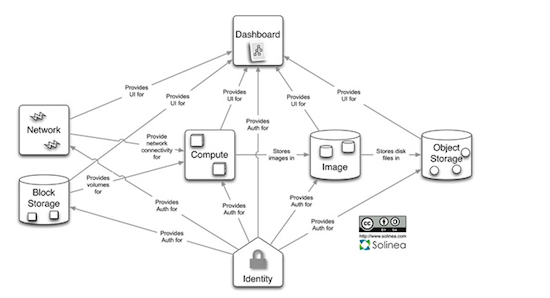
Like Puppet, Chef includes cookbooks for working with the different aspects of OpenStack, such as Keystone. Unlike Puppet, Chef doesn’t use an original scripting language. Instead, it uses Ruby. To use Chef, you don’t need to be a Ruby programming expert, however. In many cases, you can get by just knowing enough Ruby to configure your system. But, if you need to perform advanced tasks, because it’s Ruby, you can use other aspects of the language such as its procedural constructs.
Also like Puppet, Chef includes a searchable portal where you can find community-contributed recipes and cookbooks. Staying with the cooking metaphor, the portal is called the Supermarket. Note, however, that searching the Supermarket for OpenStack doesn’t provide as many libraries as with Puppet. Although I encourage you to browse through the Supermarket, you’ll want to pay close attention to Chef’s own documentation regarding OpenStack that I mentioned earlier.
You’ll also want to install the OpenStack Chef repo found on GitHub. This page contains the repo itself and shows a README page that also contains some great step-by-step information.
Conclusion
OpenStack is not small. Although you can control it programmatically from a browser or using HTTP calls within your own programming language of choice, you can also greatly simplify your life by embracing either Puppet or Chef. Which one should you choose? I suggest trying out both to see what works for you. Be forewarned that, in either case, you’ll need to learn some syntax of the files — especially in the case of Chef, if you’re not already familiar with Ruby. Take some time to work through the examples. Install OpenStack on your own virtual machine, and go for it. You’ll be up to speed in no time.
Learn more about OpenStack. Download a free 26-page ebook, “IaaS and OpenStack – How to Get Started” from Linux Foundation Training. The ebook gives you an overview of the concepts and technologies involved in IaaS, as well as a practical guide for trying OpenStack yourself.
Read more on Linux.com:

 Nvidia has released a new update for the Linux drivers, but it’s a small upgrade that only brings support for a couple of new GPUs.
 If you manage a business which deals with physical goods,
  IBM hopes that Google’s language, already in use by Docker and Kubernates, will stretch the open source ecosystem for its mainframes.