2015 was a very important year for Linux, both in the enterprise as well as in the consumer space. As a Linux user since 2005, I can see that the operating system has come a long way in the past 10 years. And, 2016 is going to be even more exciting. In this article, I have picked some of the best distros that will shine in 2016. You can also see our list of best distros for 2017.
Best Comeback Distro: openSUSE
SUSE, the company behind openSUSE, is the oldest Linux company; it was formed just a year after Linus Torvalds announced Linux. The company actually predates Linux king Red Hat. SUSE is also the sponsor of the community-based distro openSUSE.
In 2015, openSUSE teams decided to come closer to SUSE Linux Enterprise (SLE) so that users could have a distribution that shares its DNA with the enterprise server — similar to CentOS and Ubuntu. Thus, openSUSE became openSUSE Leap, a distribution that’s directly based on SLE SP (service pack) 1.
The two distros will share the code base to benefit each other — SUSE will take what’s good in openSUSE and vice versa. With this move, openSUSE is also ditching the regular release cycle, and a new version will be released in sync with SLE. That means each version will have a much longer life cycle.
As a result of this move, openSUSE has become a very important distribution because potential SLE users can now use openSUSE Leap. That’s not all, however; openSUSE also announced the release of Tumbleweed, a pure rolling-release version. So, now, users can use either the super-stable openSUSE Leap or the always up-to-date openSUSE Tumbleweed.
No other distro has made such an impressive comeback in my memory.

Most Customizable Distro: Arch Linux
Arch Linux is the best rolling-release distribution out there. Period. Ok, I could be biased because I am an Arch Linux user. However, the reason behind my claim is that Arch excels in many other areas, too, and that’s why I use it as my main operating system.
-
Arch Linux is a great distro for those who want to learn everything about Linux. Because you have to install everything manually, you learn all the bits and pieces of a Linux-based operating system.
-
Arch is the most customizable distribution. There is no “Arch” flavor of any DE. All you get is a foundation and you can build whatever distro want, on top of it. For good or for worse, unlike openSUSE or Ubuntu there is no extra patching or integration. You get what upstream developers created. Period.
-
Arch Linux is also one of the best rolling releases. It’s always updated. Users always run the latest packages, and they can also run pre-released software through unstable repositories.
-
Arch is also known for having excellent documentation. Arch Wiki is my to-go resource for everything Linux related.
-
What I like the most about Arch is that is offers almost every package and software that’s available for “any” Linux distribution, thanks to the Arch User Repository, aka AUR.
Best-Looking Distro: elementary OS
Different Linux distributions have different focus areas — in most cases, these are technical differences. In many Linux distributions. the look and feel is an afterthought — a side project at the mercy of the specific desktop environment.
elementary OS is trying to change all that. Here, design is at the forefront, and the reason is quite obvious. The distro is being developed by designers who have made their name in the Linux world by creating beautiful icons.
elementary OS is quite strict about the holistic look and feel. The developers have created their own components, including the desktop environment. Additionally, they choose only those applications that fit into the design paradigm. One can find heavy influence of Mac OS X on elementary OS.
Best Newcomer: Solus
Solus operating system has garnered quite a lot of attention lately. It’s a decent-looking operating system that has been created from scratch. It’s not a derivative of Debian or Ubuntu. It comes with the Budgie desktop environment, which was built from scratch but aims to integrate with Gnome. Solus has the same minimalistic approach as Google’s Chrome OS.
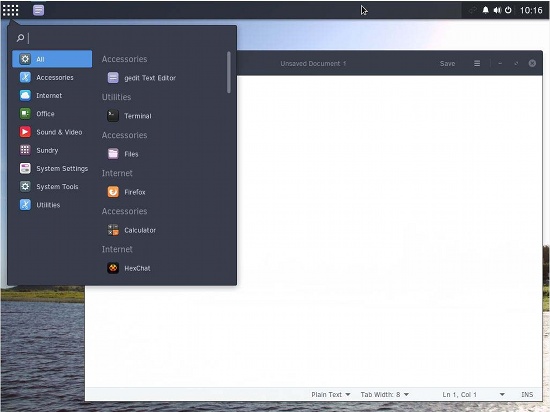 I have not played with Solus much, but it does look promising. Solus is actually not a “new” OS. It has been around for a while in different forms and names. But the entire project was revived back in 2015 under this new name.
Best Cloud OS: Chrome OS
Chrome OS may not be your typical Linux-based distribution because it’s a browser-based operating system for online activities. However, because it’s based on Linux and its source code is available for anyone to compile, it’s an attractive OS. I use Chrome OS on a daily basis. It’s an excellent, maintenance-free, always updated OS for anyone using a computer purely for web-related activities. Chrome OS, along with Android, deserves all the credit for making Linux popular in the PC and mobile space.
Best Laptop OS: Ubuntu MATE
Most laptops don’t have very high-end hardware, and if you are running a really resource-intensive desktop environment then you won’t have much system resources or battery life at your disposal — they will be used by the OS itself. That’s where I found Ubuntu MATE to be an excellent operating system. It’s lightweight, yet has all the bells and whistles needed for a pleasant experience. Thanks to its lightweight design, the majority of system resources are free for applications so you can still do some heavy work on it. I also found it to be a great distro on really low-end systems.

Best Distro for Old Hardware: Lubuntu
If you have an old laptop or PC sitting around, breathe new life into it with Lubuntu. Lubuntu uses LXDE, but the project has merged with Razor Qt to create LXQt. Although the latest release 15.04 is still using LXDE, the future versions will be using LXQt. Lubuntu is a decent operating system for old hardware.
Best Distro for IoT: Snappy Ubuntu Core
Snappy Ubuntu Core is the best Linux-based operating system out there for Internet of Things (IoT) and other such devices. The operating system holds great potential to turn almost everything around us into smart devices — such as routers, coffeemakers, drones, etc. What makes it even more interesting is the way the software manages updates and offers containerization for added security.
Best Distro for Desktops: Linux Mint Cinnamon
Linux Mint Cinnamon is the best operating system for desktops and powerful laptops. I will go as far as calling it the Mac OS X of the Linux world. Honestly, I had not been a huge fan of Linux Mint for a long time because of unstable Cinnamon. But, as soon as the developers chose to use LTS as the base, the distro has become incredibly stable. Because the developers don’t have to spend much time worrying about keeping up with Ubuntu, they are now investing all of their time in making Cinnamon better.
Best Distro for Games: Steam OS
Gaming has been a weakness of desktop Linux. Many users dual-boot with Windows just to be able to play games. Valve Software is trying to change that. Valve is a game distributor that offers a client to run games on different platforms. And, Valve has now created their open operating system — Steam OS — to create a Linux-based gaming platform. By the end of 2015, partners started shipping Steam machines to the market.
Best Distro for Privacy: Tails
In this age of mass surveillance and tracking by marketers (anonymous tracking for targeted content is acceptable), privacy has become a major issue. If you are someone who needs to keep the government and marketing agencies out of your business, you need an operating system that’s created — from the ground up — with privacy in mind.
And, nothing beats Tails for this purpose. It’s a Debian-based distribution that offers privacy and anonymity by design. Tails is so good that, according to reports, the NSA considers it a major threat to their mission.

Best Distro for Multimedia Production: Ubuntu Studio
Multimedia production is one of the major weaknesses of Linux-based operating systems. All the professional-grade applications are available for either Windows or Mac OS X. There is no dearth of decent audio/video production software for Linux, but a multimedia production system needs more than just decent applications. It should use a lightweight desktop environment so that precious system resources — such as CPU and RAM — are used sparingly by the system itself, leaving them for the multimedia applications. And, the best Linux distribution for multimedia production is Ubuntu Studio. It uses Xfce and comes with a broad range of audio, video, and image editing applications.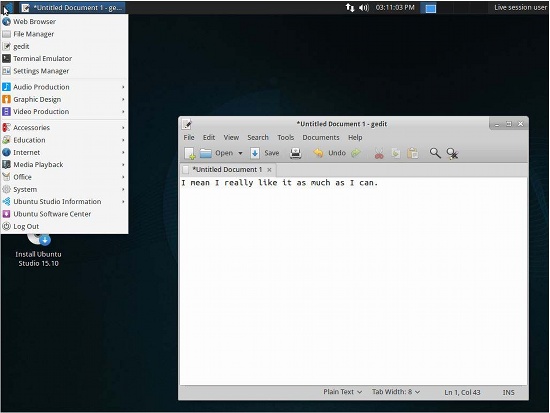
Best Enterprise Distro: SLE/RHEL
Enterprise customers don’t look for articles like these to choose a distribution to run on their servers. They already know where to go: It’s either Red Hat Enterprise Linux or SUSE Linux Enterprise. These two names have become synonymous with enterprise servers. These companies are also pushing boundaries by innovating in this changing landscape where everything is containerized and becoming software defined.
Best Server OS: Debian/CentOS
If you are looking at running a server, but you can’t afford or don’t want to pay a subscription fee for RHEL or SLE, then there is nothing better than Debian or CentOS. These distributions are the gold standard when it comes to community-based servers. And, they are supported for a very long time, so you won’t have to worry about upgrading your system so often.
Best Mobile OS: Plasma Mobile
Although the Linux-based distribution Android is ruling the roost, many in the open source community, including me, still desire a distribution that offers traditional Linux desktop apps on mobile devices. At the same time, it’s better if the distro is run by a community instead of a company so that a user remains in the focus and not the company’s financial goals. And that’s where KDE’s Plasma Mobile brings some hope.
This Kubuntu-based distribution was launched in 2015. Because the KDE community is known for their adherence to standards and developing stuff in public, I am quite excited about the future of Plasma Mobile.
Best Distro for ARM Devices: Arch Linux ARM
With the success of Android, we are now surrounded by ARM-powered devices — from Raspberry Pi to Chromebook and Nvidia Shield. The traditional distros written for Intel/AMD processors won’t run on these systems. Some distributions are aimed at ARM, but they are mostly for specific hardware only, such as Raspbian for Raspberry Pi. That’s where Arch Linux ARM (ALARM) shines. It’s a purely community-based distribution that’s based on Arch Linux. You can run it on Raspberry Pi, Chromebooks, Android devices, Nvidia Shield, and what not. What makes this distribution even more interesting is that, thanks to the Arch User Repository (AUR), you can install many applications than you may not get on other distributions.
Conclusion
I was astonished and amazed when I worked on this story. It’s very exciting to see that there is something for everyone in the Linux world. It doesn’t matter if the year of the desktop Linux never arrives. We are happy with our Linux moments!
Read more:
The Best Linux Distros for 2017


 Remix OS, a new desktop OS based on Android-x86 landed yesterday, but it comes with a pretty nasty EULA that should definitely be read by its users. Many people don’t bother to read the EULA for a new operating system or application, but that is always a good idea. Unfortunately, the EULA is a huge document and most of the time you need to be a lawyer to get the finer points.
 In just a year after the open-source Dronecode effort launched, its membership has taken off, and code and product are available.
  Built by Texas Instruments, the Speak & Spell electronic educational toy was the first mass-produced product to use digital signal processing.