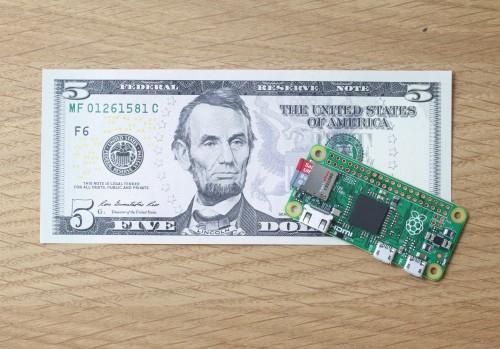
Despite the temptations of success, the Raspberry Pi Foundation has admirably stuck to its mission of improving computer education in public schools. Yet, the Thanksgiving launch of the $5 Raspberry Pi Zero, as well as the recent CustomPi Raspberry Pi customization service, suggests a shift away from education and toward the commercial embedded board market.
The Raspberry Pi Zero, which quickly sold out its initial run of 20,000 units, aligns with other embedded Linux trends, as well. The most obvious is the increasing emphasis on low price, small size, and low-power consumption. The Zero and CustomPi also reflect the increasing merger of the traditional embedded industry and community-backed SBCs, and demonstrate the blurring of the line between SBCs, which have typically been used for prototyping, with computer-on-modules aimed at volume production.
Finally, the CustomPi service, as well as similar services like Gumstix’s Geppetto, lead the migration of customization services to the maker world (see farther below).
All these trends are driven by the insatiable market for low-cost, low-power, Internet of Things gizmos, most of which run on Linux. While there are still plenty of high-end, hacker-friendly SBCs designed for virtual reality and 4K media players, there is much more activity on the low end in applications like home automation. Traditional embedded vendors and hacker communities alike are increasingly focused on cheap, power efficient SBCs and COMs boards with more flexible, customizable I/O.
In an email, VDC Research EVP Chris Rommel told Linux.com that maker hardware is not only increasingly emerging as a prototyping option for traditional engineering organizations, but “is creating more demand for small-run production based on those designs (e.g. on the Pi).” Rommel continued: “Going forward, we expect this trend to accelerate driven by three main factors: the growing adoption of agile development methodologies for embedded designs, the fact that the majority of embedded engineers we survey now report some level of experimentations with hobbyist/maker platforms, and the network effect of semiconductor vendors like Intel and Nvidia recognizing this trend and creating easier production on ramps for maker technology to be used in commercial designs.”
Raspberry Pi Zero cuts to the bone
The Raspberry Pi Zero reverts from the Raspberry Pi 2 Model B’s quad-core Cortex-A7 SoC to a faster, 1GHz version of the ARM11-based Broadcom BCM2836SoC found on the Raspberry Pi Model B+. The PoP (package-on-package) technology, in which the 512MB RAM chip is piggybacked on the SoC, add further cost and space savings.
The Raspbian compatible Zero is further equipped with a microSD slot, a mini-HDMI port, two micro-USB ports, and the usual 40-pin expansion connector. Missing are all the USB ports, DSI and CSI ports, and audio jacks found on the Pi 2. As with the $20 Pi Model A+, there’s no Ethernet port.
At first glance, selling a $5 SBC — cheap enough to bundle free into every December copy of MagPi magazine — seems like the perfect way to support the RPi Foundation’s educational mission. Yet, as Hackaday’s Rud Merriam points out, young computer education students will have a harder time getting something meaningful done with the Zero compared to other Pi SBCs.
To configure something close to a Pi B+, users will need to expand with USB hubs, cables, WiFi, and other accessories. Next Thing Co.’s Linux-ready, $9 Chip SBC, which recently began shipping to Kickstarter backers, and opened for pre-sales this week, requires similar extras, boosting useful configurations into the $20 to $30 range. Yet, at least it offers WiFi, which has never been baked into a Pi board.
On the Zero, you will not only need to choose one of the many available cable accessory kits, ranging from $5 to $60, but also configure the add-ons to work properly. Unless you add WiFi, Merriam says you may need a second Zero — or use another Pi — to avoid continually swapping cables to test software. Other situations may require setting up SSH over WiFi.
In short, the Zero may be useful for higher-end embedded computing education, but may not do much for those interested more in general programming or multimedia projects. There’s nothing wrong with that, since the other Pi boards are still available. Yet, the Zero clearly takes another step toward embedded.
While the Zero is less user-friendly than the Pi 2, it’s easier than working with a COM. In many ways, the Zero is like a next-generation Raspberry Pi Compute Module — a pure COM version of the first-generation Pi boards — but with a few real-world ports. The Zero’s 65 x 30mm dimensions are almost identical.
While a number of commercial vendors have used the Compute Module, others have engineered their own versions of the 40-pin RPi interface to claim Pi compatibility. The most popular solution for small runs and vertical reference designs is to simply build around a Pi SBC, exposing the ports of choice, as seen in the recent Silicon Labs ZigBee Gateway.
The COM-like Zero SBC attempts to meet the needs of developers who want the small size and customizability of a module, but can’t hack the complexity. This week’s Raspberry Pi blog post about the long development journey of FiveNinjas’ Compute Module based Slice media player reveals the steep learning curve involved with using COMs.
The Zero’s superior accessibility, faster processor, and especially its $5 price should make it more attractive to small-run embedded firms than the Compute Module, which debuted at $30, but is now selling for $40. In fact, the Raspberry Pi Zero could emerge as a de facto embedded form-factor for ARM, somewhere between a Qseven (COM) and a Pico-ITX (SBC).
The Raspberry Pi Foundation is not alone in exploring COMs and COM-like hacker boards. Intel’s open source Edison module can be used as a drop-in COM, but can also be extended into a hacker SBC. The trend is also moving to higher end SBCs. Nvidia’s community-backed Jetson TX1 SBC, which taps its Cortex-A57 Tegra X1 SoC, has moved to a sandwich-style carrier/COM design compared to the monolithic Jetson TK1. In fact, you can buy the COM separately. According to AnandTech, Nvidia made the product modular after discovering that many customers were using the TK1 as a drop-in mainboard for production runs.
CustomPi, Geppetto bring customization to hacker world
In late October, Element14 and Raspberry Pi Trading Ltd., the commercial subsidiary of the Raspberry Pi Foundation, announced a CustomPi board customization service. According to the partners, the service was launched due to demand for customers who want to use Pi SBCs for small-run products, but are looking for more customization.
Designed for volumes of 3,000 to 5,000, CustomPi lets customers reconfigure the Raspberry Pi 2’s board layout, change the eMMC allotment, and add and remove ports, headers, and connectors. The service can also add additional I/O, wireless features, and power management ICs, but it won’t alter the CPU, GPU, or basic firmware.
In early November, embedded Linux board vendor Gumstix answered by updating its Geppetto design-to-order platform, which lets customers use a drag-and-drop web interface to custom design carrier boards. Previously, Geppetto had been limited to carriers based on Gumstix COMs such as the TI Sitara AM335x-based Overo, but it now supports third-party AM335x-based COMs and SBCs, such as the BeagleBone Black.
In 2016, Geppetto will support third-party boards including the Raspberry Pi, Pi Compute Module, Toradex Colibri COMs, and various 96Boards SBCs. Geppetto is aimed at sandwich-style designs rather than monolithic SBCs, and it supports much smaller runs with faster turnaround than CustomPi, but the gist is the same.
Board customization services have long been offered by embedded board vendors, but generally at a high price, and limited to larger volume customers. Services like CustomPi and Geppetto bring similar services to the masses.
Together, CustomPi and the Zero offer Raspberry Pi customers two more alternatives to the Compute Module for developing more customizable designs for small runs. We can expect some other SBC projects to try something similar.



 The Taiwanese pioneering fabless semiconductor company MediaTek Labs announced the general availability of the latest addition to its LinkIt portfolio, the MediaTek LinkIt Smart 7688 development platform.
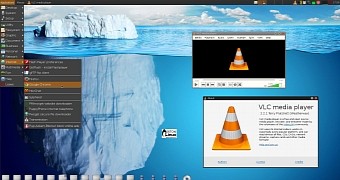 Arne Exton informed us about the availability for download of a new build of his PuppEX Linux distribution, a remix of the Slackware-based version of the lightweight Puppy Linux operating system.