
Red Hat’s Paolo Bonzini sent out the KVM updates today for the Linux 4.4 kernel…
Read more at Phoronix
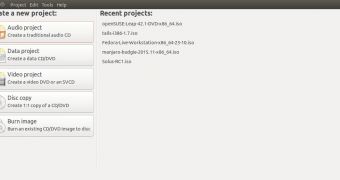 Ubuntu developers have a lot of plans for Ubuntu 16.04 LTS, and it already seems like it’s going to be a fascinating release. They have just announced that the Brasero and Empathy apps will no longer be included by default, and GNOME Calendar will be implemented.
The topic of default apps in Ubuntu has always been a hot one, but only for the main ones. People get riled up when developers talk about replacing Firefox, for example, but they are not going to be all that intere… (read more)
User permissions tend to center around UGO and +rwx. If you understand that, you’re in good shape…if you only need the basics. But using the standard methods, UGO permission systems limits how you can manage permissions with multiple users or multiple groups. If you want a more flexible permission mechanism for Linux, you turn to Access Control Lists (ACLs).
For example, what if Haley owns a file and wants to allow Ash to read it, Mixi to read it, and Anneke to read and write to it? Add to that mixture that they are all in different groups. What do you do then?
You turn to ACLs.
However, if you want to gain the added functionality of ACLs in a standard Linux desktop environment, where do you start? Probably the single easiest route to success is with the handy GUI app, Eiciel. With this tool you can easily control the extended permissions offered by ACLs without having to dive into the command line that would look something like:
setfacl -m "u:username:permissions" file
Naturally, for many a Linux system administrator, the command line will be the go-to tool. But for everyone else, a good GUI goes a long way. For ACLs, the best GUI in town is Eiciel. Let’s install it and use it.
Fortunately, Eiciel can be found in most standard repositories, so installation is only a matter of firing up your distribution’s package manager, searching for Eiciel, and clicking Install (who said installing apps on Linux was challenging?). I’ll be demonstrating the installation on Ubuntu 15.10 and, unfortunately, have discovered a rather odd bug in the available release of Eiciel (0.9.9). When selecting permissions, the checkboxes always appear empty. This is a GTK issue and is resolved in the latest release (0.9.11), which currently cannot be installed on the latest iteration of Ubuntu. I’ve tested the available release for Elementary OS Freya (Eiciel 0.9.8) and this bug doesn’t exist. Either way, Eiciel still works…only on Ubuntu 15.10 you have to guess what is checked and what is not. Hopefully this bug will be resolved asap.
Should you opt to go the installing from source route (and you’ve met the Eiciel dependencies), here are the steps for a successful installation:
Download the source into your Downloads folder
Open a terminal window
Change into the Downloads folder
Unpack the archive with the command tar xvfj eiciel-XXX.tar.bz2 (where XXX is the release number)
Change into the newly created folder with the command cd eiciel-XXX (where XXX is the release number)
Issue the command ./configure
Issue the command ./make
Issue the command sudo make install
Restart Nautilus with the command nautilus -q
NOTE: If you’re working with a distribution that doesn’t make use of sudo, you’ll need to su to the root user and then issue the final command make install without sudo.
That’s it; Eiciel is ready to run.
You might be thinking, “Doesn’t the kernel need ACL support rolled in? As of kernel 2.6.39, ACL is turned on by default. If you want to ensure that ACL is turned on and a drive is mounted with support for the feature, issue the following command in a terminal window:
sudo tune2fs -l /dev/sdXY | grep "Default mount options:"
Where XY is the specific location of your drive (for example /dev/sda1).
That command should report something like:
user_xattr acl
If you see acl, you’re good to go.
Should you want to go through the process of correcting the dependency issue and get a perfectly working instance of Eiciel running on Ubuntu 15.10, here are the steps:
Open a terminal and uninstall the current Eiciel (if still installed) with the command
sudo apt-get remove eiciel
(NOTE: This will install quite a lot of packages)
Build the dependencies for Eiciel with the following command
sudo apt-get build-dep eiciel
Download the latest version of Eiciel and untar the package and install from source as instructed earlier
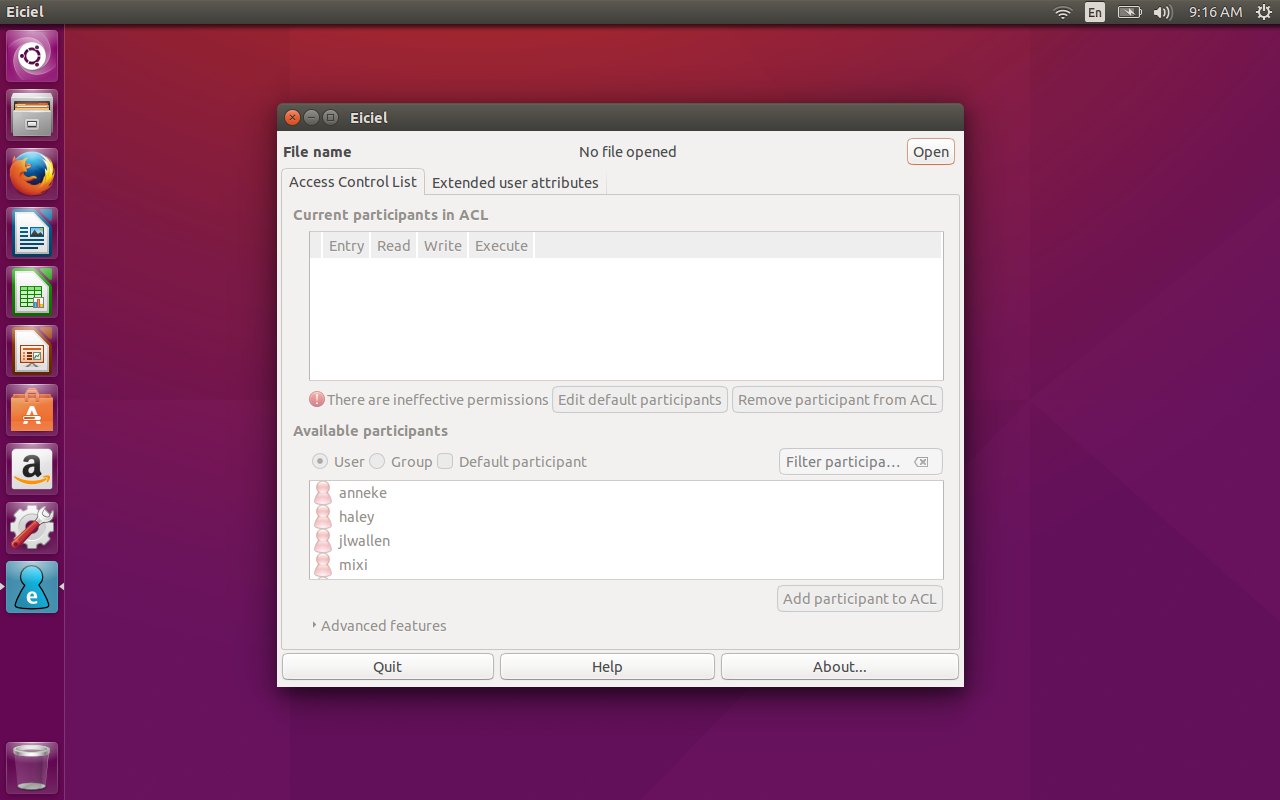
Using Eiciel is surprisingly simple. If you installed the app from within your package manager, you will find the launcher in your desktop menu. If you installed via source, you can fire up the GUI tool from the command line, with the command eiciel. Either way, the Eiciel main window will open (Figure A), and you’re ready to rock.
You should notice that Eiciel reports that you have no file open. That is because this app works on a per-file basis. So in order to use it, you must open a file. To do that, click the Open button and locate the file you want to work with.
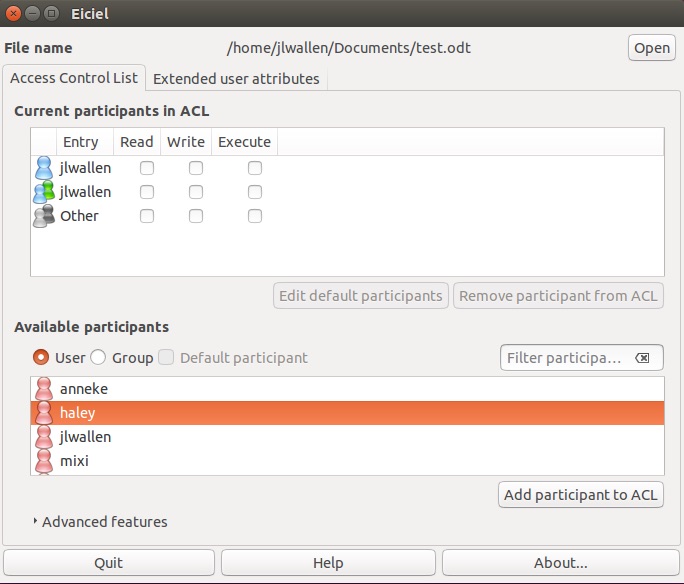
Once you have that file open, you should now see users and groups listed, so that you can manage the ACLs for those users/groups on that file (Figure B).
Take a look at the same app (only an earlier release), running on Elementary OS Freya (Figure C).
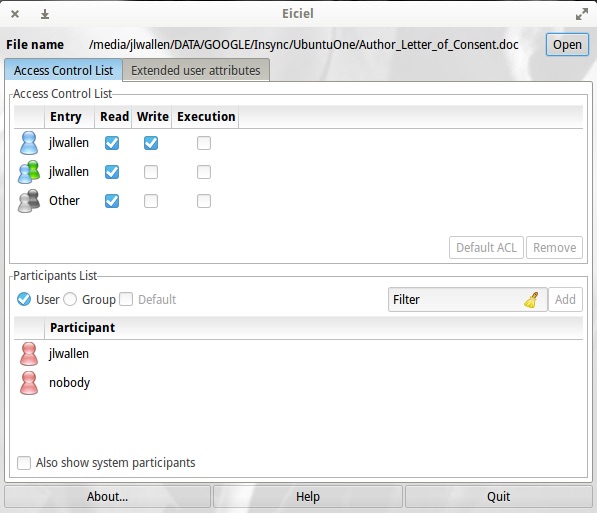
In the upper pane of the GUI you will see a list of the current ACL participants. To add a new participant, click on that user from the lower pane and then click Add participants to ACL. That user will now appear in the upper pane. You can now manage the permissions for that file by clicking to add read, write, and/or execute permissions. Once you’ve added the user as an ACL participant, you can then select what permissions they should have for the file. As you add them, the permissions take effect in real-time.
You can also add groups as participants to the file ACL, by selecting Group from the Participant List and then adding the groups you want in the same manner you added the user(s).
You will also find that the Eiciel functionality is built into the GNOME file manager. What this means is simple… open up the file manager, right-click on a file, select Properties, and you’ll see a tab for Access Control List. Click on that tab and you’ll have access to ACL permissions, thanks to Eiciel (Figure D).
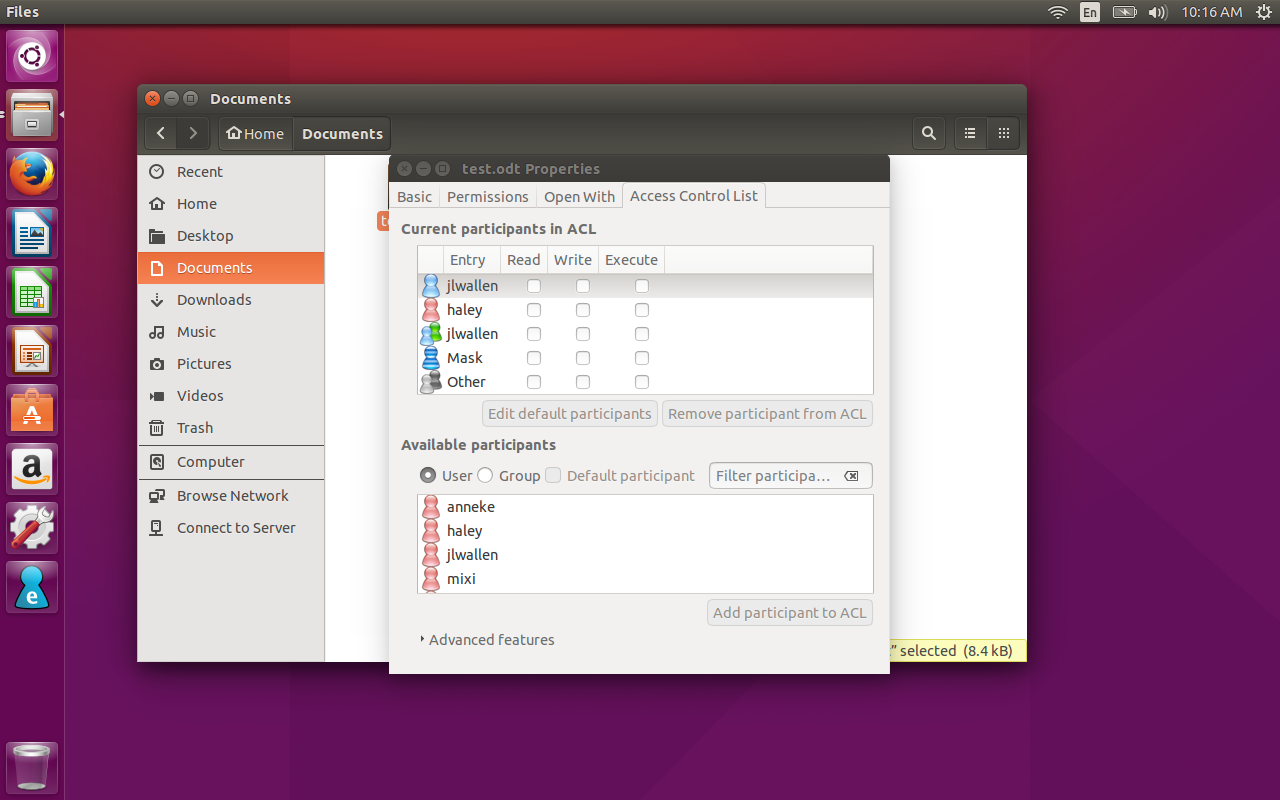
There’s no doubt Eiciel easily overcomes the shortcomings of the standard Linux permissions system. If you have a need to work with Access Control Lists on your Linux system, and you’d prefer a GUI tool for the task, Eiciel is what you want. Just understand, if you’re working with a recent release of Ubuntu, you might be faced (for the time being) with having to guess if a permission is checked or not.
 In part two of this series, Xen Project Advisory Board Chairman Lars Kurth discusses the different security vulnerabilities of containers and hypervisors. Read Part 1: A Cloud Security Introduction.
With virtualization software, every element of every interface is an opportunity to make a mistake. Every piece of code that is called from the interface, may introduce a vulnerability. Every corner of that interface is an opportunity for a mistake that will allow an attacker to break through that interface. This is what is called “attack surface.” And IT needs to be concerned about the risk of a vulnerability in the interface to the virtualization software itself and the amount of code that is executed when an interface is called.
Let’s apply how “attack surfaces” are formed given the different functionalities and how they relate and differ in popular cloud technologies.
The basic building blocks for virtualization and containers are schedulers and memory management. In the case of Xen, the hypervisor re-implements this functionality entirely from scratch. In the case of KVM functionality exposed by the Linux kernel – augmented by the KVM Kernel Module – is reused to schedule VMs and manage its memory. Under this model, every VM is a Linux process scheduled by the Linux scheduler while its memory is allocated by the Linux memory allocator. The same concept of reuse is also true for containers.
The key difference between KVM and containers is that KVM runs a separate kernel instance within each VM (either different versions of Linux, or entirely different operating system kernels such as Windows) and uses a kernel module and QEMU to implement additional compartmentalization. Containers use the same kernel instance through a single instance of the kernel’s syscall interface to manage containers as well as the applications running within containers.
Although the re-use of the Linux Kernel in containers has many advantages, one of the key trade-offs is the breadth of functionality available via the syscall interface as well as the code behind it. This increases the risk of errors in the code and vulnerabilities that can be exploited compared to Xen, which only implements what is necessary, and KVM, which re-uses kernel functionality within KVM without exposing it directly to guests VMs.
If you compare the Linux kernel syscall interface with the Xen hypercall interface, we are talking an order of magnitude difference in exposed interfaces (>300 in Linux, 40 in Xen). A kernel gives you filesystems with files, directories, seek, fstat, read, mmio, and aio. How many different kinds of sockets can you create? How many different IPC mechanisms are there? Futexes, shared memory, ioctls, TTY — all of them with lots of internal state and corner cases which have to be handled correctly. There are many more opportunities to make a mistake in the Linux system call interface. And as table 1 below shows, more mistakes are made on a more regular basis as a result. This only adds to the layer of complexity and the attack surface.
Hypervisors, such as Xen and KVM use QEMU as device model emulator to emulate server hardware components, such as motherboard, timers, interrupt and I/O that are exposed to drivers in the guest’s kernel. Xen only uses emulation in some cases (e.g for HVM on x86, but not for PV on x86 and not on ARM architectures), whereas KVM relies entirely on QEMU (or alternatives providing similar functionality).
Device Emulation is complex for two reasons. Firstly, hardware interfaces trade off ease of hardware implementation against ease of software implementation, and secondly, a large number of devices need to be emulated. This is partly the reason why we have recently seen a surge of vulnerabilities in QEMU following the attention created by the VENOM vulnerability in QEMU.
|
|
Linux as a general Container |
KVM with QEMU |
Xen PV |
|
Privilege Escalation |
7 – 9 |
3 – 5 |
0 |
|
Denial of Service |
12 |
5 – 7 |
3 |
|
Information Leak |
1 |
0 |
1 |
Table1: This table shows the result of an investigation of significant vulnerabilities, presented at FOSDEM 2015. Note that a similar investigation has not yet been performed for 2015, as significant effort is required to do this. Part 3 of this series, explains some of the challenges in putting together a fair comparison of vulnerabilities across different technologies. Also note that figures for Xen HVM are in a similar to those of KVM with QEMU.
As stated earlier, I/O to and from the system is the primary route for malicious payloads into cloud based systems. Attacks typically try to exploit a vulnerability in device drivers, which give an attacker access to everything in the system because device drivers run in Linux kernel mode. In virtualized environments, a device driver vulnerability may give an attacker control of a single VM, but an additional vulnerability would need to be exploited to gain control of the host in order to attack other VMs running on that host.
As emulation is inherently slow, Xen and KVM use paravirtualized I/O drivers for disk and network access to avoid emulation. Paravirtualized I/O drivers tend to be extremely simple. Contrast this with containers, which use the syscall interface of the single kernel instance to interact with device drivers. As pointed out earlier, the syscall interface is very large — far larger than PV I/O and emulated I/O combined. This, together with the fact that device drivers run in kernel mode, creates a significantly higher risk to container deployments compared to hypervisor deployments.
Many of the recently developed security features for containers, such as per-container ulimit, capability reduction, device access restrictions, improved handling of Linux Security Modules (SELinux, AppArmor), improved user namespaces and others are all examples of defense-in-depth (multiple layers of protection).
Despite these efforts, the fundamental problem with containers compared to hypervisors still persists as they have an exceedingly large “attack surface” making them inherently vulnerable, despite efforts to use minimal Linux distros. This is why technologies that try to combine virtualization with containers — such as Hyper, Clear Containers and Xen Containers — are starting to build momentum.
Read Part 3: Are Today’s Open Source Security Practices Robust Enough in the Cloud Era?https://www.linux.com/news/open-source-security-process-part-3-are-todays-open-source-security-practices-robust-enough