Home Blog Page 978

Optimize Web Delivery with these Open Source Tools

Web proxy software forwards HTTP requests without modifying traffic in any way. They can be configured as a transparent proxy with no client-side configuration required. They can also be used as a reverse proxy front-end to websites; here the cache serves an unlimited number of clients for one or some web servers.

Web proxies are versatile tools. They have a wide variety of uses, from caching web, DNS and other lookups, to speeding up the delivery of a web server / reducing bandwidth consumption. Web proxy software can also harden security by filtering traffic and anonymizing connections, and offer media-range limitations. This software is used by high-profile, high-traffic websites such as The New York Times, The Guardian, and social media and content sites such as Twitter, Facebook, and Wikipedia.

<A HREF=”http://www.linuxlinks.com/article/20151101020309690/WebDelivery.html“>Full article</A>


Agave Platform Provides Science as a Service

agaveWork began recently on the Agave Platform, an open ‘Science-as-a-Service’ (ScaaS) cloud platform for reproducible science. Funded by a $4 Million NSF grant, the Agave Platform will leverage the success of what originated in 2011 as a set of hosted, web-based application programming interfaces (APIs) for plant biologists under the NSF iPlant project. Since that time, Agave has evolved into a viable software platform for researchers and developers in all domains of science. … The project team will partner with commercial and academic institutions to create a community-driven Application Exchange (AX) based on Docker container technology to facilitate application transparency, portability, attribution and reproducibility. 

Read more at insideHPC

10 Linux Frights Sure to Make You Scream!

You feel safe, wrapped in that comforting blanket of Linux. It soothes you and protects you from the lumbering monsters that hide within your server closet. That innocent penguin has always been there to ward away the evil…it’s glowing red eyes peering through the Windows of a house made of glass. And you stand tall, knowing the open source platform will always have your back. Or, will it?

Zombies. Daemons. End users. Well-minded CEOs…beasts and creatures waiting in the dark, ready to drain away your very life force, your will, and run rm -rf on your soul. Don’t believe me? Have you been wooed into believing that nothing could possibly go wrong with Linux on your side?

Mu. Ha. ha.

You want fear? You want goblins and chaos and all forms of darkness to stare back from the mirror? Well then, open wide the windows of your eyes and feast on these Linux frights.

jack-hardware copy

1. Hardware support

It’s exponentially better than it once was, but there are days when you attempt an installation of Linux, only to find your network card still not supported. All you can do is fall to your knees and scream to the heavens, “Why me!!!!???” No matter how loudly you shout, that network card still doesn’t work. Or, you manage to get lucky and the worst issue you face is that super-cool ultrabook you just purchased simply won’t hibernate correctly without your having to bash out a shell script from hell.


jack-windows fanatic copy

2. Windows

It’s everywhere, with an army of zombie analysts spouting buzzwords like “market share” and “dominance.” You have to sit back and accept the horror of the situation, because for years it’s been true. The only solace you have is knowing the paradigm shift in desktop usage, the rise of mobile, and the dawn of Chromebooks and other utility computing devices is slowly eating away at Microsoft’s dominance. One day, Windows and its hoard of zombie analysts will shamble into the sunset, leaving the computing world to rebuild in peace.


jack-unity8 copy

3. The inevitable Ubuntu Unity 8

At the moment, Ubuntu Unity is a thing of beauty…not only in design, but in function and stability. That will all be dragged into a pit (complete with swinging pendulum and, if you’re lucky, the ghost of Vincent Price) when Unity 8/Mir arrives. It’ll be a giant step backward for stability…at least for a while.


jack-dependencies

4. Dependency resolutions

Oh please, not that. For the love of all that is Debian, don’t make me manually resolve dependencies. The second one is solved, five others will appear and, somewhere along the line, the whole will be broken, and I’ll just wind up having to reinstall the OS. Oh sure, for the most part this is the thing of the past, but every so often, a dependency issue will show its demonic head, and I’ll spiral downward to that dark place where I curse the day I attempted to resolve OpenShot’s animated title transparency issue (before I realized it was actually a Python script issue).


5. rm -rfjack-rmrf copy

There’s nothing more frightening than watching it all vanish before your eyes. Run that command as root (or with sudo) and that’s exactly what happens…the Incredible Vanishing Linux Box. Worst of all, there’s no recovering from that command; not without a full metal backup. I’ve actually run this command on a machine I knew I was planning on reinstall the OS onto. Your pulse will race, your flesh will flush, and you might decide it better to watch through fingers covering your eyes. 


jack-cto

6. Flip-flopping CTOs

Dr. Jekyll’s transformation to Mr. Hyde has nothing on watching CTOs change their minds about supporting Linux. You see the idea flash behind their eyes…they finally realize how much money they could save and how much more secure their network would be. But, then, in the beat of a bloodied heart, they remember all those MS certifications and Exchange licenses they just recently purchased. The decision to make the switch fades like your chances at surviving a horde of zombies.


jack-standards

7. MS Office and open standards

I probably don’t really need to elaborate on this one. Why? Because the horror that is Office’s ability to follow standards is about as horrific as you’ll find in an office suite. The arrogance displayed by MS, with this regard, is on par with Freddy Krueger facing down Jason Voorhees.


jack-fud8. FUD

Fear. Uncertainty. Doubt. Although this isn’t nearly as bad as it was in the late 1990s, it still exists. But, how could I possibly go without mentioning the infamous “Halloween Documents” that started spilling from the offices of Microsoft in 1998. Anyone who was following Linux at the time knows those documents kicked off a war between Microsoft and Linux. Why? Because Microsoft saw just how dangerous a foe Linux could be. The last of that descent into madness was Eric S Raymond’s response to MS’s “Get the Facts” campaign. A dark period.


jack-systemd copy9. Systemd vs. init

This heated war could have easily been the subject of a Hammer Horror film, complete with a river of fake blood, bad acting, false accusations, hissing and spitting vampires, and bad seventies music. This could, of course, be viewed as a Hammer Horror Dracula vs. Twilight vampires…minus the sparkles. Old school vamp vs. the new undead kids on the block. Both have their pros and cons; in the end, however, which camp you fall into might depend upon your age, your ability to tolerate change, and if you’re allowed out of the programming dungeon.


jack-apple

10. Apple fan boys/girls

Look at ‘em. Just look at ‘em. With their skinny jeans, moustachioed faces, sun dresses, and chukka shoes…ready to shout to the skies that iTunes, iWork, iLife, iEtc. rule multimedia/productivity, and that OS X is the single most secure and easy to use platform on the planet…all said without a hint of irony. Little do those hordes of zombies know that without BSD, OS X wouldn’t exist. Of course, without UNIX…Linux wouldn’t exist. So, both the zombies and the penguins owe a chant of supplication to the monolithic mothership.


An Introduction to Uncomplicated Firewall (UFW)

ufw AOne of the many heralded aspects of Linux is its security. From the desktop to the server, you’ll find every tool you need to keep those machines locked down as tightly as possible. For the longest time, the security of Linux was in the hands of iptables (which works with the underlying netfilter system). Although incredibly powerful, iptables is complicated—especially for newer users. To truly make the most out of that system, it may take weeks or months to get up to speed. Thankfully, a much simpler front end for iptables is ready to help get your system as secure as you need.

That front end is Uncomplicated Firewall (UFW). UFW provides a much more user-friendly framework for managing netfilter and a command-line interface for working with the firewall. On top of that, if you’d rather not deal with the command line, UFW has a few GUI tools that make working with the system incredibly simple.

But, before we find out what GUI tools are available, it’s best to understand how the UFW command-line system works.

Working with the Command

The fundamental UFW command structure looks like this:

ufw [--dry-run] [options] [rule syntax]

Notice the –dry-run section. UFW includes the ability to include this argument which informs the command to not make any changes. Instead, you will see the results of your changes in the output.

As for working with the command, UFW can be used in two ways:

  • Simple syntax: Specifies a port and (optionally) the protocol

  • Full syntax: Specifies source, destination, port, and (optionally) the protocol

Let’s look at the simple syntax first. Say, for example, you want to allow traffic on port 22 (SSH). To do this with UFW, you’d run a command like:

sudo ufw allow 22

NOTE: I added sudo to the command because you must have admin privileges to run ufw. If you’re using a distribution that doesn’t take advantage of sudo, you’d first have to su to root and then run the same command (minus sudo).

Conversely, say you want to prevent traffic on port 22. To do this, the command would look like:

sudo ufw deny 22

Should you want to add a protocol to this, the command would look like:

sudo ufw deny 22/tcp

What happens if you don’t happen to know the port number for a service? The developers have taken that into consideration. UFW will run against /etc/services in such a way that you can define a rule using a service instead of a port. To allow SSH traffic, that command would look like:

sudo ufw allow ssh

Pretty simple, right? You can also add protocols to the above command, in the same way you did when defining a rule via port number.

sudo ufw allow ssh/tcp

Of the available arguments, the ones you’ll use the most with the ufw command are:

  • allow

  • deny

  • reject

  • limit

  • status: displays if the firewall is active or inactive

  • show: displays the current running rules on your firewall

  • reset: disables and resets the firewall to default

  • reload: reloads the current running firewall

  • disable: disables the firewall

If you want to use a fuller syntax, you can then begin to define a source and a destination for a rule. Say, for example, you have an IP address you’ve discovered has been attempting to get into your machine (for whatever reason) through port 25 (SMTP). Let’s say that address is 192.168.2.100 (even though it’s an internal address) and your machine address is 192.168.2.101. To block that address from gaining access (through any port), you could create the rule like so:

sudo ufw deny from 192.168.2.100/8 to 192.168.2.101 port 25

Let’s look at the limit option. If you have any reason for concern that someone might be attempting a denial of service attack on your machine, via port 80. You can limit connections to that port with UFW, like so:

sudo ufw limit 80/tcp

By default, the connection will be blocked after six attempts in a 30-second period.

You might also have a need to allow outgoing traffic on a certain port but deny incoming traffic on the same port. To do this, you would use the directional argument like so. To allow outgoing traffic on port 25 (SMTP), issue the command:

sudo ufw allow out on eth0 to any port 25 proto tcp

You could then add the next rule to block incoming traffic on the same interface and port:

sudo ufw deny in on eth0 from any 25 proto tcp

GUI Tools

Now that you understand the basics of UFW, it’s time to find out what GUI tools are available to make using this handy firewall even easier. There aren’t many which are actively maintained, and many distributions default to one in particular. That GUI is…

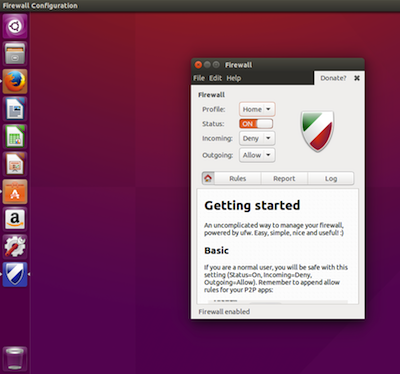
Gufw is one of the most popular GUI front ends for UFW. It’s available for Ubuntu, Linux Mint, openSUSE, Arch Linux, and Salix OS. With Gufw, you can easily create profiles to match different uses for a machine (home, public, office, etc.). As you might expect from such a tool, Gufw offers an interface that would make any level of user feel right at home (see Figure 1 above).

Some distributions, such as Ubuntu, don’t install Gufw by default. You will, however, find it in the Ubuntu Software Center. Search for gufw and install with a single click.
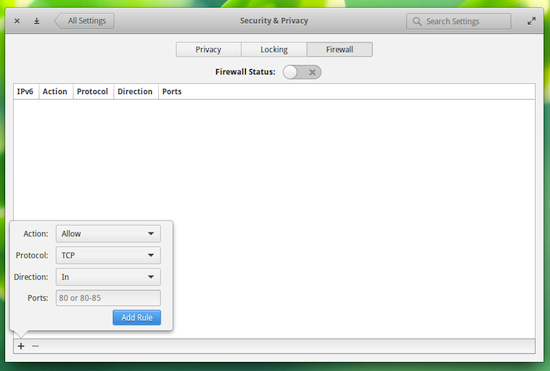
uwf BIf your distribution happens to be Elementary OS Freya, there’s a new front end for UFW built into the settings tool that allows you to very easily add rules to UFW (Figure 2). You can learn more about the Elementary OS Freya UFW front end from my post “Get to Know the Elementary OS Freya Firewall Tool.”

You might also come across another front end called ufw-frontends. That particular GUI hasn’t been in developed for some time now, so it’s best to avoid that particular app.

For most users, there is no need to spend the time learning iptables—not when there’s a much more user-friendly front end (that also happens to include solid GUI tools) that’ll get the job done. Of course, if you’re looking for business- or enterprise-class firewalling, you should certainly spend the time and effort to gain a full understanding of iptables.

Which is right for your needs, UFW or iptables?

This Week in Linux News: New Samsung Smartphone Launches in India, 3 New Linux Distros Released in 8 Days, & More!

tizen-branding-lockup-on-lightThis week in Linux news, a new Linux-based Samsung smartphone launches in India, three new Linux distros are released in 8 days, and more! Get up-to-date with these headlines.

1) Samsung’s Tizen smartphone has launched another model in India.

Linux-Based Samsung Z3 Smartphone Launches in India– ITWorld

2) Veeam Software announces backup and recovery for Linux.

Veeam Backup For Linux Announced At VeeamON– StorageReview.com

3) Three new Linux distributions announced in eight-day period. 

Happy Distrovus: 3 Big Linux Distros Released in 8 days– NetworkWorld

4) Yale-NUS College partners with Dell and Red Hat.

College Partners with Dell and Red Hat — Embraces Open Source and Linux Solutions– BetaNews

5) New Linux Foundation members represent expansion of Open cloud and IaaS services.

Linux Foundation: New Members Highlight Open Source Containers, Cloud– The VAR Guy


Unpatched, Passcode-Free Smartphones. Yes, They’re Everywhere

Results make Android seem scary this All Hallows’ Eve. Users in both enterprises and at home are failing to take basic precautions against an increasing range of mobile threats, according to a new survey by security firm Skycure. The majority (52 percent) of devices do not have any type of passcode enabled, including alphanumeric, biometric, and swipe codes. And around a third (30 per cent) of devices were running an out-of-date OS.

In fact, one in three Android devices is still vulnerable to one of the recent high-profile Android attacks because of the OS issues. Tardiness by manufacturers in pushing out Android updates is at least as much a factor as users failing to update…

Read more at The Register

Tor Project Launches Encrypted Anonymous Chat App to the Public

Tor-00The app gives users the chance to chat anonymously across Windows, Mac and Linux systems. 

The Tor Project has launched the beta version of Tor Messenger, an easy-to-use encrypted message client for those concerned about their privacy and potential surveillance. The Tor Project is a non-profit which runs the Tor network, a system of routes and servers designed to make online users more difficult to track online and disguise Internet activity, as well as access hidden areas of the Web hosted on .onionwebsites.

One of the non-profit’s projects is Tor Messenger. The client, now released to the general public, is based on Instantbird, a messaging app which allows users to connect to separate messenger systems.

Read more at ZDNet News

Solus 1.0 Operating System Gets Its First Release Candidate Build

solus-1-0-operating-systemThe guys over Solus, the independent OS that aims to change the way you think about GNU/Linux distributions, have just announced the immediate availability for download and testing of the first RC (Release Candidate) build of the upcoming Solus 1.0 release.

We know that many of you out there were expecting to download the final release of Solus 1.0, which was promised to us, mortals, on the first day of October 2015, but due to bad karma and other unforeseen events, the Solus developers had to postpone its release. The main reason for the delay of Solus 1.0 is that there were bugs that were not fixed in time for the operating system to be stable enough for deployment on production machines. 

UK To Adopt Open Source Office “GovOffice” Based On LibreOffice


UK To adopt open source office govoffice

We’ve been listening news of adopting Open-source by several countries, organisations and companies. This time it’s UK. The UK Governmentannounced the deal with an open source company Collabora Office provides LibreOffice based Office suit “GovOffice”.  

[SOLVED] Adobe Bracket Is Not Installing In Ubuntu 15.10 Due To Missing Dependency “Libgcrypt11”


adobe bracket is not installing in ubuntu 15.10

Ubuntu 15.10 was released recently with many missing dependencies due to which several applications are unable to install, including VirtualBox andBracket text editor. We wrote about how to install VirtualBox in Ubuntu 15.10, let’s see how to install Adobe Bracket text editor in Ubuntu 15.10.

Read At LinuxAndUbuntu