Home Blog Page 988

Tips and Tricks for Using the Two Best E-Readers for Linux

ereader AIt is 2015 and your home library that once resided on bookshelves and milk crates now exists on either a handheld reader, your laptop, or your desktop. That, of course, is not to say the end of physical books is nigh. But when you want the most convenient way to either read or keep your library with you, e-books are the way to go. This is especially true for larger, heavier textbooks.

The good news for Linux users is that there are plenty of outstanding apps to make reading e-books quite easy. And, because these tools happen to be offered on the Linux platform, they offer some really cool features to make your e-book life even better.

Let’s take a look at two of the best e-book readers available for Linux, as well as a trick or two for each.

Calibre

Calibre is the mack daddy of e-book tools on Linux. Not only does it offer an outstanding e-reader, it also helps you to convert your .html files into e-book format (it’ll convert .odt and other files…just not as well). The Calibre reader does a great job of displaying your e-books (from a vast array of formats). Calibre also offers a number of really handy features, such as:

  • Bookmarks

  • Reference mode (when in this mode, if you hover your cursor over a paragraph, it will show you the reference number in the form of Chapter.ParagraphNumber)

  • Table of Contents (view the book TOC as a sidebar)

  • Full-screen mode

  • Themes

  • And so much more

There is, however, one feature that places Calibre heads above all other competition: the Calibre server. With this, you can run a server and access your books from any device. Let’s set this up and access the Calibre server from another machine. I will assume you’ve already installed Calibre (it can be found in your distribution’s standard repositories). The steps are simple:

  1. Open Calibre and click on the Preferences button

  2. Click Sharing over the net (under the Sharing section)

  3. Configure the necessary port (if applicable)

  4. Give the server a username (passwords can cause some devices to not work with the server)

  5. Click Start Server

  6. Click Test Server

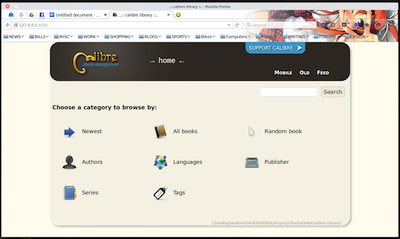
When you click Test Server, your default web browser should pop up to display the web-based Calibre Library interface (Figure 1 above).

With the server running, locate the IP address of the machine hosting your Calibre server. You can now access that server in the form of http://192.168.1.70:8080. From that page, you can open a book by locating what you want to read and then clicking the associated Get button (Figure 2).
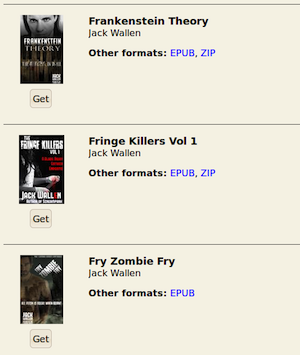
jack-ereader BOnce you click Get, the e-book file will download and you can then open it in your local copy of Calibre (or whatever e-reader you choose).

The one caveat to this is, by starting the server in this way, it will stop the second you close the app. If you want to leave the server running (without the GUI open), you can run it with the following command:

calibre-server --daemonize

This command will allow you to run the server without having to open Calibre. You can then set it to run as a startup service. How you do this will depend on what startup service your distribution uses (systemd or init).

There are even Android apps that let you access your Calibre library from anywhere (if you happen to save your Calibre Library in a cloud location). One particular app, Calibre Cloud, does a great job of accessing your Calibre Library from the likes of Google Drive, Dropbox, etc. Both a free version and a Pro version ($1.99 USD) are available. The Pro version also contains a built-in reader. If you opt for the free version, you’ll need to also install an e-book reader to use for viewing.

Lucidor

Lucidor doesn’t offer all the power and features that comes along with Calibre, but it is one of the best straight-up e-readers you’ll find for Linux. This tool is strictly a reader. Even without all that power under the hood, Lucidor delivers an outstanding e-reader experience. One of the coolest features of Lucidor is its tabbed interface, which allows you to open not only multiple books, but also multiple books from multiple sources.

You won’t find Lucidor in your standard repository. In fact, you’ll have to download the file for installation on your distribution. Let’s install Lucidor on Ubuntu. Here’s how:

  1. Download the .deb file

  2. Open a terminal window

  3. Issue the command sudo dpkg -i lucidor_XXX_all.deb (where XXX is the release number)

  4. Hit Enter

  5. Type your sudo password

  6. Hit Enter

  7. Allow the installation to complete

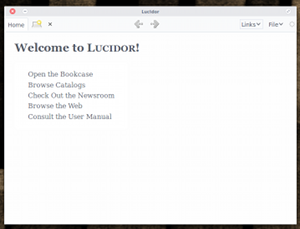
You should now see the Lucidor launcher in your Dash (or menu, depending upon your desktop). Run the app and you will be greeted by the minimal welcome screen (Figure 3).
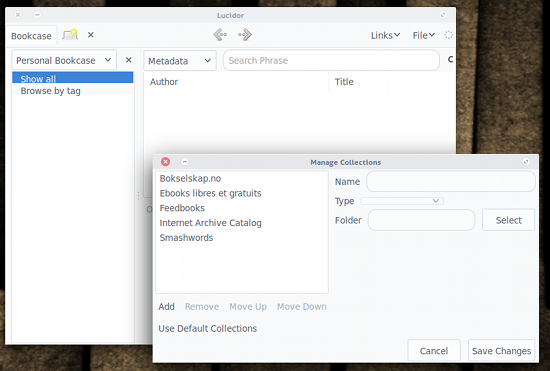
jack-ereader CThe interface is quite simple to use. You click on the Links drop-down and select what you want to open. Let’s open up the Personal bookcase in a tab and then add a book. Click Links > Bookcase and the new tab will open, defaulting to the Personal Bookcase. Now click File > Open File. Locate the .epub file you want to add and then click Open. When the file opens in the Lucidor tab, you will prompted whether you want to add the file to the current Bookcase (Figure 4). Click Add and the book will now be available in your personal bookcase.
jack-ereader DAt this point, you can click the Tab button, click Open Bookcase, and start the process over to open a new book.

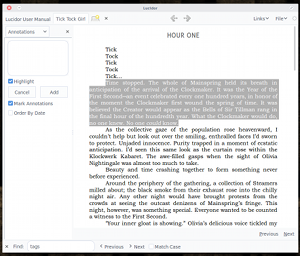
You can also add annotations to books for easy note-taking. Here’s how:jack-ereader F
  1. Open the book in question

  2. Locate a section of the book you want to annotate

  3. Click the Contents drop-down

  4. Select Annotations

  5. Highlight the portion of the text you want to annotate

  6. Click Create Note

  7. Enter your note for the annotation (Figure 5)

  8. Select Highlight (if you want the selected text to be highlighted)

  9. Select Mark Annotations to place a mark on the text where the annotation starts

  10. When you’re finished, click Add

There are several other features you can enjoy with either Calibre or Lucidor. Most importantly, however, is that you can simply read your books. Other e-readers are available for the Linux platform, but once you’ve used either of these, you won’t settle for anything less.

Malware, Restoring Data: What Keeps Data Center Techies Up All Night

A majority of organizations polled in a data center and cloud security survey are dissatisfied with their malware containment and recovery times. More than half (55 per cent) of survey respondents were dissatisfied with the length of time it takes them to contain and recover from hacker infiltrations and malware infections, with more than 17 per cent of respondents needing more than a week to contain an contagion. About 37 per cent reported containment times of up to eight hours. …The figures come from a poll of 430 security and risk professionals from the SANS Institute community, serious techies working at the security coal face of private and public sector organizations.

Read more at The Register

Red Hat Acquires Ansible

RedHat.svgRed Hat has announced that it is acquiring Ansible, the company behind the Ansible configuration management system. “Ansible’s automation capabilities, together with Red Hat’s existing management portfolio, will help users drive down the cost and complexity of deploying and managing both cloud-native and traditional applications across hybrid cloud environments.” 

Read more at LWN

Google, Facebook and Peers Criticize CISA Bill Ahead of Senate Consideration

A trade group representing Facebook, Google, Yahoo and other tech and communications companies has come down heavily against the Cybersecurity Information Sharing Act of 2015, a controversial bill in the U.S. that is intended to encourage businesses to share information about cyberthreats with the government.

The Computer & Communications Industry Association claims that the mechanism CISA prescribes for the sharing of cyberthreat information does not adequately protect users’ privacy or put an appropriate limit on the permissible uses of information shared with the government.

Read more at IT World

Ubuntu MATE 15.10 for Raspberry Pi 2 to Land Next Week

ubuntu-mate-15The Ubuntu MATE project posts the details about the donations they’ve received each month, detailing who gave money and where they are going. They’ve been doing this for quite some time, and many times they used those funds for donations to other projects. Now they are saving the money because Ubuntu MATE 15.10 for Raspberry Pi is coming out, and they think it’s going to be a hit. …It’s a known fact that Ubuntu and all the flavors will get new updates next week, on October 22, but it looks like the Raspberry Pi platform will be supported too, even if it’s not on the official list.
Mind Your Analytics – Or Get Ready for Ethical Hot Water

It’s no secret that the implications of big data extend far beyond organizational benefits into the societal and ethical realm, but market researcher Gartner predicts that the improper use of big data analytics will cause half of all business ethics violations by 2018. Organizations could suffer loss of reputation, wasted resources, competitive weakness and even legal sanctions as a result, Gartner said.

Read more at IT World

Blocks: Modularity Comes to Smartwatches

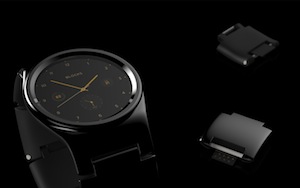
pressimages-3Blocks, which has been developing a modular, open source smartwatch for several years, has re-emerged with a resoundingly successful Kickstarter campaign, and a new Android Lollipop based operating system. UK-based Blocks has already hauled in more than $700,000 for its Blocks smartwatch, and packages starting at $195 are still available through Nov. 19, with shipments due in May 2016.
When Blocks was first announced a year ago, it ran Tizen on an Atom-based Intel Edison module. (Blocks was a top-10 finalist out of 400 entries in an Intel Make It Wearable challenge.) The company then switched to Android Wear, and when that proved too limiting, created its own Android 5.0 based OS and UI stack. The OS runs on Qualcomm’s dual-core, 1.2GHz Snapdragon 400 processor, the standard platform for Android Wear.

Blocks’ unique, modular approach to smartwatch technology remains the same. The device starts with a base level watch, which you can augment with add-ons built into individual chain links of the wrist band. You can then hot-swap these using plug connectors. One limitation of the design is that the number of modules one can wear ranges only from three to five, depending on the size of your wrist, although to be fair, it’s hard to imagine being able to cram more modular options into a watch-piece itself.

The company was inspired by UK-based Phonebloks, which also inspired, and has since been aligned with Google’s Project Ara. Like these modular smartphone projects, which also include the open source Fairphone 2 (see below), the Blocks watch is billed as being “future proof. The idea is that you can continue to improve its capabilities without having to buy a new watch and dispose of the old one. In other words, it’s good for your pocketbook and for the environment, too.

With the hot-swap capability, you can customize the watch on the fly depending on your planned activities. In the latest iteration, you can choose up to five chain-link modules, or none at all. Not surprisingly, most backers opted for the $250 or $260 packages, since sold out, which ship with four modules of your choice. The same kit is still available in $275 and $285 packages, plus $30 for the fifth module. The initial set of modules include an extra battery, heart rate sensor, GPS, NFC, or an adventure module with altitude, pressure, and temperature sensors.

Planned for next year are a SIM card module with GSM, letting you send and receive text messages or reply to emails using voice. Also in the works for 2016 are fingerprint and LED add-ons, as well as a programmable button module that “can be used as an emergency (SOS) alert for the elderly, for taking cheeky selfies, or controlling your music,” says Blocks.

Eventually, Blocks plans to add air quality, camera, flash memory, and stress-monitoring (galvanic skin sensor) modules. Beyond that, the company is considering making the watch screen itself modular, with different sizes, shapes, and display types available. Currently, only the color of the watch-piece is customizable.

The base watch-piece has a round-faced, 1.35-inch color display with 360 x 360 pixels. Like most Android Wear watches, Blocks provides 512MB RAM, 4GB of eMMC flash, Bluetooth 4.1 BLE, a microphone, and accelerometer, gyro, and vibration functions. Like most, it’s also IP67 certified for resistance against water, with plans for fully waterproof IP68. The battery is said to last 1.5 days, extendable via the extra battery module.

Unlike most Android Wear models, it also offers WiFi, enabling more autonomy away from a connected smartphone. A smartphone app will be available for Android and iOS, letting users receive selected notifications, as well as download customized watch faces and apps.

According to a June TechCrunch report, Blocks decided against Android Wear due to its lack of support for iOS phones, as well as its overall limitations, especially in its support for cellular. Android Wear has since added iOS support, but it offers a fairly limited subset of features.

A year ago, when Blocks was a Tizen project, the company said it would make both the hardware and software components open source. Now, however, it says only that it’s an “open platform.” The company has already signed up 1,500 developers who are waiting to receive the SDK and Module Development Kit (MDK).

Much of the delay in getting Blocks off the ground came from difficulties finding a manufacturer. Compal is now on board, however, and much of the Blocks technical team has moved to Taiwan to work closely with the OEM firm.

Blocks is challenged by the fact that it’s tough for a small startup to deliver a wide selection of modules from the start. Blocks’ solution is to have the modules developed and sold by a variety of partners using its open platform. The partners will be able to sell modules and apps at a planned BlockStore, where customers can also trade old modules with other users.

Assuming the company can quickly ramp up with additional modules before a wider retail launch in 2016, Blocks has a chance in the still unformed smartwatch industry. One big challenge, in addition to the limitations on the number of modules that can be worn at once, is that there is no way to upgrade the processor without buying another $195 watch. However, if their plans for a modular screen go through, that would make the mainboard modular as well, reducing the cost.

Blocks’s chain-link design mitigates the technical integration issues of modular interconnects in a monolithic form-factor such as a phone. In many ways, wearables, being a fashion accessory, are a better fit for modular technology, with more demand for customization.

Fairphone 2 Beats Project Ara to Market

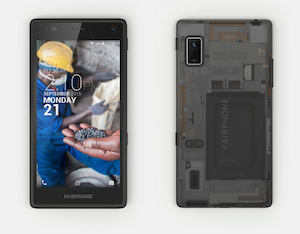
FairphoneWhile Project Ara is being redesigned to fix its magnetic connection technology, another modular smartphone called the Fairphone 2 is available for 529 Euros on pre-order, with shipments due in November. The new version adds modularity, with snap-in modules including the mainboard, display, microphone, rear and front cameras, and a 2420mAh battery.

The modular design makes it easier to replace and repair components, leading to a longer product lifespan, says Amsterdam-based Fairphone. In particular, being able to quickly replace the screen at a reasonable price has considerable appeal.

The dual-SIM, LTE-ready Fairphone 2 has advanced to a faster, quad-core Snapdragon 801 with 2GB of RAM, 32GB storage, and a 5-inch, HD display. The phone offers both 8- and 2-megapixel cameras, as well as the typical array of wireless and sensor features.

Like the original Fairphone, the Fairphone 2 is based on Android and is fully open source in hardware and software. It’s also claimed to follow exceptional standards for environmental and social impact.

NASA Just Released the Massive VICAR Collection of Apps as Open Source

NASA has released its VICAR Core set of applications as open source and it looks like the agency is opening its tools toward the international community.

NASA started to develop VICAR Video Image Communication And Retrieval back in 1966 and it was original built to digitally process multi-dimensional imaging data. It was used to transport images and data from missions like the old Voyage or the newer Cassini–Huygens. To say that it’s a powerful set of tools is actually an understatement since they have been in development for almost half a decade. NASA has been moving towards open source for some time now and this is not the first set of tools that’s been made available. 

Leap Release Candidate Gets New Office Suite

Leap1Release Candidate (RC1) of Leap 42.1 is out and with it comes more packages as well as  a new office suite. LibreOffice 5 is in the RC1 and about 400 more packages made it in the RC1 release, which were not in the Beta. Leap is less about the newest updates, which is the purpose of Tumbleweed and its frequent snapshots; Leap is more about relevance and purposeful updates and packages that provide users prolonged, stable and enterprise-level functionality. Leap has newer, community packages built on core SUSE Linux Enterprise (SLE) source code for a more stable base. Of the 7,000-plus packages in Leap, 1,500 are from SLE.

Read more at openSUSE News

IBM and VMware Partner on Hybrid Cloud Hosting and Storage

IBM and VMware’s new hybrid cloud offering supports live migration of virtual servers, new virtual storage features and the preservation of network state when migrating virtual machines. 

IBM (IBM) and VMware (VMW) have partnered to bring new flexibility to the hybrid cloud, a move they hope will help speed adoption of hybrid virtual server and storage solutions. On Thursday, the companies announced that VMware deployments running on IBM SoftLayer servers can integrate with a cloud service hosted by IBM. 

Read more at The VAR Guy