 We live in an age where everything is moving to cloud. This trend of course has its own advantages and disadvantages. The biggest advantage is that we can access our data anywhere, anytime from any device. On the flip side, the biggest disadvantage is that we lose control or ownership of our data.
What if you could get the best of both worlds? What if you get to “own” this cloud? That’s what I do. Although ownCloud takes care of my cloud needs, there are other fully or partially open source solutions that take care of my streaming needs. I have been using Plex Media Server so far and it’s extremely powerful. Recently, however, I came across an open source media server that looks quite promising; it’s called Emby. According to the website, the Emby server automatically converts and streams your media on the fly to play on any device.
Why Emby?
I tried Emby not because I wanted to switch away from Plex or because I was looking for an alternative; I love Plex, it serves me well. I gave Emby a try because of its open source base, and because it’s good to have choices.
Installation of Emy is quite easy. Officially, it supports Arch Linux (my favorite distro), CentOS, Debian (runs on my server), Docker, Fedora, and Ubuntu, but you can always install it on any distro of your choice, manually. There are different instructions for different distros.
If you are running Ubuntu 14.04, then run the following commands in the terminal:
wget -qO - http://download.opensuse.org/repositories/home:emby/xUbuntu_14.04/Release.key | sudo apt-key add -
sudo sh -c "echo 'deb http://download.opensuse.org/repositories/home:/emby/xUbuntu_14.04/ /' >> /etc/apt/sources.list.d/emby-server.list"
sudo apt-get update
sudo apt-get install mono-runtime mediainfo libsqlite3-dev imagemagick-6.q8 libmagickwand-6.q8-2 libmagickcore-6.q8-2
sudo apt-get install emby-server
If you are on Fedora or CentOS, first install the epel repo:
yum install epel-release
Then, install Emby for CentOS or Fedora releases (check the directory path for your version of Fedora here) and replace “REPO_DIRECTORY” with it in the the following command:
wget http://download.opensuse.org/repositories/home:/emby/REPO_DIRECTORY/home:emby.repo -O /etc/yum.repos.d/emby.repo
yum install emby-server
For example, if you are on CentOS 7, the command will be:
wget http://download.opensuse.org/repositories/home:/emby/CentOS_7/home:emby.repo -O /etc/yum.repos.d/emby.repo
yum install emby-server
Arch users can install emby server from the community repository.
sudo pacman -S emby-server
During the installation process, you will come across this warning: “Emby by default runs under a user named “emby”. Please ensure that the user emby has read and write access to any folders you wish to add to your library. Otherwise please run emby under a different user.”
Hit OK, and it will give you an option to change the user (see Figure 1 above).
You can change the user to an existing user on the system or create a new one. I would prefer to keep a separate user so that I can better manager permissions on my server.
Once the installation is finished, you may have to start the service, depending on your distro. Debian-based servers usually start the service automatically, but if you are on systemd-based systems such as Arch Linux, you will have to start the service using the following command:
sudo systemctl start emby-server
Once the server is running, you can open the Emby server in a browser :
http://SERVER_IP:8096/web/wizardstart.html
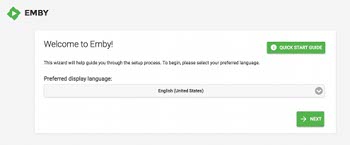
You will be greeted by the window shown in Figure 2.
Configuration
You can follow these steps to complete the configuration process.
1. Enter language
2. In this window you have to create a user so you can control which user has access to which media libraries.
Emby also offers a service similar to Plex Pass where you can use it to access the server from outside the local network or from mobile devices. You will notice a link to create Emby Connect account, at the bottom of the page. You will get a free trial of the service for a few weeks, after that you have to pay a fee to support the development work. However, Emby Connect is not required if you want to play it on local network using a browser, but I think it’s needed if you use it on Amazon Fire TV or other such devices.
3. In the next window, you can start setting up the media library (Figure 3).
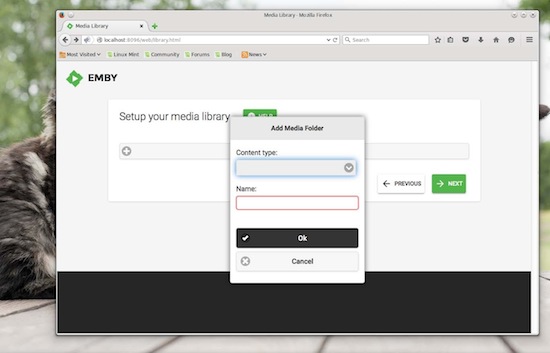 Click on the + button, choose the media type from the list and give it a name. You can add all the libraries, by media type, that you need. We will configure the location of media later.
4. Choose the preferred language for metadata
5. I skipped the Live TV Tuner settings page, as I don’t have any TV tuner.
6. Accept the terms of service.
That’s it.
You can now log into your Emby media server. That’s where you can further fine-tune the server and configure the location for media libraries (Figure 4).
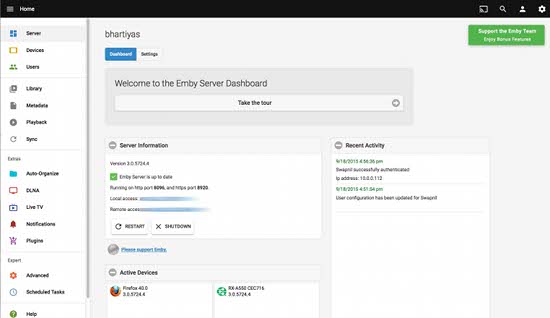 Click on Library and choose the media type, then click on the + button on “Media Locations” and choose the path to the directory where videos, music, photos or other media is stored. You can play around to understand other settings. Once configured, you can now access your very own “Netflix & Pandora” on the local server using the server path.
Just open the browser on any PC connected to the local network and give the path to Emby server, as mentioned above. Log in to the user account and access your media (Figure 5).
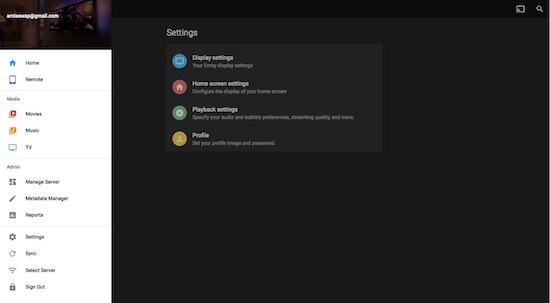 If you want to access the server from outside the local network, just log into your account from this address: app.emby.media. Once logged in, go to the settings menu and provide it with the server IP of your Emby Server. Enjoy your media remotely!
You can also access the server from mobile devices using either the Emby app or UPnP/DLNA clients. The official Emby app is available for Android devices, along with Amazon’s Fire TV. There is no client for iOS yet, but you can use VLC to play movies on the local network.
Go ahead, install Emby on your server and let us know what you think about it!

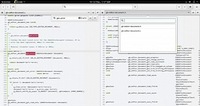 Christian Hergert had the great pleasure of announcing the release and immediate availability for download of his powerful GNOME Builder 3.18 open-source integrated development environment tool for GNOME app developers.
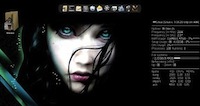 Zbigniew Konojacki, the creator and lead developer of the 4MLinux project, had the great pleasure of informing us earlier today, September 22, about the immediate availability for download and testing of the Beta build of 4MLinux 14.0.
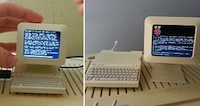 Someone built a miniature Apple Computer that is powered by Raspberry Pi Model A+ and Raspbian, and it looks fantastic. The best thing about it is that you can actually buy one of these, or you can download the specs and 3D print them yourself.