

Home Blog Page 1042

10 Job Interview Questions for Linux System Administrators

questions flickr cc

Job opportunities abound for system administrators and DevOps professionals who know Linux. But even sought-after, seasoned SysAdmins still have to go through the hiring process, from sending in a resume, to taking technical exams and meeting for interviews.

And while resumes and tests are important, they often serve as an efficient way to screen candidates before advancing them to what is, arguably, the more critical test: a job interview. It’s in the interview process that a candidate is vetted for the personal qualities that will help determine if they’re a good cultural fit for the company and an employee worth investing in.

SysAdmins of all experience levels, then, can benefit from brushing up on their job interview skills if they want to find and land a great new job.

“Interviewing for a job can be nerve-racking, especially when it’s your first interview,” says Michele Casey, director of product management for Oracle Linux. “Just be well-prepared. That’s the best thing you can do.”

Master the Interview Questions

A quick Internet search for “SysAdmin interview questions” will give you more than enough potential questions to practice with. Sites like Quora, Stack Overflow and this GitHub SysAdmin interview questions repository are good places to start.

But questions like, “Explain what happens when you type http:// into your browser,” have almost become cliché. Many skilled interviewers tend to skip over these common questions, and the basic technical underpinnings, in favor of deeper questions that not only show a candidate’s level of knowledge, but reveal their personality. Such questions aim to suss out your approach to problem-solving, critical thinking skills, and how you react under pressure.

“I try to avoid asking the questions that are published out there, but not because I’m worried that someone will memorize everything. I want to make sure people are in situations where they need to think,” said Joe Smith, a senior site reliability engineer at Twitter. “Most of the time it’s not going to be an easy solution.”

Here are some favorite interview questions from senior system administrators, IT managers, and human resources professionals who work at Linux Foundation member companies – some of the largest and most influential companies in the tech industry today. Each took a slightly different approach – some were much more technical than others. However, their reasons for asking were largely the same: find out who this candidate is, as a person, and how they think and reason through problems.

10 Favorite SysAdmin Interview Questions

1. What do you love about technology?

“I like for them to have an opportunity to share what they’re passionate about, even if it has nothing to do with the job.” – Michele Casey, Director of Product Management, Oracle.

2. Name and describe a different Linux/Unix command for each letter of the alphabet. But also, describe how a common flush toilet works.

“The first question helps illustrate the breadth of their CLI chops. But just as important is describing how a toilet works; it demonstrates their well-roundedness and/or ability to think, reason, and hypothesize on their feet.” – Michael Jennings, Computer Systems Engineer, Linux Server/Cluster Admin, Lawrence Berkeley National Laboratory.

3. What open source projects are you interested in?

“A really good candidate, even if they’re junior will have found the project they’re interested in and be committing a bit back or writing some documentation. They will be really plugged into what the open source community is doing. They’ll have run Apache Zookeeper, for example. They’ll have wrestled with the code and looked through the docs and actually understand how this works. And maybe they haven’t run it in production but they understand at a high level how the pieces interact, how you can take advantage of it, and what the benefits are.” – Joe Smith, Twitter.

4. I have this server which seems to drop off the local net every so often, and comes back on its own. How would you debug this?

“I give them problems that I hope they don’t already know to see how they work through them. I have a list of troubleshooting questions and guesstimate which one to use depending on the level of the candidate.” – Marc Merlin, Senior Linux Server Admin, Google.

5. How does TLS work?

“It helps me understand how good they are with security topics. How in-depth they go with their answer – how comfortable they are – tells me a lot.” – Konstantin Ryabitsev, Director of Collaborative IT Services at The Linux Foundation.

6. What do you know about SUSE, why do you want to work here, and what’s the role of open source in the market?

“Candidates can show their motivation through concrete contributions or visibility in an open source community and an understanding of what companies do. They will have researched SUSE before they come and talk to us. The bare minimum is that they have installed openSUSE and actually played around with that.” – Marie Louise van Deutekom, SUSE’s Global Human Resources Director.

7. What about this job appeals to you?

“That’ll tell me how much they’ve thought about it. A.) You need to make sure you understand your strong points – know yourself. B.) Know what the job entails. And C.) make sure that when you speak you do it sincerely and honestly and be yourself. Probably the biggest mistake that people make is trying to put on a facade.” – Steve Westmoreland, Chief Information Officer, The Linux Foundation.

8. Tell me a “war story” about a situation that went wrong and what you did to help on your own initiative.

“In an interview I don’t dive into “tech” skills. Coding languages and various packages can be learned. I am firmly of the belief that you learn a heck of a lot more about a candidate in an interview by asking him or her to tell you “war stories.” If they stumble on that, then you’re looking at a Drone. (Next!)” – Tim Hoogasian, Solutions Project Manager at Newstar Digital and former Technical Project Manager at Dell.

9. Print the content of a file backwards.

“I like broad questions where each person could give a different answer depending on their depth of knowledge. My personal answer is 8 characters not including the filename.” – Marc Merlin, Google.

10. Nothing in particular.

“I don’t have one question that everyone needs to know. If someone doesn’t know the answer to something, that’s great. We’ll work through the problem and come to the answer together.” – Joe Smith, Twitter.
 SysAdmin Interview WebAd

Kodi 15 Brings XBMC Media Player to Android

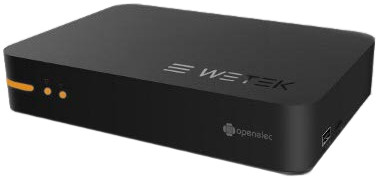
wetek openelecThe XBMC Foundation’s Team Kodi last week released version 15 of its popular, open source Kodi media player and home theater framework. The “Isengard” release of Kodi (formerly XBMC) offers enhancements ranging from new chapter support to an improved add-on manager, but the biggest news is the completion of the Android version.
Kodi for Android, which has been available as a beta on Google Play since mid-June, is the last major OS platform to receive support, joining Windows, Linux, Mac, and iOS. Recently, the Kodi-focused OpenELEC Linux distribution joined with WeTek to release a special OpenELEC media player (see farther below).

The long-awaited Kodi for Android is all the more important since Amazon abruptly dropped Kodi from the Amazon Appstore in early June. Kodi has been a popular side-loading option for Amazon Fire tablets and media players, especially the low-cost Fire TV Stick.

Amazon cancelled support for Kodi on the grounds that it “facilitated the piracy or illegal download of content.” Team Kodi was given no advance warning about the removal, which was particularly disappointing considering that the mostly volunteer Kodi community has been actively fighting back against piracy-friendly Kodi add-ons such as Genesis and Popcorn Time. The campaign began in earnest last November with the crackdown on eBay auctions for devices with piracy-friendly Kodi add-ons.

Amazon’s anti-piracy dictates regarding its Appstore seem to be as arbitrary as a ruling from NFL commish Roger Goodell. Kodi does not provide content of its own, nor does its list of add-ons link to any pirate-friendly applications. Meanwhile, other apps and browsers that also leave a trail of piracy-ware are left alone. For example, the XBMC-based Plex media software is actively supported by Amazon as a Fire TV add-on, despite the fact that it has attracted its own piracy enabling add-ons.

Meanwhile, a growing number of Linux- and Android mini-PCs and media players have Kodi preinstalled, and the final Android version should push it to even higher acceptance. According to Team Kodi, in the first 36 days on Google Play, there have been over 400,000 active Android installs.

The GPL-licensed media framework is also popular among Windows and Macintosh desktop PC users, and is especially prevalent on Linux PCs and mini-PCs like SolidRun’s CuBox-i. Even SBCs such as the Raspberry Pi and Odroid boards support the software.

Kodi 15 sees major changes

Kodi/XBMC was launched in 2002 as an MPlayer-based Xbox hack called Xbox Media Player. After a merger with the YAMP (Yet Another Media Player) project, it re-emerged in 2003 as the Windows-focused Xbox Media Center (XBMC). In 2007, a Linux port was begun, which appeared in final form in 2009 in D-Link’s Boxee Box media player.

The Macintosh port emerged around the same time, followed by an iOS version. Earlier this year, Kodi dropped support for the AppleTV2 due to poor performance resulting from Apple’s lack of support.

The framework has taken off in recent years with the explosion in IPTV cord-cutting services designed for laptops, media players, Smart TVs, and mobile devices. The software provides access to a huge variety of videos, music, podcasts, and other digital media files, called up from the Internet or local and network storage media.

Kodi lets you watch and record live TV, and it supports integration with backends including MediaPortal, MythTV, NextPVR, Tvheadend, VDR, and its prime competitor: Windows Media Center. The software provides a consistent UI ranging from phones to 10-foot TVs, and lets you apply custom skins.

In addition to adding Android support, Kodi 15 provides a new chapter selector window, a more flexible adaptive seeking feature, more convenient audio and subtitle options, and more frequent language add-on updates. The add-on manager, meanwhile, has a revamped UI.

If these don’t seem like major changes, keep in mind that Kodi is already quite mature and comprehensive, which only adds to its popularity. Full Android support was the key missing piece to the puzzle. Android-specific improvements in Kodi 15 include 4K support, refresh-rate switching, and HEVC playback on those Android 5.0-ready devices that support these features. These are said to include “a number of Amlogic based devices and the Nvidia Shield Android TV.”

New Kodi Linux Box: WeTek OpenELEC

Linux distributions offering Kodi repositories include Debian, Fedora, KodiBuntu, and OpenELEC (Open Embedded Linux Entertainment Center). You can also install it on any number of other distros such as Ubuntu and Linux Mint.

OpenELEC, which was purpose built for XBMC, can be found on a variety of ARM SBCs, including the Raspberry Pi, as well as media players like CuBox. Earlier this month, it launched on a WeTek OpenELEC (Limited Edition) Linux media player.

More than just a simple media player box, the $90.33 (99-Euro) WeTek OpenELEC version comes with a choice of satellite (DVB-S2), cable (DVB-C/T/T2), or terrestrial broadcast (ATSC) tuners. The box runs on Amlogic’s AML8726-MX, a 1.5GHz dual-core, Cortex-A9 SoC with a Mali MP400 GPU.

Semi-Official Google Drive Support For Linux Arrives, What’s Next?

Three years ago, when a user would attempt to download the Google Drive Sync Client, Google would bring them to the appropriate download page, which of course, is based off of the operating system that user is running on. If a user would attempt to download the Google Drive Sync Client while running on Linux, they’d land on a page where the message reads: “Not (yet) supported for Linux.” So, what’s the deal with Google not developing a sync client for Linux users, seeing as to how they build a lot of their things using Linux? There’s one simple answer to that, unfortunately. Windows is mainstream, so a lot of their focus is put on what a majority of people use. The bigger the market, the more money in their pockets, of course. But don’t fear, change is near!


Recently, I came across a command-line program that Burcu Dogan, a Google engineer developed as semi-official alternative solution for Linux users, called “drive.” It’s written in Google’s programming language which is known as “Go.” This does not support background data syncing from what I’ve noticed, but it can push the data from Google Drive to your computer or vice versa. It acts as a “push or pull” program, to put it simply. For example, if you need to download anything on your computer from Google Drive, you’d execute the pull command, whereas if you want to upload something to drive from your computer, you execute the push command.


Getting Started

To get started, open your Terminal and type:

sudo apt-get install golang git mercurial

 
Next, type:

go get github.com/rakyll/drive

Need help? Type:

drive help

You will be asked to choose a local directory. Choose one. You will then authenticate yourself by logging into your Google account when prompted to do so.

You’re done! Now, here’s how to upload a file from your computer to your Google Drive account using the command-line. Enter:

drive push example.txtor, to download a file from Google Drive to your computer: drive /pull/example/example.txt

That’s all there is to it! It’s a simple process if you just need a few files to be accessed by the push and pull command, but a hassle if you need need to access lots of files and have them automatically sync between your computer and the cloud service. Need a third-party Google Drive Client? Check out InSynch.

Systemd Is Launching Its Own Conference

Lennart Poettering today announced systemd.conf 2015, its inaugural conference devoted to the future of systemd…

Read more at Phoronix

Debunking 7 Common Myths About Hybrid Clouds

Overcoming common myths and misconceptions about hybrid clouds can give organizations a big boost in implementing their adoption strategies.

Read more at eWeek

OpenDaylight Beryllium Takes Shape

At the OpenDaylight Summit today, developers took to the keynote stage to discuss the success of the recent Lithium release and expectations for the upcoming Beryllium milestone.

    Colin Dixon, Technical Steering Committee Chair (TSC) at the OpenDaylight Project and a Principal Engineer at Brocade, said that the thing he’s most proud of during the Lithium release cycle was that it landed on time, without too much pain. He commented that the maturity of the overall project has grown over the last two years, making a stable release cadence possible.

    IBM Launches Internet of Things Developer Community

    IBM remains active in its quest for developer support for the IBM Cloud by launching a cloud-based Internet of things (IoT) developer community.

    Read more at eWeek

    Open Source: Free as in Speech, Beer – or Puppy?

    It’s hard to give developers more control over how their work is used and still keep it open source.

    Read more at ZDNet News

    The Case Against SSDs

    Flash-based SSDs have revolutionized enterprise storage. But SATA SSDs have serious problems that show that after more than 50 years of disk-based storage, our ancient I/O stack must be rebuilt. Here’s why.

    Read more at ZDNet News

    Canonical Says Ubuntu-Based Docker Images Are Not a Copyright Violation

    Canonical said through the voice of Dustin Kirkland that you can use Ubuntu with Docker without violating any copyright policy, contradicting what Matthew Garrett said in a blog post just a week ago.

    Canonical recently changed its IP policy to comply fully with GPL3, putting an end to some discussion t… (read more)