Home Blog Page 1044

Lustre* For the Enterprise

lustre

Lustre* is not just for the national labs any longer. It was born out of serving up data extremely fast to the world’s most powerful HPC clusters using parallel I/O to improve performance and scalability. Here are five reasons why Lustre is enterprise-ready.

The post Lustre* For the Enterprise appeared first on insideHPC.

 
Read more at insideHPC

AIDA64 Utility Now Available for Tizen

  AIDA64 is a hardware and software information utility for tizen based devices. Based on the extensive hardware knowledge of the AIDA64 for Windows application, AIDA64 for Tizen is capable of showing various diagnostic information for the phones and tablets including:   Diagnostic Information CPU detection, real-time core clock measurement Screen dimensions, pixel density and

The post [Developer] AIDA64 now available for Tizen appeared first on Tizen Experts.

Read more at Tizen Experts

Google Cloud Platform Tells Customers to Bring Their Own Encryption Keys

Google’s move to hand over the keys follows similar developments from other cloud storage providers this year.

Read more at ZDNet News

Vector Light Linux 7.1 Is Based on Slackware and IceWM

Vector Light Linux, a distribution based on Slackware that uses the IceWM window manager by default, has been released and is now available for download.

The Slackware-based Vector Linux has numerous flavors, and this is the update for just one of them. In fact, the release of the standard edition happened a month ago. The Light version is a little bit different from that one. It’s aimed at users with lower hardware specs, and it’s a little bit smaller than the regular vers… (read more)

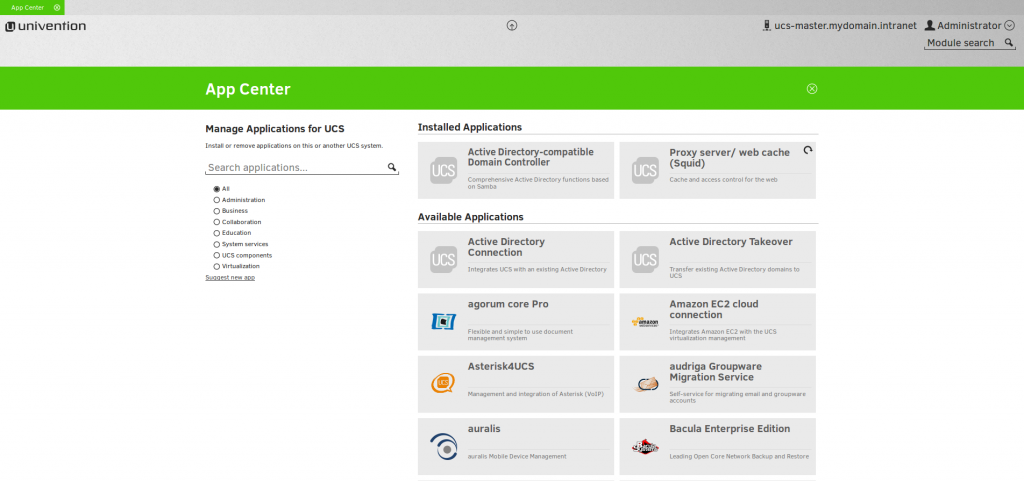
New: Univention Apps – Enterprise Applications instantly ready for use!

Univention has created Univention Apps – A strong combination of one of the existing apps from the Univention App Center, the Univention App Platform, which is based on the Linux distribution Univention Corporate Server, and the UCS management system. These ready for use apps can be very easily started as virtual machines or installed locally.

Univention Apps integrate seamlessly with each other and into existing (Active Directory) environments, and come with integrated update mechanisms. The range of these Univention Apps is wide, from groupware and document management up to filesync/-sharing and backup solutions and will be extended continuously.

Univention Apps are perfect for end users who want ready-to-use business applications, on the cloud or on-premises, combined with an easy identity management and the possibility to integrate them into the existing IT environment.

Cloud service providers are also welcome to integrate the Univention App Platform into their provisioning system with the opportunity to offer their customers an individual selection or even the entire range of available Univention Apps.

If you are an app vendor, you are very invited to certify your app for the Univention App Platform and take advantage of the steadily growing network of cloud service providers that are offering Univention Apps.

Further information on the Univention website.

Univention App Center - Manage applications for Univention Corporate Server

The Linux kernel mapping fixed resolution

The new version of the kernel for stored in IDTR register is the kernel of IDT table of addresses to use fixed mapping of linear addresses, so here to fix the kernel mapping addressing mechanism to describe.

Firstly ,Fixed concept mapping

The initial part of the kernel linear addresses the fourth GB of physical memory mapping system. But at least 128 MB of linear addresses is always reserved for he, as the kernel using the linear address mapping of discontinuous memory allocation and fixation of linear addresses.

Secondly, fix-mapped linear address

Each fixed linear address mapping has fixed addresses the index of the structure to specify (part list only 32-bit mode).

enum fixed_addresses {
#ifdef CONFIG_X86_32
 FIX_HOLE,
 FIX_VDSO,
#else
 VSYSCALL_LAST_PAGE,
 VSYSCALL_FIRST_PAGE = VSYSCALL_LAST_PAGE
  + ((VSYSCALL_END-VSYSCALL_START) >> PAGE_SHIFT) – 1,
 VVAR_PAGE,
 VSYSCALL_HPET,
 #ifdef CONFIG_PARAVIRT_CLOCK
  PVCLOCK_FIXMAP_BEGIN,
  PVCLOCK_FIXMAP_END = PVCLOCK_FIXMAP_BEGIN+PVCLOCK_VSYSCALL_NR_PAGES-1,
 #endif
#endif
 FIX_DBGP_BASE,
 FIX_EARLYCON_MEM_BASE,
#ifdef CONFIG_PROVIDE_OHCI1394_DMA_INIT
 FIX_OHCI1394_BASE,
#endif
#ifdef CONFIG_X86_LOCAL_APIC
 FIX_APIC_BASE,  /* local (CPU) APIC) — required for SMP or not */
#endif
#ifdef CONFIG_X86_IO_APIC
 FIX_IO_APIC_BASE_0,
 FIX_IO_APIC_BASE_END = FIX_IO_APIC_BASE_0 + MAX_IO_APICS – 1,
#endif
#ifdef CONFIG_X86_VISWS_APIC
 FIX_CO_CPU,     /* Cobalt timer */
 FIX_CO_APIC,    /* Cobalt APIC Redirection Table */
 FIX_LI_PCIA,    /* Lithium PCI Bridge A */
 FIX_LI_PCIB,    /* Lithium PCI Bridge B */
#endif
 FIX_RO_IDT,     /* Virtual mapping for read-only IDT */
#ifdef CONFIG_X86_32
 FIX_KMAP_BEGIN, /* reserved pte’s for temporary kernel mappings */
 FIX_KMAP_END = FIX_KMAP_BEGIN+(KM_TYPE_NR*NR_CPUS)-1,
 #ifdef CONFIG_PCI_MMCONFIG
  FIX_PCIE_MCFG,
 #endif
#endif
#ifdef CONFIG_PARAVIRT
 FIX_PARAVIRT_BOOTMAP,
#endif
 FIX_TEXT_POKE1, /* reserve 2 pages for text_poke() */
 FIX_TEXT_POKE0, /* first page is last, because allocation is backward */
#ifdef  CONFIG_X86_INTEL_MID
 FIX_LNW_VRTC,
#endif
 __end_of_permanent_fixed_addresses,

#define NR_FIX_BTMAPS           64
#define FIX_BTMAPS_SLOTS        4
#define TOTAL_FIX_BTMAPS        (NR_FIX_BTMAPS * FIX_BTMAPS_SLOTS)

 FIX_BTMAP_END =
 (__end_of_permanent_fixed_addresses ^
 (__end_of_permanent_fixed_addresses + TOTAL_FIX_BTMAPS – 1)) &
 -PTRS_PER_PTE
 ? __end_of_permanent_fixed_addresses + TOTAL_FIX_BTMAPS –
 (__end_of_permanent_fixed_addresses & (TOTAL_FIX_BTMAPS – 1))
 : __end_of_permanent_fixed_addresses,
  
 FIX_BTMAP_BEGIN = FIX_BTMAP_END + TOTAL_FIX_BTMAPS – 1,
#ifdef CONFIG_X86_32
 FIX_WP_TEST,
#endif
#ifdef CONFIG_INTEL_TXT
 FIX_TBOOT_BASE,
#endif
 __end_of_fixed_addresses
};

Thirdly,Fixed mapping of linear addresses

The kernel using the set fixmap (independence idx, phys) and set fixmap nocache (independence idx, phys) fixed to establish the mapping of linear addresses to physical addresses. Through the clear fixmap lifting independence idx fixed by the mapping of linear addresses.

telecomate.com

A New SysAdmin Pledge in Honor of SysAdmin Day

Bryan LundukeThis Friday is what I consider to be, without the slightest glimmer of doubt, the most important holiday of them all…

System Administrator Appreciation Day. “SysAdmin Day”, for short. Or simply “SAD,” for really short.

“Surely you jest!” you say. “Reginald, my good man! Come over here and observe a rather silly thing that this Lunduke chap just posted to the world wide web!”

I jest not, my old-timey-sounding friend! SysAdmin Day, celebrated on the last Friday of July, marks the one day each year that we are – obviously – legally allowed to tell our SysAdmin that he or she has done a good job.

This most glorious of holidays came into existence in the year 2,000 – making July 31st the 16th annual occurrence – when this one particularly wise man, Ted Kekatos, decided that SysAdmins should be celebrated with their own holiday. With cake. And balloons. And confetti. (Those are some of the recommendations from none other than SysAdminDay.com. Apparently all SysAdmins love confetti. Who knew?)

In case you were wondering… Ted Kekatos is a System Administrator.

But that doesn’t mean that Ted is biased! No, sir! It simply means that he, as a SysAdmin, was one of the most qualified out there to judge the importance of granting this noble profession its own holiday.

In fact, history is filled with examples of great people declaring a holiday for themselves. Take Christopher Columbus, for example. Upon discovering “The New World”, Columbus immediately declared the second Monday in October to be “Columbus Day” (to be celebrated with cake… and balloons… and confetti). It took a year or two to catch on, but before the decade was through, most of the world was already celebrating this new holiday. It’s true. Look it up.

Ok, that is absolutely not true. Don’t look it up. But it’s on the Internet now. Which means, one day in the not-too-distant future, it will become true. So long as the Internet keeps running. Which it probably will. Because we have SysAdmins.

Really, when you think about it, SysAdmins are the MOST deserving of a holiday of any profession or person. Period. On the face of the Earth.

Your computer at work. The network at your office. Your email, file and web servers. Hell, even your printers. They all work because SysAdmins fix your computers and keep the world spinning.

If you think about it, the whole freaking Internet is working – right now – because of SysAdmins.

What did Christopher Columbus ever do? Took a cruise to the Bahamas then went back to Spain and grabbed a quick dinner at this great tapas restaurant he knows of. And he got his own holiday. When you think about it like that, it makes you wonder what took us, as a species, so long to recognize the profession that keeps our email sending and our Netflix streaming with a special holiday.

I mean, just give a quick read to the oath that every SysAdmin swears:

“Neither snow nor rain nor heat nor gloom of night stays these couriers…”

Wait. That’s the mailman pledge. Why did I think of the mailman pledge? Oh! I remember, now.

“In brightest day, through Blackest Night, No other corps shall spread its light! Let those who…”

Nope. Nope. Hold on. That’s Green Lantern.

Is there no awesome pledge for SysAdmins? The closest I have been able to find is this snippet from Peter Hansteen’s seminal work, Firewalling with OpenBSD’s PF packet filter. It’s not exactly a SysAdmin Pledge, but it’s a good start.

“The Pledge of the Network Admin.
This is my network. 
It is mine 
or technically my employer's, 
it is my responsibility 
and I care for it with all my heart.
There are many other networks a lot like mine,
but none are just like it.
I solemnly swear 
that I will not mindlessly paste from HOWTOs.”

It’s good. It’s good. Just a little… long. System Administrators don’t have time to lollygag around reciting oaths like this. They need something short. Something punchy. Something that conveys their pain and their strength. Their passion and their… disdain for printers. Here’s my offering:

“At 2 am.
I am on call.
Mountain Dew powered.
I hate this printer.”

Now go, SysAdmins! Enjoy your day! Enjoy the massive quantities of confetti you are sure to receive!

Must-Know Linux Commands For New Users

fedora cli

One of the beauties of Linux-based systems is that you can manage your entire system right from the terminal using the command line. The advantage of using the command line is that you can use the same knowledge and skills to manage any Linux distribution.

This is not possible through the graphical user interface (GUI) as each distro, and desktop environment (DE), offers its own user interfaces. To be clear, there are cases in which you will need different commands to perform certain tasks on different distributions, but more or less the concept and ideas remain the same.

In this article, we are going to talk about some of the basic commands that a new Linux user should know. I will show you how to update your system, manage software, manipulate files and switch to root using the command line on three major distributions: Ubuntu (which also includes its flavors and derivatives, and Debian), openSUSE and Fedora.

Let’s get started!

Keep your system safe and up-to-date

Linux is secure by design, but the fact is that all software has bugs and there could be security holes. So it’s very important to keep your system updated. Think of it this way: Running an out-of-date operating system is like being in an armored tank with the doors unlocked. Will the armor protect you? Anyone can enter through the open doors and cause harm. Similarly there can be un-patched holes in your OS which can compromise your systems. Open source communities, unlike the proprietary world, are extremely quick at patching holes, so if you keep your system updated you’ll stay safe.

Keep an eye on news sites to be aware of security vulnerabilities. If there is a hole discovered, read about it and update your system as soon as a patch is out. Either way you must make it a practice to run the update commands at least once a week on production machines. If you are running a complicated server then be extra careful and go through the changelog to ensure updates won’t break your customization.

Ubuntu: Bear one thing in mind: you must always refresh repositories (aka repos) before upgrading the system or installing any software. On Ubuntu, you can update your system with the following commands. The first command refreshes repositories:

sudo apt-get update

Once the repos are updated you can now run the system update command:

sudo apt-get upgrade

However this command doesn’t update the kernel and some other packages, so you must also run this command:

sudo apt-get dist-upgrade

openSUSE: If you are on openSUSE, you can update the system using these commands (as usual, the first command is meant to update repos)

sudo zypper refresh
sudo zypper up

Fedora: If you are on Fedora, you can use the ‘dnf’ command which is ‘kind’ of equivalent to zypper and apt-get:

sudo dnf update
sudo dnf upgrade

Software installation and removal

You can install only those packages which are available in the repositories enabled on your system. Every distro comes with some official or third-party repos enabled by default.

Ubuntu: To install any package on Ubuntu, first update the repo and then use this syntax:

sudo apt-get install [package_name]

Example:

sudo apt-get install gimp

openSUSE: The commands would be:

sudo zypper install [package_name]

Fedora: Fedora has dropped ‘yum’ and now uses ‘dnf’ so the command would be:

sudo dnf install [package_name]

The procedure to remove the software is the same, just exchange ‘install’ with ‘remove’.

Ubuntu:

sudo apt-get remove [package_name]

openSUSE:

sudo zypper remove [package_name]

Fedora:

sudo dnf remove [package_name]

How to manage third party software?

There is a huge community of developers who offer their software to users. Different distributions use different mechanisms to make third party software available to their users. It also depends on how a developer offers their software to users; some offer binaries and others offer it through repositories.

Ubuntu heavily relies on PPAs (personal package archives) but, unfortunately, there is no built-in tool which can assist a user in searching PPAs. You will need to Google the PPA and then add the repository manually before installing the software. This is how you would add any PPA to your system:

sudo add-apt-repository ppa:<repository-name>

Example: Let’s say I want to add LibreOffice PPA to my system. I would Google the PPA and then acquire the repo name from Launchpad, which in this case is “libreoffice/ppa”. Then add the ppa using the following command:

sudo add-apt-repository ppa:libreoffice/ppa

It will ask you to hit the Enter key in order to import the keys. Once it’s done, refresh the repos with the ‘update’ command and then install the package.

openSUSE has an elegant solution for third-party apps. You can visit software.opensuse.org, search for the package and install it with one click. It will automatically add the repo to your system. If you want to add any repo manually, use this command:.

sudo zypper ar -f url_of_the_repo name_of_repo
sudo zypper ar -f http://download.opensuse.org/repositories/LibreOffice:Factory/openSUSE_13.2/LibreOffice:Factory.repo LOF

Then refresh the repo and install software:

sudo zypper refresh
sudo zypper install libreoffice

Fedora users can simply add RPMFusion (both free and non-free repos) which contain a majority of applications. In case you do need to add a repo, this is the command:

dnf
config-manager --add-repo http://www.example.com/example.repo

Some basic commands

I have written a few articles on how to manage files on your system using the CLI, here are some of the basic commands which are common across all distributions.

Copy files or directories to a new location:

cp path_of_file_1 path_of_the_directory_where_you_want_to_copy/

Copy all files from a directory to a new location (notice the slash and asterisk, which implies all files within that directory):

cp path_of_files/* path_of_the_directory_where_you_want_to_copy/

Move a file from one location to another (the trailing slash means inside that directory):

mv path_of_file_1 path_of_the_directory_where_you_want_to_move/

Move all file from one location to another:

mv path_of_directory_where_files_are/* path_of_the_directory_where_you_want_to_move/

Delete a file:

rm path_of_file

Delete a directory:

rm -r path_of_directory

Remove all content from the directory, leaving the directory folder intact:

rm -r path_of_directory/*

Create new directory

To create a new directory, first enter the location where you want to create a directory. Let’s say you want to create a ‘foundation’ folder inside your Documents directory. Let’s change the directory using the cd (aka change directory) command:

cd /home/swapnil/Documents

(exchange ‘swapnil with the user on your system)

Then create the directory with mkdir command:

mkdir foundation

You can also create a directory from anywhere, by giving the path of the directory. For example:

mkdir /home/swapnil/Documents/foundation

If you want to create parent-child directories, which means directories within other directories then use the -p option. It will create all directories in the given path:

mkdir -p /home/swapnil/Documents/linux/foundation

Become root

You either need to be root or the user should have sudo powers to perform some administrative tasks such as managing packages or making changes to the root directories or files. An example would be to edit the ‘fstab’ file which keeps a record of mounted hard drives. It’s inside the ‘etc’ directory which is within the root directory. You can make changes to this file only as a super user. In most distros you can become root by ‘switching user’. Let’s say on openSUSE I want to become root as I am going to work inside the root directory. You can use either command:

sudo su -

Or

su -

That will ask for the password and then you will have root privileges. Keep one point in mind: never run your system as root user unless you know what you are doing. Another important point to note is that the files or directories you modify as root also change ownership of those files from that user or specific service to root. You may have to revert the ownership of those files otherwise the services or users won’t be able to to access or write to those files. To change users, this is the command:

sudo chown -R user:user /path_of_file_or_directory

You may often need this when you have partitions from other distros mounted on the system. When you try to access files on such partitions, you may come across a permission denied error. You can simply change the ownership of such partitions to access them. Just be extra careful, don’t change permissions or ownership of root directories.

These are the basic commands any new Linux user needs. If you have any questions or if you want us to cover a specific topic, please mention them in the comments below.


Researchers Have Found a New Texting Vulnerability in Android

This morning, researchers at Zimperium Mobile Security announced a new vulnerability in Android, targeting the multimedia messaging system. Dubbed “Stagefright,” the vulnerability roughly 950 million Android devices worldwide, according to researcher estimates, although the most vulnerable devices are those running pre-Jelly Bean versions of Android. Google has released a patch for the vulnerability to manufacturers, but most have not yet pushed that update to customers.

Zimperium hasn’t released all the details of the attack, pending a more detailed presentation at the Black Hat conference next month, but it appears to target how Android processes video, specifically in the phone’s MMS messaging capability. Attackers could exploit that…

Continue reading…

Read more at The Verge

Meizu MX4 Ubuntu Edition Gets Big Improvement for Battery

The Meizu MX4 Ubuntu Edition is now available for purchase, and anyone can get one from the official website, and the latest update for the Ubuntu Touch that’s powering it has brought some serious improvements to it.

Ubuntu for phones is constantly being improved on, and major patches are published all the time. Each new update brings new functionality, new features, improvements, and too many fixes to count. It’s also true that the OS is still young, and there is a lot of … (read more)