
Home Blog Page 1266

BLD Kernel Scheduler Updated For Linux 3.19

The Barbershop Load Distribution (BLD) CPU load distribution technique has been updated for the mainline Linux 3.18 kernel…

Read more at Phoronix

Pay For Faster Linux Kernel Performance? There’s Patches For That

The “eXt73” patch-set aspires to yield faster kernel performance and better power efficiency. Independent benchmarks published of the eXt73 patch-set indicate faster performance out of the patched Linux kernel, but these patches do come at a cost for end-users…

Read more at Phoronix

Netflix Now Supports Android Wear, But It’s Not the Remote Control You’re Hoping For

One of the cooler things you can do with an Android Wear smartwatch is remotely control media-playing apps on your connected Android device. SoundCloud is a great example of this, using the watch to display the cover art of what you’re listening to and some basic volume and playback controls. Netflix’s latest Android update sounds like it would do the same, with the company promising to let you “play” videos using the watch, but it’s actually much narrower in functionality.

Netflix is adding the social recommendation features that were first introduced in September to Android now, and it’s extending them to Android Wear watches. That means your friends on Facebook will be able to send you notifications for things you can watch, and…

Continue reading…

Read more at The Verge

National Geographic Takes Open Source to the Wilderness

Shah Selbe, National Geographic Explorer

At Opensource.com we look and spread stories about open source applied to better the world. This is such a story!

A team of National Geographic Explorers set out to the Okavango Delta in the African wilderness to measure water quality, wildlife sightings, and more using open hardware and the Raspberry Pi as well as open source software. They created a portal to share data openly, preserving a piece of African wilderness with the help of open source.

I had the opportunity to catch up with Shah Selbe, an explorer by heart, and for National Geographic. I asked him about how he got into this kind of conservation work, how he learned about open source and came to use it, and how he applied open source methods to his work on the Okavango Wilderness Project.

read more

Read more at OpenSource.com

BMW is Working on Cars Your Smartwatch Can Park

Come CES 2015, luxury automobile maker BMW will be showing off its recent advances in autonomous vehicle research, including the smartwatch-operable Remote Valet Parking Assistant. The i3 research vehicle is equipped with four “advanced laser scanners,” which can map and identify hazards within an environment. This data can be used by the i3’s on-board assistance system to automatically trigger brakes when needed.

Continue reading…

Read more at The Verge

How to Schedule Appointments and To-do Tasks in a Linux Terminal

If you are a Linux system administrator who enjoys spending your time in terminal-land, but also needs a way to stay on top of your everyday tasks, appointments and meetings, you will find calcurse to be a very useful tool. calcurse combines a calendar, a to-do list manager, a scheduler and a configurable notification system […]
Continue reading…


Read more at Xmodulo

Hearthstone is Coming Out on Android

Blizzard’s acclaimed free-to-play trading card gameHearthstone: Heroes of Warcraft is finally making an appearance on Android tablets. Currently, it is only available in Canada, Australia, and New Zealand, but there are plans for a worldwide rollout in “the days ahead.” In a statement, CEO Mike Morhaime says that the company is also aiming to bring the title to more mobile platforms, including smartphones.

The Android version of Hearthstone includes access to the recent Goblins vs Gnomes expansion, which adds 120 new cards to the game’s already prolific collection. If you live in one of the launch regions, you can download the game from Google Play right now.

Continue reading…

Read more at The Verge

CYBORG HAWK LINUX

CYBORG HAWK v 1.0 – WORLD’S MOST ADVANCED, POWERFUL AND BEAUTIFUL PENETRATION TESTING DISTRO EVER


The Next Generation Penetration Testing Distro.

The most advanced, powerful and yet beautiful penetration testing distribution ever created.Lined up with ultimate collection of tools for pro Ethical Hackers and Cyber Security Experts.

Simplify security in your IT infrastructure with Cyborg. Its real strength comes from the understanding that a tester requires a strong and efficient system,that benefits from a strong selection of tools, integrated with a stable linux environment.


It has 700 + tools while other penetration distro have 300+ and also dedicated tools for and menu for mobile security and malware analysis . Also it is easy to compare it with others as to make a better OS than others ,we have to outperform them. 


Distro Features:-

*Exploitation Toolkit:- Toolkit to test the integrity of your IT Infrastructure.Best exploit of for best results

*Reverse Engineering:- Reversing the core code for the analysis by going backwards through the development cycle

*Forensics:- Uncover the Digital evidence. Investigate them and interpreting electronic data for use in a court of law.

*Stress Testing:- Determine the amount of stress your computer, network, program or device can bear.

*Mobile Security:- Penetrate the mobile security and fix the vulnerabilities of it . Mobile Security covers every known platform for smartphones.


*Wireless Security:- Secure your wireless world. Cyborg have top level tools to test your security.
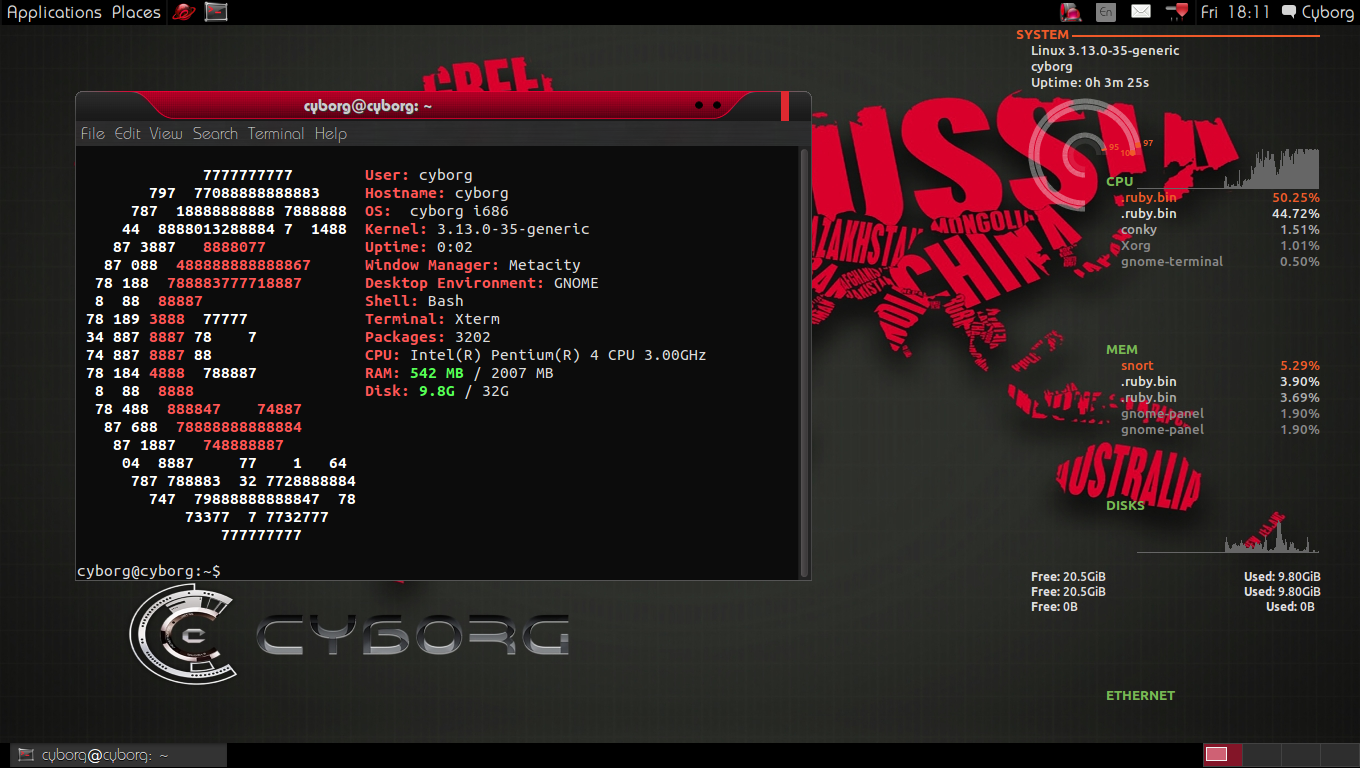


CURRENT RELEASE :- CYBORG HAWK v 1.0


DEVELOPED BY :- TEAM CYBORG LEADED BY VAIBHAV SINGH AND SHAHNAWAZ ALAM FROM ZTRELA KNOWLEDGE SOLUTIONS PVT. LTD


CYBORG TEASER  :- 



Howto Decorate Bash Prompt

The Bash shell provide users with a very customisable prompt through the variable named PS1 for the primary prompt and PS2 for the secondary prompt. This Howto is the basics to get started.

Simplest method to test changes to the prompt is by entering the following at the prompt and the immediate changes will be shown at the user prompt in the next press of the “Enter” key.

export PS1='Hello world$ '

This will display the words “Hello world$” followed by a space before the cursor.

Backslash-escaped Special Character

Users find it useful with their server hostname, user name, date, time, directory and all sorts of stuff displayed with their prompt. The list can be found at Bash Prompt from TLDP, here are listed a few;

  1. d – the date  in  “Weekday  Month  Date”  format (e.g., “Tue May 26”)
  2. e – indicate an ASCII escape character (033)
  3. h – the hostname up to the first ‘.’
  4. n – newline
  5. t – the current time in 24-hour HH:MM:SS format
  6. T – the current time in 12-hour HH:MM:SS format
  7. u – the username of the current user
  8. W – the basename of the current working directory

Example 1: Common user name, server host name and working directory display

export PS1='[u@h W]$’

Example 2: Display current time and prompt in 2nd line

export PS1=’d [u@h W]nt $’

Colours

Font colour is a assigned with the sequence [e[colourcode] where the colour code in combination of font style and ansi colour code (see TLDP). All colour escape sequences must be followed by letter ‘m’.

Ansi colour code

  1. Black      0;30m
  2. Dark Gray     1;30m
  3. Blue        0;34m    
  4. Light Blue    1;34m
  5. Green       0;32m    
  6. Light Green   1;32m
  7. Cyan        0;36m    
  8. Light Cyan    1;36m
  9. Red         0;31m    
  10. Light Red     1;31m
  11. Purple      0;35m    
  12. Light Purple  1;35m
  13. Brown       0;33m    
  14. Yellow        1;33m
  15. Light Gray  0;37m    
  16. White         1;37m

[e[m] Closing colour code

Example 1: Display common prompt as green and following character typed is also green. Its shown 2 ways of writing same prompt

export PS1='[[e[0;32m]u@h W]$ ‘export PS1='[[33[0;32m]u@h W]$ ‘

Example 2: Display common prompt as green and following character typed is default colour

export PS1='[[e[0;32m]u@h W[e[m[[$ ‘

Example 3: Contrast colours to highlight

export PS1='[e[1;34m]u[e[1;33m]@[e[1;32m]h[e[1;37m]([e[1;31m]W[e[1;37m]) [e[1;36m]$ [e[0m]’

Saving changes

Changes can be saved to ~/.bashrc to make sure that it is applied each time a user access the terminal.

To make this global, add the PS1 line to the /etc/bashrc. This however is always overridden by the user’s ~/.bashrc configuration.

Example of ~/.bashrc:

# .bashrc# Source global definitions
if [ -f /etc/bashrc ]; then
    . /etc/bashrc
fi
# User specific aliases and functions

DRM Pull Request Sent In For Linux 3.19 – Great Stuff For Intel, Nouveau, Radeon

One week into the merge window for the Linux 3.19 kernel, the DRM subsystem pull request was sent in this morning by Red Hat’s David Airlie. There’s a lot of interesting kernel graphics driver changes abound for Linux 3.19!..

Read more at Phoronix