Home Blog Page 1359

LLVM Clang Now Builds Even More Debian Packages

Going back two years has been an initiative to build the Debian package base with LLVM/Clang rather than GCC — for much the same reasons as building the Linux kernel with Clang. Thanks to Google’s Summer of Code, there’s been more progress on building out Debian using the latest Clang compiler…

Read more at Phoronix

Qualcomm: Snapdragon Chips Key to Secure Smartphone Kill Switches

The chip maker says its Snapdragon processors are an important element to creating secure methods of rendering mobile devices bricks if stolen.

Open Source Datacenter Computing With Apache Mesos

Apache Mesos is a cluster manager that provides efficient resource isolation and sharing across distributed applications or frameworks. Mesos is a open source software originally developed at the University of California at Berkeley. It sits between the application layer and the operating system and makes it easier to deploy and manage applications in large-scale clustered environments more efficiently. It can run many applications on a dynamically shared pool of nodes. Prominent users of Mesos include Twitter, Airbnb, MediaCrossing, Xogito and Categorize.

read more

Read more at OpenSource.com

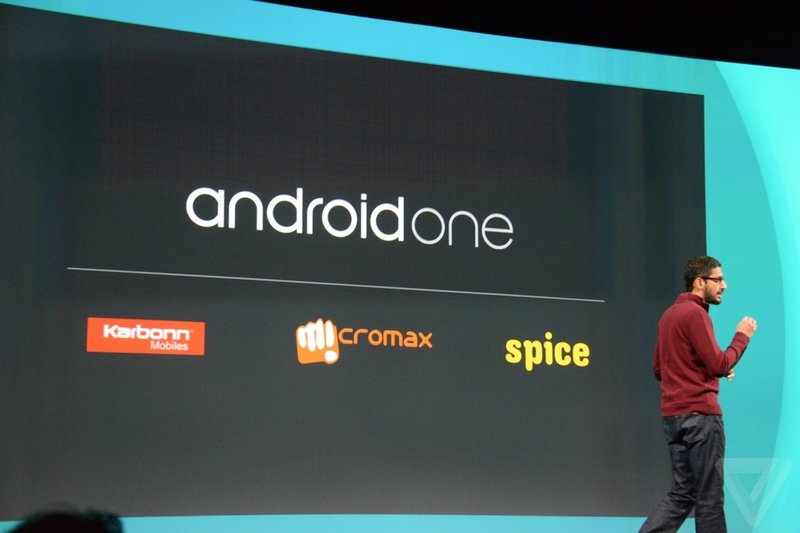
Google Reveals the First Ultra-Cheap Android One Smartphones

Google has unveiled the first smartphones to run on its Android One platform, a standard designed to help push affordable smartphones in the developing world. The initiative kicks off in India, where Micromax, Spice, and Karbonn are all selling phones said to have 4.5-inch screens, 1GB of RAM, 1.3GHz quad-core processors, dual-SIM slots, microSD expandable storage, and FM radios. Android One devices will also ship with support for more languages, including Hindi. The first phones are expected to retail for 6399 rupees ($105).

Similarly inexpensive smartphones have been around for a while, but Android One represents a concerted effort from Google to put its stamp on the user experience. These phones will all run stock Android…

Continue reading…

Read more at The Verge

How to Monitor Online Prices on Linux

Anyone who does a bit of online shopping knows that one of the most important rules to get the best deal possible is to look for the product you want on multiple shopping platforms. For example, buying a used book on Amazon is easy, and buying the same on eBay might be cheaper. You also […]

    Read more at Xmodulo

    Huawei Opens R&D Facility in France

    Chinese networking giant’s new research site in the Sophia Antipolis technology hub is its 17th in Europe and will focus on chipset design and embedded technology.

    Connected Living Room Market – Latest Technology Research Report and Industry Analysis upto 2019

    The report titled ‘Connected Living Room – Global Forecast, Market Share, Trends, Size, Growth And Industry Analysis, 2013 – 2019’ delves into the contemporary concept of living rooms that are centered on advanced entertainment and communication devices. The report takes into account various dynamics that are expected to work in tandem so as to bring about a change in the devices and technologies in new-age living rooms.

    Read More @http://www.transparencymarketresearch.com/connected-living-room.html

    This report can be described as a comprehensive study of current trends in connected living rooms. With technological advancements rapidly taking place in this sector, this report is integral to the strategy of both established as well as incumbent market players.

    It features end-to-end analyses of market propellants as well as inhibitors. The report provides users with accurate market projects for the years ahead. Besides a value chain analysis, the report also provides a market share analysis based on market segments and geographical markets.

    The report also offers a statistics-based projection of the emerging trends in this market that will play a key role over the next few years. Developments that have taken place over the recent years are extensively analyzed in this report. Yet another highlight of this study is the use of Porter’s five force model analysis as well as detailed Company Profiles section that takes into account the strategies, financial standing, and strengths and weaknesses of leading names in this sector.

    Market overview

    The concept of a connected living room is relatively modern and entails the use of technological devices and gadgets that provide a combination of information and entertainment depending on the choices of the user. With a connected living room, a user can share photos, music, and videos enabled by devices such as smart televisions, set-top boxes, and personal computers.

    According to the findings of this report, the market for connected living rooms is anticipated to witness healthy growth, with single-digit CAGR increase by the end of 2019. Some of the devices that constitute a connected living room are, plasma TVs, smart TVs, DVD players, OLED TVs, video recorders, audio and gaming consoles, among others.

    There are a variety of factors propelling growth in the connected living rooms market. These include: a growth in the demand for digitization, the growing preference for advanced display equipment, and the emergence of novel technologies and platforms for sharing information and entertainment. At the same time, there are a few factors that have been hindering the market from reaching ideal growth figures. These factors include a lack of user-friendliness of these noticeably high-tech devices as well as their high costs.

    First milestone of UCS 4.0 released

    Univention has released the first milestone of its Enterprise Linux distribution Univention Corporate Server. New features:

    • based on Debian 7.6 aka “Wheezy”
    • new Linux kernel 3.16
    • a prerelease of Samba 4.2
    • the LDAP directory service now with the better performing MDB backend.

    The milestone aims at channel partners, technology partners and interested parties who want to take a first look at the upcoming release of Univention Corporate Server (UCS) which will be released in November.

    Further information at: http://blog.univention.com/technical-overview-ucs-4-0-preview/

    Linux Debian with PXE and AOE server to install windows 7/8

    I wanted to be able to install Win7 over PXE but got a head acke when I read a few tutorials about it and thought to myself there should be a easier quicker way. Indeed there is using AOE (ATA Over Ethernet). I found a nice howto here but it is aimed at a Windows Server. I came up with a way to do this in Linux.

    This will work on Debia Squeeze and Wheezy. I have not tried this with the Windows 7 CD, only tried this with my jump drive.

    Software needed

    • Base system of Debian
    • DNSMasq – via APT
    • iPXE boot CD
    • Syslinux – via APT
    • vblade – via APT
    • Windows 7 or 8 in jump drive form

    Install DNSMasq and Syslinux with apt — sudo apt-get install dnsmasq syslinux — Configure DNSMasq with nano or vi to your liking — sudo nano /etc/dnsmasq.conf –. You can use my config if yo wish.

    interface=eth1
    listen-address=127.0.0.1
    domain=
    dhcp-range=192.168.0.50,192.168.0.150,12h
    dhcp-boot=pxelinux.0
    enable-tftp
    tftp-root=/tftpboot/
    log-queries
    log-dhcp
     
    We also need to make the NIC to run a static address. As you can see I am using eth1 but you might be using eth0 so keep in mind yours might be different. To give your NIC a static address edit — sudo nano /etc/network/interfaces — here’s mine for a example.
     
    allow-hotplug eth1
    iface eth1 inet static
            address 192.168.0.1
            netmask 255.255.255.0
            network 192.168.0.0
            broadcast 192.168.0.255
     
    Just make sure you use the correct IP subnet that matches DNSMasq. After editing the interfaces file you need to restart the device. — /etc/init.d/networking restart
     
    We can now move on to the PXE layout. The root directory I use is /tftpboot so i’ll use it in the tutorial.
    create a new directory for tftp — sudo mkdir -p /tftpboot —  and also — sudo mkdir -p /tftpboot/pxelinux.cfg
    Copy a couple of files from syslinux to the tftpboot directory — sudo cp /usr/lib/syslinux/menu.c32 /tftpboot — — sudo cp /usr/lib/syslinux/pxelinux.0 /tftpboot — After that we can create the default file for PXE — sudo nano /tftpboot/pxelinux.cfg/default — Here is a simple setup I use.
     
    DEFAULT menu.c32
    PROMPT 0
    MENU TITLE PXE Boot
    TIMEOUT 100

    LABEL Install Win7
    MENU LABEL Install Win7
    kernel ipxe.krn
    initrd conf.ipxe

    Just save and exit. Now download iPXE’s boot CD and mount it. — wget http://boot.ipxe.org/ipxe.iso — to mount it issue this — sudo mount -o loop ipxe.iso /media — cd in to /media and copy boot.cat and ipxe.krn to the root of the tftpboot directory. — sudo cp boot.cat ipxe.krn /tftpboot — unmount the ipxe.iso –sudo umount /media — Now we need a config file for iPXE to boot a AOE. — sudo nano /tftpboot/conf.ipxe — It should look like this

    #!ipxe
    dhcp net0
    set keep-san 1
    sanboot aoe:e0.1

    In all tha was the hard part. The easy part is setting up AOE. Debian’s kernel has the module ready to go but has to be enabled. — modprobe aoe — now we need to add it to the modules file so it is loaded when the system boots. — sudo nano /etc/modules — Should look like this

    # /etc/modules: kernel modules to load at boot time.
    #
    # This file contains the names of kernel modules that should be loaded
    # at boot time, one per line. Lines beginning with “#” are ignored.
    # Parameters can be specified after the module name.

    aoe
    loop

    Now install vblade — sudo apt-get install vblade — Copy the Win7 or 8 USB jump drive using disk dump. I put mine in the /tftpboot/win7 directory. — sudo mkdir -p /tftpboot/win7 — — sudo dd if=/dev/sde of=/tftpboot/win7/win7.img bs=4M — It will take about five or ten minutes to copy. When finished we can start vblade. — sudo vbladed 0 1 eth1 /tftpboot/win7/win7.img — You can create a script or even issue it in the rc.local file to start everytime the system boots. All what is left is to restart DNSMasq and test it out with Virutal Box or a real system. — sudo /etc/init.d/dnsmasq restart —

    Hope you’ll enjoy this tutorial.

    Make Downloading Files Effortless

    A download manager is computer software that is dedicated to the task of downloading files, optimizing bandwidth usage, and operating in a more organized way. Some web browsers, such as Firefox, include a download manager as a feature, but their implementation lacks the sophistication of a dedicated download manager (or add-ons for the web browser), without using bandwidth optimally, and without good file management features.

    <A HREF=”http://www.linuxlinks.com/article/20140913062041384/DownloadManagers.html“>Complete article</A>