
Forlinx Embedded(http://www.forlinx.net/), a company based in Baoding, Hebei, China specializing in embedded systems design and manufacturing, has recently launched OK335xS-II single board computer powered by Texas Instruments AM335x SoC which should be “the cheapest industrial Cortex-A8 board in history” as it sells for as low as 298 RMB or about $49.
Forlinx_OK335xS-IIOK335xS-II board is comprised of a baseboard and a CPU module soldered to the base board with the following specifications:
SoC – Texas Instruments AM335X ARM Cortex-A8 processor @ 800MHz with PowerVR SGX530 GPU
System Memory – 128M DDR3 + micro SD slot
Storage – 256MB SLC NAND Flash
Display I/F – LCD interface with support for LCD to LVDS and LCD to VGA, and resistive touchscreen interface
Connectivity – 1x 100M Ethernet
USB – 1x USB 2.0 host, 1x mini USB 2.0 device
Serial – 5x serial port (1x debug interface, 4x TTL port)
Expansions headers – 5 headers with access to
7x AD (2x for user, 1x for slide rheostat, 4x for resistive touch)
1x I2C, 1x SPI
1x I2S
2x CAN
3x PWM(1x backlight, 1x buzzer, 1x user expansion)
8x GPIOs
Misc – 2x LEDs, 3x user keys, boot and reset key, boot switch, battery for external RTC chip
Power Supply – 5V
Dimensions – 52 x 42mm (CPU module); 104.2 x 81 mm (Baseboard)
Operating Temperature Range – -40℃ to +85 ℃
Relative Humidity – 10%~90%
what ‘s more, 4.3”, 5”, 7”, 8”, and 10.4” LCD could be provided to work with the board, Wi-Fi can be added via SDIO or USB, and the boot switch is used to select between NAND or SD card boot.
Both Linux 3.2 and Win CE6.0 are supported, and the board apparently sells pre-loaded with Linux 3.2. WinCE OS will be officially released soon. “abundant documentation” with Linux and WinCE software manual, a Qt development guide, and various sample programs are provided.
For more details, please visit www.forlinx.net.
How to Build a Linux Media Server
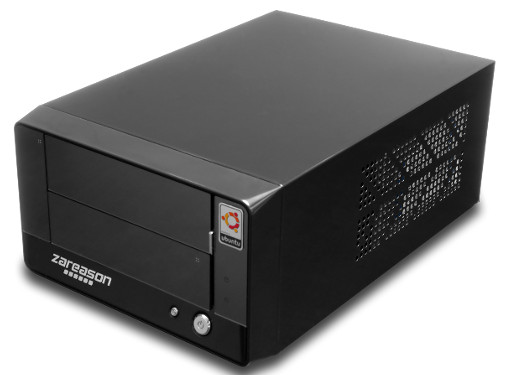
Just about any Linux makes an excellent media server because it’s lightweight and stable, so you can use whatever flavor you’re most comfortable with. Any Ubuntu variant (Ubuntu, Xubuntu, Lubuntu, and so on) is exceptionally nice to set up as a media server because they make it easy to get restricted codecs. I have Xubuntu running on a ZaReason MediaBox. This is a simple system for playing movies and music. It is not a DVR (digital video recorder), and it doesn’t need a TV tuner because I don’t have any broadcast TV. No cable, satellite, nor over-the-air even. Don’t want it and don’t miss it. But if that’s something you want you may have it, because Linux wants us to be happy.
The MediaBox is a little sweetheart that holds two 3.5″ SATA3 drives and a CD/DVD drive. Mine is powered by an Intel quad-core i5-4430 CPU and 4GB RAM, and it comes with a nice batch of ports. On the back you get:
- 4 USB 3.0
- 2 USB 2.0
- 2 HDMI
- 1 DVI
- 2 Gigabit Ethernet
- Optical Audio + S/PDIF audio out
- 6 Analog Audio I/O
- 1 PS2 Port.
It has a front panel with 2 USB 2.0 ports, and headphone and microphone jacks. It also includes Bluetooth and wireless B/G/N. Wireless G speeds (maximum 54 Mbps) are adequate for streaming movies, and N speeds (maximum 600 Mbps) allow you to comfortably stream to multiple endpoints, and to do fast file transfers. It runs from a 250-Watt power supply, and the CPU temperature never goes over 40C. A nice quiet little box that doesn’t need much room or use much power.
Of course, you can use any PC you want for your media server. A bigger case is more comfortable to work in, and has more room for drives and accessories. For best performance you want SATA 3 hard drives, and lots of audio and video ports to plug into. HDMI is great because it eliminates a lot of cabling; audio and video run over the same link, so you don’t need bales of RCA cables. (Do not pay a lot of money for cables! High-priced cables are scams.)
My home theater system is rather a hodge-podge: an older 5.1 surround receiver, an old 6-disc CD changer, a newfangled Sony Blu-Ray player with Netflix, Amazon, Pandora, Hulu, and a ton of other online services, the MediaBox, and a 42″ teevee. Only the TV, the MediaBox and the Sony have HDMI ports, so everything is connected via a nest of HDMI and RCA cables. It works.
All That Money and They Still Suck
The Sony box is useful for Amazon and Netflix video, because those are chronic pains on Linux. Today they work, tomorrow they don’t, and it’s enough to make me want to kick them because they built their empires on Linux and FOSS, but still scorn us. The Sony apps stink. It’s difficult to enter your logins because it seems that on-screen keyboards are mysteries to the app developers, and some of the apps require creating a Sony account to manage them. Which doesn’t add any useful functionality, but just more hassles. Don’t even get me started on the craptastic NPR app, to give just one example, which has like a million stations to choose from, and no way to search or bookmark. Once your apps are set up $deity help you if you want to use a different login. So, in my setup, the Sony box is a fallback for when the other services decide they don’t want to work on Linux. It’s many times easier to access them through a Web browser, so that is always my first choice.
If you’re wondering why I even bought the Sony player, well, sometimes I wonder too. I bought it before I had a media server, and it was cheap, around $100. I don’t know if I’ll ever play an actual Blu-Ray disc. Blu-Ray sounds wonderful: high-definition video (1920×1080 pixels), and it stuffs as much as 50GB of data onto a single disk. But it is encumbered by copy protection and patents, and of course the copy protection was broken long ago. Terry Hancock, who is developing a free alternative to Blu-Ray called Lib-Ray, characterizes Blu-Ray as “A ridiculously overcomplicated set of technologies whose purpose is primarily to prevent you from watching their movies.” Blu-Ray is so locked-down that producers like Terry cannot release a non-DRM Blu-Ray disk. The Oatmeal has my all-time 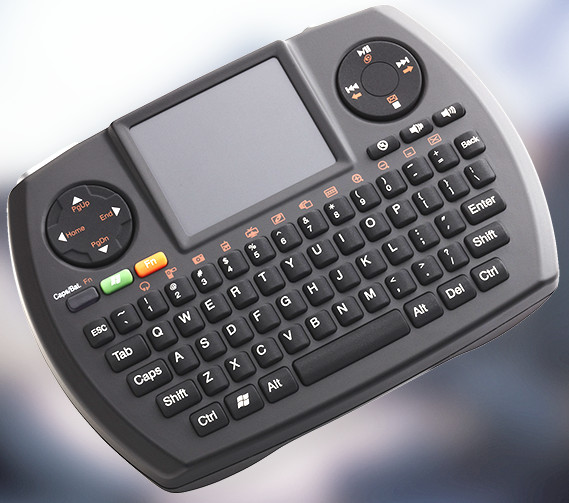 favorite take on “piracy”: I Tried To Watch Game of Thrones and This is What Happened.
Having Everything
Having a full Linux distro on a big screen is wonderful. I can run any program, Web surf, see books really big, and do anything I can do on a normal PC.
I use a tiny little SMK wireless keyboard with touchpad to control the MediaBox. Sometimes I’ll plug in a full-sized keyboard to the front USB port for more complicated tasks such as a system upgrade, or run an SSH session from my laptop. Because it’s Linux I can do all these things.
Software
Linux has all kinds of good multimedia software, and my three mainstays are XBMC, VLC, and K3b.
I use XBMC for watching movies that I have ripped from DVD. It’s nice to have them all stuffed onto a big hard drive. I’m also working on storing my music CDs on the MediaBox. Once upon a time my living room was full of racks of CDs and DVDs. It’s tidier having them put away out of sight. XBMC runs on Android, iOS, Mac, and Windows. If you have two XBMC servers on your network they can share media libraries. You can use XBMC as a DVR, and it records both Internet TV, and streams from a TV capture card.
VLC is excellent for playing music and movies, and it also plays Internet and LAN streams. It rips and converts pretty much any audio or video medium, and records any stream that it can play. Anything VLC can’t handle is probably broken.
Brasero and K3B are easier than VLC for ripping CDs and DVDs. Nearly all DVDs are copy protected, which of course was broken years and years ago, so you need libdvdcss to rip them. You also need it to play movie DVDs on Linux. Sure, wanting to play our movies on Linux makes us criminals, but I’m not sorry.
Of course there is a lot more good multimedia software on Linux: MPlayer, Totem, Amarok, Banshee, Rhythmbox…you may use whatever you want.
Making it Work
Making all of this stuff work can be a bit of a chore, but trust me it’s no worse than wrestling with something like the Sony box and its bundle of apps craptastic. XBMC has been around a long time, and consequently has amassed a good body of documention.
XBMC Wiki Manual includes information on all kinds of remote controls, from programmable remotes to smartphone apps, small home theater computers like the Boxee Box, ASUS Chromebox, and Apple TV 1, and using XBMC as a PVR/DVR.
Ubuntu Restricted Formats is a complete guide to playing all media on your Ubuntu PC
Our own Jack Wallen wrote How to Install the Netflix Streaming Client On Linux.
Amazon video is still a moving target, so when I figure out a reasonably reliable way to play it on Linux I shall share with you.