
For those curious about the performance advantages of using 64-bit Ubuntu Linux over 32-bit Ubuntu on a modern Intel laptop, here are 32-bit vs. 64-bit benchmarks of Ubuntu 14.04 LTS on the ASUS Zenbook Prime.
How to Install Sifr Icon Set for LibreOffice 4.2 on Ubuntu
Users can install the most recent updates on their own, but without doing this they receive major software updates like LibreOffice 4.1 along with their Ubuntu update every 6 months.
Windows XP Market Share Decline Stalls, Mac OS X Surges
Not even a month without support and Heartbleed is speeding migration
Windows XP’s been without support for a month and a day now, but seems not to be falling out of favour any faster than happened when it was supported…
AV Linux Dazzles Both Eyes and Ears
AV Linux can turn a new or old PC, or an Intel-powered Mac box, into a workstation for audio/graphics/video enthusiasts. AV Linux is a specialty distro much in the style of the CAELinux distro for engineers and scientists and the Musix distro for audio and music production that I reviewed in recent weeks. AV Linux is not your typical Linux desktop. It has a custom-designed 32-bit updated 3.10.27-PAE low-latency Linux kernel. This contributes to creating a unique and very effective Linux OS workstation appliance for AV pros.
Distribution Release: Pidora 2014
Pidora 2014 has been released. Pidora is a Linux distribution designed for the Raspberry Pi single-board computer and based on Fedora 20. It offers a interesting and more modern alternative to the mostly Debian-based distributions that dominated the Raspberry Pi market.
How To Build a Cloud (cluster) Hosting Without Investing a Lot of Money
Three years ago, I had an interesting problem. It was necessary to assemble a platform to combine multiple racks of servers into a single entity for the dynamic allocation of resources between sites, written for the LAMP platform.
However, the budgets were very less so expensive solutions such as Cisco Content Switch or disk shelves with fiber optics were not affordable.
And, besides, of course, in case if one server is down – this should not affect the operation of the platform was my main concern.
In my school time, I read somewhere that “Necessity is the mother of invention”, which is fairly true.
First of all you need to share a platform into subtasks. You have to do something for the synchronization of data as a shared drive is available. In addition, it is necessary to balance the traffic and have at it some statistics. Finally, the automation of providing the necessary resources – is also quite a serious problem.
Let’s start from the beginning…
I had a choice on what to organize a platform. OpenVZ or XEN ? Each has its pluses and minuses. OpenVZ has a lower overhead, work with files and does not block devices, but cannot run anything other than Linux’ovh distributions. XEN allows you to run on Windows, but more difficult work. I’ve been using OpenVZ, as this is more suited for the task, but you can choose the one you like, there is no restriction on choice.
Then I shared the server space for the VDS, one for each core. Servers were different, and therefore I had a set from 2 to 16 and virtual ok on each server. In the “average house” turned out about 150 virtual ok on the counter.
How to synchronize the data?
The next item – this is the early establishment of VDS on demand + protection against breakage of any server. The solution was simple and beautiful.
Each VDS creates the initial image as a file on the LVM partition. This image “spreads” on all servers in the platform. As a result, we have a backup of all the projects on each server (paranoid cry of emotion), and the creation of a new VDS «on demand” has been simplified to a snapshot image and it start the VDS literally in few seconds.
Database and API
If the integrity of the files were all simple, here’s a sync base things were worse. From the beginning I tried a classic example – master-slave, and collided with a classic problem: slave lag behind master.
The next step was to Mysql-Proxy. As a sysadmin, this was very easy to set and forget, but the configuration should be updated while adding / removing new VDS. But developers have had their own opinion. In particular, the fact is that, it is easier to write a PHP class for synchronization of INSERT / UPDATE / DELETE queries than to learn Lua, without which the Mysql-Proxy is useless.
Their work produced a so-called API, which was able to find neighbors of a broadcast sync up to date and to inform the neighbors of any changes to the database.
But still worth exploring Lua and make native mode, where all requests are synchronized with their neighbors.
FreeBSD
Balancer – it can be said that it is a key aspect of the platform. If they fall to balance server, all work will have no meaning.
That is why I used the CARP to create fault-tolerant balancer, choosing FreeBSD as the OS and Nginx as a balancer.
Yes, NLB has been replaced by two weak machines with FreeBSD (marketers in a rage).
And most importantly – how it works
When starting up the platform for each site runs on a single copy and monitor to balanesere watched to ensure that the primary copy has always worked.
In addition, the balancer was installed to analyze statistics Awstats, which provided all the logs in a convenient format, and most importantly – there was a script, polling each VDS via SNMP for its load.
As we remember, I devoted each VDS on one core, so Load Average in a 1 – this is a normal load for the VDS. If LA became 2 or above – the script that creates a copy of the VDS on a random server and put this in its upstream nginx’a. And when the load on extra VDS fell less than 1 -, respectively, all removed.
Summarize
If you take the rack with servers and switches supporting the CARP protocol, to create a ESDS cloud hosting Server, will need to:
- Explore Lua and adjust transparent synchronization across Mysql-Proxy
- Screw the billing account for additional copies of the VDS and traffic
- Write a web interface for managing VDS
- The filling racks with enough amount of four zeros. Compared with the decisions of the brands, where the price of one stand is the sum of six zeros, counts worth.
How to Make a Fancy and Useful Bash Prompt in Linux
We can program our humble Bash prompt to display all kinds of useful information, and pretty it up as well. We’re sitting there staring at our computers all day long, so why not make it look nice? We will learn how to quickly test new configurations and quickly reverse them, how to make nice colors, how to display different types of information, customize it for different users, and make a multi-line prompt.
Configuring a different prompt for SSH sessions is one of my favorites, because it has saved me from many an error due to running a command in the wrong terminal. A dull life without broken servers is not too much to ask. Just add these lines to the ~/.bashrc of your user on the remote machine:
if [ -n "$SSH_CLIENT" ]; then text=" ssh-session"
fi
export PS1='[e[1;32m]u@h:w${text}$[e[m] '
Then load your changes without logging out:
$ source ~/.bashrc
Now open an SSH session from another machine and you will see something like figure 1.

You can even do all of this over SSH so you don’t have to get up.
Colors
Of course you may choose from a multitude of splendid ANSI colors. You can find ANSI color code charts all over the place. These are the basic colors:
0;30m Black 0;31m Red 0;32m Green 0;33m Yellow 0;34m Blue 0;35m Purple 0;36m Cyan 0;37m White
0 is normal font. Change the 0 to 1 for bold, 4 for underline, and 5 for slow blink. In the SSH example text=" ssh-session" is whatever text string you want, and the text label is also arbitrary, as long as it matches ${text}.
The Bash shell supports a lot of special characters for customizing the prompt. For example, u is the username, and h is the hostname. Other useful special characters are:
d : the date in "Weekday Month Date" format t : the current time in 24-hour HH:MM:SS format w : the current working directory s : the name of the shell n : newline [ : begin a sequence of non-printing characters, for embedding a terminal control sequence into the prompt ] : end a sequence of non-printing characters
Your custom prompt sequences are hard to read because of all the escapes, but you’ll get the hang of it with a little practice. Note how the whole sequence is enclosed in single quotes, and it starts after PS1=. u@h: is an example of how to insert punctuation marks after the special characters. Literal punctuation marks are not escaped. You can insert spaces in the same manner; for example, see the closing color code, [e[m] ', which has a space after last square bracket. This creates a space after the dollar sign. This example also shows how to reset the font color back to the terminal default. In the next example you’ll see how to set a custom font color on right side of the prompt.
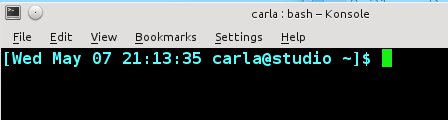
This example creates a pleasant cyan prompt with date and time (figure 2). Note also how you can add square brackets around the prompt, or any part of it, by enclosing the special characters with un-escaped brackets:
$ PS1='[e[1;34m][d t u@h w]$[e[m] '
You can go nuts with colors (figure 3):
$ PS1='[e[1;36m]d [e[1;32m]t [e[1;33m]u@[e[1;35m]h:w$[e[0;31m] '
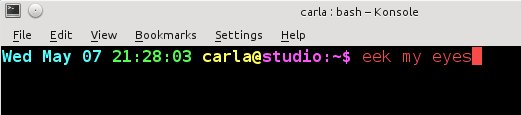
Putting a color code at the end, like [e[0;31m], sets a custom color on anything you type, and everything else that appears after the prompt.
Multi-line Prompt
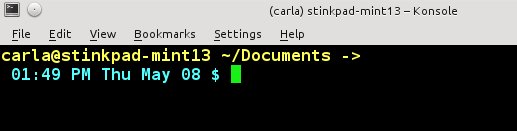
Most terminals are 80 characters wide, so you run out of room when you have a long prompt. So why not break up the lines? You can with our old friend the newline special character, n:
PS1='[e[1;33m]u@h w ->n[e[1;36m] @ d$[e[m] '
This creates a nice prompt with the username, current directory, and time and date (figure 4). It has an arrow to indicate there is another line, and it terminates in a proper dollar sign for an unprivileged user.
Root Prompt
The root prompt is indicated by the hash mark, #. As long as we’re making fancy prompts, why not make one for the root user too? Add these lines to both your ~/.bashrc, and to root’s/root/.bashrc:
if [ $(id -u) -eq 0 ];
then
PS1='[e[1;36m][d t u@h w]$[e[m] '
else
PS1='[e[1;33m][d t u@h w]$[e[m] '
fi
You can either sudo or su to root, then source ~/.bashrc, and enjoy root’s new fancy prompt. You can fancy up root’s prompt just like for any user. A quick way to check any user’s ID number is with the ID command:
$ id -u
Put a Fortune in your Prompt
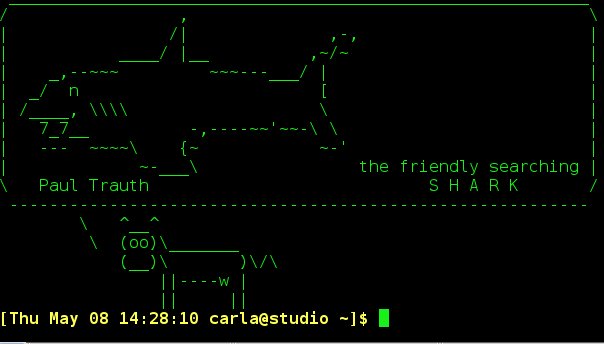
Remember way back when we did Put a Talking Cow in Your Linux Message of the Day? You can also put one in your Bash prompt by adding this line to ~/.bashrc::
[[ "$PS1" [[ && /usr/games/fortune | /usr/games/cowsay -n
~/.bashrc Gotchas
If there is not a ~/.bashrc then create one. On most distros it is sourced from ~/.profile, which you can verify by looking for something like these lines in ~/.profile:
# if running bash
if [ -n "$BASH_VERSION" ]; then
# include .bashrc if it exists
if [ -f "$HOME/.bashrc" ]; then
. "$HOME/.bashrc"
fi
fi
If your particular flavor of Linux does not use ~/.profile, then look for ~/.bash_profile or ~/.bash_login. If it doesn’t have those then you have a weird Linux, and must consult your distro documentation to find out what to do.
Feeling lost? You can output your current prompt settings:
$ echo $PS1
There are something like a billion and twelve ways to mess with your Bash prompt, so visit the Bash Reference Manual to learn all about it.

Defeating Memory Comparison Timing Oracles (Red Hat Security Blog)
Over at the Red Hat Security Blog, Florian Weimer looks at timing oracles in memory comparison functions and how to stop them. Timing oracles can allow attackers to extract keys or other secret data by timing code that compares input data to the secret. “Of course, there are other architectures (and x86 implementations), so we will have to perform further research to see if we can remove the timing oracle from their implementations at acceptable (read: zero) cost. For architectures where super-scalar, pipelined implementations are common, this is likely the case. But the GNU C library will probably not be a in a position to commit to an oracle-free memcmp by default (after all, future architectures might have different requirements). But I hope that we can promise that in -D_FORTIFY_SOURCE=2 mode, memcmp is oracle-free.“
More than 300,000 Servers are Still Vulnerable to Heartbleed

One month after the critical Heartbleed vulnerability was first revealed, there are still more than 300,000 servers vulnerable to the bug, according to security researcher Robert David Graham. Graham arrived at the number through a global internet scan, which found a full 1.5 million servers that still support the “heartbeat” feature of OpenSSL that allowed the bug, and exactly 318,239 systems that are still vulnerable. The number counts only confirmed cases and there may well be other systems that escaped Graham’s accounting, either because of spam blocking or unorthodox OpenSSL setups.
Wayland 1.5 Appears To Be In Great Shape
The 1.5 release of Wayland and the Weston compositor is imminent and this release appears to be particularly good…