“With the exabytes of data that are being generated today, it has become essential to integrate networking technology and data management technology in order to manage the movement and storage of the data. Policy-based data-management systems provide a way to proceed. They represent perhaps the latest stage in the evolution of data-management systems from file-based systems, to information-based systems, and now to knowledge-based systems.”
How to Manage Exabytes of Distributed Data?
How to Stop and Disable Unwanted Services from Linux System
We build a server according to our plan and requirements, but what are the intended functions while building a server to make it function quickly and efficiently. We all know that while installing a Linux OS, some unwanted Packages and Application get installed automatically without our knowledge…
[[ This is a content summary only. Visit my website for full links, other content, and more! [[
Five Funny Little Linux Network Testers and Monitors
In this roundup of Linux network testing utilities we use Bandwidthd, Speedometer, Nethogs, Darkstat, and iperf to track bandwidth usage, speed, find network hogs, and test performance.
Bandwidthd
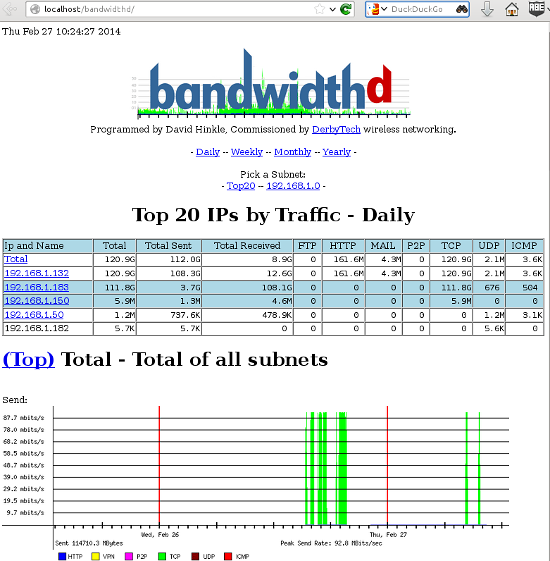
Bandwidthd is a funny little app that hasn’t been updated since 2005, but (at least on my Kubuntu system) it still works. It makes nice colorful graphs of your incoming and outgoing bandwidth usage, and tallies it up by day, week, month, and year on a Web page. So you also need Apache, or some other HTTP server. You can monitor a single PC, or everyone on your LAN. This is a nice app for tracking your monthly usage if you need to worry about bandwidth caps.

Bandwidthd has almost no documentation. man bandwidthd lists all of its configuration files and directories. Its Sourceforge page is even sparser. There are two versions: bandwidthd and bandwidthd-pgsql. bandwidthd generates static HTML pages every 150 seconds, and bandwidthd-pgsql displays graphs and data on dynamic PHP pages. The Web page says “The visual output of both is similar, but the database driven system allows for searching, filtering, multiple sensors and custom reports.” I suppose if you want to search, filter, do multiple sensors, or create custom reports you’ll have to hack PHP files. Installation on my system was easy, thanks to the Debian and Ubuntu package maintainers. It created the Apache configuration and set up PostgreSQL, and then all I had to do was open a Web browser to http://localhost/bandwidthd which is not documented anywhere, except in configuration files, so you heard it here first.
Speedometer
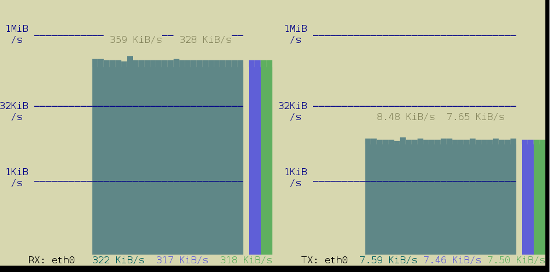
Speedometer displays real-time graphs on the console (so you don’t need a Web server) of how fast data are moving across your network connection, and it also answers the question “How fast is my hard drive?” The simplest usage displays either received or transmitted bytes per second. This called a tap:
$ speedometer -r eth0
You can watch the flow both ways by creating two taps:
$ speedometer -r eth0 -t eth0
The default is to stack taps. The -c option makes nice columns instead, and -k 256 displays 256 colors instead of the default 16, as in figure 2.
$ speedometer -r eth0 -c -t eth0

You can measure your hard drive’s raw write speed by using dd to create a 1-gigabyte raw file, and then use Speedometer to measure how long it takes to create it:
$ dd bs=1000000 count=1000 if=/dev/zero of=testfile & speedometer testfile
Change the count value to generate a different file size; for example count=2000 creates a 2GB file. You can also experiment with different block sizes (bs) to see if that makes a difference. Remember to delete the testfile when you’re finished, unless you like having useless large files laying around.
Nethogs
Nethogs is a simple console app that displays bandwidth per process, so you can quickly see who is hogging your network. The simplest invocation specifies your network interface, and then it displays both incoming and outgoing packets:
$ sudo nethogs eth0
NetHogs version 0.8.0
PID USER PROGRAM DEV SENT RECEIVED
1703 carla ssh eth0 9702.096 381.697 KB/sec
5734 www-data /usr/bin/fie eth0 1.302 59.301 KB/sec
13113 carla ..lib/firefox/firefox eth0 0.021 0.023 KB/sec
2462 carla ..oobar/lib/foobar eth0 0.000 0.000 KB/sec
? root unknown TCP 0.000 0.000 KB/sec
TOTAL 9703.419 441.021 KB/sec
Use the -r option to show only received packets, and -s to see only sent packets.
Darkstat
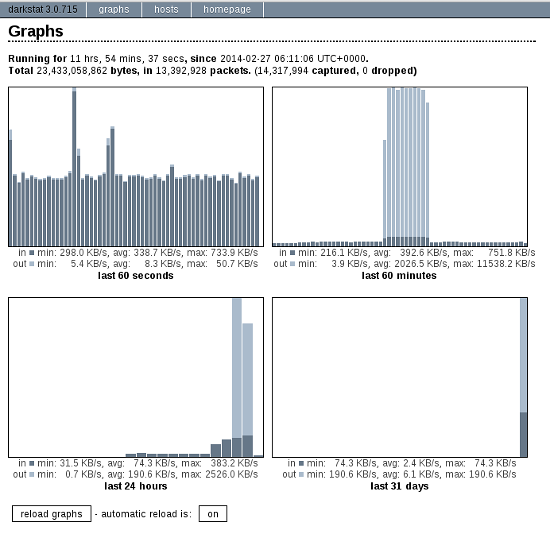
Darkstat is another Web-based network monitor, but it includes its own embedded HTTP server so you don’t need Apache. Start it up with the name of your network interface as the only option:
$ sudo darkstat -i eth0
Then open a Web browser to http://localhost:667, and you’ll see something like figure 3.

Click the automatic reload button to make it update in real time. The Hosts tab shows who you’re connected to, how long you’ve been connected, and how much traffic, in bytes, has passed between you.
You can run Darkstat as a daemon and have it start at boot. How to do this depends on your Linux distribution, and what init system you are using (Upstart, systemd, sysvinit, BSD init). I shall leave it as your homework to figure this out.
iperf
Doubtless you fine readers have been wondering “What about iperf?” Well, here it is. iperf reports bandwidth, delay jitter, and datagram loss. In other words, it tests link quality, which is a big deal for streaming media such as music, videos, and video calls. You need to install iperf on both ends of the link you want to test, which in these examples are Studio and Uberpc. Then start iperf in server mode on one host, and run it in client mode on the other host. Note that on the client, you must name the server. This is the simplest way to run a test:
carla@studio:~$ iperf -s
terry@uberpc:~$ iperf -c studio
carla@studio:~$ iperf -s
------------------------------------------------------------
Server listening on TCP port 5001
TCP window size: 85.3 KByte (default)
------------------------------------------------------------
[ 4] local 192.168.1.132 port 5001 connected with 192.168.1.182 port 32865
[ ID] Interval Transfer Bandwidth
[ 4] 0.0-10.0 sec 1.09 GBytes 938 Mbits/sec
terry@uberpc:~$ iperf -c studio
------------------------------------------------------------
Client connecting to studio, TCP port 5001
TCP window size: 22.9 KByte (default)
------------------------------------------------------------
[ 3] local 192.168.1.182 port 32865 connected with 192.168.1.132 port 5001
[ ID] Interval Transfer Bandwidth
[ 3] 0.0-10.0 sec 1.09 GBytes 938 Mbits/sec
That’s one-way, from server to client. You can test bi-directional performance from the client:
terry@uberpc:~$ iperf -c studio -d
------------------------------------------------------------
Server listening on TCP port 5001
TCP window size: 85.3 KByte (default)
------------------------------------------------------------
------------------------------------------------------------
Client connecting to studio, TCP port 5001
TCP window size: 54.8 KByte (default)
------------------------------------------------------------
[ 5] local 192.168.1.182 port 32980 connected with 192.168.1.132 port 5001
[ 4] local 192.168.1.182 port 5001 connected with 192.168.1.132 port 47130
[ ID] Interval Transfer Bandwidth
[ 5] 0.0-10.0 sec 1020 MBytes 855 Mbits/sec
[ 4] 0.0-10.0 sec 1.07 GBytes 920 Mbits/sec
Those are good speeds for gigabit Ethernet, close to the theoretical maximums, so this tells us that the physical network is in good shape. Real-life performance is going to be slower because of higher overhead than this simple test. Now let’s look at delay jitter. Stop the server with Ctrl+c, and then restart it with iperf -su. On the client try:
$ iperf -c studio -ub 900m
-b 900m means run the test at 900 megabits per second, so you need to adjust this for your network, and to test different speeds. A good run looks like this:
[ ID] Interval Transfer Bandwidth Jitter Lost/Total Datagrams
[ 3] 0.0-10.0 sec 958 MBytes 803 Mbits/sec 0.013 ms 1780/684936 (0.26%)
[ 3] 0.0-10.0 sec 1 datagrams received out-of-order
0.013 ms jitter is about as clean as it gets. Anything over 1,000 ms is going to interfere with audio and video streaming. A datagram loss of 0.26% is also excellent. Higher losses contribute to higher latency as packets have to be re-sent.
There is a new version of iperf, and that is iperf 3.0.1. Supposedly this is going to replace iperf2 someday. It has been rewritten from scratch so it’s all spiffy clean and not crufty, and it includes a library version that can be used in other programs. It’s still a baby so expect rough edges.
Developers from Cuba, Iran, North Korea, Sudan & Syria Can’t Contribute to US Based Open Source Projects?
US law prohibits developers from Cuba, Iran, North Korea, Sudan & Syria to contribute to US based open source projects?
Read more at Muktware
Attack of the 64-bit Octa-core: A Roundup of Newly Announced Mobile Processors
As usual, Mobile World Congress was packed with cool new SoCs, most of which are destined for Android phones and tablets. Some will see wider usage in the broader world of embedded Linux and Android devices.
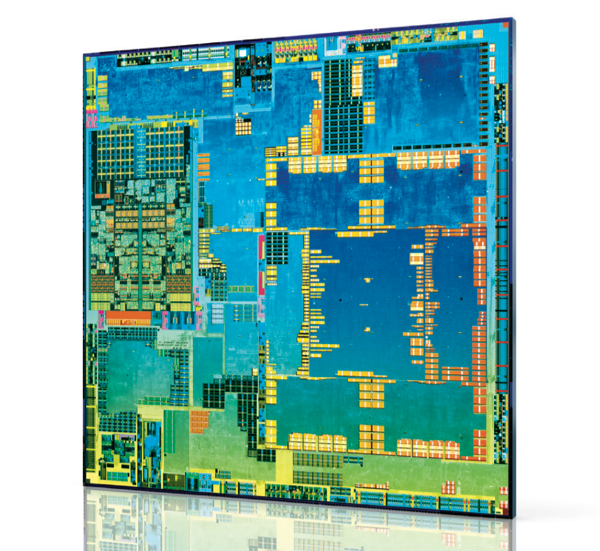
The big news was the invasion of 64-bit ARMv8 and x86 SoCs, including Qualcomm’s Snapdragon 615 and Intel’s Atom Z34xx. The ARM models are built on the ARMv8 Cortex-A53 design. Eventually, we’ll see the -A53 used in Big.Little hybrids along with the similarly 64-bit, server-class Cortex-A57.
Most of the 64-bit SoCs target year-end releases, which is likely the earliest Android will add 64-bit support. With the iPhone’s A7 chip, Apple has beaten Android by at least a year.
Another trend at MWC was the arrival of new octa-core models. The only 64-bit octa-core is the Snapdragon 615, which breaks new ground by orchestrating eight Cortex-A53 cores. Others use Big.Little combos that mix lower power Cortex-A7 cores with cores based on the -A15 or the newly announced -A17.
Amazing capabilities should emerge from a desktop-like, 64-bit data path, as well as up to eight tunable cores. Yet, the initial impact will be muted until Android and Android app developers learn how to fully exploit them. Arguably, new graphics co-processors should have a more immediate impact. SoC comparisons increasingly revolve around their associated GPUs, with newcomers including ARM’s Mali-T760, Imagination’s PowerVR Series 6, Qualcomm’s Adreno 405 and 420, and the 192-core Mobile Kepler GPU in Nvidia’s Tegra K1.
Qualcomm Snapdragon 601 and 615
At MWC, the big chip news was Qualcomm’s partial unveiling of its 64-bit Snapdragon 601 and 615. The quad-core, 1.5GHz Snapdragon 601 will land in the third quarter, with shipping devices in the fourth, while the Snapdragon 615 is expected in Q4 2014, with devices following in early 2015. The 615 has the same Cortex-A53 cores as the 601, but it offers eight of them, making it the first homogeneous, ARM-based octa-core SoC aimed at the mobile market. Applied Micro’s X-Gene combines eight Cortex-A53 cores, but is aimed at the enterprise server and networking markets. Like the 610, the 615 features Qualcomm’s new Adreno 405 GPU. Unlike the Apple A7, the new Snapdragons feature integrated LTE and hardware-based 4K video rendering.
These devices follow Qualcomm’s first 64-bit, ARMv8 SoC, the Snapdragon 410, a 1.2GHz quad-core SoC announced in December, due in the second quarter. In the 32-bit realm, Qualcomm also announced a marginally faster 2.5GHz quad-core Snapdragon 801 update to the 800.
The Snapdragon 615 contradicts Qualcomm’s earlier philosophy on two counts. Previously, Qualcomm execs have claimed that octa-core and 64-bit technologies are overkill for mobile. Although they may have been more right than wrong, marketing trumped consistency.
MediaTek and Marvell take 64-bit mid-range
It’s interesting how quickly cutting-edge CPUs now debut on mid-range devices. MediaTek, for example, announced a quad-core, Cortex-A53 based MT6732 SoC designed for “super-mid” market phones due by year’s end. The 1.5GHz, 64-bit MT6732 lacks some of the extras provided by the Snapdragon 615, but taps ARM’s new 16-core Mali-T760 GPU and offers integrated LTE.
Like MediaTek, Marvell is also aiming a new 64-bit SoC at the mid-range market, most likely in China where it has enjoyed a presence with its PXA 1088. The quad-core, Cortex-A53 based PXA 1928 runs at 1.5GHz, is paired with a Vivante GC5000 GPU, and offers integrated LTE.
In late 2014, we should see more 64-bit SoCs, including Nvidia’s ARMv8 version of the Tegra K1, a dual-core, 2.5GHz processor dubbed “Project Denver.” The SoC features 7-way superscalar technology for processing multiple instructions in a single clock cycle, compared to 3-way on the 32-bit Tegra K1.
This week, Freescale VP Tareq Bustami told TechRadar Pro that the 64-bit ARM version of Freescale’s QorIQ SoC will arrive by year’s end. The new QorIQ will be available in both 8- and 12-core configurations. Like the previously announced Altera Stratix 10 SX, an FPGA enabled Cortex-A53 SoC built with Intel’s 14-nanometer (nm) 3D Tri-Gate process, the SoCs are heading for networking and enterprise customers. There was no word on a 64-bit upgrade to Freescale’s Cortex-A9 based i.MX6, a popular SoC in the embedded world.
Intel’s 22nm Merrifield aims for smartphones
No stranger to 64-bit technology, Intel has announced its first 64-bit mobile SoC with the dual-core, 2.13GHz Atom Z34xx (“Merrifield”). The Z34xx is due to arrive in Android phones this summer along with a PowerVR Series 6 GPU and an Intel XMM 7160 multimode LTE chipset. Intel also announced a quad-core, 2.3GHz “Moorefield” version, due by the year’s end, that promises Android 4.4.2 support and an enhanced, potentially Intel-crafted, GPU.
Intel first targeted smartphones with its Atom Z2460 “Medfield” processors, and had more success with last year’s Atom Z2580 “Clover Trail +”. Still, the Atom is only a blip in the mobile market, due primarily to middling battery life.
Those concerns should be history with the Atom Z34xx, which is built on the more efficient Silvermont architecture, featuring 22nm, Tri-Gate 3D fabrication. Silvermont already fuels the Atom Z3000 (“Bay Trail-T”) tablet SoC and the embedded Atom E3800 (“Bay Trail-I”).
Will the Atom Z34xx, or perhaps the upcoming “Moorefield,” be sufficiently competitive to drive a Google Nexus phone? Rumor has it that Google is prepping an Asus-built Nexus tablet based on the Atom Z3000, so a phone could be next. The remaining challenge for Intel no longer appears to be battery life, but price. Intel may need to take an initial loss to make a mark in mobile.
Cortex-A17: MediaTek MT6595, Rockchip RK3288
ARM is billing its 32-bit Cortex-A17 as the heir to the Cortex-A9. Then again, ARM said the same thing last summer about the slower, but similarly 28nm Cortex-A12. The -A17 can also be seen as a more power efficient replacement to the Cortex-A15, which has suffered from lower than expected power efficiency.
The Cortex-A17 is claimed to offer 60 percent faster performance than the -A9, with improved power and area efficiency. Like the Cortex-A15, the -A17 supports Big.Little octa-core combos with -A7 cores. The Cortex-A12 won’t be able to do this until a 2015 update. Unlike the early -A15 SoCs, the -A17 offers full support for heterogeneous multi-processing (HMP), enabling power and performance optimizations for each Big.Little core.
The newly announced Mediatek MT6595 has four 2.5GHz -A17 cores plus four 1.7GHz -A7 cores. No clock rate was listed for Rockchip’s quad-core Cortex-A17 based RK3288. Both the RK3288 and MT6595 are said to support 4K2K video recording and playback. ARM’s suggested Cortex-A17 pairing is a new quad-core Mali-T720 GPU. The Rockchip RK3288 supports this, as well as the 16-core Mali-T760. MediaTek instead opted for a PowerVR Series 6.
Cortex-A15: Samsung, Allwinner keep ’em coming
While we wait for the Cortex-A17 SoCs to arrive in the coming months, there’s still action with Cortex-A15, including updated octa-core models from Samsung and MediaTek. At MWC, Samsung announced a 28nm Exynos 5422 octa-core that finally offers full HMP controls. It features four faster 2.1GHz Cortex-A15 and four 1.5GHz -A7 cores, and supports 4K UHD resolution. Samsung also announced a six-core Exynos 5 Hexa version with dual 1.7GHz -A15 and four 1.3GHz -A7 cores, similarly coordinated with HMP-ready Big.Little technology.
Finally, Allwinner announced an UltraOcta A80 SoC that combines four -A15 and four -A7 cores. The UltraOcta A80 also packs a 64-core PowerVR 6230 GPU.
Correction: Qualcomm’s 64-bit Snapdragon 615 was not the first ever homogeneous, ARM-based octa-core SoC.

RIT Launches Minor in Free and Open Source Software and Culture
Responding to student interest and a growing industry demand for workers with such skills, Rochester Institute of Technology is launching the nation’s first interdisciplinary minor in free and open source software and free culture.
Starting in Fall 2014, RIT’s School of Interactive Games and Media will offer the minor in free and open source software (FOSS) and free culture for students who want to develop a deep understanding of the processes, practices, technologies, and financial, legal and societal impacts of the FOSS and free culture movements.
Read more at RIT’s blog.
Professional Online Linux Classes for Anyone are Coming Soon
Want a good-paying Linux job, but don’t have the skills? The Linux Foundation is setting up a new program of online classes for you.
OpenSFS Announces LUG 2014 Agenda
Today OpenSFS announced the agenda for the LUG 2014 conference, which will take place April 8-10 in Miami.

Rainmaker: Android’s Co-Founder is Spending Google’s Billions Hunting for the Next Big Thing

Rich Miner strolls the halls of Mobile World Congress in Barcelona, pausing every few minutes to check out the latest gadgets on display. As one of the co-founders of Android, he is walking through a world that has been all but conquered by the operating system he helped create. Now, as a general partner at Google Ventures, he’s tasked with finding and investing the search giant’s billions in the next big thing.
When most people think about Android and its origins, they think of Andy…
What is the GnuTLS Bug and How to Protect Your Linux System From It
It seems that it’s only been a few weeks since we all heard of a nasty certificate validation error in Apple’s software, a.k.a. the infamous “double goto fail” bug. While some were quick to point out that Linux distributions were not vulnerable to this particular issue, wiser heads cautioned that a similar bug could be potentially lurking in software used on Linux.
And, seemingly just to illustrate this point, we now know that a popular free software library, GnuTLS, failed to correctly validate some X.509 certificates in a way that is very reminiscent of the bug that affected Apple.
What is GnuTLS?
If you’ve never heard of GnuTLS, it’s not really because you have been living under some kind of IT security rock. GnuTLS is an encryption and certificate management library that was written for a specific purpose — to write a feature-complete replacement for OpenSSL that can be legally linked against GNU GPL-licensed code. While OpenSSL is Free Software by any definition, it is made available under the OpenSSL license that imposes conditions that are incompatible with software released under GNU GPL. Any programmer working on GPL-licensed code who wanted to use a cryptography library could not legally use OpenSSL, and therefore GnuTLS was written as a GPL-compatible replacement.
A few years after GnuTLS became available, Mozilla released its own security library, called NSS (“Network Security Services”), which was also licensed in a way that was GPL-compatible. So, really, there are three popular free software libraries that do similar things today:
- OpenSSL, under the OpenSSL license (Not GPL Compatible)
- GnuTLS, under the GNU LGPL license (GPL Compatible)
- NSS, under the MPL license (GPL Compatible).
They all do similar things to work with the same X.509 and SSL/TLS standards, but other than that they have nothing in common and share no code.
Is this the same as Apple’s “goto fail” bug?
The bugs are similar in the sense that they both allow invalid certificates to pass validation checks. The exact impact of the vulnerability is still being established, but we should assume that a dedicated attacker can successfully trick an unpatched version of GnuTLS into validating a certificate that is otherwise bogus. This would allow someone with malicious intent to perform a “Man-in-the-Middle” attack by intercepting a TLS connection attempt from your system to a remote server and pretending to be the server with which you are trying to communicate instead.
In terms of a real-world example, if you go to a cafe and fire up your mail client to check your mail over the free wi-fi, what you think is “mail.google.com” may be an attacker’s laptop at the next table, to whom you just sent your Google credentials.
Certificate validation is pretty much the core basis for secure communication using TLS, so when a bug is found in the validation routines, it is nearly always treated as critical.
What software uses GnuTLS?
Quite a few things installed on a Linux workstation use GnuTLS. If you’ve been using Firefox to browse the web, then you are safe, as it uses NSS. However, Chromium (and Google’s Chrome) relies on GnuTLS, as do other webkit-based browsers. Mail clients such as mutt and claws-mail are vulnerable, but Evolution and Thunderbird aren’t.
Most server daemons tend to use OpenSSL or NSS, so your Apache or Nginx server are not affected. Java software includes its own TLS implementation (JSSE) that doesn’t rely on GnuTLS, so you’re safe there, too.
The list is quite long, so it’s impossible to write a comprehensive summary of what is vulnerable and what is not. Instead, what you really should be doing is routinely applying security errata to your systems.
How to check for security errata with yum
Various distributions of Linux use their own mechanisms of applying patches, so it’s impossible to provide a comprehensive article that would be applicable to every distro under the sun. Since I am a RHEL sysadmin and a Fedora developer, I will therefore concentrate on the software management system I know best — yum.
Both Fedora and RHEL (and its beige-box cousin, CentOS) helpfully provide extra information alongside its errata packages that you can use to see whether there are any security-related updates available for a system you administer. To tap into this information, first install yum-plugin-security:
# yum -y install yum-plugin-security
Now you should be able to list outstanding security errata for your system. Here’s one for a RHEL 6 server that hasn’t yet received the gnutls patch:
# yum updateinfo list security [...] RHSA-2014:0246 Important/Sec. gnutls-2.8.5-13.el6_5.x86_64 RHSA-2014:0222 Moderate/Sec. libtiff-3.9.4-10.el6_5.x86_64
You can then find out more about each security advisory by running:
# yum updateinfo "RHSA-2014:0246"
Or you can find out the exact CVEs (Common Vulnerability and Exposure numbers) that are applicable to your system:
# yum updateinfo list cves
Or to that specific gnutls update:
# yum updateinfo list cves "RHSA-2014:0246" CVE-2014-0092 Important/Sec. gnutls-2.8.5-13.el6_5.x86_64
If you want to apply all outstanding security errata to your system, you can do so by running the following command:
# yum --security update-minimal
The takeaway
Regardless of whether you use Linux on a server or on a workstation, it’s very important to always keep your system updated by routinely applying relevant security errata. All software contains bugs that must be patched on a routine basis — whether you use proprietary platforms such as Apple, or a free software distribution based on Linux. Failing to do so will leave you vulnerable to attacks.