
A new feature added to Ubuntu 14.04 LTS “Trusty Tahr” is the Unity desktop finally adding back support for locally integrated menus…
Read more at Phoronix
In part 1, How to Operate Your Spycams with ZoneMinder on Linux, we learned how to connect and operate a single wireless IP camera in ZoneMinder. In part 2 we’ll add a Webcam, create zones to zero in on just what we want to monitor, and watch multiple cameras at the same time.
When you’re recording surveillance videos, you probably want motion-detected recording. Because even if you have vast disk storage and aren’t worried about filling it up, it’s time-consuming to review recorded events, so it’s better to limit recordings to when something actually happens.
And now comes the excellent part, and that is defining the zones you want to monitor, which is a powerful tool for eliminating even more clutter. It is likely that there are some irrelevant events in the field of view of your camera, such as traffic, changing light, moving leaves, and what-have-you. You can define multiple zones, set different alerting levels, and exclude some zones from triggering alerts.
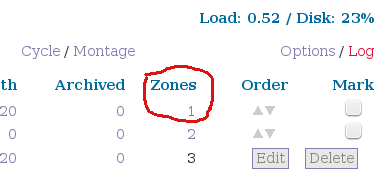
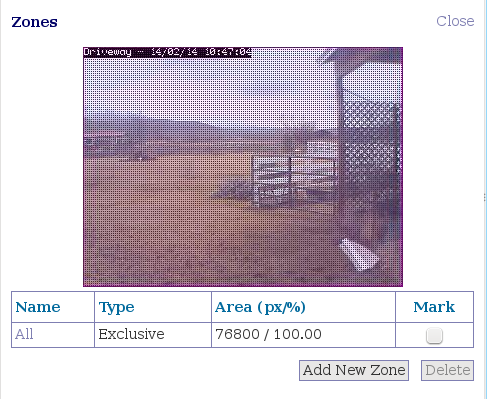
When you set up a new camera it creates a new zone by default, which includes everything the camera sees. You can see this on your ZoneMinder console (figure 1). Click on the zone number to create a new zone. You’ll see something like figure 2. Click Add New Zone. Give the new zone a name, and select the Fast, High Sensitivity preset. This fills in the relevant values for you, which of course you can tweak if you like. In my example I want only activity at the gate recorded, and exclude street traffic, and dogs and cats and goats running around in the yard (figure 3). Look for the drag handles at the corners of the image, and then drag them to create region points to define your new zone. You can have as many region points as you want to create irregularly-shaped zones, and you create new region points by clicking on one of the plus signs in the coordinates grid at the bottom.
It can be a little tricky to position your region points, so try fine-tuning them by typing the values in the coordinates grid. The coordinates are simple X and Y axes. X is the horizontal position, and Y is the vertical position. To help remember, think “X is left and Y to the sky.” Of course X is right and left, and Y is up and down. You can see which coordinate a region point belongs to by hovering the cursor over it. The whole zone is the size of your image in pixels minus 1, so a 640×480 image has a 639×479 zone.
You can also create inactive zones to screen out events you don’t want to capture. Create a new zone that covers the area you don’t want recorded, and then select Inactive in the Type dropdown menu.
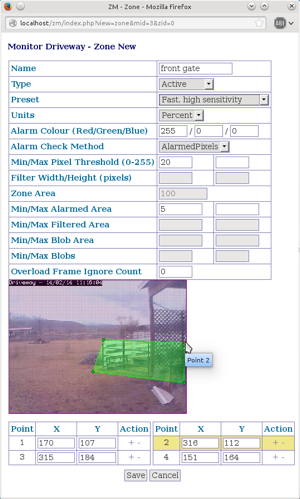
ZoneMinder supports multiple zone types and alarm check methods. I use Active and Inactive, and the AlarmedPixels alarm check method. These are the simplest to configure, and they do the job. To learn about more complex options, such as Blobs and Preclusive, consult the Defining Zones how-to in the ZoneMinder wiki. This also describes what the various min/max pixels values do.
There are a number of wireless Webcams that work well with ZoneMinder. The Foscam FI8910W and FI8918W are nice wireless indoor cameras with infrared and pan and tilt, and their setup on Linux is similar to my FI8905W in part 1. (If you’re thinking of using an indoor IR camera to peek outside, keep in mind you’ll have to deal with reflections from your window, and the infrared is useless with a glass window in front of it.)
USB Webcams are even easier, so we’ll run through adding a Logitech C310 Webcam. This is an inexpensive Webcam that I use for Google Hangouts and Skype, and it supports motion capture, so it makes a dandy inexpensive spycam. First connect it and then take a peek in lsusb to see if your system recognizes it:
$ lsusb
[...]
Bus 003 Device 013: ID 046d:081b Logitech, Inc. Webcam C310
Then fire up either Cheese or Gucview to verify that it works. Now go to your ZoneMinder console and click Add New Monitor. On the General tab give it a name, then:
Source Type is Local
Function is Modect
Maximum FPS is 15.
In the Source tab the Device Path is probably /dev/video0. Most newer Linuxes create /dev nodes dynamically, so you can look in /dev and use whatever is there. Then:
Capture Method = Video For Linux version 2
Device Channel = 0
Device Format = NTSC
Capture Palette = YUYV
Capture Width and Height = 640×480
You can use many other values than these; I know these work so it’s a good starting point. Now go back to your ZoneMinder console, click on your new monitor name, and behold! There you are (or whatever your camera is looking at – figure 4).
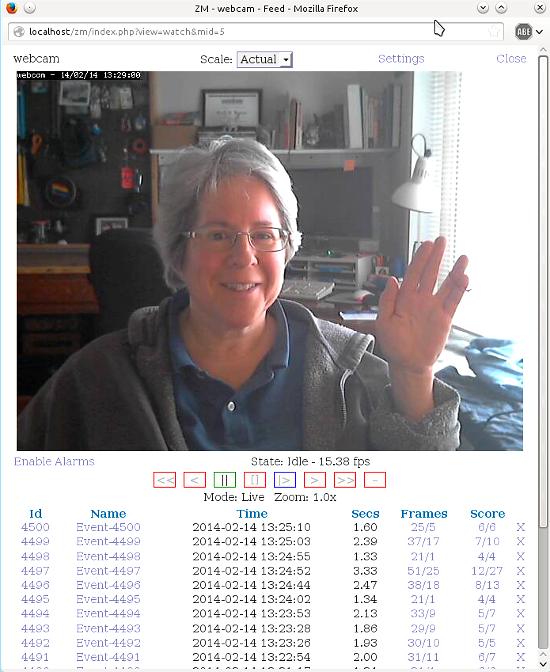 Figure 4: Hello from the mad Linux nerd’s lair!
In figure 4 you can see a list of time-stamped recorded events underneath the picture. Click any of them to watch. Note the wealth of useful options in the playback screen: Delete, Edit, Export, Archive, Frames, Stills, and Video. Click the Video link to create a video in .avi, .mov, .wmv, or other formats. If one doesn’t work try a different one. You need to have ffmpeg installed, and OPT_FFMPEG checked in Options > Images.
When you want to mass-delete Events go back to the main console screen, click in the Events column, click View All, check the checkbox next to Thumbnail to select all, and then click Delete at the bottom.
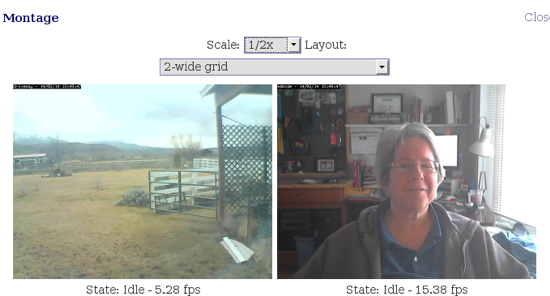
When you have multiple monitors you can view all of them at once from the main screen, or have them cycle one at a time. On the upper right side of the main screen click Cycle/Montage to select the view you want. Control the Cycle interval in Options > High B/W- Medium B/W- Low B/W. The default is 30 seconds.
The Montage view has various layout and scaling options (figure 5).
Here we are at the end of part 2, and we’ve covered just the basics of using ZoneMinder. Be fanatical about buying only well-supported cameras, because life is too short trying to make something work when it doesn’t want to. When things don’t work right, try these steps:
– Unplug and re-connect USB cameras
– Restart ZoneMinder
– Check your ZoneMinder and Apache logs
– Visit the ZoneMinder Wiki and forums.
When you solve a problem please share it in the forums or Wiki, because the world of surveillance cameras is vast, so the more we all help the better.
There are many open source software projects out there today and any list of open source licenses alone shows you how much project diversity is out there. Just take a look at Github, Apache, Eclipse or The Linux Foundation and you’ll find thousands of developers collaborating on the software that literally runs the world.
But as venture capital investor Peter Levine pointed out in his recent TechCrunch article on the economics of open source, some are more likely to succeed and take off and endure over the long run than others. Many projects spin up and have a much shorter or less effective impact than the founders envisioned. Sometimes that’s ok. Not everyone is trying to be the next Red Hat. It all depends on the goal of the project.
 At The Linux Foundation we’ve launched quite a few Collaborative Projects over the last couple years that expand our support of open source and collaborative development in different areas. Our projects typically start with members coming to us saying “we want to launch XYZ and make it like Linux, but we need help on how to do it.”
Some of those efforts have gone well; with others we’ve learned important lessons and have made course corrections. Either way, the underlying principles remain the same. We aim to bring together industry partners and facilitate the interaction necessary to create that new model for open source success that Levine mentioned: “an ecosystem of standardized open source components that are generally re-used and updated by the industry at-large.” Project participants then build their products and services on top of and around that solid platform. They’re becoming the de facto standards of today.
Over time, we have learned a lot about what tends to drive successful collaboration, or hinder it. A key success factor is what I’ll call “Open Governance”: where a project operates transparently, openly, collaboratively, and ethically. In the spirit of open, I thought I’d share some of our lessons learned and why this topic is so important. Hopefully this spurs discussion and might help others structure successful projects of their own. Some of these principles are based on what encourages positive community engagement; some are helpful in that they prevent ‘bad behavior’ that can arise when conflicting interests are involved.
Open Governance is a term I use to refer to an architecture for the project’s organizational structure that encourages:
Open participation throughout the project: anyone should be able to participate and contribute. The Linux Foundation’s own measurements for success include community engagement and making high quality code available. This is easier said than done as some open source projects (many no longer around) have at times been lured into adopting onerous membership requirements, contribution agreements or IP policies that make it very difficult for developers to engage.
Open participation in the technical community is essential, but just as important is Board participation. Boards benefit when there are technical community members who have proven their value serving as Directors. The Board also benefits when there is representation from multiple classes of membership – not just founding or ‘diamond’ level members. Governing committees or Boards should use common voting methodologies and ensure no single company involved establishes a controlling number of votes. The diversity of viewpoints that come from these approaches will certainly benefit a project in the long run and alert those in leadership positions to issues earlier.
To begin with, involve all potential participants in your project to develop bylaws, charters, policies, etc. Our members are sometimes surprised we form workstreams to create the key governance principles that are eventually drafted into bylaws. Some members ask us to “just send me the bylaws”. Often companies involved in forming a project ask us to just “send us bylaws so we can review them.” That’s not how we do things. We bring all the founding members together and have them discuss issues around business and technical leadership responsibilities, voting, membership requirements, contribution and IP policies. Engaging the founders for input early on encourages a diversity of opinions and helps form a reasonable consensus. Further, with a diverse group of founders you often get great feedback to identify and avoid issues future members may have.
Open technical meritocracy: the open source development model celebrates technical merit over pride of authorship. Code is contributed for the express purpose of advancing technologies relevant to a project, effectively separating technology advancement from individual or commercial intent. The open source development and design methodology is increasingly the driving force for modern architectures, especially those reliant upon building block or ecosystem approaches. As witnessed from the Linux community, the rapid iteration and broad visibility of community-driven activity can drive a superior rate of code velocity while the broad peer review process ensures pragmatic progress in the face of fast technology cycles.
The governance model should ensure there are no ‘closed door’ technical decisions. Instead the rationale and decision making on technical issues are done in a transparent way and visible to the community. This encourages technical contributors to offer solutions and establishes a fair, level playing field that all ideas, good and bad may be heard and decided upon by a group of peers. It’s a lot easier to make a bad decision for legitimate corporate reasons when the doors are closed. It is much more difficult for developers to look their peers in the eyes (while everyone is watching) and justify a technically inferior solution.
Open design: the design or architecture of the project should not be “pre set” by a founder or key participant dictating what the project’s code has to be. This encourages best of breed and evolution of the code with the needs of the community and users of the software.
Now that’s not to say a project should start with no code. Projects ideally will have a starting codebase to work from that will set an initial architecture. What’s important is that the initial architecture or design not be cemented by craftily worded Charters, Bylaws or other policies. Successful open source projects will live on and move forward into the future – we have no idea how they may need to evolve to meet the needs of users 10, 20 or 100 years from now.
To achieve this end, many projects have set up a technical board and a business board. At the Linux Foundation we use the terms Board and Technical Steering Committee (TSC) to differentiate between entity governance (Board) and technical governance (TSC). Typically the Board has no say in technical issues, individual project scope or technical direction as long as they remain within the scope of the open source project. Structuring your bylaws and policies to ensure the proper powers and decisions are relegated to the proper governing body will help to ensure an open design endures.
Open Source License: the license choice for an open source project is an important decision to make as the license sets the ground rules for how users, companies and the ecosystem will contribute to the code base. Projects should use an approved open source license by the Open Source Initiative or a free software license approved by the Free Software Foundation.
Yes, your counsel may be good enough to come up with a new open source license, but think about all the lawyers in your potential ecosystem who will be asked to review, understand, accept and recommend whether their companies participate. It’s far easier to select a license others are already familiar with that’s good enough and carries the key principles your project needs.
The license choice can also maximize or minimize a project’s license compatibility with the large ecosystem of libraries and third party components that have already been released under the open source licenses. There can be a huge developer benefit to having access to a large library of existing code. The license should encourage reuse and maximize incentives to share contributions without deterring developers, companies or users from participating. There is no one license that works for all projects and situations. The license choice needs to be context-aware and align to the long term needs of the project and community involved.
Open, level playing field for Intellectual Property (IP): the IP Policy needs to ensure all participants are operating on a level playing field. Our counsel Andy Updegrove posted a very interesting blog post on FRAND patent licensing and the impact on open source software projects. There are IP issues and concerns that are often not all covered by the license choice of the project. Trademark and patent rights can unfairly shift the power of actors within a community. At the Linux Foundation we require the projects to own the trademarks, which can mean that projects using existing marks may need a company to assign the mark to the project. There are a number of options in existence today for dealing with patents through the terms of a license, a patent commons, Open Invention Network or other ‘defense fund’ models that I expect we’ll hopefully see formalized in the near future.
A ‘best practice’ is to engage your legal counsel early on. On some projects we’ve seen brilliant experts driving toward launching a project, but their legal counsel has not yet been involved. Then the final plan is presented to legal for approval and they take weeks to catch up. The issue is never that something in the documents is wrong; more often the issue is the lawyers were left out of the process of discussion and debate. Those discussions around the formation are also beneficial to your counsel and helps them understand WHY the bylaws, license choice or policies are a certain way. This often enables a much faster path to agreement and buy-in. It also provides your counsel and opportunity to clarify points or resolve issues they see early on.
If there’s one thing you can learn from the 20+ years of community experience with Linux, it’s that what you establish today will have to adapt, evolve and be open to changes in the future, which you cannot foresee with any certainty. Projects evolve because people move into different jobs, companies change direction and investments, the technology from other ecosystems demand changes. As an example, who would have known all the processors Linux would need to support back in 1993? Today we enjoy the use of Android smartphones and view images from Mars rovers because of open governance decisions that the Linux developer community established decades ago.
This often also leads to “if it’s really an issue, we can just fix it later.” That may be true for technical decisions, but governance is a different matter. An open source projects’ governance model is often like dating – you typically have one shot at making a connection. Developers and companies need to ensure they trust the project and people involved. Projects often only get one chance to make a good first impression. Build open governance into your project the first time; you may never get that second chance.
Michael Dolan is an attorney and Director of Member Services at The Linux Foundation where he works with the legal community and collaborative projects.