
Curious how Ubuntu’s “convergence mode” is working out for having an application written against their SDK running across phones, tablets, and desktops? Here’s a video demonstration…
Read more at Phoronix

Of Microsoft’s many challenges in mobile, none loom larger than the app deficit: it only takes a popular new title like Flappy Bird to highlight what the company is missing out on. Windows 8 apps are also few and far between, and Microsoft is stuck in a position where it’s struggling to generate developer interest in its latest style of apps across phones and tablets. Some argue Microsoft should dump Windows Phone and create its own “forked” version of Android — not unlike what Amazon has done with its Kindle Fire tablets — while others claim that’s an unreasonably difficult task. With a new, mobile- and cloud-focused CEO in place, Nokia’s decision to build an Android phone, and rumors of Android apps coming to Windows, could…
Google is now officially the owner of Nest Labs. After the deal received early FTC approval last week, Google closed the acquisition on Friday and revealed the finalized purchase in a filing today with the US Securities and Exchange Commission. Google announced its deal to purchase Nest for $3.2 billion almost exactly one month ago. At the time, it said the deal would likely close in the next few months, but the FTC cleared the way for it to close sooner than expected by waiving a regular waiting period.
Under Google, Nest will continue to operate with a degree of independence, though it won’t be kept completely separate like Motorola was. Both companies maintain that the deal will help Nest scale its business of making smart home…
In early September 2013, Amazon released version 1.0 of awscli, a powerful command line interface which can be used to manage AWS services.
 In this two-part series, I’ll provide some working examples of how to use awscli to provision a few AWS services. (See An Introduction to the AWS Command Line Tool Part 2.)
We’ll be working with services that fall under the AWS Free Usage Tier. Please ensure you understand AWS pricing before proceeding.
For those unfamiliar with AWS and wanting to know a bit more, Amazon has excellent documentation on introductory topics.
Ensure you have a relatively current version of Python and an AWS account to be able to use awscli.
Install awscli using pip. If you’d like to have awscli installed in an isolated Python environment, first check out virtualenv.
$ pip install awscli
Next, configure awscli to create the required ~/.aws/config file.
$ aws configure
It’s up to you which region you’d like to use, although keep in mind that generally the closer the region to your internet connection the less latency you will experience.
The regions are:
- ap-northeast-1
- ap-southeast-1
- ap-southeast-2
- eu-west-1
- sa-east-1
- us-east-1
- us-west-1
- us-west-2
For now, choose table as the Default output format. table provides pretty output which is very easy to read and understand, especially if you’re just getting started with AWS.
The json format is best suited to handling the output of awscli programmatically with tools like jq. The text format works well with traditional Unix tools such as grep, sed and awk.
If you’re behind a proxy, awscli understands the HTTP_PROXY and HTTPS_PROXY environment variables.
So moving on, let’s perform our first connection to AWS.
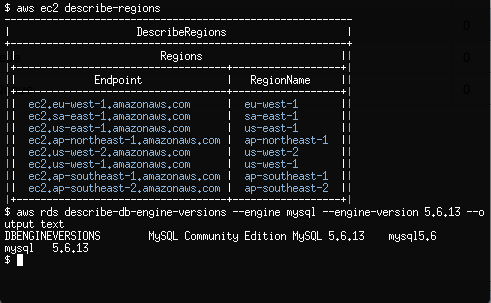
$ aws ec2 describe-regions
A table should be produced showing the Endpoint and RegionName fields of the AWS regions that support Ec2.
$ aws ec2 describe-availability-zones
The output from describe-availability-zones should be that of the AWS Availability Zones for our configured region.
awscli understands that we may not just want to stick to a single region.
$ aws ec2 describe-availability-zones --region us-west-2
By passing the —region argument, we change the region that awscli queries from the default we have configured with the aws configure command.
Let’s go ahead and start building our first Ec2 server using awscli.
Ec2 servers allow the administrator to import a SSH key. As there is no physical console that we can attach to for Ec2, SSH is the only default option we have for accessing a server.
The public SSH key is stored within AWS. You are free to allow AWS to generate the public and private keys or generate the keys yourself.
We’ll proceed by generating the keys ourselves.
$ ssh-keygen -t rsa -f ~/.ssh/ec2 -b 4096
After supplying a complex passphrase, we’re ready to upload our new SSH public key into AWS.
$ aws ec2 import-key-pair --key-name my-ec2-key
    --public-key-material "$(cat ~/.ssh/ec2.pub)"
The —public-key-material option takes the actual public key, not the path to the public key.
Let’s create a new Security Group and open up port 22/tcp to our workstation’s external IP address. Security Groups act as firewalls that we can configure to control inbound and outbound traffic to our Ec2 instance.
I generally rely on ifconfig.me to quickly provide me with my external IP address.
$ curl ifconfig.me
198.51.100.100
Now we know the external IP address of our workstation, we can go ahead and create the Security Group with the appropriate inbound rule.
$ aws ec2 create-security-group
    --group-name MySecurityGroupSSHOnly
    --description "Inbound SSH only from my IP address"
$ aws ec2 authorize-security-group-ingress
    --group-name MySecurityGroupSSHOnly
    --cidr 198.51.100.100/32
    --protocol tcp --port 22
We need to know the Amazon Machine Image (AMI) ID for the Linux Ec2 machine we are going to provision. If you already have an image-id then you can skip the next command.
AMI IDs for images differ between regions. We can use describe-images to determine the AMI ID for Amazon Linux AMI 2013.09.2 which was released on 2013-12-12.
The name for this AMI is amzn-ami-pv-2013.09.2.x86_64-ebs with the owner being amazon.
$ aws ec2 describe-images --owners amazon
    --filters Name=name,Values=amzn-ami-pv-2013.09.2.x86_64-ebs
We’ve combined —owners and applied the name filter which produces some important details on the AMI.
What we’re interested in finding is the value for ImageId. If you are connected to the ap-southeast-2 region, that value is ami-5ba83761.
$ aws ec2 run-instances --image-id ami-5ba83761
    --key-name my-ec2-key --instance-type t1.micro
    --security-groups MySecurityGroupSSHOnly
run-instances creates 1 or more Ec2 instances and should output a lot of data.
- InstanceId: This is the Ec2 instance id which we will use to reference this newly provisioned machine with all future awscli commands.
- InstanceType: The type of the instance represents the set combination of CPU, memory, storage and networking capacity that this Ec2 instance has. t1.micro is the smallest instance type available and for new AWS customers is within the AWS Free Usage Tier.
- PublicDnsName: The DNS record that is automatically created by AWS when we provisioned a new server. This DNS record resolves to the external IP address which is found under PublicIpAddress.
- GroupId under SecurityGroups: the AWS Security Group that the Ec2 instance is associated with.
If run-instances is successful, we should now have an Ec2 instance booting.
$ aws ec2 describe-instances
Within a few seconds, the Ec2 instance will be provisioned and you should be able to SSH as the user ec2-user. From the output of describe-instances, the value of PublicDnsName is the external hostname for the Ec2 instance which we can use for SSH. Once your SSH connection has been established, you can use sudo to become root.
$ ssh -i ~/.ssh/ec2 -l ec2-user
    ec2-203-0-113-100.ap-southeast-2.compute.amazonaws.com
A useful awscli feature is get-console-output which allows us to view the Linux console of an instance shortly after the instance boots. You will have to pipe the output of get-console-output into sed to correct line feeds and carriage returns.
$ aws ec2 get-console-output --instance-id i-0d9c2b31
    | sed 's/\n/n/g' | sed 's/\r/r/g'
Continue with Part 2, Introduction to the AWS Command Line Tool.

Last month, I asked 55 OpenStack developers why they decided to submit one patch to OpenStack and what prevented them from contributing more. The sample polled people who contributed only once in the past 12 months, looking for anecdotal evidence for what we can do to improve the life of the occasional contributor. To me, occasional contributors are as important as the core contributors to sustain the growth of OpenStack in the medium/long term.
Docker’s new container technology is offering a smart, more sophisticated solution for server virtualization today. The latest version of Docker, version 0.8, was announced couple of days ago.

Docker 0.8 is to focus more on quality rather than on features, with the objective of targeting the requirements of enterprises.
According to the software’s present developmental team; many companies that use the software have been using it for highly critical functions. As a result, the aim of the most recent release has been to provide such businesses top quality tools for improving efficiency and performance.
Docker is an open source virtualization technology for Linux that is essentially a modern extension of Linux Containers (LXC). The software is still quite a young initiative, having been launched for the first time in March 2013. Founder Solomon Hykes created Docker as an internal project for dotCloud, a PaaS enterprise.
The response to the application was highly impressive and the company soon reinvented itself as Docker Inc, going on to obtain $15 million in investments from Greylock Partners. Docker Inc. continued to run their original PaaS solutions, but the focus moved to the Docker platform. Since its initiation, over 400,000 users have downloaded the virtualization software.
Google (along with couple of most popular cloud computing providers out there) is offering the software as part of its Google Compute Engine though still nothing from major Australian companies (yes, I’m looking at you Macquarie).
Red Hat also included it in OpenShift PaaS as well as in the beta version of the upcoming release Red Hat Enterprise Linux. The benefits of containers are receiving greater attention from customers, who find that they can reduce overheads with lightweight apps and scale across cloud and physical architectures.
For those unfamiliar with Linux containers, they are called the Linux kernel containment at a basic level. These containers can hold applications and processes like a virtual machine, rather than virtualizing an entire operating system. In such a scenario the application developer does not have to worry about writing to the operating system. This allows greater security, efficiency and portability when it comes to performance.
Virtualization through containers has been available as part of the Linux source code for many years. Solaris Zones was pioneering software created by Sun Microsystems over 10 years ago.
Docker takes the concept of containers a little further and modernizes it. It does not come with a full OS, unlike full virtual machines, but it shares the host OS, which is Linux. The software offers a simpler deployment process for the user and tailors virtualization technology for the requirements of PaaS (platform-as-a-service) solutions and cloud computing.
This makes containers more efficient and less resource hungry than virtual machines. The condition is that the user must limit the OS host to a single platform. Containers can launch within seconds while full virtual machines can take several minutes to do so. Virtual machines must also be run through a hypervisor, which containers do not.
This further enhances container performance as compared to virtual machines. According to the company, containers can offer application processing speeds that are double than virtual machines. In addition, a single server can have a greater number of containers packed into it. This is possible because the OS does not have to be virtualized for each and every application.
Docker 0.8 has seen several improvements and debugging since its last release. Quality improvements have been the primary goal of the developmental team. The team – comprising over 120 volunteers for the release – focused on bug fixing, improving stability, and streamlining the code, performance boosting and updating documentation. The goals in future releases will be to keep the improvements on and increase quality.
There are some specific improvements that users of earlier releases will find in version 0.8. The Docker daemon is quicker. Containers and images can be moved faster. It is quicker building source images with docker build. Memory footprints are smaller; the build is more stable with fixed race conditions. Packaging is more portable for tar implementation. The code has been made easier to change because of compacted sub-packaging.
The Docker Build command has also been improved in many ways. A new caching layer, greatly in demand among customers, speeds up the software. It achieves this by eschewing the need to upload content from the same disk again and again.
There are also a few new features to expect from 0.8. The software is being shipped with a BTRFS (B-Tree File System) storage driver that is at an experimental stage. The BTRFS file system is a recent alternative to ZFS among the Linux community. This gives users a chance to try out the new, experimental file system for themselves.
A new ONBUILD trigger feature also allows an image to be used later to create other images, by adding a trigger instruction to the image.
Version 0.8 is supported by Mac OSX, which will be good news for many Mac users. Docker can be run completely offline and directly on their Mac machines to build Linux applications. Installing the software to an Apple Macintosh OS X workstation is made easy with the help of a lightweight virtual machine named Boot2Docker.
Docker may have gained the place it has today partly because of its simplicity. Containers are otherwise a complex technology, and users are traditionally required to apply complex configurations and command lines. Docker makes it easier for administrators, with its API, to easily have Docker images inserted in a larger workflow.
It is currently being developed as a plug-in that will allow use with platforms beyond Linux, such as Microsoft Windows, via a hypervisor. The future plans for the developmental team is to update the software once a month. Version 0.9 is expected to see a release early in March, 2014. The new release may have some new features if they are merged before the next release, otherwise they will be carried over to the next release.
Docker is expected to follow Linux in numbering versions. Major changes will be represented by changing the first digit. Second digit changes signify regular updates while emergency fixes will be represented by a final digit.
Customers looking forward to the production ready Docker version 1 will have to wait until April. They can also expect support for the software as well as a potential enterprise release. There are also attempts by the team to develop services for signing images, indexing them and creating private image registries.