Home Blog Page 1651

How to Customize the Star Wars Screensaver on Linux

I love screensavers, and the timeless old Xscreensaver by Jamie Zawinski is still my favorite. Xscreensaver has been around since forever, or more precisely 1992, which in Linux-years is forever. Xscreensaver runs on any Linux, Unix, OS X, and iOS. Xscreensaver supports 200+ screensavers thanks to its modular structure, which allows contributors to plug in new screensavers seamlessly. My favorites are Atlantis, Matrix, Bouncing Cow (that one entertains my dog for hours) and Star Wars (figure 1). The Star Wars screensaver displays a text crawl like the beginning of the Star Wars movie. Which may be obvious to my fellow geezers and codgers, but there are young whippersnappers walking the Earth now who have no clue what Star Wars is. There is a sad blurry lo-fi rendition of the original Star Wars opening crawl on YouTube.

GNOME and KDE have their own front-ends for Xscreensaver. Except GNOME 3, which has decided its users don’t need screensavers, so it only blanks the screen. You don’t need these anyway because Xscreensaver runs fine without them, and you get more configuration options. When you install it you have several packages to choose from. The base is xscreensaver, and then depending on your distro you’ll have some additional packages to give you more screensavers such as xscreensaver-data-extraxscreensaver-gl, and xscreensaver-gl-extra. You may find other screensavers in your distro repos. Go ahead and load up, it’s easy and fun.
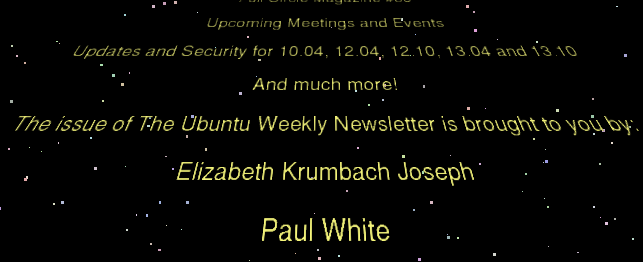
Star Wars screensaver

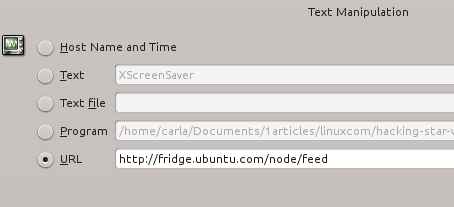
The default behavior for the Star Wars screensaver is to pull recent RSS entries from Wikipedia. The URL for English-language pages is http://en.wikipedia.org/w/index.php?title=Special:NewPages&feed=rss. If you prefer a language other than English, just replace “en” in the URL with the appropriate encoding. *buntu (U/Ku/Lu/Xu/etc./buntu) displays the Ubuntu Weekly Newsletter instead. These are both fine and dandy, but why live with the default when you can program the crawl to display what you want? Xscreensaver is designed to make this easy. Open xscreensaver-demo, which should open with a click of the Xscreensaver menu icon. Go the Advanced tab, and take a look at the four configuration panels: Image Manipulation, Display Power Management, Text Manipulation, and Fading and Colormaps. Text Manipulation controls the content of the crawl. Figure 2 shows my default Kubuntu configuration.
xscreensaver configuration

Perhaps you would rather see good Linux.com content in your Star Wars screensaver. Just copy your chosen RSS feed link (note that there are several to choose from) onto the URL line, then return to the Display Modes tab to preview it. Yes, it is that easy.

Show Fortune Cookies

The fortune command is another hackable oldie but goodie, and it makes a great Star Wars crawl because it displays random quotations from multiple databases. The simplest usage is to copy the command name– fortune — onto the Program line, and remember to check the checkbox. But you can do more because fortune supports a number of options. fortune -s selects short quotations only, which is 160 characters or less. fortune -l selects long ones. There are multiple fortune databases, so fortune -c tells you which one each quotation comes from. Some of the fortune databases in the standard *buntu repos are:

  • fortunes-bofh-excuses- BOFH excuses for fortune
  • fortunes-debian-hints – Debian Hints for fortune
  • fortunes-mario – Fortunes files from Mario
  • fortunes-off – Data files containing offensive fortune cookies
  • fortunes-spam – fortunes taken from SPAM messages
  • fortunes-ubuntu-server – Ubuntu server tips for fortune

You can select a specific database like this:

$ fortune riddles
FORTUNE PROVIDES QUESTIONS FOR THE GREAT ANSWERS: #19
A:      To be or not to be.
Q:      What is the square root of 4b^2?

And you can select multiple databases like this:

$ fortune riddles chalkboard literature

You can get even fussier and control how often each database will be called with percentages:

$ fortune 30% riddles 10% chalkboard 60% literature

Look in /usr/share/games/fortune to see the names of your installed fortune databases. fortune -o selects only offensive fortunes, which are mainly bad dirty jokes. You won’t see offensive fortunes without the -o or -a (all) options. You can find lots of fortune databases on the Web, like Christian fortunes and Splitbrain’s quotes from The Simpsons, X-Files, Discworld, and Forrest Gump.

Make Your Own Fortune Cookie Database

Want to make your own fortune collection? It’s easy. First put your fortune cookies in a plain text file in this format:

The whole world is a tuxedo and you are a pair of brown shoes.
		-- George Gobel
%
A day for firm decisions!!!!!  Or is it?
%
You will pay for your sins.  If you have already paid, please disregard
this message.
%

See the pattern? All you do is insert a percent sign after each one. Save your file, and then use the strfile command to create the data file. Let’s say the name of the textfile is carlas-wisdoms:

$ strfile carlas-wisdoms
"carlas-wisdoms.dat" created
There were 3 strings
Longest string: 87 bytes
Shortest string: 41 bytes

Copy these two files to /usr/share/games/fortune (or wherever your fortunes files are stored) and you’re done. strfile takes your text file and randomizes its contents. It is amazing what weird and useful little Linux commands we can find.

Screen Locking and Power Management

Xscreensaver can handle power management and screen locking, so if you’re using something else disable it because you shouldn’t have two power managers and screen lockers running. Look on the Display Modes tab to configure blanking and screen locking intervals, and the Advanced tab for some simple power management options.

Learn more features and options by consulting the fine man pages: man xscreensaverman xscreensaver-demoman fortune, and man strfile.

CentOS Project Leader Karanbir Singh Opens Up on Red Hat Deal

In the 10 years since the CentOS project was launched there has been no board of directors, or legal team, or commercial backing. The developers who labored to build the community-led version of Red Hat Enterprise Linux (RHEL) worked largely unpaid (though some took a few consulting gigs on the side.) They had a few hundred dollars in their bank account to pay for event t-shirts and that was it. And the project’s direction was decided based on the developers’ immediate needs, not a grand vision of future technology.

Karanbir SinghThat’s all changing with the news last week that CentOS will join Red Hat, said Karanbir Singh, CentOS project leader and one of four CentOS developers going to work for Red Hat as part of the new collaboration. For the first time, developers will work on CentOS professionally and that’s created a “paradigm shift” for the project and its contributors, he said.

Red Hat will bring resources and structure to the project. And in return, CentOS will provide a stable testing ground for new technologies – for RHEL and many other projects as well, Singh said.

“We’ll be working on infrastructure other projects need to be successful with us,” Singh said. “We won’t be delivering the features. We’ll make it as trivial as possible to come in and do the build you need, without needing to learn everything about building CentOS images.”

Here Singh discusses how CentOS and Red Hat joined up; what to expect from the project now; Red Hat’s role in the community; opportunities for more partnerships; and his own feelings on working on CentOS professionally for Red Hat.

How did this partnership come about? Did you really just get a call from Red Hat lawyers one day (as you joked on Twitter)?

The big challenge was when Red Hat called us and said, “who are your lawyers? Who do we speak to?” We don’t have a commercial interest or a legal team, so there’s no entity to partner with. Red Hat is coming in to incubate the project, provide some of the resources and help us meet goals. So it’s more accurate to say we’re joining forces. It’s a bit of legalese, but it’s a better description because some of the things they came up with we thought were too corporate.

What enabled you to “join forces?” Has your relationship with Red Hat improved?

A lot of people seem to think the relationship with Red Hat is brand spanking new but it’s not, we’ve always used them as upstream. We were taking what they were putting out and making it available for everybody.

But one of the challenges we have was isolating people from legal issues that might come up. Say someone forgot to remove the appropriate trademark somewhere. By law (Red Hat) is required to protect trademarks. The only way we could protect that is by having structure, working as an organized group privately. One of my biggest gripes was CentOS couldn’t be worked on out in the public because if we did it opened us up to possible legal action.

As part of the relation with Red Hat now we can work with them to make sure that (trademark) work is done upstream. That allows us to be a lot more open.

How will CentOS be more open?

In the past the way to get into the CentOS build process was to be nominated out of the community into the QA team. You had to have a few years of history, lots of forum posts, and not have a commercial interest, then you could come into the QA. Then those were elevated into privileged positions with access to servers.

That entire infrastructure just goes away. We go from a build team of 6 to15 people, with 60 to 70 people in the QA team, and the big win – what I’m most excited about – is other people in other projects trying to do their own thing can come and work with us to do what they need to do.

How can other projects start working with CentOS?

We’re still working out the details but we want to call them CentOS variants. They can add layers and components and configure the system to make their own whether they want to do VOIP, hosting, cloud, storage, (etc.)

When we were talking to Red Hat originally we thought it would be ideal to have one project that steps forward and model the variant projects on that relationship. We wanted six projects to come through in first 6 months. So far, we’ve had seven come through in the first 24 hours and three more since then.

One requirement, though, is every project needs a nominee from an existing development team to make sure we set the right expectations. There are a bunch of conversations going on.

What are you hearing from projects that want to be involved?

Going back 4-5 years, a lot of people found CentOS to be a stable OS they could plan against, but because there’s no SLA, it’s a best-effort set up. They’d take it back to their own ecosystem and do their own customizations in-house. They have to own every bug, feature and patch.

The variant process will allow them to come within the CentOS project. They only have to maintain the stuff they care about. It’s like if 40 different projects are using Apache to do something, only one needs to maintain Apache, the others can focus on their own bit.

How will CentOS benefit from the relationship?

People can come in and we can expand the ecosystem together. There’s so much stuff we’ve had to be very pessimistic about by keeping things private, by not allowing people we didn’t personally know to get involved. Those barriers are coming down.

How do you feel about being in a structured set up?

We have had levels of structure, but not to the extent of having a proper board. The great thing about Red Hat people is they understand how some of these communities work. They meet everybody on IRC every day, for example. We will firm up processes and procedures, like what infrastructure we’ll use, how code will flow, over the next few months and everybody can pitch in and make the decisions together.

We haven’t been a feature-led community, we’ve been a problem-led community. Eighty-five percent of the time, it’s the same thing. It’s that 15 percent when it’s not the same thing that a developer-led community is important.

The new things we’ve brought into the project weren’t because someone had a big idea of what’s coming in the future. It’s been to address problems we already have. For example, everyone out there is trying to build cloud instances to adapt for what’s coming down the road. Our approach to that right now is if they’re smart enough to install it, they don’t need our help anyway.

The CentOS project as it was is going to stay intact, but we’ll be working on infrastructure other projects need to be successful with us. We won’t be delivering the features. We’ll make it as trivial as possible to come in and do the build you need, without needing to learn everything about building CentOS images. People will come together to work on the same problems.

Will CentOS become a proving ground for new technologies in RHEL as some commenters have speculated?

I think it should. But it would be wrong to say it will be a proving ground for things into RHEL. It’s more appropriate to say it’s a proving ground for anything. Because the platform is resilient you can build on CentOS without things caving in. There’s nothing in what we’re doing that limits ourselves to what Red Hat is doing. Our biggest (potential) variant is Xen Project and Red Hat isn’t involved in that at all.

We do expect our work to feed back to RHEL. But we’re pretty serious that the platform we’re building isn’t specific to RHEL.

CentOS 6.5 was released in December – what’s on tap for the next release? How will the new partnership affect that?

In spite of the fact that I work for Red Hat now, I’m not privy to their release schedules. So over the next few months the board will publish our own road map. The mainline, the core, will stay as it is. But the variants will be able to set up their own road maps (based on their own release schedule).

The big thing we’re trying to get to is to have an installer for CentOS users to select what variants they want. But that’s a wish-list item that needs to be specced out before it’s developed and designed.

You are personally going to Red Hat – what do you think you’ll be able to do in house that you wouldn’t be able to do otherwise?

Ten years ago when some of us were getting together to start the project, the aim was to get 300 people to use it, that was fantastic. From our perspective it’s been fairly successful. How we define success is to build something we would use and that comes back to the user-driven approach. We cared about how things worked, where they worked, and overall it worked out well having that user perspective.

I’ve never worked for a big open source company before but I hope to bring that user perspective to Red Hat and what I’ll take a way is a large approach to user communities and hopefully manage that better.

Otherwise, not much has changed. They sent me a phone and a laptop and that’s how it’s going to go. I feel quite privileged to have this opportunity to focus on the CentOS larger ecosystem side of things.

Will you be able to relax a little now? Maybe enjoy your work more?

There’s been no money involved in the project. We have a bank account that’s never had more than a couple hundred dollars for printing t-shirts for events. This is the first time there’s a group of people professionally working on CentOS as a platform.

How CentOS used to happen was some of us would go to work and then work another 40 hours a week on CentOS. You can’t sustain 80 hours a week. The reason I did it wasn’t for compensation, it was because I wanted to.

You wrote on Twitter, “I think this is also a great opportunity for RH to prove it cares about community in an open, user focused, transparent way.” How can they do that?

That’s a hard question. Here you have a total community-led project suddenly going from a place of not accepting financial donation to being backed. We have access to certain resources we can rely on – people available during working hours and machines available, for example. There’s a paradigm shift in the project, but we want to keep the project as it is.

There’s nothing we’re doing right now that should make you feel it will change. If there is make sure you make those feelings public and judge us in six months. The onus for proving that, the entity to make that point and make it visible, is Red Hat.

What do you think this partnership will do for Red Hat’s image in the Linux community?

I think it should be good. They already contribute so much. The second day there I made the mistake of looking through the address book of people I could call and I was intimidated. These are the people I’ve looked up to and suddenly he’s two extensions away from me. But having them on board now it just expands what they’re doing. I think it should get them some good will.

A lot of feedback I get from people at Red Hat, from senior managers to junior developers, is that they appreciate what we do, and that ethos of being open and a community is quite strong within Red Hat itself. People outside the developer world don’t really get how engrained they are in the open source community mindset.

Anything else you’d like to share with the Linux.com community?

Come join us.  

The Search for the Lost Cray Supercomputer OS

In 1976, famed computer architect Seymour Cray released one of the most successful supercomputers ever made: the Cray-1, a stylish 5.5-ton C-shaped tower that was quickly embraced by laboratories all over the world. While it soon gave way to newer, faster Cray models that then faded away entirely in the ’90s due to huge cost and performance advances in supercomputing, its iconic shape and early success left a lasting legacy in the industry.

That led hobbyists Chris Fenton and Andras Tantos to ask: How can I build a Cray-1 for my desk?

Fenton was able to replicate the architecture, but he hit a wall when he began searching for software to make the Cray model fully operational. He determined none of the code from the original OS was available via the internet, so he went analog. He asked the Computer History Museum and government whether they had a copy laying around. Nope.

His first lead came via a friend who introduced him to Donald Lee, a former Cray software engineer who had “this giant 10-pound disk pack†— an early, removable medium for data storage — in the basement of his Minnesota home. 

Read more at GigaOM.

GnuCash Makes Money Management a Snap

GnuCash version 2.6, released earlier this month, fixes many of the nagging problems in earlier versions and is more convenient to use. It tracks bank accounts, investments, income and expenses. You can use GnuCash just to handle your checking and savings accounts — but it is capable of doing much more. GnuCash is based on professional accounting principles to ensure balanced books and accurate reports. However, if you venture beyond basic banking registers, you might find its double entry bookkeeping procedures a bit intimidating.

Read more at LinuxInsider

Nokia’s Android Phone Includes Windows Phone-Like UI

Images of Nokia’s Android phone, codenamed Normandy, were originally published in November, but a number of recent leaks have provided a closer look at the hardware and its software. Vizileaks has published what appears to be a near-final hardware unit, and some of the early Android apps that run on the device have also been detailed. Thanks to Evleaks, we’re getting a closer look at the UI on Nokia’s Android handset.

The UI appears to be very similar to Windows Phone. with a number of tiles that provide access to apps like Skype, Twitter, Vine, Facebook, and BBM. Some of the tiles are identical to the same color scheme and iconography used in the equivalent Nokia Windows Phone apps. There’s also what appears to be a notification…

Continue reading…

Read more at The Verge

The Silver Lining Of The NSA Scandal

The truth is that for enterprise security folks, the threat to our privacy and data is not the NSA. It’s the hacktivists, criminal organizations and rogue insiders who are using increasingly sophisticated techniques to gain access to our corporate intellectual property.

If there is a silver lining to the NSA story, it’s that it brings visibility to the issue of data security. SaaS applications—where software and data is centrally hosted in the cloud—and physical devices like servers, notebooks and cell phones can collect and store data at an unprecedented scale. This data comes in all shapes and sizes, so it’s important to understand what technologies exist to secure the data and how policies are defined and enforced to protect it.

Read more at ReadWriteCloud

Google’s Nest Acquisition Shines a Light on Linux Home Automation

Like many of the smart home automation platforms shown at last week’s CES show, Nest Lab’s hot-selling Nest Learning Thermostat runs on embedded Linux. With Google’s pending $3.2 billion acquisition of Nest Labs, the four-year old Palo Alto, Calif.-based firm should enjoy wider distribution and faster product development, while Google gains a foothold in home automation and the Internet of Things (IoT). Yet Google and Nest will be competing with a proliferating array of new products and cross-platform IoT and automation networks, all of which aim to expand by creating ecosystems of compatible wireless-enabled devices.

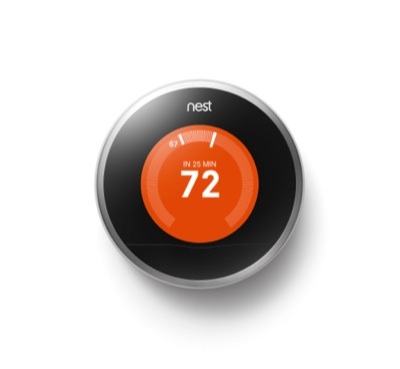
nest thermostatNest’s thermostat was an early entry in a new wave of low-cost, typically Linux-based home automation devices. The category is the result of a confluence of widespread mobile device usage, wider adoption of web APIs and cloud platforms, and lower costs for sensors, wireless chips, and application processors.

Farther below, we look at five more new Linux-based products that similarly start at a few hundred dollars: the Ivee Sleek, Ninja Blocks, BlackSumac’s Piper, Belkin’s WeMo, and WigWag. Like Nest, all of these systems let you remotely interact with a main controller device over web-based cloud platforms via Android and iOS apps to control a variety of household devices.

While the Nest Learning Thermostat controls wireless-enabled “smart grid” heating, ventilation, and air conditioning (HVAC) devices, most of its rivals, such as Belkin’s WeMo, instead focus on lighting. Some interact with smart home appliances, locks, security systems, and even multimedia systems such as the open-API Sonos devices.

Many home automation hubs are designed to support peripheral devices from the same vendor, while also offering support for ecosystems like GE’s smart devices, Philips (Hue), Lowe’s Iris, and Staples Connect. (There was an unconfirmed report that the Iris Hub runs Linux, and that the Staples Connect Hub is based on technology from Zonoff, which offers an open SDK and is seeking developers with Linux experience.)

Each ecosystem shares common wireless protocols and APIs, making it easier for vendors to extend the reach of their automation hubs. As a result, consumers can gradually build their systems a few hundred dollars at a time.

Nest to grow under Google

Despite the competition, Nest Labs looks to have a bright future. It has signed deals with U.S. energy companies and boasts a 25,000+ army of certified installation professionals. Nest’s thermostat has succeeded in the U.S. despite relatively lower energy costs and the end of stimulus spending for smart grid products. Although many analysts believe Google overpaid for Nest Labs, NextMarket projects that the company will go from selling about 100,000 thermostats per month today to an average of 200,000 per month throughout 2014. Google’s acquisition should accelerate the company’s expansion to regions such as Europe, where energy is more expensive and governments subsidize energy efficiency.

Nest’s thermostat appeals to consumers with its refined, Apple-influenced styling — Nest Labs CEO Tony Fadell was the “father of the iPod” and co-founder Matt Rogers was a key iPhone developer — as well as claims that it can reduce a typical energy bill by 20 percent. It also makes it easier to control increasingly high-tech HVAC equipment via WiFi and ZigBee, and it makes on-the-fly adjustments for improved efficiency based on user habits.

While most of the Linux-based products offer open APIs and scripting languages, Nest has yet to open its APIs. That’s more likely to happen under the Google regime, and it’s also likely Nest will introduce some Android devices. A wholesale switch to Android is also possible, but it’s more likely Google will let Nest choose the right open source OS for the job, for example using Android for any new touchscreen based devices. The thermostat already works interactively with Nest’s only other product — the Nest Protect smoke and CO alarm — which runs the open source FreeBSD. Nest could potentially offer a mixed bag of Linux, Android, and open source RTOS devices, all programmable using the same web APIs.

Some have speculated Google will lower the price of the Nest Learning Thermostat, both to grab market share and burnish its “green” image. The $249 price is far more than a dumb thermostat, especially considering owners of larger homes may want more than one. Still, it’s fairly competitive with the five rivals covered below, and it’s downright cheap compared to traditional automation systems that cost tens of thousands of dollars. One of the bigger mid-range platforms is Control4, a Linux-based ecosystem starting at about $1,000 dollars.

A Complex Web of IoT Ecosystems

AllSeen logoGoogle and Nest will be competing with a growing and overlapping array of Linux-based, or Linux-friendly Internet of Things (IoT) and automation products and frameworks. Some include branded products, such as the GE and Philips Hue ecosystems, or are launched by retailers (Lowe’s Iris and Staples Connect), while others are cross-platform standards.

Frameworks include Cisco’s IoT initiative and the Linux Foundation’s newer AllSeen Alliance, based on Qualcomm’s AllJoyn platform. Intel’s Intelligent Device Platform focuses on smart grid intelligent gateway systems, and at CES, Intel unveiled a wearables platform built around its Linux-ready Quark processor and Edison module that could also pop up in home automation.

Other frameworks include Revolv (formerly MobiPlug) and SmartThings, both of which offer a multi-platform approach. Less established are Echelon’s Industrial IoT (IIoT) and Ayla Networks’ Ayla Platform.

At CES, Samsung and LG both announced home automation initiatives built around their ecosystems of smart TVs and appliances. These devices mostly run embedded Linux and/or Linux-based OSes such as Tizen (Samsung), WebOS (LG), or potentially, Android (both). In a critical Jan. 9 analysis of the Samsung and LG initiatives in Ars Technica, Peter Bright suggests the technology will never gel, and argues that IoT is overhyped. “The ‘Internet of things’ stands a really good chance of turning into the ‘Internet of unmaintained, insecure, and dangerously hackable things’,” he writes.

A related issue is privacy — not only from malicious hackers, but from the vendors themselves. In several interviews since Google’s acquisition announcement, Nest Labs’ Fadell stressed that Nest’s strict privacy policy will not change just because the company has been bought by a search and advertising giant.

5 Linux-based Home Automation Systems

The following home automation devices run on Linux, and start at under $300, although many implementations might expand to two or three times that. Like Nest, they enable various home automation and/or security controls via smartphone apps. Most are open source to varying degrees, and started out as crowdfunding projects:

ivee clock radioIvee Sleek— Ivee’s $200 clock radio device controls smart devices from iControl, Staples Connect, and Lowe’s Iris ecosystems. In addition to mobile app control, the Sleek lets you interact with the hub by voice to control devices. A Siri-like voice assistant answer questions about time, weather, and stocks.

Ninja Block Kit— Ninja Blocks’ $199 Ninja Block Kit is built around a BeagleBone SBC and an Arduino-compatible microcontroller. The open source kit provides WiFi control of sensor inputs like motion detectors, contact closures, temperature and humidity sensors, and push buttons. An “API for Atoms” scripting environment can perform functions such as issuing a smartphone alert when the wash cycle is finished.

Piper— Designed primarily for apartment dwellers, BlackSumac’s $209 Piper controller doubles as a security system. Equipped with motion, sound, and temperature detectors, the Piper provides a 180-degree fisheye HD camera with pan and zoom, viewable and controllable via a smartphone. You can control up to 232 devices equipped with the Z-Wave wireless protocol.

WeMo— Belkin’s WeMo has focused on WiFi-equipped light switches, but it also sells a baby monitor and motion detector. At CES, Belkin unveiled an LED lighting set with smart LED bulbs, a smart crock-pot, and a DIY-oriented WeMo Maker Kit that lets you add WeMo capability to other devices. WeMo is increasingly listed as a compatible platform by other automation initiatives.

WigWag — WigWag’s system is built around a Linux-based “Relay” router, as well as Sensor Blocks that run the open source Contiki OS. The Relay supports 6LoWPAN-compatible devices, and lets you add wireless USB dongles supporting WiFi, ZigBee, Z-Wave, or Bluetooth LE. Prices start at $139 for a “Relay” router and a spool of LED lighting to $579 for a set that adds Sensor Blocks. The latter include humidity, temperature, sound, vibration, motion, contact, and ambient light sensors, as well as an IR receiver and electronic relays for controlling garage doors and sprinkler systems. An open source development kit is built around DeviceJS.


openSUSE Forums Back Online

OWN-oxygen-openSUSE-ForumsAs we reported last week, our public forums have been compromised and defaced. Passwords were safe but the cracker did manage to get access to the database with our forum posts as well as email addresses. Read on to find out what happened, what we did to prevent further damage and what we’re going to do in the future.

vBulletin hacked

openSUSE has used vBullentin forum software for a very long time. While we haven’t always been happy with it, the issues never prompted us to put in the (substantial!) time and effort required to move to another solution.

On January 7, 2014, we received word from The Hacker News that our public forums were compromised and defaced by a cracker exploiting a zero day flaw in the underlying vBulletin forum software (vBulletin 4.2.1). A Pakistani cracker has claimed responsibility. According to The Hacker News, the cracker confirmed that he/she uploaded a PHP shell to the openSUSE Forum server using a private vBulletin’s zero-day exploit, that allows him/her to browse, read or overwrite any file on the Forum server without root privileges.

Read more at openSUSE News

GNOME Shell Lands App Folders System

Updates to GNOME Shell and Mutter have been released for this week’s GNOME 3.11.4 development build in the road to GNOME 3.12…

Read more at Phoronix

Qt 5.3 Feature Freeze Is In Less Than One Month

Digia is warning developers that the feature freeze for Qt 5.3 is coming up soon…

Read more at Phoronix