
The 10.2.1 update to the Blackberry OS will support native Android apps. [Read more]
Read more at CNET News
Steven Shiau has announced the availability of a new stable release of Clonezilla Live, a Debian-based live CD designed primarily for disk cloning and backup: “Stable Clonezilla Live 2.2.1-25 released. This release includes major enhancements and bug fixes: the underlying GNU/Linux operating system has been upgraded, this release….

The Linux avalanche is rolling and gathering mass and momentum. Linux won, so what’s next? Amazing growth is what’s next: we’re at the bare beginning of the Linux juggernaut rolling into existing markets and blazing into new ones. All this growth and progress is the result of years of hard work by tens of thousands of people and billions of dollars of investment. It has reached critical mass and there is no stopping it.
The strength of the Linux and FOSS ecosystem is its breadth and depth, and ability to fill important niches large and small without worrying about profitability. My top 7 picks for 2014 are nowhere near comprehensive, but they highlight important work. As always you are invited to share your own picks in the comments.
This is an easy choice: Bodhi Linux. Bodhi Linux uses the Enlightenment window manager, which has always occupied a unique niche. Enlightenment is beautiful, lightweight, and extremely customizable. Its flexibility has worked against it in the past, because when you install the stock Enlightenment it takes a fair bit of work to set it up as it’s more of a framework than a finished desktop environment. The Bodhi team have done a great job of taming Enlightenment and giving users a beautiful, ready-to-use implementation.
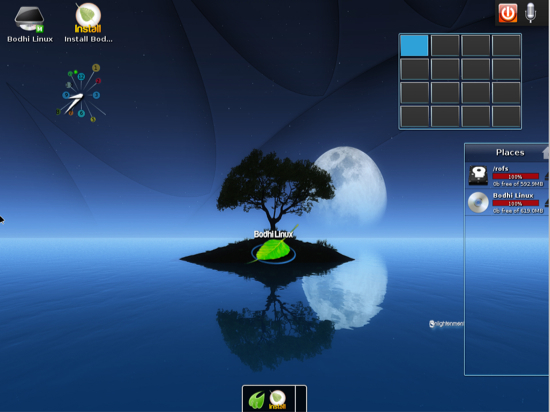
Bodhi is based on Ubuntu LTS and takes a minimalist approach: minimum system requirements are 300+MHz CPU, 128MB RAM, and 2.5GB hard drive space, and it installs with a bare minimum set of packages. Then you make it your own. Sharing artwork is a big part of the Bodhi community, with something for everyone.
People seem to forget that Ubuntu is much larger than the Unity desktop, and judge all of Ubuntu by that alone. I don’t much care for Unity, but I do like the whole *buntu ecosystem. You can reliably upgrade to new releases, which is not true of a lot of desktop-oriented Linuxes. It’s engineering brilliance to support multiple distros like Xubuntu, Edubuntu, Kubuntu, Ubuntu Server, and all the rest from a common core and common repos, and the only distro with bigger repos is Debian, so you can almost always find what you want. If you can’t then you have the giant thundering herd of Ubuntu PPAs (Personal Package Archives) to get software from.
So suppose you install Ubuntu, and you’re sitting there looking at Unity and going “ew”. You don’t have to dump Ubuntu– just install any of the other variants, and then choose the one you want when you log in. You want Xubuntu? apt-get install xubuntu-desktop. Are you a KDE4 fan? apt-get install kubuntu-desktop. And so on. You also have the option of selectively installing smaller package groups instead of the *-desktop packages, which pull in everything.
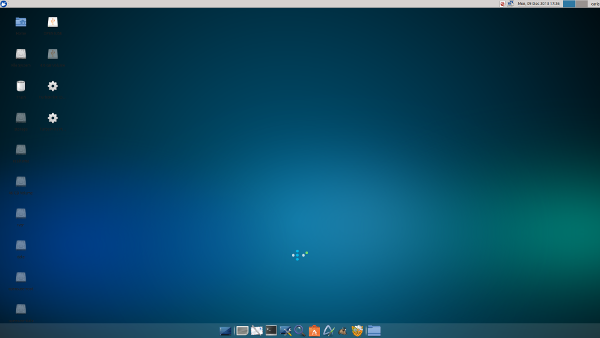
Xfce is a super-nice desktop environment, and it has come a long ways from its humble beginnings. Xubuntu’s implementation of it is sleek and nicely-organized. It reminds me of how Ubuntu customized GNOME 2 back in the early Ubuntu days. Nothing fancy, just some useful stuff in the panel and a standard system menu, plus with Xubuntu you get a dock. It starts up and shuts down quickly, and it’s peppy on feebler hardware. If you want all kinds of ornamentation and special effects then Xubuntu will disappoint you. If you want to get your work done and not fight your computer, you want Xubuntu.
Again I must go with a member of the Ubuntu family. Lubuntu flies on older, less-powerful laptops. Lubuntu is Ubuntu-ized LXDE, which is one of the lightest-weight graphical environments you can use without sacrificing a lot of functionality. You’ll get longer battery life, and have more system resources available for more demanding applications such as audio recording or graphics editing.
Where do Linux gurus come from? From baby newbies. How do baby newbies become gurus? From using DouDou Linux. DouDou is an excellent, safe platform for children to explore and learn skills the fun way. It comes with the superior Gcompris and Childsplay suite of educational software, multimedia production software, and challenging brain games. DouDou is simplified and locked-down, and includes Dan’s Guardian for some protection against Internet badness. DouDou is also an good platform for adult beginners.
Online privacy is a sad sick joke, with our own government and private businesses snooping freely into our online activities, and collecting and trading our data without the tiniest bit of oversight or accountability. But we’re not entirely on our own as hardy hackers give us tools to protect ourselves. Like TAILS. TAILS, the Amnesic Incognito Live System, is a Debian-based live distro that routes your networking through TOR, the Onion Router, and erases all tracks from any local storage media. If you run TAILS from a USB stick you’ll get nice fast performance.
TAILS uses other good privacy tools like HTTPS Everywhere, NoScript, and a cookie manager, plus it’s a complete distro with the usual set of Linux applications, so you can use it for your everyday work. It’s all rolled into a nice easy-to-use bundle, which is essential because security tools that are too hard to use don’t get used.
This is a tie: SUSE and Red Hat. I can’t pick one over the other because they’re both rock-solid, they’re excellent community members, and they have similar product lines.
SUSE has always been a top enterprise Linux distro, but it is not so well-known in North America. They hold a number of bragging rights: first mainframe Linux and most popular mainframe Linux with 80% market share, half of the world’s largest supercomputers run SUSE, most widely-used commercial enterprise Linux distribution in China (more than China’s Red Flag Linux), and it dominates in retail–even Walmart uses SUSE Linux Enterprise Point-of-Service.

When Attachmate bought Novell in 2010 they did a smart thing: they divided Novell into three separate business units. Novell’s security products were moved to the NetIQ division, and SUSE was divorced from Novell. This was a glorious event for SUSE, who could once again control their own destiny. They have done well, growing at a record rate with their largest growth in North America. 2014 may be the year that SUSE stops being the obscure enterprise Linux.
We all know and adore Red Hat. Red Hat is the first billion-dollar Linux vendor, and has been a cornerstone of Linux development from their humble beginnings way back in 1994. Red Hat is the #1 corporate kernel contributor and employs the largest percentage of kernel developers.
SUSE and Red Hat both have formed large networks of key partnerships with enterprise vendors like IBM, HP, Intel, Cisco, Dell, Fujitu, and SAP. These are essential to penetrating the enterprise and staying there, and we also enjoy a trickle-down benefit of features, hardware support, and wider acceptance of Linux at all levels. Most Linux enterprise growth has come at the expense of proprietary Unix, and not so much from Microsoft Windows. But Linux has exercised considerable influence in the datacenter by being open and supporting open standards, and providing interoperability even when proprietary competitors were actively trying to foil it. Now we see vendors who used to be hostile to Linux are now open to it, and have become contributors, and Red Hat and SUSE both deserve credit for helping to make this happen.
 What an exciting day in my Linux newsfeeds. First up is three new Linux lists that enumerate things like the top five distributions that need love and six great Linux systems for netbooks. I’ve seen several posts lately speaking of the new activity at the Darling Project recently. Jim Zemlin shares CES Linux highlights today and Chris Duckett catches us up on Linux.conf.au 2014.
Lively Linux Lists
Rahul Bali at the Linux Federation posted today of five distributions that “deserve more love.” Rosa, Russian fork of Mandriva is number five on his list followed by Korora (which just got a great review), Chakra, and, number one distro that needs more love is, Sabayon.

Valve has updated its Steam beta client to support the Oculus Rift headset. A new mode called SteamVR reportedly shows a “giant floating curved screen” interface that you can look around by moving your head. It’s described as “experimental” and isn’t fully functional, so it’s not likely to replace the regular Steam interface for anyone right now. That said, it’s the first step along the road to Valve fully integrating Oculus Rift and other VR headsets into its Steam experience.
The company is expected to announce a wider VR initiative at a developer event starting tomorrow. In addition to the new interface, Valve will show “what affordable virtual reality hardware will be capable of within a couple of years.” That will come in the form…